
Managed WiFi services: a comprehensive guide for businesses
This comprehensive guide details the architecture, deployment, and business impact of managed WiFi services for multi-tenant and BTR properties. It provides actionable guidance for IT managers and network architects on implementing Dynamic VLAN Assignment using 802.1X and RADIUS to ensure secure, scalable connectivity.
Video overview
Listen to this guide
View podcast transcript
Part of our core series: Multi-Tenant WiFi Guide →

Listen to the technical briefing:
Executive Summary
For IT managers and network architects overseeing multi-tenant buildings (such as commercial offices, retail complexes, or expansive hospitality venues), managing network segmentation is a critical challenge. Historically, isolating tenant traffic meant deploying separate physical infrastructure or broadcasting a unique SSID for every tenant. Both approaches are fundamentally flawed. Physical separation is cost-prohibitive and inflexible, while broadcasting multiple SSIDs severely degrades RF performance due to excessive management frame overhead.
Dynamic VLAN Assignment solves this by consolidating the wireless environment into a single, secure SSID. Leveraging IEEE 802.1X authentication and RADIUS, the network dynamically assigns users to their dedicated Virtual Local Area Network (VLAN) based on their identity, not the network they choose. This guide provides a comprehensive technical deep-dive into architecting, deploying, and troubleshooting dynamic VLAN assignment, ensuring secure Layer 2 isolation, compliance with standards like PCI-DSS and GDPR, and a robust ROI for venue operators.
Technical Deep-Dive
The Problem with Multiple SSIDs
In a shared building, it is common to see dozens of SSIDs broadcasted. Every SSID broadcasted by an Access Point (AP) must transmit beacon frames at the lowest mandatory data rate (typically 1 Mbps or 6 Mbps). As the number of SSIDs increases, the proportion of airtime consumed by management overhead grows exponentially, leaving less airtime for actual data transmission. This results in high latency, low throughput, and a poor user experience, regardless of the underlying internet connection speed.
To address this, the industry has shifted toward single-SSID deployments using advanced authentication to handle segmentation. This approach, central to any modern managed WiFi service, simplifies the user experience while hardening the underlying security posture.
The 802.1X and RADIUS Architecture
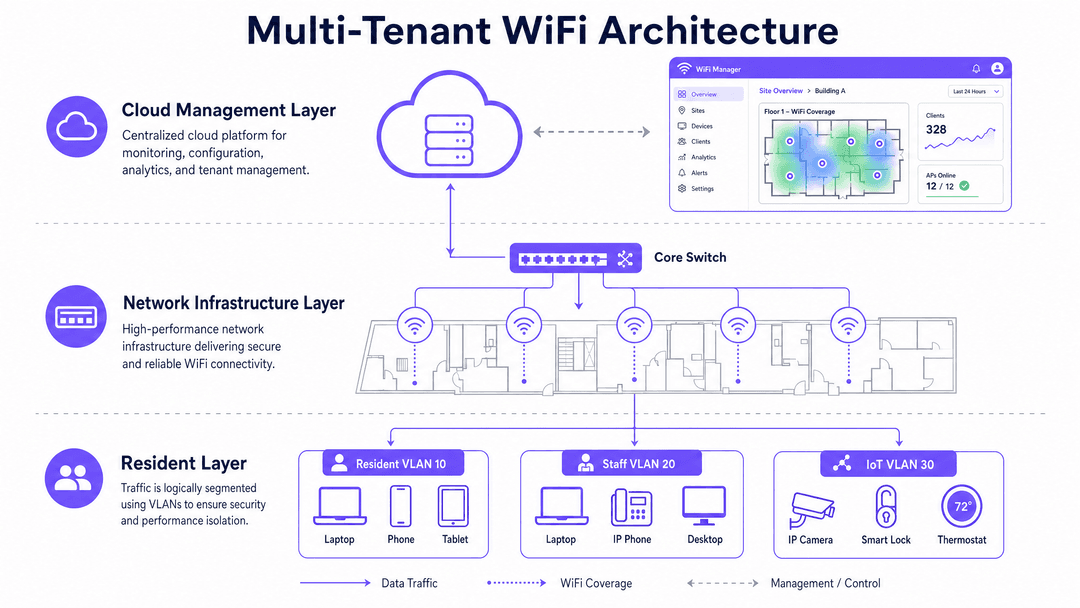
Dynamic VLAN Assignment shifts the segmentation logic from the RF layer to the authentication layer. It relies on the IEEE 802.1X standard for port-based network access control, integrated with a RADIUS (Remote Authentication Dial-In User Service) server.
The architecture consists of three primary components:
- Supplicant: The client device (laptop, smartphone) requesting network access.
- Authenticator: The network access device, typically the WiFi Access Point or wireless controller, which blocks traffic until authentication is successful.
- Authentication Server: The RADIUS server that validates credentials against an identity store and dictates network policies.
The Authentication Flow
When a supplicant attempts to connect to the unified SSID, the following flow occurs:
- EAPOL Initialisation: The supplicant connects to the AP. The AP blocks all traffic except Extensible Authentication Protocol over LAN (EAPOL) packets.
- RADIUS Access-Request: The AP encapsulates the EAP data and forwards it to the RADIUS server as an Access-Request.
- Credential Validation: The RADIUS server verifies the user's credentials.
- RADIUS Access-Accept: Upon successful validation, the RADIUS server responds with an Access-Accept message. Crucially, this message includes specific IETF standard RADIUS attributes that instruct the AP on which VLAN to assign the user.
The critical RADIUS attributes required for dynamic VLAN assignment are:
Tunnel-Type(64): Set toVLAN(Value 13)Tunnel-Medium-Type(65): Set to802(Value 6)Tunnel-Private-Group-ID(81): Set to the specific VLAN ID (e.g., "20" for Tenant A, "30" for Tenant B)
Once the AP receives these attributes, it drops the user's traffic directly into the specified VLAN. The upstream network switches then handle the traffic as if the user were physically plugged into a dedicated port for that tenant, ensuring complete Layer 2 isolation.
Got questions about your specific setup?
Our team works with venue operators, IT managers, and network engineers across 80,000 venues. Book a 20-minute call and we will show you how others like you solved it.
Implementation Guide
Deploying dynamic VLAN assignment requires careful coordination between the wireless infrastructure, edge switches, and the identity provider. Follow this vendor-neutral implementation sequence.
Phase 1: Network Infrastructure Preparation
- VLAN Provisioning: Define and create the necessary VLANs on your core routing infrastructure and DHCP servers. Ensure each tenant VLAN has its own distinct subnet and appropriate routing policies (e.g., routing to the internet, but dropping inter-VLAN traffic).
- Switch Trunking: This is a critical step. The switch ports connecting to your Access Points must be configured as 802.1Q trunks, allowing all potential tenant VLANs to traverse the link.
Phase 2: Hardware Selection
The managed WiFi market is hardware-agnostic at the platform level, but the access points and switches matter. Enterprise-grade hardware from vendors like Cisco Meraki, HPE Aruba, Ruckus, Juniper Mist, or Ubiquiti UniFi will outperform consumer-grade equipment in dense multi-unit environments. Look for access points with dedicated scanning radios, which allow the system to monitor the RF environment for rogue access points and interference without impacting client throughput.
Phase 3: Identity Management Integration
Integrate your RADIUS server with your chosen identity provider. For enterprise environments, this is typically Microsoft Entra ID, Okta, or Google Workspace. For public-facing or multi-tenant environments, a platform like Purple acts as the identity broker, authenticating users via social logins, SMS, or forms, and translating those identities into RADIUS attributes.
Best Practices
1. Enforce WPA3 Encryption
WPA3 is the current standard, ratified by the Wi-Fi Alliance. For enterprise deployments using 802.1X, you want WPA3-Enterprise, which uses 192-bit encryption in its highest security mode. This eliminates the offline dictionary attacks that plagued WPA2.
2. Segment IoT Devices
For devices that do not support 802.1X (common in the IoT space), use MAC Authentication Bypass (MAB). The RADIUS server authenticates based on the device's MAC address and assigns it to the appropriate VLAN. These devices should always land on a restricted IoT VLAN, not on the resident's primary network, because MAC addresses can be spoofed.
3. Maintain Compliance
If your development includes any retail tenants who process card payments over the WiFi network, PCI DSS applies. The key requirement is network segmentation: cardholder data environments must be isolated from all other network traffic. A properly configured VLAN architecture satisfies this requirement. Similarly, ensure your provider holds ISO 27001 certification and has a signed Data Processing Agreement under GDPR. Purple is ISO 27001 certified, GDPR compliant, CCPA compliant, and Cyber Essentials certified.
Troubleshooting & Risk Mitigation
Switch Port Misconfiguration
If RADIUS tells the AP to put a user on VLAN 40, but VLAN 40 is not tagged on the switch port connected to the AP, the traffic drops into a black hole. The user will authenticate successfully but fail to get an IP address via DHCP. This is the most common troubleshooting ticket. Always verify your trunk port configurations.
Certificate Expiration
802.1X relies heavily on certificates. If you are using EAP-TLS, which is the gold standard for security, every device needs a client certificate. For BYOD environments, PEAP-MSCHAPv2 is more common, relying on a server-side certificate and user credentials. If that server certificate expires, your entire building goes offline. Set up aggressive monitoring on your RADIUS certificates.
Fallback Mechanisms
What happens if the RADIUS server is unreachable? You need a defined "fail-open" or "fail-closed" policy. In a multi-tenant office, you typically fail-closed for security. But for a guest network, you might configure a fail-open policy that drops users into a highly restricted, internet-only quarantine VLAN.
ROI & Business Impact
Managed WiFi services are a commercial differentiator that directly affects tenant acquisition and retention. Properties with managed WiFi report higher Net Promoter Scores and lower churn.
Consider a 280-unit build-to-rent development. A single bulk broadband connection with shared infrastructure and per-unit VLAN isolation typically results in a 40% reduction in connectivity cost per unit compared to individual retail contracts. The managed service pays for itself within 18 months through reduced resident churn alone.
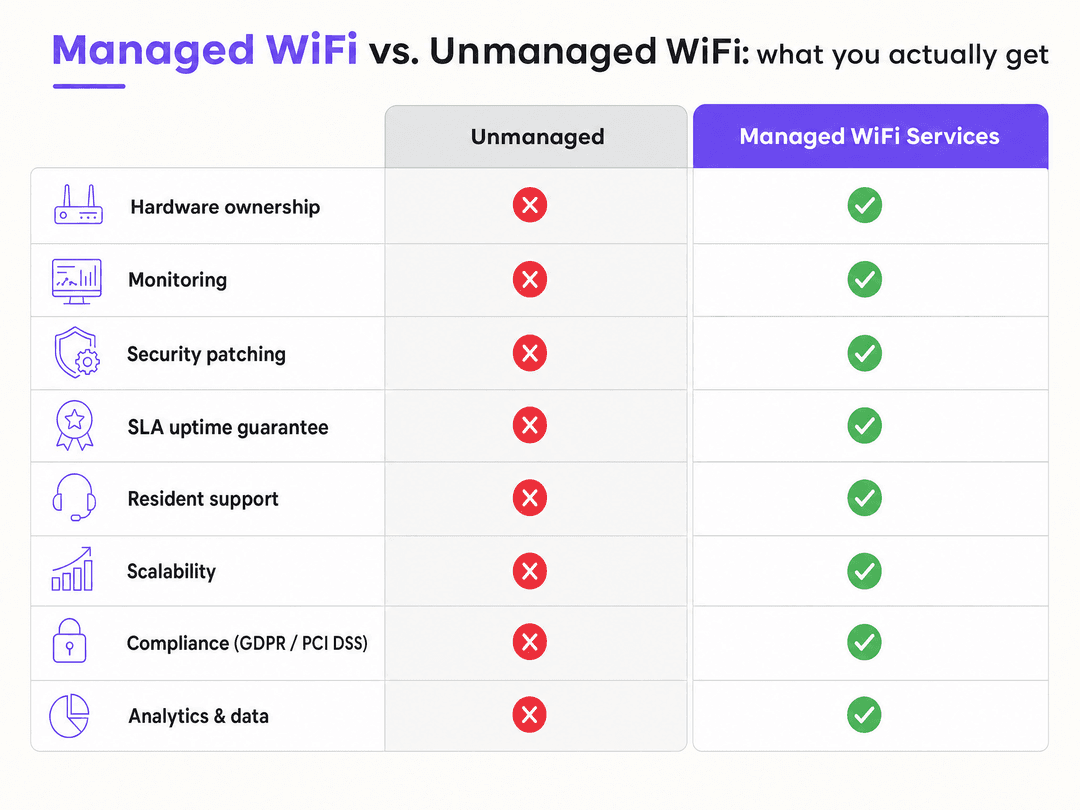
Furthermore, a centralised platform provides analytics and data that unmanaged networks simply cannot offer. You gain visibility into how the multi-tenant space is being utilised, allowing you to optimise common areas and tailor services to actual usage patterns. For more insights on leveraging this data, explore our WiFi Analytics capabilities and see how Retail and Hospitality operators are driving revenue through connected experiences.
Key Definitions
Managed WiFi
A professionally designed, installed, and continuously monitored wireless network delivered as a service, rather than a capital hardware purchase.
When property developers want to provide reliable connectivity as an amenity without taking on the IT management burden.
Dynamic VLAN Assignment
The process of using an authentication server to dynamically place a user into a specific Virtual Local Area Network based on their identity.
Crucial for multi-tenant environments to provide Layer 2 isolation without broadcasting multiple SSIDs.
IEEE 802.1X
An IEEE Standard for port-based Network Access Control that provides an authentication mechanism to devices wishing to attach to a LAN or WLAN.
The underlying protocol that enables secure, identity-based access to enterprise networks.
RADIUS
Remote Authentication Dial-In User Service, a networking protocol that provides centralised Authentication, Authorization, and Accounting management.
The server component that validates user credentials and returns VLAN assignment attributes to the access point.
WPA3-Enterprise
The highest tier of WiFi security, requiring an 802.1X authentication server and providing 192-bit encryption.
The required security standard for modern, secure enterprise and multi-tenant WiFi deployments.
MAC Authentication Bypass (MAB)
A fallback authentication method where the network uses a device's MAC address as its credential.
Used to connect headless IoT devices (like smart thermostats or printers) that cannot process an 802.1X login prompt.
EAPOL
Extensible Authentication Protocol over LAN, the encapsulation technique used to deliver EAP packets between the supplicant and authenticator.
The only traffic allowed through a switch port or AP before a user successfully authenticates.
SSID Overhead
The proportion of airtime consumed by management frames (beacons) broadcast by an access point.
Why broadcasting dozens of SSIDs in a multi-tenant building destroys network performance.
Worked Examples
A 280-unit build-to-rent development in Manchester needs to provide internet access to residents. The developer originally planned to leave broadband to individual residents, each signing their own contract with a retail ISP.
Deploy a managed WiFi service with a single bulk broadband connection, shared infrastructure, and per-unit VLAN isolation. Use 802.1X authentication to dynamically assign residents to their dedicated VLANs upon connection.
A mixed-use development combining 150 BTR apartments with ground-floor retail and a co-working space requires connectivity for residents, retail staff, co-working members, and delivery operatives, all with different security and access requirements.
Implement a single physical network infrastructure with five logical segments: resident VLAN, retail VLAN, co-working member VLAN, IoT VLAN for building management systems, and a guest VLAN for short-term visitors. Use Purple's Multi-Tenant WiFi platform to handle identity management and VLAN assignment.
Practice Questions
Q1. A new retail tenant moves into your mixed-use development and needs to process card payments over the building's WiFi network. How should you configure their access?
Hint: Consider PCI-DSS compliance requirements for network segmentation.
View model answer
Create a dedicated VLAN specifically for the retail tenant's point-of-sale devices. Use 802.1X authentication to dynamically assign their devices to this VLAN, ensuring complete Layer 2 isolation from resident and guest traffic. Document the segmentation and test it annually to maintain PCI DSS compliance.
Q2. A resident reports that their smart TV cannot connect to the enterprise WiFi network because it does not support username/password login prompts.
Hint: Think about fallback authentication methods for headless devices.
View model answer
Use MAC Authentication Bypass (MAB). Register the smart TV's MAC address in the RADIUS server and configure it to assign the device to a restricted IoT VLAN. Ensure this VLAN has no route to other residents' personal devices, as MAC addresses can be spoofed.
Q3. Your building's WiFi performance has degraded significantly after adding five new SSIDs for different tenant groups. What is the architectural solution?
Hint: Address the management frame overhead causing co-channel interference.
View model answer
Consolidate the RF environment by removing the individual SSIDs and broadcasting a single, unified secure SSID. Implement Dynamic VLAN Assignment using 802.1X and RADIUS to authenticate users and place them into their respective logical network segments based on their identity.
Continue reading in this series
Per-unit VLAN and PSK architecture: a design walkthrough for MDU networks
You will be able to choose between a VLAN per apartment and policy carried by each resident's unique key, using four factors: wired ports, churn, segment count and hardware support. You can then size DHCP scopes, count segments against your real platform limits and estimate running cost for BTR, PBSA and aparthotel sites.
Retrofit vs new build: planning MDU WiFi cabling and access point placement
Decide whether an apartment building needs corridor or in-unit access points, and plan the cabling, risers, fire-stopping and PoE budget each path demands. You will be able to scope an occupied-building retrofit around access limits, or bring network design into a new build by RIBA Stage 3 so every AP sits within the 90-metre permanent link.
Managed WiFi cost per door: a worked model for MDU operators
You will be able to build a defensible managed WiFi cost per door for an MDU scheme, line by line across cabling, access points, switching, licensing and support. You can then normalise managed service bids, test how scale and asset lives move the figure, and compare the fully loaded monthly cost with a retail broadband benchmark.
Got questions about your specific setup?
Our team works with venue operators, IT managers, and network engineers across 80,000 venues. Book a 20-minute call and we will show you how others like you solved it.