
Best WiFi Channels for High-Density Venues
A definitive technical reference for selecting and optimising WiFi channels in high-density environments like stadiums, arenas, and large public venues. It covers RF physics, channel reuse strategies across 5 GHz and 6 GHz bands, and actionable deployment guidance for IT leaders.
Listen to this guide
View podcast transcript
Executive Summary
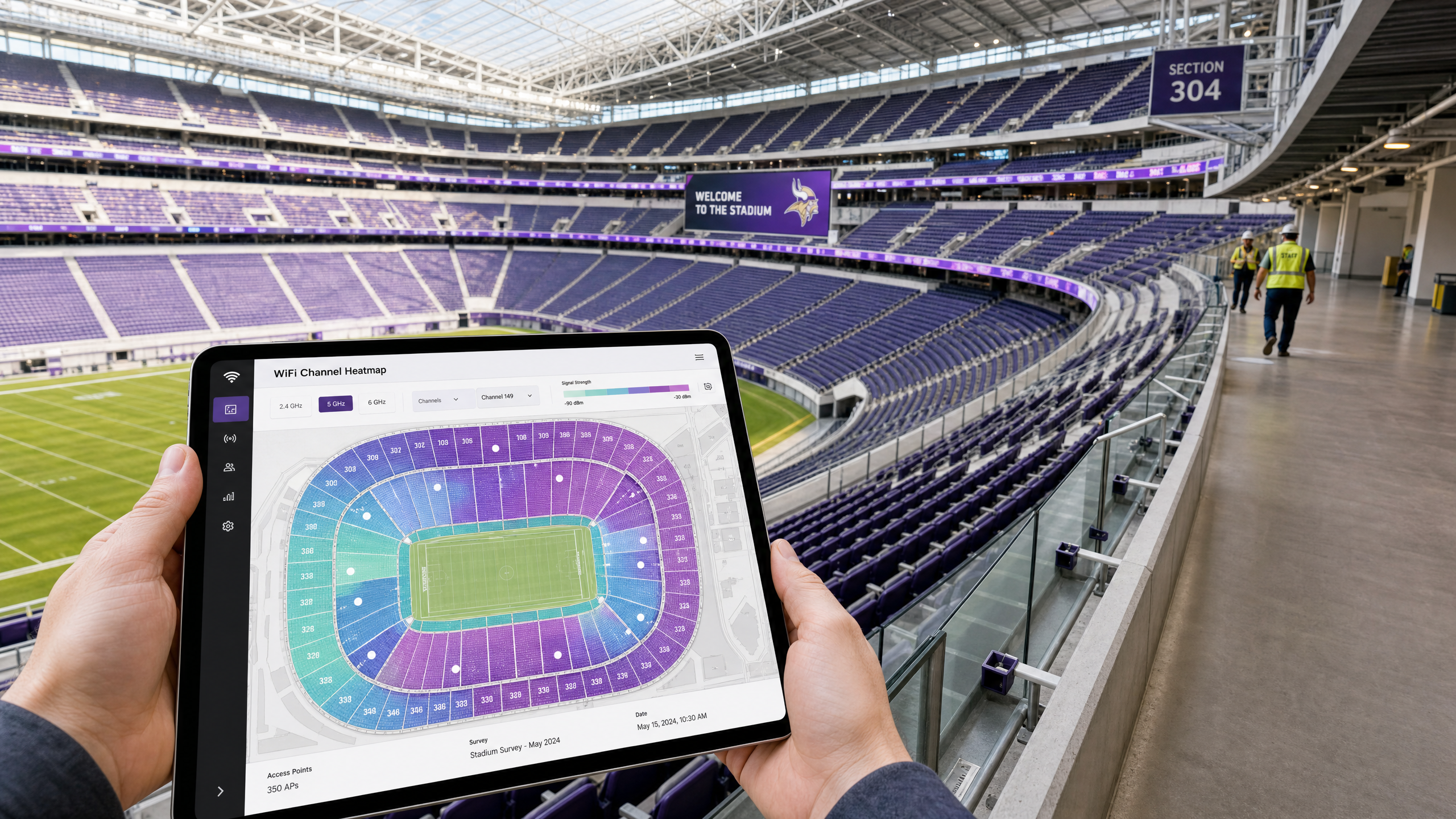
For CTOs and IT Directors managing high-density environments—stadiums, arenas, large retail complexes, and conference centres—legacy WiFi design principles are no longer sufficient. In a high-density deployment, capacity is the primary constraint, not coverage. The introduction of 802.11ax (WiFi 6) and the pristine 1200 MHz of spectrum in the 6 GHz band (WiFi 6E) have fundamentally shifted how network architects approach channel planning.
This guide provides actionable, vendor-neutral strategies for optimising WiFi channels in extreme density scenarios. It details why 20 MHz channels remain the gold standard for 5 GHz deployments, how to leverage BSS Colouring and OFDMA for spatial reuse, and the strategic implementation of 6 GHz to alleviate legacy band congestion. Whether you are deploying an overlay for Retail analytics or upgrading a 60,000-seat stadium, mastering channel reuse is critical to delivering a reliable Guest WiFi experience and capturing accurate WiFi Analytics .
Technical Deep-Dive: The Physics of High Density
In standard enterprise deployments, the goal is often to maximise throughput per user, leading to the use of wider channels (40 MHz or 80 MHz). However, in high-density environments, the RF paradigm flips.
The 5 GHz Strategy: 20 MHz is Mandatory
In a stadium seating bowl or a crowded conference hall, co-channel interference (CCI) is the primary enemy of network performance.
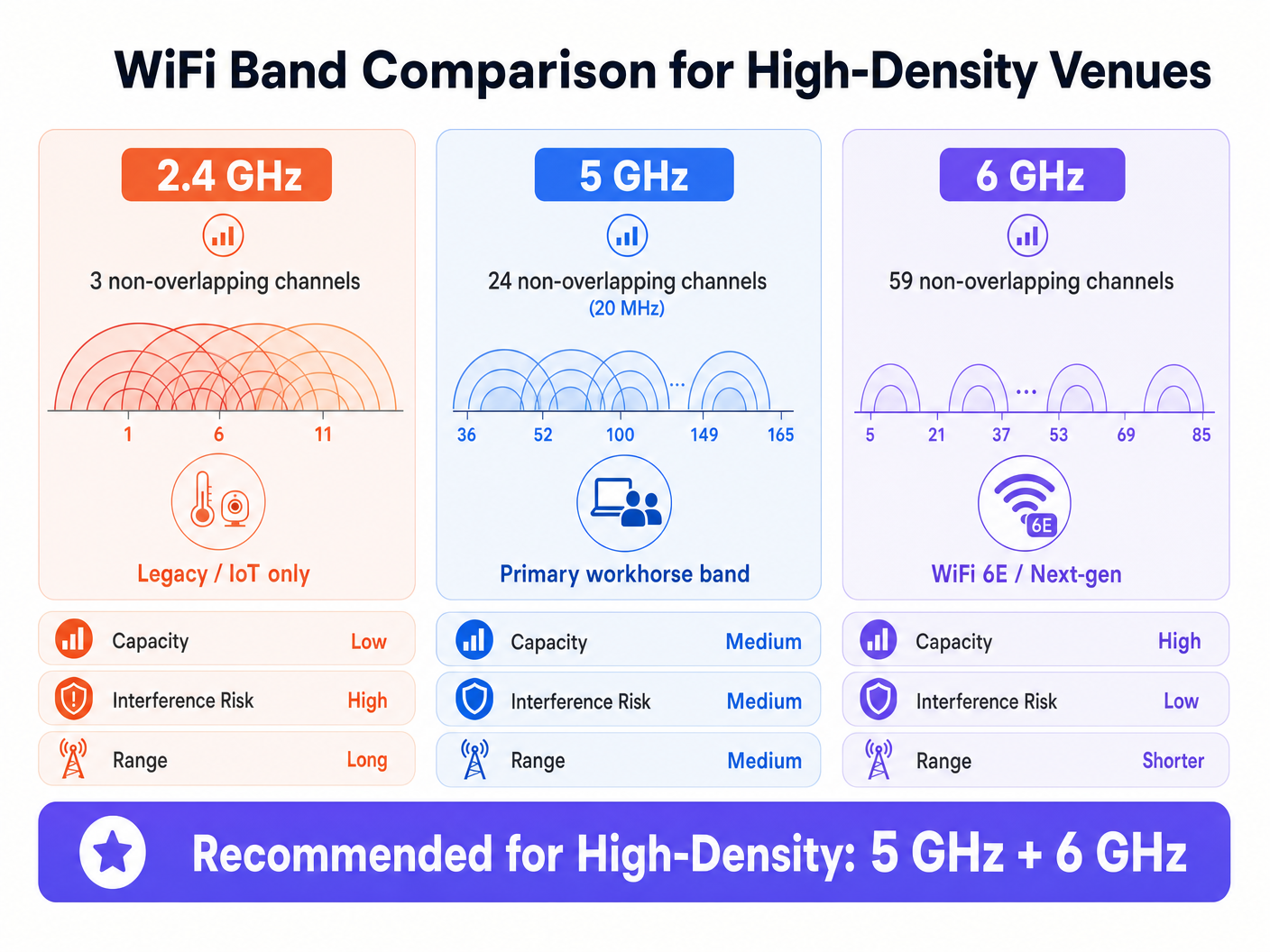
- The Maths: The 5 GHz band offers 24 non-overlapping 20 MHz channels (assuming DFS channels are available and usable). If you bond channels to 40 MHz, you halve your available non-overlapping channels to 12.
- The Reality: In a dense deployment with hundreds of Access Points (APs) in close proximity, you need maximum channel reuse. Using 20 MHz channels allows you to pack more APs into a given physical space without them interfering with one another.
As noted in industry deployments, the best throughput you will get out of a 20 MHz 5 GHz channel is around 150 Mbps, but in high density, it is more likely 70-80 Mbps due to management overhead and client density. This is entirely sufficient for the vast majority of venue applications, including streaming replays and social media uploads.
802.11ax (WiFi 6) and Spatial Reuse
WiFi 6 introduced mechanisms specifically designed for high-density environments, shifting the focus from peak theoretical speed to overall network efficiency.
- OFDMA (Orthogonal Frequency-Division Multiple Access): Instead of one client consuming the entire channel for a transmission, OFDMA divides the channel into smaller sub-carriers (Resource Units or RUs). This allows a single AP to communicate with multiple clients simultaneously, drastically reducing latency in dense crowds.
- BSS Colouring (Spatial Reuse): Historically, if an AP heard another AP transmitting on the same channel (even weakly), it would defer transmission (CSMA/CA). BSS Colouring adds a "colour" identifier to the PHY header. If an AP hears a transmission on its channel but with a different colour (meaning it's from a neighbouring AP, not its own BSS), it can evaluate the signal strength. If the signal is below a certain threshold (OBSS-PD), it can transmit simultaneously, increasing aggregate capacity.
The 6 GHz Revolution (WiFi 6E)
The 6 GHz band provides 1200 MHz of clean spectrum, yielding 59 non-overlapping 20 MHz channels (or 29 non-overlapping 40 MHz channels).
- Channel Width in 6 GHz: Because of the massive increase in available spectrum, network architects can safely deploy 40 MHz channels in 6 GHz even in high-density environments, doubling per-client throughput without causing CCI.
- Client Adoption: As mobile devices increasingly support 6 GHz, steering these capable clients to the clean 6 GHz band frees up valuable airtime on the 5 GHz band for legacy devices.
Implementation Guide: Designing for the Seating Bowl
Deploying APs in a stadium requires precision engineering. Overhead AP placement is rarely effective for the seating bowl due to the distance from the clients and the lack of physical attenuation between APs.
Under-Seat Deployment Strategy
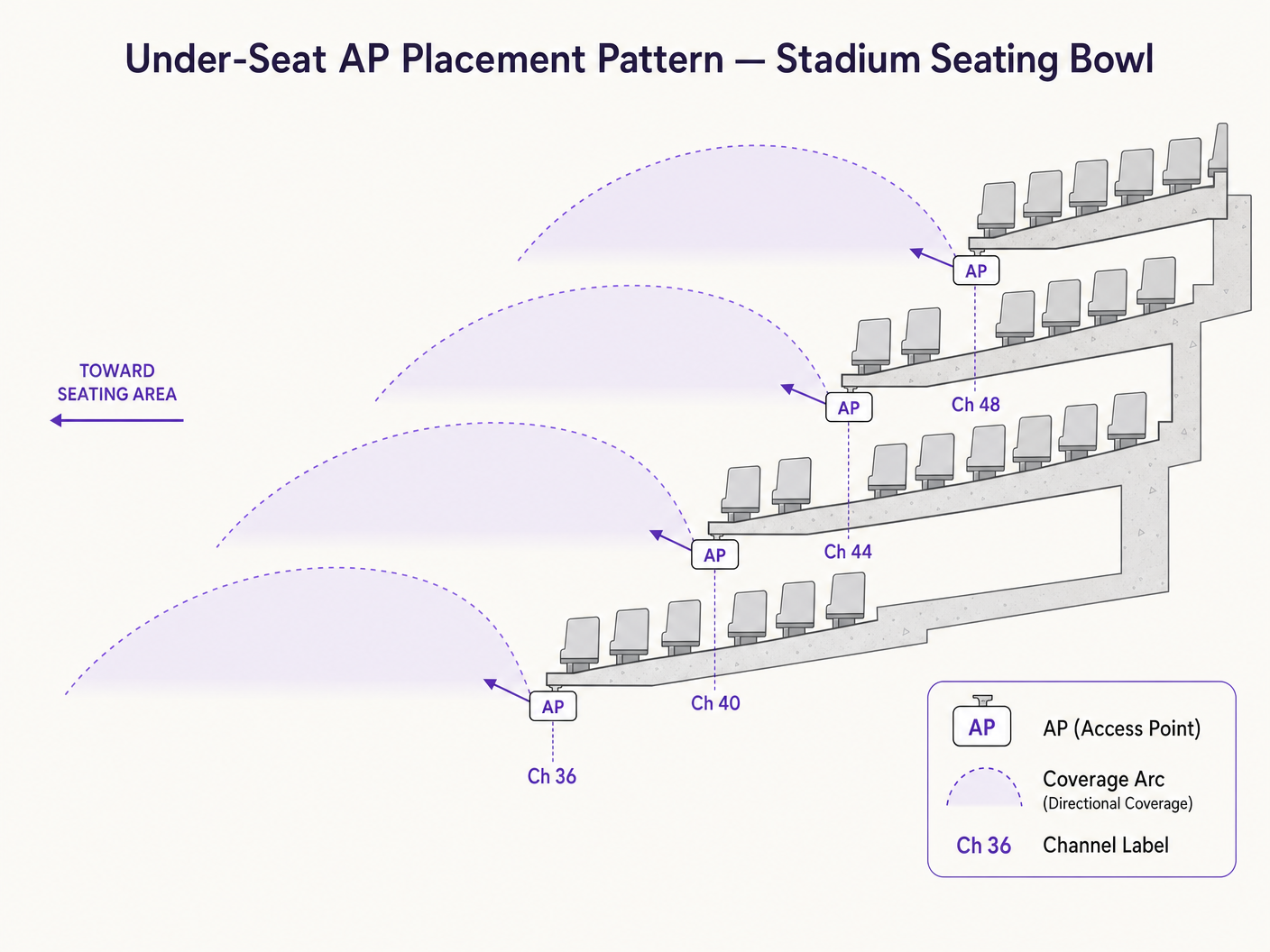
The industry standard for stadium seating is under-seat AP placement using directional antennas.
- Attenuation is Your Friend: Human bodies are excellent RF attenuators (composed mostly of water). By placing APs under the seats, the crowd itself helps block RF signals from travelling too far, naturally reducing CCI.
- Pico-Cell Design: Create micro-coverage zones. A typical design might have one AP serving a "wedge" of 50-70 seats.
- Directional Antennas: Use highly directional patch antennas pointing towards the specific seating wedge, limiting RF bleed into adjacent sections.
Channel Planning Checklist
- Disable 2.4 GHz in the Bowl: The 2.4 GHz band has only 3 non-overlapping channels. It is mathematically impossible to deploy 2.4 GHz in a stadium bowl without catastrophic interference. Leave it disabled, or relegate it strictly to back-of-house IoT devices or specific concourse areas.
- Leverage DFS Channels: In 5 GHz, you must use Dynamic Frequency Selection (DFS) channels to get the full 24 channels. Ensure you conduct a thorough spectrum analysis to identify any radar activity that might trigger DFS events.
- Strict Power Control: AP transmit power must be turned down significantly. If an AP is shouting, it causes CCI. The goal is a whisper that only the immediate clients can hear.
- Disable Lower Data Rates: Disable legacy data rates (e.g., 1, 2, 5.5, 11 Mbps, and even up to 12 or 24 Mbps). This forces clients to connect at higher, more efficient modulation rates, reducing the airtime required for management frames.
Best Practices & Industry Standards
- Capacity Over Coverage: Always design for capacity. If you design for capacity, coverage is guaranteed.
- Client Steering: Aggressively steer clients to 5 GHz and 6 GHz bands. Purple's platform integrates seamlessly with major infrastructure vendors to ensure authentication flows smoothly regardless of the band.
- Authentication & Security: In dense public venues, traditional captive portals can struggle under the load of 50,000 simultaneous connections. Leveraging profile-based authentication, such as Passpoint/OpenRoaming, provides a seamless, secure (WPA3/802.1X) connection. As detailed in our recent update, How a wi fi assistant Enables Passwordless Access in 2026 , this is the future of venue connectivity.
- Tools: Rely on professional survey tools (e.g., Ekahau) for predictive modelling and post-deployment validation. See our guide on The Best WiFi Analyzer Tools for Troubleshooting Channel Overlap for specific recommendations.
Troubleshooting & Risk Mitigation
Common Failure Modes
- Sticky Clients: Devices that hold onto an AP even when a better one is closer.
- Mitigation: Implement strict roaming thresholds (e.g., minimum RSSI requirements) and utilise 802.11k/v/r to assist client roaming decisions.
- DFS Radar Hits: A nearby weather or military radar forces APs to change channels, causing temporary network drops.
- Mitigation: Continuous spectrum monitoring. If specific DFS channels are prone to hits in your area, remove them from the channel plan.
- Management Frame Overhead: In dense environments, beacon frames and probe responses can consume up to 40% of available airtime.
- Mitigation: Limit the number of SSIDs to an absolute maximum of 3 (e.g., Guest, Corporate, IoT). Every additional SSID multiplies the management overhead.
ROI & Business Impact
A high-performing WiFi network is no longer a cost centre; it is a revenue-enabling platform.
- Retail Media Monetisation: In large retail or stadium environments, the captive portal and subsequent digital engagement represent prime real estate. Reliable connectivity ensures high opt-in rates, allowing venues to monetise through targeted advertising.
- Operational Efficiency: A robust 6 GHz overlay can support critical venue operations (mobile point-of-sale, ticketing scanners, staff communications) completely separate from the guest network.
- Data Acquisition: High-density networks powered by platforms like Purple capture first-party data at scale. This data drives CRM integrations, loyalty programmes, and precise footfall analytics, providing actionable insights for venue operations and marketing teams. For public sector applications, see how Purple Appoints Iain Fox as VP Growth – Public Sector to Drive Digital Inclusion and Smart City Innovation .
- Wayfinding: Reliable connectivity is a prerequisite for blue-dot navigation. For environments where connectivity might drop, Purple Launches Offline Maps Mode for Seamless, Secure Navigation to WiFi Hotspots ensures continuity of service.
Key Definitions
Co-Channel Interference (CCI)
When two or more APs operate on the same channel and can hear each other, forcing them to take turns transmitting.
CCI is the primary cause of poor performance in stadiums. It turns a high-speed network into a single, congested collision domain.
BSS Coloring
An 802.11ax feature that adds an identifier to transmissions, allowing APs on the same channel to ignore distant APs and transmit simultaneously if the signal is weak enough.
Crucial for spatial reuse in dense deployments, allowing more efficient use of the limited 5 GHz spectrum.
OFDMA (Orthogonal Frequency-Division Multiple Access)
A technology that subdivides a WiFi channel into smaller resource units, allowing an AP to talk to multiple clients at the exact same time.
Reduces latency in crowded environments by preventing single clients from monopolizing the entire channel for small data payloads.
Dynamic Frequency Selection (DFS)
A mandate requiring WiFi equipment to detect radar systems on certain 5 GHz channels and automatically switch channels to avoid interference.
Venue operators must use DFS channels to get enough spectrum for a stadium, but must carefully monitor for radar hits that can cause network instability.
OBSS-PD (Overlapping Basic Service Set Preamble Detection)
The specific threshold mechanism used in BSS Coloring to determine if an AP can transmit over a distant, same-channel transmission.
This is the technical mechanism that actually executes the 'spatial reuse' promised by WiFi 6.
Management Frame Overhead
The airtime consumed by APs broadcasting their presence (beacons) and responding to client probes, rather than transmitting actual user data.
In dense environments, this overhead can cripple a network if too many SSIDs are broadcast or low data rates are enabled.
Pico-Cell Architecture
A network design strategy using highly directional antennas and low transmit power to create very small, tightly controlled coverage zones.
The standard approach for under-seat stadium WiFi, ensuring one AP only serves a specific section of 50-70 seats.
Passpoint / OpenRoaming
Profile-based authentication standards that allow devices to automatically and securely connect to enterprise WiFi without captive portals.
Essential for seamless onboarding of tens of thousands of fans simultaneously, avoiding the bottleneck of web-based splash pages.
Worked Examples
A 40,000-seat stadium is upgrading its legacy 802.11ac network to WiFi 6E. The IT Director wants to use 40 MHz channels on 5 GHz to maximize speed tests for VIPs in the lower bowl. What is the architectural recommendation?
The recommendation is to strictly enforce 20 MHz channels on the 5 GHz band across the entire seating bowl, and utilize 40 MHz channels exclusively on the new 6 GHz band.
A large conference centre is experiencing severe network latency during keynote speeches when 5,000 attendees are in a single hall. The dashboard shows 5 GHz channel utilization at 85%. They are currently broadcasting 6 SSIDs.
- Reduce the number of SSIDs from 6 to a maximum of 3 (e.g., Guest, Exhibitor, Staff). 2. Disable lower data rates (1-11 Mbps). 3. Ensure BSS Coloring is enabled if using WiFi 6 infrastructure.
Practice Questions
Q1. You are auditing a newly installed network in a 15,000-seat arena. The vendor has deployed omni-directional APs in the ceiling catwalk (80 feet high) using 40 MHz channels on the 5 GHz band. What are the immediate architectural concerns?
Hint: Consider both the physical distance to the clients and the mathematical reality of channel reuse in 5 GHz.
View model answer
There are two major failures here. First, overhead omni-directional APs at 80 feet will hear each other clearly, causing massive Co-Channel Interference (CCI), and the signal reaching the clients will be weak. Second, using 40 MHz channels reduces the available non-overlapping channels to 12. In an arena, 12 channels is insufficient to prevent CCI. The design should be changed to under-seat directional APs using 20 MHz channels.
Q2. A retail complex IT team wants to leave 2.4 GHz enabled across their high-density food court to support legacy devices, but they are experiencing severe latency. How should they reconfigure the 2.4 GHz band?
Hint: How many non-overlapping channels exist in 2.4 GHz?
View model answer
The 2.4 GHz band only has 3 non-overlapping channels (1, 6, 11). In a high-density area like a food court, this will inevitably lead to severe interference. They should disable 2.4 GHz entirely in the high-density zones, forcing clients to the 5 GHz or 6 GHz bands. If 2.4 GHz is strictly required for IoT devices (like POS terminals), it should be broadcast on a separate, hidden SSID with AP transmit power turned down to the absolute minimum.
Q3. During a post-deployment survey of a stadium, you notice that APs are frequently changing channels during a match, causing clients to drop connections. The logs indicate DFS events. What is the remediation strategy?
Hint: What triggers a DFS event and how do you handle it in a static environment?
View model answer
DFS (Dynamic Frequency Selection) events are triggered when an AP detects radar activity (weather, military, airport) on its operating channel. The remediation is to review the controller logs to identify exactly which DFS channels are taking hits. Once identified, those specific channels must be permanently removed from the dynamic channel assignment pool for the venue.