
Migrating from On-Premises RADIUS (NPS) to RADIUS as a Service

This authoritative guide details the technical architecture, implementation methodology, and business impact of migrating from on-premises Microsoft Network Policy Server (NPS) to a cloud-native RADIUS as a Service model. It provides IT leaders and network architects with practical frameworks to reduce operational overhead, eliminate single points of failure, and secure enterprise authentication across distributed venues.

📖 5 min read📝 1,066 words🔧 2 worked examples3 practice questions📚 8 key definitions

Listen to this guide

View podcast transcript
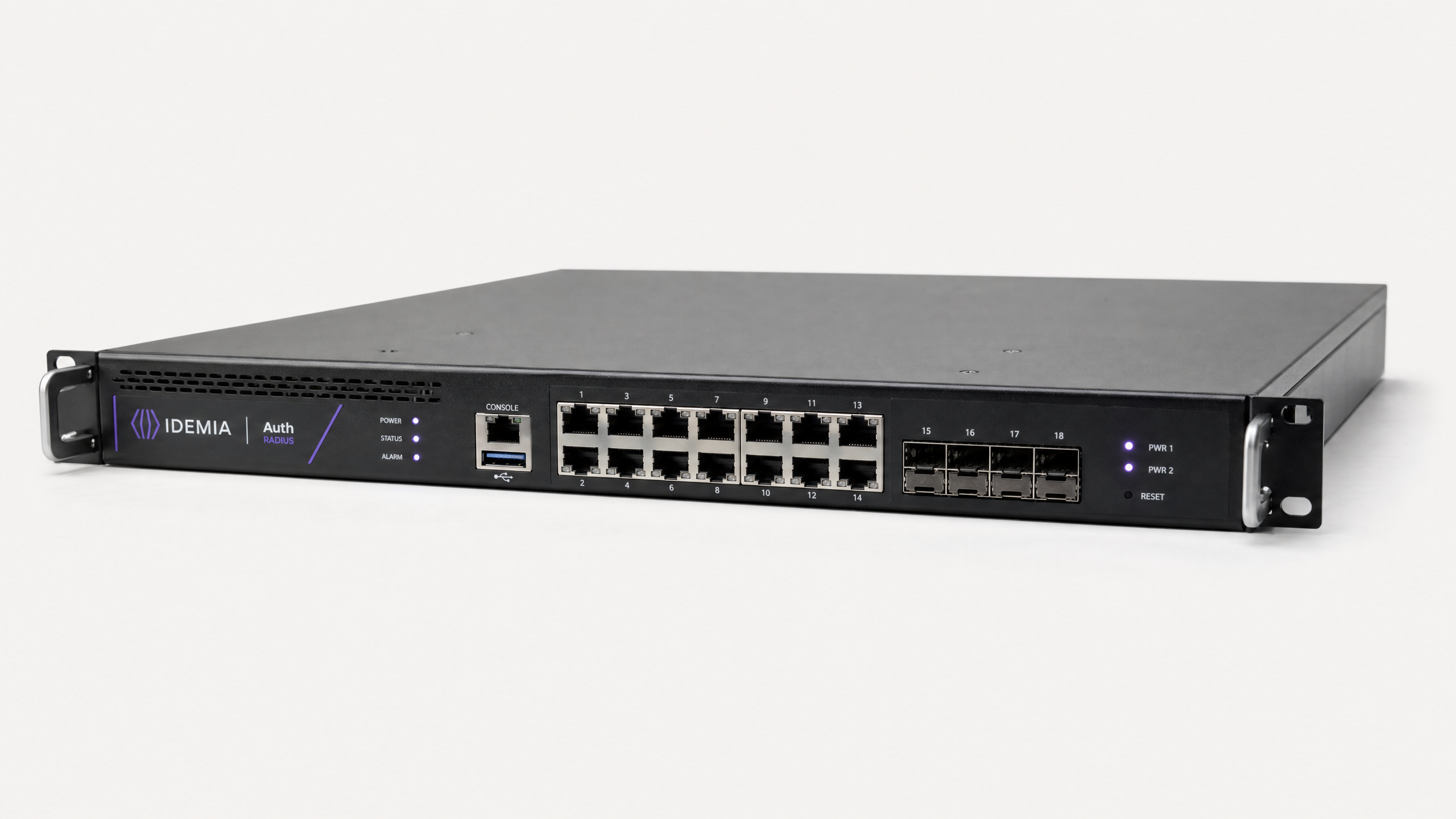
PODCAST SCRIPT: Migrating from On-Premises RADIUS (NPS) to RADIUS as a Service Duration: ~10 minutes | Voice: UK English, Male, Senior Consultant tone --- SEGMENT 1: INTRODUCTION AND CONTEXT Welcome to the Purple WiFi technical briefing series. Today we're tackling a migration that's sitting on the roadmap of a significant number of enterprise IT teams right now: moving away from on-premises RADIUS — specifically Microsoft's Network Policy Server — to a cloud-hosted RADIUS as a Service model. If you're managing WiFi authentication across a hotel group, a retail estate, a stadium, or a public-sector campus, this is directly relevant to you. The on-premises NPS model has served us well for the better part of two decades, but the operational overhead, the single-point-of-failure risk, and the scaling limitations are becoming increasingly hard to justify — particularly when cloud-native alternatives now offer enterprise-grade reliability at a fraction of the total cost of ownership. Over the next ten minutes, we'll cover the technical architecture of both approaches, walk through a structured migration methodology, look at two real-world implementation scenarios, and finish with the key decision frameworks you need to make this call confidently. Let's get into it. --- SEGMENT 2: TECHNICAL DEEP-DIVE First, let's make sure we're aligned on what RADIUS actually does in your network stack. RADIUS — Remote Authentication Dial-In User Service — is the protocol defined in RFC 2865 that handles authentication, authorisation, and accounting for network access. In a WiFi context, it's the backbone of IEEE 802.1X port-based access control. When a device connects to a WPA2-Enterprise or WPA3-Enterprise SSID, the access point acts as a RADIUS client — what we call a Network Access Server — and forwards the authentication request to the RADIUS server. The server validates the credentials, typically against Active Directory or an LDAP directory, and returns an Access-Accept or Access-Reject response. That's the fundamental flow. Now, in the on-premises NPS model — Network Policy Server is Microsoft's RADIUS implementation bundled with Windows Server — you're running that authentication logic on hardware you own, in a data centre or server room you maintain. The NPS server holds your network policies, your certificate infrastructure for EAP-TLS or PEAP-MSCHAPv2, and your connection request policies. It works. It's mature. But it comes with a set of operational realities that compound over time. The first is hardware dependency. Your NPS server is a physical or virtual machine that requires patching, capacity planning, and eventual hardware refresh. In a multi-site deployment — say, a hotel group with properties across the UK — you're either running a centralised NPS with WAN dependency, or you're deploying NPS instances at each site and managing them individually. Neither is elegant. The second is availability. A single NPS instance is a single point of failure for your entire authentication infrastructure. Yes, you can deploy NPS in a failover pair, but that doubles your hardware and licensing overhead, and it still doesn't give you the geographic redundancy that a cloud service provides natively. The third is scalability. NPS was designed for corporate LAN environments. When you're handling thousands of concurrent authentication requests during a stadium event or a conference centre peak, the throughput limitations of a single NPS instance become very apparent. Authentication latency spikes, and users experience connection failures at exactly the moment you can least afford it. RADIUS as a Service addresses all three of these constraints architecturally. The cloud RADIUS provider runs a distributed, geo-redundant cluster of RADIUS servers. Your access points point to cloud-hosted RADIUS endpoints rather than an on-premises server. Authentication requests are load-balanced across the cluster, and failover is automatic and transparent. The provider handles patching, capacity scaling, and certificate management. From your perspective as the network operator, RADIUS becomes a consumed service rather than a managed component. The authentication protocols themselves don't change. You're still running IEEE 802.1X with EAP-TLS, PEAP-MSCHAPv2, or EAP-TTLS depending on your client device mix. The difference is where the RADIUS server lives and who is responsible for its operational continuity. There's an important security consideration here that I want to address directly, because it comes up in almost every client conversation. Moving RADIUS to the cloud means your authentication traffic is traversing the public internet to reach the cloud RADIUS endpoint. This is mitigated through two mechanisms. First, RADIUS traffic between the Network Access Server and the RADIUS server is protected using a shared secret and MD5-based message authentication. Second, and more importantly for modern deployments, you should be running RadSec — RADIUS over TLS, defined in RFC 6614 — which wraps the entire RADIUS conversation in a TLS tunnel. This gives you transport-layer encryption equivalent to HTTPS, eliminating the MD5 vulnerability and providing mutual authentication between the NAS and the RADIUS server. Any cloud RADIUS provider worth considering should support RadSec as standard. On the identity integration side, cloud RADIUS services typically support LDAP and LDAPS connections back to your on-premises Active Directory, or native integration with Azure Active Directory and Entra ID via SAML or SCIM. This means you don't need to migrate your user directory — the cloud RADIUS service queries your existing identity store, maintaining your existing user lifecycle management processes. For compliance-conscious organisations — and that includes anyone handling payment card data under PCI DSS, or personal data under GDPR — cloud RADIUS providers that are SOC 2 Type II certified and ISO 27001 accredited provide a stronger compliance posture than most organisations can achieve with self-managed NPS infrastructure. --- SEGMENT 3: IMPLEMENTATION RECOMMENDATIONS AND PITFALLS Right, let's talk about how you actually execute this migration without taking your authentication infrastructure offline. The methodology I recommend is a five-phase approach. Phase one is audit and inventory. Document every RADIUS client — every access point, every switch, every VPN concentrator — along with its current shared secret, the EAP method it's using, and any vendor-specific attributes in your NPS policies. This is the unglamourous work, but skipping it is the number one cause of migration failures. Phase two is pilot deployment. Stand up your cloud RADIUS instance and point a non-production SSID or a single test site at it. Validate that your EAP method works end-to-end, that your identity integration is functioning, and that your accounting data is flowing correctly. Phase three is parallel running. This is the critical risk mitigation step. Configure your access points with both the on-premises NPS server and the cloud RADIUS server as authentication targets, with the cloud service as primary and NPS as fallback. Run in this configuration for a minimum of two weeks across a full business cycle. Monitor authentication success rates, latency, and any policy discrepancies. Phase four is cutover. Remove the NPS fallback configuration and commit to cloud RADIUS as your sole authentication infrastructure. Do this during a planned maintenance window, and have a rollback procedure documented and tested. Phase five is decommission. Once you've validated stable operation for thirty days post-cutover, decommission the NPS servers and reclaim the hardware or virtual machine resources. The pitfalls I see most frequently are: certificate trust chain issues — specifically, client devices that don't trust the cloud RADIUS server's certificate because the CA isn't in their trusted store. Resolve this through your MDM or Group Policy before cutover. The second common pitfall is firewall rules. Cloud RADIUS requires outbound UDP 1812 and 1813 from your access points to the cloud endpoints, or TCP 2083 for RadSec. Ensure your network perimeter allows this traffic. Third: shared secret complexity. If your existing NPS shared secrets are weak, use the migration as an opportunity to rotate to cryptographically strong secrets, or better yet, move to RadSec and eliminate shared secrets entirely. --- SEGMENT 4: RAPID-FIRE Q&A Let me run through the questions I get most often on this topic. Can we keep Active Directory on-premises? Yes, absolutely. Cloud RADIUS connects to your on-premises AD via LDAPS. Your directory stays where it is. What happens if our internet connection goes down? This is the key dependency shift. With cloud RADIUS, internet connectivity becomes a dependency for authentication. Mitigate this with redundant WAN links or a local RADIUS proxy that caches authentication for known devices during outages. Does this affect our PCI DSS compliance? Moving to a certified cloud RADIUS provider typically improves your compliance posture. Ensure your provider can supply SOC 2 Type II reports and is included in your annual QSA assessment scope. How long does a full migration take? For a single site, two to four weeks. For a multi-site estate of fifty or more locations, plan for three to six months with a phased rollout. --- SEGMENT 5: SUMMARY AND NEXT STEPS To wrap up: the case for migrating from on-premises NPS to RADIUS as a Service is compelling on operational, financial, and compliance grounds. The migration itself is low-risk when executed with a structured parallel-running phase. The key technical decisions are your EAP method selection, your identity integration approach, and whether to implement RadSec for transport security — which I'd strongly recommend for any new deployment. Your immediate next steps: conduct the audit of your current RADIUS clients and policies, engage your cloud RADIUS provider for a pilot environment, and review your firewall rules and certificate trust chains before you start. For organisations running Purple WiFi's guest access platform, the RADIUS as a Service capability integrates directly with the guest WiFi authentication flow, giving you a single control plane for both corporate 802.1X authentication and guest network access management — with the analytics and compliance reporting built in. Thanks for listening. The full technical reference guide is available on the Purple website, and our solutions team is available for a scoping conversation if you're ready to move forward. --- END OF SCRIPT

header_image.png

執行摘要

近二十年來,Microsoft 的網路原則伺服器 (NPS) 一直是企業網路的預設 RADIUS 實作。然而,隨著場域營運商在分散的據點(從零售連鎖店到全球餐旅集團)進行擴充,管理地端驗證基礎架構的營運負擔已成為一項重大責任。

遷移至 RADIUS as a Service 將驗證從受管理的硬體元件轉變為取用的雲端服務。這種架構轉型消除了獨立 NPS 部署中固有的單一故障點,免除了硬體更新週期,並提供了體育場和會議中心等高密度環境所需的彈性擴充能力。對於 IT 經理和網路架構師,本指南提供了一套廠商中立、結構化的方法,可在不影響生產流量的情況下,將 802.1X 驗證遷移至雲端,確保符合 PCI DSS 和 GDPR,並將驗證基礎架構的營運成本 (OpEx) 降低高達 80%。

技術深入探討:架構與標準

要了解此遷移,我們必須首先檢視 IEEE 802.1X 埠型存取控制交付方式的架構轉變。

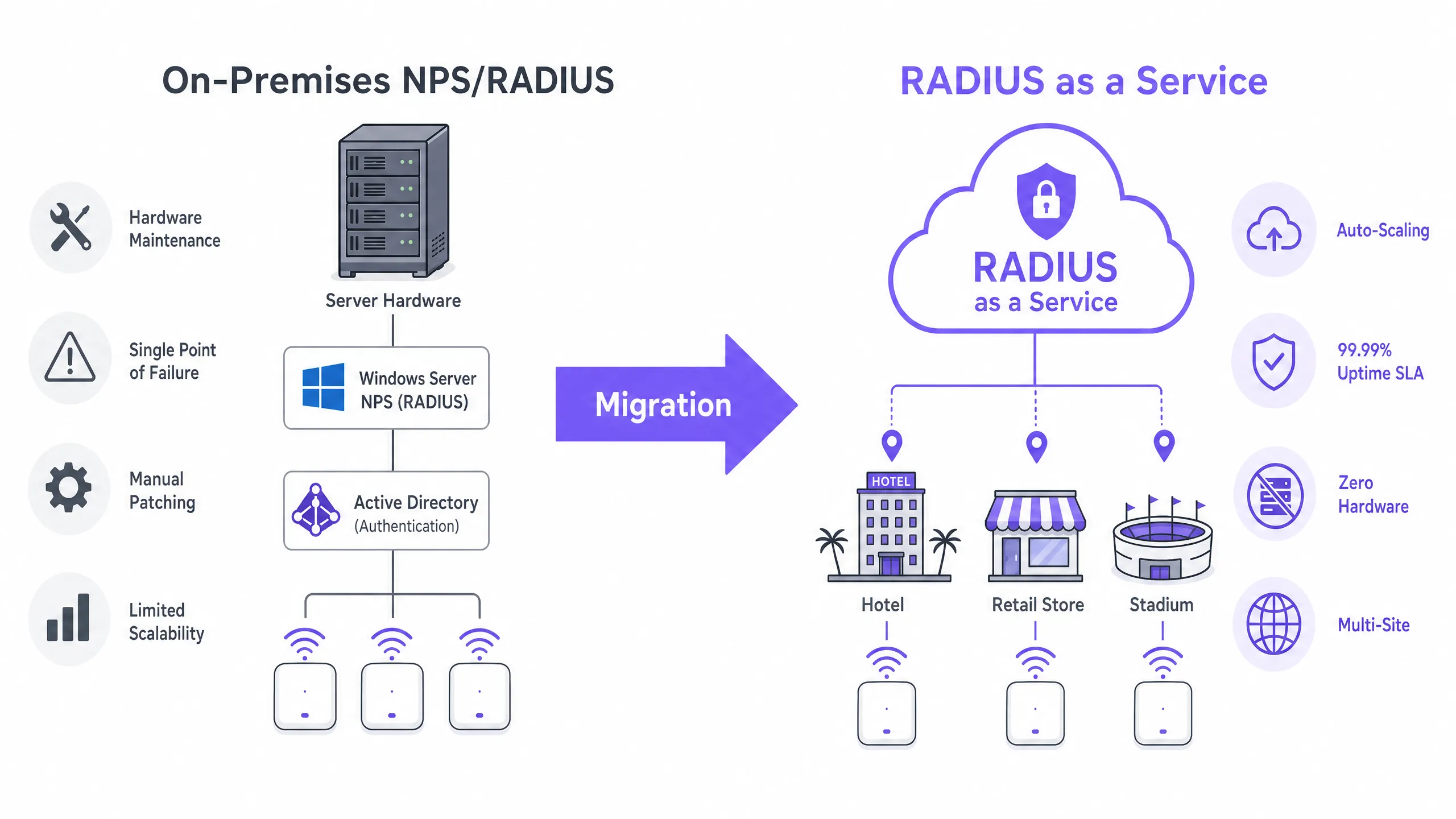
地端 NPS 的限制

在傳統部署中,存取點充當網路存取伺服器 (NAS),將驗證請求轉發到地端 NPS 伺服器。NPS 伺服器評估連線要求原則,比對身分識別存放區(通常是透過 LDAP 的 Active Directory)驗證憑證,並傳回 Access-Accept 或 Access-Reject 訊息。

此模型對現代網路提出了三個關鍵限制:

  1. 硬體依賴與維護:NPS 需要專用的實體或虛擬機器,需要持續的修補、容量規劃和生命週期管理。
  2. 高可用性複雜度:實現備援需要將 NPS 部署在容錯移轉配對中,這會使授權成本加倍,卻無法提供真正的地理備援。
  3. 吞吐量瓶頸:在尖峰並行期間(例如體育場入場或零售尖峰營業時間),單一 NPS 執行個體可能會成為瓶頸,導致驗證逾時和使用者體驗下降。

雲端 RADIUS 架構

RADIUS as a Service 抽象化了驗證層。雲端供應商營運分散式、地理備援的 RADIUS 伺服器叢集。NAS 指向這些雲端端點,且請求會自動進行負載平衡。
architecture_comparison.png

傳輸安全:RadSec 的角色 當將 RADIUS 移至雲端時,驗證流量會經過公開網路。雖然傳統的 RADIUS 使用共享金鑰和 MD5 雜湊,但現代部署必須實作 RadSec(RADIUS over TLS,RFC 6614)。RadSec 將整個 RADIUS 對話封裝在 TLS 通道中(通常為 TCP 連接埠 2083),提供等同於 HTTPS 的傳輸層加密,以及 NAS 與雲端 RADIUS 端點之間的雙向驗證。

身分整合 雲端 RADIUS 不需要遷移您的使用者目錄。服務通常支援連回本地 Active Directory 的 LDAPS 連線,或透過 SAML 或 SCIM 與 Azure Active Directory (Entra ID) 進行原生 API 整合。這可確保您現有的使用者生命週期管理流程保持不變。

對於利用 Guest WiFi 平台的場域,雲端 RADIUS 可直接整合,為企業 802.1X 驗證和訪客網路存取提供統一的控制介面,並配有先進的 WiFi Analytics

實作指南:五階段方法論

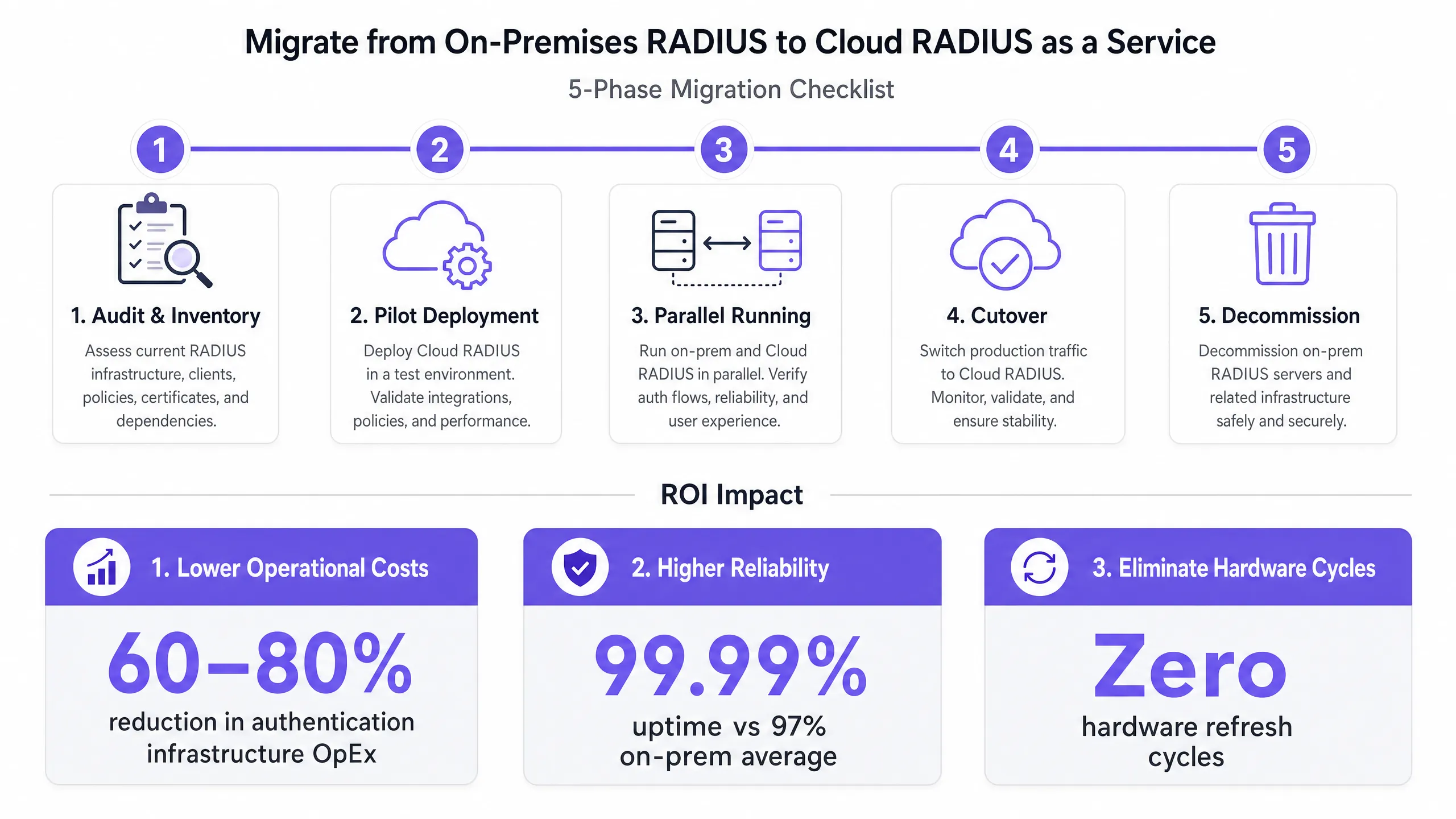
在不中斷服務的情況下執行遷移,需要結構化、分階段的方法。
migration_checklist.png

第一階段:稽核與盤點

在進行任何變更之前,請記錄目前的狀態:

  • RADIUS 用戶端:識別每個 NAS(無線基地台、交換器、VPN 集中器)。
  • 原則:記錄現有的 NPS 連線要求和網路原則,包括用於 VLAN 指派的廠商專屬屬性 (VSA)。
  • EAP 方法:識別正在使用哪些可延伸驗證協定方法(例如 EAP-TLS、PEAP-MSCHAPv2)。

第二階段:試點部署

佈建雲端 RADIUS 執行個體,並設定非生產 SSID 或單一測試站點。驗證身分目錄整合(例如 Entra ID 同步),並確保 EAP 方法端到端正常運作。

第三階段:平行運作(風險緩釋)

將生產環境的 NAS 裝置設定為同時使用雲端 RADIUS 伺服器(主要)和舊版 NPS 伺服器(備用)。維持此設定運作至少兩週。監控驗證成功率、延遲指標和計費資料流,以便在切換前識別任何原則差異。

第四階段:切換

在排定的維護視窗期間,從 NAS 裝置中移除舊版 NPS 備用設定。完全切換至雲端基礎架構。確保您的還原程序已記錄並經過測試。

第五階段:除役

在穩定運作 30 天后,安全地將舊版 NPS 伺服器除役並回收運算資源。

最佳實踐與合規性

在設計您的雲端 RADIUS 架構時,請遵循以下標準:

  • 強制使用 RadSec:如果您的 NAS 硬體支援 RadSec (TCP 2083),切勿使用標準 UDP 1812/1813 透過公用網際網路傳送 RADIUS 流量。
  • 憑證信任鏈:確保用戶端裝置信任核發雲端 RADIUS 伺服器憑證的憑證授權單位 (CA)。在移轉前,透過 MDM 或群組原則將根 CA 推送至受管理裝置。
  • 合規性態勢:選擇維持 SOC 2 Type II 認證與 ISO 27001 認證的雲端 RADIUS 供應商。這能大幅簡化您的年度 PCI DSS 評估,特別是針對 零售旅宿 環境。

如需更廣泛的網路設計原則,請參閱我們的指南: 企業 WiFi 設定:2026 年指南 以及 了解 RSSI 與訊號強度以進行最佳通道規劃

疑難排解與風險緩釋

故障模式 根本原因 緩釋策略
驗證逾時 防火牆阻擋了連外的 UDP 1812/1813 或 TCP 2083。 驗證周邊防火牆規則是否允許連外流量傳送至雲端 RADIUS 供應商的特定 IP 範圍。
憑證信任錯誤 用戶端裝置的信任存放區中缺少根 CA。 在第 3 階段(平行運作)之前,透過 MDM/GPO 部署根 CA。
VLAN 指派失敗 廠商特定屬性 (VSA) 未在雲端原則中正確對應。 在第 1 階段期間,將 NPS 的確切 VSA 字串格式複製到雲端 RADIUS 原則引擎中。
WAN 中斷影響 失去網際網路連線導致無法存取雲端 RADIUS。 部署備援 WAN 連結,或實作可為已知裝置快取憑證的本機 RADIUS 代理伺服器。

投資報酬率與業務影響

移轉至 RADIUS 即服務 (RADIUS as a Service) 可帶來可衡量的業務成果:

  • 降低成本:免除硬體採購、Windows Server 授權,以及花費在修補和維護上的工程工時。典型的營運費用 (OpEx) 可減少 60-80%。
  • 可靠性 SLA:雲端供應商提供具財務保障的 99.99% 可用性 SLA,而單一站點 NPS 部署的典型可用性僅為 97-98%。
  • 敏捷性:無需配置本機驗證硬體即可立即讓新站點上線,從而縮短 交通運輸 樞紐與 醫療保健 機構的部署時程。

歡迎收聽我們的資深顧問團隊在這份 10 分鐘的簡報中討論策略性影響:

Key Definitions

RADIUS (Remote Authentication Dial-In User Service)

A networking protocol that provides centralised Authentication, Authorisation, and Accounting (AAA) management for users who connect and use a network service.

The core protocol used by enterprise WiFi networks to validate user credentials before granting network access.

NPS (Network Policy Server)

Microsoft's implementation of a RADIUS server and proxy, bundled as a role in Windows Server.

The legacy on-premises infrastructure that organisations are actively migrating away from to reduce maintenance overhead.

NAS (Network Access Server)

The device that acts as the gateway to the network and passes authentication requests to the RADIUS server.

In a wireless context, the NAS is typically the WiFi Access Point or Wireless LAN Controller.

RadSec (RADIUS over TLS)

A protocol defined in RFC 6614 that transports RADIUS packets over a TCP connection encrypted with TLS.

Essential for cloud RADIUS deployments to ensure credential data is encrypted while traversing the public internet.

EAP (Extensible Authentication Protocol)

An authentication framework frequently used in wireless networks and point-to-point connections.

Determines how the client and server securely exchange credentials (e.g., certificates via EAP-TLS, or passwords via PEAP).

VSA (Vendor-Specific Attribute)

Custom attributes defined by hardware vendors within the RADIUS protocol to support proprietary features.

Crucial during migration; VSAs are often used to assign authenticated users to specific network VLANs dynamically.

LDAPS (Lightweight Directory Access Protocol over SSL)

A secure protocol for querying and modifying directory services like Active Directory.

Used by cloud RADIUS services to securely query on-premises identity stores without migrating the user directory to the cloud.

802.1X

An IEEE standard for port-based network access control (PNAC).

The underlying standard that uses RADIUS to ensure only authenticated devices can pass traffic onto the enterprise LAN or WLAN.

Worked Examples

A 200-property hotel group currently runs local NPS servers at each site for staff 802.1X authentication. They are migrating to Entra ID (Azure AD) and want to decommission the local servers. How should they approach the migration?

  1. Deploy a cloud RADIUS service that integrates natively with Entra ID via SAML/SCIM.
  2. Configure the cloud RADIUS policies to map Entra ID groups (e.g., 'Front Desk', 'Management') to specific VLAN VSAs.
  3. At a pilot property, configure the access points to use RadSec to connect to the cloud RADIUS endpoint.
  4. Push the cloud RADIUS server's Root CA to all staff devices via Microsoft Intune.
  5. Run parallel authentication at the pilot site, then execute a phased roll-out across the remaining 199 properties.
Examiner's Commentary: This approach removes 200 physical/virtual servers from the estate, drastically reducing the attack surface and maintenance overhead. Integrating directly with Entra ID eliminates the need for complex site-to-site VPNs back to a central Active Directory.

A stadium with 50,000 capacity experiences authentication failures on their corporate SSID during major events because their on-premises NPS server cannot handle the throughput of thousands of devices roaming simultaneously.

  1. Audit the existing NPS policies and EAP methods.
  2. Provision a cloud RADIUS service capable of auto-scaling to handle high authentications per second (APS).
  3. Establish an LDAPS connection from the cloud RADIUS service to the stadium's on-premises Active Directory.
  4. Update the stadium's high-density wireless LAN controllers to point to the cloud RADIUS endpoints as the primary authentication servers.
Examiner's Commentary: By offloading the RADIUS processing to a cloud cluster, the stadium leverages elastic compute resources that scale dynamically during event ingress, resolving the bottleneck without requiring the venue to over-provision expensive local hardware.

Practice Questions

Q1. Your organisation is migrating to Cloud RADIUS. The security team mandates that no authentication traffic can be sent over the internet in cleartext or using deprecated hashing algorithms like MD5. What protocol must you configure on your wireless LAN controllers?

Hint: Look for the protocol that wraps RADIUS in a TLS tunnel.

View model answer

You must configure RadSec (RADIUS over TLS). RadSec establishes a TLS tunnel over TCP port 2083 between the NAS and the cloud RADIUS server, providing transport-layer encryption and mutual authentication, satisfying the security team's requirements.

Q2. During Phase 3 (Parallel Running) of your migration, you notice that users are authenticating successfully against the cloud RADIUS server, but they are not being placed in the correct network segments. What is the most likely configuration gap?

Hint: How does a RADIUS server tell an access point which network segment to use?

View model answer

The Vendor-Specific Attributes (VSAs) for dynamic VLAN assignment have not been configured correctly in the cloud RADIUS policies. You must ensure the exact VSA strings used in the legacy NPS server are replicated in the cloud environment so the NAS knows which VLAN to assign to the user.

Q3. A client device is repeatedly failing EAP-TLS authentication against the new cloud RADIUS service, but it works fine against the legacy NPS server. The device logs show an 'untrusted server' error. How do you resolve this?

Hint: EAP-TLS requires the client to trust the server's identity.

View model answer

The client device does not have the Root Certificate Authority (CA) that issued the cloud RADIUS server's certificate in its trusted root store. You must deploy the Root CA to the client device using a Mobile Device Management (MDM) solution or Group Policy.

Continue reading in this series

The Security Benefits of RADIUS as a Service for Hybrid Workforces

This technical reference guide explains how RADIUS as a Service secures network access for hybrid workforces across distributed venues. It covers the architecture, security benefits, and deployment steps for replacing on-premise RADIUS infrastructure with a cloud-managed authentication service. For IT managers and network architects at hotels, retail chains, stadiums, and public-sector organisations, this guide provides the evidence needed to evaluate and act on a cloud RADIUS migration this quarter.

Read the guide →

The Security Benefits of RADIUS as a Service for Hybrid Workforces

This technical reference guide explains how RADIUS as a Service secures network access for hybrid workforces across distributed venues. It covers the architecture, security benefits, and deployment steps for replacing on-premise RADIUS infrastructure with a cloud-managed authentication service. For IT managers and network architects at hotels, retail chains, stadiums, and public-sector organisations, this guide provides the evidence needed to evaluate and act on a cloud RADIUS migration this quarter.

Read the guide →

Integrating RADIUS as a Service with Cloud Directories (Azure AD & Google Workspace)

This technical reference guide details how to integrate RADIUS as a Service with cloud directories - Microsoft Entra ID and Google Workspace - for enterprise WiFi authentication. It covers the architectural shift from on-premises NPS to cloud-native RADIUS, the deployment of certificate-based EAP-TLS authentication, and the operational best practices for securing wireless access across hospitality, retail, and public-sector environments. For IT managers and network architects already invested in cloud identity, this guide bridges the gap between directory management and physical network security.

Read the guide →