
Nama ff keren iPSK: a comprehensive guide for businesses
This guide explains how to deploy iPSK (Identity Pre-Shared Key) in multi-tenant environments such as Build to Rent developments, student accommodation, and MDU properties. It covers the RADIUS-backed architecture that gives each resident a private, isolated WiFi bubble on a single shared SSID, and details the implementation steps, hardware integrations, and commercial case for treating WiFi as a managed amenity.
Listen to this guide
View podcast transcript
Executive summary
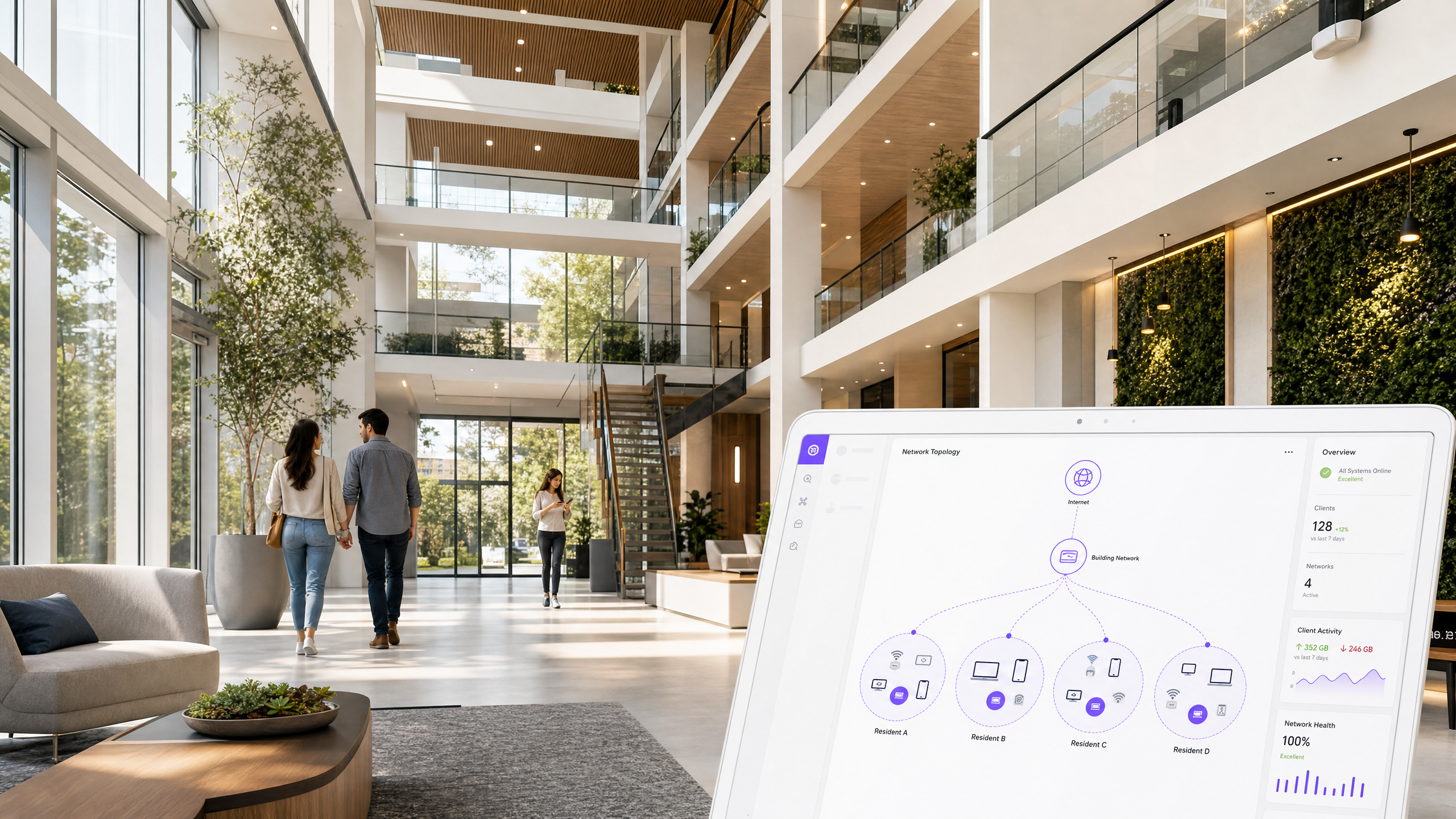
iPSK (Identity Pre-Shared Key) is the enabling technology for multi-tenant WiFi. It lets you broadcast a single SSID across an entire property while issuing a unique password to each resident. When a device connects, a RADIUS server maps that password to a dedicated VLAN, creating a private network bubble per apartment. The resident's phone sees their Chromecast. Their smart speaker controls their lights. Resident B sees none of it.
Standard guest WiFi isolates every device from every other - it cannot support smart home devices. 802.1X EAP-TLS provides strong security but requires certificate management and fails on headless IoT devices. iPSK sits between the two: it is simpler than 802.1X, far more secure than a shared password, and fully compatible with every device a resident owns.
Purple deploys iPSK as a cloud overlay on Cisco Meraki, HPE Aruba, Ruckus, Juniper Mist, Ubiquiti UniFi, Cambium, Extreme Networks, and Fortinet hardware. You do not need to replace your access points. Purple acts as the RADIUS server, manages the key lifecycle, and automates onboarding and offboarding via API. This guide covers the architecture, deployment steps, pitfalls, and the commercial case for treating WiFi as a managed amenity in BTR and MDU properties.
Technical deep-dive
How iPSK works
Traditional WPA2-Personal uses one password for all users on an SSID. Any resident can see any other resident's devices on the same broadcast domain. Rotating the password when a resident leaves affects every other resident. iPSK changes the authentication model entirely.
When a device attempts to associate with the access point using a specific PSK, the wireless controller sends a RADIUS Access-Request to the Purple cloud. The RADIUS server matches the password against the resident record and returns a RADIUS Access-Accept message containing a vendor-specific attribute: the VLAN ID assigned to that resident. The controller drops the client onto that VLAN. The entire exchange takes milliseconds and is invisible to the resident.
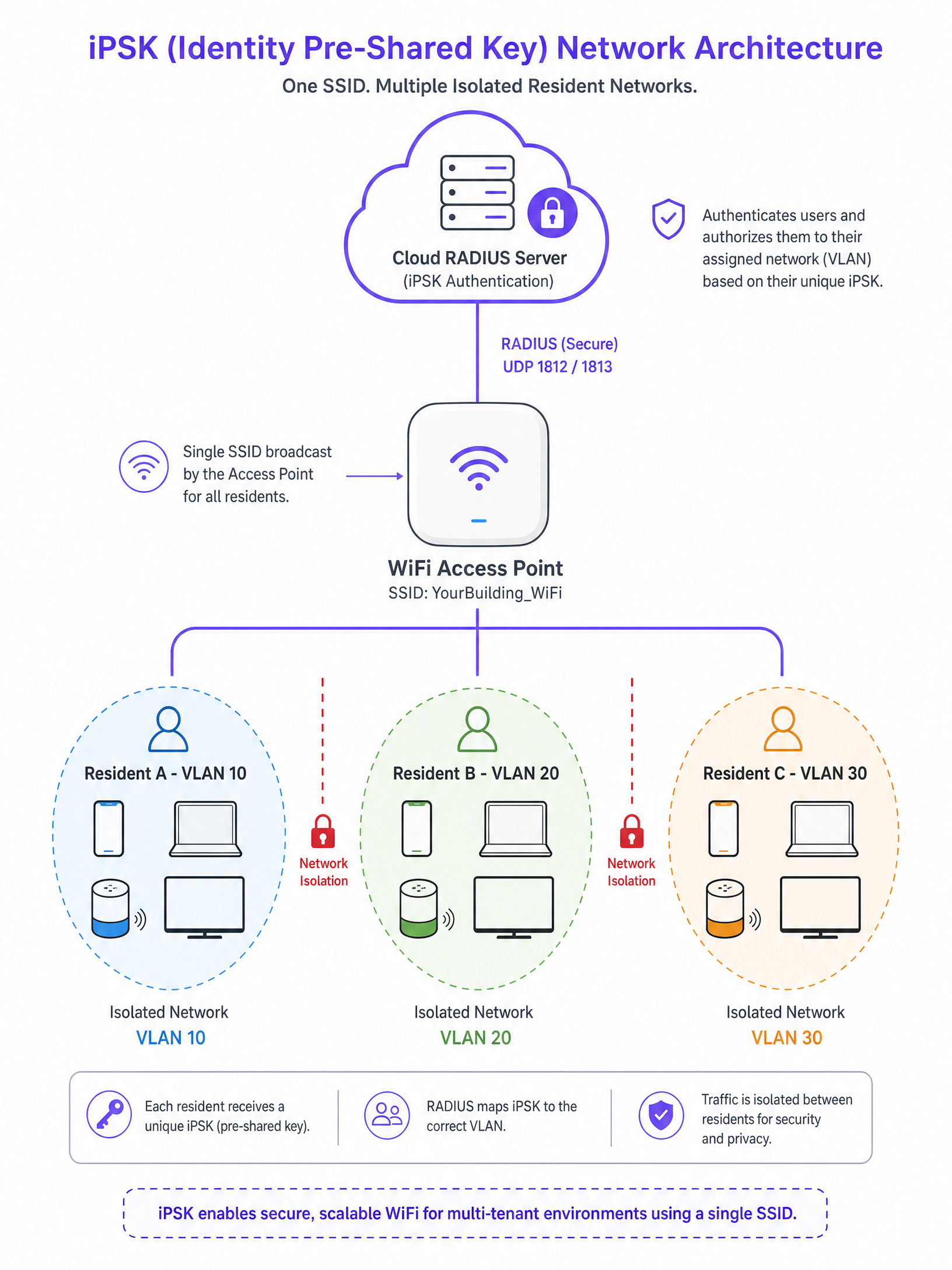
This architecture delivers three outcomes. First, VLAN segmentation: traffic is isolated at Layer 2, so Resident A on VLAN 10 cannot route traffic to Resident B on VLAN 20. Second, broadcast containment: mDNS and Bonjour discovery traffic stays within the resident's VLAN, so Chromecast and Sonos work inside the apartment but do not bleed into the corridor. Third, clean key lifecycle: revoking one key at move-out affects only that resident; the rest of the building stays online.
Vendor terminology varies. HPE Aruba calls this PPSK (Private Pre-Shared Key). Cisco Meraki calls it Personal Private Network. Ruckus and Juniper Mist use DPSK (Dynamic Pre-Shared Key). The concept is identical across all platforms.
Comparing authentication methods
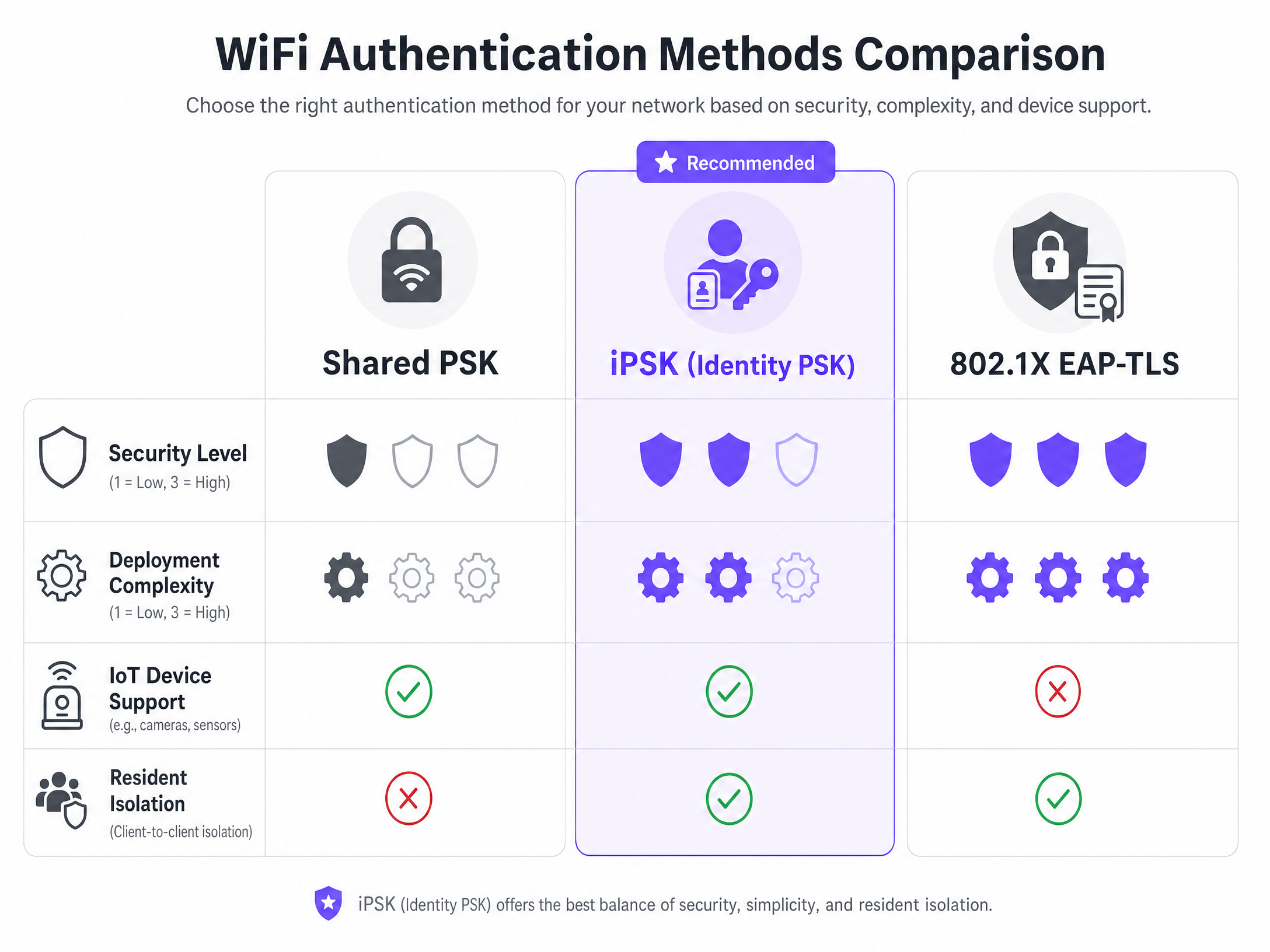
The table below summarises the trade-offs across the three main WiFi authentication methods used in multi-tenant environments.
| Dimension | Shared PSK | iPSK | 802.1X EAP-TLS |
|---|---|---|---|
| Security level | Low - one key for all | Medium - unique key per resident | High - certificate per device |
| Deployment complexity | Low | Medium | High |
| IoT device support | Yes | Yes | No - certificates required |
| Resident isolation | No | Yes - per-VLAN | Yes - per-VLAN |
| Key revocation | Affects all residents | Affects one resident only | Per-device certificate revocation |
| Smart home compatibility | No | Yes | No |
For BTR and MDU deployments, iPSK is the correct choice. It provides the isolation and security you need without the operational overhead of a certificate authority.
WPA3 and the 6 GHz challenge
WPA3 introduces Simultaneous Authentication of Equals (SAE) as a replacement for the WPA2 4-way handshake. SAE is more resistant to offline dictionary attacks. However, the IEEE 802.11 standard for SAE does not currently support multiple pre-shared keys per SSID.
Because WiFi 6E and WiFi 7 mandate WPA3 on the 6 GHz band, you cannot run standard iPSK on a 6 GHz SSID today. This is not a vendor-specific limitation. Cisco Meraki, HPE Aruba, Ruckus, Juniper Mist, Ubiquiti UniFi, Extreme, and Fortinet all face the same constraint because it derives from the IEEE standard itself.
The current best practice is a hybrid deployment. Maintain a WPA2 iPSK SSID on the 2.4 GHz and 5 GHz bands to support legacy devices and IoT hardware. For 6 GHz-capable devices, deploy a separate SSID using 802.1X EAP-TLS, or wait for vendor-specific SAE implementations to mature. Some vendors are developing proprietary multi-key SAE solutions, but there is no universally standardised approach yet.
Implementation guide
Step 1: VLAN planning
Allocate one dedicated VLAN per apartment or resident. Ensure your core switches and firewalls support the required number of VLAN interfaces. A 200-unit BTR property requires 200 distinct VLANs. Modern enterprise switching platforms handle thousands of VLANs without performance impact.
Step 2: DHCP and IP addressing
Configure a DHCP scope for each VLAN. Assign a /24 subnet (254 usable addresses) per resident. A modern household connects 15 to 25 devices. A /28 subnet (14 usable addresses) will be exhausted within days. Never under-size the DHCP scope.
Step 3: RADIUS configuration
Point your wireless controllers at the Purple RADIUS servers. Configure the controllers to accept RADIUS override attributes for VLAN assignment. Purple provides the RADIUS server IP addresses, shared secrets, and attribute mappings for each supported hardware platform.
Step 4: SSID provisioning
Broadcast a single building-wide SSID. Enable MAC Authentication Bypass (MAB) on the SSID. MAB is the mechanism by which the controller initiates the RADIUS request when a device connects using a PSK rather than a certificate.
Step 5: Resident onboarding
Integrate the WiFi provisioning into the resident move-in workflow. Purple's API generates the unique iPSK and delivers it to the resident via email or a resident portal. At move-out, the property management system triggers the Purple API to revoke the key. No manual intervention is required.
Best practices
Disable client isolation within resident VLANs
Client isolation prevents devices on the same subnet from communicating with each other. If you enable it, you break the smart home functionality that iPSK is designed to support. Disable client isolation within each resident's VLAN. The VLAN boundary itself provides the isolation between residents.
Configure NAT for gaming
Online gaming requires specific NAT configurations. The PlayStation 5 and Xbox Series X need NAT Type 2 (Moderate) or NAT Type 1 (Open) for matchmaking. Implement Carrier-Grade NAT (CGNAT) carefully. Configure UPnP or static port forwarding per resident VLAN rather than applying a blanket strict NAT policy.
Trunk all resident VLANs to all access points
A resident connecting in their flat on the 4th floor must maintain their connection when they walk to the gym on the ground floor. All resident VLANs must be trunked to all access points across the property, or you must implement a tunneling protocol such as CAPWAP or GRE to anchor client traffic to a central controller.
Plan for cohort move-in events
Student accommodation operators face a specific challenge: hundreds of residents connecting simultaneously during move-in week. Pre-provision all iPSKs before move-in day. Test the RADIUS server capacity under load. Purple's cloud infrastructure is rated to 99.999% uptime and handles concurrent authentication bursts without degradation.
Troubleshooting and risk mitigation
Chromecast and smart speaker failures
The most common support ticket in multi-tenant WiFi. If a resident cannot cast to their Chromecast or pair their smart speaker, check two things. First, confirm client isolation is disabled within their VLAN. Second, confirm mDNS proxy or Bonjour gateway is not filtering discovery traffic within the VLAN.
IP address exhaustion
If residents report that new devices cannot connect, check the DHCP lease table for their VLAN. A /28 subnet will exhaust within days in a modern household. Expand the scope to a /24 immediately.
Dropped connections in common areas
If residents lose connectivity when moving between floors or zones, the resident's VLAN is not trunked to the access point in that area. Audit the VLAN trunk configuration on every switch port connected to an access point.
Authentication failures after key revocation
If a device continues to connect after a key is revoked, check the RADIUS server cache. Some controllers cache authentication decisions for a configurable period. Set the session timeout and re-authentication interval to a short value (15 to 30 minutes) to ensure revocations take effect promptly.
ROI and business impact
The rent premium case
Research from the British Property Federation indicates that managed WiFi commands a £15 to £30 rent premium per unit, per month in UK BTR developments. On a 200-unit property, that is £3,000 to £6,000 in additional monthly revenue. The capital cost of deploying enterprise access points and the Purple software overlay is typically recovered within 12 to 18 months.
Void period reduction
Providing day-one connectivity eliminates the 5 to 10 day void period while a resident waits for an ISP engineer. Residents move in and connect immediately. This reduces void costs and improves resident satisfaction from the first day of tenancy.
RF environment improvement
A 200-unit building where each resident runs their own consumer router creates severe co-channel interference. 200 routers competing on overlapping 2.4 GHz and 5 GHz channels degrade performance for everyone. Replacing this with a single managed SSID on enterprise access points eliminates the interference and delivers consistent, high-speed connectivity throughout the building.
Operational efficiency
Purple automates the entire key lifecycle via API integration with property management systems. Move-in provisioning and move-out revocation require zero manual intervention from the IT or property management team. This is directly measurable in support ticket volume and staff time.
For more on how Purple supports Guest WiFi and WiFi Analytics across 80,000+ venues, see the related guides. If you are evaluating multi-tenant WiFi for a retail or hospitality context, see our Retail and Hospitality industry pages. For a broader discussion of SSID design strategy, read Three SSIDs to rule them all: guest, Passpoint, and IoT WiFi .
Key Definitions
iPSK (Identity Pre-Shared Key)
An authentication method that allows multiple unique passwords on a single SSID. A RADIUS server maps each password to a specific VLAN and network policy.
The core technology for multi-tenant WiFi. Also called PPSK (Aruba), Personal Private Network (Cisco Meraki), or DPSK (Ruckus, Juniper Mist).
RADIUS (Remote Authentication Dial-In User Service)
A networking protocol providing centralised Authentication, Authorization, and Accounting (AAA) management for users connecting to a network.
The engine behind iPSK. When a device connects, the access point queries the RADIUS server to verify the key and retrieve the VLAN assignment.
VLAN (Virtual Local Area Network)
A logical subnetwork that groups devices from different physical locations into an isolated broadcast domain.
Each resident in an iPSK deployment is assigned their own VLAN. This is the mechanism that prevents one resident from seeing another's devices.
BTR (Build to Rent)
Purpose-built residential accommodation designed specifically for long-term rental rather than owner-occupation.
The primary commercial context for multi-tenant iPSK deployments. WiFi is treated as a managed amenity, commanding a £15 to £30 monthly rent premium per unit.
MDU (Multi-Dwelling Unit)
A building classification containing multiple separate residential units, including apartment blocks, student accommodation, and social housing.
The physical environment where multi-tenant WiFi is deployed. Shared infrastructure serves many independent households.
SAE (Simultaneous Authentication of Equals)
The key establishment protocol used in WPA3, replacing the WPA2 4-way handshake. SAE is resistant to offline dictionary attacks.
The current limitation for iPSK on 6 GHz networks. The IEEE 802.11 SAE standard does not support multiple PSKs per SSID, requiring a hybrid deployment approach.
MAB (MAC Authentication Bypass)
A method to trigger a RADIUS authentication request based on a device's MAC address when the device does not initiate 802.1X.
Used in iPSK deployments to initiate the RADIUS request from the wireless controller when a device connects using a PSK.
CGNAT (Carrier-Grade NAT)
A method of sharing a single public IP address among multiple private IP addresses, used by operators managing large numbers of connected devices.
Required in large residential deployments to conserve IPv4 addresses. Must be configured carefully to support online gaming NAT requirements.
mDNS (Multicast DNS)
A protocol that resolves hostnames to IP addresses within a local network without requiring a DNS server, used by Chromecast, AirPlay, and Bonjour.
mDNS must be contained within the resident's VLAN for smart home devices to work. If mDNS bleeds across VLANs, residents can discover each other's devices.
Worked Examples
A 250-unit Build to Rent operator currently plans to install individual broadband lines and consumer routers in each apartment. The property manager is concerned about WiFi quality and support costs. How does an iPSK deployment change this architecture, and what are the measurable outcomes?
Replace the 250 individual ISP lines and consumer routers with enterprise access points (Cisco Meraki MR57 or HPE Aruba AP-635) deployed in corridors and apartments, all wired back to central managed switches. A single uplink from the building to a business-grade ISP provides the internet connection. Broadcast one SSID ('BuildingName_WiFi'). Configure Purple as the RADIUS server. Issue 250 unique iPSKs at move-in via the Purple API. Each resident is assigned a /24 VLAN. Disable client isolation within each VLAN. Trunk all VLANs to all access points. Integrate the Purple API with the property management system to automate provisioning at move-in and revocation at move-out.
A 500-bed purpose-built student accommodation (PBSA) operator needs to provision WiFi for the entire cohort during move-in week. Last year, the network collapsed under load during the first 48 hours. How do you design the iPSK deployment to handle this?
Pre-provision all 500 iPSKs before move-in day. Deliver the unique key to each student via the welcome email pack sent two weeks before arrival. On move-in day, students simply enter their key - no captive portal, no queue, no RADIUS bottleneck from simultaneous first-time authentications. Configure the RADIUS server with sufficient concurrent session capacity. Purple's cloud RADIUS infrastructure handles authentication bursts without degradation. Set DHCP lease times to 24 hours to prevent exhaustion during the high-density move-in period. Ensure all VLANs are trunked to all access points including common areas, study rooms, and the gym.
Practice Questions
Q1. A resident reports that they cannot cast Netflix from their phone to their Chromecast. Both devices are connected to the building WiFi using the resident's unique iPSK. Other residents are not affected. What is the most likely configuration error, and how do you fix it?
Hint: Chromecast uses mDNS for device discovery. Think about what network setting prevents devices on the same subnet from communicating.
View model answer
Client isolation (also called Layer 2 isolation) is enabled on the SSID or within the resident's VLAN. This prevents devices on the same subnet from communicating with each other, which blocks mDNS and Bonjour discovery. The fix is to disable client isolation within the resident's VLAN. The VLAN boundary itself provides isolation from other residents. You do not need client isolation to achieve resident-to-resident security.
Q2. You are deploying WiFi in a 500-unit student accommodation block. A colleague suggests assigning a /28 subnet to each room to conserve IP address space. Why is this a problem, and what should you assign instead?
Hint: Calculate the number of usable addresses in a /28 subnet, then count the devices a typical student connects.
View model answer
A /28 subnet provides only 14 usable IP addresses. A typical student connects a phone, laptop, tablet, games console, smart TV, and smart speaker - that is already six devices. Add a few IoT devices and a friend visiting, and you exhaust the pool within days. Assign a /24 subnet (254 usable addresses) per room. The additional IP space costs nothing and prevents a common and disruptive failure mode.
Q3. A BTR operator wants to upgrade their entire network to WiFi 7 and mandate WPA3 security on all bands, including 6 GHz. They currently run iPSK on a WPA2 SSID. What is the impact on their iPSK deployment, and what is the recommended migration path?
Hint: Consider the authentication handshake used in WPA3 and whether it supports multiple PSKs per SSID.
View model answer
WPA3 uses SAE, which does not currently support multiple PSKs per SSID under the IEEE 802.11 standard. Mandating WPA3 on all bands will break the iPSK deployment. The recommended approach is a hybrid model: retain the WPA2 iPSK SSID on 2.4 GHz and 5 GHz for IoT devices and legacy hardware. Deploy a separate WPA3 SSID using 802.1X EAP-TLS on the 6 GHz band for WiFi 7 capable devices. This is not a compromise - it is the current vendor-neutral best practice across Cisco Meraki, HPE Aruba, Ruckus, and all other major platforms.
Continue reading in this series
Spectrum managed WiFi customer service: a comprehensive guide for businesses
This comprehensive guide details how build-to-rent operators and property developers can deploy spectrum managed WiFi to provide secure, isolated network experiences for residents. It covers the technical architecture of cloud RADIUS, VLAN isolation, and iPSK, alongside practical implementation strategies to reduce support overhead.
Spectrum managed WiFi customer service: a comprehensive guide for businesses
This comprehensive guide details how build-to-rent operators and property developers can deploy spectrum managed WiFi to provide secure, isolated network experiences for residents. It covers the technical architecture of cloud RADIUS, VLAN isolation, and iPSK, alongside practical implementation strategies to reduce support overhead.
PPSK lights: comparing features and deployment models
A definitive technical guide comparing PPSK (Private Pre-Shared Key) authentication models for smart buildings and multi-tenant environments. It covers architecture, IoT segmentation, vendor implementations, and the business case for identity-based WiFi in the Build-to-Rent sector.