
OpenWrt Custom Firmware Integration with Purple WiFi
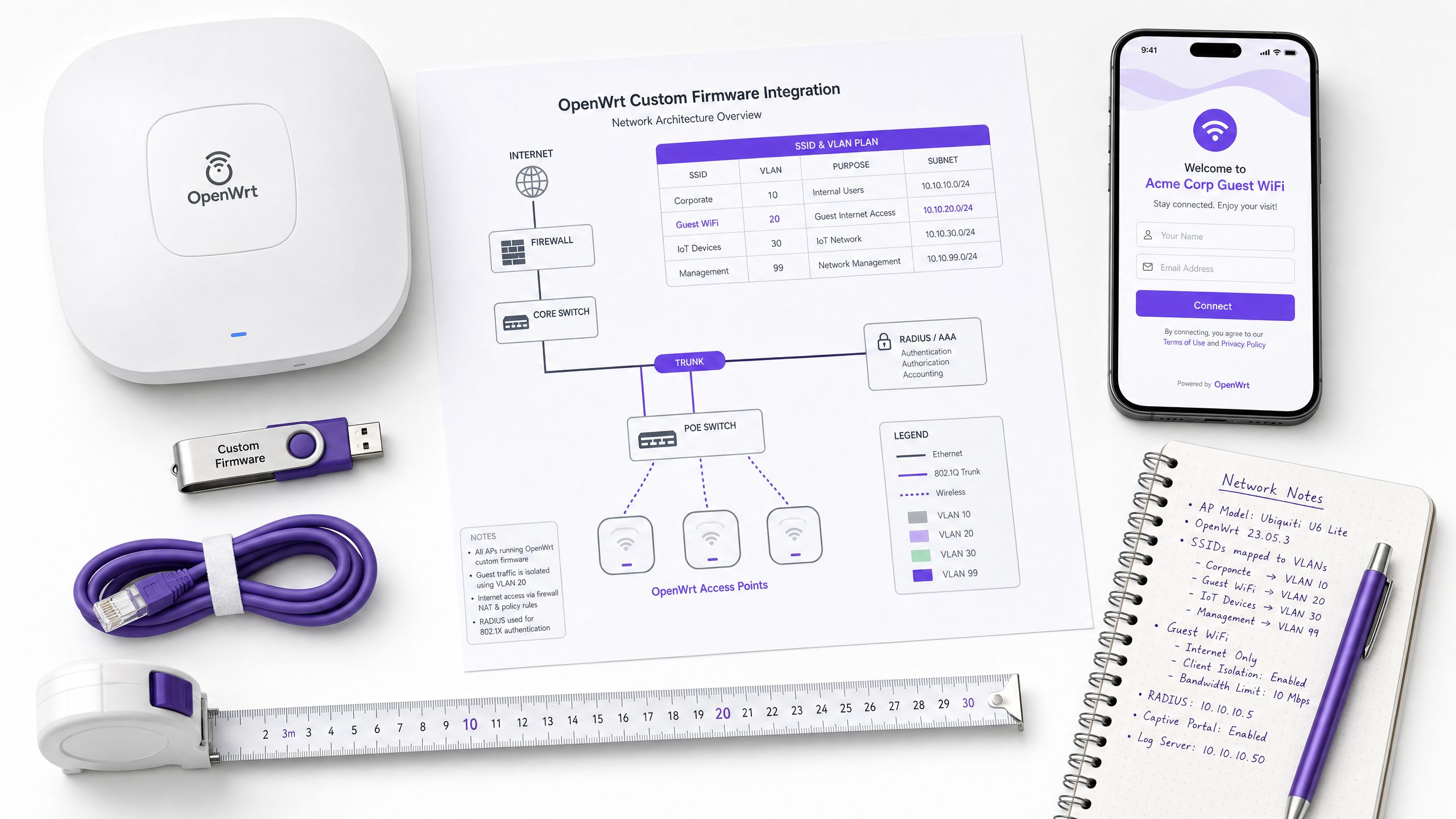
This guide provides the complete integration playbook for deploying OpenWrt custom firmware with Purple WiFi. It covers CoovaChilli captive portal configuration, iptables walled garden management, 802.1X secure staff WiFi with hostapd, and multi-tenant PPSK segmentation with dynamic VLAN assignment - giving IT teams the exact configuration steps needed to build an Identity-Based Network on any OpenWrt-capable hardware.
Listen to this guide
View podcast transcript
कार्यकारी सारांश (Executive summary)
OpenWrt हे अशा IT टीम्ससाठी पसंतीचे फर्मवेअर आहे ज्यांना एंटरप्राइझ-ग्रेड नियंत्रण न गमावता हार्डवेअर स्वातंत्र्याची आवश्यकता असते. हॉस्पिटॅलिटी, रिटेल आणि सार्वजनिक क्षेत्रातील ठिकाणांवर तैनात केलेले, हे पूर्णपणे कॉन्फिगर करण्यायोग्य Linux-आधारित नेटवर्क स्टॅक प्रदान करते. परंतु डीफॉल्ट स्वरूपात, OpenWrt एक कोरा कॅनव्हास आहे. संरचित ओळख स्तराशिवाय (identity layer), अतिथी नेटवर्क्स व्यवस्थापित करणे कठीण होते, कर्मचारी नेटवर्क्स असुरक्षित राहतात आणि मल्टी-टेनंट वातावरण एकाच सपाट नेटवर्कमध्ये संकुचित होते.
हे मार्गदर्शक OpenWrt ला Purple च्या क्लाउड RADIUS आणि Captive Portal प्लॅटफॉर्मशी जोडण्यासाठी निश्चित एकत्रीकरण प्लेबुक प्रदान करते. आम्ही चार वेगवेगळ्या उपयोजन परिस्थिती कव्हर करतो: CoovaChilli वापरून अतिथी Captive Portal पुनर्निर्देशन (redirection), iptables वॉल्ड गार्डन कॉन्फिगरेशन, hostapd आणि IEEE 802.1X वापरून सुरक्षित कर्मचारी WiFi, आणि डायनॅमिक VLAN असाइनमेंटसह प्रायव्हेट प्री-शेअर्ड की (PPSK) वापरून मल्टी-टेनंट सेगमेंटेशन. शेवटी, तुमच्याकडे कोणत्याही OpenWrt-सक्षम हार्डवेअरवर उत्पादन-तयार, GDPR-सुसंगत, ओळख-चालित नेटवर्क तैनात करण्यासाठी अचूक कॉन्फिगरेशन पॅरामीटर्स, सामान्य त्रुटींचे प्रकार आणि निर्णय घेण्याची फ्रेमवर्क असेल.
Purple हे ८०,०००+ हून अधिक लाइव्ह ठिकाणी कार्यरत आहे आणि २०२४ मध्ये ४४० दशलक्ष लॉगिन प्रक्रियेतून गेले आहेत (Purple अंतर्गत डेटा, २०२४). येथे वर्णन केलेले आर्किटेक्चर हेच हॉस्पिटॅलिटी चेन्स, रिटेल इस्टेट्स आणि ट्रान्सपोर्ट हबमध्ये मोठ्या प्रमाणावर तैनात केलेले आहे.
तांत्रिक सखोल विश्लेषण (Technical deep-dive)
CoovaChilli captive portal आर्किटेक्चर
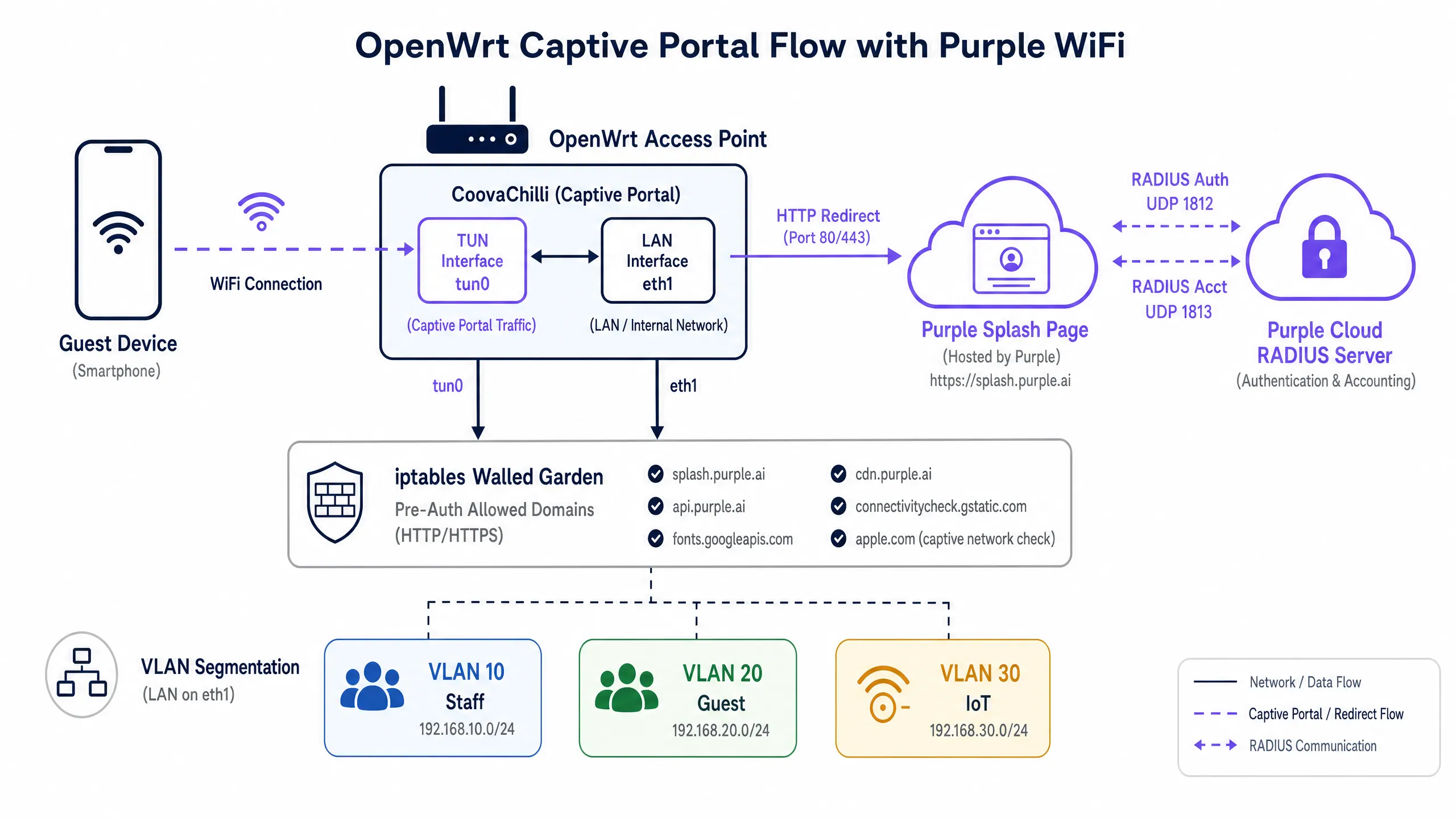
OpenWrt वर Guest WiFi तैनात करताना, CoovaChilli हे उद्योग-मानक ॲक्सेस कंट्रोलर आहे. हे एक Captive Portal डिमन म्हणून कार्य करते जे अनधिकृत क्लायंट ट्रॅफिक अडवते, tun0 व्हर्च्युअल इंटरफेसवरील त्याच्या अंतर्गत DHCP सर्व्हरद्वारे IP पत्ते प्रदान करते, आणि थेट व्यवस्थापित करत असलेल्या iptables नियमांचा वापर करून वॉल्ड गार्डन धोरणे लागू करते.
प्रमाणीकरण (authentication) प्रवाह खालीलप्रमाणे कार्य करतो. अतिथी डिव्हाइस ओपन SSID शी जोडले जाते. CoovaChilli डिव्हाइसला त्याच्या अंतर्गत पूल मधून (सहसा 10.1.0.0/24) एक IP पत्ता नियुक्त करते. जेव्हा डिव्हाइस त्याची पहिली HTTP विनंती पाठवते, तेव्हा CoovaChilli ती अडवते आणि Purple स्प्लॅश पेज URL वर HTTP 302 पुनर्निर्देशन जारी करते. या पूर्व-प्रमाणीकरण (pre-authentication) टप्प्यादरम्यान, डिव्हाइस वेगळे केले जाते - ते केवळ वॉल्ड गार्डनमध्ये स्पष्टपणे सूचीबद्ध केलेल्या डोमेनपर्यंत पोहोचू शकते.
एकदा अतिथीने Purple पोर्टलवर प्रमाणीकरण पूर्ण केले की, Purple चे क्लाउड RADIUS सर्व्हर UDP पोर्ट 1812 वर CoovaChilli ला Access-Accept संदेश पाठवते. त्यानंतर CoovaChilli त्या विशिष्ट MAC पत्त्यासाठी इंटरनेट प्रवेशाची परवानगी देण्यासाठी त्याचे iptables नियम अद्यतनित करते आणि UDP पोर्ट 1813 वर Purple RADIUS अकाउंटिंग सर्व्हरकडे अकाउंटिंग डेटा (सत्र कालावधी, हस्तांतरित केलेले बाईट्स) पाठवू लागते. अकाउंटिंग पर्यायी नाही - हे असे माध्यम आहे ज्याद्वारे Purple तुमच्या WiFi Analytics डॅशबोर्डमध्ये सत्राच्या डेटासह माहिती भरते.
वॉल्ड गार्डन (Walled garden): iptables आणि डोमेन परवानगी सूची
कोणत्याही Captive Portal उपयोजनामध्ये वॉल्ड गार्डन हा सर्वात महत्त्वपूर्ण ऑपरेशनल कॉन्फिगरेशन घटक आहे. CoovaChilli दोन माध्यमांद्वारे वॉल्ड गार्डन व्यवस्थापित करते: वैयक्तिक IP पत्त्यांसाठी uamallowed पॅरामीटर आणि DNS तपासणीसह डोमेन-आधारित परवानगी सूचीसाठी uamdomains पॅरामीटर.
Purple इंटिग्रेशनसाठी, किमान आवश्यक वॉल्ड गार्डन नोंदी खालीलप्रमाणे आहेत:
| डोमेन | उद्देश |
|---|---|
*.purple.ai |
पोर्टल मालमत्ता, API, आणि प्रमाणीकरण एंडपॉइंट्स |
*.googleapis.com |
Google Fonts आणि Google Sign-In |
*.gstatic.com |
Google कनेक्टिव्हिटी तपासणी आणि स्थिर मालमत्ता |
*.facebook.com |
Facebook Login API |
*.fbcdn.net |
लॉगिन मालमत्तेसाठी Facebook CDN |
captive.apple.com |
Apple CNA शोध (खालील टीप पहा) |
connectivitycheck.gstatic.com |
Android Captive Portal शोध |
Apple CNA व्यवस्थापनावर टीप: जर तुम्ही वॉल्ड गार्डनमध्ये captive.apple.com समाविष्ट केले, तर iOS डिव्हाइसेस प्रमाणीकरणापूर्वी इंटरनेट कनेक्टिव्हिटी शोधतील आणि Captive Network Assistant पॉप-अप दाबून टाकतील (दाखवणार नाहीत). बहुतांश आदरातिथ्य (hospitality) उपयोजने मुद्दाम हे डोमेन वगळतात जेणेकरून स्वयंचलित पोर्टल प्रॉम्प्ट सुरू होईल. योग्य पर्याय तुमच्या अतिथी अनुभवाच्या रचनेवर अवलंबून असतो.
सुरक्षित कर्मचारी WiFi: hostapd आणि IEEE 802.1X
अतिथी नेटवर्कसाठी अडथळा नसलेल्या ऑनबोर्डिंगची आवश्यकता असते. कर्मचारी नेटवर्कसाठी पूर्ण सुरक्षिततेची आवश्यकता असते. अंतर्गत वापरकर्त्यांसाठी, OpenWrt IEEE 802.1X प्रमाणीकरण सुलभ करण्यासाठी hostapd चा वापर करते. या आर्किटेक्चरमध्ये, OpenWrt ॲक्सेस पॉइंट Authenticator म्हणून काम करतो, जे क्लायंट डिव्हाइस (Supplicant) आणि Purple RADIUS सर्व्हर दरम्यान Extensible Authentication Protocol (EAP) संदेश फॉरवर्ड करते.
कॉर्पोरेट डिव्हाइसेससाठी, EAP-TLS हा अनिवार्य मानक आहे. हे परस्पर प्रमाणपत्र प्रमाणीकरणावर अवलंबून असते - सर्व्हर आणि क्लायंट डिव्हाइस दोन्ही डिजिटल प्रमाणपत्रे सादर करतात - ज्यामुळे पासवर्ड आणि संबंधित क्रेडेंशियल चोरी किंवा फिशिंगचे धोके पूर्णपणे नष्ट होतात. संपूर्ण पब्लिक की इन्फ्रास्ट्रक्चर (PKI) साठी अद्याप तयार नसलेल्या वातावरणासाठी, PEAP-MSCHAPv2 वापरकर्ता नाव आणि पासवर्ड क्रेडेंशियलचे संरक्षण करण्यासाठी एनक्रिप्टेड टनेलचा वापर करून एक चांगला अंतरिम पर्याय प्रदान करतो.
जेव्हा एखादा कर्मचारी यशस्वीरित्या ऑथेंटिकेट करतो, तेव्हा RADIUS सर्व्हर ऑथरायझेशन ॲट्रिब्युट्स परत करतो. नेटवर्क सेगमेंटेशनसाठी मुख्य ॲट्रिब्युट Tunnel-Private-Group-ID आहे, जे OpenWrt ला युझरला योग्य VLAN मध्ये डायनॅमिकली असाइन करण्याचे निर्देश देते. आयडेंटिटी-बेस्ड नेटवर्क्स (Identity-Based Networks) मागची हीच यंत्रणा आहे: युझरची ओळख (identity), त्यांचे भौतिक स्थान नाही, त्यांचे नेटवर्क ॲक्सेस ठरवते.
मल्टी-टेनंट सेगमेंटेशन: OpenWrt PPSK कॉन्फिगरेशन
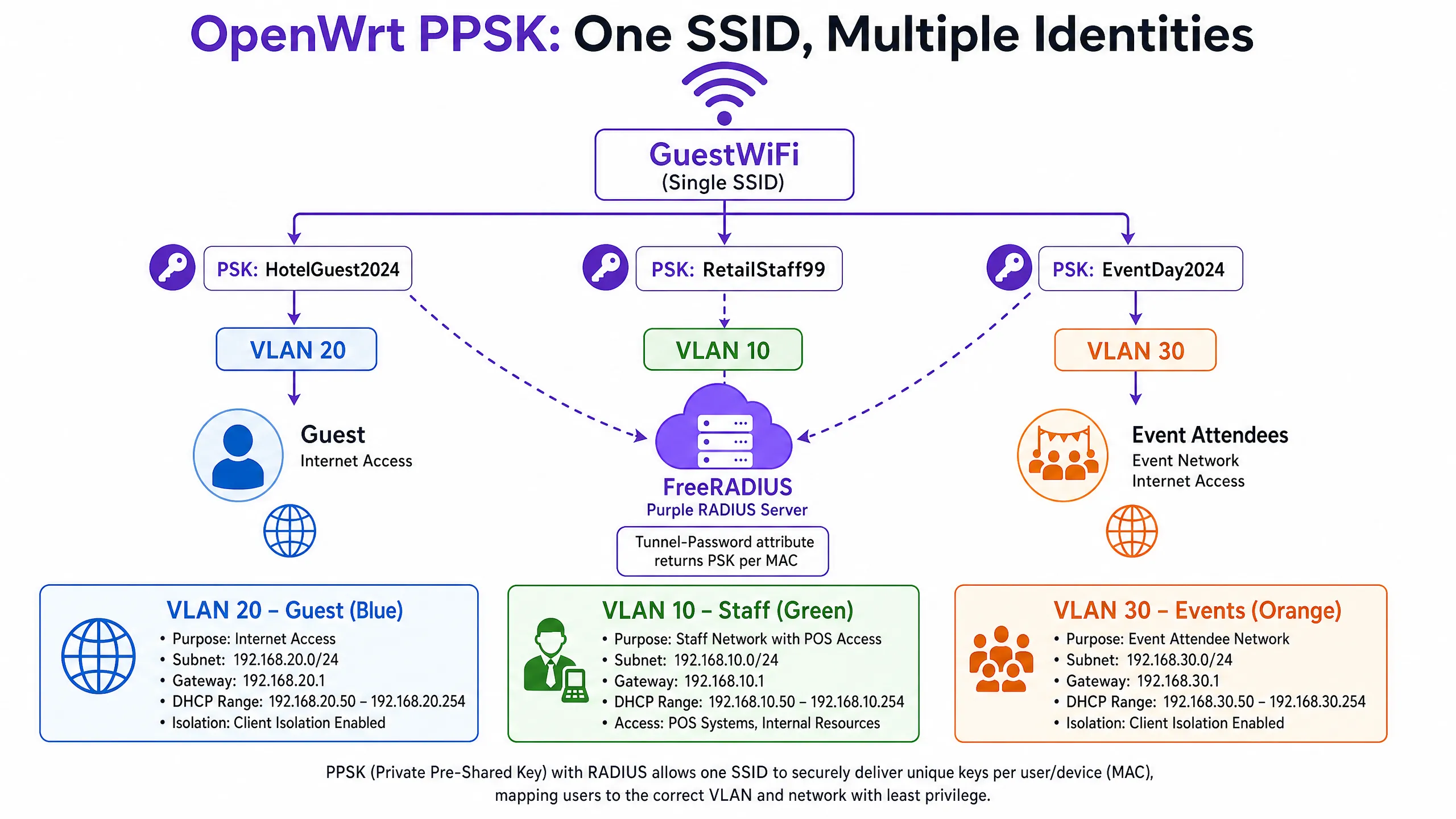
मल्टी-टेनंट वातावरणात - जसे की कोवर्कर्स स्पेसेस, बिल्ड-टू-रेंट (BTR) प्रॉपर्टीज, एकाधिक विक्रेते असलेले रिटेल सेंटर्स किंवा स्वतंत्र स्पॉन्सर झोन असलेले स्टेडियम्स - एकाधिक SSIDs ब्रॉडकास्ट करणे हे ऑपरेशनली खर्चिक आणि RF-अकार्यक्षम असते. प्रत्येक अतिरिक्त SSID मॅनेजमेंट फ्रेम ओव्हरहेड वाढवतो, ज्यामुळे डेटा ट्रॅफिकसाठी उपलब्ध एअरटाइम कमी होतो.
प्रायव्हेट प्री-शेअर्ड की (PPSK), ज्याला कधीकधी डायनॅमिक PSK देखील म्हटले जाते, यावर उपाय शोधतात. तुम्ही एकच SSID ब्रॉडकास्ट करता. जेव्हा एखादे डिव्हाइस कनेक्ट करण्याचा प्रयत्न करते, तेव्हा hostapd प्रमाणित Access-Request द्वारे डिव्हाइसचा MAC ॲड्रेस RADIUS सर्व्हरकडे पाठवते. RADIUS सर्व्हर त्याच्या डेटाबेसमध्ये MAC ॲड्रेसची पडताळणी करतो आणि दोन महत्त्वपूर्ण ॲट्रिब्युट्स असलेले Access-Accept परत करतो: Tunnel-Password ॲट्रिब्युट (त्या डिव्हाइससाठी युनिक पासफ्रेज) आणि Tunnel-Private-Group-ID ॲट्रिब्युट (VLAN असाइनमेंट). डिव्हाइस त्याच्या युनिक पासफ्रेजचा वापर करून कनेक्ट होते आणि थेट त्याच्या नियुक्त केलेल्या VLAN वर जाते.
याचा अर्थ असा आहे की एखादा रिटेल मॅनेजर आणि इव्हेंटला आलेला व्यक्ती एकाच SSID शी कनेक्ट होऊ शकतात परंतु त्यांच्या युनिक ओळखीच्या आधारावर पूर्णपणे वेगळ्या, आयसोलेटेड नेटवर्क्सवर राउट केले जाऊ शकतात.
इम्प्लीमेंटेशन गाईड
पायरी १: Purple RADIUS क्रेडेंशियल्स मिळवा
OpenWrt कॉन्फिगरेशनला हात लावण्यापूर्वी, Purple पोर्टल ॲडमिन कन्सोलमधून खालील गोष्टी मिळवा:
- प्रायमरी RADIUS सर्व्हर IP ॲड्रेस
- सेकंडरी RADIUS सर्व्हर IP ॲड्रेस (फेलओव्हरसाठी)
- RADIUS शेअर्ड सिक्रेट (Shared Secret)
- Captive Portal Splash Page URL
- पोस्ट-ऑथेंटिकेशन रिडायरेक्ट URL
पायरी २: गेस्ट WiFi साठी CoovaChilli इंस्टॉल आणि कॉन्फिगर करा
opkg द्वारे coova-chilli पॅकेज इंस्टॉल करा:
opkg update && opkg install coova-chilli
मुख्य कॉन्फिगरेशन फाईल /etc/chilli/defaults ही आहे. मुख्य नेटवर्क पॅरामीटर्स परिभाषित करा:
# Network interfaces
HS_WANIF=eth0           # Upstream internet interface
HS_LANIF=wlan0          # The guest WiFi interface (or a VLAN sub-interface)

# Guest subnet
HS_NETWORK=10.10.20.0
HS_NETMASK=255.255.255.0
HS_UAMLISTEN=10.10.20.1 # CoovaChilli's IP on the guest network
HS_UAMPORT=3990

# Purple RADIUS integration
HS_RADIUS=
HS_RADIUS2=
HS_RADSECRET=
HS_NASID=venue-openwrt-01

# Purple splash page
HS_UAMSERVER=

# Walled garden - domain-based allowlisting
HS_UAMDOMAINS=".purple.ai,.googleapis.com,.gstatic.com,.facebook.com,.fbcdn.net"
सर्व्हिस सुरू आणि सक्रिय करा:
/etc/init.d/chilli enable
/etc/init.d/chilli start
पायरी 3: गेस्ट SSID साठी OpenWrt वायरलेस इंटरफेस कॉन्फिगर करा
/etc/config/wireless मध्ये, गेस्ट SSID ला CoovaChilli व्यवस्थापित करत असलेल्या इंटरफेसशी बांधील असलेले ओपन नेटवर्क म्हणून परिभाषित करा:
config wifi-iface 'guest_wifi'
    option device 'radio0'
    option network 'guest'
    option mode 'ap'
    option ssid 'Venue_Guest'
    option encryption 'none'
    option isolate '1'
क्लायंट आयसोलेशन (isolate '1') गेस्ट डिव्हाइसेसना एकमेकांशी संवाद साधण्यापासून रोखते - कोणत्याही सामायिक नेटवर्कसाठी हे एक अनिवार्य सुरक्षा नियंत्रण आहे.
पायरी 4: 802.1X स्टाफ WiFi साठी hostapd कॉन्फिगर करा
स्टाफ SSID साठी, /etc/config/wireless मध्ये WPA2-Enterprise कॉन्फिगर करा:
config wifi-iface 'staff_wifi'
    option device 'radio0'
    option network 'staff_vlan10'
    option mode 'ap'
    option ssid 'Venue_Staff'
    option encryption 'wpa2'
    option server ''
    option port '1812'
    option key ''
    option dynamic_vlan '2'
    option vlan_tagged_interface 'eth0'
    option vlan_bridge 'br-vlan'
    option vlan_naming '0'
dynamic_vlan '2' सेट केल्याने hostapd ला RADIUS सर्व्हरद्वारे परत केलेले VLAN असाइनमेंट लागू करण्याचे आणि कोणतेही VLAN परत न आल्यास प्रमाणीकरण नाकारण्याचे निर्देश मिळतात.
पॅकेज आवश्यकता: मानक wpad-mini पॅकेज WPA2-Enterprise ला सपोर्ट करत नाही. तुम्ही wpad किंवा wpad-openssl इंस्टॉल करणे आवश्यक आहे:
opkg remove wpad-mini && opkg install wpad-openssl
पायरी 5: मल्टी-टेनंट सेगमेंटेशनसाठी PPSK कॉन्फिगर करा
PPSK ला RADIUS सर्व्हरच्या विरोधात MAC ॲड्रेस प्रमाणीकरण करण्यासाठी hostapd ची आवश्यकता असते, जे नंतर प्रति-डिव्हाइस पासफ्रेज परत करते. /etc/config/wireless मध्ये:
config wifi-iface 'ppsk_ssid'
    option device 'radio0'
    option mode 'ap'
    option ssid 'Venue_Connect'
    option encryption 'psk2'
    option key 'default_fallback_key'
    option macfilter 'radius'
    option server ''
    option port '1812'
    option key ''
    option dynamic_vlan '2'
    option vlan_tagged_interface 'eth0'
    option wpa_psk_radius '2'
wpa_psk_radius '2' पॅरामीटर hostapd ला RADIUS प्रतिसादातून Tunnel-Password विशेषता आवश्यक असल्याचे निर्देश देतो. जर RADIUS सर्व्हरने पासफ्रेज परत केला नाही, तर प्रमाणीकरण नाकारले जाते.
Purple RADIUS बाजूला, तुमच्या FreeRADIUS कॉन्फिगरेशनचा (किंवा समतुल्य) authorize विभाग MAC ॲड्रेसेसना पासफ्रेज आणि VLAN IDs शी मॅप करतो:
# PPSK साठी RADIUS ऑथोराईझ एन्ट्रीचे उदाहरण
AA:BB:CC:DD:EE:FF   Auth-Type := Accept
    Tunnel-Password = "GuestPass2024",
    Tunnel-Type = VLAN,
    Tunnel-Medium-Type = IEEE-802,
    Tunnel-Private-Group-ID = "20"
पायरी 6: डायनॅमिक VLAN असाइनमेंट कॉन्फिगर करा
डायनॅमिक VLAN असाइनमेंट कार्य करण्यासाठी, तुमचे OpenWrt स्विच कोर स्विचशी जोडणाऱ्या ट्रंक पोर्टवर संबंधित VLANs टॅग केलेले ट्रॅफिक म्हणून वाहून नेण्यासाठी कॉन्फिगर केलेले असणे आवश्यक आहे. /etc/config/network मध्ये:
config interface 'vlan10'
    option ifname 'eth0.10'
    option proto 'dhcp'

config interface 'vlan20'
    option ifname 'eth0.20'
    option proto 'dhcp'

config interface 'vlan30'
    option ifname 'eth0.30'
    option proto 'dhcp'
तुमचे कोर स्विच पोर्ट ट्रंक म्हणून कॉन्फिगर केले असल्याची खात्री करा, जे VLANs 10, 20 आणि 30 टॅग केलेले पाठवेल.
सर्वोत्तम पद्धती
पूर्णपणे नेटवर्क अलगाव (Absolute network segregation). गेस्ट इंटरफेसेसना अंतर्गत नेटवर्कशी कधीही ब्रिज करू नका. गेस्ट ट्रॅफिक समर्पित VLAN वर वेगळे केले पाहिजे आणि थेट इंटरनेट फायरवॉलकडे पाठवले पाहिजे. PCI DSS 4.0 चे पालन करण्यासाठी ही एक अनिवार्य आवश्यकता आहे, ज्यामध्ये अशी तरतूद आहे की गेस्ट WiFi नेटवर्क्स कार्डधारक डेटा हाताळणाऱ्या कोणत्याही नेटवर्क सेगमेंटपासून पूर्णपणे वेगळे असावेत.
अचूक वॉल्ड गार्डन (Walled garden precision). अपूर्ण वॉल्ड गार्डन हे Captive Portal अयशस्वी होण्याचे मुख्य कारण आहे. गेस्ट SSID शी कनेक्ट केलेल्या चाचणी डिव्हाइसवर तुमच्या ब्राउझरचे डेव्हलपर टूल्स वापरा, जेणेकरून प्रमाणीकरणापूर्वी कोणते रिक्वेस्ट्स ब्लॉक केले जात आहेत हे ओळखता येईल. प्रत्येक ब्लॉक केलेले डोमेन हे पोर्टल अयशस्वी होण्याचे संभाव्य कारण असू शकते.
RADIUS अकाउंटिंग अंतराळ (RADIUS accounting intervals). CoovaChilli अकाउंटिंग अंतर १२० सेकंदांवर कॉन्फिगर करा. यामुळे अतिरिक्त RADIUS ट्रॅफिक निर्माण न करता Purple ॲनालिटिक्स डॅशबोर्डमध्ये रिअल-टाइमच्या जवळचा सेशन डेटा मिळतो.
दुय्यम RADIUS सर्व्हर. तुमच्या CoovaChilli कॉन्फिगरेशनमध्ये नेहमी HS_RADIUS2 कॉन्फिगर करा. मुख्य Purple RADIUS सर्व्हर अनुपलब्ध असल्यास, CoovaChilli नवीन सेशन्स प्रमाणित करू शकणार नाही. दुय्यम सर्व्हर ॲक्सेस पॉइंटवर कोणत्याही कॉन्फिगरेशन बदलाशिवाय स्वयंचलित फेलओव्हर प्रदान करतो.
पॅकेज निवड. बऱ्याच OpenWrt बिल्ड्ससह येणारे wpad-mini पॅकेज WPA2-Enterprise किंवा डायनॅमिक VLAN असाइनमेंटला सपोर्ट करत नाही. 802.1X किंवा PPSK आवश्यक असणाऱ्या कोणत्याही उपयोजनासाठी (deployment) नेहमी wpad-openssl इंस्टॉल करा.
एंटरप्राइझ WiFi सुरक्षा आर्किटेक्चरवरील अधिक मार्गदर्शनासाठी, आमचे Enterprise WiFi Security: A Complete Guide for 2026 पहा.
त्रुटी निवारण आणि जोखीम निवारण
| लक्षण | संभाव्य कारण | उपाय |
|---|---|---|
| रिडायरेक्शननंतर पोर्टल लोड होत नाही | अपूर्ण वॉल्ड गार्डन | गहाळ असलेले CDN/API डोमेन्स HS_UAMDOMAINS मध्ये जोडा |
| प्रमाणीकरण न सांगता अयशस्वी होते | RADIUS सामायिक सिक्रेट विसंगती | HS_RADSECRET हे CoovaChilli आणि Purple पोर्टल दोन्हीमध्ये अचूक जुळत असल्याची खात्री करा |
| Purple ॲनालिटिक्समध्ये डेटा नाही | RADIUS अकाउंटिंग ब्लॉक केले आहे | आउटबाउंड UDP 1813 ला परवानगी असल्याची खात्री करा; HS_RADIUS2 अकाउंटिंग कॉन्फिगरेशन तपासा |
| iOS वर पोर्टल पॉप-अप दिसत नाही | वॉल्ड गार्डनमध्ये captive.apple.com आहे |
HS_UAMDOMAINS मधून Apple डिटेक्शन डोमेन्स काढा |
| PPSK क्लायंट चुकीच्या VLAN वर जातात | vlan_tagged_interface चुकीचे कॉन्फिगर केले आहे |
OpenWrt आणि कोर स्विच दोन्हीवर ट्रंक पोर्ट कॉन्फिगरेशन तपासा |
| wpad त्रुटीसह 802.1X प्रमाणीकरण अयशस्वी | wpad-mini इंस्टॉल केलेले आहे |
wpad-mini काढा, wpad-openssl इंस्टॉल करा |
| Dynamic VLAN fails on ath10k | Known driver issue in older builds | Update to OpenWrt 21.02 or later; use non-CT ath10k firmware |
GDPR अनुपालन नोंद: CoovaChilli स्वतः वैयक्तिक डेटा गोळा किंवा स्टोअर करत नाही. सर्व संमती मिळवणे, डेटा प्रक्रिया करणे आणि GDPR अनुपालन यंत्रणा पोर्टल लेयरवर Purple प्लॅटफॉर्मद्वारे हाताळल्या जातात. लाइव्ह जाण्यापूर्वी तुमचे Purple पोर्टल तुमच्या वेन्यूच्या अटी व शर्ती आणि डेटा प्रोसेसिंग नोटीससह कॉन्फिगर केले असल्याची खात्री करा.
संबंधित हार्डवेअर इंटिग्रेशन पॅटर्नसाठी, आमचे EnGenius Cloud Access Points Integration with Purple WiFi आणि DrayTek Vigor Routers and Access Points Integration with Purple WiFi वरील मार्गदर्शक पहा.
ROI आणि व्यावसायिक प्रभाव
बेसिक PSK नेटवर्कवरून Purple-व्यवस्थापित OpenWrt आर्किटेक्चरवर स्थलांतरित केल्याने तीन आयामांमध्ये मोजण्यायोग्य प्रभाव दिसून येतो.
डेटा कॅप्चर आणि मार्केटिंग. Captive Portal ऑथेंटिकेशन लागू करून, वेन्यू WiFi कनेक्शनच्या वेळी सुसंगत, फर्स्ट-पार्टी डेमोग्राफिक डेटा - नावे, ईमेल पत्ते, सोशल प्रोफाइल - कॅप्चर करतात. हा डेटा थेट CRM आणि ईमेल मार्केटिंग प्लॅटफॉर्मवर पाठवला जातो, ज्यामुळे लॉयल्टी प्रोग्राम साइन-अप वाढतात आणि लक्ष्यित मोहिमा सक्षम होतात. Purple ने 2024 मध्ये 440 दशलक्ष लॉगिनवर प्रक्रिया केली आहे (Purple अंतर्गत डेटा), जे नेटवर्क एजवर शक्य असलेल्या फर्स्ट-पार्टी डेटा कॅप्चरचे प्रमाण दर्शवते.
ऑपरेशनल कार्यक्षमता. PPSK लागू केल्याने SSID ओव्हरहेड कमी होतो, ज्यामुळे दाट वातावरणात WiFi कामगिरी सुधारते. 200-लोकेशन असलेल्या रिटेल चेनसाठी, प्रत्येक साइटवर स्थानिक राउटर कॉन्फिगरेशन अपडेट करण्याऐवजी - Purple च्या क्लाउड RADIUS द्वारे मध्यवर्ती पद्धतीने ओळख व्यवस्थापित केल्याने - दरवर्षी शेकडो इंजिनिअरिंग तास वाचतात. एकच RADIUS पॉलिसी बदल सर्व 200 ठिकाणी त्वरित लागू होतो.
सुरक्षा आणि अनुपालन. डायनॅमिक VLAN असाइनमेंट एजवर सर्वात कमी-विशेषाधिकार प्रवेश (least-privilege access) लागू करते. कर्मचारी पाहुण्यांपासून वेगळे केले जातात. IoT डिव्हाइसेस कर्मचाऱ्यांपासून वेगळे केले जातात. POS टर्मिनल्स इतर सर्व ट्रॅफिकपासून वेगळे केले जातात. हे वर्गीकरण PCI DSS 4.0 नेटवर्क आयसोलेशन आवश्यकता पूर्ण करते आणि GDPR अनुपालन पुनरावलोकनांसाठी स्पष्ट, ऑडिट करण्यायोग्य नेटवर्क टोपोलॉजी प्रदान करते.
विशिष्ट क्षेत्रांतील डिप्लॉयमेंट पॅटर्नसाठी, आमचे Retail , Hospitality , Healthcare , आणि Transport वातावरणासाठीचे मार्गदर्शक पहा. वेन्यू डिप्लॉयमेंटमधील पूरक वायरलेस तंत्रज्ञान समजून घेण्यासाठी तुम्हाला आमचे What Is Wireless Display: Protocols & Best Practices 2026 वरील मार्गदर्शक देखील उपयुक्त वाटू शकते.
Key Definitions
CoovaChilli
An open-source software access controller that provides a captive portal and walled-garden environment for wireless networks, using RADIUS for authentication and accounting.
IT teams deploy CoovaChilli on OpenWrt to intercept guest HTTP traffic and redirect it to the Purple splash page. It manages the iptables rules that enforce the walled garden and grant post-authentication internet access.
Walled garden
A strict allowlist of IP addresses or domains that an unauthenticated user can access before completing captive portal authentication.
Critical for allowing guest devices to load the Purple portal graphics and reach social media login APIs while blocking general internet access. An incomplete walled garden is the most common cause of captive portal failures.
PPSK (Private Pre-Shared Key)
A security mechanism where individual users or devices are assigned unique passphrases for the same WiFi SSID, with RADIUS returning the correct passphrase and VLAN assignment per device MAC address.
Used to segment multi-tenant environments without broadcasting multiple SSIDs. Supported in OpenWrt via the wpa_psk_radius parameter in hostapd.
Dynamic VLAN assignment
The process where a RADIUS server instructs the access point to place a specific authenticated user onto a specific virtual LAN, using the Tunnel-Type, Tunnel-Medium-Type, and Tunnel-Private-Group-ID RADIUS attributes.
The core mechanism for Identity-Based Networks. The user's identity, not their physical port, determines their network segment and access rights.
IEEE 802.1X
The IEEE standard for port-based network access control, defining the Authenticator (access point), Supplicant (client device), and Authentication Server (RADIUS) roles in enterprise WiFi authentication.
The underlying protocol for secure staff WiFi on OpenWrt. Requires the full wpad or wpad-openssl package - wpad-mini does not support it.
EAP-TLS (Extensible Authentication Protocol - Transport Layer Security)
An 802.1X authentication method that uses mutual certificate-based authentication, requiring both the RADIUS server and the client device to present valid digital certificates.
The gold standard for corporate device authentication. Eliminates passwords entirely, neutralising credential theft and phishing attacks. Requires a PKI infrastructure to issue client certificates.
Captive Network Assistant (CNA)
The pseudo-browser that iOS and Android devices automatically display when they detect they are behind a captive portal, based on probing specific detection URLs.
Network engineers must manage their walled gardens carefully to control whether the CNA triggers automatically. Most hospitality deployments exclude Apple and Google detection domains to force the CNA pop-up.
RADIUS accounting
The third pillar of the AAA (Authentication, Authorisation, Accounting) framework, tracking network resource consumption by recording session start, interim updates, and session stop events on UDP port 1813.
Required by Purple to populate the analytics dashboard with session duration and bandwidth data. Configured in CoovaChilli via HS_RADIUS2 and the radiusacctport parameter.
hostapd
The open-source IEEE 802.11 access point daemon used by OpenWrt to manage wireless interfaces, supporting WPA2/WPA3-Enterprise, 802.1X, and PPSK authentication modes.
The core daemon for staff and PPSK WiFi on OpenWrt. The wpad-openssl package provides the full-featured hostapd build required for enterprise authentication.
Tunnel-Password attribute
A RADIUS attribute (attribute 69) used in PPSK deployments to return a per-device passphrase from the RADIUS server to the access point during MAC authentication.
The mechanism by which Purple's RADIUS server delivers unique PSKs to OpenWrt's hostapd daemon for PPSK-based multi-tenant segmentation.
Worked Examples
A 200-room hotel needs to provide tiered WiFi access: free basic internet for guests, high-speed access for loyalty members, and secure access for staff point-of-sale devices. The IT team wants to minimise SSID overhead and enforce PCI DSS network isolation between the POS terminals and guest traffic.
Deploy OpenWrt access points broadcasting two SSIDs: 'Hotel_Guest' (open, CoovaChilli-managed) and 'Hotel_Secure' (PPSK-managed via hostapd). On 'Hotel_Guest', CoovaChilli redirects all unauthenticated traffic to the Purple splash page. Guests authenticate via the portal and land on VLAN 20 (internet-only). On 'Hotel_Secure', configure hostapd with wpa_psk_radius=2. When a loyalty member's device connects, the RADIUS server returns their unique PSK and VLAN 21 (higher bandwidth tier). When a POS terminal connects, the RADIUS server returns the POS device PSK and VLAN 10 (internal network access, internet blocked). The VLAN segmentation enforces PCI DSS isolation between cardholder data (VLAN 10) and guest traffic (VLANs 20 and 21) at the access point level.
A retail chain is rolling out OpenWrt routers to 50 locations. During UAT at the first site, the Purple splash page loads correctly after redirect, but clicking the Facebook login button results in a connection timeout. The Google Sign-In button works correctly.
The issue is an incomplete CoovaChilli walled garden. Facebook's authentication flow requires access to multiple domains: facebook.com, connect.facebook.net, and fbcdn.net (Facebook's CDN for login assets). Google Sign-In works because googleapis.com and gstatic.com are already in the walled garden. Update the HS_UAMDOMAINS parameter in /etc/chilli/defaults to add '.facebook.com,.connect.facebook.net,.fbcdn.net'. Reload the chilli daemon with '/etc/init.d/chilli restart' and retest. To diagnose future walled garden issues systematically, connect a test device to the guest SSID and use browser developer tools (Network tab) to identify which requests return connection errors before authentication.
Practice Questions
Q1. You have deployed OpenWrt with CoovaChilli at a Premier Inn property. Guests report that their iPhones do not automatically prompt them to log in when they connect to the guest WiFi. They must manually open Safari and navigate to an HTTP site to trigger the portal. What configuration change causes this, and how do you resolve it?
Hint: Consider how iOS determines whether a network has full internet access upon association.
View model answer
The engineer has included Apple's captive portal detection domain (captive.apple.com) in the CoovaChilli walled garden via HS_UAMDOMAINS. When an iPhone connects, iOS sends a probe to captive.apple.com. Because this domain is in the walled garden, the probe succeeds pre-authentication, and iOS concludes it has full internet access - suppressing the Captive Network Assistant pop-up. To resolve this, remove captive.apple.com from HS_UAMDOMAINS and restart the chilli daemon. iOS devices will then receive a failed probe response, correctly identify the captive portal, and display the login prompt automatically.
Q2. A coworking space operator wants to deploy IoT smart thermostats across their estate. They already broadcast a 'Cowork_Guest' SSID (CoovaChilli) and a 'Cowork_Staff' SSID (802.1X). The thermostats do not support WPA2-Enterprise. How do you securely onboard them without adding a third SSID?
Hint: IoT devices typically support only WPA2-PSK. Consider which existing SSID can be extended to support per-device passphrases.
View model answer
Configure PPSK on the 'Cowork_Staff' SSID by enabling wpa_psk_radius=2 in the hostapd configuration. Register each thermostat's MAC address in the Purple RADIUS server with a unique passphrase and VLAN 40 (IoT VLAN) as the Tunnel-Private-Group-ID. When a thermostat connects, hostapd queries the RADIUS server with the device MAC, receives the unique PSK and VLAN assignment, and places the thermostat on VLAN 40 - completely isolated from staff traffic on VLAN 10. This approach avoids a third SSID, maintains RF efficiency, and enforces least-privilege access for IoT devices without requiring 802.1X certificate infrastructure.
Q3. After deploying OpenWrt with CoovaChilli at a retail venue, the Purple analytics dashboard shows zero active sessions and no bandwidth data, despite guests successfully connecting and browsing the internet. What is the most likely cause, and what are the two steps to diagnose it?
Hint: Authentication (port 1812) and accounting (port 1813) are separate RADIUS functions.
View model answer
The RADIUS accounting configuration is either missing or blocked. Step 1: Verify the CoovaChilli configuration. Check that HS_RADIUS and HS_RADIUS2 are set correctly in /etc/chilli/defaults, and confirm that the radiusacctport is set to 1813. If HS_RADIUS2 is not configured, there is no accounting server defined. Step 2: Verify firewall rules. Confirm that outbound UDP port 1813 traffic from the OpenWrt router to the Purple RADIUS server IP addresses is permitted by the venue's edge firewall. Use 'tcpdump -i eth0 udp port 1813' on the OpenWrt device to confirm whether accounting packets are being sent. If packets appear in tcpdump but the dashboard remains empty, the issue is a firewall blocking the traffic between the router and Purple's cloud RADIUS servers.
Q4. An OpenWrt deployment at a stadium uses dynamic VLAN assignment via RADIUS to segment fan WiFi (VLAN 30), media (VLAN 40), and operations (VLAN 50). After upgrading the access points to new hardware running OpenWrt 19.07 with ath10k drivers, VLAN assignment stops working. Authenticated users all land on the default VLAN regardless of RADIUS attributes. What is the known cause?
Hint: Consider driver-level support for AP/VLAN mode in ath10k.
View model answer
This is a known regression in ath10k-ct (Candela Technologies) firmware included in OpenWrt 19.07. The ath10k-ct driver in this release has a bug that breaks AP/VLAN mode, preventing dynamic VLAN assignment from functioning. The resolution is to upgrade to OpenWrt 21.02 or later, where the ath10k-ct driver was updated to restore AP/VLAN functionality. Alternatively, replace the ath10k-ct firmware with the standard ath10k firmware (non-CT variant) on the 19.07 build. This issue does not affect ath9k-based hardware, which handles AP/VLAN mode correctly across all OpenWrt versions.
Continue reading in this series
Cisco WLC and Catalyst Integration with Purple WiFi: Step-by-Step Guest Access Guide
This authoritative guide details the step-by-step integration of Cisco Catalyst 9800 WLCs with Purple WiFi. It covers External Web Authentication for guest captive portals, 802.1X EAP-TLS for secure staff access, and Cisco iPSK for multi-tenant dynamic VLAN segmentation.
Cisco WLC and Catalyst Integration with Purple WiFi: Step-by-Step Guest Access Guide
This authoritative guide details the step-by-step integration of Cisco Catalyst 9800 WLCs with Purple WiFi. It covers External Web Authentication for guest captive portals, 802.1X EAP-TLS for secure staff access, and Cisco iPSK for multi-tenant dynamic VLAN segmentation.
CommScope Ruckus Integration with Purple WiFi: Setup and Configuration Guide
This technical reference guide provides an authoritative configuration playbook for integrating CommScope Ruckus architectures with Purple WiFi. It details step-by-step deployments for Guest WiFi captive portals, Secure Staff WiFi via 802.1X, and Multi-Tenant network isolation using Ruckus Dynamic PSK.