
Reducing Latency on High-Density WiFi Networks
This guide details how eliminating unnecessary DNS lookups for tracking domains drastically lowers latency on high-density WiFi networks. It provides actionable architecture, implementation, and ROI guidance for IT leaders managing congested venue environments.
Video overview
Listen to this guide
View podcast transcript
Part of our core series: Guest WiFi Guide →
Executive Summary

For CTOs and network architects managing high-density environments like Hospitality venues, stadiums and Retail estates, latency is often misunderstood as merely an RF or backhaul issue. However, a significant percentage of perceived latency on modern WiFi networks originates from the DNS layer. When a user connects to your Guest WiFi, a single page load can trigger between 20 to 70 DNS queries, primarily for third-party tracking pixels, ad networks and telemetry beacons. In a crowded venue, this creates a 'DNS query storm' that blocks local resolvers and consumes valuable airtime.
By implementing aggressive local DNS caching at the edge and filtering tracking domains, venues can return NXDOMAIN instantly for unnecessary requests. This approach eliminates public internet round-trips, reducing perceived latency by up to 87%. This guide provides the technical architecture and implementation framework to deploy DNS-optimised WiFi, improving user experience, reducing support tickets and ensuring seamless WiFi Analytics data capture.
Technical Deep-Dive
Anatomy of a DNS Query Storm
In high-density deployments running 802.11ax (WiFi 6/6E), efficiency mechanisms like OFDMA and BSS colouring are designed to manage co-channel interference and optimise airtime. However, these mechanisms assume the radio medium is transmitting actual user data. When 3,000 guests in a hotel or 10,000 fans in a stadium simultaneously attempt to load web pages, the sheer volume of DNS queries for non-essential domains (e.g., ad-tracker.com, analytics.thirdparty.net) introduces massive overhead.
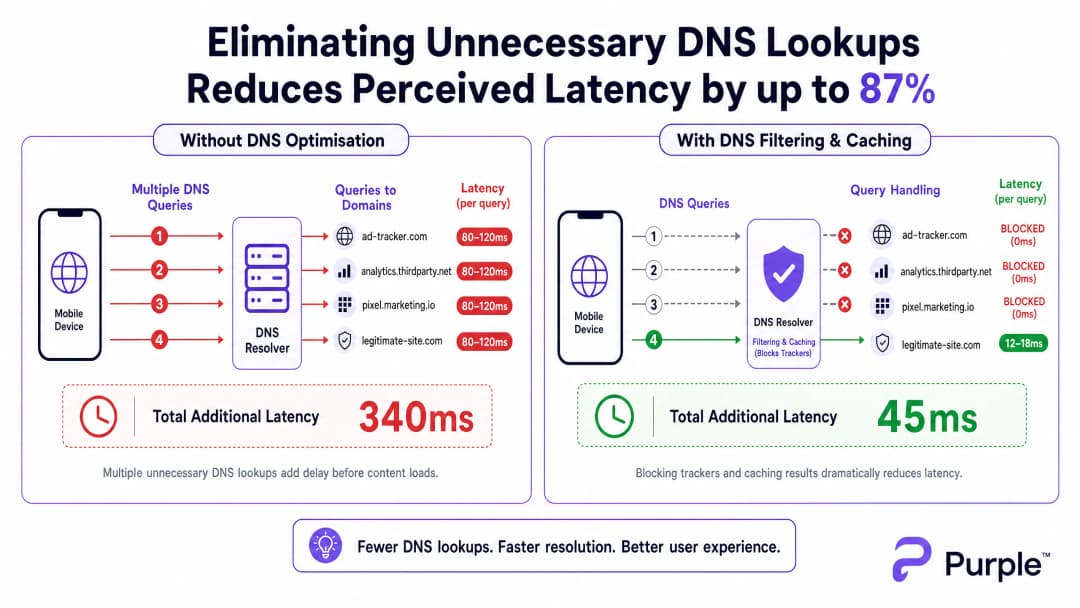
Each DNS query sent to an external resolver (such as an ISP's default DNS or Google's 8.8.8.8) incurs an 80-150ms round-trip time over congested networks. If a page requires 15 tracking domain lookups before rendering content, the user experiences over a second of 'invisible' delay. This is not a throughput problem; it is a transactional bottleneck.
Architecture for Edge Resolution
To mitigate this, the architecture must shift resolution to the network edge. Deploying a local DNS resolver with an aggressive TTL cache ensures that valid, frequently requested domains are resolved in under 5ms.

Crucially, this resolver should integrate a curated blocklist (e.g., Pi-hole enterprise mode, Cisco Umbrella) to drop queries for known tracking domains. Returning NXDOMAIN immediately frees up transmission opportunity (TXOP) over the wireless medium, allowing genuine payload data to flow faster.
Got questions about your specific setup?
Our team works with venue operators, IT managers, and network engineers across 80,000 venues. Book a 20-minute call and we will show you how others like you solved it.
Implementation Guide
Step 1: Baseline Auditing
Before changing the DNS path, establish a baseline. Instrument your existing resolver or deploy passive taps to capture query logs during peak usage windows. Identify the top 50 most queried domains; typically, 30-50% will be tracking or telemetry services.
Step 2: Local Resolver Deployment
Deploy an on-premises or edge-hosted resolver. Configure authoritative zones for internal resources (split DNS) and apply a conservative blocklist. Avoid aggressive lists initially to prevent breaking legitimate applications.
Step 3: Managing DNS over HTTPS (DoH)
Modern operating systems are increasingly bypassing local resolvers using DoH. To maintain control, intercept DoH traffic at the firewall by blocking outbound TCP/UDP 443 to known DoH providers, and redirect them to your managed DoH resolver. For its deeper implications, review our guide on DNS Over HTTPS (DoH): Implications for Public WiFi Filtering.
Best Practices
- Iterative Blocklisting: Update blocklists weekly via automated feeds, but maintain a quick-response whitelist process for false positives.
- Compliance Alignment: Document DNS filtering in your Captive Portal's terms of service. This aligns with GDPR by actively reducing third-party data collection.
- VLAN Segmentation: Test new blocklists on staging VLANs or specific subsets of APs before rolling out venue-wide.
Troubleshooting and Risk Mitigation
- Application Breakage: The most common failure mode is a legitimate app failing because a dependency was blocked. Monitor
NXDOMAINspike rates; a sudden increase usually indicates a false positive. - DoH Bypass Failures: If latency remains high despite local filtering, check firewall logs for encrypted DNS bypassing your intercept rules.
- Cache Poisoning: Ensure your local resolver is secured against cache poisoning attacks, particularly in public-facing Transport or Healthcare deployments.
ROI and Business Impact
Reducing latency through DNS optimisation directly impacts the bottom line. For a hotel, faster Captive Portal loads and responsive browsing correlate directly with higher TripAdvisor scores. For a retail environment, this ensures seamless integration with tools like location-based services, such as the Purple Appoints Iain Fox as VP Growth - Public Sector to Drive Digital Inclusion and Smart City Innovation initiative or Purple Launches Offline Maps Mode for Seamless, Secure Navigation to WiFi Hotspots.
By treating DNS as a critical infrastructure layer rather than an afterthought, venues can extract maximum performance from their existing RF hardware investments.
Expert Briefing Podcast
Listen to our senior consultant's analysis of the mechanics and implementation strategies for DNS optimisation in high-density venues.
Key Definitions
DNS Query Storm
A massive, simultaneous spike in domain name resolution requests, typically occurring when hundreds of devices connect and load tracking-heavy web pages simultaneously.
Common in stadiums and hotels during peak ingress times, causing perceived network failure even when bandwidth is available.
NXDOMAIN
A DNS response code indicating that the requested domain name does not exist.
Used strategically in DNS filtering to instantly terminate requests for known tracking domains, saving latency and airtime.
DNS over HTTPS (DoH)
A protocol for performing remote Domain Name System resolution via the HTTPS protocol, encrypting the data between the DoH client and the DoH-based DNS resolver.
While good for consumer privacy, DoH can bypass corporate network controls and filtering, requiring specific firewall interception strategies.
TTL Cache (Time to Live)
A mechanism where a local DNS resolver stores the IP address of a recently resolved domain for a specified period, serving subsequent requests instantly without querying the authoritative server.
Crucial for reducing latency for legitimate, highly trafficked domains (e.g., google.com, netflix.com) in a venue.
Airtime Overhead
The proportion of wireless transmission capacity consumed by management frames, control frames, and transactional protocols (like DNS) rather than actual user payload data.
Reducing unnecessary DNS queries directly reduces airtime overhead, improving the efficiency of the entire AP cluster.
Split DNS
An implementation where different DNS responses are provided depending on the source IP address of the request, often used to resolve internal hostnames differently from external ones.
Necessary when a venue hosts local services (like a Captive Portal or local media server) that should not be resolved via the public internet.
BSS Colouring
A spatial reuse technique in 802.11ax (WiFi 6) that assigns a 'colour' (a number) to each Basic Service Set, allowing APs on the same channel to differentiate between their own traffic and overlapping network traffic.
A key RF optimisation feature that works best when the network isn't bogged down by unnecessary transactional overhead like excessive DNS lookups.
Passive DNS Tap
A method of monitoring DNS traffic by copying packets from a switch port (SPAN port) without interfering with the actual flow of traffic.
Used during the initial audit phase to understand query volume and identify the top tracking domains before implementing filtering.
Worked Examples
A 500-room resort hotel experiences severe 'slow WiFi' complaints during the 4:00 PM to 6:00 PM check-in window, despite having upgraded to WiFi 6 access points last year. Backhaul utilisation is only at 40%.
- Deploy a local caching DNS resolver (e.g., Unbound) on the guest VLAN. 2. Implement a conservative tracking domain blocklist. 3. Configure the DHCP server to assign the local resolver's IP to all guest clients. 4. Implement firewall rules blocking outbound port 53 to force all DNS traffic through the local resolver.
A large conference centre needs to implement DNS filtering to improve latency but is concerned about modern smartphones bypassing the local resolver using DNS over HTTPS (DoH).
- Identify the IP ranges of major public DoH providers (Cloudflare, Google, Quad9). 2. Create firewall rules blocking outbound TCP port 443 to these specific IP ranges. 3. Deploy a local DoH-capable resolver. 4. Use network policy (e.g., DHCP Option 6) to direct clients to the managed DoH resolver.
Practice Questions
Q1. You are managing a stadium WiFi network. During halftime, users report slow loading times. Dashboard metrics show AP CPU utilisation is low, and backhaul bandwidth is at 30% capacity. What is the most likely cause, and what is the immediate mitigation?
Hint: Consider the transactional volume that occurs when 15,000 people open their phones simultaneously.
View model answer
The most likely cause is a DNS query storm overwhelming the local resolver or upstream ISP resolver. The immediate mitigation is to verify the local resolver's cache hit rate and ensure that a blocklist for high-volume tracking domains is active, instantly returning NXDOMAIN to reduce the query load.
Q2. A retail chain implements local DNS filtering to block tracking domains. A week later, the marketing team complains that their new in-store analytics app is failing to load on the guest WiFi. How do you resolve this while maintaining latency benefits?
Hint: Filtering is not a set-and-forget configuration.
View model answer
Review the DNS query logs for the specific devices or timeframes when the app failed. Identify the blocked domain that the app depends on (a false positive). Add this specific domain to the resolver's whitelist, ensuring the app functions while the rest of the tracking domains remain blocked.
Q3. You deploy a local DNS resolver with aggressive caching and filtering in a public sector building. However, packet captures show a significant volume of DNS traffic still leaving the network on port 443. What is happening, and how do you enforce local policy?
Hint: Modern browsers use encrypted protocols to bypass standard port 53 DNS.
View model answer
Devices are using DNS over HTTPS (DoH) to bypass the local resolver. To enforce policy, you must configure the firewall to block outbound TCP/UDP port 443 traffic destined for known public DoH provider IP ranges (e.g., Cloudflare, Google), forcing devices to fall back to the DHCP-provided local resolver.
Continue reading in this series
How to Scan for WiFi Interference and Find the Best Channel
This comprehensive technical guide provides enterprise IT leaders with actionable methodologies for identifying RF interference and selecting the optimal 5GHz channels. It covers spectrum analysis, DFS considerations, and practical deployment strategies to maximise throughput and reduce latency without requiring new hardware investments.
How to Improve WiFi Speed Without Buying New Access Points
This guide details how enterprise venues can reclaim 30%+ of their WiFi bandwidth without purchasing new access points. By implementing DNS filtering, band steering, and QoS policies, IT teams can extend hardware lifespans, reduce CapEx, and improve network performance and security.
Understanding WiFi Speed Meaning: Throughput vs Bandwidth
This authoritative technical reference guide demystifies WiFi speed metrics for enterprise IT leaders, clearly distinguishing between link speed, bandwidth, and throughput. It provides actionable methodologies for measuring real-world performance, mitigating RF congestion, and optimising WLAN infrastructure across high-density venue deployments. IT managers, network architects, and venue operations directors will leave with concrete frameworks for aligning infrastructure investments with measurable business outcomes.
Got questions about your specific setup?
Our team works with venue operators, IT managers, and network engineers across 80,000 venues. Book a 20-minute call and we will show you how others like you solved it.