
WiFi Repeater v. Extender: Enterprise Use Cases
This technical reference guide provides a definitive comparison between WiFi repeaters and extenders for enterprise environments. It equips IT managers and network architects with the decision frameworks needed to deploy the correct hardware for specific venue requirements, ensuring optimal performance, compliance, and ROI.
Listen to this guide
View podcast transcript
Executive Summary
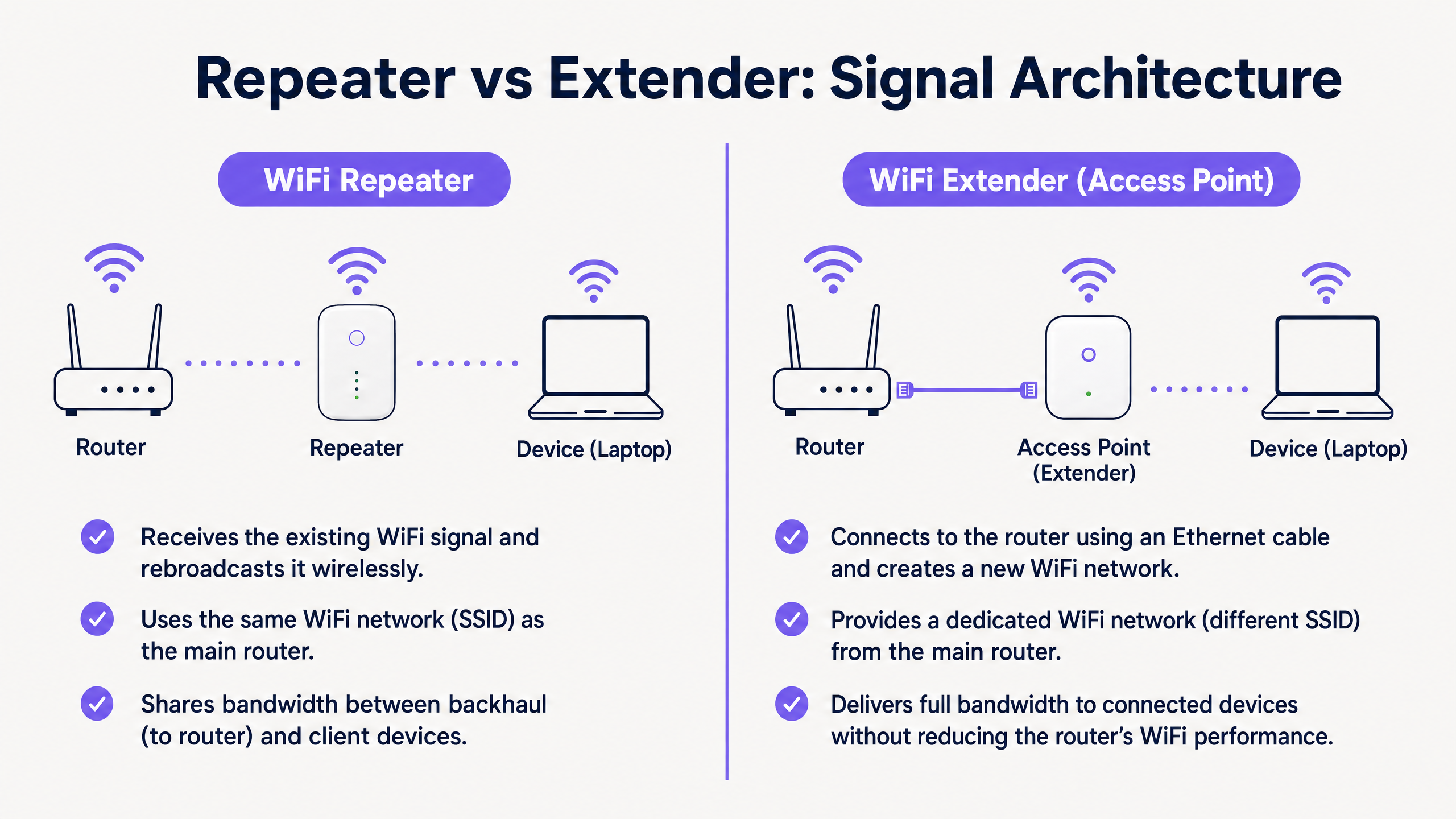
For enterprise venues—from high-density stadiums to expansive retail floors—the decision between deploying a WiFi repeater v. a WiFi extender (access point) is a critical infrastructure choice. While often used interchangeably in consumer markets, these technologies represent fundamentally different network architectures. A WiFi repeater captures and rebroadcasts an existing signal, inherently halving throughput. In contrast, a WiFi extender, functioning as a wired access point, provides a dedicated connection to the core network, ensuring full bandwidth delivery. This guide provides a technical deep-dive into both architectures, equipping IT leaders with the frameworks needed to optimise deployment, maintain compliance (such as PCI DSS and GDPR), and maximise ROI through robust connectivity.
Technical Deep-Dive: Architecture and Standards
Understanding the physical and logical layers of these devices is essential for enterprise network design.
The WiFi Repeater Architecture
A WiFi repeater operates entirely wirelessly. It contains two wireless radios (or sometimes just one, operating in half-duplex mode). It connects to the primary router via WiFi and simultaneously broadcasts to client devices.
Because it must use the same radio to both receive data from the router and transmit data to the client, the available bandwidth is effectively halved. This is known as the half-duplex penalty. In high-density environments, this latency and throughput degradation is unacceptable.
The WiFi Extender (Access Point) Architecture
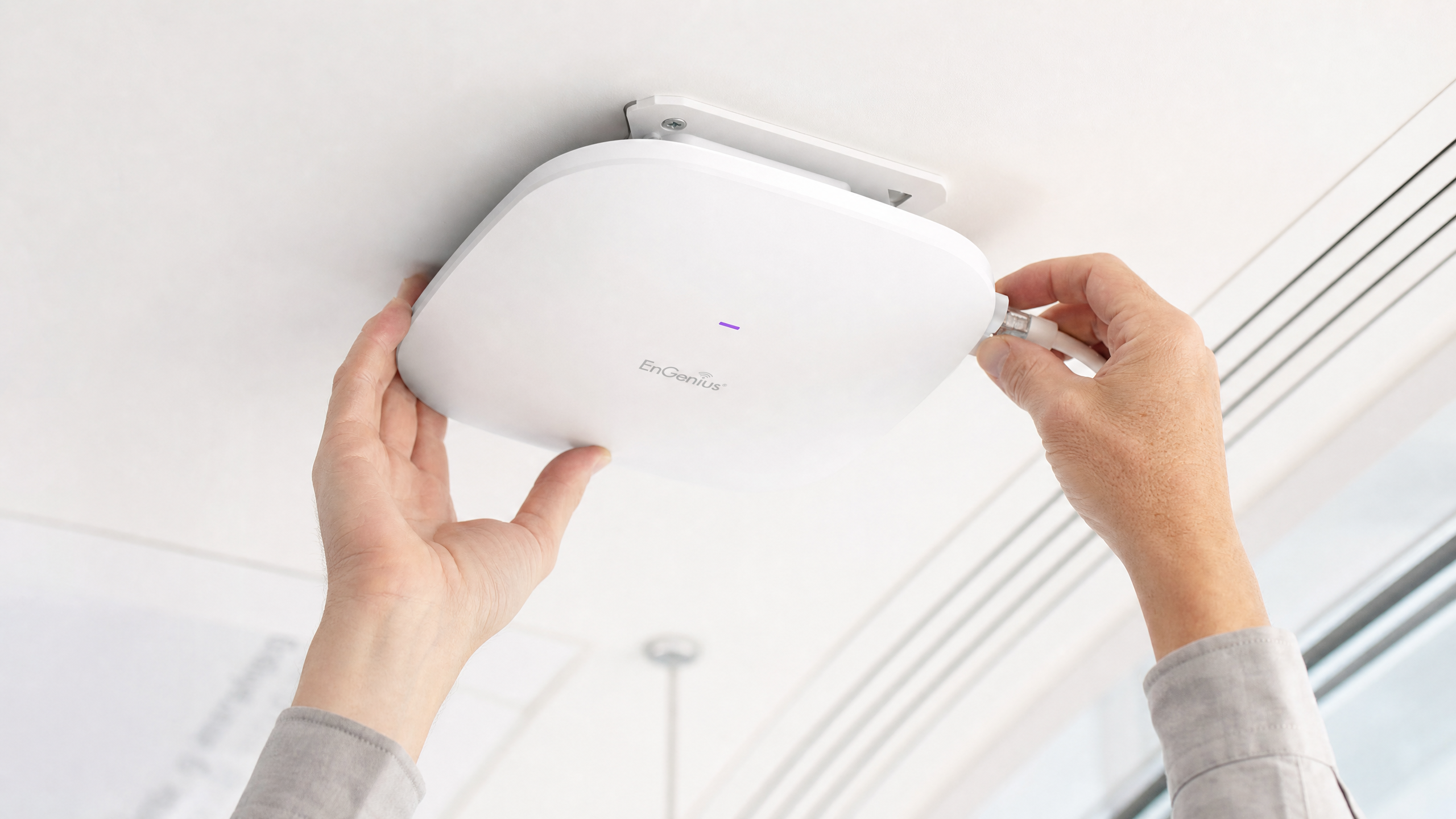
A true enterprise WiFi extender is an Access Point (AP). It connects to the core network via a physical Ethernet cable (Cat6 or better), often utilising Power over Ethernet (PoE) for streamlined deployment.
By using a wired backhaul, the AP dedicates its entire wireless capacity to serving client devices. This architecture supports high throughput, seamless roaming (using standards like IEEE 802.11r/k/v), and robust security protocols like WPA3-Enterprise and 802.1X authentication.
Core Differences at a Glance
| Feature | WiFi Repeater | WiFi Extender (Access Point) |
|---|---|---|
| Backhaul | Wireless | Wired (Ethernet) |
| Throughput | Halved (Half-duplex) | Full capacity |
| SSID | Usually the same as primary | Can be same or distinct |
| Latency | High | Low |
| Enterprise Suitability | Temporary/Low-density only | Permanent/High-density |
Implementation Guide
When designing the network for a commercial venue, the physical environment dictates the hardware choice.
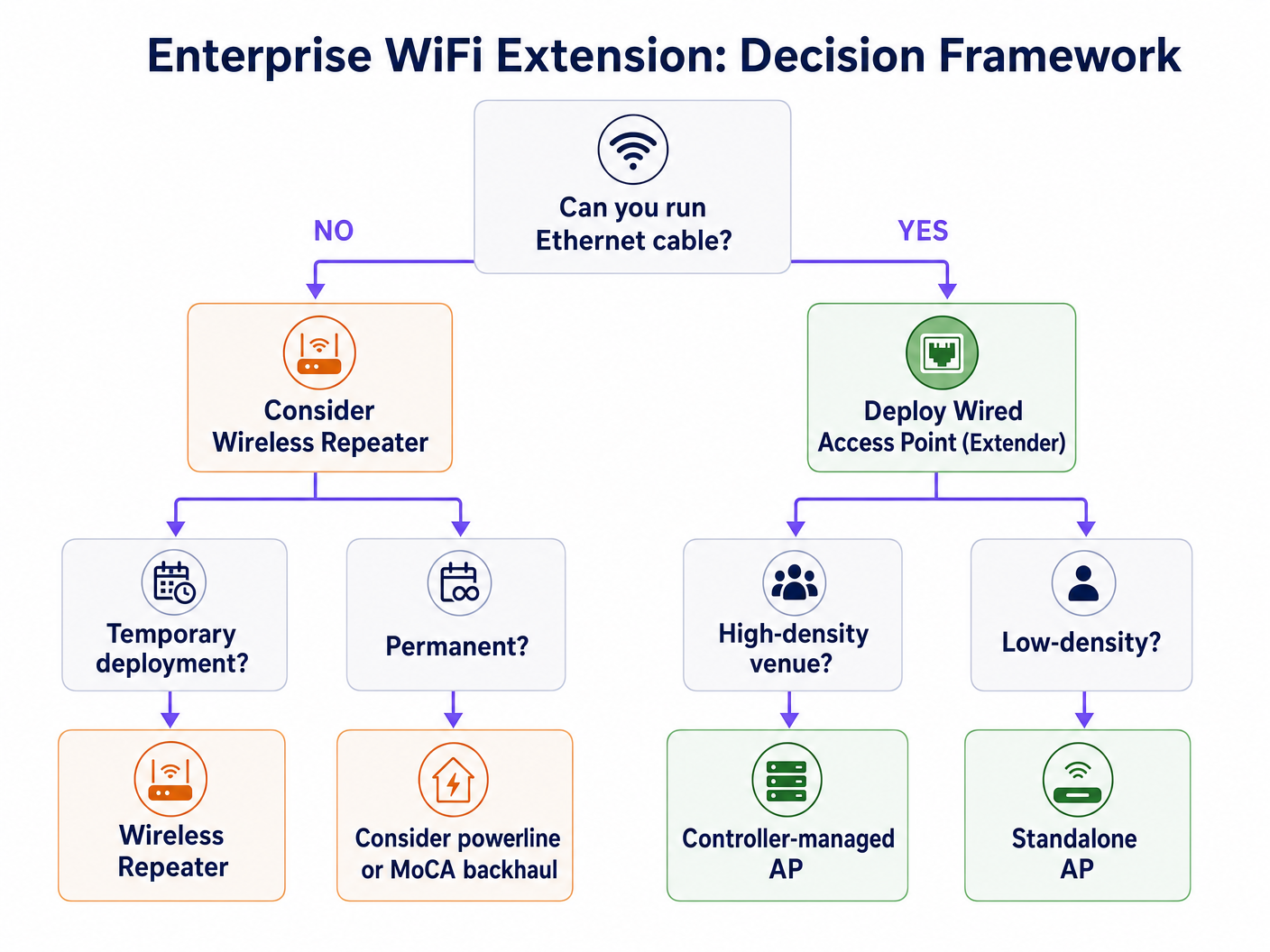
Scenario 1: The High-Density Stadium
In a stadium, thousands of concurrent connections demand maximum throughput. Deploying repeaters here would result in immediate network collapse due to co-channel interference and the half-duplex penalty.
Recommendation: Deploy wired Access Points (Extenders) in a high-density configuration. Utilise directional antennas and ensure robust wired backhaul. This infrastructure is critical for supporting advanced WiFi Analytics and location-based services.
Scenario 2: The Historic Hotel
In a heritage-listed hotel where running new Ethernet cables is physically impossible or legally restricted, traditional AP deployment is challenging.
Recommendation: While a wireless repeater might seem appealing, it is often inadequate for guest expectations. Consider advanced mesh systems with dedicated wireless backhaul bands, or leveraging existing coaxial infrastructure (MoCA) to provide a wired backhaul to local APs. If you must use repeaters, ensure they are strategically placed at the edge of the primary signal footprint, not in dead zones. Read more on How To Improve Guest Satisfaction: The Ultimate Playbook .
Best Practices and Integration
Regardless of the hardware chosen, the overlaying management platform is where the business value is realised.
- Hardware-Agnostic Management: Ensure your analytics and captive portal solutions are hardware-agnostic. Purple's platform integrates seamlessly with major vendors (Cisco, Aruba, Meraki), allowing you to mix and match APs and repeaters as the physical environment demands without losing visibility.
- Seamless Authentication: Implement robust authentication mechanisms. Profile-based authentication, such as OpenRoaming (where Purple acts as a free identity provider under the Connect licence), provides secure, frictionless access for users while ensuring enterprise-grade security. Learn more about How a wi fi assistant Enables Passwordless Access in 2026 .
- Data Segregation: For Retail and Hospitality environments, strictly segregate Guest WiFi traffic from operational traffic (e.g., PoS systems) using VLANs to maintain PCI DSS compliance.
Troubleshooting & Risk Mitigation
- The 'Sticky Client' Problem: Devices often hold onto a weak signal from a distant AP rather than roaming to a closer one. Ensure your infrastructure supports 802.11k/v to actively manage client roaming.
- Co-Channel Interference: Repeaters broadcasting on the same channel as the primary router increase noise. Careful channel planning is essential.
- Security Vulnerabilities: Repeaters often lack enterprise-grade security features. Ensure all devices support WPA3 and can integrate with your central RADIUS server.
ROI & Business Impact
Investing in the correct infrastructure directly impacts the bottom line. A robust wired AP network enables advanced location analytics. Understanding the Heatmapping vs Presence Analytics: Technical Differences allows venues to optimise floor layouts and staff deployment. Furthermore, a stable connection is a prerequisite for monetising the network through retail media and targeted engagement.
Key Definitions
Half-Duplex
A communication mode where data can flow in both directions, but only one direction at a time.
This is the primary technical limitation of standard WiFi repeaters, resulting in halved throughput.
Backhaul
The connection between the access point/repeater and the core network router.
A wired backhaul (Ethernet) provides full capacity, while a wireless backhaul shares the radio spectrum with client devices.
SSID (Service Set Identifier)
The public name of a wireless network.
Repeaters often clone the primary SSID, while extenders can broadcast the same or a distinct SSID depending on the roaming configuration.
802.11r/k/v
A set of IEEE standards that facilitate fast and seamless roaming of client devices between different access points.
Essential for enterprise environments to prevent the 'sticky client' problem where devices cling to a weak signal.
PoE (Power over Ethernet)
A technology that allows network cables to carry electrical power.
Crucial for deploying wired access points in ceilings or high walls without requiring a separate electrical outlet.
RSSI (Received Signal Strength Indicator)
A measurement of the power present in a received radio signal.
Critical data point used by platforms like Purple for location analytics and heatmapping.
VLAN (Virtual Local Area Network)
A logical subnetwork that groups a collection of devices on a single physical LAN.
Mandatory for segregating guest traffic from operational traffic to maintain security and compliance (e.g., PCI DSS).
Mesh Network
A network topology where nodes connect directly, dynamically and non-hierarchically to as many other nodes as possible.
An advanced alternative to simple repeaters, often utilizing a dedicated radio band for the wireless backhaul to maintain throughput.
Worked Examples
A 200-room heritage hotel needs to provide seamless WiFi coverage. Running new Ethernet cables to the guest rooms is prohibited due to the building's listed status. The current setup uses standard wireless repeaters in the hallways, resulting in poor speeds and frequent disconnects.
- Conduct a comprehensive RF site survey to identify existing signal propagation and dead zones.
- Abandon the standard wireless repeaters, as the half-duplex penalty is exacerbating the poor performance.
- Implement a managed mesh WiFi system that utilizes a dedicated, discrete 5GHz or 6GHz radio exclusively for wireless backhaul between nodes.
- Where possible, leverage existing coaxial cabling (using MoCA adapters) to provide a wired backhaul to strategic access points without drilling new holes.
- Configure the network to support 802.11r/k/v for seamless client roaming between nodes.
A large retail chain is deploying a new Guest WiFi network across 50 locations to support an indoor mapping and location-based marketing initiative. The IT director is considering using high-end wireless repeaters to save on cabling costs.
- Reject the use of wireless repeaters for this deployment.
- Specify the installation of enterprise-grade, wired Access Points (Extenders) with PoE (Power over Ethernet).
- Ensure AP placement is optimized for location analytics, not just coverage, requiring a higher density of APs.
- Integrate the hardware with a hardware-agnostic analytics platform (like Purple) to normalize the location data across all 50 sites.
- Implement strict VLAN segregation between the Guest WiFi and the PoS/operational network.
Practice Questions
Q1. Your organisation is deploying a temporary pop-up retail store in a leased space for three weeks. The landlord provides a primary router in the back office, but the signal does not reach the point-of-sale terminals at the front. Running cables is prohibited. What is the most appropriate hardware solution?
Hint: Consider the duration of the deployment and the physical constraints.
View model answer
In this specific, temporary scenario with physical constraints, a high-quality wireless repeater or a simple mesh system is appropriate. While a wired AP is always preferred for throughput, the temporary nature and cabling restrictions make a wireless solution the pragmatic choice, provided the PoS systems do not require massive bandwidth.
Q2. A hospital IT director needs to ensure seamless roaming for mobile medical carts (WoWs) moving between wards. The current infrastructure uses a mix of older routers configured as repeaters. Staff complain of dropped connections when moving. What architectural change is required?
Hint: Focus on the 'sticky client' problem and backhaul architecture.
View model answer
The hospital must rip and replace the repeater infrastructure. They need to deploy enterprise-grade wired Access Points (Extenders) with a unified controller. Crucially, the new system must support IEEE 802.11r/k/v to actively manage client hand-offs between APs, eliminating the dropped connections experienced with the disjointed repeater setup.
Q3. You are tasked with implementing Purple's location analytics in a large shopping centre. The centre management wants to use cheaper wireless repeaters to expand coverage to the car park. Why should you advise against this?
Hint: Consider how location analytics platforms calculate device position.
View model answer
You must advise against repeaters because they obscure accurate RSSI (Received Signal Strength Indicator) data. When a device connects to a repeater, the core network often sees the MAC address and signal strength of the repeater, not the client device. This renders precise location tracking and heatmapping impossible. Wired APs are mandatory for accurate analytics.