
Twilio segment customer data platform: a comprehensive guide for businesses
This technical guide explains how to implement Twilio Segment Customer Data Platform (CDP) to unify fragmented data sources. It provides actionable architecture blueprints and deployment strategies for IT and marketing teams to activate first-party data.
Listen to this guide
View podcast transcript

Executive summary
Most enterprise IT teams manage a fragmented data architecture. Website analytics live in one tool, CRM records in another, point-of-sale transactions in a third, and Guest WiFi login data in a fourth. Each team operates on a partial view of the customer. Twilio Segment Customer Data Platform (CDP) solves this by collecting first-party data from every touchpoint, unifying it into a single profile, and routing it to downstream tools in real time.
For venue operators, retailers, and hospitality brands, deploying a CDP is not just a data engineering exercise. It is a commercial requirement. By unifying identity, you can suppress existing customers from acquisition campaigns, personalise win-back sequences, and activate high-value audiences across ad platforms. This guide details the technical architecture of Twilio Segment, the implementation path, and the vendor-neutral best practices for securing a return on investment.
Technical deep-dive: the Segment architecture
The Twilio Segment architecture operates across four distinct layers: Connections, Protocols, Unify, and Engage. Understanding this data flow is critical for network architects and data engineers planning an enterprise deployment.
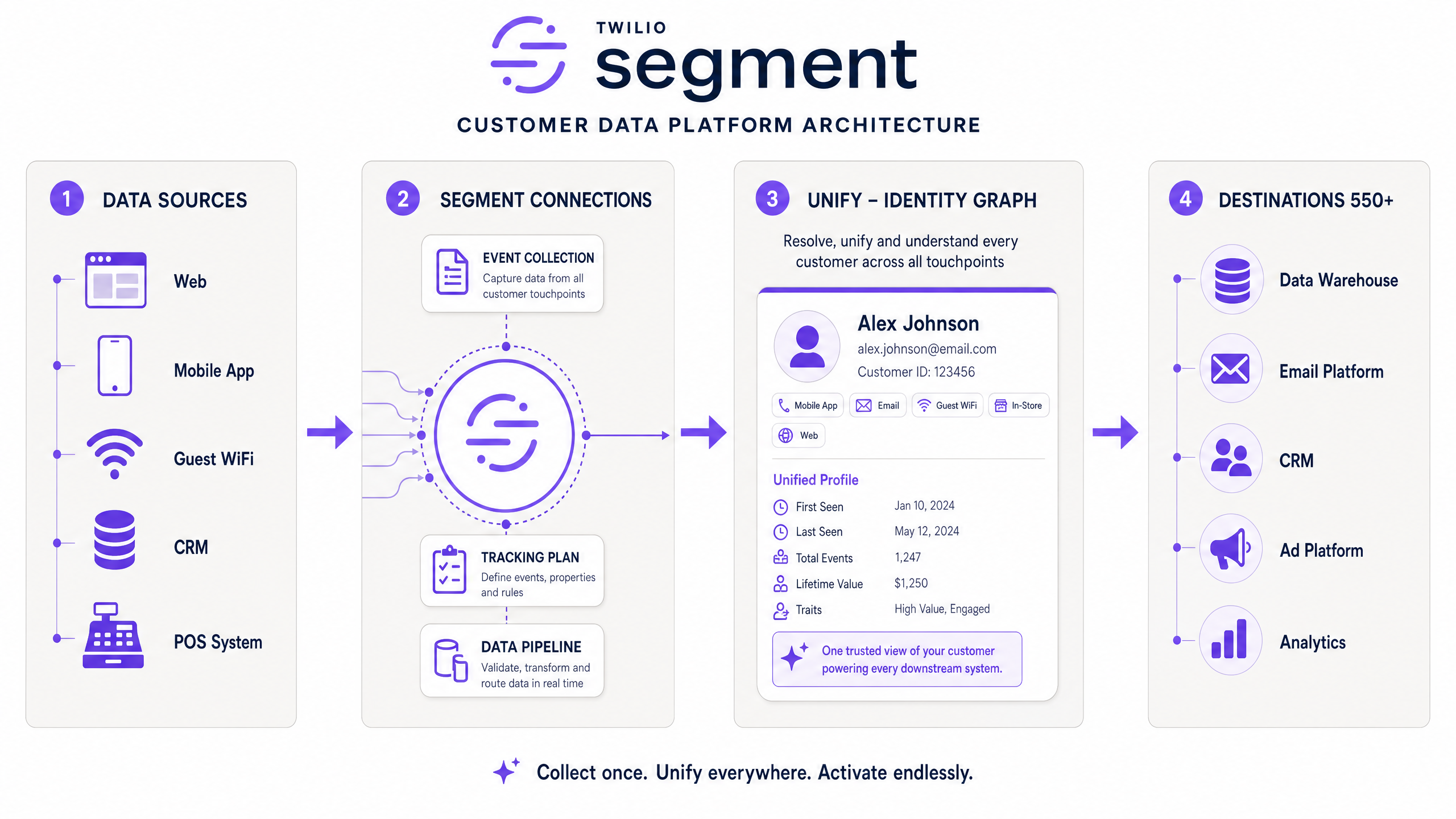
1. Connections: the data pipeline
Connections is the ingestion and routing layer. You instrument your data sources using Segment's SDKs and libraries (Analytics.js for web, iOS/Android SDKs for mobile, and server-side libraries for backend systems).
Every user action fires an event into Segment using a standardised schema of six API calls:
- Identify: Records who the user is and their traits.
- Track: Records what the user did (e.g., "Item Purchased").
- Page: Records web page views.
- Screen: Records mobile app screen views.
- Group: Associates a user with an account or organisation.
- Alias: Links an anonymous ID to a known user ID.
This standardisation ensures data arrives in a consistent format, regardless of whether it originated from a Retail point-of-sale system or a hotel booking engine.
2. Protocols: data governance
Protocols acts as the validation layer. Before writing any code, you define a Tracking Plan - a strict schema that specifies exactly which events are permitted, what properties they must contain, and the required data types. Protocols validates incoming data against this plan in real time, blocking or flagging non-conforming events before they pollute your downstream systems.
3. Unify: identity resolution
Unify is the identity graph. When a user connects to your network and authenticates, their device MAC address, email, and session data are captured. If that same user later visits your website from a different device, Segment merges those interactions into a single persistent profile. It achieves this by matching identifiers deterministically across channels.
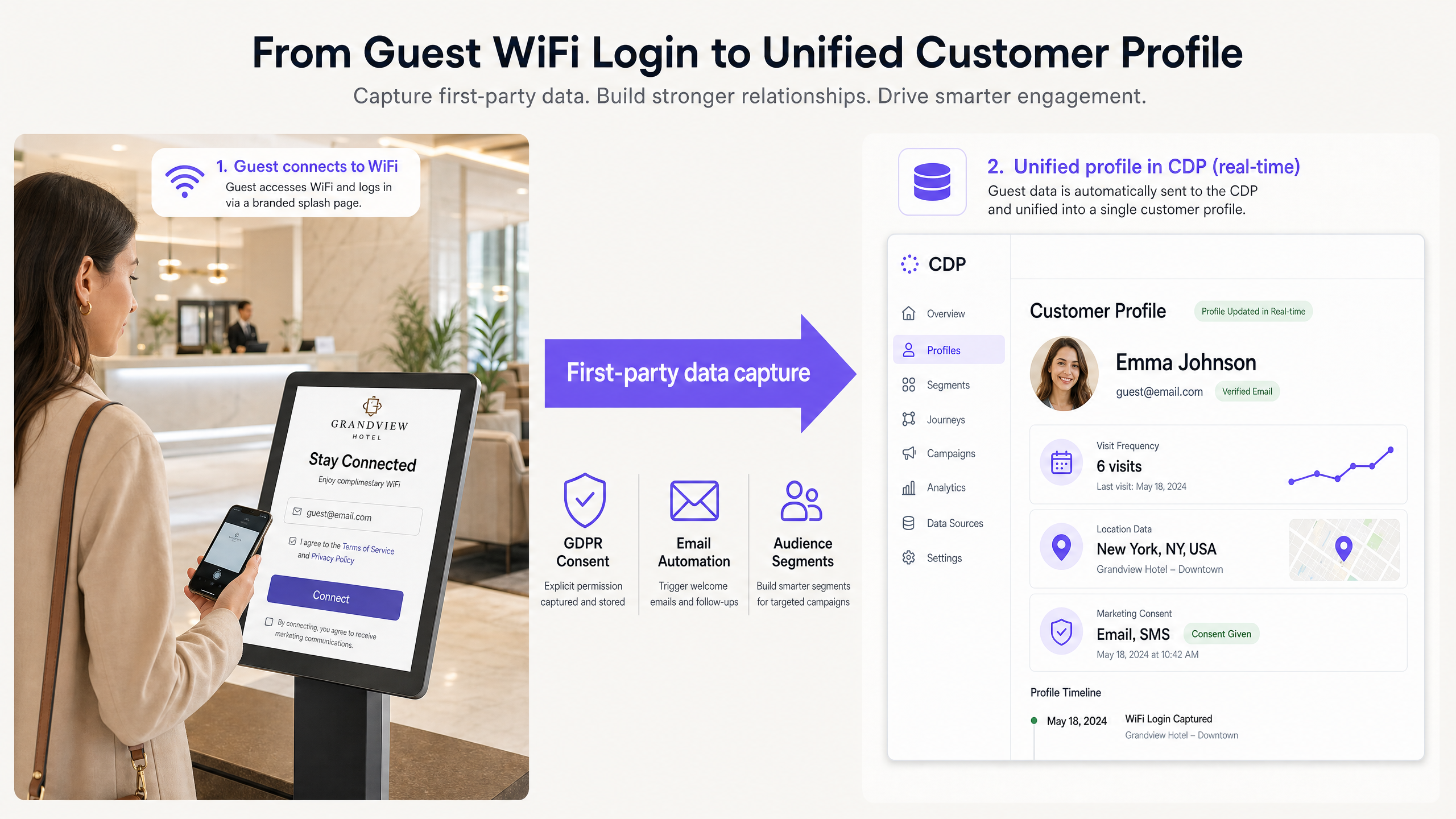
For example, How to make a great first impression with your guest WiFi (and keep your brand consistent) discusses the importance of the captive portal. When integrated with Segment, that portal becomes a primary identity resolution node, linking an anonymous physical visitor to a known digital profile.
4. Engage: audience activation
Engage is the audience building and activation layer. Once profiles are unified, marketing teams can define dynamic segments (e.g., "High-value guests who have not visited in 90 days"). Segment evaluates these rules continuously and syncs the resulting audiences to any of its 550+ supported destinations, such as Google Ads, Salesforce, or email platforms.
Implementation guide
Deploying a CDP requires strict alignment between IT and marketing. Follow this deployment path to avoid the common trap of instrumenting data that no one uses.
Step 1: Define the business use cases
Do not write tracking code until you have defined exactly what decisions the data will power. Identify three high-impact use cases. For example:
- Suppressing recent purchasers from paid media acquisition campaigns.
- Triggering a personalised email sequence when a lapsed customer logs into the in-store WiFi.
- Syncing high-lifetime-value customer segments to Meta for lookalike audience generation.
Step 2: Build the Tracking Plan
Create a unified Tracking Plan using Protocols. Agree on standard naming conventions across the business. Use snake_case or camelCase consistently. Define the minimum viable events needed to power your three use cases. Do not track every possible button click.
Step 3: Instrument sources and validate
Start with two primary sources: your website and your most reliable offline data source, such as Purple WiFi Analytics .
Implement the SDKs and use Segment's debugger to verify events are firing correctly and conforming to the Tracking Plan.
Step 4: Configure identity resolution
Review the Unify merge rules. Segment's default deterministic matching works well, but you must ensure your source systems are passing identifiers correctly. For environments with shared devices, ensure you are firing the correct reset() calls on logout to prevent profile merging errors.
Step 5: Connect destinations and activate
Connect your downstream destinations. Start with one analytics destination (e.g., Google Analytics) and one activation destination (e.g., an email platform). Build your audiences in Engage and verify the sync rates.
Best practices
- Treat Guest WiFi as a primary identity source: Guest WiFi captures verified first-party data (email, phone number) with explicit consent. It bridges the gap between anonymous foot traffic and known digital profiles. Ensure your network architecture supports this integration. For design considerations, review Three SSIDs to rule them all: guest, Passpoint, and IoT WiFi .
- Enforce strict data typing: Use Protocols to enforce data types (e.g., ensuring revenue is always passed as a float, not a string). Bad data types will break downstream integrations.
- Standardise hardware integrations: When integrating network infrastructure as a data source, stick to supported enterprise hardware. Purple integrates seamlessly with Cisco Meraki, HPE Aruba, Ruckus, Juniper Mist, Ubiquiti UniFi, Cambium, Extreme Networks, and Fortinet.
Troubleshooting & risk mitigation
GDPR and consent management
You are the data controller; Segment is the data processor. Under GDPR, you must manage consent rigorously. If a user opts out of marketing communications on your website, that preference must propagate to every downstream destination.
Use Segment's Privacy Portal to manage data deletion requests. However, you must configure consent categories correctly at the source level. Capture explicit consent during the WiFi login process and map that consent state to the user's Segment profile.
The "Destination Overload" failure mode
A common failure mode is connecting 20 destinations on day one. This cascades data quality issues across the entire stack. Connect destinations sequentially. Validate the data flow in the destination tool before adding the next one.
ROI & business impact
The return on investment for a CDP is measured across three primary vectors:
- Ad spend efficiency: By suppressing existing customers from acquisition campaigns using unified CDP audiences, organisations typically reduce wasted ad spend by 10% to 20%.
- Campaign revenue lift: Personalised cross-sell and win-back campaigns driven by real-time behavioural triggers generate higher conversion rates than batch-and-blast emails.
- Operational efficiency: Automating data pipelines and audience syncing eliminates the manual CSV exports and data reconciliation previously performed by data engineers and analysts.
For organisations in Hospitality and Transport , where physical footfall is the primary engagement metric, connecting that physical data to the digital stack via Segment delivers immediate commercial leverage.
Key Definitions
Identity Resolution
The process of deterministically or probabilistically matching disparate data points (cookies, device IDs, emails) to create a single, unified customer profile.
When IT teams need to merge an anonymous website visitor with a known CRM record after the user authenticates.
Tracking Plan
A formal schema defining the exact events, properties, and data types that are permitted to enter the CDP.
Used by data engineers to govern data quality and prevent undocumented events from polluting the data warehouse.
First-Party Data
Information a company collects directly from its customers with their explicit consent, such as CRM records or Guest WiFi logins.
Critical for marketing strategy as third-party cookies are deprecated by major browsers.
Source
Any system, application, or website that generates data and sends it into the Segment pipeline.
Common sources include iOS apps, Node.js servers, and hardware integrations like Purple WiFi.
Destination
Any downstream tool or platform that receives data from Segment.
Common destinations include Google Analytics, Salesforce CRM, and Snowflake data warehouses.
Audience
A dynamic segment of users defined by specific traits or behaviours, updated in real time by the CDP.
Used by marketing teams to trigger targeted campaigns or suppress specific users from advertising.
Deterministic Matching
Merging customer profiles based on exact matches of unique identifiers, such as an email address or user ID.
The most accurate method for identity resolution, preferred for compliance and targeting accuracy.
Data Processor
An entity that processes personal data on behalf of the data controller under GDPR.
Segment acts as the data processor, meaning the venue operator (the controller) remains responsible for obtaining user consent.
Worked Examples
A 200-room hotel needs to stop spending ad budget on guests who have already booked a stay, but their booking engine data is disconnected from their Google Ads account.
- Connect the hotel booking engine as a Source in Segment.
- Fire a
Trackevent namedBooking Completedwith properties includingbooking_valueandcheck_in_date. - In Segment Engage, create an Audience defined as 'Users who performed Booking Completed in the last 60 days'.
- Connect Google Ads as a Destination.
- Sync the Audience to Google Ads and apply it as a negative targeting list (suppression list) on all acquisition campaigns.
A retail chain wants to trigger a personalised email offering a 10% discount when a high-value online shopper logs into the in-store WiFi for the first time.
- Connect the e-commerce platform and Purple Guest WiFi as Sources in Segment.
- The e-commerce platform passes the
Identifycall with the customer's email and a computed traitLifetime_Value > 500. - When the customer logs into the store WiFi, Purple fires an
Identifycall with the same email address. - Segment Unify merges the online profile with the physical visit data.
- Create an Engage Journey triggered by the
WiFi Loginevent, filtered for users with the high-value trait. - The Journey sends a webhook to the email platform to trigger the discount code.
Practice Questions
Q1. Your marketing team wants to track 150 different user interactions on the new mobile app to send to Segment. How should you approach this implementation?
Hint: Consider the maintenance overhead and the purpose of the data.
View model answer
Push back on the request. Require the marketing team to define the specific business decisions or campaigns each event will power. Reduce the list to the minimum viable events needed for those use cases, document them in the Tracking Plan, and implement only those. Tracking data without a use case creates technical debt.
Q2. A customer requests that all their personal data be deleted under GDPR. How do you execute this across a stack with 15 different downstream tools connected to Segment?
Hint: Look at Segment's privacy features rather than manual deletion.
View model answer
Use Segment's Privacy Portal to issue a deletion request. Segment will process the deletion within its own archives and forward the deletion request to all supported downstream destinations automatically, ensuring compliance across the stack without requiring manual intervention in 15 separate tools.
Q3. You notice that a single user has two separate profiles in Segment: one containing their website browsing history (anonymous ID) and one containing their WiFi login data (email address). Why hasn't Unify merged them?
Hint: How does the identity graph link anonymous traffic to known users?
View model answer
The user has not performed an action that links the anonymous cookie to their known email address on the website. To fix this, you need an authentication event on the website (like a login or newsletter signup) that fires an Identify call passing both the anonymous ID and the email address. Once that happens, Segment will merge the historical browsing data with the WiFi profile.