
Uu PPSK is: comparing features and deployment models
This comprehensive technical reference guide dissects PPSK (Private Pre-Shared Key) architecture, comparing it with iPSK and 802.1X to help venue operators and IT teams select the right authentication model. It provides actionable deployment strategies for multi-tenant environments, ensuring secure, isolated, and manageable WiFi networks.
Listen to this guide
View podcast transcript

Executive Summary
For IT managers and property operators managing multi-dwelling units (MDUs), build-to-rent (BTR) properties, and complex enterprise venues, providing secure WiFi is no longer an optional extra - it is a core amenity that directly impacts net operating income. Traditional shared passwords fail to provide the necessary security and isolation, while full 802.1X Enterprise deployments introduce significant complexity and exclude headless IoT devices.
Private Pre-Shared Key (PPSK) and Identity PSK (iPSK) solve this dilemma. By issuing unique passphrases that map to individual network identities on a single SSID, these technologies create isolated 'WiFi bubbles' for each resident or tenant. This guide explores the technical architecture of PPSK, compares it against alternative authentication models, and provides actionable implementation strategies to deploy a secure, scalable, and manageable multi-tenant WiFi infrastructure using Purple's cloud overlay.
Technical Deep-Dive
Transitioning from a single-occupant to a multi-tenant WiFi architecture requires a fundamental shift in network design philosophy. The primary objective is to ensure that multiple independent tenants co-exist on a single physical infrastructure without compromising security, performance, or privacy. This is achieved through a layered approach to isolation and control.
The Architecture of PPSK and iPSK
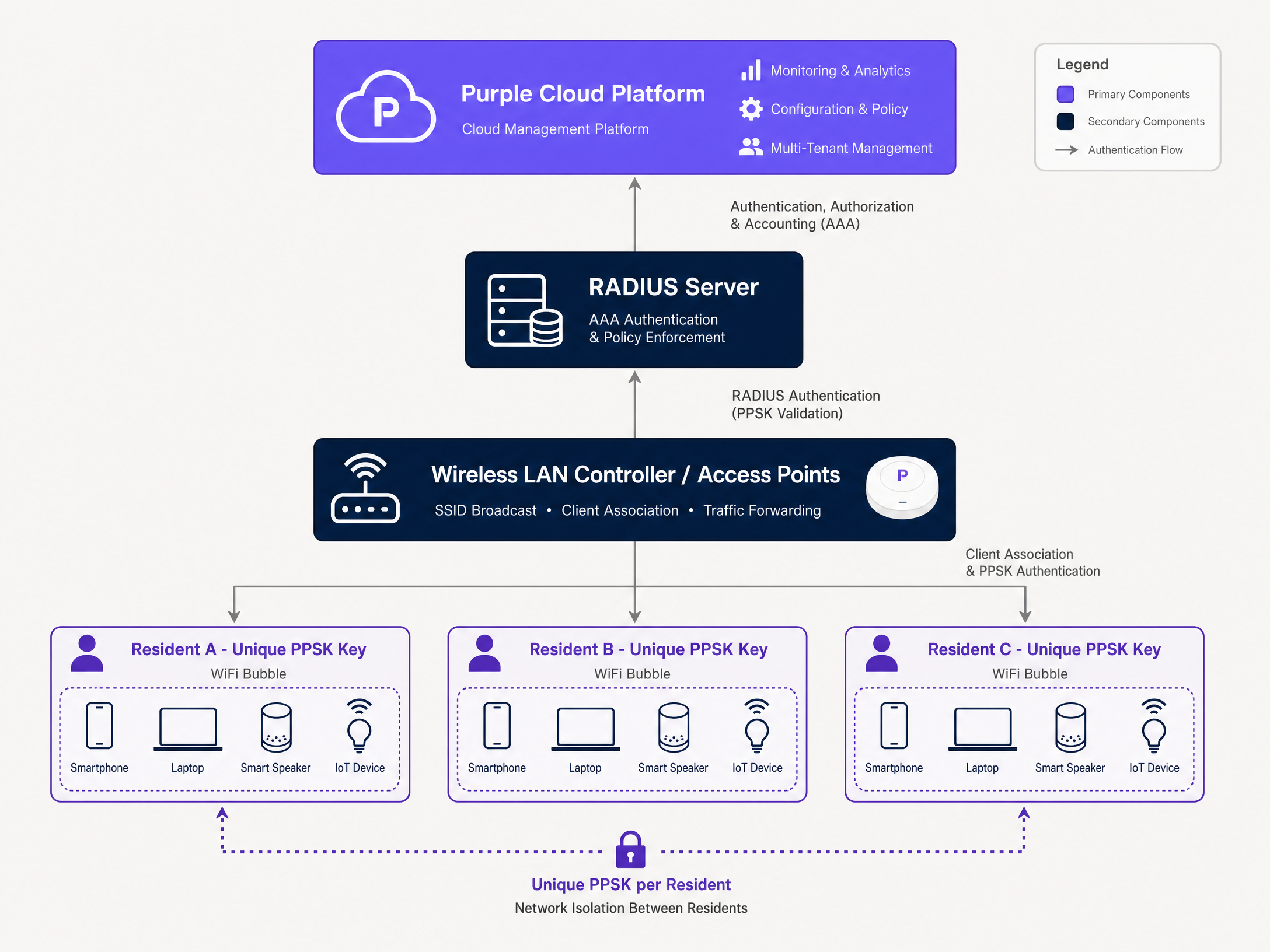
When a device connects to a standard WPA2-Personal network, the access point validates the shared password. There is no individual identity associated with the connection. In contrast, a PPSK or iPSK deployment intercepts the connection attempt and validates the unique key against an identity store.
In a RADIUS-backed iPSK architecture, the wireless LAN controller forwards the authentication request to a RADIUS server (Remote Authentication Dial-In User Service). The RADIUS server looks up the presented credentials and returns an Access-Accept response. Crucially, this response includes specific Attribute-Value Pairs (AVPs) that dictate the device's network policy, such as VLAN assignment and bandwidth limits.
This mechanism creates Layer 2 isolation. Every device using Resident A's unique key is placed on Resident A's dedicated VLAN. Their smartphone can discover their smart TV and smart speaker, replicating the experience of a home network. Meanwhile, Resident B's devices are cryptographically isolated on a separate VLAN, completely invisible to Resident A, despite sharing the same physical access point.
Comparing Authentication Models
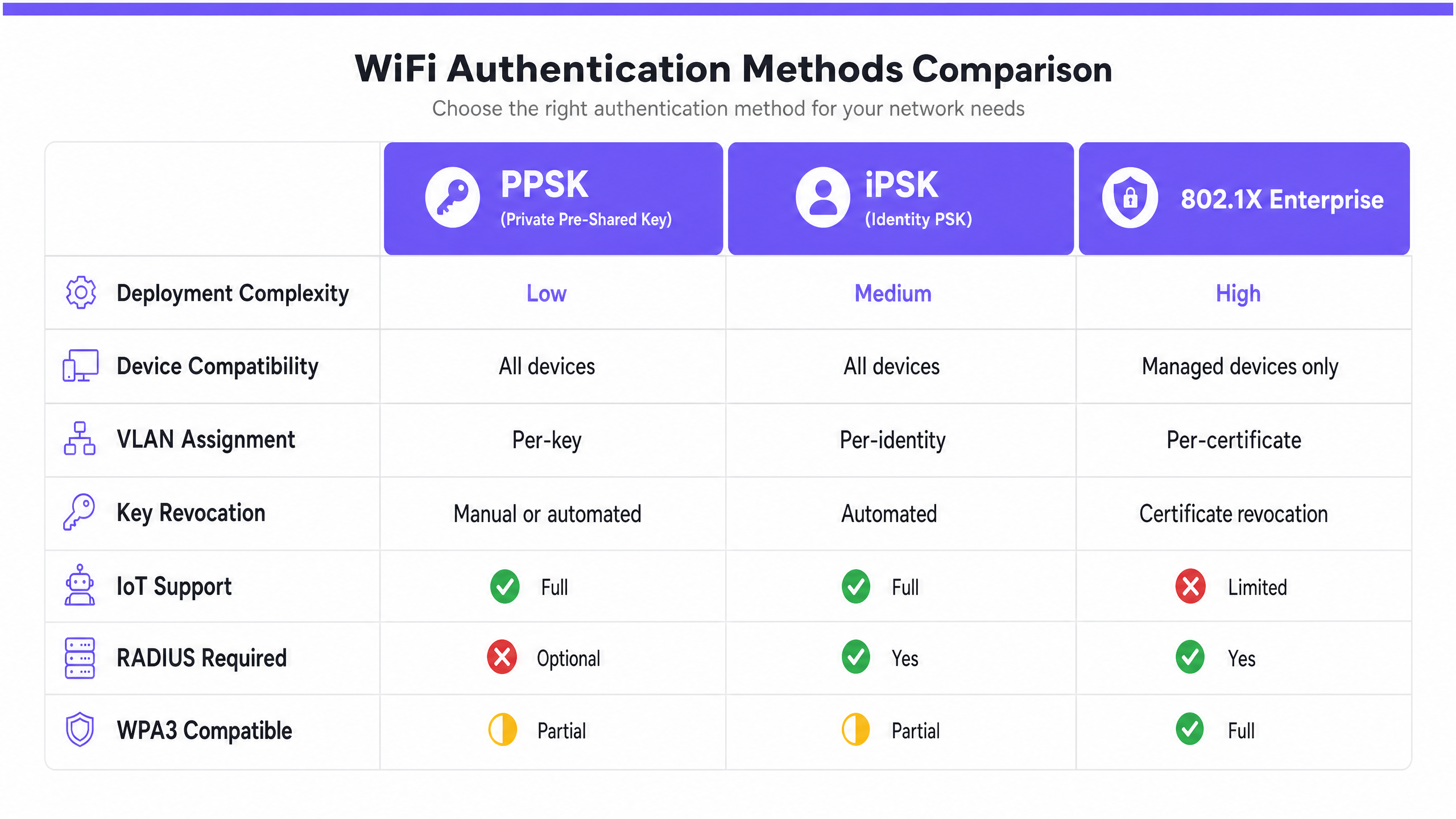
Understanding the distinctions between PPSK, iPSK, and 802.1X is critical for selecting the right deployment model for your venue.
- Controller-Local PPSK: The key database resides directly on the wireless LAN controller. This model is suitable for smaller deployments (typically under 200 units) due to hardware limitations on the number of stored keys. It does not require an external RADIUS server, simplifying the initial setup, but it complicates automated key lifecycle management.
- RADIUS-Backed iPSK: This model scales to tens of thousands of unique keys by offloading authentication to a cloud RADIUS service. It supports dynamic VLAN assignment and integrates seamlessly with property management systems for automated provisioning and revocation. This is the recommended architecture for enterprise multi-tenant environments.
- 802.1X Enterprise: Utilising digital certificates or username/password credentials, 802.1X is the most secure option for corporate environments where the IT department manages all connecting devices. However, it is unsuitable for residential or hospitality venues where users bring unmanaged devices, particularly headless IoT hardware like smart speakers and games consoles, which lack the necessary supplicants to support 802.1X.
Implementation Guide
Deploying a robust multi-tenant WiFi network requires careful planning and execution. Follow these steps to ensure a successful rollout.
Step 1: Define the Segmentation Strategy
Determine the required level of isolation. In a BTR environment, each residential unit requires a dedicated VLAN. In a retail setting, you may need separate VLANs for point-of-sale terminals, staff devices, and guest access. Map out the IP subnets and DHCP scopes required to support the anticipated device density (typically 15 - 25 devices per household).
Step 2: Select the Authentication Architecture
For schemes exceeding 100 units, deploy a RADIUS-backed iPSK architecture. This ensures scalability and enables automated key management. Ensure your chosen wireless hardware (e.g., Cisco Meraki, HPE Aruba, Ruckus) supports dynamic VLAN assignment via RADIUS AVPs.
Step 3: Automate Key Lifecycle Management
Do not rely on manual processes for generating and revoking keys. Integrate your WiFi management platform with your Property Management System (PMS). When a new tenancy is created in the PMS, the integration should automatically generate a unique key and provision the corresponding VLAN. Upon move-out, the key must be automatically revoked to maintain security.
Step 4: Address MAC Address Randomisation
Modern operating systems use MAC address randomisation by default to enhance privacy. Because iPSK relies on MAC address lookups in the RADIUS identity store, randomised MACs will fail authentication. Configure your SSID to require permanent MAC addresses, or implement a pre-registration workflow where residents register their devices before connecting.
Best Practices
To maximise the value and reliability of your multi-tenant network, adhere to these industry-standard best practices.
- Enforce Quality of Service (QoS): Implement granular bandwidth management policies to prevent the 'noisy neighbour' problem. Ensure that one resident downloading large files does not degrade the experience for others. Set explicit upstream and downstream limits per VLAN.
- Design for RADIUS Resilience: Your network's availability depends entirely on the RADIUS infrastructure. Deploy primary and secondary RADIUS servers, and configure appropriate failover mechanisms on your wireless controllers to ensure continuous authentication.
- Maintain Hardware Agnosticism: Avoid vendor lock-in by utilising a software overlay like Purple. This allows you to manage authentication and policy across mixed hardware environments (e.g., Cisco Meraki, HPE Aruba, Ruckus) from a single pane of glass.
- Prioritise the User Experience: The onboarding process must be seamless. Provide residents with clear instructions on how to connect their devices, particularly headless IoT hardware. The network should function exactly like a private home connection.
Troubleshooting & Risk Mitigation
Anticipating common failure modes will reduce support tickets and improve tenant satisfaction.
- IoT Device Compatibility: While most modern smart home devices support WPA2-PSK, some legacy hardware may struggle with complex authentication handshakes. Conduct thorough compatibility testing with common devices (e.g., smart TVs, voice assistants, games consoles) prior to full deployment.
- Broadcast Traffic Management: In high-density environments, excessive broadcast traffic (e.g., mDNS, ARP) can degrade network performance. Implement broadcast suppression techniques and ensure that mDNS reflection is configured correctly to allow device discovery within a resident's VLAN while blocking it across the wider network.
- Rogue Access Points: Residents may attempt to plug their own wireless routers into the network, causing interference and security risks. Enable rogue AP detection and containment features on your wireless controllers to mitigate this threat.
ROI & Business Impact
A well-architected multi-tenant WiFi network transforms a necessary utility into a revenue-generating asset.
- Rent Premiums: According to industry benchmarks, BTR operators can achieve a premium of £15-£30 per unit per month when high-quality, managed WiFi is included as an amenity.
- Reduced Void Periods: Properties with seamless, move-in-ready WiFi experience shorter void periods, as connectivity is a top-five decision factor for prospective tenants.
- Operational Efficiency: Automating key lifecycle management reduces the burden on IT and operations staff, eliminating manual password resets and the associated support tickets.
By utilising PPSK technology and a robust management platform, venue operators can deliver a secure, isolated, and high-performance network that meets the demands of modern tenants while driving measurable business value.
Podcast Briefing
Listen to our senior consultant break down the architecture, deployment models, and business impact of PPSK in this 10-minute executive briefing.
Key Definitions
PPSK (Private Pre-Shared Key)
An authentication method where multiple unique passphrases are valid on a single SSID, with each passphrase mapping to a specific user or device group.
Used to provide individualised security and network segmentation in environments where 802.1X is too complex or incompatible with the device fleet.
iPSK (Identity PSK)
An enterprise implementation of PPSK that utilises an external RADIUS server to validate keys and dynamically assign network policies like VLANs.
Essential for large-scale multi-tenant deployments requiring automated key management and robust policy enforcement.
VLAN (Virtual Local Area Network)
A logical grouping of network devices that act as if they are on the same physical network, regardless of their actual physical location.
The foundational technology for creating isolation between tenants sharing the same physical access points and switches.
RADIUS (Remote Authentication Dial-In User Service)
A networking protocol that provides centralised Authentication, Authorisation, and Accounting (AAA) management.
The backend engine that validates iPSK credentials and dictates which VLAN a device should be assigned to.
Layer 2 Isolation
Cryptographic separation of network traffic at the data link layer, preventing devices on different VLANs from communicating directly.
Crucial for ensuring privacy and security in multi-tenant environments, preventing lateral movement between tenant networks.
Headless Device
A device without a traditional user interface (screen and keyboard), such as a smart speaker, IoT sensor, or games console.
These devices typically cannot navigate captive portals or support 802.1X authentication, making PPSK the ideal secure connection method.
MAC Address Randomisation
A privacy feature in modern operating systems that generates a temporary MAC address when connecting to a WiFi network.
A significant challenge for iPSK deployments, as it prevents the RADIUS server from consistently identifying the device based on its hardware address.
Captive Portal
A web page that a user must view and interact with before access is granted to a public WiFi network.
Appropriate for transient guest access to capture data and accept terms, but entirely unsuitable for persistent residential connectivity.
Worked Examples
A 250-unit Build-to-Rent (BTR) property requires a managed WiFi solution. The operator wants to offer move-in-ready connectivity where each resident's smart devices (TVs, speakers, laptops) can communicate with each other, but remain completely isolated from other apartments. The IT team wants to avoid manual password management.
Deploy a RADIUS-backed iPSK architecture using Purple's cloud platform. Configure a single building-wide SSID. Integrate Purple with the property's PMS. Upon lease signing, the integration automatically generates a unique pre-shared key and assigns a dedicated VLAN for that unit. The resident receives their key via email. All devices connecting with that key are placed in the unit's specific VLAN, enabling local device discovery (e.g., casting to a smart TV) while ensuring Layer 2 isolation from all other units. Upon lease termination, the PMS integration automatically revokes the key.
A large retail complex needs to provide WiFi for store employees, point-of-sale (POS) terminals, and public shoppers using the same physical access points. The POS terminals require strict PCI DSS compliance, and the employee devices cannot support 802.1X certificates.
Implement a multi-SSID strategy combined with iPSK. Create a 'Retail-Secure' SSID utilising iPSK for POS terminals and staff devices. Issue specific keys for POS devices that map to a highly restricted, PCI-compliant VLAN with default-deny outbound firewall rules. Issue separate keys for staff devices that map to an employee VLAN with internet access. Create a separate 'Retail-Guest' SSID utilising an open network with a captive portal for shopper data capture and terms-of-service acceptance.
Practice Questions
Q1. Your organisation is deploying WiFi across a new 300-unit student accommodation block. Students will bring laptops, smartphones, PlayStations, and smart speakers. The network must support seamless roaming and ensure students cannot access each other's devices. Which authentication model should you specify, and why?
Hint: Consider the device types (managed vs. unmanaged) and the scale of the deployment (300 units * 10+ devices).
View model answer
RADIUS-backed iPSK is the correct choice. 802.1X is unsuitable because students bring unmanaged and headless devices (PlayStations, smart speakers) that cannot support certificates. Controller-local PPSK is inappropriate because the scale (3,000+ devices) exceeds the practical limits of local databases and makes manual key management impossible. iPSK allows for unique keys per student, automated provisioning via the student portal, and Layer 2 isolation via dynamic VLAN assignment.
Q2. A hotel operator reports that guests are complaining they cannot cast Netflix from their smartphones to the smart TVs in their rooms. The hotel is currently using a standard WPA2-Personal network with a single shared password and client isolation enabled to protect guest privacy. How do you resolve this?
Hint: Client isolation prevents all peer-to-peer communication on the wireless network.
View model answer
The current setup uses blunt client isolation, which breaks local device discovery protocols like mDNS used by Chromecast. To resolve this, migrate the network to an iPSK architecture. Issue a unique key for each hotel room (integrated with the PMS at check-in). Place the room's smart TV and the guest's devices on the same unique VLAN. This creates a "WiFi bubble" where the phone can discover the TV, but remains completely isolated from the devices in the adjacent room.
Q3. You are auditing a proposed network design for a coworking space. The design uses a single SSID with controller-local PPSK to isolate different companies. The space hosts 50 different companies, with high turnover and frequent temporary contractors. What is the primary operational risk in this design?
Hint: Focus on the lifecycle of the keys rather than the technical capability of the controller.
View model answer
The primary operational risk is the manual overhead and security vulnerability of key lifecycle management. Because it is controller-local, there is no automated integration with the coworking space's membership system. When a company leaves or a contractor's term ends, IT staff must manually delete the key from the controller. If this manual step is missed, unauthorised users retain access to the network. The design should be upgraded to RADIUS-backed iPSK to enable automated key revocation.
Continue reading in this series
Logo iPSK: a comprehensive guide for businesses
This guide explains how Identity Pre-Shared Key (iPSK) technology solves the core security challenge in multi-tenant WiFi environments: delivering enterprise-grade isolation and per-user control without breaking compatibility for IoT devices, gaming consoles, and smart home tech. It covers the full technical architecture, deployment strategies, and business case for property developers, BTR operators, and hospitality IT teams.
Logo iPSK: a comprehensive guide for businesses
This guide explains how Identity Pre-Shared Key (iPSK) technology solves the core security challenge in multi-tenant WiFi environments: delivering enterprise-grade isolation and per-user control without breaking compatibility for IoT devices, gaming consoles, and smart home tech. It covers the full technical architecture, deployment strategies, and business case for property developers, BTR operators, and hospitality IT teams.
WiFi managed services: a comprehensive guide for businesses
WiFi managed services shift the full lifecycle of enterprise wireless networks - from RF design and hardware procurement through to daily monitoring and firmware management - to a specialist provider. This guide explains the cloud-managed architectures, VLAN segmentation strategies, and authentication standards that underpin reliable, secure deployments across hotels, retail chains, BTR developments, and public-sector venues. Property developers, landlords, and BTR operators will find actionable guidance on isolating resident traffic, onboarding smart devices, and turning connectivity into a measurable business asset.