
Deploying SCEP for Secure Higher Education BYOD and WiFi Authentication
This technical guide provides network architects and IT managers with a vendor-neutral blueprint for deploying SCEP-based certificate enrollment to secure higher education WiFi. It details the transition from vulnerable password-based authentication to EAP-TLS, focusing on scalable BYOD onboarding and MDM integration.
Listen to this guide
View podcast transcript
Executive Summary
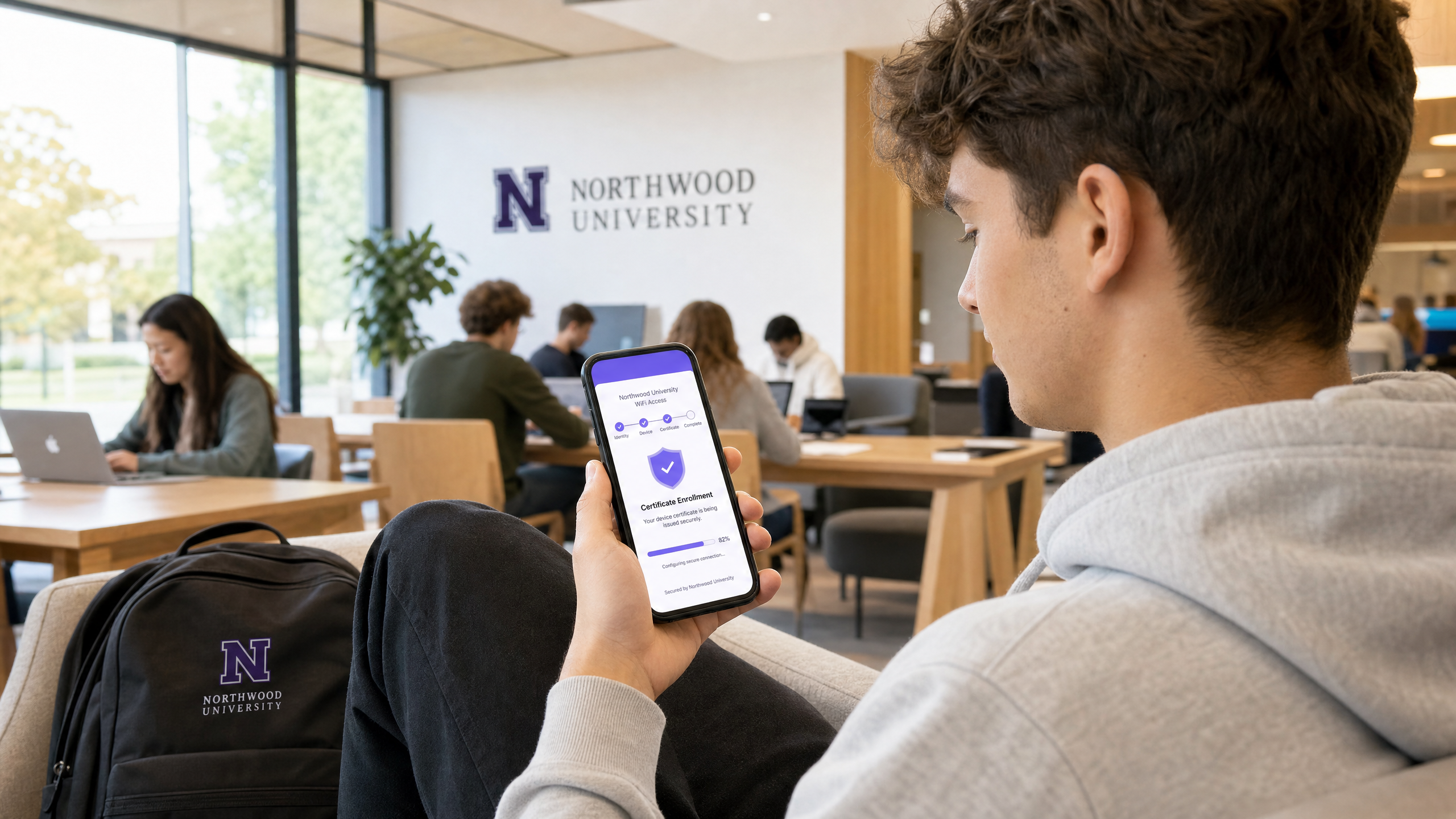
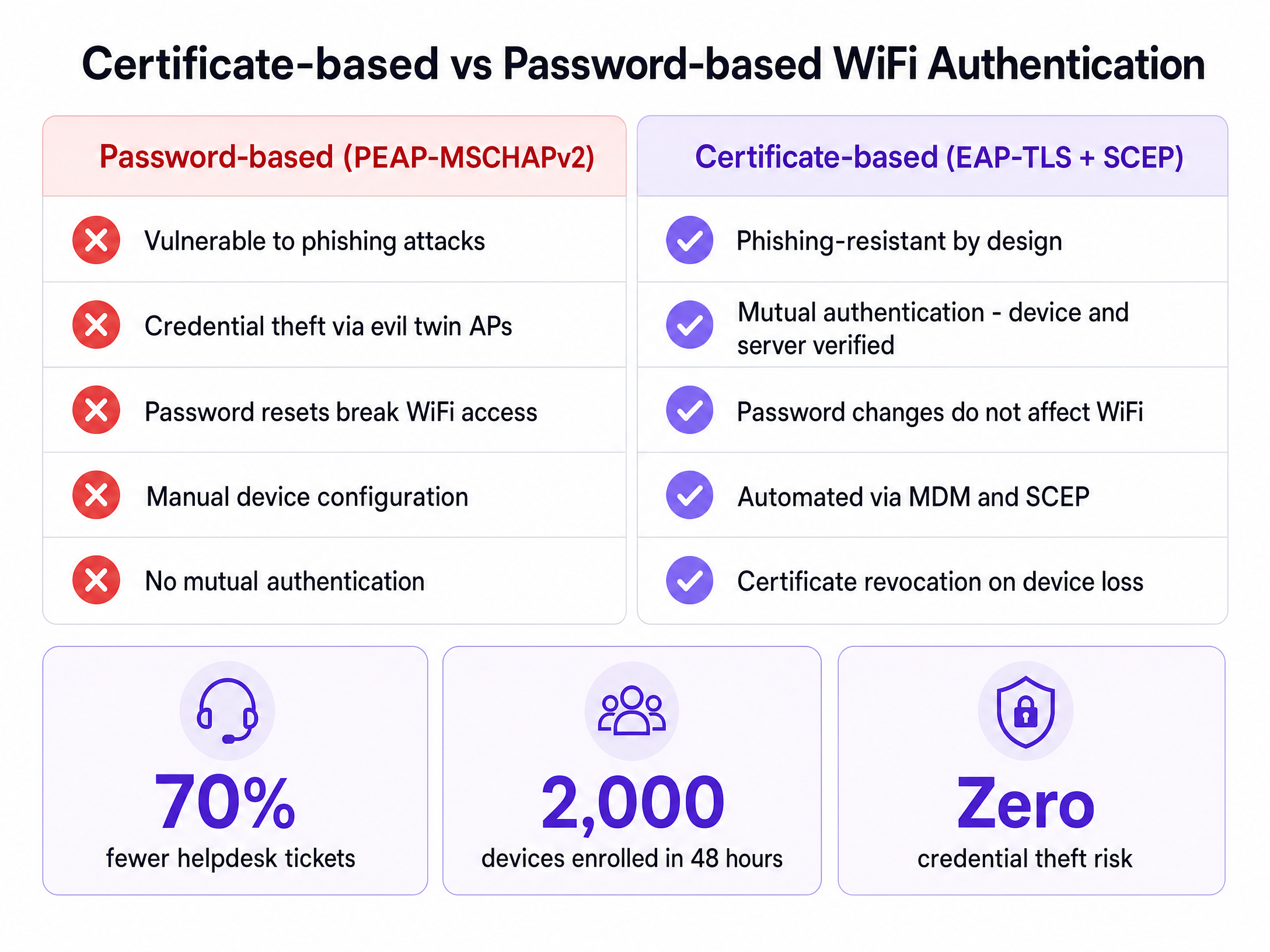
For higher education IT teams, the start of the academic year brings an immediate stress test. Thousands of students arrive on campus with multiple unmanaged devices, expecting instant, secure connectivity. When universities rely on password-based authentication like PEAP-MSCHAPv2, this influx predictably results in massive helpdesk queues, configuration errors, and severe vulnerabilities to credential theft via evil twin access points.
The architectural solution to this scale and security challenge is certificate-based authentication using EAP-TLS. To make certificate deployment viable across tens of thousands of endpoints, universities must implement the Simple Certificate Enrollment Protocol (SCEP). SCEP automates the provisioning of digital certificates to both managed devices via MDM and unmanaged student devices via self-service onboarding portals. This guide details the technical requirements for deploying SCEP in a higher education environment, providing actionable steps to eliminate password-related helpdesk tickets and secure the campus perimeter.
The Architecture of SCEP Certificate Enrollment
Transitioning to certificate-based WiFi requires a fundamental shift from validating user knowledge (a password) to validating device identity (a certificate). The SCEP protocol acts as the bridge between your device management layer and your Public Key Infrastructure (PKI).
Core Infrastructure Components
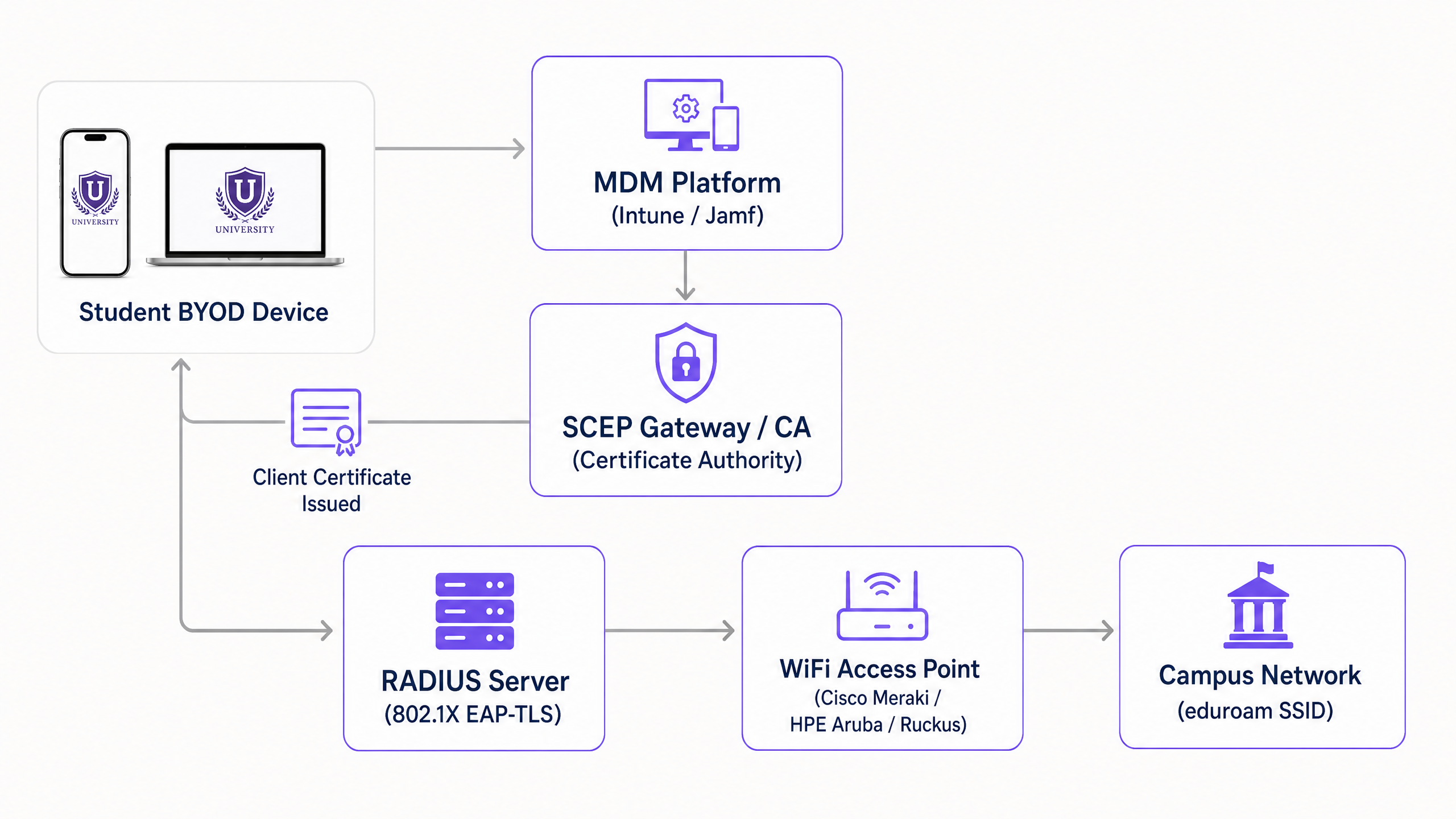
A production-ready SCEP deployment requires six integrated components working in sequence:
- Identity Provider (IdP): The authoritative directory (Microsoft Entra ID, Okta, or Google Workspace) that verifies the user's identity before certificate issuance.
- Mobile Device Management (MDM): Platforms like Microsoft Intune or Jamf that push the SCEP payload to institution-owned devices.
- Certificate Authority (CA): The PKI engine that signs and issues the certificates. This can be an on-premises Microsoft ADCS deployment or a cloud-native PKI overlay.
- SCEP Gateway: The HTTP endpoint that receives Certificate Signing Requests (CSRs) from devices, validates the challenge password, and forwards the request to the CA.
- RADIUS Server: The authentication server that evaluates the presented client certificate against network access policies during the 802.1X EAP-TLS exchange.
- Wireless Access Network: The physical access points (Cisco Meraki, HPE Aruba, Ruckus, or Juniper Mist) configured to enforce 802.1X authentication.
The SCEP Enrollment Flow
The enrollment process executes without user intervention on managed devices. The MDM platform pushes a configuration profile containing the SCEP gateway URL and a dynamically generated challenge password. The device generates a private key locally and constructs a CSR. It then transmits this CSR to the SCEP gateway over HTTP.
The gateway intercepts the request and validates the challenge password against the MDM API to confirm the device is authorised. Once verified, the gateway forwards the CSR to the CA. The CA signs the certificate and returns it through the gateway to the device. The private key never leaves the endpoint, ensuring cryptographic integrity.
Implementation Guide: A Phased Deployment Strategy
Deploying SCEP requires precise sequencing. Profile dependencies mean that executing these steps out of order will result in authentication failures.
Step 1: Directory Synchronisation and Group Policy
Before touching certificates, ensure your identity store is clean. Create distinct security groups for students, staff, and faculty in Entra ID or Active Directory. Your RADIUS server will use these group memberships, embedded as Subject Alternative Names (SAN) in the certificates, to assign devices to the correct VLANs dynamically.
Step 2: PKI and SCEP Gateway Configuration
Establish your CA hierarchy. If building on-premises, deploy an offline Root CA and an online Issuing CA. For higher education environments looking to reduce infrastructure footprint, cloud PKI solutions offer operational simplicity. Configure the SCEP gateway to communicate with your CA and expose the enrollment endpoint to the network segment where devices will initially connect.
Step 3: RADIUS Server Integration
Import the Issuing CA certificate into your RADIUS server's trusted certificate store. Configure the authentication protocol strictly to EAP-TLS. Define network policies that map certificate attributes (such as the User Principal Name) to specific VLAN return attributes, enabling micro-segmentation across the campus.
Step 4: MDM Profile Sequencing
For institution-owned devices managed by Intune or Jamf, profile deployment order is critical. You must deploy profiles in this exact sequence:
- Trusted Certificate Profile: Distributes the Root CA certificate to establish trust.
- SCEP Certificate Profile: Directs the device to the gateway to obtain its client certificate.
- WiFi Profile: Configures the SSID to use WPA3-Enterprise with EAP-TLS, explicitly referencing the certificate acquired in the previous step.
Step 5: BYOD Self-Service Onboarding
Students will not manually install certificates on their personal devices. You must provide an automated onboarding pathway. Deploy an open SSID that restricts traffic exclusively to the captive portal and the SCEP gateway. When a student connects, the portal prompts them to authenticate via Single Sign-On using their university credentials. Upon successful authentication, the portal provisions the SCEP payload to the device. Purple integrates this onboarding flow directly into the captive portal experience, enabling students to complete enrollment in under two minutes without IT intervention.
Best Practices and Risk Mitigation
Transitioning to EAP-TLS eliminates credential theft, but introduces new operational considerations. Network architects must anticipate scale and lifecycle events.
RADIUS Capacity Planning
The computational overhead of EAP-TLS certificate validation is significantly higher than PEAP password checking. During the first week of term, thousands of devices will attempt to authenticate simultaneously. A single RADIUS node will likely exhaust its resources and drop requests, leading to widespread connection failures. You must implement load balancing across multiple RADIUS nodes and increase the authentication timeout on your access points to at least five seconds to accommodate peak latency.
Certificate Lifecycle Management
Certificates for student devices should typically carry a validity period of one to two years. This duration covers the academic cycle while limiting exposure if a device is compromised. Crucially, you must implement a robust revocation mechanism. When a student graduates or reports a lost device, the certificate must be revoked immediately. Ensure your CA publishes a Certificate Revocation List (CRL) or operates an Online Certificate Status Protocol (OCSP) responder, and configure your RADIUS server to check revocation status on every authentication attempt.
Handling Headless IoT Devices
Smart TVs, gaming consoles, and wireless printers in residence halls lack the native 802.1X supplicants required for SCEP enrollment. For these devices, implement MAC Authentication Bypass (MAB). Provide a self-service device registration portal where students can register the MAC addresses of their IoT hardware. The Network Access Control (NAC) system then authenticates these registered addresses and places them into the appropriate student VLAN.
Listen to the Technical Briefing
For a deeper dive into the architecture and real-world deployment scenarios, listen to our 10-minute technical briefing podcast.
ROI and Business Impact
The business case for SCEP deployment in higher education rests on two pillars: security posture and operational efficiency.
From a security perspective, EAP-TLS provides mutual authentication. The device verifies the RADIUS server's certificate before transmitting any data, entirely mitigating the risk of evil twin access points harvesting credentials. This architecture aligns with zero-trust principles, ensuring that only cryptographically verified devices access the campus network.
Operationally, decoupling WiFi authentication from directory passwords yields immediate financial returns. When a university forces a 90-day password reset, students using PEAP must update their credentials on every device. Inevitably, many fail, resulting in a surge of helpdesk tickets. With SCEP and EAP-TLS, the certificate remains valid regardless of password changes. Universities deploying automated certificate onboarding consistently report up to a 70% reduction in WiFi-related support tickets during peak periods, allowing IT staff to focus on strategic initiatives rather than basic connectivity troubleshooting.
Key Definitions
SCEP (Simple Certificate Enrollment Protocol)
A protocol that automates the request and issuance of digital certificates to network devices without manual intervention.
Essential for scaling EAP-TLS deployments, as it allows MDMs and onboarding portals to provision certificates to tens of thousands of student devices seamlessly.
EAP-TLS (Extensible Authentication Protocol - Transport Layer Security)
The most secure 802.1X authentication method, requiring both a server-side and client-side certificate for mutual authentication.
Replaces vulnerable password-based protocols like PEAP, eliminating the risk of credential theft via evil twin access points.
MDM (Mobile Device Management)
Software platforms like Microsoft Intune or Jamf used to administer and secure institution-owned devices.
Used to push SCEP payloads and WiFi profiles silently to managed devices, ensuring they are configured for network access before deployment.
CSR (Certificate Signing Request)
A block of encoded text generated by the client device containing the public key and identity information, sent to the CA to apply for a certificate.
In a SCEP workflow, the device generates the private key locally and sends only the CSR to the gateway, ensuring the private key remains secure on the endpoint.
RADIUS (Remote Authentication Dial-In User Service)
The networking protocol that provides centralized authentication, authorization, and accounting management.
The server that evaluates the client certificate presented by the device during the 802.1X exchange and dictates VLAN assignment.
Evil Twin Attack
A security exploit where an attacker sets up a rogue access point with the same SSID as the legitimate network to intercept user credentials.
EAP-TLS prevents this because the client device verifies the RADIUS server's certificate before transmitting any data; if the attacker lacks the trusted server certificate, the connection drops.
MAB (MAC Authentication Bypass)
A fallback authentication method that uses a device's MAC address as its credential.
Required for onboarding headless IoT devices (like gaming consoles) in residence halls that cannot support 802.1X or SCEP.
CRL (Certificate Revocation List)
A list published by the Certificate Authority containing the serial numbers of certificates that have been invalidated prior to their expiration date.
Crucial for network security; the RADIUS server must check the CRL to ensure stolen devices or graduated students are immediately denied access.
Worked Examples
A university with 20,000 students is migrating from PEAP-MSCHAPv2 to EAP-TLS. They use Microsoft Intune for 3,000 university-owned Windows laptops, but the remaining 45,000 devices are student BYOD (phones, tablets, personal laptops). How should they architect the certificate deployment to ensure all devices can authenticate on the first day of term?
The university must implement a bifurcated enrollment strategy. For the 3,000 Intune-managed laptops, the IT team configures a SCEP Certificate profile within Intune, pushing the gateway URL and challenge password silently to the devices. For the 45,000 BYOD devices, they deploy an open 'Onboarding' SSID that restricts traffic to a self-service captive portal and the SCEP gateway. Students connect to the Onboarding SSID, authenticate via SAML SSO against Entra ID, and download a configuration payload that triggers SCEP enrollment. Once the certificate is installed, the device automatically associates with the secure 'eduroam' SSID using EAP-TLS.
During the first week of term, a university's helpdesk receives reports that students can connect to the WiFi with their laptops, but their smart speakers and gaming consoles in the residence halls cannot connect to the 802.1X network. How should the network architect resolve this?
The architect must implement MAC Authentication Bypass (MAB) for headless devices. Because smart speakers and consoles lack 802.1X supplicants, they cannot process SCEP payloads or present client certificates. The university should deploy a self-service device registration portal where students log in with their university credentials and input the MAC addresses of their IoT devices. The RADIUS server is configured to accept these registered MAC addresses via MAB and assign them to the student's specific Per-Room VLAN.
Practice Questions
Q1. Your university is deploying EAP-TLS. You have configured the SCEP gateway and the MDM profiles. However, when test devices attempt to connect to the secure SSID, the connection fails silently. The RADIUS logs show that the client certificate is valid, but the device is rejecting the server. What is the most likely configuration error?
Hint: Consider the requirements for mutual authentication and what the device needs to trust the server.
View model answer
The MDM Trusted Certificate profile is likely missing or misconfigured. In EAP-TLS, mutual authentication requires the device to verify the RADIUS server's certificate. If the device does not have the Root CA certificate installed in its trusted store, it cannot validate the server's certificate and will drop the connection to prevent a potential evil twin attack.
Q2. A student reports that their laptop, which was successfully enrolled via the BYOD portal and has a valid client certificate, can no longer access the network after they changed their university directory password. What architectural flaw does this indicate?
Hint: EAP-TLS authentication relies entirely on the certificate, not the password.
View model answer
This indicates that the network is not actually using EAP-TLS, but is likely falling back to PEAP-MSCHAPv2 or another password-based protocol. If true EAP-TLS is configured, the RADIUS server validates the cryptographic signature of the certificate, completely decoupling network access from the directory password. The network architect must enforce strict EAP-TLS policies on the RADIUS server and disable fallback protocols.
Q3. During the first week of term, the RADIUS servers are experiencing high CPU utilization and intermittent timeout errors, causing widespread authentication failures. The servers are adequately provisioned for the total number of concurrent sessions. What is causing the timeouts?
Hint: Consider the difference in computational overhead between checking a password and validating a certificate chain during the initial connection phase.
View model answer
The timeouts are caused by the heavy computational overhead of EAP-TLS cryptographic handshakes during the initial authentication storm of returning students. The architect must increase the RADIUS timeout value on the wireless access points (e.g., Cisco Meraki or HPE Aruba) to at least 5 seconds to accommodate the latency, and ensure load balancing is evenly distributing the initial full-authentication requests across all RADIUS nodes.
Continue reading in this series
Per-Device PSK by Vendor: iPSK, DPSK, MPSK and PPSK Compared (and WPA3 Support)
A comprehensive comparison of per-device PSK implementations across Cisco Meraki, HPE Aruba, Ruckus, Juniper Mist, Extreme, Fortinet, and Ubiquiti UniFi. Learn how WPA3-SAE impacts per-device key strategies and when to deploy transition modes versus moving to 802.1X.
Per-Device PSK by Vendor: iPSK, DPSK, MPSK and PPSK Compared (and WPA3 Support)
A comprehensive comparison of per-device PSK implementations across Cisco Meraki, HPE Aruba, Ruckus, Juniper Mist, Extreme, Fortinet, and Ubiquiti UniFi. Learn how WPA3-SAE impacts per-device key strategies and when to deploy transition modes versus moving to 802.1X.
Captive Portal Authentication Methods Compared
This authoritative technical reference guide evaluates the architectural, operational, and compliance trade-offs of five core captive portal authentication methods. It provides network architects, IT directors, and marketing managers with the quantitative data and decision frameworks required to balance guest onboarding friction with data-collection requirements across enterprise venues.