
Captive Portal for Ruckus
This technical reference guide provides an authoritative integration playbook for deploying external captive portals on CommScope Ruckus SmartZone and Unleashed architectures. It guides network engineers through step-by-step configurations for Guest WLANs, WISPr redirection, RADIUS AAA server settings, and Walled Garden exceptions to deliver a secure, high-density guest WiFi solution.
Listen to this guide
View podcast transcript
📚 Part of our core series: Multi-Tenant WiFi →
कार्यकारी सारांश (Executive Summary)
एंटरप्राइझ स्थळांमध्ये हाय-परफॉर्मन्स गेस्ट वायरलेस नेटवर्क तैनात करण्यासाठी अखंड वापरकर्ता अनुभव आणि मजबूत तांत्रिक सुरक्षा यांच्यात अचूक संतुलन राखणे आवश्यक आहे. CommScope Ruckus आर्किटेक्चर वापरणाऱ्या संस्थांसाठी—ज्यामध्ये हाय-डेन्सिटी स्टेडियम आणि कन्व्हेन्शन सेंटर्सपासून ते विस्तीर्ण रिटेल इस्टेट आणि हॉस्पिटॅलिटी ग्रुप्सचा समावेश आहे—Captive Portal हा वापरकर्ता ऑनबोर्डिंग, अनुपालन अंमलबजावणी आणि फर्स्ट-पार्टी डेटा कॅप्चर करण्यासाठी प्राथमिक गेटवे म्हणून काम करतो.
हे मार्गदर्शक बाह्य Captive Portals ला Ruckus SmartZone आणि Ruckus Unleashed कंट्रोलर्ससह एकत्रित करण्यासाठी एक अधिकृत, टप्प्याटप्प्याने काम करणारी नियमावली प्रदान करते. उद्योग-मानक Wireless Internet Service Provider roaming (WISPr) प्रोटोकॉलचा वापर करून, नेटवर्क इंजिनिअर्स विश्वसनीय रिडायरेक्शन, सुरक्षित Remote Authentication Dial-In User Service (RADIUS) ऑथेंटिकेशन आणि तपशीलवार Walled Garden कॉन्फिगरेशन लागू करू शकतात.
जेव्हा हे Purple च्या Guest WiFi आणि WiFi Analytics प्लॅटफॉर्मसह जोडले जाते, तेव्हा हे एकत्रीकरण स्थळ चालकांना महत्त्वाचे अभ्यागत डेमोग्राफिक्स कॅप्चर करण्यास, आंतरराष्ट्रीय डेटा नियमांचे (जसे की GDPR आणि PCI DSS) पालन करण्यास आणि शक्तिशाली मार्केटिंग ऑटोमेशन अनलॉक करण्यास अनुमती देते. Hospitality आणि Transport हबमध्ये सेंट्रलाइज्ड व्हर्च्युअल स्मार्टझोन (vSZ) आर्किटेक्चर तैनात करणे असो, किंवा Retail वातावरणात डिस्ट्रिब्युटेड AP-आधारित Unleashed नेटवर्क असो, हा तांत्रिक संदर्भ एक लवचिक, हाय-थ्रूपुट डिप्लॉयमेंट सुनिश्चित करतो.
तांत्रिक सखोल विश्लेषण (Technical Deep-Dive)
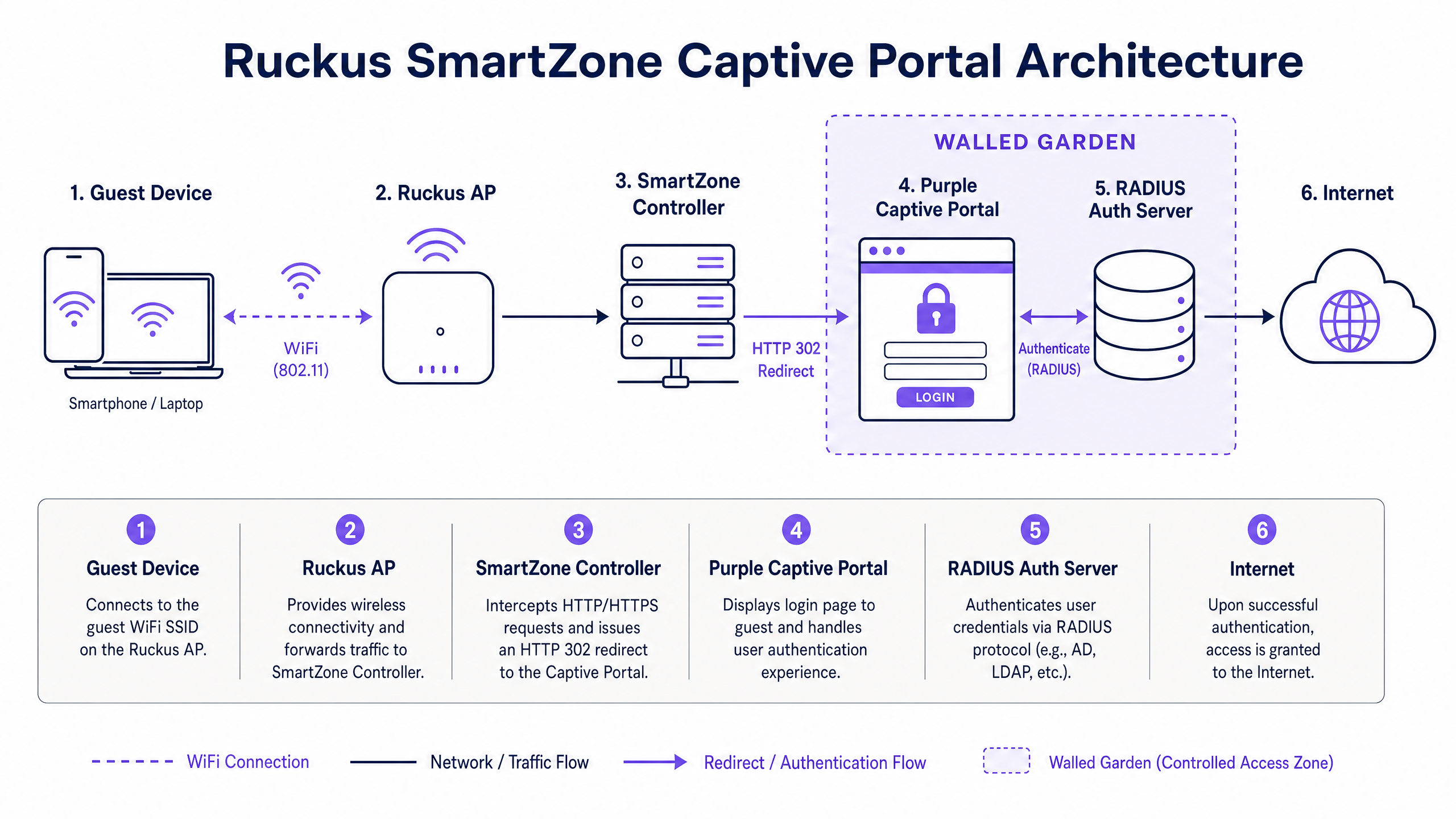
अत्यंत स्केलेबल गेस्ट नेटवर्क तैनात करण्यासाठी, इंजिनिअर्सना Captive Portal फ्लो नियंत्रित करणाऱ्या मूलभूत कम्युनिकेशन मानकांना समजून घेणे आवश्यक आहे. Ruckus आर्किटेक्चर क्लायंट रिडायरेक्शन आणि ऑथेंटिकेशनची बोलणी करण्यासाठी WISPr 2.0 मानकांचा वापर करतात. WISPr हे परिभाषित करते की वायरलेस ॲक्सेस पॉइंट (AP) किंवा कंट्रोलर अनऑथेंटिकेटेड HTTP/HTTPS ट्रॅफिक कसे अडवतो आणि क्लायंट ब्राउझरला बाह्य पोर्टल वेब सर्व्हरवर कसे रिडायरेक्ट करतो.
WISPr ऑथेंटिकेशन फ्लो
बाह्य Captive Portal रिडायरेक्शन प्रक्रिया नेटवर्क व्यवहारांच्या कठोर अनुक्रमाचे अनुसरण करते. अपस्ट्रीम फायरवॉल पॉलिसींचे ट्रबलशूटिंग आणि कॉन्फिगरेशन करण्यासाठी हा फ्लो समजून घेणे आवश्यक आहे:
- असोसिएशन (Association): गेस्ट क्लायंट खुल्या, अनइन्क्रिप्टेड गेस्ट SSID शी जोडला जातो. AP DHCP द्वारे क्लायंटला IP ॲड्रेस नियुक्त करतो.
- HTTP प्रोब (HTTP Probe): इंटरनेट प्रवेशाची पडताळणी करण्यासाठी क्लायंट ऑपरेटिंग सिस्टम HTTP प्रोब सुरू करते (उदा. Apple चा Captive Network Assistant प्रोब
captive.apple.comवर किंवा Android चा कनेक्टिव्हिटी चेकconnectivitycheck.gstatic.comवर). - HTTP 302 Redirect: Ruckus AP किंवा SmartZone कंट्रोलर या अनधिकृत HTTP विनंतीला अडवतो. तो HTTP 302 Redirect सह प्रतिसाद देतो, क्लायंटच्या ब्राउझरला बाह्य पोर्टल URL वर (उदा. Purple चे लॉगिन पृष्ठ) फॉरवर्ड करतो. या रीडायरेक्ट URL मध्ये महत्त्वाचे क्वेरी पॅरामीटर्स जोडले जातात, ज्यामध्ये क्लायंटचा MAC पत्ता (
client_mac), IP पत्ता (client_ip), AP MAC पत्ता (ap_mac), आणि कंट्रोलरचा Northbound Interface IP (nbiIP) समाविष्ट असतो. - Portal Rendering: क्लायंट ब्राउझर बाह्य पोर्टल पृष्ठ लोड करतो. पोर्टल डोमेन आणि त्याच्याशी संबंधित मालमत्तांवरील अनधिकृत ट्रॅफिकला कंट्रोलरच्या Walled Garden पॉलिसीद्वारे परवानगी दिली जाते.
- User Authentication: वापरकर्ता पोर्टलवर लॉगिन आवश्यकता पूर्ण करतो (उदा. सोशल साइन-ऑन, SMS नोंदणी, फॉर्म सबमिशन).
- RADIUS Access-Request: बाह्य पोर्टल प्लॅटफॉर्म, RADIUS क्लायंट म्हणून काम करत, कॉन्फिगर केलेल्या RADIUS Authentication Server कडे (जसे की Purple ची Cloud RADIUS इन्फ्रास्ट्रक्चर) Access-Request पाठवतो.
- RADIUS Access-Accept: RADIUS सर्व्हर क्रेडेंशियल्स सत्यापित करतो आणि Ruckus कंट्रोलरला सेशन पॅरामीटर्स (उदा. सेशन टाइमआउट, बँडविड्थ मर्यादा) असलेले Access-Accept पॅकेट परत करतो.
- NBI Callback: बाह्य पोर्टल WISPr क्रेडेंशियल्सचा वापर करून Ruckus कंट्रोलरच्या Northbound Interface (NBI) ला API कॉल करते, ज्यामुळे कंट्रोलरला क्लायंटचा MAC पत्ता अधिकृत करण्याची सूचना मिळते.
- Internet Access: कंट्रोलर क्लायंटची स्थिती "Authenticated" वर बदलतो, ज्यामुळे कॉन्फिगर केलेल्या सेशन पॉलिसींच्या अधीन राहून पूर्ण इंटरनेट प्रवेश मिळतो.
मुख्य आर्किटेक्चर तुलना
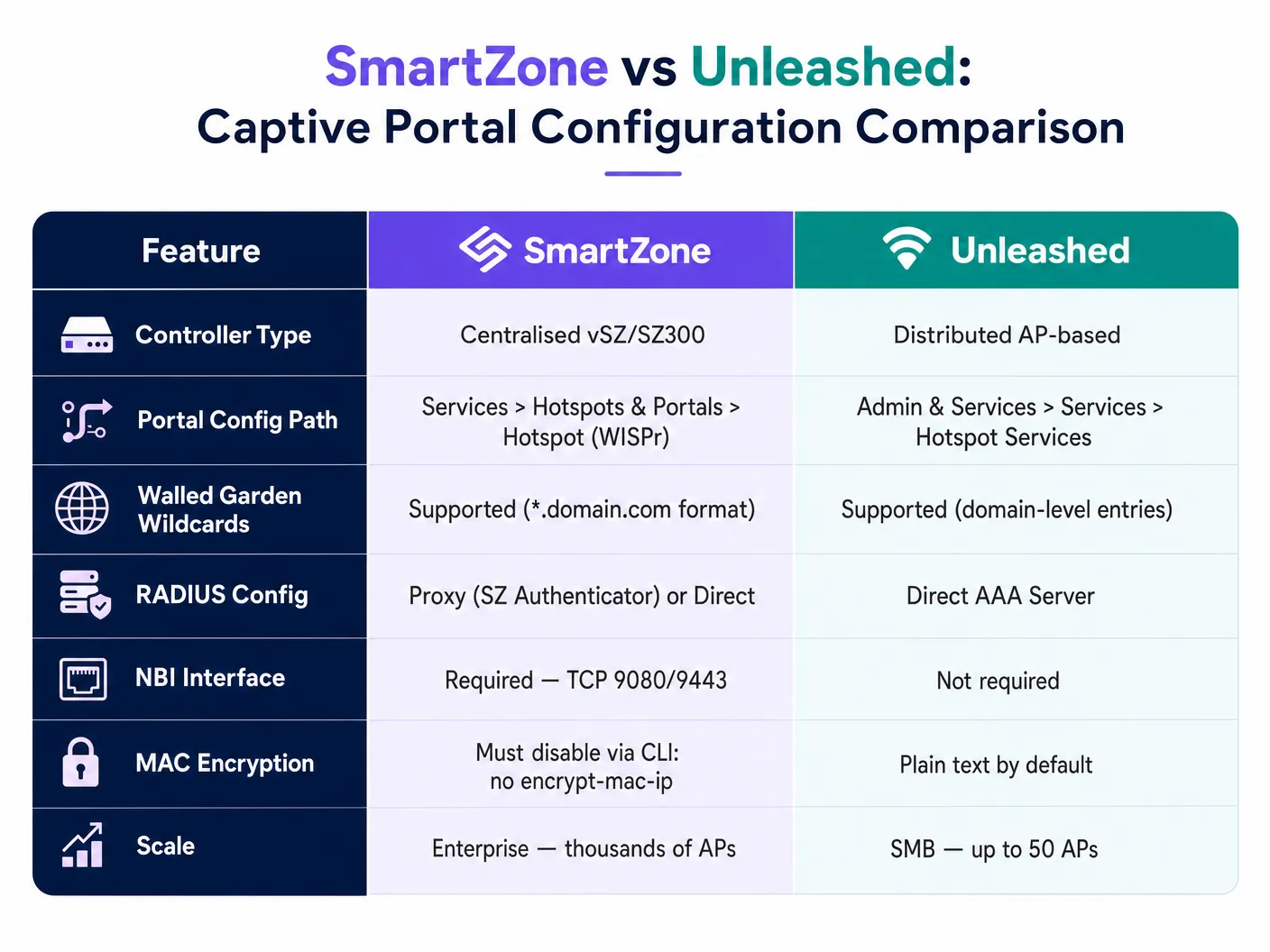
ठिकाणाच्या प्रमाणावर अवलंबून, संस्था CommScope Ruckus SmartZone (एंटरप्राइझ-स्केल, कंट्रोलर-आधारित) किंवा Ruckus Unleashed (वितरित, कंट्रोलर-विरहित) आर्किटेक्चर तैनात करतात. दोन्ही WISPr-आधारित बाह्य Captive Portals ला सपोर्ट करत असले तरी, त्यांचे मूळ कॉन्फिगरेशन मार्ग आणि क्षमता लक्षणीयरीत्या भिन्न आहेत:
| तांत्रिक वैशिष्ट्य | Ruckus SmartZone (vSZ / SZ144 / SZ300) | Ruckus Unleashed (वितरित AP) |
|---|---|---|
| कंट्रोलर आर्किटेक्चर | १०,००० पर्यंत APs व्यवस्थापित करणारे केंद्रीकृत भौतिक किंवा आभासी उपकरण. | ५० पर्यंत APs व्यवस्थापित करणारे वितरित मास्टर-मेंबर AP आर्किटेक्चर. |
| कॉन्फिगरेशन मार्ग | Services > Hotspots & Portals > Hotspot (WISPr) |
Admin & Services > Services > Hotspot Services |
| API कॉलबॅक पद्धत | TCP पोर्ट्स ९०८०/९४४३ द्वारे Northbound Interface (NBI). | बाह्य API कॉलबॅकशिवाय थेट RADIUS/स्थानिक प्रमाणीकरण. |
| MAC पत्ता एन्क्रिप्शन | डीफॉल्टनुसार सक्षम; CLI द्वारे अक्षम करणे आवश्यक आहे (no encrypt-mac-ip). |
डीफॉल्टनुसार अक्षम; MAC पत्ते प्लेन टेक्स्टमध्ये पाठवले जातात. |
| Walled Garden Wildcards | पूर्ण वाईल्डकार्ड फॉरमॅटिंगला सपोर्ट करते (उदा., *.purple.ai). |
डोमेन-स्तरीय एंट्रीजला सपोर्ट करते (उदा., purple.ai). |
| RADIUS Proxy Support | "Proxy (SZ Authenticator)" किंवा थेट AAA द्वारे सपोर्टेड. | थेट AAA Server कॉन्फिगरेशनद्वारे सपोर्टेड. |
| Target Deployments | स्टेडियम, मोठी हॉटेल्स, Transport हब्स, Healthcare कॅम्पसेस. | मिड-मार्केट हॉटेल्स, Retail स्टोअर्स, Schools . |
अंमलबजावणी मार्गदर्शिका (Implementation Guide)
ही टप्प्याटप्प्याने दिलेली अंमलबजावणी मार्गदर्शिका नेटवर्क इंजिनिअर्सना Ruckus SmartZone आणि Ruckus Unleashed कंट्रोलर्सवर बाह्य Captive Portal कॉन्फिगर करण्याची प्रक्रिया समजावून सांगते.
भाग A: Ruckus SmartZone कॉन्फिगरेशन
टप्पा १: RADIUS AAA Servers कॉन्फिगर करा
बाह्य डेटाबेसवर अतिथी युजर्सचे प्रमाणीकरण (authenticate) करण्यासाठी, तुम्ही प्रथम RADIUS Authentication आणि Accounting सर्व्हर्स परिभाषित केले पाहिजेत.
- Services & Profiles > Authentication वर जा आणि Proxy (SZ Authenticator) टॅब निवडा.
- तुमचा लक्ष्यित Zone निवडा आणि Create वर क्लिक करा.
- खालील पॅरामीटर्स कॉन्फिगर करा:
- Name:
Purple_RADIUS_Auth - Service Protocol:
RADIUS - Primary Server IP: तुमच्या Purple Admin Console मध्ये दिलेला IP ॲड्रेस प्रविष्ट करा.
- Port:
1812 - Shared Secret: तुमचे Purple RADIUS Shared Secret प्रविष्ट करा.
- Backup RADIUS: Enabled (हाय अॅव्हेलेबिलिटीसाठी दुय्यम IP, Port
1812आणि तेच shared secret कॉन्फिगर करा).
- Name:
- सेव्ह करण्यासाठी OK वर क्लिक करा.
- Services & Profiles > Accounting वर जा आणि Proxy (SZ Authenticator) टॅब अंतर्गत Create वर क्लिक करा.
- खालील पॅरामीटर्स कॉन्फिगर करा:
- Name:
Purple_RADIUS_Acct - Service Protocol:
RADIUS Accounting - Primary Server IP: तुमच्या Purple Admin Console मध्ये दिलेला IP ॲड्रेस प्रविष्ट करा.
- Port:
1813 - Shared Secret: तुमचे Purple RADIUS Shared Secret प्रविष्ट करा.
- Backup RADIUS: Enabled (दुय्यम IP, Port
1813आणि तेच shared secret कॉन्फिगर करा).
- Name:
- सेव्ह करण्यासाठी OK वर क्लिक करा.
टप्पा २: Hotspot WISPr Portal Profile कॉन्फिगर करा
Hotspot WISPr प्रोफाइल रिडायरेक्शन वर्तन आणि Walled Garden नियम परिभाषित करते.
- Services & Profiles > Hotspots & Portals > Hotspot (WISPr) वर जा.
- तुमचा लक्ष्यित Zone निवडा आणि Create वर क्लिक करा.
- General Options विभागात, खालील कॉन्फिगर करा:
- Portal Name:
Purple_WISPr_Portal - WISPr Smart Client Support:
None - Login URL: External निवडा आणि Purple द्वारे प्रदान केलेले प्राथमिक रिडायरेक्ट URL प्रविष्ट करा (उदा.,
https://login.purple.ai/start). - Redirect MAC Format:
AA:BB:CC:DD:EE:FF(हा फॉरमॅट Purple च्या डेटाबेस पार्सिंगसाठी अत्यंत महत्त्वाचा आहे).
- Portal Name:
- Start Page विभागात, खालील कॉन्फिगर करा:
- Redirect to the following URL निवडा आणि प्रविष्ट करा:
https://login.purple.ai/success.php
- Redirect to the following URL निवडा आणि प्रविष्ट करा:
- Session Options विभागात, खालील कॉन्फिगर करा:
- Session Timeout:
1440मिनिटे (२४ तास, किंवा तुमच्या कॉर्पोरेट पॉलिसीनुसार ठेवा). - Grace Period:
60मिनिटे (वापरकर्त्यांना पुन्हा-प्रमाणित न करता १ तासाच्या आत पुन्हा कनेक्ट होण्याची परवानगी देते).
- Session Timeout:
- प्रोफाइल सेव्ह करण्यासाठी OK वर क्लिक करा.
पायरी ३: Walled Garden अपवाद परिभाषित करा
Walled Garden अप्रमाणित क्लायंटना DNS रिझॉल्व्ह करण्याची आणि स्प्लॅश पेज लोड करण्यासाठी व प्रमाणित करण्यासाठी आवश्यक असलेल्या विशिष्ट डोमेन्समधून मालमत्ता डाउनलोड करण्याची परवानगी देते.
- तुमच्या नवीन तयार केलेल्या
Purple_WISPr_Portalप्रोफाइलमध्ये सुधारणा करा. - खाली स्क्रोल करा आणि Walled Garden विभाग विस्तृत करण्यासाठी + चिन्हावर क्लिक करा.
- खालील अनिवार्य डोमेन्स जोडा. लक्षात ठेवा की Ruckus SmartZone ला
*.domain.comया वाइल्डकार्ड फॉरमॅटची आवश्यकता असते:*.purple.ai(मुख्य पोर्टल आणि रिडायरेक्शन डोमेन)*.cloudfront.net(स्टाईलशीट आणि JavaScript मालमत्ता लोड करण्यासाठी CDN)*.apple.comआणिcaptive.apple.com(Apple Captive Network Assistant वर्तन व्यवस्थापित करण्यासाठी)*.googleapis.comआणि*.gstatic.com(Google API आणि मालमत्ता वितरणासाठी)
- तुम्ही सोशल लॉगिन सक्षम केल्यास कोणतेही सोशल मीडिया डोमेन्स जोडा (उदा. Facebook लॉगिनसाठी
*.facebook.com,*.facebook.net). - सेव्ह करण्यासाठी OK वर क्लिक करा.
पायरी ४: गेस्ट वायरलेस LAN (WLAN) कॉन्फिगर करा
आता, RADIUS सर्व्हर आणि Hotspot प्रोफाइल एका नवीन SSID शी बाइंड करा.
- Wireless LANs वर जा आणि तुमचे लक्ष्य Zone निवडा.
- नवीन WLAN तयार करण्यासाठी Create वर क्लिक करा.
- General Options कॉन्फिगर करा:
- नाव:
Guest_WiFi - SSID:
!Free_Venue_WiFi
- नाव:
- Security Options कॉन्फिगर करा:
- Authentication Type:
Hotspot (WISPr) - Method:
Open - Encryption Options:
None
- Authentication Type:
- Hotspot Portal विभाग विस्तृत करा:
- Hotspot (WISPr) Portal:
Purple_WISPr_Portalनिवडा. - Authentication Service:
Purple_RADIUS_Authनिवडा. - Accounting Service:
Purple_RADIUS_Acctनिवडा. - Send Interim Update:
5मिनिटांवर सेट करा (रिअल-टाइम सेशन ट्रॅकिंगसाठी आवश्यक).
- Hotspot (WISPr) Portal:
- RADIUS Options विस्तृत करा:
- NAS ID: User-defined वर सेट करा आणि तुमचा Purple-नियुक्त ठिकाण (venue) ID प्रविष्ट करा.
- Called Station ID: AP MAC निवडा.
- Single Session ID: ON (APs मध्ये सेशन डुप्लिकेशन प्रतिबंधित करते).
- WLAN तैनात करण्यासाठी OK वर क्लिक करा.
पायरी ५: WISPr Northbound Interface (NBI) सक्षम करा
NBI मुळे Purple ला क्लायंटना अधिकृत करण्यासाठी SmartZone शी परत संवाद साधण्याची परवानगी मिळते.
- Administration > External Services > WISPr Northbound Interface वर जा.
- Enable Northbound Interface support या बॉक्सवर खूण करा.
- एक Username आणि Password परिभाषित करा (उदा.
purple_nbi/SecureNbiPassword123!). - हे क्रेडेंशियल्स Purple ॲडमिन कन्सोलमध्ये Integrations > Ruckus SmartZone अंतर्गत प्रविष्ट करा.
पायरी ६: MAC/IP एन्क्रिप्शन अक्षम करा (महत्त्वाची CLI पायरी)
डीफॉल्टनुसार, SmartZone रिडायरेक्ट URL मधील MAC पत्ते एन्क्रिप्ट करते. Purple ला क्लायंटचे MAC वाचता यावेत यासाठी तुम्ही हे अक्षम केले पाहिजे.
- तुमच्या SmartZone कंट्रोलर मॅनेजमेंट IP वर SSH सेशन उघडा.
- तुमच्या प्रशासक क्रेडेंशियल्ससह लॉग इन करा.
- खालील कमांड्स कार्यान्वित करा:
ruckus> enable
ruckus# config
ruckus(config)# no encrypt-mac-ip
ruckus(config)# end
ruckus# write memory
भाग B: Ruckus Unleashed कॉन्फिगरेशन
कंट्रोलर-लेस Unleashed आर्किटेक्चर वापरणाऱ्या लहान ठिकाणांसाठी, मास्टर AP वेब इंटरफेसद्वारे Captive Portal कॉन्फिगर करा.
पायरी 1: AAA सर्व्हर्स परिभाषित करा
- Admin & Services > Services > AAA Servers वर जा.
- RADIUS ऑथेंटिकेशन सर्व्हर जोडण्यासाठी Create New वर क्लिक करा:
- Name:
Purple_Auth - Type:
RADIUS - IP Address: Purple चा RADIUS IP प्रविष्ट करा.
- Port:
1812 - Shared Secret: तुमचा Purple RADIUS Shared Secret प्रविष्ट करा.
- Name:
- OK वर क्लिक करा.
- RADIUS अकाउंटिंग सर्व्हर जोडण्यासाठी Create New वर क्लिक करा:
- Name:
Purple_Acct - Type:
RADIUS Accounting - IP Address: Purple चा RADIUS IP प्रविष्ट करा.
- Port:
1813 - Shared Secret: तुमचा Purple RADIUS Shared Secret प्रविष्ट करा.
- Name:
- OK वर क्लिक करा.
पायरी 2: Hotspot सेवा कॉन्फिगर करा
- Admin & Services > Services > Hotspot Services वर जा.
- Create New वर क्लिक करा.
- General टॅब अंतर्गत:
- Name:
Purple_Hotspot - Login URL: तुमची Purple रीडायरेक्ट URL प्रविष्ट करा.
- Start Page: Redirect to the following URL निवडा आणि
https://login.purple.ai/success.phpप्रविष्ट करा.
- Name:
- Authentication टॅब अंतर्गत:
- Authentication Server:
Purple_Authनिवडा. - Accounting Server:
Purple_Acctनिवडा. - Interim Update:
5मिनिटांवर सेट करा.
- Authentication Server:
- Walled Garden टॅब अंतर्गत:
- डोमेन-स्तरीय नोंदी जोडा (उदा.
purple.ai,cloudfront.net,gstatic.com). लक्षात ठेवा की Unleashed ला एस्टरिस्क वाईल्डकार्ड (*) उपसर्गाची आवश्यकता नसते; मानक डोमेन-स्तरीय मॅचिंग स्वयंचलितपणे लागू केले जाते.
- डोमेन-स्तरीय नोंदी जोडा (उदा.
- सेव्ह करण्यासाठी OK वर क्लिक करा.
पायरी 3: WLAN ला Hotspot सेवा लागू करा
- Wi-Fi Networks वर जा आणि Create वर क्लिक करा.
- Name आणि SSID तुमच्या गेस्ट नेटवर्कच्या नावावर सेट करा.
- Usage Type हे Hotspot Service वर सेट करा.
- सेवांच्या सूचीमधून
Purple_Hotspotनिवडा. - सर्व Unleashed APs वर SSID प्रकाशित करण्यासाठी OK वर क्लिक करा.
सर्वोत्तम पद्धती (Best Practices)
कमाल कार्यक्षमता, सुरक्षा आणि नियामक अनुपालन सुनिश्चित करण्यासाठी, नेटवर्क आर्किटेक्ट्सनी खालील उद्योग-मानक सर्वोत्तम पद्धती लागू केल्या पाहिजेत:
1. ग्रॅन्युलर गेस्ट VLAN सेगमेंटेशन
गेस्ट ट्रॅफिक कधीही नेटिव्ह किंवा मॅनेजमेंट VLAN वर मॅप करू नका. गेस्ट क्लायंट्सना नेहमी एका समर्पित, नॉन-राउटेबल VLAN (उदा. VLAN 100) वर वेगळे ठेवा. कॉर्पोरेट सबनेट्स, पॉइंट-ऑफ-सेल (POS) सिस्टीम्स आणि IoT इन्फ्रास्ट्रक्चरपर्यंत गेस्ट ट्रॅफिक पोहोचण्यापासून रोखण्यासाठी अपस्ट्रीम स्विच किंवा फायरवॉलवर कडक ॲक्सेस कंट्रोल लिस्ट्स (ACLs) लागू करा. हे सेगमेंटेशन PCI DSS अनुपालनासाठी एक मुख्य आवश्यकता आहे.
2. हाय-डेन्सिटी RF ऑप्टिमायझेशन
स्टेडियम, कॉन्फरन्स सेंटर्स आणि मोठ्या रिटेल हब सारख्या हाय-डेन्सिटी वातावरणात, RF ट्यूनिंग अत्यंत आवश्यक आहे. क्लायंट्सना जलद गतीवर जाण्यास भाग पाडण्यासाठी आणि एअरटाइममधील स्पर्धा कमी करण्यासाठी कमी लेगसी डेटा दर अक्षम करा (उदा. १२ Mbps पेक्षा कमी ८०२.११b दर अक्षम करा). ड्युअल-बँड क्लायंट डिव्हाइसेसना ५ GHz आणि ६ GHz स्पेक्ट्रमवर निर्देशित करण्यासाठी Band Steering सक्षम करा, जेणेकरून अत्यंत गर्दीचा २.४ GHz बँड लेगसी डिव्हाइसेससाठी सुरक्षित राहील.
३. डायनॅमिक Walled Garden व्यवस्थापन
तुमचा Walled Garden शक्य तितका मर्यादित ठेवा. अतिशय सवलत देणारे walled gardens (जसे की १७२.२१७.०.०/१६ सारखे मोठे IP सबनेट्स जोडणे) अनधिकृत वापरकर्त्यांना Captive Portal बायपास करण्याची आणि लॉग इन न करता बाह्य सेवांवर (जसे की Google Search किंवा YouTube) प्रवेश करण्याची परवानगी देऊ शकतात. तुमच्या walled garden डोमेन्सचे नियमितपणे ऑडिट करा, विशेषतः नवीन सोशल लॉगिन प्रदाते सक्षम केल्यानंतर.
४. सुरक्षित सत्र (Session) व्यवस्थापन
योग्य सत्र कालबाह्यता (उदा. १४४० मिनिटे / २४ तास) आणि वाढीव कालावधी (उदा. ६० मिनिटे) सेट करा. योग्यरित्या कॉन्फिगर केलेला वाढीव कालावधी वापरकर्त्यांना तात्पुरते WiFi कव्हरेज गमावल्यास (उदा. हॉटेलच्या लॉबीबाहेर पाऊल ठेवल्यास) पुन्हा लॉग इन करण्याची सक्ती न करता अखंडपणे कनेक्ट होण्याची परवानगी देऊन "पोर्टल थकवा" टाळतो.
५. नियामक अनुपालन आणि सुरक्षा
सार्वजनिक अतिथी WiFi तैनात केल्याने ठिकाणे कायदेशीर जोखमीच्या कक्षेत येतात. तुमचे Captive Portal एकत्रीकरण स्थानिक नियमांचे पालन करत असल्याची खात्री करा:
- GDPR / CCPA: स्प्लॅश पेज स्पष्ट सेवा अटी आणि गोपनीयता धोरणे प्रदर्शित करत असल्याची खात्री करा, ज्यासाठी विपणन संप्रेषणांसाठी सक्रिय संमती आवश्यक आहे.
- WPA3-Transition Mode: अतिथी नेटवर्क सामान्यतः खुले असले तरी, क्लायंट आणि AP मधील वायरलेस ट्रॅफिक एन्क्रिप्ट करण्यासाठी Opportunistic Wireless Encryption (OWE) सह WPA3-Transition मोड सक्षम करण्याचा विचार करा, जेणेकरून अतिथींचे पॅसिव्ह इव्हसड्रॉपिंग (गुप्तपणे ऐकणे) पासून संरक्षण होईल.
- वेब सामग्री फिल्टरिंग: अतिथी VLAN वरील दुर्भावनापूर्ण डोमेन्स, प्रौढ सामग्री आणि बेकायदेशीर फाइल-शेअरिंग ट्रॅफिक ब्लॉक करण्यासाठी अपस्ट्रीम DNS सर्व्हर्स (जसे की Cisco Umbrella किंवा Cloudflare Families) कॉन्फिगर केले पाहिजेत.
ट्रबलशूटिंग आणि जोखीम कमी करणे
Ruckus हार्डवेअरवर बाह्य Captive Portals तैनात करताना, अभियंत्यांना सामान्यतः कॉन्फिगरेशन आणि नेटवर्क पाथ समस्यांच्या एका विशिष्ट संचाचा सामना करावा लागतो. उपयोजन अडथळे सोडवण्यासाठी या संरचित ट्रबलशूटिंग फ्रेमवर्कचा वापर करा.
सामान्य बिघाड मोड आणि निराकरण मार्ग
समस्या १: अतिथी डिव्हाइसेस Captive Portal पृष्ठावर रीडायरेक्ट होत नाहीत.
- मूळ कारण A: DNS रिझोल्यूशन अयशस्वी. अनधिकृत क्लायंट रीडायरेक्शनपूर्वी DNS क्वेरी सोडवण्यास सक्षम असणे आवश्यक आहे. जर क्लायंट
login.purple.aiसोडवू शकला नाही, तर रीडायरेक्ट अयशस्वी होईल.- निराकरण: अतिथी VLAN ला नियुक्त केलेली DHCP व्याप्ती वैध, सार्वजनिक DNS सर्व्हर्स (उदा.
१.१.१.१किंवा८.८.८.८) प्रदान करत असल्याची पडताळणी करा. अपस्ट्रीम फायरवॉल अतिथी सबनेटमधून इंटरनेट प्री-ऑथेंटिकेशनसाठी UDP पोर्ट ५३ ट्रॅफिकला अनुमती देत असल्याची खात्री करा.
- निराकरण: अतिथी VLAN ला नियुक्त केलेली DHCP व्याप्ती वैध, सार्वजनिक DNS सर्व्हर्स (उदा.
- मूळ कारण B: फायरवॉल पोर्ट ९०८०/९४४३ ब्लॉक करत आहे. SmartZone ला स्प्लॅश पेज लोड करण्यासाठी विशिष्ट पोर्ट्स उघडे असणे आवश्यक आहे.
- निराकरण: कोणत्याही स्थानिक फायरवॉलद्वारे TCP पोर्ट 9080 (HTTP) किंवा 9443 (HTTPS) ला परवानगी असल्याची खात्री करा.
- मूळ कारण C: Walled Garden चे चुकीचे कॉन्फिगरेशन. रीडायरेक्ट URL स्वतःच ब्लॉक केली असू शकते.
- निराकरण: Hotspot WISPr Walled Garden मध्ये
*.purple.aiस्पष्टपणे परिभाषित केले असल्याची खात्री करा.
- निराकरण: Hotspot WISPr Walled Garden मध्ये
समस्या 2: अतिथी लॉगिन पेज पाहू शकतात आणि पूर्ण करू शकतात, परंतु "Connect" वर क्लिक केल्यानंतर इंटरनेटचा वापर करू शकत नाहीत.
- मूळ कारण A: NBI कम्युनिकेशन अयशस्वी. बाह्य पोर्टल SmartZone कंट्रोलरला ऑथोरायझेशन API कॉल परत पाठवू शकत नाही.
- निराकरण: SmartZone चा Northbound Interface (NBI) सक्षम असल्याची आणि Purple ॲडमिन कन्सोलमध्ये प्रविष्ट केलेली क्रेडेन्शियल्स कंट्रोलर कॉन्फिगरेशनशी जुळत असल्याची पडताळणी करा. तुमची एज फायरवॉल Purple च्या पब्लिक IP रेंजमधून SmartZone मॅनेजमेंट IP कडे येणाऱ्या इनबाउंड TCP पोर्ट 9080 (किंवा 9443) ट्रॅफिकला परवानगी देते याची खात्री करा.
- मूळ कारण B: RADIUS ऑथेंटिकेशन अयशस्वी. कंट्रोलर RADIUS Access-Accept नाकारत आहे किंवा तो प्राप्त झालेला नाही.
- निराकरण: SmartZone वरील Services & Profiles > Authentication वर जा, तुमचा RADIUS सर्व्हर निवडा आणि Test AAA वर क्लिक करा. कनेक्टिव्हिटीची पडताळणी करण्यासाठी चाचणी क्रेडेन्शियल्स प्रविष्ट करा. चाचणी अयशस्वी झाल्यास, RADIUS IP, पोर्ट 1812 आणि Shared Secret ची पडताळणी करा. तुमच्या एज फायरवॉलवर UDP पोर्ट 1812 आणि 1813 ला आउटबाउंड परवानगी असल्याची खात्री करा.
समस्या 3: Apple iOS डिव्हाइसेस Captive Network Assistant (CNA) मिनी-ब्राउझर स्वयंचलितपणे प्रदर्शित करत नाहीत.
- मूळ कारण: Apple CNA बायपास सक्षम आहे किंवा Walled Garden खूप शिथिल आहे. जर Apple च्या चाचणी डोमेनला walled garden मध्ये परवानगी दिली असेल, तर iOS गृहीत धरते की त्याला थेट इंटरनेट ॲक्सेस आहे आणि ते CNA दाबून टाकते.
- निराकरण: तुम्हाला CNA दिसण्यास भाग पाडायचे असल्यास तुमच्या walled garden मध्ये
captive.apple.comपूर्णपणे बायपास केलेले नाही याची खात्री करा. याउलट, तुमचे धोरण CNA बायपास करण्याचे आणि वापरकर्त्यांना मानक ब्राउझर उघडण्यास भाग पाडण्याचे असल्यास, WLAN कॉन्फिगरेशनमध्ये Bypass CNA ON असल्याचे सुनिश्चित करा.
- निराकरण: तुम्हाला CNA दिसण्यास भाग पाडायचे असल्यास तुमच्या walled garden मध्ये
नेटवर्क पोर्ट आणि प्रोटोकॉल आवश्यकता
Ruckus कंट्रोलर, क्लायंट डिव्हाइसेस आणि बाह्य पोर्टल दरम्यान अखंड संवाद सुनिश्चित करण्यासाठी, तुमच्या नेटवर्क फायरवॉलवर खालील पोर्ट्सना परवानगी असल्याची पडताळणी करा:
| स्त्रोत | गंतव्य | प्रोटोकॉल | पोर्ट | उद्देश |
|---|---|---|---|---|
| Guest Subnet | Public DNS | UDP | 53 |
प्री-ऑथेंटिकेशन DNS रिझोल्यूशन. |
| Guest Subnet | SmartZone Controller | TCP | 9080 / 9443 |
Captive Portal रीडायरेक्शन आणि WISPr वेब ऑथेंटिकेशन. |
| SmartZone Controller | Purple RADIUS Servers | UDP | 1812 |
RADIUS ऑथेंटिकेशन ट्रॅफिक. |
| SmartZone Controller | Purple RADIUS Servers | UDP | 1813 |
RADIUS अकाउंटिंग / सेशन ट्रॅकिंग. |
| Purple Portal Cloud | SmartZone Controller | TCP | 9080 / 9443 |
इनबाउंड Northbound Interface (NBI) API कॉलबॅक. |
ROI आणि व्यावसायिक प्रभाव
नेटवर्क इंजिनिअर्स पॅकेट फ्लो आणि पोर्ट कॉन्फिगरेशनवर लक्ष केंद्रित करत असताना, IT डायरेक्टर्स आणि CTOs नी एंटरप्राइझ गेस्ट WiFi मधील गुंतवणुकीचे समर्थन केले पाहिजे. Ruckus हाय-डेन्सिटी हार्डवेअरला Purple's WiFi Analytics प्लॅटफॉर्मसह एकत्रित केल्याने कॉस्ट-सेंटर नेटवर्कचे रूपांतर एका उच्च-मूल्य व्यवसाय मालमत्तेत होते, ज्यामुळे मोजता येण्याजोगा रिटर्न ऑन इन्व्हेस्टमेंट (ROI) मिळतो.
1. मोठ्या प्रमाणावर फर्स्ट-पार्टी डेटा कॅप्चर
Retail आणि Hospitality सारख्या उद्योगांमध्ये, ग्राहकांची डेमोग्राफिक्स समजून घेणे हा व्यवसाय वाढीचा मुख्य चालक आहे. एक मानक ओपन SSID कोणताही अभ्यागत डेटा कॅप्चर करत नाही. Purple चे Captive Portal लागू करून, ठिकाणे सरासरी २५% ते ४०% लॉगिन पूर्णता दर प्राप्त करतात. हे ऑपरेटर्सना कायदेशीररित्या सत्यापित ईमेल पत्ते, फोन नंबर आणि सोशल प्रोफाईल कॅप्चर करण्याची परवानगी देते.
2. हायपर-लोकलाइज्ड मार्केटिंग आणि एंगेजमेंट
Ruckus च्या अचूक लोकेशन सेवांना Purple च्या मार्केटिंग इंजिनसह जोडून, ठिकाणे प्रत्यक्ष उपस्थितीवर आधारित स्वयंचलित, रिअल-टाइम मोहिमा सुरू करू शकतात. उदाहरणार्थ, एखादा रिटेल ब्रँड १५ मिनिटांपेक्षा जास्त काळ विशिष्ट विभागात ब्राउझिंग करत असलेल्या पाहुण्याला लक्ष्यित SMS कूपन पाठवू शकतो, किंवा एखादे हॉटेल पाहुण्याने लॉबी WiFi शी कनेक्ट केल्यानंतर लगेचच स्पा सेवा बुक करण्यासाठी लिंकसह स्वागत ईमेल पाठवू शकते.
3. ऑपरेशनल कार्यक्षमता आणि ठिकाणाचे इनसाइट्स
Captive Portals ना लोकेशन ॲनालिटिक्ससह एकत्रित केल्याने शक्तिशाली ऑपरेशनल इंटेलिजन्स मिळतो. ठिकाणाचे डायरेक्टर्स खालील गोष्टींचे निरीक्षण करू शकतात:
- फूटफॉल आणि ड्वेल टाइम: अभ्यागतांची अचूक संख्या, ते किती वेळ थांबतात आणि प्रत्यक्ष जागेतील त्यांचा मार्ग मोजा.
- लॉयल्टी आणि रिटर्न रेट्स: मार्केटिंग मोहिमा आणि ऑपरेशनल बदलांच्या प्रभावाचे मूल्यांकन करण्यासाठी नवीन विरुद्ध परत येणारे अभ्यागत ओळखा.
- कर्मचारी ऑप्टिमायझेशन: रिअल-टाइम अभ्यागत डेन्सिटी मॅपसह कर्मचाऱ्यांच्या पातळीची सांगड घाला, ज्यामुळे ऑफ-पीक अवर्समध्ये ओव्हरहेड कमी होतो आणि पीक अवर्समध्ये ग्राहक सेवा सुधारते.
बिझनेस इम्पॅक्ट मॅट्रिक्स
खालील तक्ता Ruckus आणि Purple एकात्मिक गेस्ट WiFi नेटवर्कच्या तैनातीनंतर मुख्य व्हर्टिकल्समधील सामान्य व्यावसायिक परिणाम दर्शवतो:
| ठिकाण व्हर्टिकल | प्राथमिक व्यावसायिक आव्हान | Ruckus + Purple सोल्यूशन | मोजता येणारा व्यावसायिक प्रभाव |
|---|---|---|---|
| Hospitality (हॉटेल्स, रिसॉर्ट्स) | उच्च गेस्ट ऑनबोर्डिंग घर्षण; कमी थेट बुकिंग दर; कमी रिव्ह्यू प्रमाण. | अखंड WISPr ऑनबोर्डिंग; TripAdvisor शी लिंक केलेले स्वयंचलित पोस्ट-स्टे ईमेल ट्रिगर्स. | थेट बुकिंगमध्ये २०% वाढ; सकारात्मक ऑनलाइन रिव्ह्यू प्रमाणात ३५% वाढ. |
| Retail (मॉल्स, फ्लॅगशिप स्टोअर्स) | प्रत्यक्ष अभ्यागतांच्या प्रवासाचा मागोवा घेण्यास असमर्थता; कमी लॉयल्टी प्रोग्राम नोंदणी. | स्प्लॅश पेजद्वारे डेमोग्राफिक डेटा कॅप्चर करा; प्रत्यक्ष मार्ग आणि ड्वेल टाइमचा मागोवा घ्या. | लॉयल्टी डेटाबेसमध्ये १५% वाढ; लक्ष्यित SMS द्वारे सरासरी बास्केट आकारात १०% वाढ. |
| वाहतूक (विमानतळ, रेल्वे स्थानके) | प्रचंड गर्दी; क्लिष्ट बहु-भाषिक प्रवासी ऑनबोर्डिंग. | हाय-डेन्सिटी Ruckus AP परफॉर्मन्स; फ्लाइट ट्रॅकिंगसह बहु-भाषिक Captive Portal. | कनेक्शन-संबंधित सपोर्ट तिकिटांमध्ये ४०% घट; रिटेल कन्सेशन खर्चात २५% वाढ. |
| आरोग्य सेवा (रुग्णालये, दवाखाने) | कडक सुरक्षा अनुपालन; अतिथी प्रवेशासाठी उच्च प्रशासकीय ओव्हरहेड. | स्वतंत्र Guest VLAN; सुरक्षित सेल्फ-रजिस्ट्रेशन पोर्टल; NAC solutions सह एकत्रीकरण. | HIPAA आणि PCI DSS चे १००% अनुपालन; आयटी हेल्पडेस्क तिकीट व्हॉल्यूममध्ये ३०% घट. |
वायरलेस इंजिनिअरिंगमधील तांत्रिक उत्कृष्टतेला धोरणात्मक व्यावसायिक उद्दिष्टांशी जोडून, Ruckus आणि Purple चे एकत्रीकरण एक सुरक्षित, अनुपालन करणारे आणि अत्यंत फायदेशीर एंटरप्राइझ नेटवर्क इन्फ्रास्ट्रक्चर प्रदान करते.
संदर्भ
- [1] CommScope Ruckus SmartZone Access Services Guide
- [2] Ruckus SmartZone RADIUS Authentication Deployment Guide
- [3] Ruckus Unleashed Hotspot WISPr Configuration Guide
- [4] Cisco Wireless APs: 2026 Guide to Products & Deployment
- [5] 10 Best Network Access Control (NAC) Solutions for 2026
- [6] WiFi in Schools: The 2026 Administrator & IT Guide
- [7] How to Implement 802.1X Authentication with Cloud RADIUS
Key Definitions
WISPr (Wireless Internet Service Provider roaming)
A draft protocol developed by the Wi-Fi Alliance that enables smart clients and web browsers to automatically authenticate against a wireless hotspot using standardized XML or HTTP 302 redirection.
Used as the core redirection protocol in Ruckus controllers to forward unauthenticated guest devices to external captive portal platforms.
Northbound Interface (NBI)
An API exposed by the Ruckus SmartZone controller that allows external web portals to send authorization callbacks, instructing the controller to grant internet access to a specific client MAC address.
Must be enabled on TCP port 9080 (HTTP) or 9443 (HTTPS) to allow Purple to authorize guest sessions after successful login.
Walled Garden
A list of IP addresses, subnets, or domain names that unauthenticated guest clients are permitted to access pre-authentication.
Must be configured with the portal's domain, CDNs, and operating system captive portal detection endpoints to ensure the splash page loads correctly.
RADIUS (Remote Authentication Dial-In User Service)
A networking protocol operating on UDP ports 1812 (Authentication) and 1813 (Accounting) that provides centralized Authentication, Authorization, and Accounting (AAA) management for users.
Ruckus controllers forward client session data to Purple's RADIUS servers to validate credentials and track session durations.
CNA (Captive Network Assistant)
A lightweight, limited browser built into operating systems (like Apple iOS/macOS and Android) that automatically launches when an open network with an active captive portal is detected.
Can be bypassed in the WLAN settings if engineers want to force guests to open a full browser manually to complete authentication.
Interim Accounting Update
A periodic RADIUS message sent by the wireless controller to the RADIUS server to update the active session status, bandwidth consumption, and connection time.
Must be set to 5 minutes in the Ruckus WLAN configuration to ensure Purple's dashboard displays accurate, real-time analytics.
Client Isolation
A security feature configured on the wireless controller that prevents wireless clients connected to the same AP or WLAN from communicating directly with each other.
Essential for guest WiFi networks to protect users from local ARP spoofing, man-in-the-middle attacks, and unauthorized device scanning.
WPA3-Transition Mode
A security configuration that allows older WPA2-compatible devices and newer WPA3-compatible devices to connect to the same SSID simultaneously.
Can be deployed on guest networks with Opportunistic Wireless Encryption (OWE) to provide over-the-air encryption for open SSIDs without requiring a password.
Worked Examples
A high-density conference centre deploying Ruckus SmartZone (vSZ) needs to implement a guest WiFi network using Purple's captive portal. The network must handle up to 5,000 concurrent sessions, isolate guest traffic from corporate subnets, and support social login authentication.
- Configure dedicated Guest VLAN 200 on core switches and map it to the Ruckus AP Zone. Define a DHCP scope with public DNS servers (e.g., 1.1.1.1, 8.8.8.8) and a short lease time (2 hours) to accommodate high rotation.
- In SmartZone, navigate to Services & Profiles > Authentication > Proxy (SZ Authenticator) and create primary/backup RADIUS servers pointing to Purple's Cloud RADIUS IPs on Port 1812 with the provided shared secret.
- Create RADIUS Accounting servers pointing to Purple's Accounting IPs on Port 1813. Set the interim update interval to 5 minutes to track active sessions accurately.
- Create a Hotspot WISPr Portal Profile. Set Login URL to 'External' with the Purple redirection URL. Add walled garden wildcard exceptions for '.purple.ai', '.cloudfront.net', and social media domains (e.g., '*.facebook.com').
- Create the Guest WLAN. Set Authentication Type to Hotspot (WISPr), select the newly created Hotspot profile, and bind the RADIUS authentication and accounting services. Set Called Station ID to 'AP MAC' and enable 'Single Session ID'.
- Access the SmartZone CLI via SSH and execute 'no encrypt-mac-ip' to pass raw MAC addresses to the portal. Enable the WISPr Northbound Interface (NBI) on the controller and input the credentials in the Purple portal admin console to enable NBI authorization callbacks.
A mid-sized boutique hotel with 45 rooms wants to deploy guest WiFi with an external splash page using Ruckus Unleashed APs. They require a lightweight, controller-less setup that does not require CLI management or a public-facing NBI API port.
- Log in to the master Unleashed AP web interface. Go to Admin & Services > Services > AAA Servers and create RADIUS Authentication (Port 1812) and Accounting (Port 1813) server entries pointing to Purple's Cloud RADIUS infrastructure.
- Navigate to Admin & Services > Services > Hotspot Services and click Create New. Name the service 'Purple_Hotel_Hotspot'.
- Under the General tab, set the Login URL to the Purple portal redirection URL. Set the Start Page to redirect to ' https://login.purple.ai/success.php '.
- Under the Authentication tab, select the newly created RADIUS servers. Set the interim accounting update interval to 5 minutes.
- Under the Walled Garden tab, add the required domains as domain-level entries (e.g., 'purple.ai', 'cloudfront.net', 'gstatic.com'). Note that Unleashed does not require or support the asterisk wildcard prefix (*.domain.com).
- Go to Wi-Fi Networks, click Create, and set the SSID name (e.g., 'Hotel_Guest_WiFi'). Set the Usage Type to 'Hotspot Service' and select 'Purple_Hotel_Hotspot' from the drop-down list. Save the configuration to automatically sync the SSID across all 45 Unleashed APs.
Practice Questions
Q1. An engineer has configured a Ruckus SmartZone captive portal integration. When users connect to the guest WiFi, they are redirected to the login page. However, after entering their credentials and clicking 'Connect', they are immediately redirected back to the login page in an infinite loop. What is the most likely cause of this issue, and how should it be resolved?
Hint: Focus on the communication between the portal cloud and the SmartZone controller after authentication is completed.
View model answer
The most likely cause is a failure in the WISPr Northbound Interface (NBI) callback or a RADIUS authentication mismatch. When the user clicks 'Connect', the portal authenticates the user and attempts to send an NBI callback to the SmartZone controller on TCP port 9080 or 9443 to authorize the client's MAC address. If the edge firewall blocks this inbound port, or if the NBI credentials entered in the portal console do not match the controller's settings, the controller never authorizes the client. Consequently, when the client attempts to access the internet again, the controller intercepts the traffic and redirects them back to the portal. To resolve this: 1) Verify that TCP port 9443 (or 9080) is open inbound on the edge firewall from the portal's IP range to the SmartZone's management IP. 2) Check the SmartZone's NBI configuration under Administration > WISPr Northbound Interface and confirm that the username and password match what is configured in the portal admin console. 3) Test RADIUS connectivity on the SmartZone under Services & Profiles > Authentication > Test AAA to ensure the shared secret is correct.
Q2. During the deployment of a guest WiFi network on a Ruckus Unleashed cluster, several guests report that the splash page loads with broken images and styling, and the social login options fail to function. Other guests on different devices cannot load the splash page at all. What is the most likely configuration error?
Hint: Analyze the difference between the domains that load successfully and those that fail pre-authentication.
View model answer
The most likely cause is a misconfigured or incomplete Walled Garden. Unauthenticated clients are blocked from accessing any internet destinations except those explicitly defined in the Walled Garden. If the splash page loads with broken styling and images, it means the browser is blocked from downloading those assets from external CDNs. If social login options fail, it means the social provider's authentication endpoints (e.g., Facebook or Google OAuth URLs) are blocked. To resolve this: 1) Audit the Walled Garden entries in the Unleashed Hotspot Service configuration. 2) Ensure that all CDN domains used by the portal (such as '.cloudfront.net') and core portal domains (such as 'purple.ai') are added. 3) If social login is enabled, add the specific social provider domains (e.g., '.facebook.com', '.facebook.net', '.google.com'). 4) Note that Unleashed uses domain-level matching, so do not include the asterisk wildcard prefix (e.g., use 'purple.ai' instead of '*.purple.ai').
Q3. A wireless engineer is migrating a guest WiFi network from Ruckus Unleashed to a centralized Virtual SmartZone (vSZ) controller. They copy the Walled Garden list exactly as it was configured in Unleashed: 'purple.ai', 'cloudfront.net', 'apple.com'. However, after the migration, clients on the vSZ network cannot load the splash page. What is the syntax difference that caused this failure?
Hint: Review the specific wildcard formatting rules for Ruckus SmartZone compared to Ruckus Unleashed.
View model answer
The failure is caused by a syntax difference in how the two platforms parse Walled Garden entries. Ruckus Unleashed applies automatic domain-level matching, meaning that entering 'purple.ai' automatically covers all subdomains (such as 'login.purple.ai' or 'assets.purple.ai'). However, Ruckus SmartZone does not apply automatic subdomain matching; it requires explicit wildcard formatting using the asterisk prefix (e.g., '.purple.ai'). If the engineer entered 'purple.ai' in SmartZone, the controller would permit traffic only to the root domain, blocking the client from loading the actual login page at 'login.purple.ai'. To resolve this, the engineer must edit the Hotspot WISPr profile in SmartZone and update the Walled Garden entries to use the correct format: '.purple.ai', '.cloudfront.net', and '.apple.com'.
Continue reading in this series
Cisco WLC and Catalyst Integration with Purple WiFi: Step-by-Step Guest Access Guide
This authoritative guide details the step-by-step integration of Cisco Catalyst 9800 WLCs with Purple WiFi. It covers External Web Authentication for guest captive portals, 802.1X EAP-TLS for secure staff access, and Cisco iPSK for multi-tenant dynamic VLAN segmentation.
Cisco WLC and Catalyst Integration with Purple WiFi: Step-by-Step Guest Access Guide
This authoritative guide details the step-by-step integration of Cisco Catalyst 9800 WLCs with Purple WiFi. It covers External Web Authentication for guest captive portals, 802.1X EAP-TLS for secure staff access, and Cisco iPSK for multi-tenant dynamic VLAN segmentation.
CommScope Ruckus Integration with Purple WiFi: Setup and Configuration Guide
This technical reference guide provides an authoritative configuration playbook for integrating CommScope Ruckus architectures with Purple WiFi. It details step-by-step deployments for Guest WiFi captive portals, Secure Staff WiFi via 802.1X, and Multi-Tenant network isolation using Ruckus Dynamic PSK.