
Cisco WLC and Catalyst Integration with Purple WiFi: Step-by-Step Guest Access Guide
This authoritative guide details the step-by-step integration of Cisco Catalyst 9800 WLCs with Purple WiFi. It covers External Web Authentication for guest captive portals, 802.1X EAP-TLS for secure staff access, and Cisco iPSK for multi-tenant dynamic VLAN segmentation.
Listen to this guide
View podcast transcript
Executive Summary
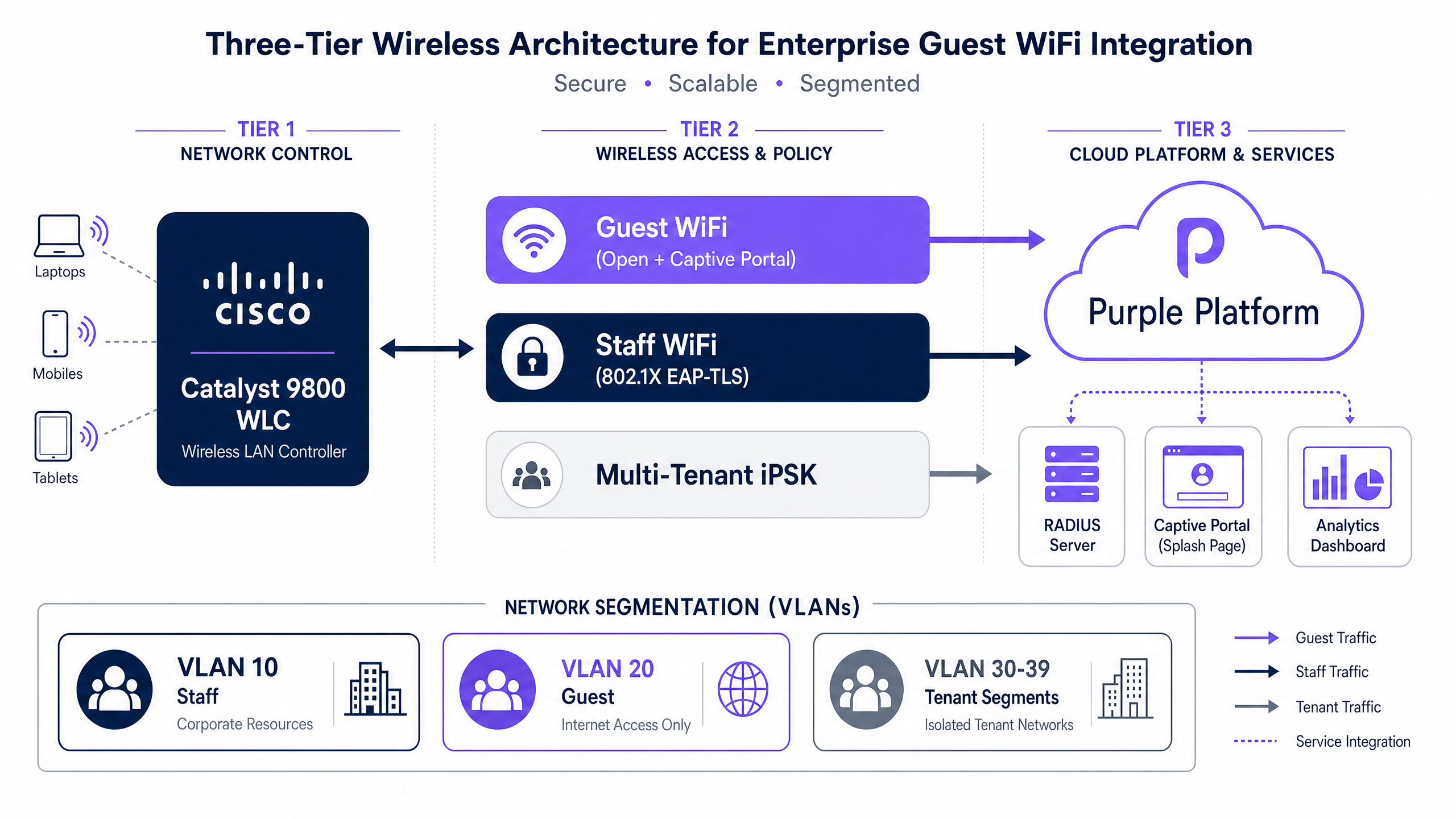
Deploying a secure, compliant, and scalable wireless network across enterprise environments requires tight integration between infrastructure and identity providers. This guide details the architectural decisions and configuration steps required to integrate Cisco Catalyst 9800 Wireless LAN Controllers (WLC) with Purple's cloud platform.
For guest access, we explore External Web Authentication (EWA) for captive portal redirection, enabling first-party data capture and Guest WiFi analytics. For staff access, we detail 802.1X EAP-TLS and PEAP authentication using Purple SecurePass as a RADIUS proxy to Microsoft Entra ID or Okta. For IoT and multi-tenant environments, we outline Cisco Identity PSK (iPSK) configuration, which enables dynamic VLAN assignment and network segmentation on a single SSID without relying on complex certificate deployments.
Purple operates across 80,000+ live venues globally, processing 440 million logins in 2024. This integration is proven in high-density Hospitality , Retail , and Transport environments where uptime, compliance, and seamless user experience are non-negotiable.
Technical Deep-Dive: Architecture and Authentication Flows
1. Guest WiFi: External Web Authentication (EWA)
To deliver a branded captive portal and capture user data for WiFi Analytics , the Cisco Catalyst 9800 WLC must intercept unauthenticated HTTP traffic and redirect it to Purple's cloud-hosted splash page. This mechanism is called External Web Authentication (EWA).
The process follows a specific sequence:
- The client associates to the open or Opportunistic Wireless Encryption (OWE) SSID.
- The WLC places the client in a
Webauth_reqdstate and applies a pre-authentication Access Control List (ACL). - The WLC intercepts the client's HTTP request and issues a 302 redirect to Purple's splash page URL, appending parameters like the AP MAC address, client MAC address, and WLAN SSID.
- The client completes the authentication journey on the Purple portal (e.g., social login, email capture, or terms acceptance).
- Purple's RADIUS server sends an Access-Accept message to the WLC.
- The WLC moves the client to the
Runstate, granting internet access based on the post-authentication policy.
2. Staff WiFi: 802.1X EAP-TLS and PEAP
For corporate devices, WPA2/WPA3 Enterprise with 802.1X provides the strongest security posture. Instead of deploying an on-premises RADIUS server like Cisco ISE, Purple SecurePass acts as a cloud RADIUS proxy. It terminates the Extensible Authentication Protocol (EAP) tunnel and forwards the identity verification to your Identity Provider (IdP), such as Microsoft Entra ID or Google Workspace.
- EAP-TLS: Recommended for managed corporate devices. Requires deploying client certificates via an MDM (e.g., Microsoft Intune). Authentication is silent and highly secure.
- PEAP-MSCHAPv2: Recommended for BYOD environments where certificate deployment is impractical. Users authenticate with their corporate credentials.
3. IoT and Multi-Tenant: Cisco Identity PSK (iPSK)
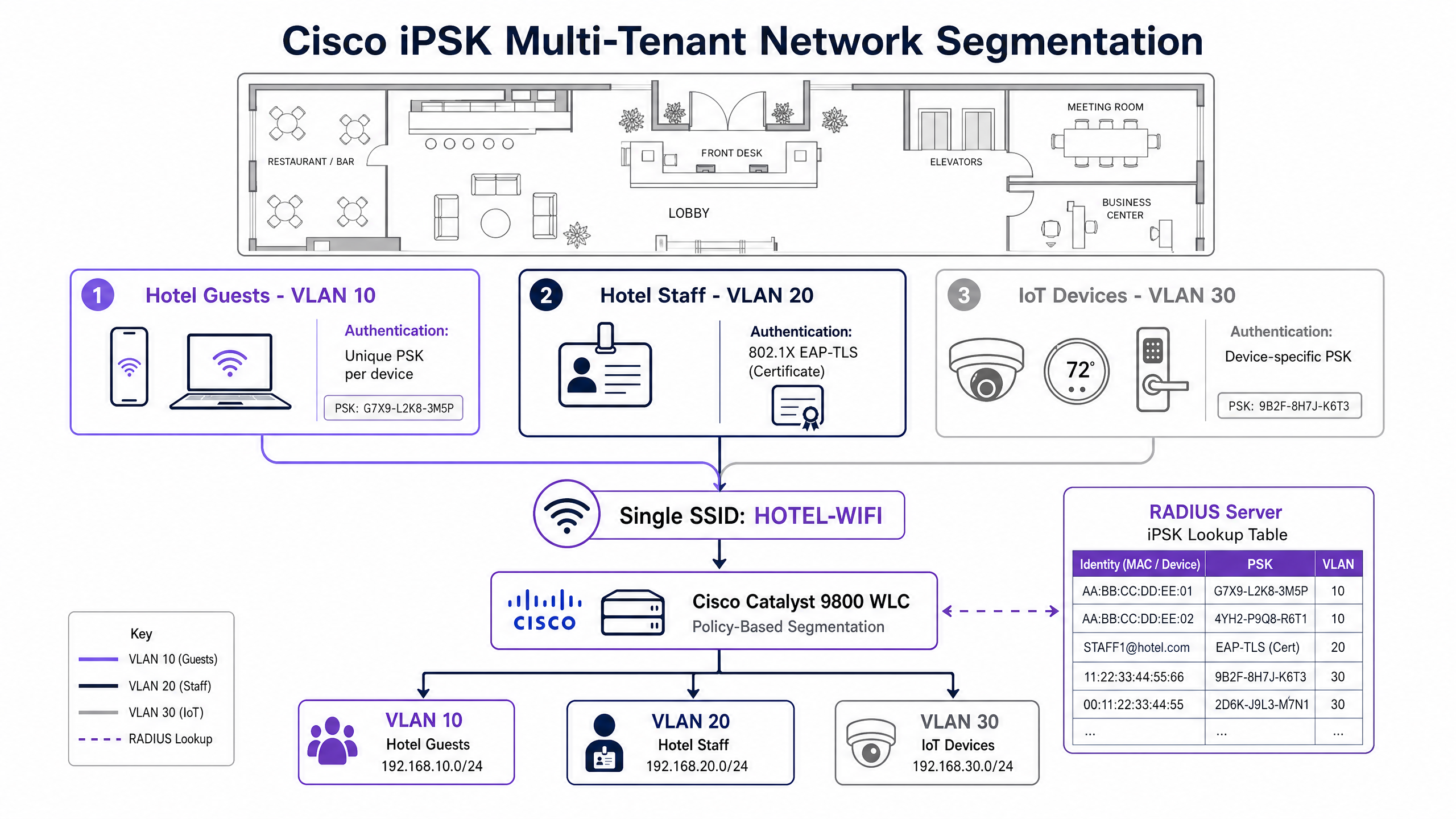
In environments like Build-to-Rent (BTR) properties, student accommodation, or retail stores with numerous IoT devices, deploying 802.1X is often impossible because devices lack supplicant support. Creating a separate SSID for every tenant or device type causes RF congestion.
Cisco iPSK solves this by allowing multiple unique Pre-Shared Keys (PSKs) on a single SSID. When a device associates, the WLC sends its MAC address to Purple's RADIUS server. Purple returns the specific PSK for that device along with dynamic VLAN assignment attributes, segmenting the traffic at the switch port.
Implementation Guide
Configuring Guest Captive Portal Redirection
To configure External Web Authentication on the Catalyst 9800 WLC, you must define a parameter map and a URL filter to permit pre-authentication traffic to Purple's portal [1].
Step 1: Create the Web Authentication Parameter Map
Configure the WLC to redirect clients to the Purple portal, passing necessary variables. You must configure the virtual IPv4 address (typically 192.0.2.1) globally.
parameter-map type webauth PURPLE-GUEST
  type consent
  timeout init-state sec 600
  redirect for-login https://portal.purple.ai
  redirect append ap-mac tag ap_mac
  redirect append wlan-ssid tag wlan
  redirect append client-mac tag client_mac
  redirect portal ipv4
  logout-window-disabled
  success-window-disabled
Step 2: Configure the Pre-Authentication URL Filter
Clients must reach Purple's portal before they are authenticated. The 9800 WLC uses URL filters to dynamically punch holes in the intercept ACL based on DNS snooping.
urlfilter list PURPLE-PREAUTH
  action permit
  url portal.purple.ai
Apply this URL filter to your WLAN policy profile under the pre-authentication ACL settings.
Configuring Dynamic VLAN Assignment for iPSK
To place users or devices into specific VLANs dynamically, the Purple RADIUS server must send three specific IETF attributes in the Access-Accept response [2].
- IETF 64 (Tunnel-Type): Set to
VLAN(value 13). - IETF 65 (Tunnel-Medium-Type): Set to
802(value 6). - IETF 81 (Tunnel-Private-Group-ID): Set to the VLAN ID as a string (e.g.,
"10").
On the Catalyst 9800 WLC, ensure the following are configured on the iPSK WLAN:
- MAC Filtering is enabled.
- AAA Override is enabled (crucial for accepting the RADIUS VLAN assignment).
- Layer 2 Security is set to WPA2-PSK (the configured PSK acts as a fallback).
Best Practices
- VLAN Verification: The VLAN ID returned by the RADIUS server in
Tunnel-Private-Group-IDMUST exist as a dynamic interface on the WLC. If it does not, the WLC drops the client onto the native VLAN, creating a severe security risk. - Certificate Trust Chains: For EAP-TLS deployments, upload your Root CA and any Intermediate CA certificates to the Purple SecurePass dashboard before rolling out client certificates. If the RADIUS server cannot validate the chain, authentication fails silently.
- Redundant RADIUS: Always configure secondary RADIUS servers. Set the primary timeout to 3 seconds with 2 retries to ensure rapid failover without frustrating the user.
- WPA3 Adoption: Use WPA3-SAE for iPSK networks where supported by client devices. For open guest networks, implement WPA3-OWE (Opportunistic Wireless Encryption) to encrypt traffic without requiring a password.
Troubleshooting & Risk Mitigation
| Failure Mode | Symptom | Root Cause | Mitigation |
|---|---|---|---|
| Redirect Loop | Client device constantly refreshes the captive portal page without loading it. | The pre-authentication ACL or URL filter does not permit access to Purple's portal IP addresses. The WLC redirects the client, the client tries to load the page, the WLC blocks it and redirects again. | Verify the PURPLE-PREAUTH URL filter is applied to the policy profile and correctly spells the portal domain. Ensure DNS traffic is permitted pre-auth. |
| iPSK Fallback Failure | Unregistered IoT device connects to the network but receives the wrong IP address. | The device's MAC address is not in Purple's RADIUS database. The WLC falls back to the global PSK configured on the WLAN and assigns the default VLAN. | Audit the MAC address in the Purple dashboard. Ensure the default VLAN assigned to the WLAN policy profile is a restricted quarantine network, not the corporate LAN. |
| RADIUS Timeout | Clients experience long delays connecting; WLC logs show RADIUS server unreachable. | Firewalls between the WLC and Purple's cloud RADIUS endpoints are blocking UDP ports 1812 (Authentication) or 1813 (Accounting). | Verify outbound firewall rules permit UDP 1812/1813 from the WLC management interface to Purple's published RADIUS IP addresses. |
ROI & Business Impact
Implementing a unified architecture with Cisco and Purple delivers measurable business value across three pillars:
- Operational Efficiency: Replacing manual VLAN provisioning and multiple SSIDs with iPSK reduces IT ticket volume. Automating IoT onboarding via API saves hours of technician time per site.
- Compliance and Security: Dynamic VLAN assignment ensures PCI DSS compliance in retail environments by strictly isolating payment terminals from guest traffic (Requirement 1.3). EAP-TLS eliminates the risk of shared staff passwords.
- Revenue Generation: Captive portal integration turns a cost centre (Guest WiFi) into a marketing asset. Capturing conscious-choice opt-ins builds a first-party database that drives loyalty campaigns and repeat visits.
References
[1] Cisco Systems, "Configure Spaces Captive Portal with Catalyst 9800 WLC," May 2025. [2] Cisco Systems, "Configure a RADIUS Server and WLC for Dynamic VLAN Assignment," September 2012.
Key Definitions
External Web Authentication (EWA)
A mechanism where the Cisco WLC intercepts unauthenticated HTTP traffic and redirects the client to an externally hosted captive portal (like Purple) for authentication.
Used to deliver branded splash pages and capture first-party data without relying on the WLC's limited internal web server.
Identity PSK (iPSK)
A Cisco feature that allows multiple unique Pre-Shared Keys to be used on a single SSID, with each key mapped to a specific client MAC address and VLAN via RADIUS.
Essential for securing IoT devices and multi-tenant environments where 802.1X is unsupported, reducing the need for multiple SSIDs.
AAA Override
A WLAN setting on the Cisco WLC that forces the controller to accept policy parameters (like VLAN IDs or ACLs) returned by the RADIUS server, overriding the local WLAN configuration.
Must be enabled for dynamic VLAN assignment and iPSK to function correctly.
EAP-TLS
Extensible Authentication Protocol - Transport Layer Security. A highly secure 802.1X authentication method that relies on mutual certificate exchange rather than passwords.
The gold standard for staff WiFi security, requiring an MDM to deploy client certificates to corporate devices.
PEAP-MSCHAPv2
Protected Extensible Authentication Protocol. An 802.1X method that encrypts the authentication process inside a TLS tunnel, allowing users to authenticate safely with a username and password.
Used for BYOD staff networks where deploying client certificates is not feasible.
Pre-Authentication ACL
An Access Control List applied to a wireless client before they have authenticated, defining exactly what network resources they can reach.
Crucial for captive portals; it must permit DNS and access to the Purple splash page IPs while blocking all other traffic.
Dynamic Interface
A logical interface created on the WLC mapped to a specific VLAN ID and physical port.
When RADIUS returns a VLAN ID for dynamic assignment, that VLAN must already exist as a dynamic interface on the WLC, or the client will be dropped onto the native VLAN.
WPA3-SAE
Simultaneous Authentication of Equals. The modern replacement for WPA2-PSK, providing forward secrecy and protection against offline dictionary attacks.
Supported by Cisco Catalyst 9800 and Purple RADIUS for securing modern IoT and guest networks.
Worked Examples
A 200-room hotel needs to segment network traffic across guests, staff, and IoT devices (door locks, thermostats) using a single Cisco Catalyst 9800 WLC, without creating multiple SSIDs that cause RF congestion.
Deploy a single SSID using Cisco iPSK. Register the MAC address of every IoT device in Purple's dashboard, assigning each to VLAN 30. Configure the WLC WLAN with MAC filtering, AAA Override, and WPA2-PSK. When a door lock associates, Purple's RADIUS server returns the unique PSK and IETF attributes 64, 65, and 81 to dynamically steer the device to VLAN 30. Guests use a separate open SSID with External Web Authentication pointing to Purple's captive portal.
A retail chain with 80 stores must isolate payment terminal traffic from guest WiFi traffic to maintain PCI DSS compliance, managed centrally via Cisco Catalyst Centre.
Configure the guest SSID with a pre-authentication ACL that explicitly drops traffic destined for the payment terminal subnet (VLAN 40). Use iPSK to authenticate payment terminals, dynamically assigning them to VLAN 40 via Purple's RADIUS server. Guest traffic is authenticated via the Purple captive portal and placed on VLAN 10.
Practice Questions
Q1. You are deploying a captive portal on a Catalyst 9800 WLC. Clients associate to the SSID, but their browsers continuously refresh the splash page URL without ever loading the content. What is the most likely architectural cause?
Hint: Consider the state of the client before authentication is complete and what traffic is permitted.
View model answer
The pre-authentication ACL or URL filter is misconfigured. It is blocking access to Purple's portal IP addresses. The WLC intercepts the traffic and redirects to the portal, but the client cannot reach the portal to load it, triggering an endless redirect loop. You must explicitly permit Purple's IP addresses or use a URL filter for the portal domain.
Q2. An IoT device authenticates successfully via iPSK, and Purple's RADIUS server returns an Access-Accept with IETF attributes 64, 65, and 81 specifying VLAN 50. However, the device is placed on VLAN 10 (the management VLAN). Why did this happen?
Hint: Think about the prerequisites required on the WLC itself to accept and apply a RADIUS-assigned VLAN.
View model answer
Either 'AAA Override' is disabled on the WLAN advanced settings, causing the WLC to ignore the RADIUS attributes, OR VLAN 50 does not exist as a configured dynamic interface on the WLC. If the assigned VLAN does not exist locally, the WLC falls back to the native/management VLAN.
Q3. A venue wants to deploy 802.1X for staff WiFi using Microsoft Entra ID. They do not have an on-premises RADIUS server like Cisco ISE. How can this be achieved using the Purple platform?
Hint: Consider how Purple handles the EAP tunnel and identity verification.
View model answer
Configure the WLC to use Purple SecurePass as the RADIUS server. Purple acts as a cloud RADIUS proxy, terminating the EAP-TLS or PEAP tunnel from the WLC and securely forwarding the identity lookup to Microsoft Entra ID via API/SAML. No on-premises RADIUS server is required.
Continue reading in this series
CommScope Ruckus Integration with Purple WiFi: Setup and Configuration Guide
This technical reference guide provides an authoritative configuration playbook for integrating CommScope Ruckus architectures with Purple WiFi. It details step-by-step deployments for Guest WiFi captive portals, Secure Staff WiFi via 802.1X, and Multi-Tenant network isolation using Ruckus Dynamic PSK.
CommScope Ruckus Integration with Purple WiFi: Setup and Configuration Guide
This technical reference guide provides an authoritative configuration playbook for integrating CommScope Ruckus architectures with Purple WiFi. It details step-by-step deployments for Guest WiFi captive portals, Secure Staff WiFi via 802.1X, and Multi-Tenant network isolation using Ruckus Dynamic PSK.
Allied Telesis Access Points Integration with Purple WiFi
This guide provides a comprehensive configuration playbook for integrating Allied Telesis TQ-Series access points with Purple WiFi. It covers external captive portal redirection, 802.1X RADIUS authentication, and dynamic VLAN steering using Private Pre-Shared Keys (PPSK) for secure multi-tenant deployments.