
How to leverage mailchimp SMS marketing to increase return visits
This technical reference details how to architect and deploy Mailchimp SMS marketing campaigns using first-party data captured through Purple Engage and Guest WiFi. It provides actionable guidance for IT and marketing teams on configuring the Mailchimp Connector, building automated campaign flows, and maintaining GDPR compliance - all to drive a measurable 24% increase in return visits across hospitality, retail, and public-sector venues.
Listen to this guide
View podcast transcript
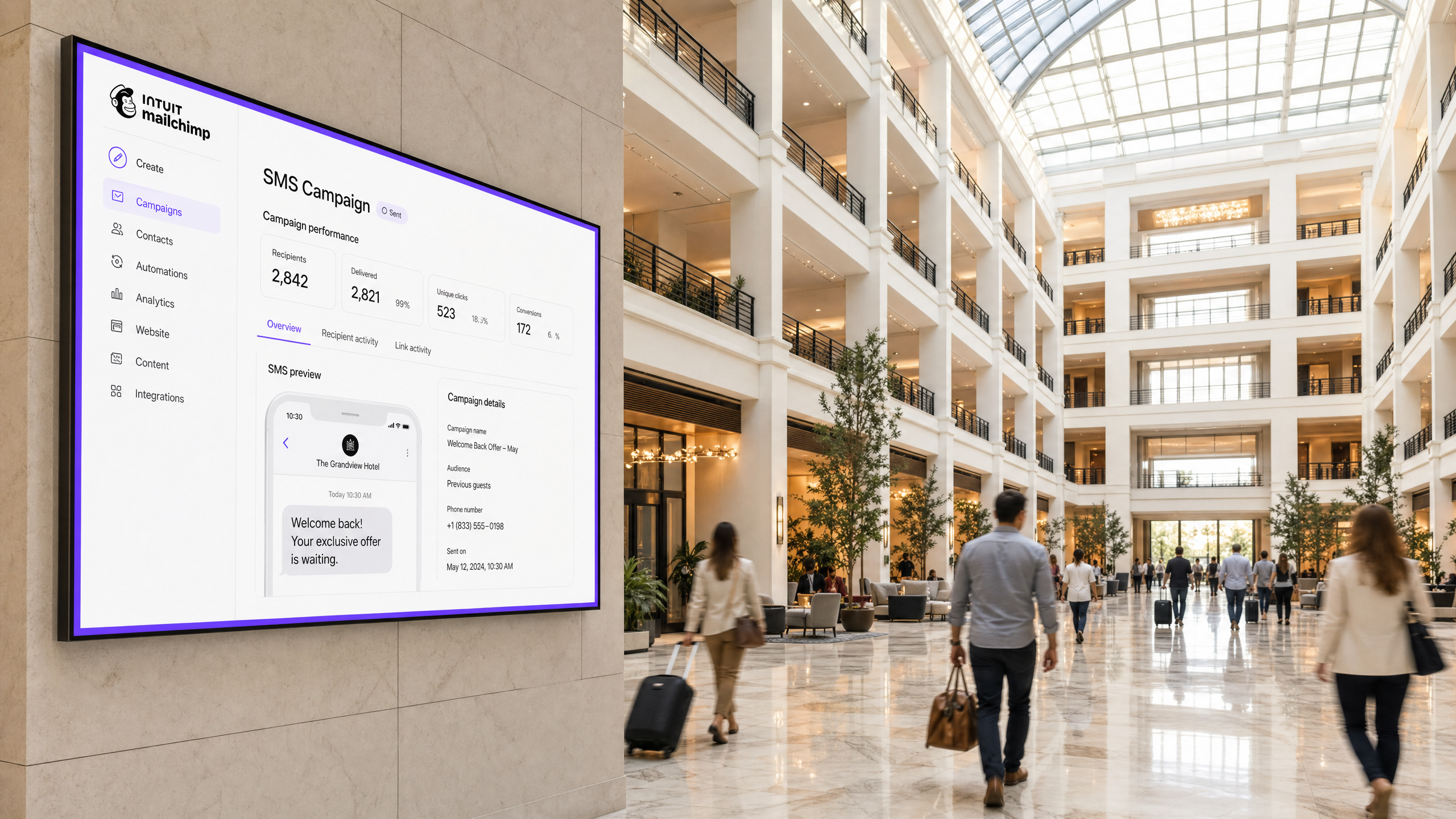
Executive summary
SMS is the highest-visibility channel available to physical venues. With a 98% open rate versus email's 20%, and 90% of messages read within three minutes, it is the most direct route to your guest's attention. The obstacle has always been data: how do you build a compliant, accurate database of mobile numbers at scale?
Purple Engage solves this at the network layer. Every guest who connects to your Guest WiFi authenticates through a captive portal that captures their first name, phone number, email address, and explicit marketing consent. The Mailchimp Connector then synchronises this data in real time, eliminating manual CSV exports and enabling automated SMS campaigns to fire within seconds of a guest's first login.
This guide covers the full deployment architecture, step-by-step connector configuration, campaign design, GDPR compliance, and troubleshooting for IT and marketing teams operating across hospitality, retail, events, and public-sector venues. Venues running targeted SMS campaigns via Purple data consistently record a 24% increase in return visits (Purple platform data, 2024).
Technical deep-dive
Why SMS outperforms email for return visit campaigns
The performance gap between SMS and email is not marginal - it is structural. SMS messages achieve a 98% open rate compared to email's average of 20% [Emarsys, 2026]. The average SMS response rate is 45%, versus 6% for email [Business.com]. Brands that integrate SMS into their omnichannel strategies see a 47.7% lift in customer engagement [Omnisend]. For a venue operator, these numbers translate directly to footfall and revenue.
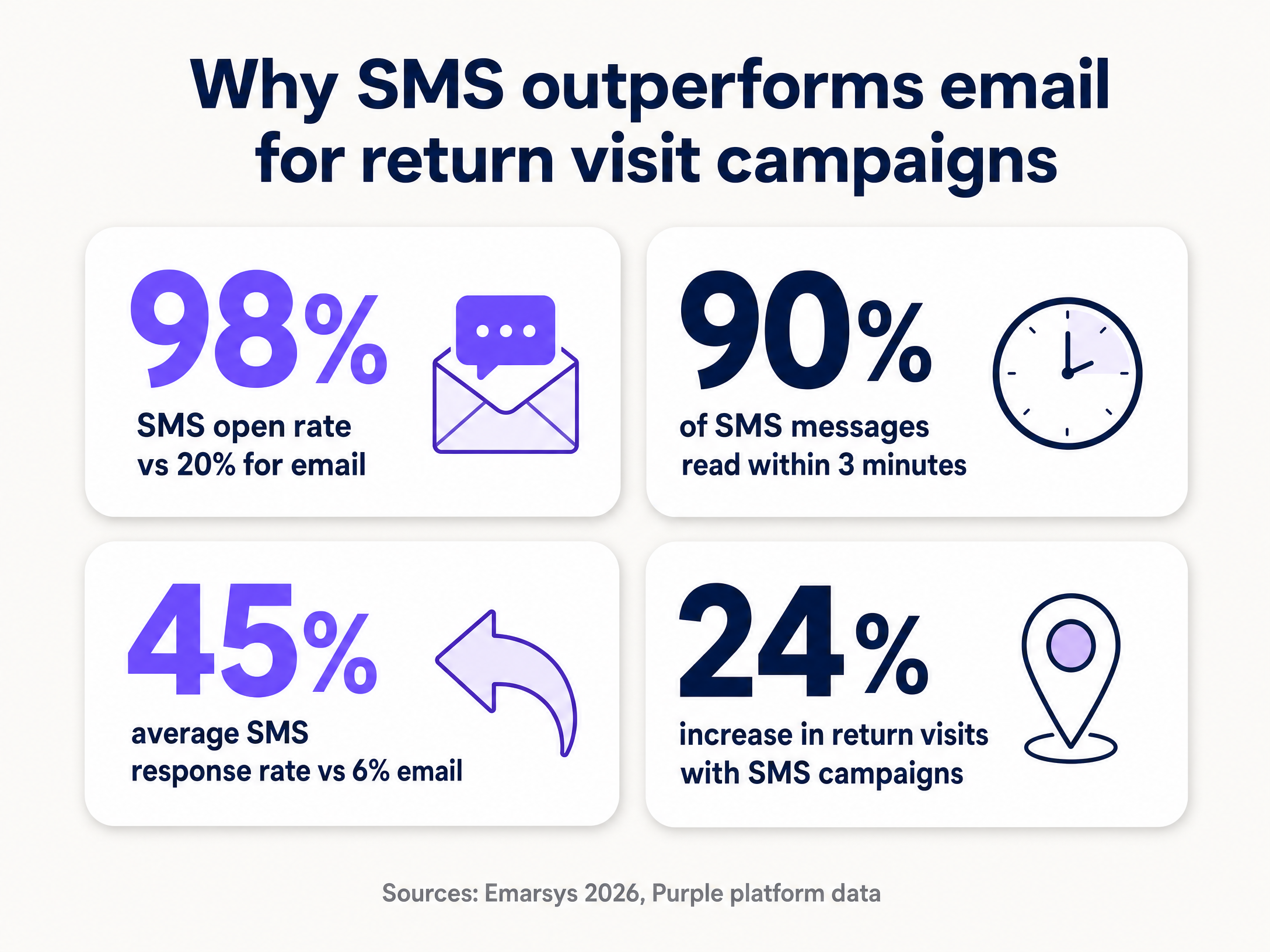
The reason SMS performs so well in physical venue contexts is timing. A guest who visited your hotel bar last Tuesday is far more likely to respond to a personalised text on a Friday afternoon than to an email newsletter. SMS is immediate, personal, and mobile-native - precisely the characteristics that matter when you are trying to convert a past visitor into a returning one.
Data capture architecture
The foundation of any SMS marketing programme is a clean, compliant contact database. Purple Engage builds this database automatically through the Guest WiFi authentication flow.
When a guest connects to the venue's WiFi network - whether that network runs on Cisco Meraki, HPE Aruba, Ruckus, Juniper Mist, Ubiquiti UniFi, Cambium, Extreme, or Fortinet hardware - they are directed to a captive portal. The portal is configurable and can be branded to match your venue. To gain internet access, the guest provides their mobile number and email address, and actively opts in to marketing communications.
This consent mechanism is critical. Purple records the exact timestamp, the method of collection, and the specific consent given. This audit trail is what makes the database GDPR-compliant. Unlike purchased lists or scraped data, every contact in your Mailchimp audience has explicitly agreed to receive messages from you.
The Mailchimp Connector: technical specification
The Purple Mailchimp Connector operates as a real-time webhook integration. When a guest authenticates on the WiFi, Purple pushes their data to the Mailchimp API immediately. The connector can be scoped at three levels: customer (all venues in an account), group (a subset of venues), or individual venue. This flexibility is essential for multi-site operators who need to segment their audience by location.
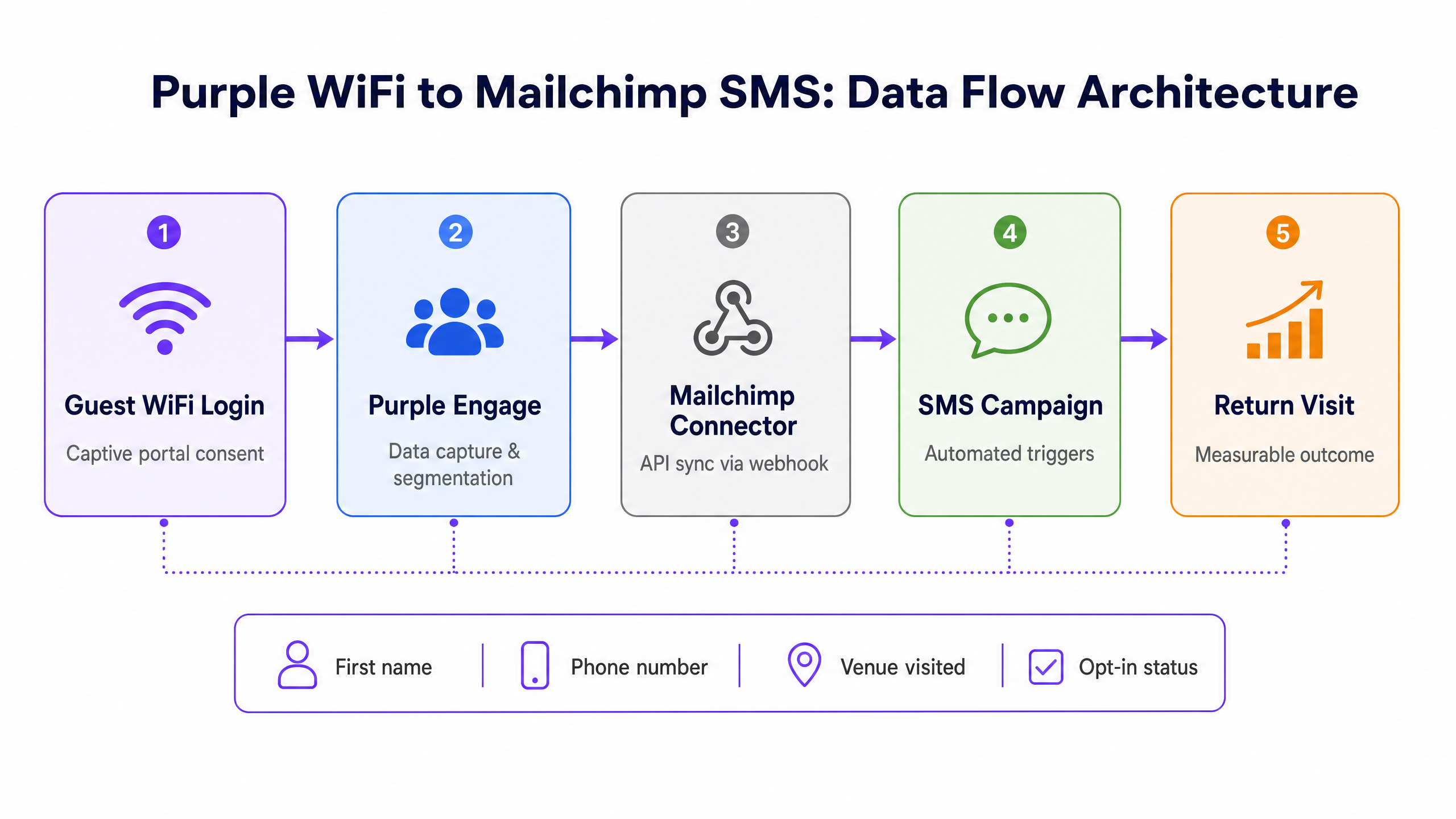
The connector maps the following data fields from Purple to Mailchimp:
| Purple field | Mailchimp field | Data type | Notes |
|---|---|---|---|
firstName |
First Name | String | Used for personalisation merge tags |
lastName |
Last Name | String | Used for personalisation merge tags |
phone |
Phone Number | String | The primary field for SMS campaigns |
email_address |
Email Address | String | Used for email campaigns |
status |
Subscription Status | String | subscribed or unsubscribed |
dateOfBirth |
Birthday | Custom field | Must be set up as BIRTHDAY merge tag |
name |
Venue Name | Array | The specific venue(s) the guest visited |
The name array is particularly valuable. It allows you to segment your Mailchimp audience by the specific venue a guest visited and to personalise SMS messages with that location. A guest who visited your Manchester location receives a message referencing Manchester, not a generic brand message.
Implementation guide
Deploying the Purple to Mailchimp SMS integration requires configuration in both platforms. The steps below apply to all hardware-agnostic deployments.
Step 1: Configure the captive portal
Log in to the Purple portal and navigate to your splash page settings. Ensure the login method includes a mandatory mobile number field. Configure the terms and conditions to include explicit, conscious-choice opt-ins for SMS marketing. Do not pre-tick the consent checkboxes - this violates GDPR. The opt-in must be a deliberate action by the guest.
For venues operating in the UK and EU, include a clear statement of what the guest is consenting to, such as: "I agree to receive promotional SMS messages from [Venue Name]. You can opt out at any time by replying STOP."
Step 2: Set up the Mailchimp Connector
- In the Purple portal, navigate to Management > Connectors and select the Mailchimp connector.
- Click Add and enter a descriptive connector name.
- In Mailchimp, generate an API key by navigating to Extras > API keys and clicking Create A Key. Copy and paste this key into the Purple portal.
- Locate your Mailchimp List ID by navigating to the audience settings and scrolling to the Unique ID for list field. Copy and paste this ID into the Purple portal.
- Select the appropriate scope for the connector: Customer level, Group level, or Venue level.
- Click Save to activate the API connection.
Before saving, verify that your Mailchimp audience has a custom field set up for date of birth. Navigate to Audience > Manage Contacts > Settings > Audience fields and MERGE TAGS. Create a new field with the type Birthday and set the merge tag value to exactly BIRTHDAY. If this field is absent or incorrectly named, the Purple connector cannot write date of birth data.
Step 3: Design automated campaigns in Mailchimp
With data flowing from Purple into Mailchimp, you can build automated SMS campaigns triggered by specific guest behaviours. Three campaigns form the baseline for any venue:
Welcome campaign. Triggered immediately after a guest's first WiFi login. Keep this message brief and welcoming. Example: "Hi [firstName], welcome to [Venue Name]. Show this text at the bar for a complimentary welcome drink."
Win-back campaign. Triggered when a guest has not connected to the WiFi for 30 days. Use the venue name from the name array to personalise the message. Example: "We have not seen you at [Venue Name] for a while, [firstName]. Here is 20% off your next visit. Valid for 7 days."
Birthday campaign. Triggered on the guest's birthday using the BIRTHDAY merge field. Example: "Happy birthday, [firstName]! Celebrate with us at [Venue Name] - your birthday treat is waiting."
For Retail operators, add a fourth campaign: a post-purchase follow-up triggered 14 days after the last visit, offering a related product recommendation. For Hospitality venues, consider a pre-arrival campaign triggered 24 hours before a confirmed booking.
For more on splash page design and first impressions, see How to make a great first impression with your guest WiFi (and keep your brand consistent) .
Best practices
Compliance and consent
GDPR (General Data Protection Regulation) and CCPA (California Consumer Privacy Act) both require explicit consent before sending marketing messages. The Purple captive portal provides a verifiable audit trail of this consent. Include clear opt-out instructions in every SMS message. Respect regional quiet hours - in the UK, Mailchimp enforces quiet hours between 9 PM and 8 AM.
For venues operating across multiple countries, note that Mailchimp supports SMS in the US, Canada, Australia, and over 30 European countries. Each country requires a separate Sending Number registration. In the UK and Belgium, Mailchimp uses Virtual Long Numbers (VLN). In most of Europe, Branded Sender IDs are used. In the US and Canada, 10-Digit Long Codes (10DLC) are required.
Personalisation and segmentation
Use the data captured by Purple to personalise every message. Address the guest by their firstName. Reference the specific venue they visited. Segment your audience by visit frequency - guests who visit weekly respond differently to guests who visit once a quarter.
For multi-site operators, avoid sending the same message to your entire database. A guest who visited your London venue should receive a message about London, not a generic national promotion. The venue-level scoping of the Purple connector makes this segmentation straightforward.
Message frequency
The data is clear: 23% of consumers would stop engaging with a brand if they receive too many marketing messages [SAP Engagement Cloud]. Limit promotional SMS to one or two per month. Use transactional messages (booking confirmations, event reminders) more freely, as these have a different consent basis and are expected by the recipient.
For further reading on SMS marketing for specific verticals, see our related guides: Comment exploiter le marketing par SMS pour les restaurants afin d'augmenter les visites de retour and Wie Sie SMS-Marketing fur Restaurants nutzen, um die Zahl der wiederkehrenden Besuche zu steigern .
For Healthcare and Transport operators, additional regulatory requirements apply. Always consult your legal team before deploying SMS marketing in these verticals.
Troubleshooting & risk mitigation
Data not syncing to Mailchimp
Verify the API key and List ID in the Purple connector settings. API keys expire if regenerated in Mailchimp - if you have recently rotated your Mailchimp API keys, you must update the connector with the new key. Also confirm that the Mailchimp audience has the correct custom fields configured, particularly the BIRTHDAY merge field.
Birthday field not populating
This is the most common configuration error. The custom field in Mailchimp must be set up with a Birthday data type and the merge tag must be set to exactly BIRTHDAY in capitals. Any deviation from this exact string will prevent the Purple connector from writing data to the field.
High opt-out rates
Review message frequency and relevance. Opt-out rates above 2% indicate that messages are either too frequent or insufficiently personalised. Audit your campaign triggers and ensure each message provides genuine value. A 20% discount sent once a month consistently outperforms a 5% discount sent weekly.
Carrier throttling (US deployments)
In the US, carriers enforce rate limits on SMS delivery. Businesses not listed on the Russell 3000 Index with a high brand score can send up to 4,500 SMS per minute to AT&T recipients and 200,000 per day to T-Mobile recipients. Businesses with a lower brand score face significantly reduced limits. Ensure your business has completed the standard vetting process and registered a 10DLC number to maximise throughput. If messages are queuing, Mailchimp's throttling dashboard will show the send duration estimate.
ROI & business impact
The business case for SMS marketing via Guest WiFi data is straightforward. Venues running targeted win-back campaigns via Purple data record a 24% increase in return visits (Purple platform data, 2024). With an average SMS ROI of $21 to $41 for every $1 spent [Upcity, 2023], the investment in the integration pays back rapidly.
For a 200-room hotel with an average food and beverage spend of £40 per guest visit, a 24% increase in return visits from a database of 5,000 opted-in guests represents approximately £48,000 in incremental annual revenue - from a campaign that, once configured, runs automatically.
For WiFi Analytics on campaign performance, Purple provides dashboards showing login frequency, dwell time, and return visit rates. These metrics allow you to correlate SMS campaign sends with actual footfall data, giving you a closed-loop view of campaign ROI that no other marketing channel can provide.
Purple currently operates across 80,000+ live venues with 440 million logins recorded in 2024 (Purple platform data). The platform is ISO 27001, GDPR, CCPA, and Cyber Essentials certified, ensuring your data infrastructure meets enterprise security standards.
Key Definitions
Captive portal
A web page that users must view and interact with before gaining access to a public WiFi network. It is the primary data collection and consent mechanism in a Guest WiFi deployment.
IT teams configure the captive portal in Purple to require specific data fields and consent checkboxes. Marketing teams use the portal design to reinforce brand identity and set expectations for future communications.
First-party data
Information a business collects directly from its own customers or visitors, with their knowledge and consent.
Unlike purchased lists or third-party data, first-party data captured via Purple WiFi is highly accurate, fully consented, and GDPR-compliant. It is the foundation of any effective SMS marketing programme.
Webhook
A method for one application to automatically send real-time data to another application when a specific event occurs.
The Purple Mailchimp Connector uses a webhook to push guest data to Mailchimp immediately upon WiFi authentication, ensuring the audience is always current without manual intervention.
Conscious-choice opt-in
A consent mechanism where the user must take a deliberate, active action to agree to receive marketing communications. Pre-ticked boxes do not qualify.
GDPR requires conscious-choice opt-ins for marketing communications. Purple's captive portal enforces this standard and records the consent timestamp for audit purposes.
10DLC (10-Digit Long Code)
A standard 10-digit phone number used by businesses to send SMS messages in the United States. Businesses must register their brand and use case with carriers to use 10DLC.
IT teams deploying SMS marketing in the US must ensure 10DLC registration is complete before launching campaigns. Unregistered numbers face severe carrier throttling.
Throttling
The deliberate slowing of message delivery by telecom carriers when a sender exceeds their permitted sending rate.
Throttling causes delays in campaign delivery, particularly during high-volume sends such as flash sales. Proper 10DLC registration and brand vetting minimise throttling risk.
Merge tag
A placeholder variable used in Mailchimp campaign content that is replaced with personalised data when the message is sent. For example, `*|FNAME|*` is replaced with the recipient's first name.
The Purple connector maps data to specific Mailchimp merge tags. The `BIRTHDAY` merge tag must be configured exactly in Mailchimp for date of birth data to populate correctly.
Hardware-agnostic
Software that operates independently of the underlying hardware manufacturer, integrating with multiple vendors without requiring proprietary equipment.
Purple is hardware-agnostic, meaning it deploys as a cloud overlay on existing network infrastructure from Cisco Meraki, HPE Aruba, Ruckus, Juniper Mist, Ubiquiti UniFi, Cambium, Extreme, and Fortinet.
Win-back campaign
An automated marketing campaign triggered when a customer has not engaged with a brand for a defined period, designed to re-activate lapsed relationships.
A 30-day or 90-day win-back SMS campaign is one of the highest-ROI automations a venue can deploy, targeting guests who have already demonstrated intent by visiting once.
Worked Examples
A 200-room hotel wants to increase food and beverage revenue from staying guests without relying on printed flyers or in-room tablets.
The IT manager configures the Purple Guest WiFi portal to require a mobile number and SMS opt-in at login. The Mailchimp connector is set to sync at the venue level. The marketing team creates an automated Mailchimp SMS campaign triggered at 4:30 PM each day, targeting all guests with an active WiFi session: 'Hi [firstName], join us in the lounge for 2-for-1 cocktails until 6 PM. Show this text at the bar.' A second campaign fires at 10:00 AM targeting guests who checked in the previous day: 'Good morning, [firstName]. Breakfast is served until 11 AM. Mention this text for a complimentary pastry.' Both campaigns use the name array to confirm the specific hotel property.
A multi-site retail operator with 50 locations wants to re-engage shoppers who have not visited any location in the past 90 days.
The operator uses Purple Engage to segment their database, filtering for users whose last login date is greater than 90 days ago. This segment is exported to a Mailchimp tag. An automated SMS win-back campaign fires: 'We miss you, [firstName]! Here is 15% off your next visit to [Venue Name]. Valid for 7 days. Show this text in-store.' The name array ensures each recipient sees the name of the specific location they last visited, not a generic brand message. The campaign includes a tracking link to measure click-through rates and a unique discount code per recipient to attribute in-store redemptions.
Practice Questions
Q1. Your venue operates across the UK and Germany. The marketing director wants to send a single SMS campaign to all opted-in guests simultaneously. What technical and compliance considerations must you address before proceeding?
Hint: Consider country-specific Sending Number requirements and quiet hours regulations.
View model answer
You must register separate Sending Numbers for each country. In the UK, Mailchimp uses a Virtual Long Number (VLN). In Germany, a Branded Sender ID is required. You must also verify that the campaign send time respects quiet hours in both countries - Mailchimp enforces country-specific quiet hours automatically, but you should schedule the send to fall within acceptable windows in both time zones. Additionally, confirm that consent was obtained in compliance with both UK GDPR and the German Telecommunications Act (TKG).
Q2. You have configured the Mailchimp connector and data is syncing correctly for all fields except `dateOfBirth`. Guests are logging in and their names, phone numbers, and email addresses appear in Mailchimp, but the Birthday field is blank. What is the most likely cause and how do you fix it?
Hint: Check the exact configuration of the custom field in Mailchimp.
View model answer
The most likely cause is that the custom field in Mailchimp has not been configured correctly. Navigate to Audience > Manage Contacts > Settings > Audience fields and MERGE TAGS. Verify that a custom field exists with the data type set to Birthday and that the merge tag value is set to exactly BIRTHDAY in capitals. If the merge tag is named anything other than BIRTHDAY - for example, 'Birthday', 'DOB', or 'birthday' - the Purple connector cannot write to it. Correct the merge tag and the field will populate on the next login event.
Q3. A US-based stadium operator is running an SMS campaign during a major event, targeting 80,000 opted-in fans. Messages are delivering slowly and many fans are not receiving them until after the event ends. What infrastructure issue is causing this and what should the IT team do to prevent it in future?
Hint: Review carrier rate limits and the business's vetting status.
View model answer
The stadium is hitting carrier rate limits. Without a high brand score and proper 10DLC registration, a US business can send as few as 75 SMS per minute to AT&T recipients. For an 80,000-recipient campaign, this would take days to complete. The IT team should complete the standard vetting process with Mailchimp to improve the brand score, which can increase throughput to 4,500 SMS per minute for AT&T recipients. For time-sensitive event campaigns, the team should also use Mailchimp's send duration feature to estimate delivery time in advance and schedule the campaign to begin well before the event starts.