
How to Fix Slow WiFi Without Upgrading Your Internet Plan
A comprehensive technical reference guide for IT managers and network architects on optimising enterprise WiFi performance without increasing ISP bandwidth. Covers RF tuning, client density management, QoS implementation, and how to leverage WiFi analytics to diagnose and resolve bottlenecks.
Listen to this guide
View podcast transcript
Executive Summary
For CTOs and venue operations directors managing high-density environments across Hospitality , Retail , and Transport , slow WiFi is a critical risk to customer experience and operational efficiency. The immediate instinct is often to upgrade the underlying ISP connection. However, in the vast majority of enterprise deployments, the internet pipe is rarely the bottleneck. The root cause of poor performance typically lies within the local radio frequency (RF) environment, suboptimal access point (AP) configuration, or inadequate client density management.
This guide provides a vendor-neutral, technical framework for diagnosing and resolving local network bottlenecks. By implementing proper channel planning, enforcing Quality of Service (QoS) policies, managing roaming behaviour, and leveraging WiFi Analytics , IT teams can dramatically improve throughput and reduce latency without incurring additional monthly ISP costs. This approach not only extends the lifecycle of existing hardware but also ensures compliance with data protection standards when deploying Guest WiFi solutions.
Technical Deep-Dive
RF Interference and Channel Overlap
The most pervasive cause of slow WiFi is co-channel interference (CCI). The IEEE 802.11 standard dictates a listen-before-talk protocol (CSMA/CA). When multiple APs operate on the same or overlapping channels, they must wait for the airtime to be clear before transmitting. This contention drastically reduces aggregate throughput.
In the 2.4 GHz band, only channels 1, 6, and 11 are non-overlapping. Relying on default auto-channel assignment algorithms often results in overlapping channel selections, especially in dense deployments.
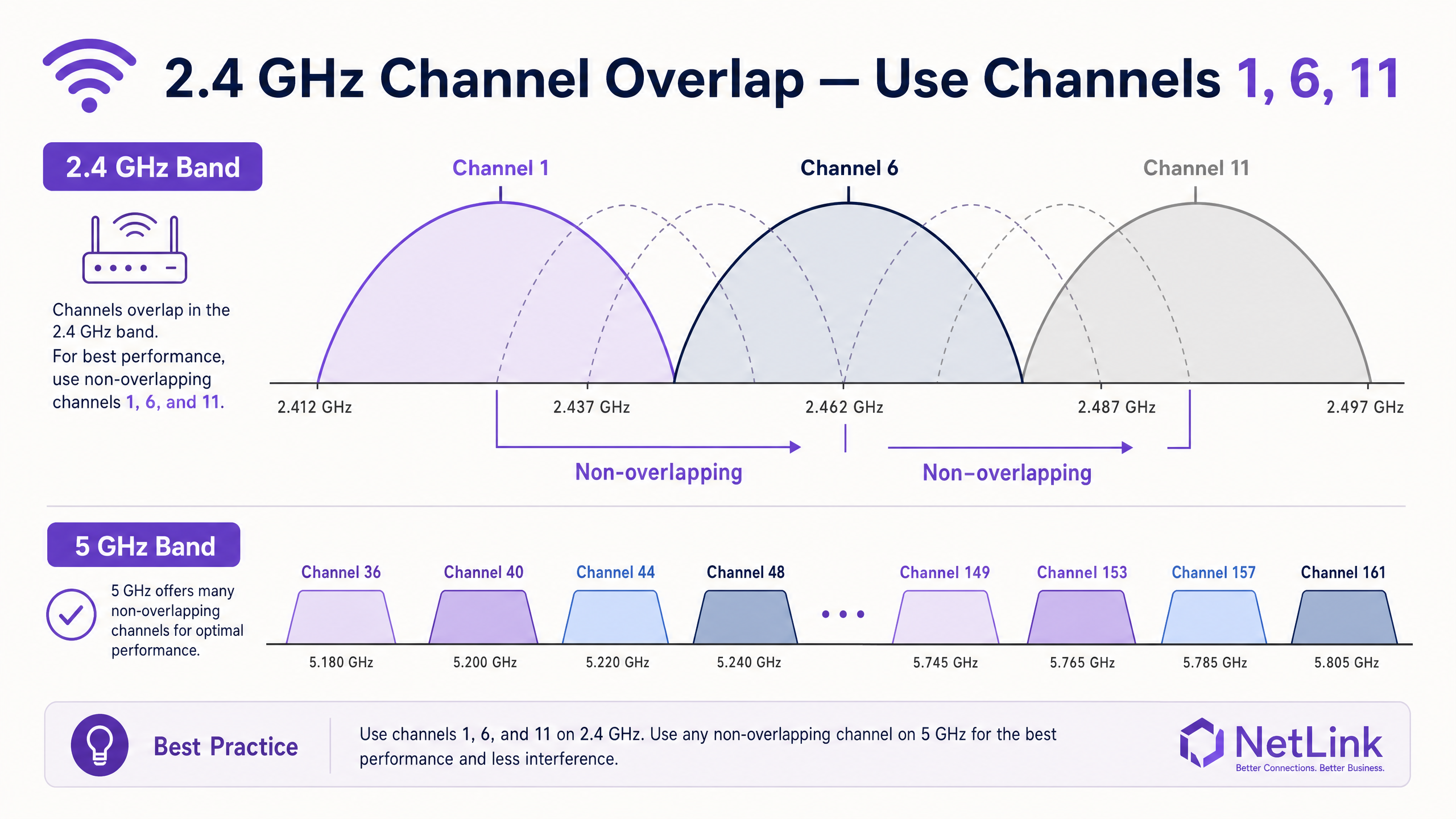
Migrating clients to the 5 GHz band is essential. The 5 GHz spectrum offers up to 24 non-overlapping channels (including DFS channels in the UK), significantly reducing CCI. Enterprise controllers should be configured with aggressive band steering to force capable clients onto the 5 GHz radio.
Client Density and Airtime Fairness
WiFi is a shared medium. An AP rated for 1.2 Gbps aggregate throughput will struggle if forced to serve 100 concurrent clients. Furthermore, legacy clients operating at low data rates (e.g., 1 Mbps or 2 Mbps) consume a disproportionate amount of airtime to transmit the same amount of data as a modern Wi-Fi 6 client.
To address this, administrators must disable legacy data rates. By setting the minimum mandatory data rate to 12 Mbps or 24 Mbps, legacy clients are forced to either associate at a higher rate or drop off, freeing up airtime for faster devices. This principle of airtime fairness is critical in high-density environments like conference centres and stadiums.
Implementation Guide
1. Baseline and Audit
Before implementing changes, establish a performance baseline. Utilise The Best WiFi Analyzer Tools for Troubleshooting Channel Overlap to map the current RF environment. Document channel utilisation, signal-to-noise ratio (SNR), and existing AP placement.
2. RF Tuning
- Static Channel Assignment: Manually assign non-overlapping channels (1, 6, 11) on the 2.4 GHz band based on your site survey.
- Transmit Power Reduction: In dense deployments, reduce the transmit (Tx) power of the 2.4 GHz radios. This shrinks the coverage cell of each AP, reducing overlap and CCI. The 5 GHz radios can typically operate at a higher Tx power due to the higher attenuation of 5 GHz signals.
- Disable Legacy Rates: Remove support for 802.11b rates (1, 2, 5.5, 11 Mbps) to improve overall cell efficiency.
3. Traffic Prioritisation (QoS)
Implement Quality of Service (QoS) to protect latency-sensitive applications. Without QoS, a single user downloading a large file can disrupt VoIP calls or POS transactions across the entire BSSID.
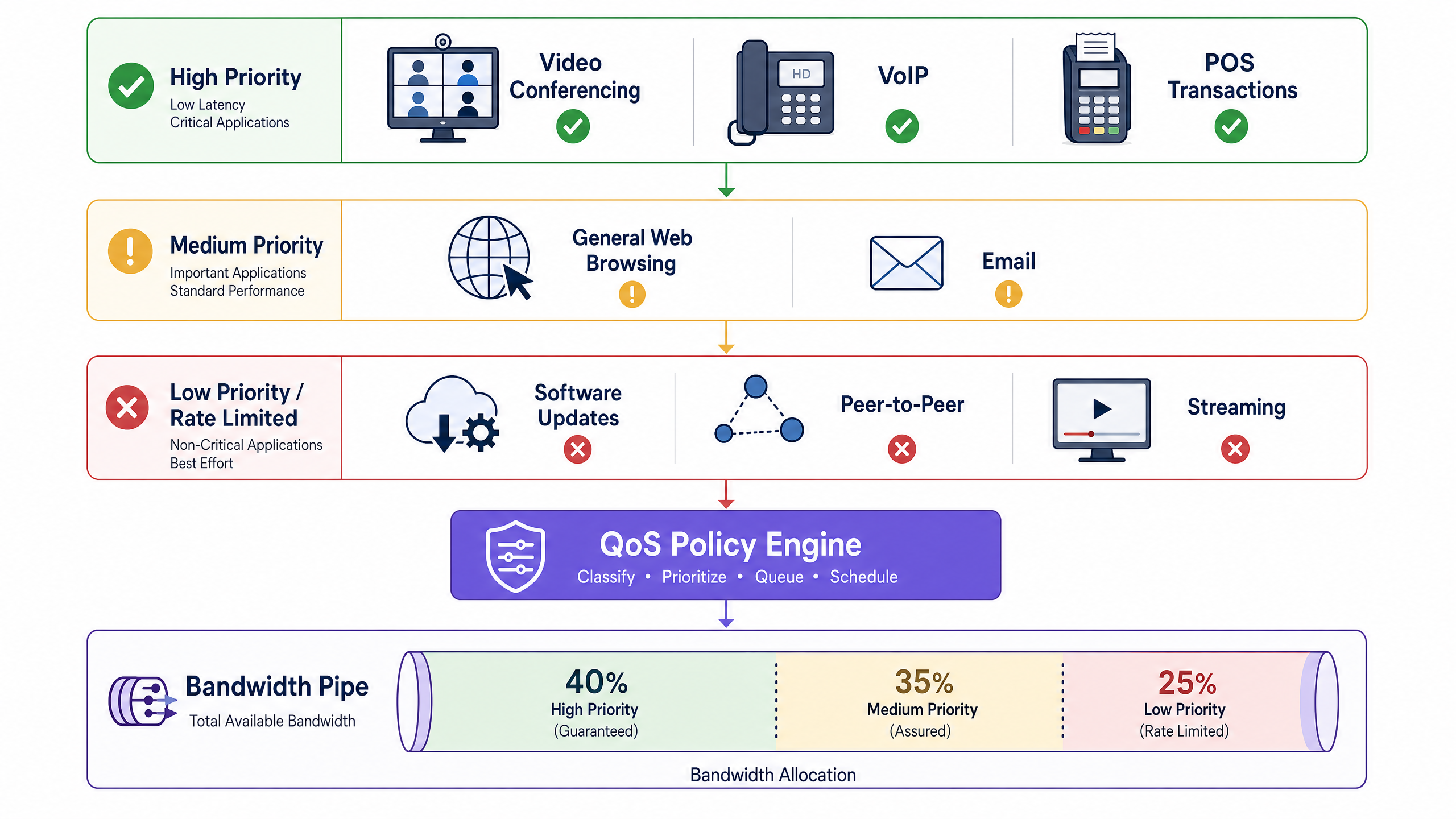
Configure DSCP (Differentiated Services Code Point) markings at the controller level to classify traffic into three tiers:
- High Priority (Guaranteed): VoIP, Video Conferencing, POS systems.
- Medium Priority (Assured): General web browsing, email, corporate applications.
- Low Priority (Rate Limited): Peer-to-peer, software updates, large media downloads.
4. Roaming Optimisation
Sticky clients—devices that hold onto a weak AP signal rather than roaming to a closer, stronger AP—degrade performance for the entire cell. Enable the 802.11 RRM suite (802.11r, 802.11k, and 802.11v) on your controller. These standards facilitate fast BSS transition and provide clients with neighbour reports, encouraging them to roam proactively.
Best Practices
- SSID Rationalisation: Every broadcast SSID incurs management frame overhead (beacons). Limit the number of broadcast SSIDs to a maximum of three or four per AP. Use VLAN tagging to segment traffic dynamically (e.g., via 802.1X RADIUS attributes) rather than creating separate SSIDs for different user groups.
- Security and Compliance: When deploying public networks, ensure compliance with PCI DSS and GDPR. Transitioning to WPA3-Enterprise or utilising secure, profile-based authentication methods like How a wi fi assistant Enables Passwordless Access in 2026 mitigates risk while improving the user experience.
- Continuous Monitoring: Deploy a hardware-agnostic analytics layer. Platforms that provide deep visibility into session duration, client density, and spatial analytics allow IT teams to proactively identify bottlenecks. For expansive venues, integrating Purple Launches Offline Maps Mode for Seamless, Secure Navigation to WiFi Hotspots can further enhance the visitor experience while providing valuable location data.
Troubleshooting & Risk Mitigation
- DFS Radar Detection: When using 5 GHz DFS channels, APs must listen for radar signatures. If radar is detected, the AP will immediately change channels, temporarily disconnecting clients. In environments near airports or weather stations, it may be necessary to exclude specific DFS channels from the channel plan.
- PoE Budget Exhaustion: Modern Wi-Fi 6 and Wi-Fi 6E APs often require PoE+ (802.3at) or PoE++ (802.3bt). If connected to an older 802.3af switch, the AP may boot up but operate with disabled radios or reduced Tx power. Always verify the switch PoE budget against the AP requirements.
- Uplink Bottlenecks: Ensure the switch ports connecting the APs are negotiating at full Gigabit or Multi-Gigabit speeds. A faulty cable causing a port to negotiate at 100 Mbps will severely throttle a high-capacity AP.
ROI & Business Impact
Optimising the local RF environment delivers immediate, measurable ROI. By deferring unnecessary ISP bandwidth upgrades, organisations can redirect OPEX toward strategic IT initiatives.
Furthermore, a stable, high-performing network is foundational for revenue-generating services. In retail and hospitality, reliable connectivity enables the deployment of rich media applications and targeted marketing campaigns. As highlighted when Purple Appoints Iain Fox as VP Growth – Public Sector to Drive Digital Inclusion and Smart City Innovation , robust infrastructure is the prerequisite for advanced smart city and digital inclusion projects. Success should be measured not just by ping times, but by increased user dwell time, higher conversion rates on captive portals, and reduced IT support tickets.
Listen to the Audio Briefing
For a deeper dive into these concepts, listen to our senior solutions architect outline the diagnostic framework and implementation priorities in this 10-minute technical briefing.
Key Definitions
Co-Channel Interference (CCI)
Interference caused when two or more APs operate on the same channel, forcing them to share the available airtime.
When IT teams encounter high latency despite low user counts, CCI from poorly planned channel assignments or neighbouring networks is usually the cause.
Band Steering
A controller feature that encourages or forces dual-band client devices to connect to the less congested 5 GHz or 6 GHz bands rather than the crowded 2.4 GHz band.
Essential for balancing load across the AP's radios and ensuring modern devices get the throughput they expect.
Airtime Fairness
A mechanism that allocates equal transmission time to all clients, rather than equal packet counts, preventing slow legacy devices from dragging down the performance of the entire network.
Critical in mixed-device environments like public venues, where a single old smartphone can otherwise cripple the AP for everyone else.
Dynamic Frequency Selection (DFS)
A requirement for APs operating on certain 5 GHz channels to detect and avoid interfering with military or weather radar systems.
IT managers must be aware of DFS when designing networks near airports; if radar is detected, the AP must immediately vacate the channel, causing temporary client disconnects.
Minimum Mandatory Data Rate
The lowest speed at which an AP will allow a client to connect. Disabling lower rates (1, 2, 5.5 Mbps) forces clients to use faster modulation schemes or roam to a closer AP.
A primary tool for eliminating 'sticky clients' and improving overall cell efficiency.
802.11r (Fast BSS Transition)
An IEEE standard that allows a client device to roam seamlessly between APs without needing to re-authenticate to the RADIUS server every time.
Vital for maintaining active VoIP calls or video streams as a user walks through a large facility.
Quality of Service (QoS)
Network policies that prioritise certain types of traffic (e.g., voice or POS data) over less critical traffic (e.g., guest downloads).
Necessary to ensure business-critical operations remain stable even when the guest network is heavily utilised.
Spatial Streams
Multiple independent data signals transmitted simultaneously over different antennas (e.g., 2x2, 4x4 MIMO) to increase throughput.
When evaluating AP hardware, higher spatial streams indicate greater capacity to handle dense client environments.
Worked Examples
A 200-room hotel in a dense urban environment is experiencing severe WiFi complaints during the evening peak (7 PM - 10 PM). The ISP connection is 1 Gbps symmetric, but guest throughput drops below 5 Mbps. The controller shows high channel utilisation on the 2.4 GHz band.
- Conduct an RF survey to identify overlapping APs from neighbouring buildings. 2. Manually assign non-overlapping channels (1, 6, 11) on 2.4 GHz and reduce Tx power by 3-6 dBm to shrink the cell size. 3. Enable aggressive band steering to force 5 GHz-capable devices off the congested 2.4 GHz band. 4. Increase the minimum mandatory data rate to 12 Mbps to prevent sticky legacy clients from consuming excessive airtime. 5. Implement QoS to rate-limit bulk downloads while prioritising streaming and VoIP traffic.
A large retail chain wants to deploy a new POS system over WiFi, but the current network supports 8 different SSIDs (Guest, Staff, IoT, Scanners, Managers, CCTV, HVAC, Vendors). Performance is sluggish even when the store is empty.
Consolidate the SSIDs to a maximum of three: 'Retail-Guest' (Open/Captive Portal), 'Retail-Secure' (802.1X), and 'Retail-IoT' (PSK/MPSK). Use RADIUS attributes via the 802.1X authentication on the 'Retail-Secure' SSID to dynamically assign staff, POS terminals, and managers to their respective VLANs. This drastically reduces the management frame overhead (beacons) that is currently consuming a large percentage of the available airtime.
Practice Questions
Q1. A stadium deployment is experiencing poor throughput in the VIP seating area. The APs are configured to maximum transmit power on both 2.4 GHz and 5 GHz to 'ensure coverage'. What is the likely result of this configuration, and how should it be corrected?
Hint: Consider how clients decide when to roam, and the impact of large coverage cells overlapping.
View model answer
Maximum Tx power creates massive overlapping coverage cells, leading to severe Co-Channel Interference (CCI) and 'sticky clients' that refuse to roam to closer APs because they still hear a strong signal from distant APs. The correction is to significantly reduce the Tx power (especially on 2.4 GHz) to create smaller, non-overlapping micro-cells, forcing clients to roam appropriately and increasing aggregate capacity.
Q2. You are auditing a network with 6 SSIDs broadcast across all APs. The client complains that the network feels 'sluggish' even when only a few users are connected. Why is this happening?
Hint: Think about the management frames that APs must broadcast for every active SSID.
View model answer
Each SSID must broadcast beacon frames (typically every 100ms) at the lowest mandatory data rate. With 6 SSIDs, the management frame overhead is consuming a massive percentage of the available airtime before any actual user data is transmitted. The solution is to consolidate to 3 or fewer SSIDs and use 802.1X/RADIUS to dynamically assign VLANs.
Q3. A school has upgraded to 1 Gbps fibre, but laptops in a classroom with 30 students are struggling to load web pages. The AP is a modern Wi-Fi 6 model. A packet capture shows several legacy 802.11g devices connected. What is the most immediate fix?
Hint: Consider how legacy devices affect the transmission time for the entire BSSID.
View model answer
The legacy 802.11g devices are connecting at very low data rates (e.g., 1 or 2 Mbps) and monopolising the airtime, dragging down performance for the modern Wi-Fi 6 laptops. The immediate fix is to disable legacy data rates by raising the minimum mandatory data rate to 12 Mbps or 24 Mbps, forcing the older devices off the network or requiring them to use faster modulation.