
Designing B2B Captive Portals: Collecting Registered Name and Company Data
This guide provides IT managers and venue operators with a vendor-neutral technical framework for designing B2B captive portals. It details how to structure registration fields to capture registered name and company data, ensuring high completion rates while maintaining GDPR compliance and building account-level intelligence.
Video overview
Listen to this guide
View podcast transcript
📚 Part of our core series: Captive Portal Guide →

Executive Summary
Designing a B2B captive portal requires a different architectural approach than a consumer retail deployment. For IT managers and venue operations directors at conference centres, hotels, and business hubs, the primary objective is not simply building a generic email list. The goal is to capture structured registered name and company data to build account-level intelligence.
This technical guide outlines the exact field architecture required to maximise form completion rates while capturing commercially valuable first-party data. It covers the technical data flow from access point to CRM, the specific GDPR compliance mechanisms required for B2B data processing, and how to normalise company identities using email domains. By implementing these vendor-neutral recommendations across hardware platforms like Cisco Meraki or HPE Aruba, venues can transform their guest WiFi from a cost centre into a measurable driver of commercial ROI.
Technical Deep-Dive
A captive portal intercepts a visitor's initial HTTP request and redirects their device to a hosted login page before granting network access. In a B2B context, the data captured during this authentication flow is highly valuable. However, the architecture must balance data collection requirements against user friction and compliance obligations.
The B2B Field Architecture
The most common failure mode in B2B captive portal design is form bloat. Research consistently demonstrates that increasing mandatory fields from two to five results in a 20% drop in form completion. For a busy professional at a conference centre, a long registration form leads directly to connection abandonment.
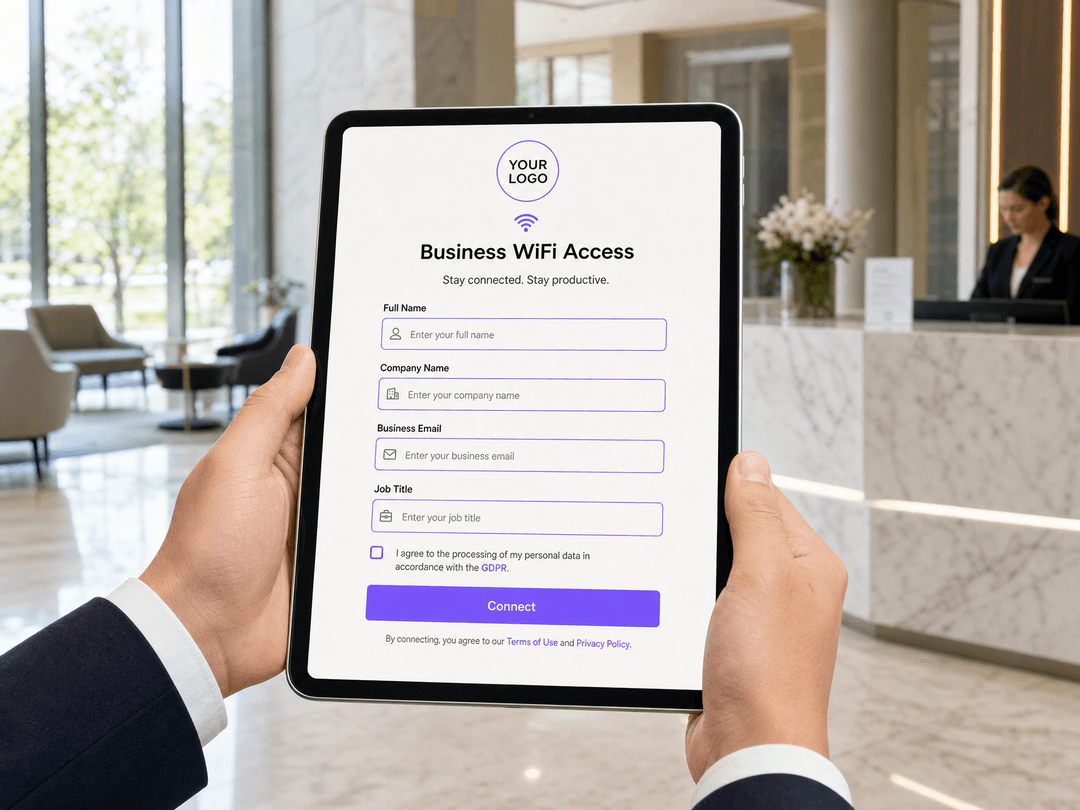
The optimal B2B registration form consists of exactly three mandatory fields:
- Full Name: Identifies the individual visitor.
- Company Name: Provides the explicit business affiliation.
- Business Email: Serves as the verified contact point and the primary identity anchor.
Job title should be included as an optional field. It provides valuable segmentation data for exhibitors or sponsors, but making it mandatory introduces unnecessary friction.
Identity Resolution and Data Normalisation
The critical technical mechanism in B2B data collection is using the email domain for identity resolution, rather than relying on the free-text company name field. Visitors will type their company name inconsistently (e.g., "Deloitte", "Deloitte UK", "Deloitte Consulting").
Your back-end logic must normalise these entries using the email domain suffix (e.g., @deloitte.com). This ensures that 50 visitors from the same organisation are aggregated into a single account profile in your CRM, regardless of how they typed the company name. This approach also mitigates the impact of MAC address randomisation (introduced in iOS 14 and Android 10), as the verified email address remains stable across devices and sessions.
Technical Architecture and Data Flow
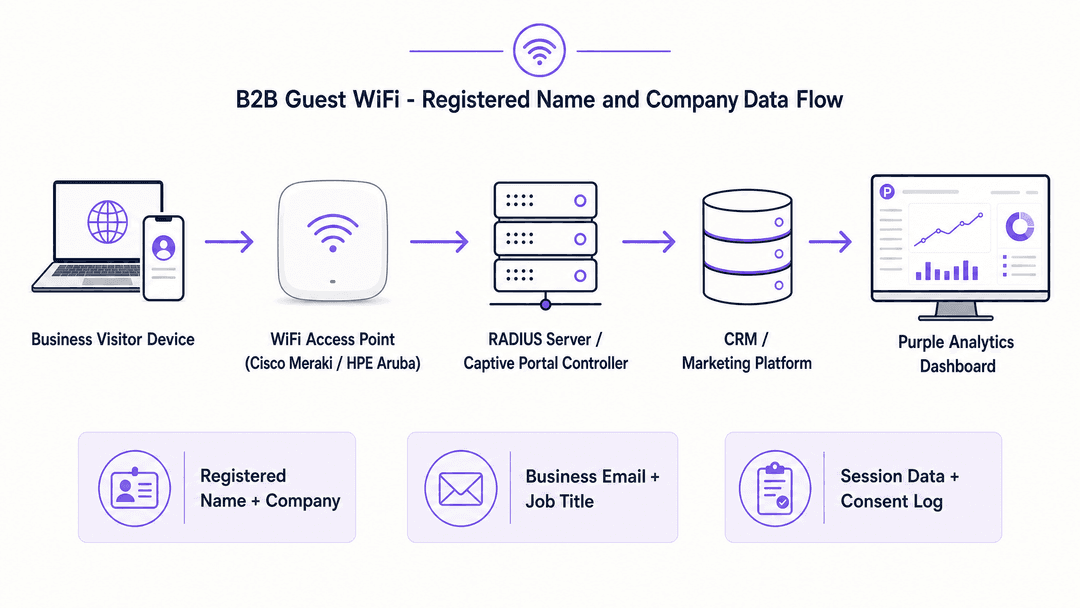
The data flow for a compliant B2B captive portal involves four distinct layers. Purple operates as a cloud overlay across these layers, integrating with existing infrastructure rather than requiring a rip-and-replace approach.
- Access Point Layer: Hardware from vendors like Cisco Meraki, HPE Aruba, or Juniper Mist intercepts the connection and handles the redirection.
- Portal Controller: Serves the branded registration page and validates the submitted data.
- Identity Store: Securely stores the registered name, company data, and explicit consent logs.
- Analytics and CRM Integration: Normalises the data and syncs it to marketing platforms or CRM systems via API.
Implementation Guide
Deploying a B2B captive portal requires careful configuration of both the network hardware and the portal software.
Step 1: Network Configuration
Configure your guest SSID to use an open network with a captive portal redirect. Ensure that WPA3 is enabled where supported by client devices to provide encryption over the air, even on an open network. Isolate the guest VLAN entirely from the corporate network, routing traffic directly to the firewall.
Step 2: Portal Design
Build the registration page using the minimal field set: Full Name, Company Name, and Business Email. Implement domain validation on the email field to reject known consumer domains (e.g., @gmail.com, @yahoo.com) if your venue policy strictly requires business addresses.
Step 3: Consent Architecture
Implement separate checkboxes for network access and marketing communications. The terms of service checkbox is mandatory for access; the marketing checkbox must be optional and unticked by default.
Step 4: CRM Integration
Configure the API webhook from your portal controller to your CRM. Map the portal fields to the corresponding Contact and Account objects, using the email domain to handle Account matching and deduplication.
Best Practices
When designing B2B captive portals, adhere to these industry-standard recommendations:
- Mandate Business Emails: For high-value B2B venues, validate the email input to reject consumer domains. This ensures the data collected is professionally relevant.
- Enforce Session Limits: Implement a per-device bandwidth cap and a session timeout (e.g., 4 hours). This prevents a single device from monopolising the network and forces a re-authentication if the visitor stays for an extended period.
- Offer Social Login Cautiously: LinkedIn login provides excellent B2B data (name, company, job title) without manual entry. Offer it as an option, but always provide a standard form fallback, as not all visitors will authorise a social connection on a corporate device.
Troubleshooting & Risk Mitigation
The primary risk in captive portal deployment is regulatory non-compliance, specifically under the UK GDPR.
Managing GDPR Compliance
Collecting registered name and company data constitutes processing personal data. You must establish a lawful basis for this processing. While legitimate interest can cover basic session data for network security, building a marketing database requires explicit consent under Article 6(1)(a).
Do not bundle consent. If a visitor must agree to receive marketing emails to access the WiFi, the consent is not freely given and is invalid. Your portal must log the exact timestamp of consent and the version of the privacy notice displayed.
Data Retention
Do not store session logs and consent records in the same system with the same retention policy. Session logs used for troubleshooting should be purged after 30 days. Consent records must be retained for the duration of the relationship plus two years to handle Data Subject Access Requests (DSARs). Use a platform that automates these distinct retention rules.
ROI & Business Impact
A properly designed B2B captive portal transforms anonymous footfall into structured account intelligence. For a conference centre, knowing that 34% of attendees belong to FTSE 100 companies directly supports higher sponsorship and advertising rates. For a hotel group, identifying business travellers who visit multiple properties enables highly targeted, account-based marketing campaigns that drive direct bookings. The ROI is measured not just in marketing list size, but in the actionable sales signals generated by the registered company data.
Podcast Briefing
Listen to our senior technology consultant explain the technical architecture and compliance requirements for B2B captive portals.
Key Definitions
Captive Portal
A web page that intercepts a visitor's connection attempt and forces interaction (such as registration or authentication) before granting network access.
The primary mechanism for capturing first-party data and enforcing terms of service on guest WiFi networks.
Identity Resolution
The process of matching disparate data points to a single, unified profile.
In B2B WiFi, this means using the business email domain to link a visitor to a specific corporate account, rather than relying on transient MAC addresses.
MAC Address Randomisation
A privacy feature in modern mobile operating systems that generates a temporary, network-specific hardware address to prevent cross-network tracking.
Forces IT teams to rely on authenticated data (like email addresses) rather than hardware identifiers for visitor analytics.
Data Normalisation
The process of structuring and standardising data to eliminate redundancy and inconsistencies.
Crucial for B2B portals where visitors might type 'IBM', 'IBM UK', or 'I.B.M.' - normalisation groups these under the ibm.com domain.
Article 6(1)(a) Consent
The GDPR lawful basis requiring freely given, specific, informed, and unambiguous indication of the data subject's wishes.
The required legal basis for adding a WiFi visitor to a marketing database.
Article 6(1)(f) Legitimate Interests
The GDPR lawful basis allowing data processing if it is necessary for the organisation's legitimate interests, provided it doesn't override the user's rights.
Can be used to justify processing basic session data for network security, but is generally insufficient for B2B marketing data collection.
RADIUS Server
Remote Authentication Dial-In User Service; a networking protocol that provides centralised authentication, authorisation, and accounting management.
The back-end system that communicates with the portal controller to authorise the device's MAC address once registration is complete.
VLAN Isolation
Configuring network switches to separate specific traffic into its own virtual local area network.
A mandatory security practice ensuring guest WiFi traffic cannot access internal corporate network resources.
Worked Examples
A financial district conference centre running 200 events annually needs to capture actionable attendee data to justify increased sponsorship rates. Currently, their WiFi portal asks for 8 fields, resulting in a 45% drop-off rate and inconsistent company data.
The venue replaced the 8-field form with a structured B2B portal requiring only Full Name, Company Name, and Business Email, plus an optional Job Title field. They implemented back-end normalisation using the email domain to aggregate visitors into canonical company accounts.
A hotel group with 45 properties wants to identify corporate clients who frequently use meeting facilities across multiple locations, but their current portal data is siloed per property and relies on MAC addresses, which are increasingly randomised by iOS and Android devices.
The group standardised a single B2B portal template across all 45 properties. They shifted their identity resolution logic away from the MAC address and anchored it entirely to the verified Business Email address collected at registration, storing all data in a centralised CRM.
Practice Questions
Q1. Your marketing team wants to add 'Industry Sector' and 'Company Size' dropdowns to the conference centre WiFi login portal to improve lead scoring. How should IT respond?
Hint: Consider the impact of form length on connection abandonment rates.
View model answer
IT should advise against adding these fields. Increasing the form length will cause a significant drop in completion rates, meaning fewer total leads. Instead, IT should recommend capturing only the Business Email, and using a third-party data enrichment tool integrated with the CRM to automatically append 'Industry Sector' and 'Company Size' based on the email domain.
Q2. A venue operator suggests making the marketing consent checkbox mandatory so they can build their database faster. What is the technical and compliance response?
Hint: Review the requirements for valid consent under Article 6(1)(a) of the GDPR.
View model answer
This approach violates GDPR. Consent must be 'freely given'. If WiFi access is conditional upon accepting marketing communications, the consent is bundled and legally invalid. The portal must separate the mandatory terms of service acceptance from the optional marketing opt-in.
Q3. The analytics dashboard shows 500 unique MAC addresses connected during a two-day corporate event, but the CRM only shows 280 registered email addresses. What is the most likely technical cause?
Hint: Consider modern mobile operating system privacy features.
View model answer
This discrepancy is likely caused by MAC address randomisation on iOS and Android devices. A single user's device may generate a new MAC address when reconnecting or returning the next day, inflating the hardware count. The CRM count of 280 registered email addresses is the accurate metric for actual human visitors.
Continue reading in this series
Captive portal for Ruijie: set it up with Purple guest WiFi
How Purple's cloud guest WiFi sits on top of Ruijie RG Series access points using web authentication and RADIUS, configured from the command line, and where to find the exact setup steps.
Captive Portal Architecture: Security, Redirection, and Best Practices
A definitive technical reference on enterprise captive portal architecture. This guide unpacks network isolation, DNS redirection, RADIUS authentication, and security compliance for IT leaders deploying secure, data-rich guest WiFi networks.
Optimizing B2B Captive Portals: Capturing Company Names and Professional Data
This guide explains how IT managers, network architects, and venue operations directors can configure B2B captive portals to capture professional data - company names, job titles, and business email addresses - at the point of WiFi login. It covers the full technical architecture from VLAN isolation and RADIUS authentication through to CRM integration with Salesforce and HubSpot, with CCPA/CPRA compliance built in. Venues that deploy this correctly turn their guest WiFi network into a first-party data engine and automated lead generation system.