
Managing Digital Certificates for EAP-TLS WiFi Authentication

This technical reference guide details the lifecycle management of digital certificates for EAP-TLS WiFi authentication. It provides actionable strategies for deploying, renewing, and revoking certificates at scale across enterprise networks using SCEP and MDM integrations.

📖 4 min read📝 892 words🔧 2 worked examples3 practice questions📚 8 key definitions

Listen to this guide

View podcast transcript

Speak in British English with a confident, authoritative, and conversational tone - like a senior consultant briefing a client. Measured pace, clear diction, warm but direct. Occasional natural pauses for emphasis: Welcome to the Purple technical briefing series. Today we are talking about EAP-TLS certificate management - specifically, how to run a certificate-based WiFi authentication programme at scale without it becoming a full-time operational burden. [medium pause] If you are responsible for corporate or staff WiFi across multiple sites - whether that is a hotel group, a retail estate, a university campus, or a public-sector estate - this briefing is for you. We are going to cover the full certificate lifecycle: from setting up your CA hierarchy, through automated deployment via SCEP and MDM, to renewal and revocation. And we will talk about where things go wrong, because they do go wrong, and how to avoid the most common traps. [medium pause] Let us start with the fundamentals. EAP-TLS - that is Extensible Authentication Protocol with Transport Layer Security - is the gold standard for 802.1X WiFi authentication. Unlike PEAP, which relies on a username and password, EAP-TLS uses mutual certificate-based authentication. The device proves its identity with a client certificate. The RADIUS server proves its identity with a server certificate. Both sides verify the other. No password to phish. No credential to steal. That is why PCI DSS 4.0 and the NCSC's zero-trust guidance both point towards certificate-based authentication for staff networks. [medium pause] Now, the architecture. You need three things to make EAP-TLS work. First, a Public Key Infrastructure - your CA hierarchy. Second, a mechanism to get certificates onto devices - that is SCEP or your MDM platform. Third, a RADIUS server that trusts your CA and can validate client certificates in real time. [medium pause] The CA hierarchy is where most organisations get into trouble early. The correct pattern is a three-tier model. You have a Root CA at the top - this should be offline, air-gapped, and only brought online to sign your Intermediate CA certificate. The Intermediate CA - sometimes called the Issuing CA - is the one that actually signs day-to-day certificates. It is online, but its private key is well protected. Below that, you issue two types of certificate: server certificates for your RADIUS infrastructure, and client certificates for your devices and users. [medium pause] Why does this matter? Because if your Root CA is compromised, you have to rebuild your entire PKI from scratch and re-enrol every device. Keeping it offline eliminates that risk. The Intermediate CA can be replaced without touching the Root. That is the operational resilience argument for the three-tier model. [medium pause] Let us talk about certificate validity periods. There has been a significant industry shift here. Apple, Google, and Mozilla have all moved to enforce shorter maximum certificate lifetimes. For TLS server certificates, the maximum is now 398 days. For client certificates in enterprise WiFi, you have more flexibility - one to two years is common - but the trend is towards shorter lifetimes and automated renewal rather than long-lived certificates managed manually. The reason is simple: a shorter lifetime limits the window of exposure if a certificate is compromised. [medium pause] This brings us to automation. Manual certificate management does not scale. If you have 500 devices, you can just about manage renewals by hand. If you have 5,000 devices across 50 sites, you cannot. You need SCEP - the Simple Certificate Enrolment Protocol - or its modern successor, EST. SCEP integrates directly with MDM platforms including Microsoft Intune, Jamf Pro, and VMware Workspace ONE. The MDM pushes a SCEP configuration profile to the device. The device generates a key pair, sends a certificate signing request to your SCEP server, and receives a signed certificate back - all without any user interaction. [medium pause] For Windows devices in an Active Directory environment, you have an alternative: Group Policy-driven auto-enrolment via Active Directory Certificate Services. The device authenticates to the domain, the CA issues a certificate automatically, and the certificate is renewed before expiry without any manual intervention. This is the most seamless path for Windows-heavy estates. [medium pause] Now, revocation. This is the piece that organisations most often underinvest in, and it is the piece that matters most when something goes wrong. If a device is lost, stolen, or an employee leaves, you need to revoke their certificate immediately. There are two mechanisms: CRL - Certificate Revocation Lists - and OCSP - Online Certificate Status Protocol. [medium pause] CRL is the older mechanism. Your CA publishes a list of revoked certificate serial numbers at a known URL. The RADIUS server downloads this list periodically and checks against it. The problem with CRL is latency - if your CRL has a 24-hour validity period, a revoked certificate can still authenticate for up to 24 hours after revocation. [medium pause] OCSP is the real-time alternative. The RADIUS server sends a query to the OCSP responder for each authentication attempt, and gets a live good or revoked response. The trade-off is that your OCSP responder becomes a critical dependency - if it is unavailable, you need to decide whether to fail open or fail closed. For high-security environments, fail closed is the right answer. For operational environments where availability matters, you may configure a short OCSP grace period. [medium pause] Let me give you two concrete scenarios to make this real. [medium pause] First: a 150-property hotel group. They were running PEAP with a shared password for staff WiFi. Password rotation was quarterly, which meant a two-week window every quarter where staff were locked out or using the old password. They moved to EAP-TLS using Microsoft Intune for certificate deployment. SCEP profiles pushed to all Windows and iOS devices. Active Directory Certificate Services as the CA. The result: zero password rotation events, certificate renewal handled automatically 30 days before expiry, and when a member of staff left, their certificate was revoked in the MDM within minutes of their account being disabled in Microsoft Entra ID. The IT team estimated they saved approximately 40 hours per quarter in password reset and helpdesk tickets. [medium pause] Second: a multi-site retail chain with 3,000 staff devices across 200 stores. The challenge here was device diversity - a mix of Windows laptops, Android handhelds, and iOS devices. They used Jamf Pro for Apple devices and Microsoft Intune for Windows and Android, both pointing at the same SCEP server backed by a Microsoft ADCS Intermediate CA. The WiFi infrastructure was Cisco Meraki, with RADIUS authentication handled by a cloud-hosted RADIUS service integrated with Purple. The key design decision was to issue certificates with a 12-month validity and configure automatic renewal at 60 days before expiry. This gave a comfortable renewal window without creating operational overhead. [medium pause] Now, the pitfalls. There are four that I see consistently. [medium pause] First: not testing revocation. Organisations set up their PKI, deploy certificates, and never actually test whether revocation works end-to-end. Test it. Revoke a test certificate, confirm the RADIUS server picks up the revocation within your expected window, and confirm the device is denied access. [medium pause] Second: expiry cliff edges. If you issue all your certificates at the same time with the same validity period, they all expire at the same time. Stagger your issuance, or at minimum stagger your renewal triggers. A 10% renewal failure rate across 5,000 devices simultaneously is a significant incident. [medium pause] Third: not distributing the Root CA certificate to all devices before deploying EAP-TLS. If the device does not trust your Root CA, it will reject the RADIUS server's certificate and authentication will fail. This sounds obvious, but it catches organisations out when they have BYOD devices or contractor laptops that are not enrolled in the MDM. [medium pause] Fourth: OCSP responder availability. If your OCSP responder goes down and your RADIUS server is configured to fail closed on OCSP errors, your entire WiFi estate stops working. Build redundancy into your OCSP infrastructure, or configure a short grace period with appropriate monitoring. [medium pause] Right, rapid-fire questions. [medium pause] Can I use a public CA for EAP-TLS client certificates? Technically yes, but in practice no. Public CAs will not issue client certificates for arbitrary devices. You need your own CA for client certificates. For the RADIUS server certificate, a public CA is fine and simplifies trust distribution. [medium pause] What about BYOD? BYOD is the hard case. You cannot push certificates to unmanaged devices via MDM. Options include a network access control portal that issues short-lived certificates after user authentication, or simply keeping BYOD on a separate SSID with a different authentication method. [medium pause] How does this interact with WPA3? WPA3-Enterprise mandates 192-bit security mode for sensitive environments, which requires specific cipher suites. EAP-TLS is fully compatible with WPA3-Enterprise and is in fact the recommended authentication method. [medium pause] To summarise. EAP-TLS certificate management is not simple, but it is manageable if you get the architecture right from the start. Three-tier CA hierarchy. Automated enrolment via SCEP or MDM. Short certificate lifetimes with automated renewal. Real-time revocation via OCSP. Test everything, especially revocation. And integrate your certificate lifecycle with your identity provider - Microsoft Entra ID, Okta, or Google Workspace - so that certificate revocation is triggered automatically when an account is deprovisioned. [medium pause] If you are running Purple-linked RADIUS servers, the integration points are your SCEP server URL, your RADIUS server certificate, and your CRL or OCSP endpoint. Purple's hardware-agnostic architecture means this works across Cisco Meraki, HPE Aruba, Ruckus, Juniper Mist, and the rest of the canonical hardware list - you are not locked into a single vendor's PKI tooling. [medium pause] Next steps: audit your current certificate inventory. If you do not know how many certificates you have, when they expire, and who issued them, that is the first thing to fix. From there, the path to full automation is well-defined. Thanks for listening.

header_image.png

執行摘要

管理用於 EAP-TLS WiFi 驗證的數位憑證,對企業 IT 團隊而言是一項重大的營運挑戰。隨著企業組織逐步淘汰憑證型驗證(credential-based authentication)以符合零信任規範,營運負擔也從密碼重設轉移到憑證生命週期管理。本指南詳細介紹了在複雜的資產環境中,大規模部署、更新和撤銷用戶端憑證所需的架構模式。

對於技術長(CTO)和網路架構師而言,目標非常明確:實施強健的公開金鑰基礎建設(PKI),並與現有的行動裝置管理(MDM)平台無縫整合。透過簡單憑證註冊協定(SCEP)自動發放憑證,並執行即時撤銷,即可消除人工干預。此方法能確保網路邊界安全,滿足包括 PCI DSS 4.0 在內的合規框架,並確保運行企業硬體的 80,000 多個實體場域持續保持連線。

技術深入探討

EAP-TLS(可延伸驗證協定與傳輸層安全)代表了 802.1X 網路存取控制的最高標準。它強制執行雙向驗證。RADIUS 伺服器出示憑證以向用戶端證明其身分,而用戶端則出示憑證以向網路證明其身分。

三層式 PKI 架構

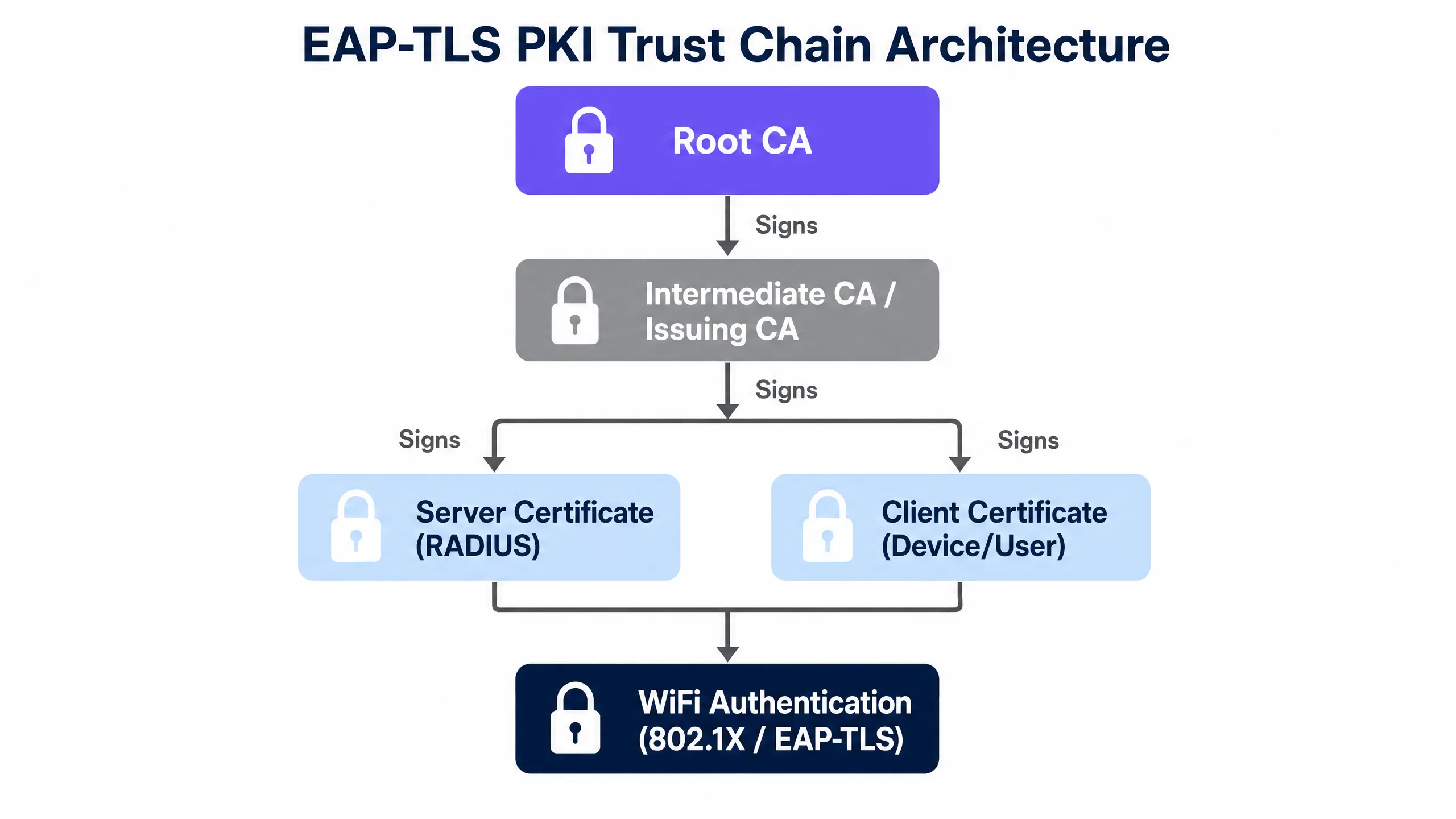
扁平式的 PKI 層級結構會引入無法接受的風險。推薦的模式是三層式架構:

  1. 根憑證授權單位 (Root CA):最終的信任根源。此伺服器保持離線並與網路隔離(air-gapped)。其唯一功能是簽署中間 CA 憑證。
  2. 中間 CA (發放 CA):此伺服器保持在線,負責日常用戶端與伺服器憑證的簽署工作。如果遭到破解,可由 Root CA 予以撤銷,而無需重建整個信任基礎建設。
  3. 終端實體憑證 (End-Entity Certificates):這些是實際部署到 RADIUS 伺服器和用戶端裝置的憑證。
pki_trust_chain_diagram.png

憑證效期與密碼學標準

業界正強制縮短憑證壽命,以限制金鑰遭破解時的暴露空窗期。雖然公開的 TLS 憑證上限為 398 天,但用於 WiFi 驗證的內部用戶端憑證通常使用 365 天的有效期。

密碼學要求強制使用至少 2048 位元的 RSA 金鑰,或使用 P-256 曲線的橢圓曲線密碼學 (ECC)。WPA3-Enterprise 192 位元模式需要特定的加密套件,而 EAP-TLS 是唯一能完全滿足這些要求的驗證方法。

實作指南

在分散式場域中部署 EAP-TLS 需要您的身分識別提供者、MDM 平台與網路硬體之間進行緊密整合。Purple 的雲端重疊(cloud overlay)可與 Cisco Meraki、HPE Aruba、Ruckus、Juniper Mist、Ubiquiti UniFi、Cambium、Extreme 和 Fortinet 整合。

步驟 1:建立信任鏈

在任何裝置進行驗證之前,它必須信任 RADIUS 伺服器。請透過您的 MDM 將根憑證授權機構(Root CA)憑證部署到所有託管裝置。對於非託管裝置,您必須提供一個引導註冊入口網頁(onboarding portal)來安裝信任設定檔。

步驟 2:透過 SCEP 自動化核發

手動產生憑證是行不通的。請實作 SCEP 以將此工作流程自動化:

  1. MDM(例如 Microsoft Intune)將 SCEP 負載推送到裝置。
  2. 裝置在本地端產生私鑰。
  3. 裝置向 SCEP 伺服器提交憑證簽署請求(CSR)。
  4. CA 核發憑證,裝置並將其安裝在硬體備份的金鑰庫中。

步驟 3:設定 RADIUS 原則

將您的 RADIUS 伺服器設定為需要 EAP-TLS。確保伺服器會比對您的身分識別目錄(Microsoft Entra ID、Okta 或 Google Workspace)驗證用戶端憑證的主體別名(SAN),以確認該使用者帳戶仍處於啟用狀態。

certificate_lifecycle_infographic.png

最佳實踐

  • 儘早自動續期:設定 MDM 設定檔,使其在憑證到期前至少 30 天觸發憑證續期。這可以防止整個場域內突然發生驗證失敗。
  • 強制執行硬體金鑰庫:要求私鑰必須在裝置的信賴平台模組(TPM)或安全隔離區(Secure Enclave)中產生並儲存。金鑰必須設定為不可匯出。
  • 實作即時撤銷:依賴靜態憑證撤銷清單(CRL)會產生延遲。請實作線上憑證狀態協定(OCSP),以便 RADIUS 伺服器能在驗證期間即時確認憑證狀態。

疑難排解與風險緩釋

EAP-TLS 部署中最常見的失敗模式與信任和時間有關。

信任錨點失敗

如果用戶端裝置拒絕 RADIUS 伺服器憑證,驗證將會無聲無息地失敗。當裝置的信任庫中遺失根 CA 憑證時,就會發生這種情況。請驗證 MDM 部署記錄,確保信任設定檔在 WiFi 設定檔之前套用。如需連線問題的進一步診斷,請參閱 Troubleshooting Public WiFi: Fixing 'Connected, No Internet' and Splash Page Redirection Failures

到期懸崖

同時核發數千張憑證會造成續期高峰期的懸崖效應。如果 SCEP 伺服器在此期間發生停機,裝置將會斷開網路。請交錯進行初始部署,以分攤續期負載。

OCSP 逾時

如果 RADIUS 伺服器無法連線至 OCSP 回應程式,它必須決定是要預設開放(fail open)還是預設關閉(fail closed)。對於企業網路,預設關閉是標準做法。請確保您的 OCSP 基礎架構具備高可用性且呈地理分佈。

投資報酬率與業務影響

過渡到 EAP-TLS 需要前期投入工程心力,但營運回報非常顯著。一個擁有 5,000 名使用者的組織,通常每月要花費 40 小時來處理因 PEAP 密碼輪替而導致的密碼重設與 RADIUS 鎖定問題。

透過自動化憑證生命週期,您可以消除這些支援工單。此外,您還能滿足 ISO 27001 和 PCI DSS 嚴格的存取控制要求,從而減少稽核開銷。當與 Guest WiFiWiFi Analytics 整合時,Purple 可針對所有使用者類型提供統一的網路存取檢視,簡化分散式場域的合規性報告。

Key Definitions

EAP-TLS

Extensible Authentication Protocol with Transport Layer Security. An authentication framework that requires both the client and the server to prove their identity using digital certificates.

The industry standard for securing enterprise WiFi networks without relying on vulnerable passwords.

SCEP

Simple Certificate Enrolment Protocol. A protocol used by MDM platforms to securely automate the request and installation of digital certificates on devices.

Essential for scaling EAP-TLS deployments beyond a few dozen devices by removing manual certificate handling.

RADIUS

Remote Authentication Dial-In User Service. The networking protocol that provides centralised authentication, authorisation, and accounting management.

The server component that validates the client certificate and tells the access point to grant network access.

OCSP

Online Certificate Status Protocol. An internet protocol used for obtaining the revocation status of an X.509 digital certificate in real time.

Replaces static CRLs to ensure that a revoked certificate is blocked from the network immediately.

Root CA

Root Certificate Authority. The top-level cryptographic authority in a Public Key Infrastructure, used to sign subordinate CAs.

Must be kept highly secure and offline to protect the entire trust chain of the organisation.

SAN

Subject Alternative Name. An extension to X.509 that allows various values to be associated with a security certificate, such as email addresses or UPNs.

Used by the RADIUS server to map the certificate to a specific user account in the identity directory.

MDM

Mobile Device Management. Software used by IT departments to monitor, manage, and secure employees' mobile devices.

The delivery mechanism that pushes the SCEP configuration and WiFi profiles to the end-user devices.

CRL

Certificate Revocation List. A list of digital certificates that have been revoked by the issuing CA before their scheduled expiration date.

A legacy method of checking certificate validity that suffers from latency issues compared to OCSP.

Worked Examples

A 150-property hotel group needs to secure staff access across 3,000 devices. They currently use PEAP with a shared password that rotates quarterly, causing significant helpdesk volume. How should they implement EAP-TLS?

Deploy Microsoft Intune to manage all corporate devices. Establish a Microsoft ADCS Intermediate CA integrated with Intune via the Intune Certificate Connector. Push the Root CA certificate to all devices, followed by a SCEP profile that requests a client certificate with a 365-day validity. Configure the WiFi profile to use EAP-TLS and point to the Purple-linked RADIUS servers. Set the SCEP profile to renew automatically at 20% remaining life (73 days).

Examiner's Commentary: This approach eliminates the quarterly password rotation entirely. By setting an early renewal trigger, the IT team avoids expiry cliff edges. Integrating directly with Intune ensures that when a staff member leaves and their Entra ID account is disabled, the MDM revokes the certificate and wipes the WiFi profile automatically.

A retail chain requires secure WiFi for point-of-sale handhelds in 200 locations. The devices run Android and frequently lose connectivity to the central management server. How do you handle certificate revocation?

Implement OCSP for real-time revocation checking at the RADIUS server level. Configure the RADIUS server to query the OCSP responder for every authentication attempt. If a handheld is reported lost, the security team revokes the certificate in the CA. The next time the device attempts to associate with an access point, the RADIUS server receives a 'revoked' response from OCSP and denies access immediately.

Examiner's Commentary: Relying on MDM to wipe a lost device is insufficient if the device is offline or shielded. By enforcing revocation checks at the network edge via OCSP, the RADIUS server acts as the enforcement point, ensuring the compromised certificate cannot be used even if the device itself cannot be reached by the MDM.

Practice Questions

Q1. You are deploying EAP-TLS for 2,000 corporate laptops. The SCEP infrastructure is configured, but during testing, the laptops fail to connect to the WiFi. The RADIUS logs show 'Unknown CA'. What is the most likely cause?

Hint: Consider the order of operations when deploying trust profiles versus authentication profiles.

View model answer

The laptops do not have the Root CA certificate installed in their trusted root store. The MDM must be configured to push the Root CA certificate payload to the devices before pushing the SCEP payload or the EAP-TLS WiFi profile. Without the Root CA, the client rejects the RADIUS server's certificate.

Q2. A compromised device is reported lost. The IT team deletes the device from the MDM and revokes the certificate in the CA. However, testing reveals the device can still connect to the network for up to 12 hours. How do you resolve this?

Hint: Look at how the RADIUS server validates certificate status.

View model answer

The RADIUS server is likely relying on a Certificate Revocation List (CRL) that is only published or downloaded every 12 to 24 hours. To resolve this, implement the Online Certificate Status Protocol (OCSP) and configure the RADIUS server to query the OCSP responder for real-time validation during every authentication attempt.

Q3. You are designing the certificate lifecycle policy. The security team wants 30-day certificate lifetimes to minimise risk, but the network team is concerned about SCEP server load and connectivity drops. What is the recommended balance?

Hint: Consider the difference between public web certificates and internal managed PKI.

View model answer

A 365-day validity period with automated renewal triggered at 60 or 90 days before expiry provides the optimal balance. 30-day lifetimes for WiFi certificates create excessive operational risk if devices are offline during their narrow renewal window. Security is maintained through robust, real-time OCSP revocation rather than aggressively short lifetimes.

Continue reading in this series

Server RADIUS: a comprehensive guide for businesses

This guide provides IT managers, network architects, and CTOs with a definitive technical reference on server RADIUS authentication for enterprise WiFi. It covers the AAA framework, 802.1X architecture, EAP method selection, cloud versus on-premises deployment trade-offs, and dynamic VLAN assignment. Venue operators across hospitality, retail, events, and the public sector will find actionable implementation guidance, real-world case studies, and the decision frameworks needed to migrate from insecure pre-shared keys to a secure, identity-driven network access control architecture.

Read the guide →

Server RADIUS: a comprehensive guide for businesses

This guide provides IT managers, network architects, and CTOs with a definitive technical reference on server RADIUS authentication for enterprise WiFi. It covers the AAA framework, 802.1X architecture, EAP method selection, cloud versus on-premises deployment trade-offs, and dynamic VLAN assignment. Venue operators across hospitality, retail, events, and the public sector will find actionable implementation guidance, real-world case studies, and the decision frameworks needed to migrate from insecure pre-shared keys to a secure, identity-driven network access control architecture.

Read the guide →

Aruba ClearPass vs. Purple WiFi: Comparing Features and Co-deployment

A comprehensive technical guide detailing the co-deployment architecture of Aruba ClearPass and Purple WiFi. It covers RADIUS proxy configuration, dynamic VLAN assignment, and best practices for delivering secure, analytics-driven guest networks alongside enterprise NAC.

Read the guide →