
A Step-by-Step Guide to Diagnosing WiFi Roaming Issues
This comprehensive guide provides enterprise IT leaders and network architects with an authoritative, step-by-step methodology for diagnosing and resolving WiFi roaming issues. By combining technical deep-dives into IEEE 802.11k/v/r standards with real-world case studies and packet-level analysis, this reference equips teams to eliminate the 'sticky client' problem and deliver seamless mobile connectivity. It covers the full diagnostic workflow from RF site surveys and controller configuration audits through to over-the-air packet capture analysis and post-remediation validation.
Video overview
Listen to this guide
View podcast transcript
Part of our core series: WiFi RF Engineering Guide →
WiFi roaming & AP handoff diagnostic tool
Troubleshoot sticky clients, handoff VoIP packet drops, 802.1X re-authentication delays, and AP oscillation across enterprise wireless architectures.
Sticky Client Syndrome (Lack of 802.11v BSS Transition / Power Asymmetry)
Severity: HighThe client stays associated to an AP at -78 dBm or lower despite standing adjacent to a stronger AP (-52 dBm). Often caused by missing 802.11v BSS transition management, excessive 2.4 GHz transmit power masking 5 GHz advantages, or disabled neighbor reports (802.11k).
Technical root cause factors:
- Client driver roaming algorithm triggers only when signal drops below device threshold (e.g., iOS roams at -70 dBm, macOS at -75 dBm).
- Without 802.11k neighbor reports, client must perform full active/passive scanning across all channels, delaying handoff.
- Equal Tx power on 2.4 GHz and 5 GHz creates cell overlap asymmetry: 2.4 GHz propagates further, trapping clients on congested lower bands.
Actionable remediation steps:
- Enable 802.11k (Neighbor Reports) and 802.11v (BSS Transition Management) on the target RF profile.
- Reduce 2.4 GHz transmit power by 6 to 9 dBm relative to 5 GHz (e.g., 2.4 GHz @ 11 dBm, 5 GHz @ 17 dBm).
- Configure minimum RSSI / Disassociate Low RSSI clients threshold to -75 dBm or -78 dBm to force de-authentication when clients cling.
- Ensure AP cell edge overlap is calibrated to 15-20% at -67 dBm for high-density voice and enterprise environments.
# Cisco Meraki Dashboard:
Wireless > Configure > Radio Settings > RF Profiles > Enable 802.11k & 802.11v

# Aruba Central / CLI:
wlan ssid-profile <SSID>
  dot11k
  dot11v
  advertise-ap-name
  min-rssi -75
Need an enterprise RF site survey & roaming audit?
Purple provides cloud-managed captive portals, 802.1X identity-based networking, and RF location analytics for thousands of high-density venues worldwide.
Executive Summary
In the modern enterprise venue - the luxury hotel, the multi-floor retail flagship, the packed stadium, and the sprawling corporate campus - wireless connectivity is no longer a static amenity but a dynamic operational cornerstone. As users, staff, and IoT devices move through these physical spaces, their devices must transition seamlessly from one access point (AP) to another. When that transition fails or lags, the consequences are immediate and costly: dropped VoIP calls, frozen video conferences, stalled mobile point-of-sale (mPOS) transactions, and a degraded user experience that directly damages brand reputation and venue ROI.
This technical reference guide provides network architects, CTOs, and IT managers with a rigorous, step-by-step diagnostic framework for identifying, isolating, and resolving WiFi roaming failures. We go beyond generic troubleshooting advice to deliver an in-depth architectural analysis of the IEEE 802.11k, 802.11v, and 802.11r amendments. By understanding the packet-level mechanics of these protocols and deploying advanced diagnostic tooling - including multi-channel over-the-air (OTA) packet capture and client-side logging - IT teams can systematically resolve the notorious "sticky client" problem.
Additionally, this guide explores the critical integration between fast roaming and centralized session management, clarifying how platforms like Purple's Guest WiFi and WiFi Analytics ensure that guest authentication sessions persist across thousands of APs without repeated Captive Portal logins. Through real-world case studies from the Hospitality and Retail sectors, this guide gives enterprise IT teams the actionable strategies they need to deploy resilient, high-performance wireless infrastructure.
Technical Deep Dive: The Mechanics of WiFi Roaming
To diagnose roaming failures, you must first understand that roaming is fundamentally a client-side decision. While the infrastructure can assist, the client device determines when to scan, which target AP to select, and when to initiate the handoff.
The Three Phases of Roaming
Every roaming event consists of three sequential phases. Phase one is scanning (discovery): the client device detects that its current connection is deteriorating (typically based on an RSSI threshold) and performs either an active scan (sending probe requests across channels) or a passive scan (listening for beacons) to discover candidate APs. Phase two is AP selection (decision): the client evaluates the candidates based on signal strength (RSSI), signal-to-noise ratio (SNR), channel load, and supported capabilities, and selects the best target. Phase three is handoff (execution): the client disconnects from its current AP (BSSID) and associates with the new one, which involves authentication, reassociation, and the cryptographic key handshake.
The "Sticky Client" Problem and RSSI Thresholds
The most common roaming failure is the sticky client phenomenon. It occurs when a client device remains associated with a distant, weak AP (often at an RSSI of -75 dBm to -85 dBm) despite standing directly beneath a stronger, closer AP. This happens because the client's internal roaming threshold (typically around -70 dBm to -75 dBm, depending on the operating system) has not been crossed, or because its driver algorithms are poorly optimized.
Sticky clients not only suffer from low throughput and high packet loss - they degrade the performance of the entire cell. Because they transmit at low physical data rates (PHY rates), they consume a disproportionate amount of airtime, starving every other device sharing the same channel of airtime.
The Roaming Assistance Framework: 802.11k, 802.11v, and 802.11r
To mitigate client inefficiencies, the IEEE introduced three key standards that transform roaming from a blind, client-only process into a collaborative, infrastructure-assisted interaction.
| Standard | Name | Core Mechanism | Practical Benefit |
|---|---|---|---|
| IEEE 802.11k | Radio Resource Management | Provides a Neighbor Report containing a curated list of nearby APs and their channels | Eliminates full-band active scanning, cutting discovery time from >100ms to <10ms |
| IEEE 802.11v | BSS Transition Management | Allows the AP to send BTM Request frames to steer clients | Enables the network to proactively steer "sticky" or overloaded clients to the optimal AP |
| IEEE 802.11r | Fast BSS Transition (FT) | Establishes a Mobility Domain to pre-distribute cryptographic key material across APs | Compresses the 802.1X/EAP handshake, cutting handoff time from 200 - 400ms to <50ms |
802.11k Neighbor Reports in Practice
When an 802.11k-capable client notices its RSSI has dropped below a specific threshold, it sends an 802.11k Neighbor Report Request to its current AP. The AP responds with a list of neighboring BSSIDs and their operating channels. Instead of scanning all 25+ channels in the 5 GHz band, the client scans only the 3 or 4 channels listed in the report, dramatically reducing latency and battery drain.
802.11v BSS Transition Management (BTM)
Under 802.11v, the infrastructure can actively suggest that a client roam. If an AP is overloaded or detects a client's signal declining, it sends an 802.11v BTM Request frame. The frame contains a preferred target BSSID. While the client can technically ignore the request, modern operating systems (iOS, Android, Windows) weight 802.11v suggestions heavily in their roaming decisions.
The 802.11r Fast BSS Transition (FT) Key Hierarchy
On enterprise networks secured by WPA2/WPA3-Enterprise (802.1X), a standard roam requires a full EAP exchange with the RADIUS server, which can take up to 400 milliseconds. 802.11r bypasses this by creating a three-tier key hierarchy. The MSK (Master Session Key) is generated during the initial 802.1X authentication. The PMK-R0 (Pairwise Master Key Level 0) is held by the key holder (typically the wireless controller). The PMK-R1 (Pairwise Master Key Level 1) is derived from the PMK-R0 and pre-distributed to every AP within the same Mobility Domain. When the client roams to a new AP, it presents its PMK-R1 identifier. The target AP already holds the corresponding key, allowing the client to complete association and the 4-way handshake in a single exchange, typically in under 50 milliseconds.
Got questions about your specific setup?
Our team works with venue operators, IT managers, and network engineers across 80,000 venues. Book a 20-minute call and we will show you how others like you solved it.
Step-by-Step Diagnostic Workflow
Diagnosing roaming issues demands a structured, scientific approach. The following six-step framework is designed to systematically isolate and resolve roaming failures.
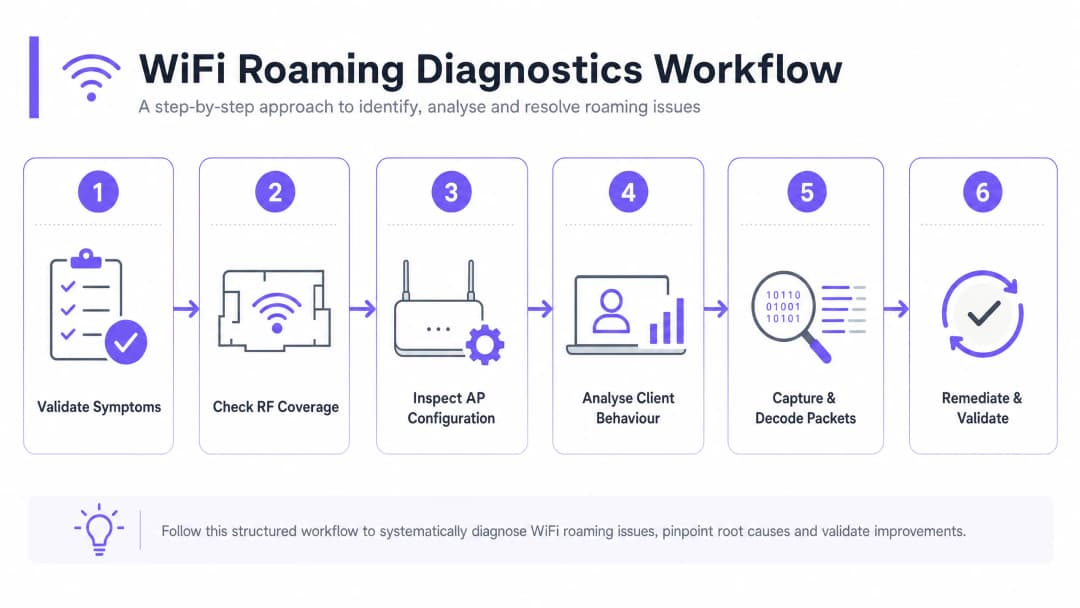
Step 1: Validate the Symptoms and Scope
Begin by gathering empirical data to define the scope of the problem. If roaming issues affect all devices, this typically indicates an architectural or physical deployment flaw - such as poor AP placement, excessive channel overlap, or misconfigured controller settings. If the problem is device-specific, it usually points to a client driver bug, a lack of support for specific bands or channels (such as DFS channels), or an overly aggressive internal roaming threshold.
Step 2: Examine RF Coverage and Signal Overlap
The leading physical cause of roaming failure is incorrect AP spacing. If APs are too far apart, dead zones or weak-signal areas exist between them. If they are too close together, clients will not roam because the signal from the original AP remains too strong, producing the "sticky client" problem.
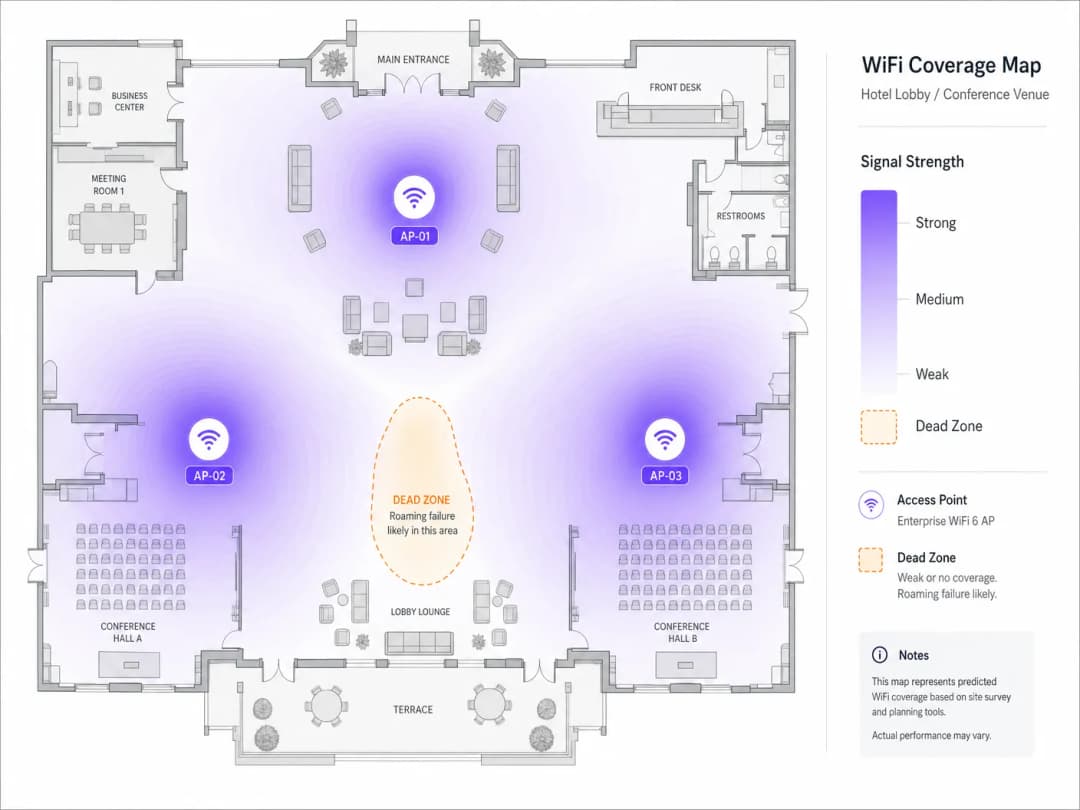
Conduct an active site survey with a dedicated WiFi analyzer. The target metric is an overlapping signal strength of -67 dBm from neighboring APs at the cell boundary. In high-density environments, aim for 20% to 30% cell overlap. Verify that overlapping APs are not operating on the same channel. In the 5 GHz band, use non-overlapping 20 MHz or 40 MHz channels to minimize co-channel interference (CCI).
Step 3: Review AP and Controller Configuration
Ensure the wireless controller is configured to support and broadcast the roaming assistance features. Verify that the SSID name, security type (e.g. WPA3-Enterprise), and VLAN assignment are perfectly consistent across all APs. Enable 802.11k, 802.11v, and 802.11r on the target SSID. Exercise caution when running WPA2/WPA3 transition mode, as some older client devices struggle to parse the complex Information Elements (IEs) in beacon frames, causing association failures.
Step 4: Analyze Client Behavior and Driver Settings
If the infrastructure is correctly configured, examine the client devices. Ensure client NIC drivers - particularly Intel and Realtek chipsets on Windows - are updated to the latest enterprise-certified versions. On Windows clients, navigate to Device Manager > Network Adapters > Wireless Adapter Properties > Advanced, and adjust "Roaming Aggressiveness" to "Medium-High" or "High" to force the client to scan for better APs sooner. Verify that client devices support Dynamic Frequency Selection (DFS) channels. If APs are on DFS channels (52–144) and the client does not support them, the client will never roam to those APs, creating coverage blind spots.
Step 5: Capture and Decode Packets Over the Air (OTA)
The gold standard of wireless troubleshooting is over-the-air (OTA) packet capture. To capture a roaming event, you must capture wireless frames on the channels of both the source and target APs simultaneously. Position the packet capture device in the physical area where the roam occurs and apply the following Wireshark filter to isolate management frames:
wlan.fc.type_subtype == 0x00 || wlan.fc.type_subtype == 0x01 || wlan.fc.type_subtype == 0x0b || wlan.fc.type_subtype == 0x0c
In a healthy 802.11r over-the-air roam, you should observe: the client sending a Reassociation Request containing the Fast BSS Transition Information Element (FTIE) and the Mobility Domain Information Element (MDIE) to the target AP, followed by a Reassociation Response with status code 0x0000 (Success), with the 4-way handshake embedded within the reassociation frames.
If the roam fails, examine the status code in the Reassociation Response. Status code 0x000c (association denied) typically indicates the target AP is overloaded. Status code 0x001e (association denied for security reasons) indicates an FT key negotiation mismatch. If the client sends a standard Association Request instead of a Reassociation Request, it is performing a full authentication - indicating that 802.11r is disabled on the AP, or the client does not support the protocol.
Step 6: Remediate and Validate
Make the necessary physical or logical changes, then validate the results. Adjust AP transmit power - a common best practice is to set 2.4 GHz power to 6-9 dBm and 5 GHz power to 12-15 dBm to maintain a clean 5 GHz preference. Adjust the BSS Minimum Rate (data rate pruning): disable legacy rates (1, 2, 5.5, 11 Mbps) and set the minimum mandatory rate to 12 Mbps or 24 Mbps to force clients to roam earlier and prevent sticky client behavior. Validate by running continuous ping or VoIP tests while walking the venue, ensuring handoff times remain below 50ms with zero packet loss.
Best Practices and Industry Standards
1. Unified Security and Network Access Control (NAC)
Seamless roaming requires consistent authentication across the entire venue. When deploying enterprise-grade security, integrate your wireless infrastructure with a centralized RADIUS or NAC solution. For a detailed guide to this architecture, see our guide: How to Implement 802.1X Authentication with Cloud RADIUS. To evaluate vendor options, consult our review of the 10 Best Network Access Control (NAC) Solutions for 2026.
2. Physical and Logical Separation of SSIDs
In environments with a mix of modern and legacy devices, a single-SSID configuration can create compatibility problems. The recommended approach is to maintain three separate SSIDs: a Corporate/Staff SSID with WPA3-Enterprise and 802.11k/v/r enabled; a Guest SSID powered by Purple's Guest WiFi platform, with MAC caching and an 8-hour session timeout to prevent re-authentication on every roam; and a Legacy/IoT SSID restricted to 2.4 GHz with WPA2-PSK for devices that do not support 802.11r.
3. Compliance and Regulatory Standards
In retail environments, devices within PCI DSS scope (such as mobile point-of-sale mPOS terminals) must roam securely. Ensure WPA3-Enterprise is enforced and enable rogue AP detection to defend roaming clients against "evil twin" attacks. When using WiFi Analytics to track user roaming patterns and dwell times, ensure MAC addresses are cryptographically salted and hashed at the point of collection to remain GDPR compliant.
For a reference on AP hardware selection and deployment best practices, see our Cisco Wireless APs: 2026 Guide to Products & Deployment. For education environments, the principles in this guide apply equally - see WiFi in Schools: The 2026 Administrator & IT Guide.
Real-World Case Studies
Case Study 1: Resolving Roaming Failures in a 500-Room Luxury Hotel
A multi-story luxury hotel with 500 rooms, conference space, and a large lobby lounge was receiving persistent guest complaints of dropped VoIP calls and broken VPN sessions when walking from the lobby toward the guest rooms. Staff also reported that their cell phone housekeeping tablets disconnected frequently, delaying room status updates.
A comprehensive RF audit revealed two primary issues. First, the APs were running at maximum transmit power (20+ dBm) on both 2.4 GHz and 5 GHz, creating enormous coverage overlap and causing client devices in guest rooms to remain "stuck" to lobby APs. Second, 802.11r had been disabled on the main guest SSID over concerns about legacy device compatibility.
Remediation included: adjusting AP transmit power to 8 dBm on 2.4 GHz and 14 dBm on 5 GHz; enabling 802.11k, 802.11v, and 802.11r (over-the-air FT); pruning mandatory data rates below 12 Mbps; and integrating the wireless controller with Purple's hospitality WiFi platform with MAC caching and 8-hour session timeouts. As a result, average roaming handoff latency fell from 380 milliseconds to 42 milliseconds, VoIP call drops were eliminated entirely, and guest satisfaction scores for WiFi connectivity rose by 48% within 30 days.
Case Study 2: Optimizing mPOS Roaming for a Global Retailer
A high-density flagship retail store spanning three floors was using mobile point-of-sale (mPOS) terminals for checkout. During peak shopping periods, mPOS terminals frequently failed to complete transactions as sales associates moved with customers across the retail floor.
Over-the-air packet capture revealed that the mPOS terminals exhibited sticky client behavior, remaining connected to third-floor APs while on the ground floor. When they finally attempted to roam, the lack of 802.11r forced a full 802.1X/EAP re-authentication, which timed out due to extreme channel utilization (85%) caused by co-channel interference.
The solution involved: redesigning the channel plan to use non-overlapping 20 MHz channels (reducing channel utilization below 35%); enabling 802.11k and 802.11v; implementing a dedicated hidden SSID with 802.11r enabled for store operations; and consulting the retail deployment guidance to optimize AP placement near checkout lines. The result was zero failed mPOS transactions, a 14-second reduction in average transaction completion time, directly shortening checkout lines and increasing peak-hour sales throughput.
ROI and Business Impact
Optimizing WiFi roaming is a strategic business investment that delivers measurable financial and operational returns. In sectors such as transport and healthcare, staff reliance on mobile devices is absolute. When clinical staff or logistics workers experience roaming drops, critical workflows stall. By reducing handoff latency below 50 milliseconds, organizations eliminate administrative delays and directly improve staff utilization and operational throughput.
In hospitality and events, guest WiFi is a primary driver of customer satisfaction. A seamless wireless experience encourages guests to dwell longer on site, increasing secondary spend on food, beverage, and retail services. By leveraging Purple's WiFi Analytics, venue operators can track movement journeys and optimize staff rostering and retail layouts based on real-time dwell data.
As venues prepare for the widespread adoption of OpenRoaming and profile-based authentication, a perfectly tuned roaming infrastructure is a prerequisite. By deploying 802.11k/v/r today, organizations position themselves for seamless integration with global roaming federations, opening new monetization channels and driving the network effects that define the modern digital venue.
-
References
- [1] WiFi Roaming and Handoff: 802.11r and 802.11k Explained
- [2] Cisco Wireless APs: 2026 Guide to Products & Deployment
- [3] How to Implement 802.1X Authentication with Cloud RADIUS
- [4] 10 Best Network Access Control (NAC) Solutions for 2026
- [5] WiFi in Schools: The 2026 Administrator & IT Guide
- [6] Understanding and Troubleshooting Client Roaming Issues
- [7] Troubleshooting WiFi Connectivity and Roaming Problems
Key Definitions
Sticky Client
A wireless device that remains connected to a distant, weak access point despite a stronger, closer access point being available.
Sticky clients degrade their own performance and starve other devices of airtime by transmitting at low physical data rates. They are the most common root cause of roaming-related complaints in enterprise venues.
802.11r (Fast BSS Transition)
An IEEE amendment that allows cryptographic key material to be pre-distributed across APs within a Mobility Domain, reducing handoff authentication times from 200 - 400ms to under 50ms.
Crucial for real-time applications like VoIP, video conferencing, and mobile payments. The most impactful single standard for eliminating dropped calls during roaming.
802.11k (Radio Resource Management)
An IEEE amendment that allows client devices to request a Neighbor Report - a curated list of nearby APs and their operating channels - from their current AP.
Eliminates the need for the client to perform a full-band active scan, reducing roaming discovery time from over 100ms to under 10ms.
802.11v (BSS Transition Management)
An IEEE amendment that enables the wireless infrastructure to send BTM Request frames to client devices, suggesting optimal target APs for roaming.
Used by network administrators to load-balance clients and proactively resolve sticky client issues. Particularly effective on iOS and modern Android devices.
Mobility Domain
A logical grouping of access points within a wireless network that share 802.11r cryptographic keys and support fast roaming between members.
Clients can only perform Fast BSS Transitions (FT) when roaming between APs belonging to the same Mobility Domain. Misconfigured Mobility Domain IDs are a common cause of 802.11r failures.
Pairwise Master Key (PMK)
The top-level cryptographic key established during initial 802.1X or WPA pre-shared key authentication, from which all session keys are derived.
In 802.11r, the PMK is split into PMK-R0 (held by the controller) and PMK-R1 (pre-distributed to APs) to facilitate fast handoffs without a full RADIUS round-trip.
BSS Minimum Rate
The lowest data rate that an access point will allow a client to use while remaining associated with the SSID. Clients that cannot maintain this rate are disassociated.
Pruning lower rates (e.g., setting a minimum of 12 Mbps) acts as a natural roaming trigger, forcing sticky clients to seek a new AP when their physical data rate drops below the threshold.
Co-Channel Interference (CCI)
RF interference caused by multiple access points operating on the same frequency channel in the same physical area, forcing devices to wait their turn to transmit.
CCI increases airtime contention and can delay or disrupt roaming management frames, leading to failed handoffs. It is a primary cause of roaming failures in densely deployed networks.
Over-the-Air (OTA) Packet Capture
A wireless diagnostic technique where a device in monitor mode captures all 802.11 frames transmitted on a specific channel, including management, control, and data frames.
The gold standard for diagnosing roaming failures. Allows engineers to inspect the exact sequence of authentication, association, and reassociation frames during a handoff event.
Worked Examples
A large convention center with 80 access points experiences severe audio drops on wireless VoIP badges (Vocera) as event staff move between exhibition halls. The network uses WPA2-Enterprise (802.1X) authentication with a local RADIUS server.
- Perform an OTA packet capture on channels 36 and 44 (the operating channels of adjacent APs in the main hall). 2. Identify that the VoIP badges are performing full EAP-TLS authentications on every roam, taking an average of 340ms, which exceeds the 50ms threshold required for real-time voice. 3. Enable 802.11r (Fast BSS Transition) on the controller for the staff SSID. 4. Configure the 802.11r mode to 'FT over-the-Air' to ensure maximum compatibility with the badge hardware. 5. Enable 802.11k Neighbor Reports to eliminate the need for active scanning. 6. Set the BSS Minimum Rate to 12 Mbps to prevent badges from sticking to distant APs. 7. Verify the roam time in Wireshark: confirm that the reassociation exchange takes 32ms and voice traffic remains uninterrupted.
A major retail flagship store deploying mobile point-of-sale (mPOS) iPads experiences transaction failures. The iPads are sticking to third-floor APs even when moved to the ground floor checkout area, resulting in an RSSI of -78 dBm and high retry rates.
- Conduct an RF site survey to measure the signal overlap between the third-floor and ground-floor APs. 2. Discover that the third-floor APs are transmitting at maximum power (20 dBm), bleeding through the floorboards and creating a strong but low-quality signal on the ground floor. 3. Reduce the transmit power of the 5 GHz radios to 14 dBm and the 2.4 GHz radios to 8 dBm. 4. Enable 802.11v BSS Transition Management (BTM) on the wireless controller. 5. Configure a minimum association RSSI threshold of -72 dBm on the controller. When an iPad's RSSI drops below -72 dBm, the AP will send an 802.11v BTM Request suggesting the ground-floor AP. 6. Verify that the iPads successfully roam to the ground-floor AP within 45ms of crossing the physical threshold.
Practice Questions
Q1. A warehouse operator reports that handheld barcode scanners frequently disconnect from the ERP system when driving forklifts between aisles. The network has 802.11r enabled, but the scanners do not support 802.11r. What is the best immediate remediation strategy?
Hint: Consider the compatibility of legacy clients with 802.11r and how to isolate them without degrading the primary enterprise network.
View model answer
Since the barcode scanners do not support 802.11r, they will either fail to connect to an 802.11r-enabled SSID or experience slow, standard 802.1X authentications. The recommended approach is to create a dedicated, separate SSID specifically for the warehouse scanners using WPA2-PSK and 2.4 GHz-only radios. This isolates the legacy traffic, avoids 802.11r compatibility issues, and ensures stable roaming using basic pre-shared key handovers, which scanners natively support. The primary enterprise SSID with 802.11r can remain intact for modern devices.
Q2. During a packet capture analysis of a roaming failure, you observe that the client device sends an Association Request (Type 0x00) instead of a Reassociation Request (Type 0x02) when moving to the target AP. What does this tell you about the roaming state, and what are the three most likely root causes?
Hint: Analyze the difference between an association and a reassociation frame in the context of fast roaming and Mobility Domain membership.
View model answer
An Association Request indicates that the client is initiating a completely new connection from scratch, rather than performing an 802.11r fast handoff. This bypasses the FT mechanism and forces a full 802.1X/EAP re-authentication. The three most likely root causes are: 1) The client device does not support 802.11r (verify against the device specification sheet); 2) 802.11r is disabled on the target SSID (check the controller configuration); or 3) The target AP belongs to a different Mobility Domain ID than the source AP, preventing key sharing (verify that all APs share the same Mobility Domain ID in the controller).
Q3. An IT manager notices that after enabling 802.11v BSS Transition Management, several older laptop clients are frequently disconnected from the network entirely rather than roaming. What is the likely cause, and how should it be resolved?
Hint: Think about how older or poorly coded client drivers handle 802.11v BTM Request frames and what the driver interprets the request as.
View model answer
Some older or poorly coded client drivers do not correctly parse 802.11v BTM Request frames. Instead of evaluating the suggested target APs, they interpret the request as a deauthentication or disassociation command, causing them to drop off the network entirely. The resolution steps are: 1) Identify the specific client MAC addresses experiencing the issue; 2) Update their wireless NIC drivers to the latest version; 3) If driver updates are not possible, disable 802.11v on a separate legacy SSID for those devices, or configure the controller's steering aggressiveness to 'passive' mode, allowing the client to ignore the BTM request without being forcibly disconnected.
Frequently asked questions
What causes sticky client issues in enterprise WiFi networks?
Sticky clients occur when a device clings to an enterprise WiFi access point at low signal (-75 dBm or lower) instead of roaming to an adjacent AP with stronger RSSI. The primary causes are missing 802.11v BSS Transition Management, unequal transmit power between 2.4 GHz and 5 GHz radios, missing 802.11k neighbor reports, or an uncalibrated cell overlap where minimum RSSI thresholds are not configured.
What is the optimal RSSI threshold for enterprise WiFi roaming handoff?
Most enterprise WiFi clients initiate roaming scans when signal drops below -70 dBm (iOS triggers at -70 dBm; macOS triggers at -75 dBm). Access points should be calibrated to maintain 15% to 20% cell overlap at -67 dBm for voice and high-density environments. Setting a minimum RSSI disconnect threshold between -75 dBm and -78 dBm prevents client stagnation without causing premature coverage drops.
How do 802.11k, 802.11v, and 802.11r collaborate during roaming?
802.11k provides the client with a radio neighbor list so it scans only candidate channels rather than the full RF spectrum. 802.11v enables the controller to send BSS Transition Management frames requesting the client steer to a specific AP. 802.11r (Fast BSS Transition) pre-authenticates the client's encryption keys (PMK-R1) with target APs, slashing 802.1X WiFi handoff latency from 800ms down to under 30ms.
Why do VoIP and video calls drop during WiFi access point handoff?
Real-time voice (VoIP) and video sessions drop when WiFi roaming handoff latency exceeds 50ms to 100ms, overflowing RTP packet jitter buffers. In networks without 802.11r FT, an 802.1X client must execute a full EAP exchange and RADIUS round-trip upon every AP change, creating 400ms to 1200ms delays. Enabling 802.11r and verifying upstream WMM / DSCP 46 (Expedited Forwarding) QoS prevents voice packet drop.
How do you prevent WiFi client bouncing (ping-pong) between two APs?
Client ping-pong occurs when two adjacent WiFi access points provide identical signal levels (for example, fluctuating between -64 dBm and -65 dBm) with excessive cell overlap (>30%). To eliminate oscillation, reduce AP transmit power to achieve a 15% to 20% cell edge, configure an 802.11v roaming hysteresis delta of 6 dBm, and set dynamic Radio Resource Management (RRM) sensitivity to conservative intervals.
How does Purple help enterprise venues optimize WiFi roaming and performance?
Purple provides hardware-agnostic cloud captive portals and enterprise WiFi management across Cisco Meraki, HPE Aruba, Ruckus, Juniper Mist, Fortinet, and Ubiquiti UniFi networks. Purple automates guest onboarding, monitors client connection health and venue dwell times, and integrates with 802.1X identity platforms to deliver seamless, drop-free wireless mobility.
Continue reading in this series
Roaming Optimization for VoIP and Video Calls on Corporate WiFi
This guide provides IT managers, network architects, and CTOs with a comprehensive, vendor-neutral blueprint for optimizing WiFi roaming to support seamless VoIP and video calls on corporate staff networks. It covers the IEEE 802.11k/r/v protocol stack, WMM QoS configuration, RF cell design, and end-to-end wired QoS mapping required to achieve sub-50ms handoff latency. Applicable across hospitality, retail, healthcare, and large-venue environments, this reference includes real-world implementation scenarios, troubleshooting frameworks, and a measurable ROI analysis.
Understanding RSSI and Signal Strength for Optimal Channel Planning
This guide provides a comprehensive technical deep-dive into RSSI, Signal-to-Noise Ratio (SNR), and RF propagation principles for optimal channel planning. It equips IT managers, network architects, and venue operations directors with actionable strategies to mitigate Co-Channel and Adjacent Channel Interference, optimize AP placement, and leverage analytics for measurable business impact across hospitality, retail, and public-sector environments.
20MHz vs 40MHz vs 80MHz: Which Channel Width Should You Use?
This guide provides a definitive, vendor-neutral technical reference for IT managers, network architects, and venue operations directors on selecting the correct WiFi channel width - 20MHz, 40MHz, or 80MHz - across enterprise deployments in hospitality, retail, events, and public-sector environments. It covers the underlying IEEE 802.11 mechanics, real-world capacity trade-offs, and step-by-step deployment guidance to help teams make the right call this quarter. Understanding channel width selection is one of the highest-leverage decisions in any wireless LAN design, directly impacting throughput, interference, client density support, and the reliability of guest-facing services.
Got questions about your specific setup?
Our team works with venue operators, IT managers, and network engineers across 80,000 venues. Book a 20-minute call and we will show you how others like you solved it.