
How to Implement 802.1X Authentication with Cloud RADIUS
This technical reference guide provides a comprehensive framework for implementing 802.1X authentication with Cloud RADIUS across distributed enterprise estates. It details the architecture, EAP method selection, deployment sequencing, and risk mitigation strategies required to secure network access while eliminating the operational overhead of on-premises infrastructure.
Listen to this guide
View podcast transcript
Executive Summary
For IT leaders managing distributed networks across hospitality, retail, and public-sector environments, securing network access has moved from an operational preference to a strict compliance mandate. The reliance on Pre-Shared Keys (PSK) presents an unacceptable risk profile, failing to satisfy modern auditing standards such as PCI DSS and exposing organisations to lateral movement in the event of credential compromise. Transitioning to IEEE 802.1X port-based network access control mitigates these risks by authenticating devices before IP connectivity is granted.
Historically, the deployment of 802.1X across multi-site estates was hindered by the requirement for localized RADIUS infrastructure to manage latency and availability. The maturation of Cloud RADIUS architectures has fundamentally altered this calculus. By centralizing authentication decisions and integrating directly with cloud identity providers (such as Azure AD or Okta), organisations can enforce robust access policies uniformly across all locations without the capital expenditure and maintenance burden of on-premises servers. This guide outlines the technical architecture, deployment methodologies, and operational best practices for successfully implementing Cloud RADIUS-backed 802.1X authentication, ensuring both security and scalability for enterprise Guest WiFi and corporate networks.
Technical Deep-Dive
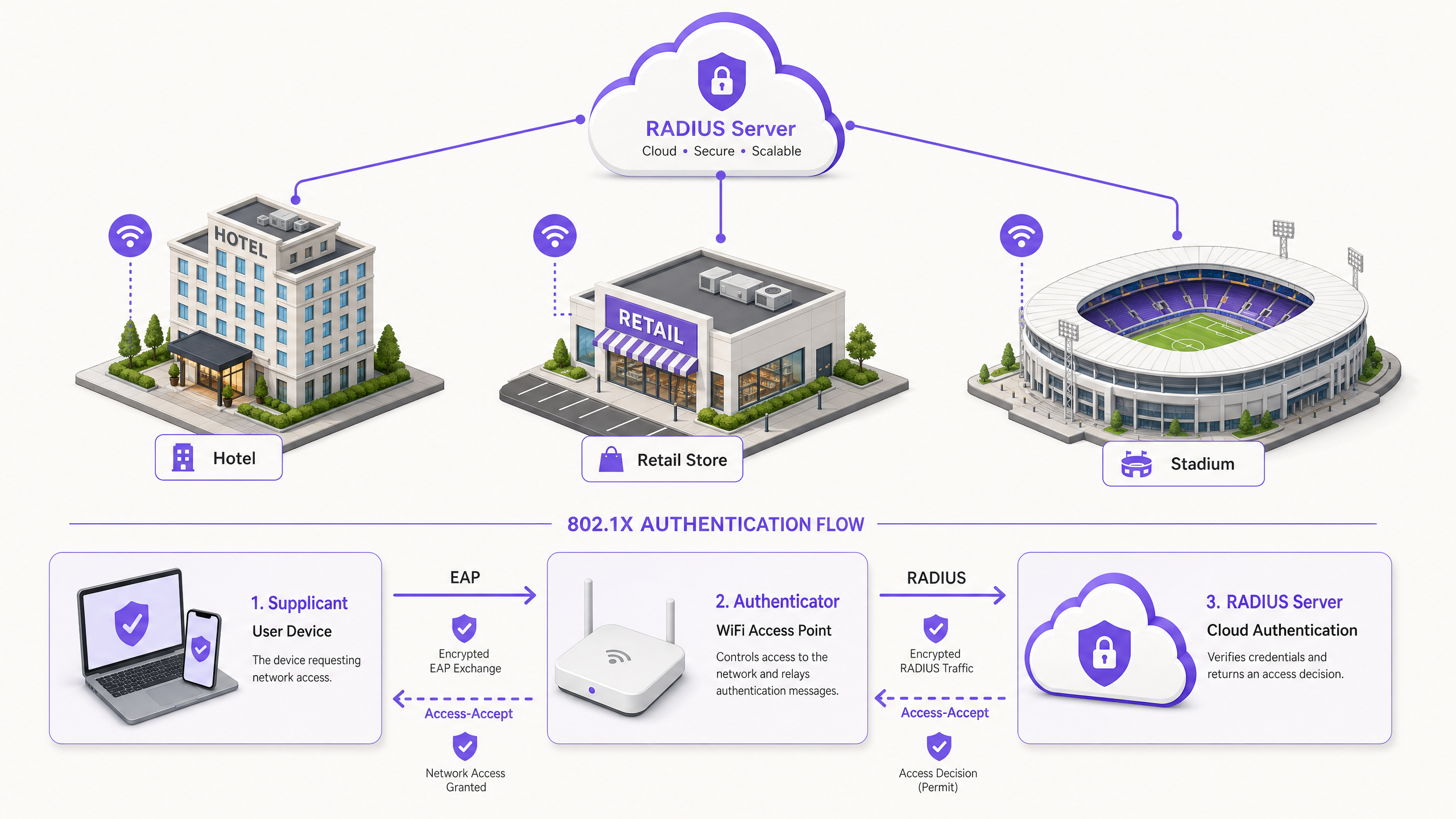
The foundation of modern enterprise wireless security rests on the IEEE 802.1X standard. Unlike application-layer authentication, 802.1X operates at Layer 2 of the OSI model. When a device (the supplicant) attempts to associate with an access point (the authenticator), the port remains in an unauthorized state, passing only Extensible Authentication Protocol (EAP) traffic. This traffic is encapsulated in RADIUS packets and forwarded to the authentication server (the Cloud RADIUS instance). Only upon receiving an Access-Accept message does the authenticator transition the port to an authorized state, granting network access.
Cloud RADIUS Architecture
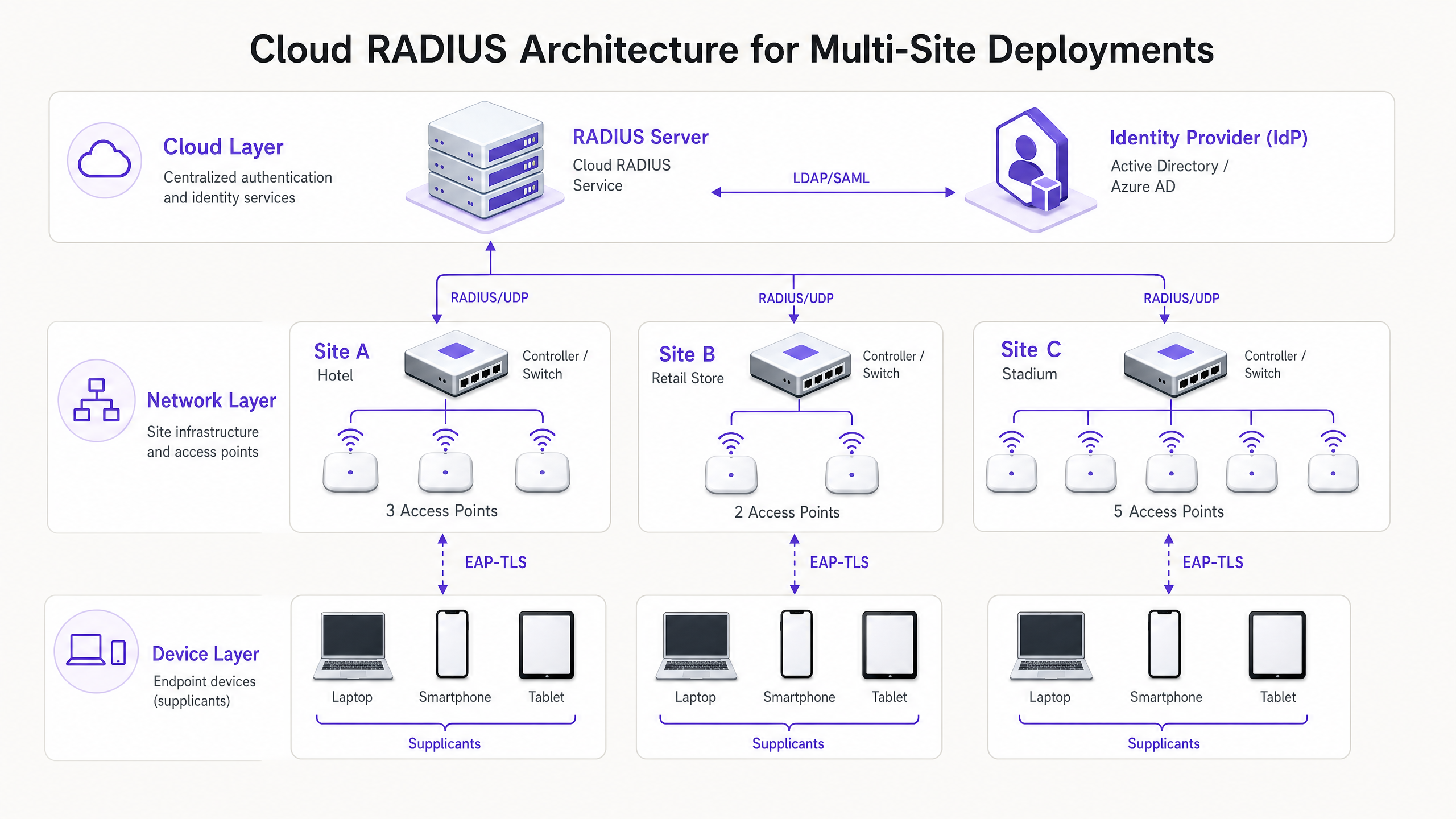
The architectural shift from on-premises to Cloud RADIUS eliminates the need for distributed FreeRADIUS or Microsoft NPS servers. In a cloud model, access points or wireless LAN controllers communicate directly with a globally distributed RADIUS service over the internet. To secure this transit, it is critical to implement RadSec (RADIUS over TLS), which encrypts the authentication payload, protecting it from interception. The Cloud RADIUS service acts as an intermediary, validating credentials against a central Identity Provider (IdP) via LDAP, SAML, or native API integrations. This enables dynamic policy enforcement, such as VLAN assignment based on Azure AD group membership, seamlessly integrating network access with broader enterprise identity management strategies.
EAP Method Selection
The choice of EAP method dictates the security posture and operational complexity of the deployment.
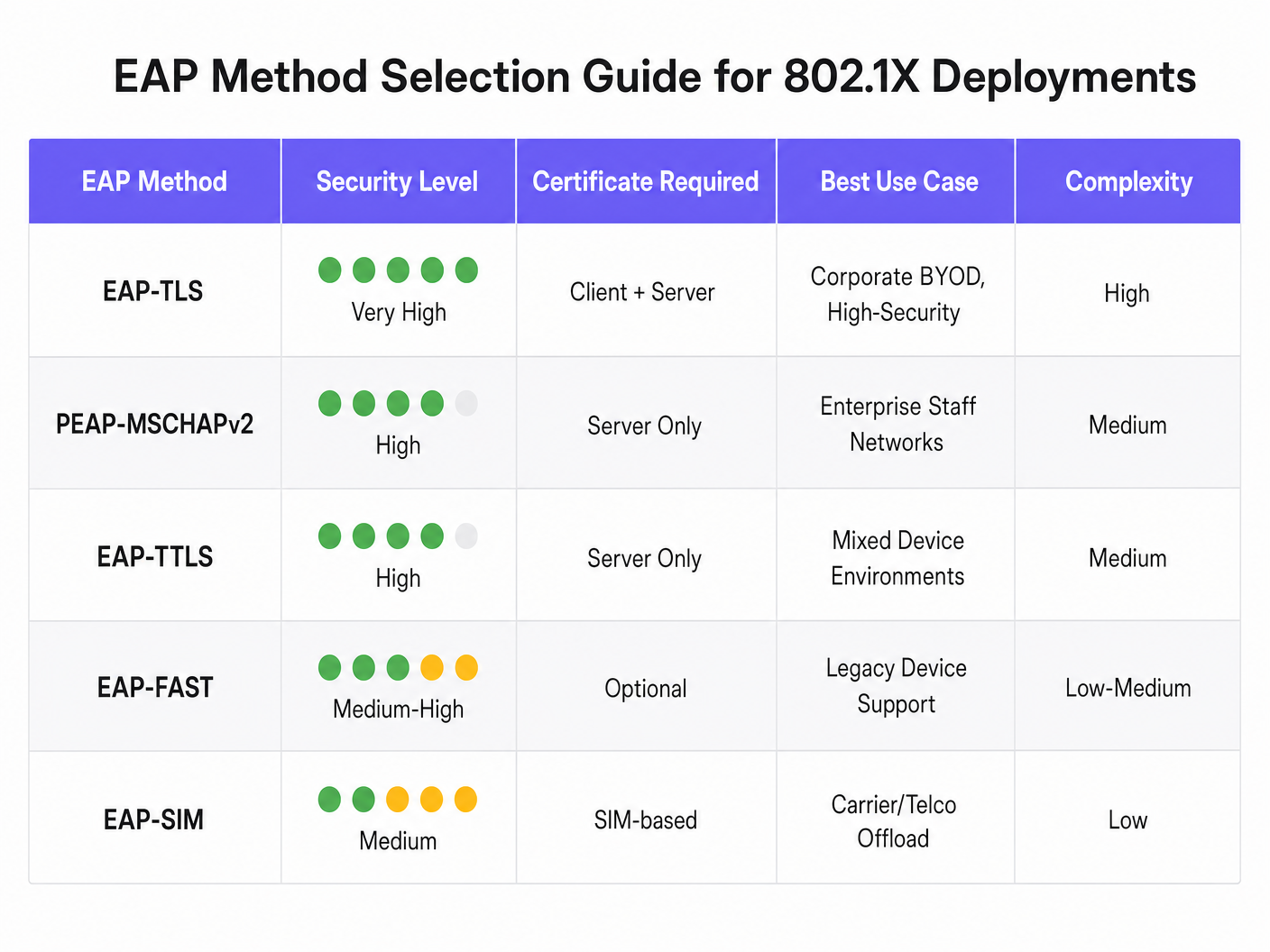
- EAP-TLS (Transport Layer Security): The most secure method, requiring both server and client certificates for mutual authentication. It eliminates credential theft risks as no passwords are exchanged. However, it necessitates a Public Key Infrastructure (PKI) and Mobile Device Management (MDM) to distribute client certificates. It is highly recommended for corporate devices.
- PEAP-MSCHAPv2 (Protected EAP): Widely deployed due to its native support in Windows and reliance solely on a server-side certificate. It tunnels the credential exchange within a TLS session. While easier to deploy, it is vulnerable to credential harvesting if client-side certificate validation is not strictly enforced.
- EAP-TTLS: Similar to PEAP but offers greater flexibility in the inner authentication protocol, making it suitable for environments with diverse client operating systems.
Implementation Guide
Deploying 802.1X with Cloud RADIUS requires a phased, methodical approach to minimize disruption to existing operations.
- Identity Provider Integration: Establish and validate the connection between the Cloud RADIUS service and the enterprise IdP. Ensure that directory synchronization is accurate and that the necessary user attributes (e.g., group memberships) are available for policy formulation.
- Certificate Management: For PEAP deployments, procure a server certificate from a trusted public Certificate Authority (CA). Crucially, configure supplicants via MDM or Group Policy to explicitly trust this CA and validate the server certificate name. For EAP-TLS, deploy the internal CA infrastructure and begin issuing client certificates to managed devices.
- Network Infrastructure Configuration: Configure wireless controllers and access points to point to the Cloud RADIUS endpoints. Implement RadSec if supported by the hardware vendor. Define the RADIUS shared secrets using strong, cryptographically secure strings, ensuring they are unique per site or controller cluster.
- Policy Definition: Construct authentication policies within the Cloud RADIUS platform. Define conditions based on user groups, device types, or location to dynamically assign VLANs or apply Access Control Lists (ACLs) upon successful authentication.
- Pilot and Phased Rollout: Select a representative subset of users and devices for an initial pilot. Monitor authentication logs closely to identify latency issues, certificate validation failures, or incorrect VLAN assignments. Following a successful pilot, execute a phased rollout, prioritizing high-risk locations such as administrative offices or locations handling sensitive data.
Best Practices
- Enforce Client Certificate Validation: The most common vulnerability in PEAP deployments is the failure to enforce server certificate validation on the client. If clients are allowed to blindly trust any presented certificate, they are susceptible to rogue access point attacks.
- Implement MAC Authentication Bypass (MAB) with Caution: For headless devices (e.g., printers, IoT sensors) that cannot run an 802.1X supplicant, MAB can be used. However, MAC addresses are easily spoofed. MAB devices must be isolated on heavily restricted VLANs with strict firewall rules limiting their network access.
- Leverage 802.11r for Roaming: In environments where devices move frequently between access points, the full 802.1X authentication process can introduce unacceptable latency, disrupting real-time applications like voice. Implement 802.11r (Fast BSS Transition) to streamline roaming by caching authentication keys.
- Integrate with Analytics: For venues operating both corporate 802.1X networks and public access networks, integrating the authentication infrastructure with WiFi Analytics provides a holistic view of network utilization and device behavior across the entire estate.
Troubleshooting & Risk Mitigation
Authentication failures in an 802.1X environment can result in widespread connectivity loss. Robust troubleshooting processes are essential.
- Certificate Expiration: A lapsed server or client certificate will cause immediate authentication failures. Implement automated monitoring and alerting for certificate validity periods, ensuring renewals are processed well in advance of expiration.
- Latency and Timeouts: If the Cloud RADIUS service or the IdP experiences high latency, authenticators may time out and drop the connection. Configure appropriate timeout values on the wireless controllers (typically 5-10 seconds) and implement backup RADIUS servers to provide redundancy.
- Radius Shared Secret Mismatch: A mismatch between the shared secret configured on the authenticator and the RADIUS server will result in silently dropped packets. Standardize secret management and avoid manual entry where possible.
ROI & Business Impact
The transition to 802.1X with Cloud RADIUS delivers measurable business value. It drastically reduces the attack surface by eliminating shared passwords, directly supporting compliance with PCI DSS (Requirements 1 and 8) and GDPR data protection mandates. Operationally, it centralizes access control, allowing IT teams to revoke access instantly across all global locations by simply disabling a user account in the central directory. Furthermore, by decommissioning legacy on-premises RADIUS servers, organizations reduce hardware maintenance costs, software licensing fees, and the administrative burden of patching and managing distributed infrastructure. For comprehensive deployments across sectors like Retail and Hospitality , this centralized security posture is a critical enabler of secure digital transformation.
Listen to our comprehensive briefing on this topic:
Key Definitions
Supplicant
The software client on an end-user device (laptop, smartphone) that negotiates network access using EAP.
IT teams must ensure the supplicant is correctly configured (often via MDM) to validate server certificates to prevent credential theft.
Authenticator
The network device (typically a WiFi access point or switch) that controls physical or logical access to the network based on the authentication status.
The authenticator acts as the middleman, relaying EAP messages between the supplicant and the RADIUS server.
Cloud RADIUS
A centralized, cloud-hosted authentication service that processes RADIUS requests from distributed network infrastructure without requiring on-premises servers.
Essential for multi-site organizations looking to implement enterprise-grade security without the hardware maintenance overhead.
EAP (Extensible Authentication Protocol)
The framework used to encapsulate authentication messages between the supplicant and the authentication server.
Choosing the right EAP method (e.g., PEAP vs. EAP-TLS) determines the security strength and deployment complexity of the wireless network.
RadSec
A protocol that transmits RADIUS data over a TLS tunnel, ensuring encryption of authentication traffic in transit.
Crucial when using Cloud RADIUS, as it protects sensitive credential exchanges from interception over the public internet.
Dynamic VLAN Assignment
The process where the RADIUS server instructs the authenticator to place a device onto a specific virtual network segment based on the user's identity or group membership.
Allows IT to broadcast a single SSID while securely segmenting traffic (e.g., putting HR staff and IT staff on different subnets).
Mutual Authentication
A security process where both the client verifies the server's identity, and the server verifies the client's identity (typically using certificates).
The defining characteristic of EAP-TLS, making it highly resistant to man-in-the-middle attacks.
MAC Authentication Bypass (MAB)
A fallback authentication method that uses a device's MAC address as its credential when it cannot support an 802.1X supplicant.
Used for legacy hardware like printers or IoT devices, but requires strict network segmentation due to the ease of MAC spoofing.
Worked Examples
A 200-room hotel operating a legacy PSK network for back-of-house operations (housekeeping tablets, point-of-sale terminals, manager laptops) needs to achieve PCI DSS compliance ahead of an upcoming audit. They lack on-site IT staff and cannot deploy local servers.
The hotel should deploy a Cloud RADIUS solution integrated directly with their central Azure AD tenant. For manager laptops (Windows/macOS), they should implement PEAP-MSCHAPv2, utilizing an MDM profile to push the trusted server certificate and enforce validation. For point-of-sale terminals that may lack robust supplicants, they should utilize MAC Authentication Bypass (MAB) but strictly assign these devices to an isolated VLAN that only permits communication with the payment gateway. The deployment requires configuring the existing cloud-managed access points to point to the Cloud RADIUS IP addresses, securing the connection with RadSec.
A national retail chain is rolling out a new fleet of corporate-owned tablets for inventory management across 500 stores. They want to ensure that even if a tablet is stolen, it cannot be used to access the network, and they want to eliminate password-related helpdesk tickets.
The retailer must implement EAP-TLS. They will deploy an internal Certificate Authority (CA) and integrate it with their MDM platform. When a tablet is provisioned, the MDM pushes a unique client certificate to the device. The Cloud RADIUS service is configured to authenticate devices based solely on the presence of a valid client certificate. If a tablet is reported stolen, the IT team simply revokes that specific certificate in the CA. The Cloud RADIUS service, checking the Certificate Revocation List (CRL) or via OCSP, will immediately deny network access.
Practice Questions
Q1. Your organization is migrating from a shared PSK to 802.1X using PEAP-MSCHAPv2. During the pilot phase, users report they can connect, but a security audit reveals that devices are silently accepting any server certificate presented to them. What is the immediate risk, and how must it be remediated?
Hint: Consider what happens if an attacker sets up an access point broadcasting your corporate SSID.
View model answer
The immediate risk is a Man-in-the-Middle (MitM) attack via a rogue access point. An attacker can broadcast the corporate SSID, present a self-signed certificate, and harvest user credentials as devices attempt to authenticate. To remediate this, the IT team must configure the supplicant profiles (via MDM or Group Policy) to explicitly validate the server certificate. This involves specifying the exact Trusted Root CA that issued the RADIUS server's certificate and strictly defining the expected server hostname.
Q2. A remote retail branch has lost its internet connection. The local access points are still powered on. Will staff devices currently connected to the 802.1X network remain connected, and will new devices be able to authenticate? Assume standard Cloud RADIUS architecture without local survivability nodes.
Hint: Think about the path an authentication request must take and the state of already authorized ports.
View model answer
Devices that are already authenticated and connected will typically remain connected until their session timeout expires or they disconnect, as the authenticator port is already in the authorized state. However, new devices attempting to connect, or devices attempting to re-authenticate, will fail. Because the internet connection is down, the access points cannot reach the Cloud RADIUS server to process the EAP exchange. This highlights the importance of resilient WAN links when relying on cloud-based authentication.
Q3. You need to secure network access for a fleet of legacy barcode scanners in a warehouse. These scanners do not support 802.1X supplicants and only support WPA2-Personal (PSK). You cannot upgrade the hardware. How do you integrate these devices into a secure network architecture alongside your 802.1X corporate devices?
Hint: You need an alternative to 802.1X that still provides access control, combined with network-level isolation.
View model answer
The recommended approach is to utilize MAC Authentication Bypass (MAB) for the barcode scanners. The access point will use the scanner's MAC address as the identity and send it to the RADIUS server. Because MAC addresses are easily spoofed, this provides weak authentication. Therefore, the RADIUS server must be configured to return a specific VLAN attribute upon successful MAB authentication. This VLAN must be heavily restricted via firewalls or ACLs, allowing the scanners to communicate only with the specific inventory servers they require, and blocking all other lateral network access.