
Why Your Stadium WiFi Grinds to a Halt (And How to Fix It)
This authoritative technical guide examines the root cause of stadium WiFi congestion - the simultaneous background chatter of 50,000 devices loading programmatic advertisements and telemetry - and provides a detailed architectural blueprint for deploying edge DNS filtering as the primary mitigation strategy. Designed for IT Directors, CTOs, and Network Architects, it delivers actionable implementation guidance, real-world case studies, and measurable ROI frameworks to help venue operators reclaim bandwidth and deliver high-performance connectivity at scale.
Video overview
Listen to this guide
View podcast transcript
Part of our core series: Guest WiFi Guide →
Executive Summary
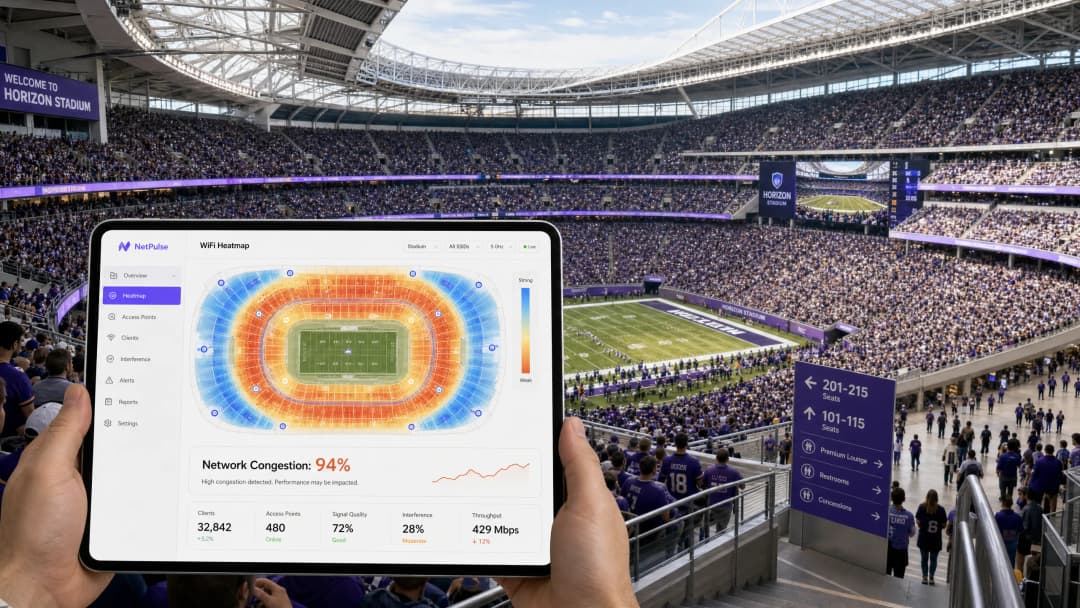
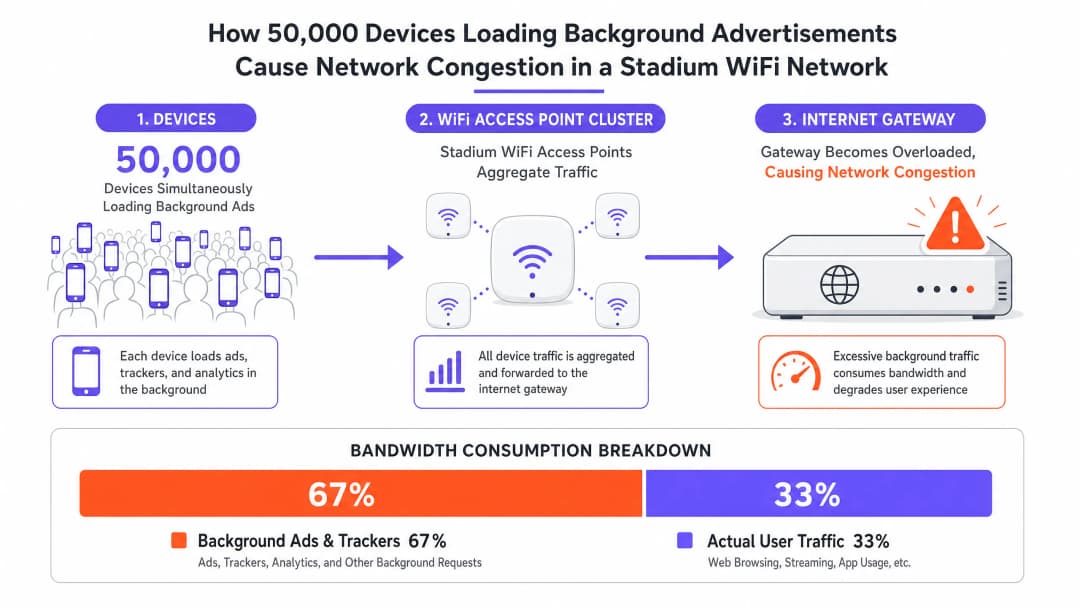
For CTOs and IT directors managing high-density venues, the phenomenon of stadium WiFi slow is a persistent and costly operational risk. Despite significant capital expenditure on multi-gigabit backhaul, high-density access points, and meticulous RF planning, networks often grind to a halt when venue capacity exceeds 80%. The root cause is rarely a hardware limitation. It is the invisible avalanche of background traffic. When 50,000 devices simultaneously connect to a Guest WiFi network, they initiate millions of micro-transactions - loading programmatic advertisements, syncing telemetry, and executing background SDK calls. This "chatter" can consume up to 60% of available bandwidth, exhaust NAT pools, and saturate airtime before a single user actively browses the web. This guide details the technical mechanics of this congestion, provides a vendor-neutral architectural blueprint for implementing Edge DNS filtering, and quantifies the ROI of doing so.
Technical Deep-Dive: The Anatomy of High-Density Congestion
Background Traffic Avalanche
When a device connects to a guest WiFi network, it immediately initiates a series of background activities that have nothing to do with what the user is actively doing. Modern mobile applications are embedded with multiple third-party SDKs - for analytics platforms, crash reporting services, and programmatic advertising networks. Each SDK operates independently, polling its own servers on its own schedule. In a stadium environment, 50,000 devices performing these tasks simultaneously create a traffic profile that is fundamentally different from any other deployment scenario.
This traffic is characterized by high-volume, low-payload requests: small-packet TCP handshakes, DNS queries, and HTTP GET requests for tracking pixels and ad creatives. Although the total data transferred per device may seem negligible in isolation, its aggregate impact on the network's spectral efficiency is devastating. The IEEE 802.11 standard dictates that WiFi is a shared medium; every packet transmitted by any device must contend for airtime. Millions of background micro-transactions saturate this shared medium, leaving insufficient airtime for legitimate user sessions.
Three Failure Modes at Scale
High-density congestion typically manifests through three distinct failure modes, which often occur simultaneously:
| Failure Mode | Technical Cause | Symptom Experienced by User | |---|---|---|| State Table Exhaustion | Firewall/NAT gateway connection tracking memory is depleted | Dropped packets, connection timeouts, Captive Portal failures | | Airtime Saturation | Shared RF medium is overloaded due to background micro-transactions | High latency, poor throughput despite low AP client counts | | DNS Resolver Overload | Local resolvers are overloaded due to ad network and telemetry queries | Slow page loads, app failures, authentication delays |
Of these, State Table Exhaustion is the most lethal. A typical enterprise firewall may be sized to handle 500,000 to 1,000,000 concurrent connection states. In a 50,000-device stadium, where each device maintains 20 to 30 background connections, the theoretical connection state count exceeds one million before accounting for any active user traffic. This results in dropped packets and failed connections across the board, affecting every user regardless of their own behavior.
Airtime Saturation is further exacerbated by the 802.11 contention mechanism (CSMA/CA). Every device must listen before transmitting, and the probability of collisions increases exponentially with device density. Background traffic from ad networks and telemetry services forces legitimate user traffic to queue, increasing latency and reducing effective throughput to a fraction of the access points' theoretical capacity.
DNS Resolver Overload is frequently overlooked. In a typical stadium deployment, WiFi Analytics reveals that ad network domains - such as those operated by major programmatic advertising platforms - consistently appear in the top five most queried DNS entries. Each query, though individually small, contributes to the aggregate load on the local resolver and triggers downstream TCP connection attempts that further burden the state table.
Implementation Guide: Edge DNS Filtering Architecture
The strategic response to this failure pattern is not to provision more hardware, but to eliminate the source of the noise. Edge DNS Filtering is the primary mitigation strategy, and when deployed correctly, it can reclaim up to 40% of WAN bandwidth and reduce average latency by 60ms or more.
Architectural Blueprint
Edge DNS filtering works by intercepting DNS queries at the network perimeter. When a device requests the IP address of a known ad network, telemetry server, or malware domain, the filter responds with a null route - returning either a 0.0.0.0 or NXDOMAIN response. This prevents the device from establishing a TCP connection, eliminating the associated state-table overhead, airtime consumption, and WAN bandwidth usage.

Deployment Steps
Step 1: Deploy Local DNS Resolvers Implement highly available local DNS resolvers at the edge of the venue. These must be capable of handling the full query load of the connected device population. Do not rely solely on upstream ISP resolvers, as this introduces latency and removes your ability to filter.
Step 2: Integrate Threat Intelligence and Ad-Blocking Feeds Subscribe to enterprise-grade threat intelligence feeds that include known ad network domains, telemetry servers, and malware infrastructure. These feeds must be dynamically updated - ideally every few hours - to catch newly registered domains used by ad networks to evade blocking.
Step 3: Configure DHCP Policy Configure DHCP servers to distribute the IP addresses of the local, filtered resolvers to all guest devices. This is the primary enforcement mechanism for directing client DNS traffic through the filter.
Step 4: Implement Egress Firewall Rules This step is critical and frequently omitted. Implement strict egress firewall rules to block all outbound DNS traffic (TCP/UDP port 53) to any destination other than the approved local resolvers. This prevents devices with hardcoded DNS settings from bypassing the filter.
Step 5: Address DNS over HTTPS (DoH) As detailed in our guide on DNS Over HTTPS (DoH): Implications for Public WiFi Filtering, modern operating systems and browsers increasingly use DoH to encrypt DNS queries, routing them to external resolvers and bypassing local filtering entirely. Network administrators must explicitly block the IP addresses of known DoH providers at the firewall level. This forces clients to fall back to standard, unencrypted DNS, which can then be filtered. For international deployments, the Portuguese-language equivalent of this guidance is available at DNS Over HTTPS (DoH): Implicações para a Filtragem de WiFi Público.
Step 6: Integrate with Identity and Access Management For maximum effectiveness, link DNS filtering policies to user authentication. Leveraging profile-based authentication - as explored in our 2026 guide on passwordless access - allows venues to apply differentiated filtering policies based on user roles. General admission users receive aggressive filtering; press, corporate, or VIP users can receive more permissive policies that allow specific business applications.
Got questions about your specific setup?
Our team works with venue operators, IT managers, and network engineers across 80,000 venues. Book a 20-minute call and we will show you how others like you solved it.
Case Studies
Case Study 1: 60,000-Seat Soccer Stadium, UK
A Premier League soccer club was experiencing severe network degradation during halftime, with the Captive Portal timing out and social media sharing failing at peak moments. The WAN circuit was a 10Gbps dedicated connection, which was operating at only 28% utilization during the event. However, the firewall state table was at 97% capacity.
Following a traffic audit using WiFi Analytics, the team identified that ad network domains accounted for 61% of all DNS queries. The top five domains were all programmatic advertising infrastructure. Edge DNS filtering was deployed with a blocklist of 1.2 million domains, alongside strict egress rules blocking port 53 and DoH provider IPs.
The result: state table utilization at peak capacity dropped to 34%, average latency fell from 280ms to 95ms, and WAN bandwidth utilization at peak dropped from 28% to 17% - a 39% reduction in consumed bandwidth despite no change in the number of connected devices.
Case Study 2: International Convention Center, Hospitality Sector
A major convention center hosting a 15,000-delegate technology summit was experiencing attendee complaints about slow WiFi, despite recently upgraded infrastructure. The venue had deployed 400 enterprise-grade access points and a 5Gbps WAN circuit.
Traffic analysis revealed that delegate devices - primarily corporate laptops running multiple enterprise applications - were generating an average of 45 background connections per device. The DNS resolver was processing 2.3 million queries per hour, 68% of which were destined for ad networks and analytics platforms.
Following the deployment of Edge DNS filtering with policy integration linked to the conference registration system, the venue saw a 52% reduction in DNS query volume, a 41% reduction in firewall state table utilization, and a measurable improvement in average TCP connection establishment time from 180ms to 62ms. Delegate satisfaction scores for WiFi quality rose from 3.1 to 4.6 out of 5.
Best Practices & Standards
The following vendor-neutral best practices reflect current industry standards for high-density WiFi deployments:
- IEEE 802.11ax (WiFi 6/6E): Deploy WiFi 6 or 6E access points. OFDMA and BSS coloring features significantly reduce airtime contention in high-density environments, complementing the traffic reduction achieved by DNS filtering.
- WPA3-Enterprise: Implement WPA3-Enterprise with IEEE 802.1X authentication for any deployment handling sensitive data. This is a baseline requirement for PCI DSS compliance in Retail environments and aligns with CCPA/CPRA data minimization principles.
- CCPA/CPRA Compliance: Transparently communicate the use of network optimization tools, including DNS filtering, in the Captive Portal terms of service. Users must be informed that DNS queries are processed locally as part of the network management function.
- Monitoring and Analytics: Continuously monitor top requested domains using WiFi Analytics and adjust filtering policies accordingly. Ad networks regularly register new domains to evade blocking; static blocklists become outdated within days.
- Public Sector Deployments: For public sector and smart city WiFi deployments, as discussed in the context of Purple's public sector expansion, DNS filtering also serves a safeguarding function, preventing access to harmful content categories in compliance with local authority requirements.
Troubleshooting & Risk Mitigation
False Positives
Risk: Overly aggressive filtering can block legitimate application functionality, such as ticketing apps, venue navigation services, or corporate VPN endpoints.
Mitigation: Implement a strict allowlist for mission-critical domains identified during a monitor-only baseline phase. Never move directly into enforcement mode in a production environment. A two-week monitoring period prior to enforcement is the minimum recommended baseline.
Captive Portal Bypass via Background Traffic
Risk: If background traffic satisfies the OS's Captive Portal detection mechanisms (e.g., Apple's captive.apple.com check) before the user opens a browser, devices may fail to trigger the Captive Portal.
Mitigation: Tighten the walled garden to allow only the specific domains required for Captive Portal detection and authentication. All other traffic must be blocked until the user has fully authenticated and the filtering policy is applied to their session.
DoH Bypass
Risk: Devices using DoH will bypass local DNS filtering, rendering the entire strategy ineffective for those clients.
Mitigation: Maintain an up-to-date blocklist of DoH provider IP addresses and block them at the firewall. This is not a one-time configuration; new DoH providers emerge regularly and must be tracked.
Offline Maps & Navigation Services
For venues deploying indoor navigation alongside WiFi - such as those using Purple's Offline Maps Mode - ensure that map tile servers and navigation APIs are explicitly allowlisted. These services are critical to the user experience and must not be caught in broad ad-network filtering rules.
ROI & Business Impact
The business case for Edge DNS filtering is compelling across multiple dimensions:
| Metric | Typical Result | Business Impact |
|---|---|---|
| WAN Bandwidth Reduction | 30-40% | Circuit upgrade costs deferred; infrastructure lifecycle extended |
| Latency Reduction | 40-70ms average | Higher user engagement with venue apps and digital services |
| State Table Utilization | 50-65% reduction at peak | Firewall hardware refresh deferred; outage risk mitigated |
| DNS Query Volume | 40-60% reduction | Resolver load decreased; authentication speed improved |
| User Satisfaction | Measurable NPS improvement | Higher dwell time, increased F&B spend, improved brand perception |
For a stadium spending $80,000 per annum on WAN connectivity and facing a $200,000 hardware refresh cycle, a 35% bandwidth reduction translates to approximately $28,000 in annual WAN savings and a potential 18-month extension of the hardware refresh cycle - against implementation costs typically in the range of $15,000 to $30,000 for a venue of this scale, the combined three-year savings exceed $100,000.
Listen to the Technical Briefing
Key Definitions
State Table Exhaustion
A condition where a firewall or NAT gateway runs out of memory allocated for tracking active network connections, causing it to drop new connection requests.
Occurs in high-density venues when tens of thousands of devices simultaneously initiate micro-connections to ad networks and telemetry servers. The primary cause of the "stadium WiFi slow" paradox where the WAN circuit appears underutilized but the network is effectively broken.
Airtime Utilization
The percentage of time the RF spectrum on a given WiFi channel is actively being used to transmit data or management frames.
High airtime utilization from background chatter reduces the capacity available for active user sessions. In a high-density stadium, background traffic can drive airtime utilization above 80%, leaving insufficient capacity for legitimate user traffic.
Edge DNS Filtering
The practice of intercepting DNS queries at the network perimeter and blocking resolution for known malicious, high-overhead, or policy-violating domains by returning a null route or NXDOMAIN response.
The primary architectural mitigation for background traffic congestion in high-density venues. Prevents devices from establishing connections to ad networks and telemetry servers, reclaiming bandwidth and reducing state table load.
DNS over HTTPS (DoH)
A protocol for performing DNS resolution via the HTTPS protocol, encrypting the DNS query and routing it to an external resolver, bypassing local DNS infrastructure.
The primary bypass mechanism for edge DNS filtering. Must be explicitly blocked at the IP level to ensure all DNS traffic passes through the local, filtered resolver.
Null Route
A network route that discards traffic destined for a specific IP address or domain, effectively dropping it without forwarding.
Used by DNS filters to respond to blocked domains - returning 0.0.0.0 or NXDOMAIN - preventing the client from initiating a TCP connection and eliminating the associated network overhead.
Walled Garden
A restricted network environment that limits device access to a predefined set of resources, typically used to enforce captive portal authentication before granting full internet access.
Must be strictly configured to prevent background traffic from satisfying OS captive portal detection mechanisms before the user authenticates, which would allow unrestricted background traffic to flow without a filtering policy being applied.
Profile-Based Authentication
An authentication method that dynamically applies specific network policies - including DNS filtering rules, bandwidth limits, and access controls - based on the authenticated user's identity or role.
Enables venues to offer differentiated network experiences, applying aggressive filtering to general admission users while providing more permissive policies to VIPs, press, or corporate guests.
OFDMA (Orthogonal Frequency Division Multiple Access)
A multi-user version of OFDM that allows a single WiFi 6 (802.11ax) transmission to be split across multiple users simultaneously, reducing contention and improving spectral efficiency.
A key feature of WiFi 6 that directly addresses airtime contention in high-density deployments. Works in conjunction with DNS filtering to maximize the usable capacity of each access point.
Spectral Efficiency
The amount of useful data that can be transmitted over a given bandwidth in a specific communication system.
Reduced by background micro-transactions that consume airtime without delivering value to end users. Edge filtering and WiFi 6 features like OFDMA work together to maximize spectral efficiency.
Worked Examples
A 50,000-seat stadium is experiencing severe network degradation during halftime. The IT team has verified that the 10Gbps WAN circuit is only at 30% utilization, but APs are reporting high airtime utilization and the firewall state table is at 95% capacity. Adding more APs has not improved performance.
The issue is not raw bandwidth or AP density, but connection state exhaustion caused by background application chatter. The solution requires deploying an Edge DNS Filter in a phased approach. Phase 1: Deploy local DNS resolvers and configure them in monitor-only mode for two weeks. Analyze the top 100 queried domains. Phase 2: Configure DHCP to point all guest clients to the local resolvers. Implement egress firewall rules blocking outbound TCP/UDP Port 53 to all external IPs. Phase 3: Block the IP addresses of known DoH providers (Cloudflare 1.1.1.1, Google 8.8.8.8, etc.) at the firewall. Phase 4: Activate enforcement mode on the DNS filter with a blocklist targeting the identified ad network and telemetry domains. Phase 5: Monitor state table utilization and airtime metrics over the next three events to validate the improvement.
A major transportation hub wants to implement DNS filtering across 12 terminal buildings to improve network performance for 80,000 daily passengers. They are concerned about breaking legitimate airline ticketing applications and airport operations systems.
Implement a centralized, cloud-managed DNS filtering platform with local forwarders at each terminal. Phase 1: Deploy local forwarders in all 12 terminals, pointing to a centralized management plane. Phase 2: Run in monitor-only mode for 30 days across all terminals simultaneously. Use the analytics to build a comprehensive allowlist of airline ticketing domains, airport operations APIs, and ground handling system endpoints. Phase 3: Segment the network into guest WiFi and operational technology (OT) VLANs. Apply aggressive filtering to guest WiFi; apply a strict allowlist-only policy to OT VLANs. Phase 4: Enforce filtering on guest WiFi. Phase 5: Implement automated allowlist management - when a new airline begins operations at the terminal, their domain requirements are added to the allowlist via a change management process.
Practice Questions
Q1. You have deployed an Edge DNS filter and configured DHCP to point all clients to the local resolver. After the first major event, you find that bandwidth utilization has only dropped by 5%, and traffic analysis shows many devices are still successfully resolving ad network domains. What is the most likely architectural oversight, and what is the remediation?
Hint: Consider how modern browsers and operating systems handle DNS resolution by default, and what happens when a device has a hardcoded DNS server configured.
View model answer
There are two likely causes. First, the network is failing to block DNS over HTTPS (DoH) traffic. Modern browsers will attempt to use DoH, routing encrypted DNS queries to external resolvers like Cloudflare or Google, bypassing the local filter entirely. The remediation is to implement egress firewall rules blocking the IP addresses of known DoH providers. Second, some devices may have hardcoded DNS server addresses (e.g., 8.8.8.8) in their network configuration, bypassing DHCP-assigned resolvers. The remediation is to implement egress firewall rules blocking all outbound TCP/UDP Port 53 traffic to any destination other than the local resolvers, forcing all DNS traffic through the filter regardless of client configuration.
Q2. During a major event, the Captive Portal is timing out for users attempting to connect, even though the APs show relatively low client counts (only 40% of capacity). The WAN circuit is at 15% utilization. What is the likely cause, and what architectural changes would prevent this at the next event?
Hint: Think about what happens to device traffic in the period between WiFi association and captive portal authentication, and what network resource is most likely to be exhausted.
View model answer
The firewall's state table is likely exhausted by background traffic from devices that have associated with the AP but not yet authenticated through the Captive Portal. In the unauthenticated state, if the walled garden is too permissive, background traffic flows freely, creating thousands of connection state entries per device. With 40% of 50,000 seats occupied (20,000 devices), even a brief window of unrestricted background traffic can exhaust the state table before users attempt to authenticate. The architectural remediation requires two changes: First, tighten the walled garden to permit only the minimum required traffic - DHCP (UDP 67/68), DNS to the local resolver only, and HTTP/HTTPS to the Captive Portal IP. Block all other traffic until authentication is complete. Second, consider deploying a dedicated stateless ACL at the AP or switch level to drop background traffic in the pre-authentication state, preventing it from even reaching the stateful firewall.
Q3. A retail chain with 500 locations wants to implement DNS filtering to improve POS system reliability and reduce WAN costs. They need uniform policy enforcement but also need to ensure that new point-of-sale software vendors can be onboarded without causing outages. What architectural approach should be taken, and what operational process should accompany it?
Hint: Consider the tension between centralized policy management and the operational agility needed to support a dynamic retail technology stack.
View model answer
Deploy a cloud-managed DNS filtering solution with local forwarders at each site. The centralized management plane allows for uniform policy definition and threat feed updates across all 500 locations simultaneously, while the local forwarders ensure low-latency resolution and resilience against WAN link degradation. For operational agility, implement a tiered allowlist management process: a permanent allowlist for core POS and payment processing domains (which should be treated as change-controlled infrastructure), a temporary allowlist for new vendor onboarding (with a 90-day review cycle), and a self-service request process for store managers to flag false positives. Critically, the PCI-DSS requirement for network segmentation means the POS VLAN must be isolated from the guest WiFi VLAN, with separate filtering policies applied to each. The guest WiFi policy can be aggressive; the POS policy should be allowlist-only, permitting only explicitly approved payment processor and software update domains.
Continue reading in this series
Using Packet Capture (PCAP) to Diagnose Slow WiFi Performance
This technical reference guide provides IT managers, network architects, and venue operations directors with a structured, packet-level methodology to diagnose and resolve slow enterprise WiFi performance using Packet Capture (PCAP) analysis. By dissecting raw 802.11 frames - including retransmission rates, airtime utilization, and physical layer metadata - teams can isolate RF-layer bottlenecks from wired or application issues with precision. Applicable across high-density venues including hotels, retail chains, stadiums, and convention centers, this guide delivers actionable diagnostic workflows, real-world case studies, and configuration remediation steps to reclaim network capacity and protect guest experience.
Solving the Connected but No Internet Error on Guest WiFi
This authoritative technical reference guide explains how DNS timeouts caused by congested networks trigger the 'Connected, No Internet' error on guest WiFi. It provides network architects and IT managers with actionable implementation steps for deploying enterprise DNS filters to resolve these bottlenecks and improve guest onboarding.
Why is Our Guest WiFi So Slow? Diagnosing Network Congestion
This guide diagnoses the hidden drivers of guest WiFi congestion - background telemetry, programmatic ad networks, and automated OS updates - which collectively consume up to 40% of public WiFi bandwidth before a guest even opens a browser. It provides a phased, vendor-neutral implementation framework for DNS filtering and QoS policies that reclaim that bandwidth, improve guest experience, and deliver measurable ROI. Targeted at IT Directors and Operations Managers in hospitality, retail, events, and public-sector environments.
Got questions about your specific setup?
Our team works with venue operators, IT managers, and network engineers across 80,000 venues. Book a 20-minute call and we will show you how others like you solved it.