
Access Point vs. Router: A Guide for Commercial Networking
This comprehensive guide explores the technical distinctions between access points and routers, providing actionable deployment strategies for commercial environments. It equips IT managers and venue operators with the knowledge required to architect scalable, secure, and high-performance wireless networks.
Listen to this guide
View podcast transcript
Executive Summary
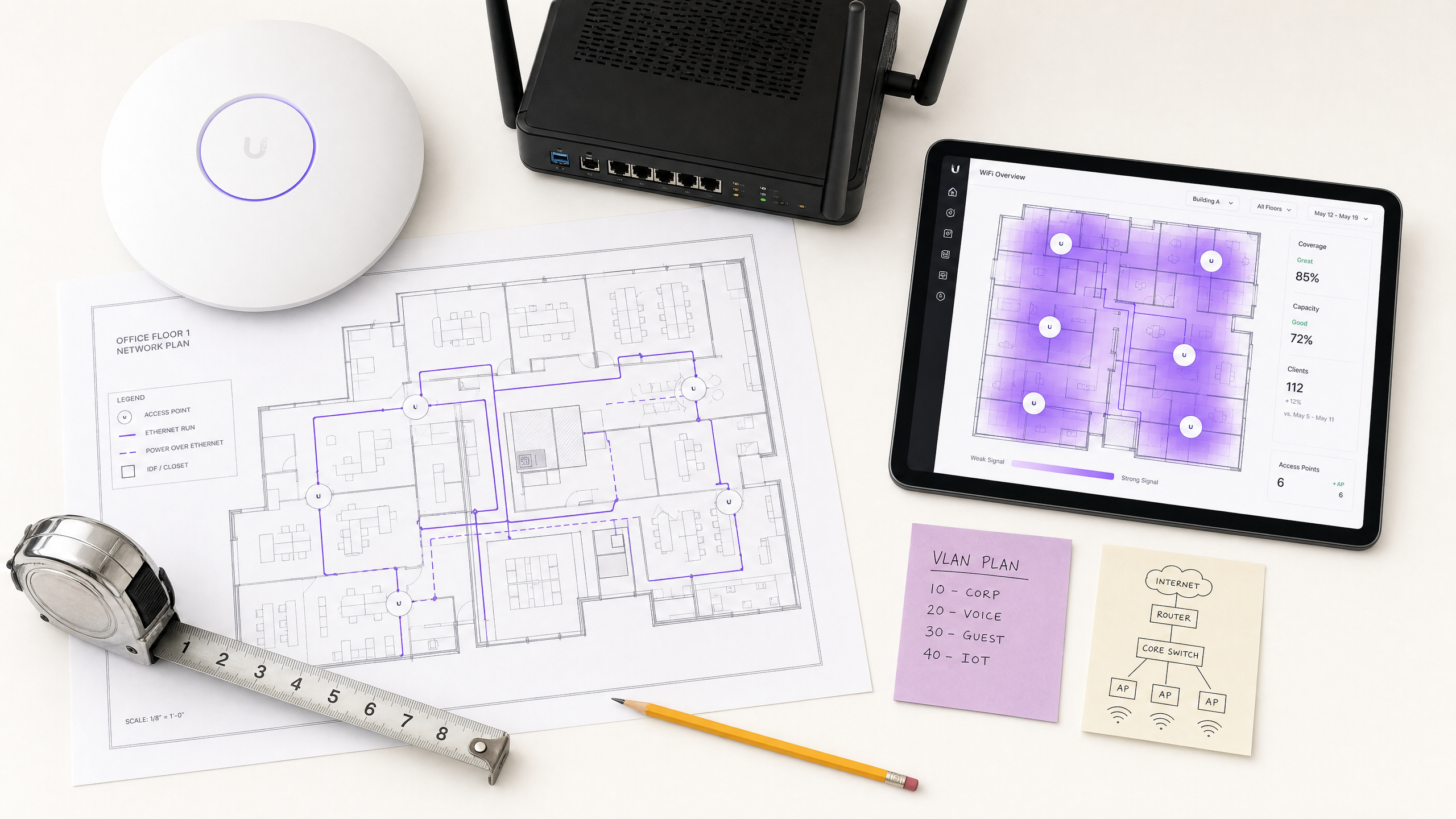
For CTOs and network architects overseeing commercial venues, the distinction between an access point (AP) and a router is fundamental to scalable infrastructure design. While consumer environments often blur these lines with all-in-one devices, enterprise deployments require strict separation of duties to ensure high availability, security, and performance. A router operates at OSI Layer 3, directing IP traffic and managing network boundaries, whereas an access point functions at Layer 2, serving as a wireless bridge to the wired LAN.
Implementing a robust architecture with dedicated APs enables seamless roaming, advanced VLAN segmentation, and integration with enterprise platforms like Guest WiFi and WiFi Analytics . This guide details the technical specifications, deployment methodologies, and risk mitigation strategies necessary for building resilient wireless networks in Hospitality , Retail , and other high-density environments. We will explore how to transition from legacy setups to controller-based AP deployments that support modern standards such as WPA3 and IEEE 802.1X.
Technical Deep-Dive
OSI Model Operation and Core Functions
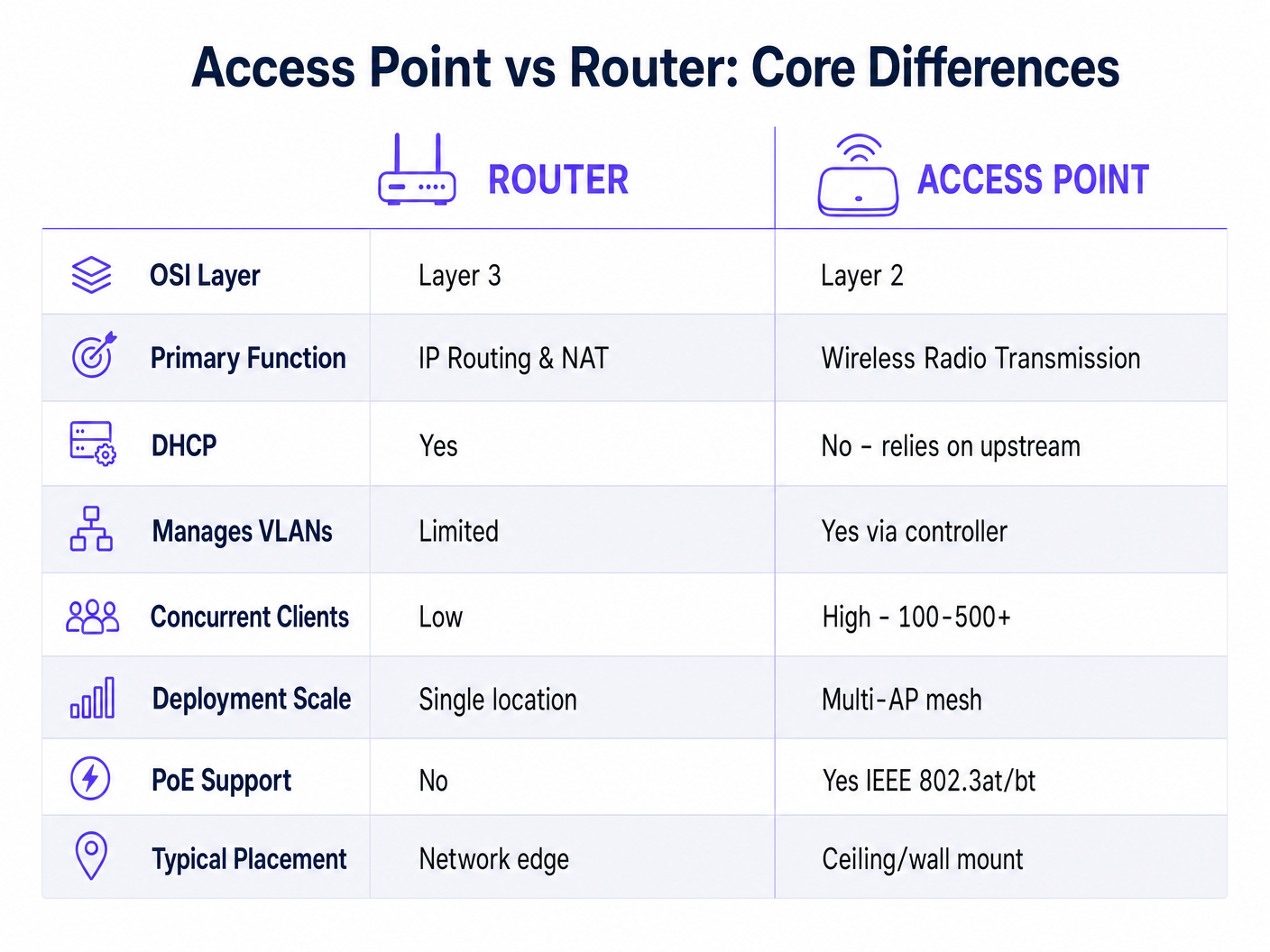
The fundamental difference between a router and an access point lies in their operational layer within the OSI model. A router is a Layer 3 (Network Layer) device. Its primary responsibility is to route packets between different IP subnets, typically managing the boundary between the local area network (LAN) and the wide area network (WAN). Routers handle Network Address Translation (NAT), DHCP services, and firewall rules. They maintain routing tables to determine the optimal path for data packets.
Conversely, an access point is a Layer 2 (Data Link Layer) device. It acts as a bridge, converting wired Ethernet frames into wireless 802.11 frames. An AP does not route traffic, assign IP addresses, or manage NAT. It relies on an upstream router or core switch to handle these functions. In an enterprise environment, APs are deployed in a mesh or controller-managed architecture to provide continuous coverage across large areas, allowing clients to roam seamlessly between access points without losing their IP address or dropping connections.
Scalability and Client Density
Consumer-grade wireless routers are designed for low-density environments, typically supporting 15-30 concurrent devices before experiencing performance degradation due to CPU and memory constraints. In commercial settings such as Retail or Transport hubs, client density can easily exceed hundreds of devices per zone. Enterprise APs are engineered with dedicated radio chipsets and high-gain antennas to support 100-500+ concurrent clients per access point. They utilize advanced features like MU-MIMO (Multi-User, Multiple Input, Multiple Output) and OFDMA (Orthogonal Frequency-Division Multiple Access) to manage high-density traffic efficiently.
Network Architecture and Segmentation
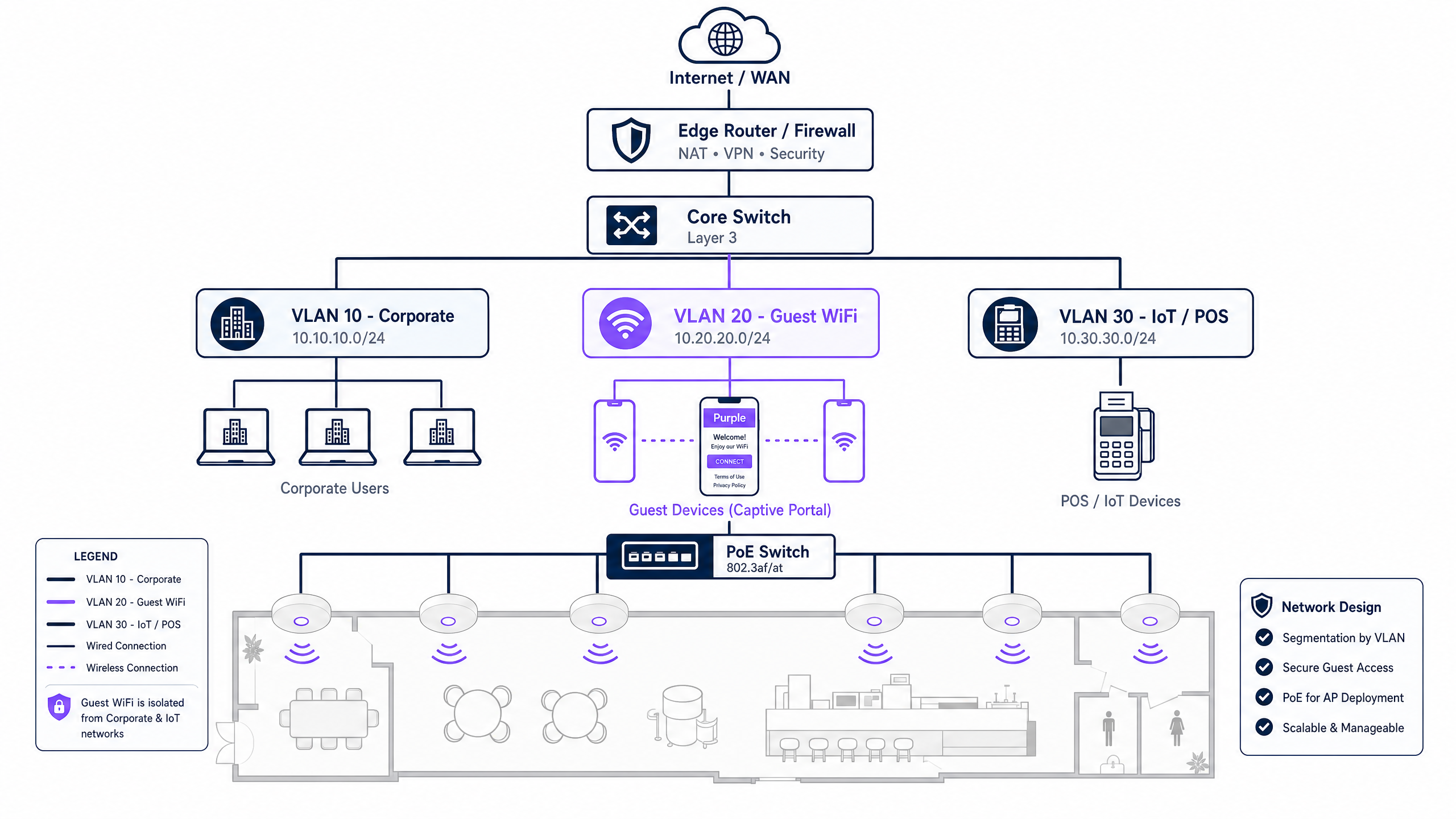
A critical requirement for commercial networks is logical segmentation. A standard architecture involves an edge router handling WAN connectivity, connected to a core Layer 3 switch, which then distributes to PoE (Power over Ethernet) access switches. The APs connect to these PoE switches. This design allows for the implementation of multiple VLANs (Virtual Local Area Networks). For instance, an AP can broadcast multiple SSIDs, mapping a corporate SSID to VLAN 10 (using 802.1X authentication) and a guest SSID to VLAN 20 (using a captive portal). This isolation is crucial for compliance with standards like PCI DSS and GDPR.
Implementation Guide
1. Requirements Gathering and Site Survey
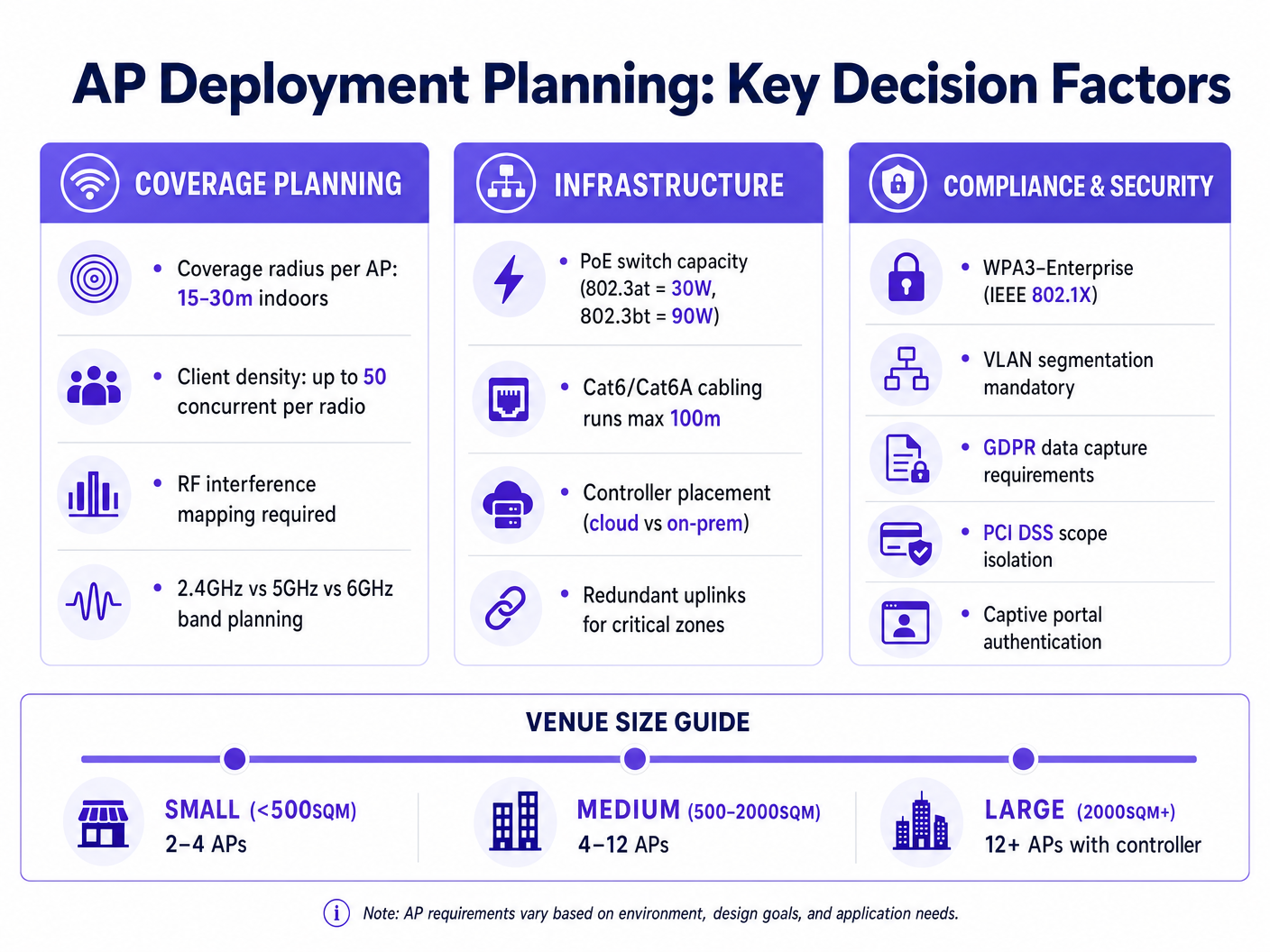
Before deploying APs, a predictive and physical site survey is mandatory. This involves mapping the venue to identify RF (Radio Frequency) obstacles, attenuation zones, and high-density areas. Tools like Ekahau or AirMagnet are standard for this phase. The goal is to determine the optimal placement of APs to ensure a minimum signal strength (typically -65 dBm) across the coverage area, while minimizing co-channel interference.
2. Infrastructure Preparation
Enterprise APs require Power over Ethernet (PoE) for both data connectivity and power. Ensure the access switches support the required PoE standard (e.g., 802.3at/PoE+ for standard APs, or 802.3bt/PoE++ for high-performance Wi-Fi 6E/7 APs). Cable runs must use Cat6 or Cat6A cabling to support multi-gigabit throughput, adhering to the 100-meter length limitation.
3. Controller Configuration and Provisioning
Modern enterprise APs are managed via a central controller, which can be hardware-based (on-premises) or cloud-hosted. The controller handles AP provisioning, firmware updates, and Radio Resource Management (RRM). RRM dynamically adjusts AP transmit power and channel assignments to optimize the RF environment. During this phase, configure the necessary SSIDs, VLAN tags, and authentication methods. For guest networks, integrate the controller with a captive portal solution to capture first-party data, as detailed in How To Improve Guest Satisfaction: The Ultimate Playbook .
Best Practices
- Decouple Routing from Wireless Access: Never rely on a single device to handle both routing and high-density wireless access in a commercial setting. Use dedicated edge routers/firewalls and separate APs.
- Implement Strict VLAN Segmentation: Isolate corporate traffic, IoT devices, and guest networks onto separate VLANs. Ensure the guest network has client isolation enabled to prevent peer-to-peer communication.
- Standardize on WPA3 and 802.1X: For internal networks, mandate WPA3-Enterprise with IEEE 802.1X authentication (RADIUS/EAP). For seamless guest access, consider technologies like OpenRoaming, as Purple acts as a free identity provider for these services.
- Plan for Capacity, Not Just Coverage: Designing solely for coverage often leads to performance issues in high-density areas. Factor in the expected number of concurrent clients and application throughput requirements when determining AP density.
Troubleshooting & Risk Mitigation
Co-Channel Interference (CCI)
CCI occurs when multiple APs in close proximity operate on the same channel, causing them to wait for each other before transmitting (CSMA/CA). Mitigation: Utilize dynamic channel assignment via the wireless controller. In the 2.4GHz band, strictly use non-overlapping channels (1, 6, 11). Prioritize the 5GHz and 6GHz bands for high-capacity deployments due to the availability of more non-overlapping channels.
Rogue Access Points
Employees or malicious actors may plug unauthorized APs into the corporate network, bypassing security controls. Mitigation: Enable Wireless Intrusion Prevention Systems (WIPS) on the enterprise APs to detect and contain rogue devices. Implement port security (802.1X) on all wired switch ports to prevent unauthorized devices from connecting to the LAN.
Captive Portal Failures
Guest users may fail to authenticate or receive the captive portal splash page, leading to poor user experience. Mitigation: Ensure DNS and DHCP services are highly available. Whitelist necessary domains (Walled Garden) required for the captive portal to render, especially if utilizing social login or external identity providers. For more insights on seamless authentication, see How a wi fi assistant Enables Passwordless Access in 2026 .
ROI & Business Impact
Investing in a dedicated AP architecture rather than consumer-grade routers yields significant business returns.
Firstly, it mitigates risk. Proper segmentation and enterprise-grade security protocols reduce the likelihood of a data breach, protecting the organization from severe financial and reputational damage. Compliance with PCI DSS is simplified when POS systems are isolated from guest traffic.
Secondly, it enables data monetization and enhanced customer engagement. A robust AP deployment is the foundation for advanced platforms like Purple's WiFi Analytics . By providing reliable, high-performance guest Wi-Fi, venues can capture valuable first-party data, analyze footfall patterns, and deliver targeted marketing campaigns. This transforms the network from a cost center into a revenue-generating asset, driving loyalty and increasing lifetime customer value. For public sector applications, robust infrastructure supports initiatives discussed in Purple Appoints Iain Fox as VP Growth – Public Sector to Drive Digital Inclusion and Smart City Innovation .
Key Definitions
Access Point (AP)
A networking device that bridges wireless devices to a wired local area network (LAN), operating at OSI Layer 2.
The fundamental building block for providing scalable wireless coverage in commercial venues.
Router
A Layer 3 device that forwards data packets between computer networks, managing IP addresses and NAT.
Used at the edge of the network to connect the venue's LAN to the internet.
VLAN (Virtual Local Area Network)
A logical grouping of network devices that behave as if they are on the same physical network, regardless of physical location.
Essential for isolating guest traffic from corporate systems to maintain security and PCI compliance.
PoE (Power over Ethernet)
A technology that passes electric power alongside data on twisted-pair Ethernet cabling.
Allows APs to be installed in ceilings or walls without requiring a separate electrical outlet.
Captive Portal
A web page that the user of a public-access network is obliged to view and interact with before access is granted.
Used to capture first-party data, enforce terms of service, and deliver targeted marketing.
SSID (Service Set Identifier)
The primary name associated with an 802.11 wireless local area network (WLAN).
What users see when they search for available Wi-Fi networks on their devices.
Wireless Controller
A centralized management device or software that configures, monitors, and updates multiple access points.
Crucial for managing large deployments, ensuring seamless roaming, and optimizing RF performance.
802.1X
An IEEE Standard for port-based Network Access Control (PNAC), providing authenticated access to LANs and WLANs.
The gold standard for securing corporate wireless networks, integrating with identity providers like RADIUS or Active Directory.
Worked Examples
A 200-room hotel is upgrading its network. The current setup uses 20 consumer-grade wireless routers configured in bridge mode, leading to constant guest complaints about dropped connections and slow speeds. How should the IT team redesign this infrastructure?
- Remove all consumer-grade routers. 2. Deploy a dedicated enterprise edge firewall/router to handle WAN connectivity and NAT. 3. Install PoE+ access switches in the IDF closets. 4. Conduct a predictive RF survey to determine AP placement. 5. Deploy enterprise-grade, ceiling-mounted APs in the corridors and high-density areas (lobby, conference rooms). 6. Configure a cloud-hosted wireless controller to manage the APs. 7. Create separate VLANs: VLAN 10 (Corporate, WPA3-Enterprise), VLAN 20 (Guest, Open SSID with Captive Portal), VLAN 30 (IoT/Locks). 8. Enable client isolation on the Guest VLAN.
A large retail chain wants to implement location-based analytics and targeted marketing via their guest Wi-Fi across 50 stores. They currently have basic ISP-provided routers in each store.
- Replace ISP routers with enterprise branch firewalls capable of SD-WAN and VPN connectivity back to HQ. 2. Deploy 3-5 enterprise APs per store, depending on square footage, powered by a local PoE switch. 3. Standardize the SSID configuration across all stores via a central cloud controller. 4. Integrate the guest SSID with Purple's Guest WiFi platform. 5. Configure the APs to forward presence data (probe requests) to the analytics platform. 6. Set up the captive portal to capture customer demographics and opt-ins.
Practice Questions
Q1. A stadium IT director needs to provide Wi-Fi coverage for 50,000 seats. The current proposal suggests using high-end prosumer Wi-Fi routers placed every 50 meters. Evaluate this proposal.
Hint: Consider the difference between coverage and capacity, and the OSI layer functions required for roaming.
View model answer
The proposal is fundamentally flawed. Prosumer routers are not designed for high-density environments and lack the CPU/memory to handle thousands of concurrent connections. Furthermore, deploying multiple routers will create routing conflicts (double NAT) and prevent seamless roaming, as clients will have to obtain a new IP address every time they move between router coverage zones. The correct approach is to deploy high-density enterprise Access Points with directional antennas, managed by a central wireless controller, all feeding back to a robust core routing infrastructure.
Q2. A retail chain is implementing Purple's Guest WiFi platform to capture marketing data. They need to ensure this new guest network does not compromise their point-of-sale (POS) systems. What is the required architectural approach?
Hint: Think about logical segmentation at Layer 2 and Layer 3.
View model answer
The network must utilize VLAN segmentation. The APs should broadcast a dedicated Guest SSID mapped to a specific VLAN (e.g., VLAN 20), while the POS systems operate on a separate VLAN (e.g., VLAN 30). The edge firewall/router must be configured with Access Control Lists (ACLs) that strictly prohibit traffic routing between the Guest VLAN and the POS VLAN. Additionally, client isolation should be enabled on the Guest SSID to prevent guest devices from communicating with each other.
Q3. During a site survey for a new office deployment, the engineer notices significant interference on the 2.4GHz band from neighboring businesses. How should the AP deployment be configured to mitigate this?
Hint: Consider band steering and channel planning.
View model answer
The primary mitigation is to utilize 'Band Steering' on the wireless controller, which encourages dual-band clients to connect to the cleaner, higher-capacity 5GHz or 6GHz bands. For the 2.4GHz radios, the controller's Radio Resource Management (RRM) should be configured to use only non-overlapping channels (1, 6, 11) and dynamically adjust transmit power to minimize co-channel interference. In extreme cases, 2.4GHz radios on some APs may be disabled entirely to reduce the noise floor.