
Troubleshooting Public WiFi: Fixing 'Connected, No Internet' and Splash Page Redirection Failures
This authoritative technical reference guide explains the underlying mechanics of captive portal detection and details the six primary failure modes that prevent guest WiFi from connecting. It provides IT managers and network architects with a practical troubleshooting framework to resolve HTTP redirect issues, DNS conflicts, and MAC randomization challenges.
Video overview
Listen to this guide
View podcast transcript
Part of our core series: Captive Portal Guide →
Public WiFi & Captive Portal Redirection Diagnostic Tool
Diagnose the root cause of splash page redirection failures, probe timeouts, and 'Connected, No Internet' errors across client operating systems and enterprise wireless controllers.
Root Cause Mechanism
The wireless controller or gateway is failing to intercept cleartext HTTP port 80 requests, or DNS queries for probe domains are being dropped by upstream firewalls before authentication.
http://captive.apple.com/hotspot-detect.htmlRecommended Remediation Actions
- Verify that UDP port 53 (DNS) is completely open in pre-authentication firewall policies to allow probe domain resolution.
- Ensure the AP or gateway intercepts cleartext HTTP requests (TCP 80) and issues an immediate HTTP 302 Found redirect to the portal URL.
- Do not intercept HTTPS port 443 before authentication, as HSTS and TLS SNI mismatches will trigger security warnings.
- Instruct users to test manual fallback URLs such as http://neverssl.com or http://captive.apple.com to trigger redirection.
Configuration Location: Wireless > Configure > Access control > Splash page
# Meraki Dashboard Configuration
1. Set Association Requirements to "Open (no encryption)"
2. Set Splash page to "Sign-on splash page / External captive portal"
3. In "Walled garden", add: *.purple.ai, *.purpleserver.net
4. Enable "RADIUS CoA (RFC 5176)" on port 3799*.purple.ai*.purpleserver.netEliminate Public WiFi Redirection Failures Across Your Estate
Purple's hardware-agnostic cloud guest WiFi platform eliminates captive portal drops, delivers sub-second splash page loading, and manages pre-auth walled gardens across Cisco Meraki, Aruba, Ruckus, and UniFi.
Executive Summary

A guest connects to your WiFi, but the login page fails to load. They see a 'Connected, No Internet' warning and give up. For Venue Operations Directors and IT Managers, this failure represents a direct degradation of the guest experience, an increase in support tickets, and a missed opportunity to collect first-party data, which justifies investment in wireless infrastructure.
This guide explains exactly how Captive Portal detection works at the operating system level and identifies the six root causes responsible for most connection failures. It provides a practical, vendor-neutral troubleshooting framework for resolving DHCP exhaustion, DNS interception failures, incomplete walled gardens, blocked HSTS redirects, active VPN conflicts, and MAC address randomization issues.
Technical Deep-Dive: How Captive Portal Detection Actually Works
To troubleshoot a captive portal, you must first understand what a captive portal actually does at the network level. It is not simply a login page; it is a network-level traffic interception mechanism.
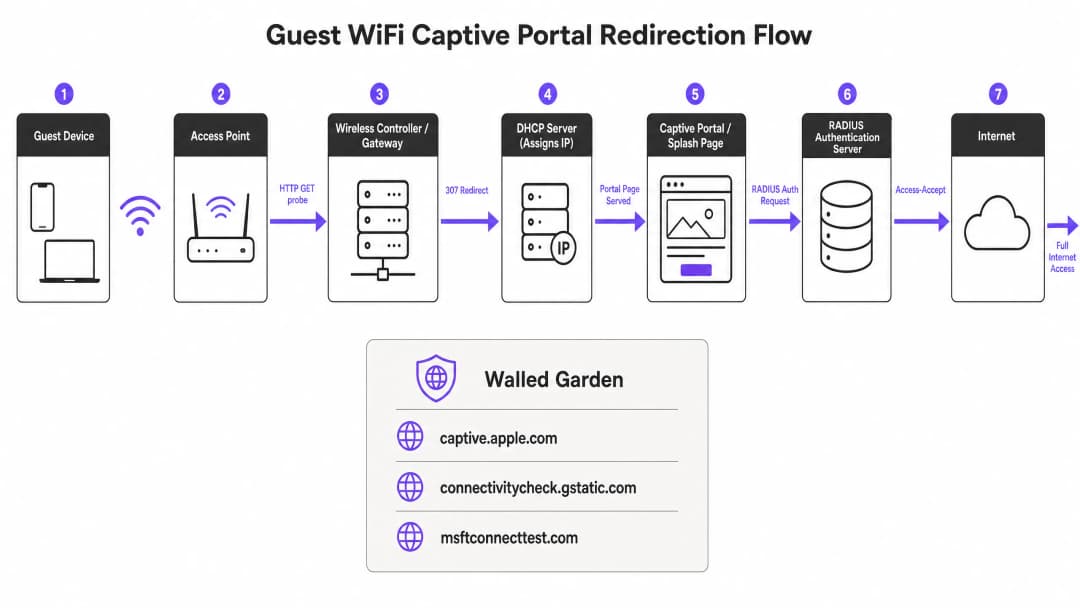
When a guest device joins a guest SSID, it receives an IP address via DHCP. The operating system does not wait for the user to open a browser. Instead, a background system service immediately sends an unencrypted HTTP GET request to a vendor-controlled probe URL. Apple devices query captive.apple.com. Android devices query connectivitycheck.gstatic.com. Windows devices query msftconnecttest.com. Firefox queries detectportal.firefox.com.
If the network has open internet access, these probes return their expected HTTP 200 OK response and the operating system decides that the connection is active. However, on a guest network, the wireless gateway or controller intercepts this HTTP probe before it can reach the internet. Instead of the expected response, the gateway returns an HTTP 307 Temporary Redirect pointing to the captive portal's splash page. The operating system detects this unexpected redirect, understands that it is behind a captive portal, and opens a sandboxed browser window (Captive Network Assistant) to display the login page.
Got questions about your specific setup?
Our team works with venue operators, IT managers, and network engineers across 80,000 venues. Book a 20-minute call and we will show you how others like you solved it.
Troubleshooting & Risk Mitigation: The 6 Root Causes of Failure
When a captive portal fails to load, the issue is almost always caused by one of six specific failure modes.

1. DHCP Pool Exhaustion
This is a silent killer at high-density events. If you are running a conference with 2,000 attendees and using a standard /24 subnet, you only have 254 usable IP addresses. If your DHCP lease time is set to the default 24 hours, your pool will be exhausted within minutes of the doors opening. Every connection attempt after that will fail before the Captive Portal sequence even begins.
Solution: Set guest DHCP lease times to between 15 and 30 minutes for high-turnover environments. Size your subnets according to peak concurrent users, not just average attendance. A /22 subnet provides 1,022 usable addresses, which is the minimum recommended size for enterprise venues.
2. DNS Interception Failure
Captive Portal redirection relies on the gateway intercepting an HTTP probe. However, that probe first requires a DNS lookup. If your DNS configuration does not allow pre-authenticated clients to resolve external domain names, the probe will never fire.
Solution: Ensure your firewall policies explicitly allow DNS queries (port 53) from unauthenticated clients. Run a packet capture on a test device to verify that your DNS interception is functioning.
3. Incomplete Walled Garden
The walled garden (pre-authentication access control list) defines which external domains unauthenticated guests can reach. If your portal splash page loads assets from a CDN that is not included in the walled garden, the page will render as a blank screen. If you offer social logins via Google, Apple, or Microsoft Entra ID, every single OAuth domain used by those providers must be whitelisted. Social identity providers regularly update their CDN IP ranges and authentication domains; a walled garden that worked perfectly six months ago can break overnight.
Solution: Schedule quarterly walled garden audits. Where your hardware supports it, use wildcard domain snooping, which is natively available on Cisco Meraki, HPE Aruba, Ruckus, and Juniper Mist. Purple automatically maintains and updates these walled garden entries as part of our cloud-managed service.
4. HSTS Redirect Blocking
HTTP Strict Transport Security (HSTS) is a browser security policy that forces connections to specific domains only via HTTPS. If a guest device attempts to communicate with an HSTS-preloaded domain, and your gateway tries to intercept that HTTPS request to redirect to the portal, the browser detects a certificate mismatch. This displays an unavoidable security warning and completely blocks the redirect.
Solution: Never attempt HTTPS interception for the initial redirect. Ensure your gateway only redirects unencrypted HTTP canary probes. The long-term standards-based solution is RFC 8910, which defines DHCP Option 114. This option allows your DHCP server to advertise the Captive Portal URL directly to the client device, completely bypassing the need for HTTP redirection. iOS 14 and Android 11 and above support this natively.
5. Active VPN on the Client Device
A VPN encrypts all traffic from the device and routes it through an external tunnel before it reaches your gateway. Your gateway never sees the HTTP probe, so the Captive Portal detection sequence is never triggered. Guests see neither a login page nor the internet.
Solution: The guest must disable the VPN, connect to the portal, and then re-enable the VPN. For front-of-house staff, asking if the guest is using a VPN should be the first troubleshooting step.
6. Session Persistence Interrupted by MAC Address Randomization
Modern iOS and Android devices use randomized MAC addresses by default as a privacy feature. Each time a device connects to a network, it may present a different MAC address. Since the Captive Portal session state is tracked by the MAC address, a guest authenticated an hour ago may be presented with the login page again after their device's MAC changes.
Solution: The solution for guests is to disable Private Address for your specific SSID in their network settings. The operator-side solution is to implement profile-based authentication, such as Passpoint and OpenRoaming via 802.1X, which authenticates at Layer 2 using credentials rather than MAC addresses, making randomization irrelevant.
Implementation Guide: Building a Resilient Architecture
Deploying a well-configured Captive Portal requires active architectural decisions.
- Verify your walled garden before every major event. The minimum required entries are: your portal's FQDN and all associated CDN domains, the Captive Portal detection URLs for Apple, Google, Windows, and Firefox, and the OAuth domains for every social login provider you support.
- Use a publicly trusted TLS certificate. Self-signed certificates will trigger browser warnings on every device. Renew certificates before they expire; an expired certificate is one of the most common causes of sudden, venue-wide portal failures.
- Test from a fresh, unauthenticated state. Testing the portal from a previously authenticated device will bypass the portal entirely because the session is still active. Always test from a new device, or from a device where you have forgotten the network and deleted the WiFi profile.
- Adjust idle timeouts. Many controllers default to a 5-minute idle timeout, which is highly aggressive for mobile devices that go into sleep mode between interactions. Set the idle timeout to at least 30 minutes for hospitality and retail environments.
ROI and Business Impact
Captive Portals are a mature technology, but they have some inherent complexities. The strategic goal is to move towards seamless and secure authentication.
OpenRoaming, built on Passpoint and 802.1X, helps returning guests connect automatically and securely without seeing any login page. Under our Connect plan, Purple acts as a free identity provider for OpenRoaming. Venues like Sweetgreen and Eastern Michigan University are already using it to eliminate the hassle of re-authentication for repeat visitors, while maintaining full CCPA/CPRA compliance and first-party data collection. By reducing connection failures, you can directly increase the volume of first-party data collected, boosting customer loyalty and personalized engagement.
Technical Briefing Podcast
Listen to a detailed breakdown of these troubleshooting steps from our Senior Solutions Architect in our 10-minute technical briefing.
Key Definitions
Captive Portal
A network-level traffic interception mechanism that restricts internet access until a user completes a required action, such as accepting terms or providing credentials on a splash page.
The primary method for enterprise venues to secure guest access and capture first-party data.
Walled Garden
A pre-authentication access control list that defines which external IP addresses or domains an unauthenticated guest device is permitted to reach.
Crucial for allowing access to portal assets, CDNs, and OAuth identity providers before the user is fully authenticated.
Captive Network Assistant (CNA)
A sandboxed, limited-functionality browser window opened automatically by the operating system when it detects a captive portal redirect.
This is the interface where the guest actually sees and interacts with your login page.
HSTS (HTTP Strict Transport Security)
A web security policy mechanism that helps protect websites against man-in-the-middle attacks by forcing browsers to interact with them only via secure HTTPS connections.
HSTS prevents gateways from using HTTPS interception to redirect users to a captive portal, causing connection failures if configured incorrectly.
DHCP Pool Exhaustion
A state where a DHCP server has assigned all available IP addresses in its configured subnet, preventing new devices from joining the network.
A common cause of 'Connected, No Internet' errors in high-density environments like stadiums or conferences.
MAC Address Randomization
A privacy feature in modern mobile operating systems that generates a random MAC address for each WiFi network, preventing tracking across different locations.
This feature breaks session persistence on captive portals, forcing guests to re-authenticate if their MAC address rotates.
OpenRoaming
A federation of WiFi networks that allows users to automatically and securely connect to participating networks without entering credentials or interacting with a captive portal.
The strategic successor to captive portals for repeat visitors, supported by Purple as a free identity provider.
RFC 8910 (DHCP Option 114)
A standard that allows a DHCP server to directly provide the URL of the captive portal to the client device during IP address assignment.
This bypasses the need for HTTP redirection entirely, resolving issues caused by HSTS and improving the speed of portal detection.
Worked Examples
A 350-room hotel in downtown Chicago runs a single /24 subnet for guest WiFi. During a large conference, 400 delegates arrive simultaneously. Within 20 minutes, guests report being connected but unable to reach the portal or the internet.
The immediate fix is to extend the subnet to /22, giving 1,022 usable addresses, and to reduce the DHCP lease time from 24 hours to 8 hours. The longer-term fix is to implement Purple's cloud-managed captive portal, which monitors DHCP pool utilization in real time and alerts the network team before exhaustion occurs.
A major retail chain with 200 stores uses social login via Google and Facebook on their guest portal. After Google updates its OAuth infrastructure, guests can reach the portal page, but the social login buttons produce blank screens.
The IT team must identify the new authentication domains used by Google and add them to the walled garden (pre-authentication access control list). To prevent this in the future, they should use wildcard domain entries (e.g., *.google.com) rather than hardcoding specific IP addresses, and review the walled garden quarterly.
Practice Questions
Q1. A stadium IT director reports that during halftime, thousands of fans attempt to connect to the guest WiFi. The portal loads for some, but many report their devices are stuck on "Obtaining IP address" or show "Connected, No Internet" before the portal even appears. What is the most likely architectural flaw?
Hint: Consider the volume of concurrent connections versus the available resources on the network segment.
View model answer
The network is experiencing DHCP pool exhaustion. The subnet is likely sized too small (e.g., a /24) for the peak concurrent user load, and the DHCP lease time is likely set too high. The recommended approach is to increase the subnet size (e.g., to a /22 or /21) and reduce the DHCP lease time to match the expected dwell time (e.g., 3 hours for a stadium).
Q2. A guest connects to your retail WiFi network. Their device shows a security warning stating "Your connection is not private" when attempting to load a popular website, and the captive portal never appears. What mechanism is causing this block?
Hint: Think about how modern browsers handle forced redirects on secure connections.
View model answer
HSTS (HTTP Strict Transport Security) is blocking the redirect. The guest attempted to navigate to an HSTS-preloaded domain (via HTTPS), and the wireless gateway attempted to intercept that secure connection to redirect to the portal. The browser detected the certificate mismatch and blocked the connection. The gateway must be configured to only intercept unencrypted HTTP probes.
Q3. You have recently enabled Google and Microsoft Entra ID social login options on your captive portal. Guests report that the portal page loads, but clicking the login buttons results in a timeout. The portal works perfectly when tested on the IT department's unrestricted staff network. What configuration is missing?
Hint: Consider the network state of the guest device before authentication is complete.
View model answer
The walled garden (pre-authentication access control list) is incomplete. The OAuth authentication domains and CDNs used by Google and Microsoft Entra ID have not been whitelisted. Because the guest is unauthenticated, the gateway blocks access to these external domains, causing the social login process to time out. The IT team must add wildcard entries for these identity providers to the walled garden.
Frequently asked questions
Why does public WiFi fail to redirect to the splash login page?
Public WiFi fails to redirect when the wireless controller or gateway cannot intercept cleartext HTTP requests (TCP port 80), when upstream firewalls drop DNS queries for captive portal probe URLs (such as captive.apple.com or connectivitycheck.gstatic.com), or when modern client browsers enforce HSTS on HTTPS requests before authentication. Allowing pre-authentication DNS and redirecting HTTP traffic resolves the issue.
How do client operating systems detect public WiFi captive portals?
Upon connecting to an open or public WiFi network, iOS fires HTTP requests via Captive Network Assistant (CNA) to captive.apple.com/hotspot-detect.html, Android queries connectivitycheck.gstatic.com/generate_204 via CaptivePortalLogin, and Windows probes msftconnecttest.com/connecttest.txt via NCSI. If the network returns an HTTP 302 redirect, the operating system launches the captive portal webview. If the probe domain fails to resolve or times out, the device marks the connection as having no internet.
Why do users see SSL certificate or HSTS warnings on public WiFi?
When an access point or gateway intercepts encrypted HTTPS requests (port 443) and presents its own self-signed or vendor certificate to force a splash page on public WiFi, modern web browsers detect a domain mismatch and block the connection with an HSTS or untrusted certificate error. Public WiFi networks should only intercept cleartext HTTP port 80 requests or implement RFC 8910 DHCP Option 114 to cleanly announce the portal URL.
What causes public WiFi captive portals to loop back to the login page?
Infinite login loops occur when the wireless access point or controller fails to receive or process the RADIUS Access-Accept packet or RFC 5176 Change of Authorization (CoA) disconnect/re-authenticate message on UDP port 3799. As a result, the controller maintains the client device in the pre-authentication walled garden role despite successful submission of guest credentials on the public WiFi network.
How does Purple eliminate public WiFi splash page redirection failures?
Purple operates as a cloud-delivered, hardware-agnostic guest WiFi management platform across Cisco Meraki, HPE Aruba, Ruckus, Ubiquiti UniFi, and Fortinet architectures. By optimizing captive portal redirection flows, automating walled garden rules, and integrating with high-speed Anycast DNS, Purple ensures detection probes succeed instantly, onboarding visitors in under 3 seconds without connection drops.
Continue reading in this series
Ruckus captive portal troubleshooting: WISPr redirect, hotspot and walled garden checklist
You will be able to diagnose a failing Ruckus captive portal from the symptom guests report, then fix it in a set order. The order covers the hotspot (WISPr) logon URL, walled garden, northbound portal interface password, RADIUS authentication and accounting, and HTTPS redirect certificates. The checks apply on SmartZone, Ruckus One and Unleashed.
Ubiquiti UniFi captive portal troubleshooting: external portal, hotspot and walled garden checklist
Use this checklist to find out why your Ubiquiti UniFi captive portal is not working and fix it. You will match the symptom to one of six causes, run two quick tests, and correct the external portal server, pre-authorization access, guest subnet restrictions, HTTPS redirects, controller reachability or client settings.
HPE Aruba captive portal troubleshooting: redirect, certificate and walled garden checklist
Use this checklist to diagnose a failing HPE Aruba captive portal from the symptom you see: no redirect, a certificate warning or a guest who is never released. You can then trace the fault to DNS, DHCP, the walled garden, the redirect URL, the certificate or RADIUS. Finally, apply the fix on Instant APs, Aruba Central or a mobility controller.
Got questions about your specific setup?
Our team works with venue operators, IT managers, and network engineers across 80,000 venues. Book a 20-minute call and we will show you how others like you solved it.