
Public WiFi Liability: Why Content Filtering is Mandatory
This technical reference guide outlines the legal and operational risks of providing unfiltered public WiFi, detailing why content filtering is a mandatory deployment requirement for venue operators. It provides actionable architecture strategies, implementation steps, and risk mitigation tactics to protect networks from illegal activity, copyright infringement, and regulatory non-compliance. Venue operators and CTOs will find concrete case studies, decision frameworks, and configuration guidance to implement a defensible, compliant Guest WiFi environment.
Listen to this guide
View podcast transcript
Executive Summary
For IT managers, network architects, and CTOs overseeing public venues, deploying Guest WiFi is a baseline operational requirement. However, providing an open pipe to the internet without robust content filtering exposes the venue to severe legal, financial, and reputational risks. When you provide public internet access, your organisation assumes the role of an Internet Service Provider (ISP). If malicious or illegal traffic — such as copyright infringement, peer-to-peer (P2P) piracy, or Child Sexual Abuse Material (CSAM) — originates from your public IP addresses, the liability often falls on the venue operator.
This guide provides a definitive technical framework for implementing mandatory content filtering. We explore the architecture required to maintain safe harbour protections, ensure regulatory compliance (including GDPR and PCI DSS), and maintain network performance. By integrating robust filtering with WiFi Analytics , venues in Retail , Hospitality , Healthcare , and Transport sectors can mitigate risk while maintaining a seamless guest experience.
Technical Deep-Dive
The Legal Landscape and Safe Harbour
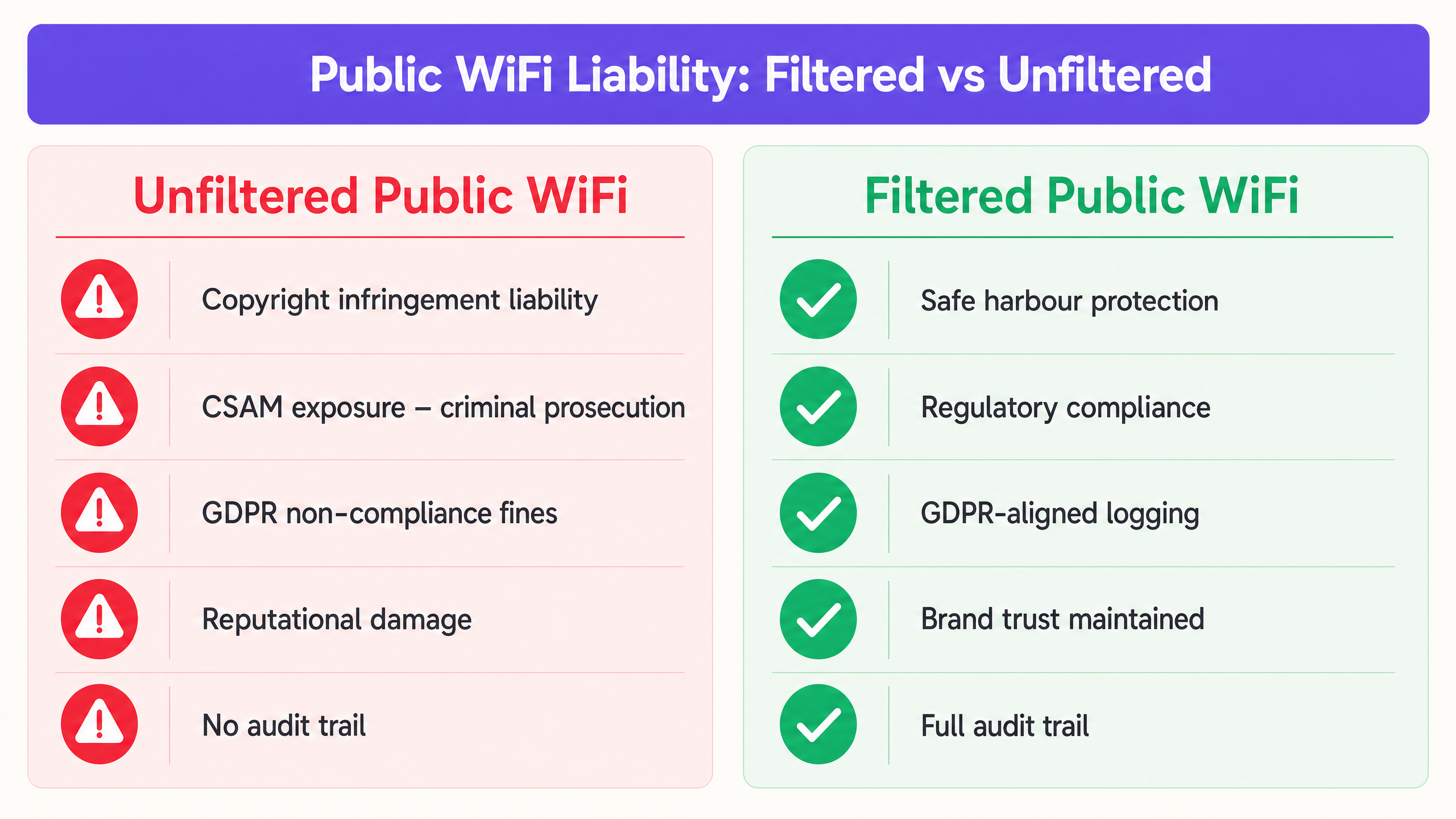
The primary driver for content filtering is public WiFi legal liability. In most jurisdictions, ISPs and public WiFi providers are protected by "safe harbour" provisions — for example, the Digital Millennium Copyright Act (DMCA) in the US, or the E-Commerce Directive and its successor frameworks in the EU. However, these protections are explicitly conditional. To qualify, providers must demonstrate they have taken reasonable technical steps to prevent illegal activity and can assist law enforcement when required.
Without an audit trail and active filtering, a venue cannot prove it took reasonable steps, which nullifies safe harbour protections entirely. This is particularly critical for public sector deployments, where accountability requirements are even more stringent. For context on how public sector digital infrastructure is evolving, see Purple Appoints Iain Fox as VP Growth – Public Sector to Drive Digital Inclusion and Smart City Innovation .
The three primary legal risk vectors for unfiltered networks are:
| Risk Vector | Legal Exposure | Example Consequence |
|---|---|---|
| Copyright Infringement (P2P) | Civil liability, cease and desist orders | Rights holder sues the venue for facilitating infringement |
| CSAM Distribution | Criminal prosecution | Police investigation, licence revocation |
| GDPR Non-Compliance | Regulatory fines up to 4% of global turnover | ICO enforcement action for inadequate logging |
Architecture of a Filtered Network
Effective content filtering requires a multi-layered architecture. No single control is sufficient. The following layers must work in concert:
Layer 1 — Authentication (Captive Portal): Before network access is granted, users must authenticate. This ties a device (MAC address) and an IP lease to a verified identity via SMS, email, or social login. This is the foundation of your audit trail. For more on why this record-keeping is critical, see Explain what is audit trail for IT Security in 2026 .
Layer 2 — DNS Filtering Engine: The most scalable approach for high-throughput environments is cloud-based DNS filtering. When a user requests a domain, the DNS resolver checks the request against a real-time threat intelligence database. If the domain is categorized as malicious or illegal — malware, adult content, piracy trackers — the resolution is blocked and the user is redirected to a policy-compliant block page.
Layer 3 — Application Layer Gateway (Firewall): DNS filtering alone is insufficient. Users can bypass DNS filters using direct IP connections or encrypted DNS (DNS over HTTPS — DoH). The network gateway must block known DoH resolvers and restrict specific protocols, particularly P2P protocols like BitTorrent, which are the primary vector for copyright infringement on public networks.
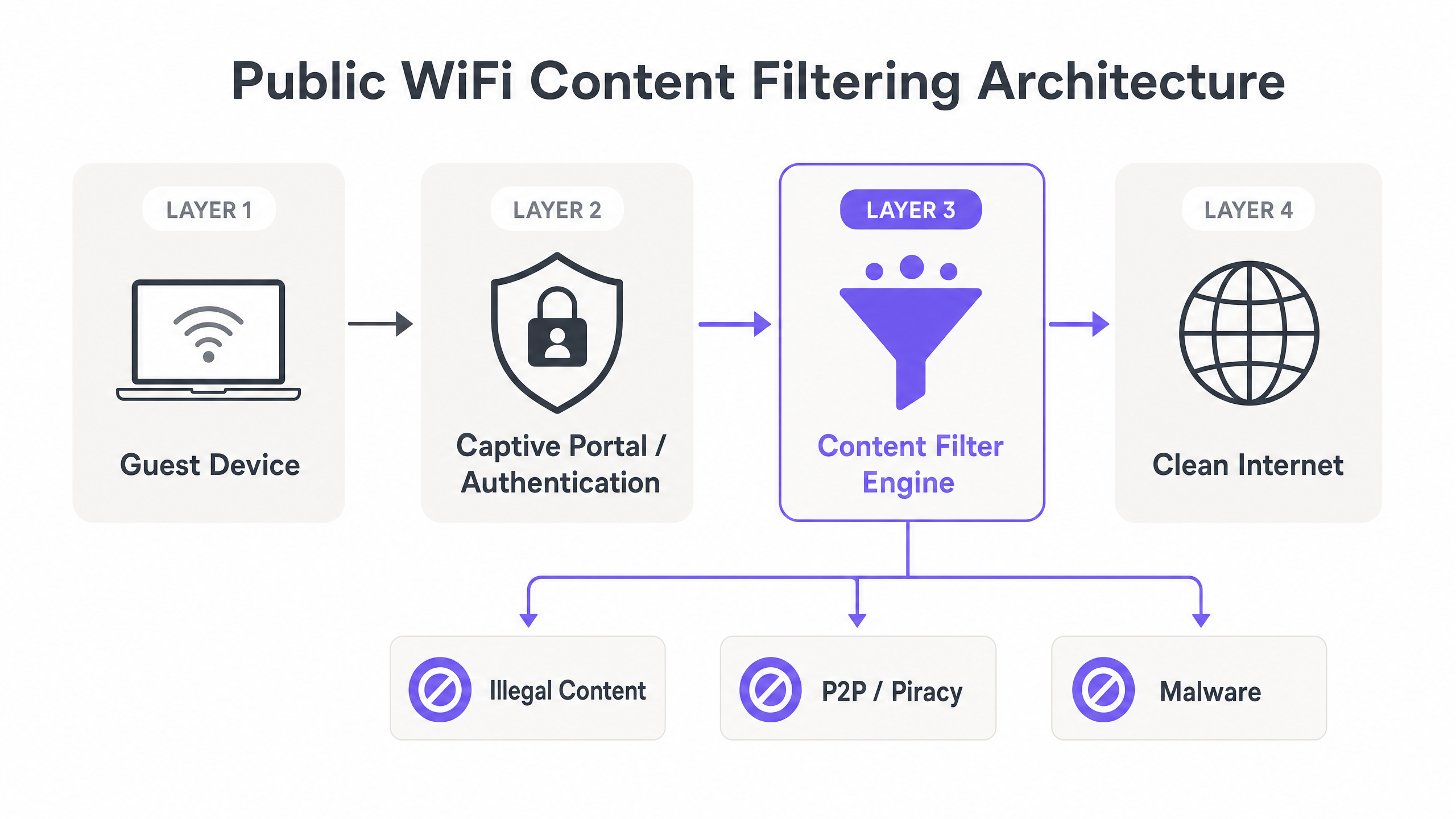
Layer 4 — Logging and Audit Trail: All session data — authenticated identity, MAC address, assigned IP, timestamps, and session duration — must be logged securely and retained for the legally mandated period. This data must be accessible to law enforcement on request without compromising other users' data under GDPR principles.
Addressing the DoH Problem
DNS over HTTPS (DoH) is the single biggest technical challenge for content filtering in 2025 and beyond. Modern browsers — including Chrome, Firefox, and Edge — can be configured to use DoH by default, routing DNS queries over HTTPS to resolvers like Cloudflare (1.1.1.1) or Google (8.8.8.8). This completely bypasses your managed DNS filtering layer.
The mitigation strategy has two components:
- Blocklist known DoH resolver IPs at the firewall level. Maintain an updated list of known DoH endpoints and block outbound HTTPS traffic to those specific IPs.
- Intercept and redirect all port 53 traffic to your managed DNS resolver using firewall NAT rules, preventing manual DNS override by guests.
Implementation Guide
Deploying a robust filtering solution requires careful planning to balance security with user experience. The following steps apply to venues of all scales, from a single-site hotel to a multi-location Retail chain.
Step 1: Define the Acceptable Use Policy
Establish a clear Acceptable Use Policy (AUP) that guests must accept at the captive portal. The technical filtering policy must mirror the AUP. At a minimum, block: known malware and phishing domains; CSAM (integrate with databases such as the Internet Watch Foundation blocklist); P2P file-sharing protocols; and adult content for family-appropriate venues.
Step 2: Configure the Captive Portal and Authentication
Ensure the captive portal mandates authentication. Anonymous access is the enemy of the audit trail. Implement session limits and ensure DHCP lease times are optimised for high-turnover environments. For Hospitality deployments, integrate with the Property Management System (PMS) to authenticate guests against their booking reference.
Step 3: Deploy DNS Filtering and Gateway Rules
Integrate a cloud DNS filtering service. Configure the network gateway to intercept all outbound DNS requests on port 53 and force them through the approved filtering service. Implement firewall rules to block known DoH endpoints. Configure application-layer rules to drop P2P protocol traffic.
Step 4: Whitelist Critical Services
Ensure critical venue services are whitelisted before go-live. If your venue uses location services or navigation tools — for example, Purple Launches Offline Maps Mode for Seamless, Secure Navigation to WiFi Hotspots — ensure the relevant endpoints are accessible. Also prepare support teams for common post-deployment issues; filtering can occasionally cause connectivity anomalies, as discussed in Solving the Connected but No Internet Error on Guest WiFi .
Step 5: Test and Validate
Before going live, conduct a structured test: attempt to access known blocked categories from a guest device, verify the block page is displayed, verify the audit log captures the session, and confirm legitimate traffic is unaffected.
Best Practices
Dynamic Threat Intelligence: Static blocklists are obsolete within hours of publication. Ensure your filtering engine uses real-time, continuously updated threat intelligence to categorize new domains as they emerge. Threat actors register new domains daily specifically to evade static lists.
Granular Policy Control: Avoid blanket bans that disrupt legitimate business. Blocking all video streaming may be appropriate for a corporate office network but would be entirely inappropriate for a hotel. Define policies per SSID, per venue type, or per time of day where the platform supports it.
Encrypted Traffic Management: As TLS 1.3 and DoH become standard, relying solely on DNS is insufficient. Evaluate hardware capable of Server Name Indication (SNI) inspection as a middle ground between full DPI and DNS-only filtering. SNI inspection reads the unencrypted server name in the TLS handshake without decrypting the payload, offering category-level blocking with minimal throughput impact.
Compliance Logging: Maintain connection logs — MAC address, assigned IP, timestamp, authenticated identity — in compliance with local data retention laws. Under GDPR, do not log full browsing history; log only connection metadata. Ensure logs are encrypted at rest and access-controlled.
Troubleshooting & Risk Mitigation
Common Failure Modes
The DoH Bypass: Guests using modern browsers configured to use DNS over HTTPS will bypass standard DNS filters. Mitigation: Maintain an updated blocklist of DoH provider IPs at the firewall level and redirect all port 53 traffic via NAT.
MAC Randomization: Modern iOS and Android devices randomize MAC addresses per SSID, breaking traditional device tracking. Mitigation: Rely on session-based authentication tied to the captive portal login, rather than persistent MAC tracking. The session ID, not the MAC, becomes the audit key.
Over-Filtering and False Positives: Aggressive filtering blocks legitimate traffic, generating helpdesk tickets and degrading the guest experience. Mitigation: Implement a rapid whitelist review process. Monitor blocked domain logs weekly and whitelist confirmed false positives within 24 hours.
Policy Drift Across Sites: In multi-site deployments, manually managed policies diverge over time. Site A may have an outdated blocklist while Site B is current. Mitigation: Enforce centralised, cloud-managed policy distribution with version control. All sites must pull from the same policy baseline.
ROI & Business Impact
The Return on Investment (ROI) for content filtering is primarily measured in risk avoidance. A single copyright infringement lawsuit or ICO enforcement action can cost tens of thousands of pounds — far exceeding the annual cost of a filtering solution. The table below illustrates the cost differential:
| Cost Item | Unfiltered Network | Filtered Network |
|---|---|---|
| Annual filtering solution cost | £0 | £2,000–£15,000 (scale-dependent) |
| Copyright infringement settlement | £10,000–£100,000+ | £0 (mitigated) |
| GDPR fine (inadequate logging) | Up to 4% global turnover | £0 (compliant) |
| Reputational damage / brand impact | Significant | Minimal |
| Network performance (P2P removed) | Degraded | Improved |
Furthermore, filtering improves overall network performance. By blocking bandwidth-heavy P2P traffic and malware botnets, you preserve throughput for legitimate guests, improving the user experience and reducing infrastructure strain. When combined with a robust WiFi Analytics platform, the network transforms from an unmanaged liability into a secure, data-generating asset that drives measurable business outcomes.
Key Definitions
Safe Harbour
Legal provisions that protect ISPs and network operators from liability for the actions of their users, provided they take reasonable technical steps to prevent abuse and can assist law enforcement.
The primary legal shield for venue operators. Content filtering and audit logging are the technical conditions that maintain safe harbour status.
Captive Portal
A web page that users must view and interact with before access is granted to a public network, used for authentication, AUP acceptance, and session initiation.
The primary mechanism for establishing user identity and creating an audit trail. Without it, anonymous access makes safe harbour untenable.
DNS Filtering
The process of blocking access to certain websites or IP addresses by intercepting and evaluating Domain Name System (DNS) requests against a threat intelligence database before resolving the IP address.
The most efficient, low-latency method for blocking malicious or inappropriate content at scale. Suitable for high-throughput environments without requiring DPI hardware.
Audit Trail
A chronological, tamper-evident record of network events, including user authentication, IP lease assignments, session start/end times, and authenticated identity.
Required to respond to law enforcement requests, demonstrate regulatory compliance, and prove that reasonable steps were taken to prevent illegal activity.
Deep Packet Inspection (DPI)
Advanced network packet filtering that examines the data payload of a packet as it passes an inspection point, enabling application-level identification and control.
Provides the most granular control but requires significant processing power and can reduce network throughput. Best used selectively for high-risk protocol detection.
DNS over HTTPS (DoH)
A protocol for performing remote DNS resolution via the HTTPS protocol, encrypting the DNS query to prevent interception or manipulation by network operators.
The primary bypass mechanism that undermines DNS-only filtering. Must be blocked at the firewall level by maintaining a blocklist of known DoH resolver IPs.
Peer-to-Peer (P2P)
A decentralised communications model where each participating node has equivalent capabilities, commonly used for file sharing via protocols such as BitTorrent.
The primary vector for copyright infringement on public networks. Must be blocked at both the DNS and application layer (firewall port/protocol rules) for effective mitigation.
MAC Randomization
A privacy feature in modern operating systems (iOS 14+, Android 10+) that uses a randomised MAC address when connecting to WiFi networks, preventing persistent device tracking.
Breaks traditional MAC-based device tracking, forcing network operators to rely on session-based authentication via the captive portal as the primary audit identifier.
Server Name Indication (SNI)
An extension to the TLS protocol that allows the client to indicate which hostname it is connecting to during the TLS handshake, before the encrypted session is established.
Enables category-level content blocking on HTTPS traffic without full payload decryption, offering a middle ground between DNS-only filtering and full DPI.
Worked Examples
A 200-room hotel is receiving automated copyright infringement notices from their ISP because guests are torrenting movies over the open Guest WiFi. The hotel currently uses a basic WPA2-PSK network with no captive portal and no content filtering.
Step 1: Remove the shared PSK and replace with an open SSID fronted by a Captive Portal. Step 2: Require guests to authenticate using their room number and last name via PMS integration, or via SMS/email verification. Step 3: Deploy a cloud-based DNS filtering service integrated with the network gateway, enabling the 'P2P/File Sharing' and 'Malware' blocking categories. Step 4: Configure the gateway firewall to block all outbound traffic on standard BitTorrent ports (6881–6889 TCP/UDP) and block known torrent tracker domains via the DNS filter. Step 5: Implement NAT rules to intercept all port 53 traffic and redirect to the managed DNS resolver. Step 6: Enable session logging to capture MAC address, assigned IP, authenticated identity, and timestamps for all sessions.
A large retail chain is deploying Guest WiFi across 500 stores. They need to ensure compliance with family-friendly policies and prevent malware distribution, but they cannot afford high-latency DPI hardware at every branch. They also need consistent policy enforcement across all sites.
Step 1: Deploy a centrally managed cloud WiFi architecture with a cloud controller managing all 500 branch access points. Step 2: Implement a cloud-based DNS filtering solution applied at the SSID level, configured centrally and pushed to all sites simultaneously. Step 3: Configure the policy centrally to block the 'Adult', 'Malware', 'Phishing', and 'P2P' categories. Step 4: Use the cloud controller to enforce NAT rules redirecting all port 53 traffic to the managed DNS resolver at every site. Step 5: Configure a centralised logging aggregator to collect session logs from all 500 sites into a single SIEM or log management platform for compliance reporting.
Practice Questions
Q1. Your venue is upgrading its Guest WiFi. The network architect proposes removing the captive portal to create a smoother user experience, relying solely on a cloud DNS filter to block bad content. What is the primary legal risk of this approach, and what would you recommend instead?
Hint: Consider what happens if law enforcement requests information about a specific IP address used at a specific time.
View model answer
Removing the captive portal eliminates the authentication layer, meaning there is no audit trail tying a network session to a specific user identity. While the DNS filter will block known bad sites, if a user bypasses it or commits an illegal act not caught by the filter, the venue cannot identify the user. This nullifies safe harbour protections, leaving the venue fully liable. The recommendation is to retain the captive portal with mandatory authentication, and use the DNS filter as a complementary layer — not a replacement for identity verification.
Q2. A user complains they cannot access a legitimate corporate VPN while connected to your filtered Guest WiFi. You check the logs and see the connection is being dropped at the gateway, not the DNS level. What are the two most likely causes, and how would you resolve each?
Hint: Think about how firewalls handle encrypted traffic and non-standard ports, and how VPN protocols operate.
View model answer
Cause 1: The firewall has an overly restrictive outbound policy blocking the specific ports used by the VPN protocol — for example, UDP 500 and UDP 4500 for IKEv2/IPsec, or TCP/UDP 1194 for OpenVPN. Resolution: Whitelist standard VPN ports for outbound traffic while monitoring for abuse. Cause 2: A DPI engine is dropping the encrypted tunnel traffic because it cannot inspect the payload and is configured to block unrecognised encrypted sessions. Resolution: Create an application-layer exception for known VPN protocols, or disable DPI for traffic on standard VPN ports.
Q3. You have deployed a robust cloud DNS filtering solution across your venue network, but your WiFi analytics dashboard shows significant bandwidth consumption consistent with BitTorrent traffic. How is this possible if DNS filtering is active, and what additional controls do you need to implement?
Hint: DNS only resolves names to IP addresses. Consider how P2P software discovers and connects to peers after initial tracker contact.
View model answer
BitTorrent and other P2P protocols use DNS only for initial tracker discovery. Once peers are discovered, the client connects to them directly via IP address, completely bypassing DNS. DNS filtering alone cannot stop peer-to-peer data transfer once the initial connection is established. To resolve this, you must configure the network gateway firewall to block P2P protocols using application-layer filtering or by blocking the known BitTorrent port ranges (6881–6889 TCP/UDP) and the DHT protocol (UDP 6881). Additionally, consider enabling bandwidth throttling for any remaining P2P traffic that uses non-standard ports.