
Troubleshooting Public WiFi: Fixing 'Connected, No Internet' and Splash Page Redirection Failures
This authoritative technical reference guide explains the underlying mechanics of captive portal detection and details the six primary failure modes that prevent guest WiFi from connecting. It provides IT managers and network architects with a practical troubleshooting framework to resolve HTTP redirect issues, DNS conflicts, and MAC randomisation challenges.
Listen to this guide
View podcast transcript
Executive Summary

A guest connects to your WiFi, but the login page fails to load. They see a 'Connected, No Internet' warning and abandon the attempt. For venue operations directors and IT managers, this failure represents a direct breakdown of the guest experience, a spike in support tickets, and a missed opportunity to capture the first-party data that justifies the wireless infrastructure investment.
This guide explains exactly how captive portal detection works at the operating system level and identifies the six root causes responsible for the vast majority of connection failures. It provides a practical, vendor-neutral troubleshooting framework to resolve DHCP exhaustion, DNS interception failures, incomplete walled gardens, HSTS redirect blocking, active VPN conflicts, and MAC address randomisation issues.
Technical Deep-Dive: How Captive Portal Detection Actually Works
To fix a captive portal problem, you must first understand what a captive portal does at the network level. It is not simply a login page; it is a network-level traffic interception mechanism.
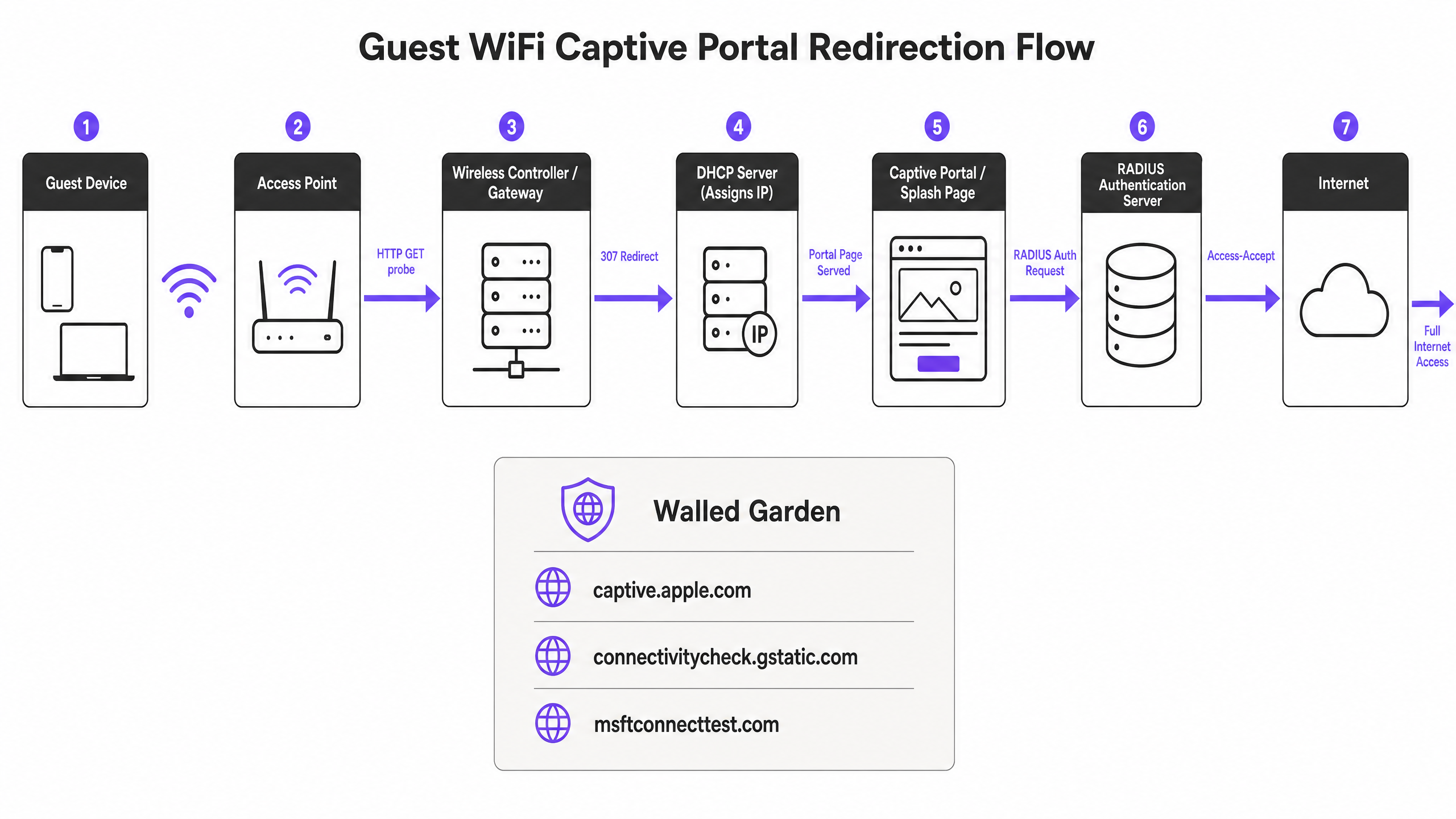
When a guest device joins a guest SSID, it receives an IP address via DHCP. The operating system does not wait for the user to open a browser. Instead, a background system service immediately fires an unencrypted HTTP GET request to a vendor-controlled probe URL. Apple devices query captive.apple.com. Android devices query connectivitycheck.gstatic.com. Windows devices query msftconnecttest.com. Firefox queries detectportal.firefox.com.
If the network has open internet access, these probes return their expected HTTP 200 OK responses, and the operating system concludes the connection is active. However, on a guest network, the wireless gateway or controller intercepts this HTTP probe before it reaches the internet. Instead of the expected response, the gateway returns an HTTP 307 Temporary Redirect pointing to the captive portal splash page. The operating system detects this unexpected redirect, realises it is behind a captive portal, and opens a sandboxed browser window (the Captive Network Assistant) to display the login page.
Troubleshooting & Risk Mitigation: The 6 Root Causes of Failure
When the captive portal fails to load, the breakdown almost always occurs within one of six specific failure modes.
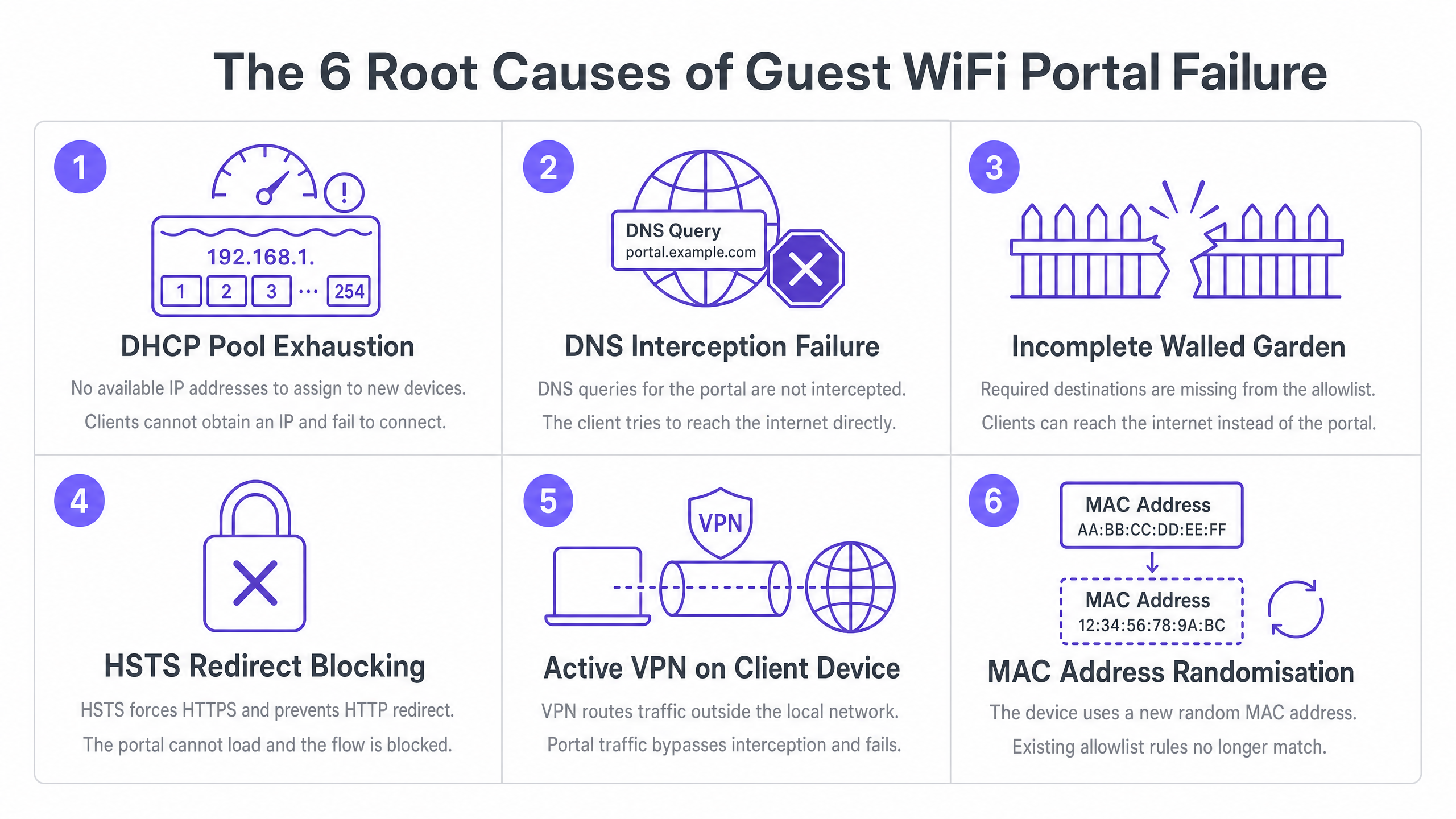
1. DHCP Pool Exhaustion
This is the silent killer at high-density events. If you run a conference with 2,000 attendees on a standard /24 subnet, you have 254 usable IP addresses. If your DHCP lease time is set to the default 24 hours, you will exhaust that pool within minutes of doors opening. Every subsequent connection attempt fails before the captive portal sequence even begins.
The Fix: Set guest DHCP lease times to between 15 and 30 minutes for high-turnover environments. Size your subnets appropriately for peak concurrent users, not just total headcount. A /22 subnet provides 1,022 usable addresses, which is the minimum recommended size for enterprise venues.
2. DNS Interception Failure
The captive portal redirect depends on the gateway intercepting the HTTP probe. But the probe requires a DNS lookup first. If your DNS configuration does not permit pre-authenticated clients to resolve external domain names, the probe never fires.
The Fix: Ensure your firewall policy explicitly allows DNS queries (Port 53) from unauthenticated clients. Verify that your DNS interception is working by running a packet capture against a test device.
3. Incomplete Walled Garden
The walled garden (pre-authentication access control list) defines which external domains unauthenticated guests can reach. If your portal splash page loads assets from a CDN that is not in the walled garden, the page renders as a blank screen. If you offer social login via Google, Apple, or Microsoft Entra ID, every OAuth domain those providers use must be whitelisted. Social identity providers update their CDN IP ranges and authentication domains regularly; a walled garden that worked perfectly six months ago may be silently broken today.
The Fix: Schedule quarterly walled garden audits. Use wildcard domain snooping where your hardware supports it. On Cisco Meraki, HPE Aruba, Ruckus, and Juniper Mist, this is available natively. Purple maintains and updates these walled garden entries automatically as part of our cloud-managed service.
4. HSTS Redirect Blocking
HTTP Strict Transport Security (HSTS) is a browser security policy that forces connections to specific domains over HTTPS only. If a guest device attempts to contact an HSTS-preloaded domain, and your gateway tries to intercept that HTTPS request to redirect to the portal, the browser detects a certificate mismatch. It presents a non-bypassable security warning and blocks the redirect entirely.
The Fix: Never attempt HTTPS interception for the initial redirect. Your gateway should only redirect the unencrypted HTTP canary probes. The long-term standards-based fix is RFC 8910, which defines DHCP Option 114. This option allows your DHCP server to directly advertise the captive portal URL to the client device, bypassing the need for HTTP redirection entirely. iOS 14 and Android 11 and above support this natively.
5. Active VPN on the Client Device
A VPN encrypts all traffic from the device and routes it through an external tunnel before it reaches your gateway. Your gateway never sees the HTTP probe, so the captive portal detection sequence never triggers. The guest sees no login page and no internet.
The Fix: The guest must disable the VPN, connect to the portal, and then re-enable the VPN. For front-of-house staff, asking if the guest is using a VPN should be the first troubleshooting step.
6. MAC Address Randomisation Breaking Session Persistence
Modern iOS and Android devices use randomised MAC addresses by default as a privacy feature. Each time a device connects to a network, it may present a different MAC address. Since captive portal session state is tracked by MAC address, a guest who authenticated an hour ago may be presented with the login page again after their device's MAC rotates.
The Fix: The guest-facing fix is to disable Private Address for your specific SSID in the network settings. The operator-side fix is to implement profile-based authentication, such as OpenRoaming via Passpoint and 802.1X, which authenticates at Layer 2 using credentials rather than MAC addresses, making randomisation irrelevant.
Implementation Guide: Building a Resilient Architecture
A well-configured captive portal deployment requires proactive architectural decisions.
- Validate your walled garden before every major event. The minimum required entries are: your portal's FQDN and all associated CDN domains, the captive portal detection URLs for Apple, Google, Windows, and Firefox, and the OAuth domains for every social login provider you support.
- Use a publicly trusted TLS certificate. Self-signed certificates will trigger browser warnings on every device. Renew certificates before expiry; a lapsed certificate is one of the most common causes of sudden, venue-wide portal failures.
- Test from a fresh, unauthenticated state. Testing the portal from a device that has previously authenticated will bypass the portal entirely because the session is still active. Always test from a new device, or one where you have forgotten the network and cleared the WiFi profile.
- Adjust idle timeouts. Many controllers default to a 5-minute idle timeout, which is far too aggressive for mobile devices that sleep between interactions. Set idle timeout to at least 30 minutes for hospitality and retail environments.
ROI & Business Impact
Captive portals are a mature technology, but they carry inherent friction. The strategic direction of travel is toward seamless, secure authentication.
OpenRoaming, built on Passpoint and 802.1X, allows returning guests to connect automatically and securely without ever seeing a login page. Purple acts as a free identity provider for OpenRoaming under our Connect plan. Venues like Premier Inn and Manchester Airports Group are already deploying this to eliminate re-authentication friction for repeat visitors while maintaining full GDPR compliance and first-party data capture. By reducing connection failures, you directly increase the volume of captured first-party data, driving loyalty and personalised engagement.
Technical Briefing Podcast
Listen to our Senior Solutions Architect break down these troubleshooting steps in our 10-minute technical briefing.
Key Definitions
Captive Portal
A network-level traffic interception mechanism that restricts internet access until a user completes a required action, such as accepting terms or providing credentials on a splash page.
The primary method for enterprise venues to secure guest access and capture first-party data.
Walled Garden
A pre-authentication access control list that defines which external IP addresses or domains an unauthenticated guest device is permitted to reach.
Crucial for allowing access to portal assets, CDNs, and OAuth identity providers before the user is fully authenticated.
Captive Network Assistant (CNA)
A sandboxed, limited-functionality browser window opened automatically by the operating system when it detects a captive portal redirect.
This is the interface where the guest actually sees and interacts with your login page.
HSTS (HTTP Strict Transport Security)
A web security policy mechanism that helps protect websites against man-in-the-middle attacks by forcing browsers to interact with them only via secure HTTPS connections.
HSTS prevents gateways from using HTTPS interception to redirect users to a captive portal, causing connection failures if configured incorrectly.
DHCP Pool Exhaustion
A state where a DHCP server has assigned all available IP addresses in its configured subnet, preventing new devices from joining the network.
A common cause of 'Connected, No Internet' errors in high-density environments like stadiums or conferences.
MAC Address Randomisation
A privacy feature in modern mobile operating systems that generates a random MAC address for each WiFi network, preventing tracking across different locations.
This feature breaks session persistence on captive portals, forcing guests to re-authenticate if their MAC address rotates.
OpenRoaming
A federation of WiFi networks that allows users to automatically and securely connect to participating networks without entering credentials or interacting with a captive portal.
The strategic successor to captive portals for repeat visitors, supported by Purple as a free identity provider.
RFC 8910 (DHCP Option 114)
A standard that allows a DHCP server to directly provide the URL of the captive portal to the client device during IP address assignment.
This bypasses the need for HTTP redirection entirely, resolving issues caused by HSTS and improving the speed of portal detection.
Worked Examples
A 350-room hotel in central London runs a single /24 subnet for guest WiFi. During a large conference, 400 delegates arrive simultaneously. Within 20 minutes, guests report being connected but unable to reach the portal or the internet.
The immediate fix is to extend the subnet to /22, giving 1,022 usable addresses, and to reduce the DHCP lease time from 24 hours to 8 hours. The longer-term fix is to implement Purple's cloud-managed captive portal, which monitors DHCP pool utilisation in real time and alerts the network team before exhaustion occurs.
A major retail chain with 200 stores uses social login via Google and Facebook on their guest portal. After Google updates its OAuth infrastructure, guests can reach the portal page, but the social login buttons produce blank screens.
The IT team must identify the new authentication domains used by Google and add them to the walled garden (pre-authentication access control list). To prevent this in the future, they should use wildcard domain entries (e.g., *.google.com) rather than hardcoding specific IP addresses, and review the walled garden quarterly.
Practice Questions
Q1. A stadium IT director reports that during halftime, thousands of fans attempt to connect to the guest WiFi. The portal loads for some, but many report their devices are stuck on 'Obtaining IP address' or show 'Connected, No Internet' before the portal even appears. What is the most likely architectural flaw?
Hint: Consider the volume of concurrent connections versus the available resources on the network segment.
View model answer
The network is experiencing DHCP pool exhaustion. The subnet is likely sized too small (e.g., a /24) for the peak concurrent user load, and the DHCP lease time is likely set too high. The recommended approach is to increase the subnet size (e.g., to a /22 or /21) and reduce the DHCP lease time to match the expected dwell time (e.g., 3 hours for a stadium).
Q2. A guest connects to your retail WiFi network. Their device shows a security warning stating 'Your connection is not private' when attempting to load a popular website, and the captive portal never appears. What mechanism is causing this block?
Hint: Think about how modern browsers handle forced redirects on secure connections.
View model answer
HSTS (HTTP Strict Transport Security) is blocking the redirect. The guest attempted to navigate to an HSTS-preloaded domain (via HTTPS), and the wireless gateway attempted to intercept that secure connection to redirect to the portal. The browser detected the certificate mismatch and blocked the connection. The gateway must be configured to only intercept unencrypted HTTP probes.
Q3. You have recently enabled Google and Microsoft Entra ID social login options on your captive portal. Guests report that the portal page loads, but clicking the login buttons results in a timeout. The portal works perfectly when tested on the IT department's unrestricted staff network. What configuration is missing?
Hint: Consider the network state of the guest device before authentication is complete.
View model answer
The walled garden (pre-authentication access control list) is incomplete. The OAuth authentication domains and CDNs used by Google and Microsoft Entra ID have not been whitelisted. Because the guest is unauthenticated, the gateway blocks access to these external domains, causing the social login process to time out. The IT team must add wildcard entries for these identity providers to the walled garden.
Continue reading in this series
Top 10 Causes of DHCP Timeouts on High-Density Wireless Networks
This authoritative technical reference guide identifies the top ten causes of DHCP timeouts on high-density wireless networks and provides actionable, vendor-neutral remediation strategies. Designed for senior IT leaders, network architects, and venue operations directors, it covers deep-dive engineering principles, step-by-step implementation workflows, and measurable business outcomes. Learn how to eliminate connection bottlenecks and optimise your wireless infrastructure to deliver seamless connectivity in demanding enterprise environments.
Top 10 Causes of DHCP Timeouts on High-Density Wireless Networks
This authoritative technical reference guide identifies the top ten causes of DHCP timeouts on high-density wireless networks and provides actionable, vendor-neutral remediation strategies. Designed for senior IT leaders, network architects, and venue operations directors, it covers deep-dive engineering principles, step-by-step implementation workflows, and measurable business outcomes. Learn how to eliminate connection bottlenecks and optimize your wireless infrastructure to deliver seamless connectivity in demanding enterprise environments.
Using Packet Capture (PCAP) to Diagnose Slow WiFi Performance
This technical reference guide provides IT managers, network architects, and venue operations directors with a structured, packet-level methodology to diagnose and resolve slow enterprise WiFi performance using Packet Capture (PCAP) analysis. By dissecting raw 802.11 frames — including retransmission rates, airtime utilisation, and physical layer metadata — teams can isolate RF-layer bottlenecks from wired or application issues with precision. Applicable across high-density venues including hotels, retail chains, stadiums, and conference centres, this guide delivers actionable diagnostic workflows, real-world case studies, and configuration remediation steps to reclaim network capacity and protect guest experience.