
Sophos Firewall and Access Points Integration with Purple WiFi
This guide details the technical integration of Sophos Firewall (XG/XGS) and Sophos AP6/APX access points with Purple WiFi. It covers external captive portal redirection, RADIUS authentication and accounting configuration, Walled Garden setup, 802.1X for Staff WiFi, and dynamic VLAN assignment using Sophos PPSK for secure Multi-Tenant network segregation across hospitality, retail, and public-sector venues.
Listen to this guide
View podcast transcript
執行摘要
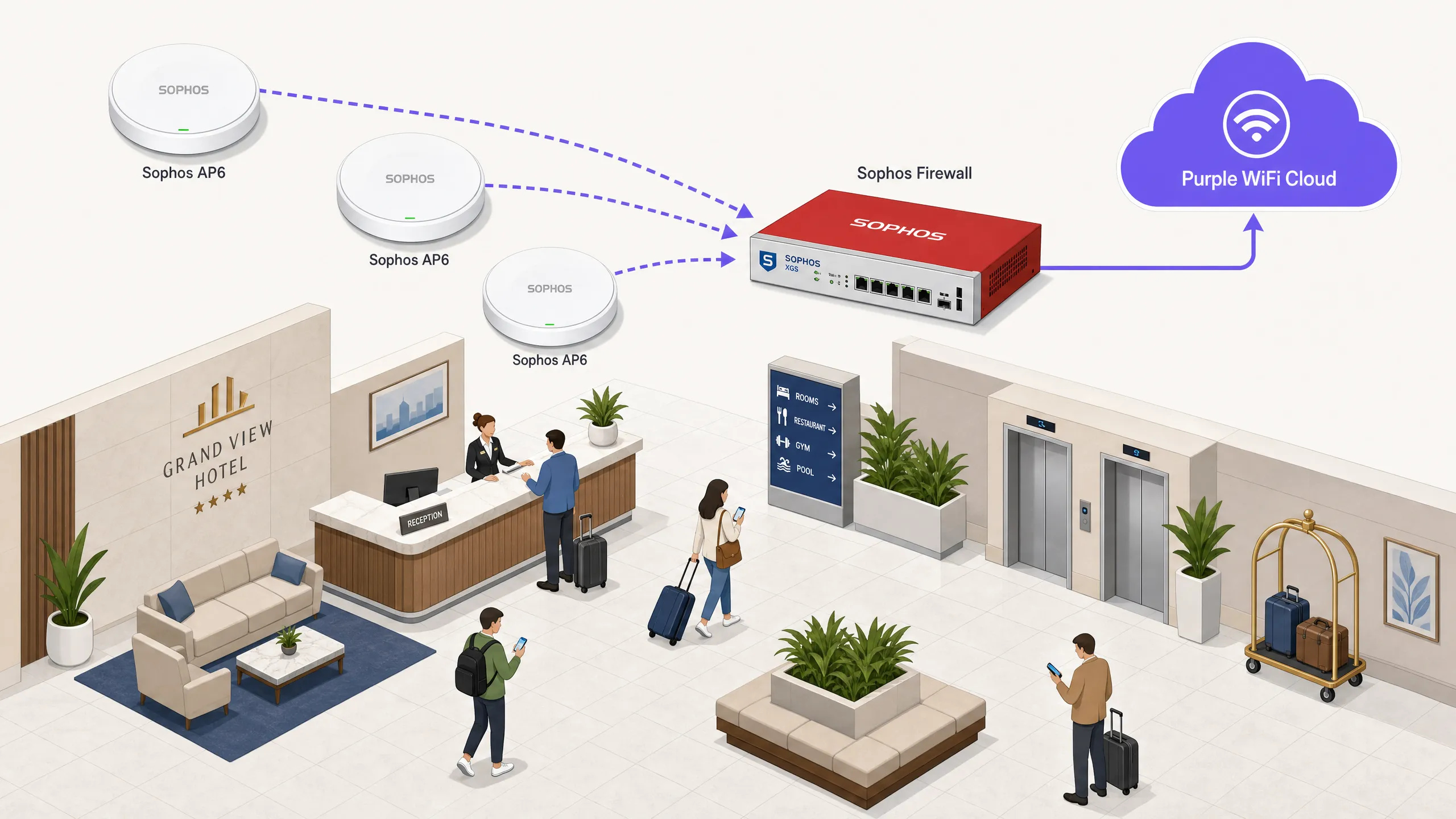
如果您運行 Sophos 基礎架構並需要部署可收集第一方數據的 Guest WiFi ,本指南將為您提供確切的設定步驟。Purple 與 Sophos Firewall(XG 和 XGS 系列)以及 Sophos AP6/APX 無線基地台整合,作為外部 Captive Portal,將訪客身分管理、GDPR 同意書收集和社群登入處理卸載到 Purple 的雲端 RADIUS。您的 Sophos Firewall 將繼續對所有流量執行深層封包檢測與統一威脅管理。最終結果:一個符合規範且細分的網路,訪客透過品牌化的 Purple 網頁驗證,員工透過 WPA2-Enterprise 的 802.1X 連線,而多租戶環境則使用 Sophos 私有預共用金鑰 (PPSK) 進行動態 VLAN 分配。Purple 在全球 80,000 多個實體場域運行,並在 2024 年處理了 4.4 億次登入(Purple 內部數據,2024 年)。它已獲得 ISO 27001 認證、符合 GDPR 規範,並獲得 Cyber Essentials 認證。
技術深度解析
重新導向的運作原理
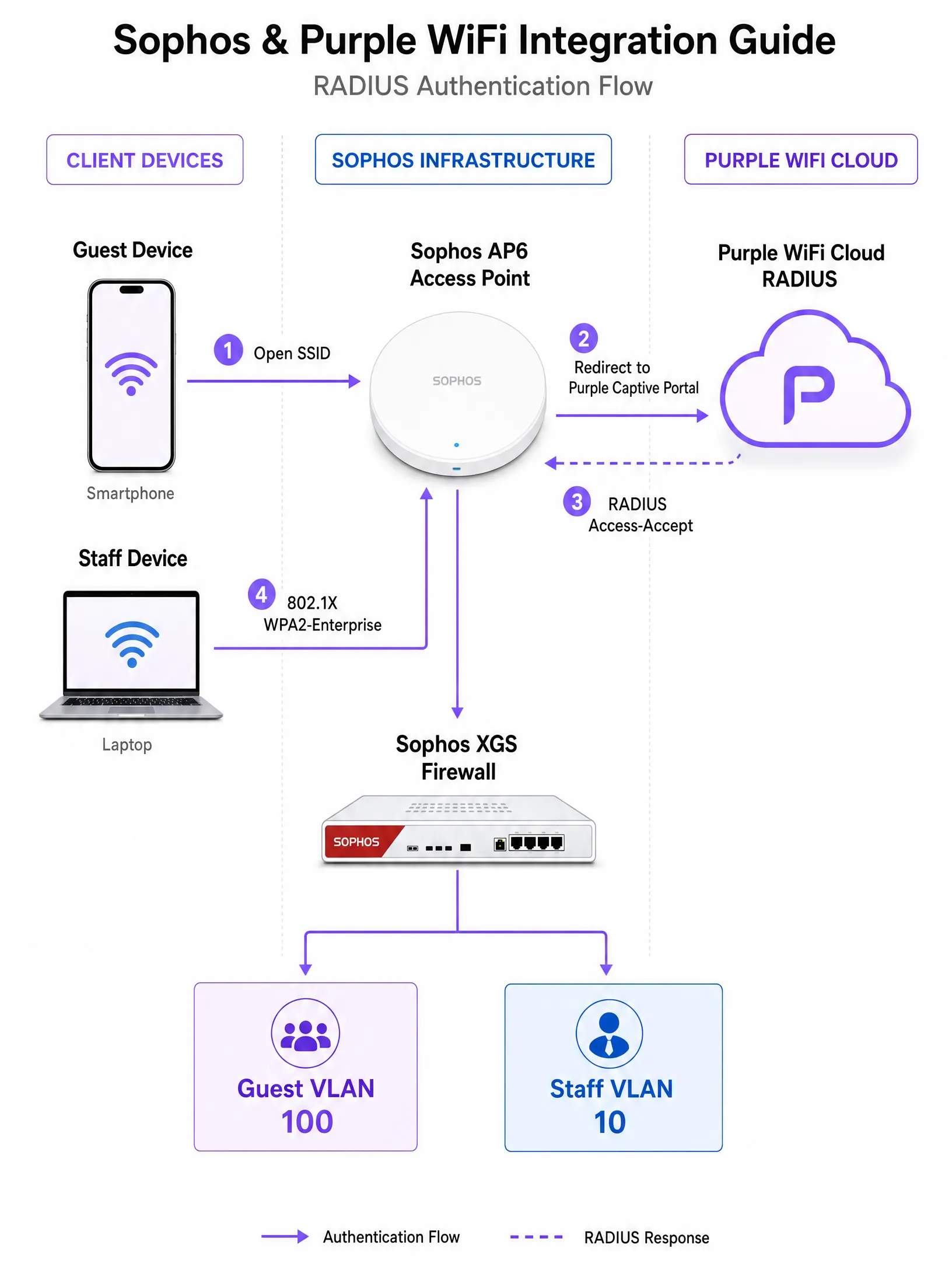
此整合使用標準 RADIUS 協定和 HTTP 重新導向。當場域使用者在 Sophos AP6 或 APX 無線基地台上與您的開放式 Guest WiFi SSID 建立關聯時,Sophos Firewall 會攔截該未驗證裝置的第一個 HTTP 請求。防火牆不會提供本地儲存的登入頁面,而是發出 302 重新導向到 Purple 的雲端代管登入網頁 URL — 通常格式為 https://region1.purpleportal.net/access/。
在此預先驗證階段,裝置處於 Walled Garden(圍牆花園)內:這是一個未驗證裝置可以存取的嚴格網域白名單。此白名單必須包含 Purple 的入口網站資源、任何社群登入提供商(Facebook、Google、LinkedIn)以及您使用的任何身分識別同盟端點,例如 Microsoft Entra ID 或 Okta。一旦使用者在 Purple 登入網頁上完成驗證,Purple 的雲端 RADIUS 就會向 Sophos Firewall 發送 RADIUS Access-Accept 訊息。防火牆會將工作階段狀態更新為已驗證,並套用您驗證後的安全性原則。
RADIUS 驗證與帳務
Purple 提供 RADIUS 即服務(RADIUS-as-a-Service)。您不需要為訪客網路部署 FreeRADIUS、Windows NPS 或任何本地 RADIUS 基礎架構。只需將 Sophos Firewall 設定為直接指向 Purple 的雲端 RADIUS IP 位址即可。
需要兩種 RADIUS 功能:
| 功能 | 協定 | 連接埠 | 用途 |
|---|---|---|---|
| 驗證 | UDP | 1812 | 驗證訪客憑證並傳回 Access-Accept 或 Access-Reject |
| 帳務 | UDP | 1813 | 向 Purple 回報工作階段開始、過渡更新和工作階段結束 |
帳務處理並非選配。它是 Sophos Firewall 用來將工作階段持續時間、消耗的頻寬以及工作階段終止事件回報給 Purple 的機制。若沒有帳務資料,您的 WiFi 分析 儀表板將會顯示不完整的訪客指標。請將帳務中期時間間隔設定為 120 秒,以在即時可見性與網路負載之間取得良好平衡。
Sophos 設定與 Purple 傳送門之間的 RADIUS 共用密鑰必須完全一致。單一字元的差異都會導致無聲的驗證失敗。
Walled Garden 設定
Walled Garden 是最重要的前置驗證設定元素,也是最常見的部署失敗原因。請在 Sophos Firewall 的 無線 > 熱點設定 (Wireless > Hotspot Settings) 下進行設定。
您必須至少允許以下網域:
| 類別 | 允許的網域 |
|---|---|
| Purple 核心 | region1.purpleportal.net, venuewifi.com, cloudfront.net |
| 付款(如適用) | stripe.com |
| 天氣小工具(如使用) | openweathermap.org |
| Facebook 登入 | facebook.com, fbcdn.net, connect.facebook.net, akamaihd.net |
| Google 登入 | accounts.google.com, googleapis.com, gstatic.com |
| LinkedIn 登入 | linkedin.com, licdn.net, licdn.com |
| Microsoft Entra ID | login.microsoftonline.com, login.microsoft.com |
務必允許未經驗證用戶端的 DNS 解析(UDP 53 埠)。若沒有 DNS,裝置將無法解析 Purple 傳送門的主機名稱,重新導向在開始前就會失敗。
員工 WiFi 的 802.1X
針對員工 WiFi,請搭配 WPA2-Enterprise 或 WPA3-Enterprise 使用 802.1X(IEEE 802.1X 基於連接埠的網路存取控制)。設定 Sophos AP 以針對您的內部 RADIUS 伺服器或雲端身分識別提供者(例如 Microsoft Entra ID)使用 EAP-TLS(基於憑證)或 PEAP-MSCHAPv2(使用者名稱/密碼)。
RADIUS 伺服器會傳回 VLAN 分配屬性,以將已驗證的員工裝置分配到正確的內部 VLAN。這與下方針對 PPSK 所述的動態 VLAN 機制相同,並套用於企業驗證。
請將員工 WiFi 的 SSID 與 VLAN,與 Guest WiFi 的 SSID 與 VLAN 完全隔離。切勿將訪客流量橋接到管理或企業子網。如果任何網路區段處理持卡人資料,此隔離是 PCI DSS 的規範要求。
適用於多租戶環境的 Sophos PPSK 與動態 VLAN 分配
在多租戶環境(例如共享工作空間、租賃型住宅大樓、學生宿舍或零售特許櫃位)中,您需要在網路層級隔離不同的使用者群組,而無需為每個租戶廣播個別的 SSID。廣播多個 SSID 會增加無線電頻率開銷並使管理複雜化。
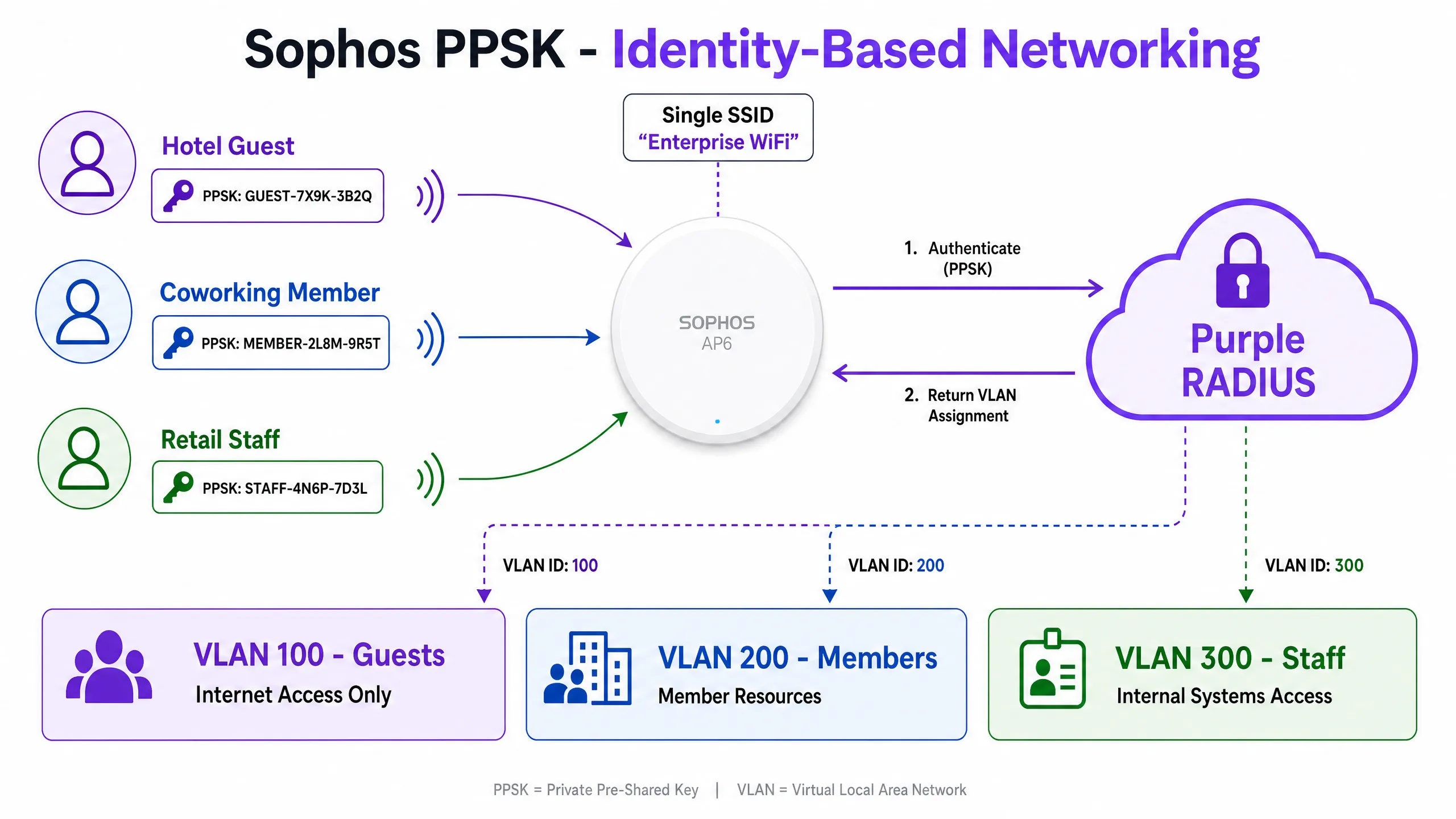
Sophos AP6 無線基地台支援 PPSK (Private Pre-Shared Key),也稱為 Identity PSK 或每使用者 PSK。PPSK 允許單一 SSID 接受多個唯一的密碼,每個密碼均透過 RADIUS 屬性對應到特定的 VLAN。
動態 VLAN 分配流程如下:
- 住戶或成員連線到該單一共享 SSID 並輸入其唯一的 PPSK。
- Sophos AP 向配置的 RADIUS 伺服器發送 RADIUS Access-Request,其中包含 PPSK 作為憑證。
- RADIUS 伺服器驗證 PPSK 並傳回包含以下 VLAN 屬性的 Access-Accept:
Tunnel-Type=VLAN(值 13)Tunnel-Medium-Type=IEEE-802(值 6)Tunnel-Private-Group-ID= `` (例如100)
- Sophos AP 使用傳回的 VLAN ID 標記該裝置的流量,並將其置於正確的隔離網路區段中。
這就是基於身分識別的網路運作方式 (Identity-Based Networking):單一 SSID,多個隔離 VLAN,由使用者的唯一憑證驅動。
實作指南
步驟 1:取得 Purple 憑證
登入 Purple 入口網站。導覽至 Management > Locations > [您的場所] > Hardware > Add Hardware。選擇 Sophos 作為硬體類型。入口網站將顯示:
- 主要與次要 RADIUS 伺服器 IP 位址
- RADIUS 共用金鑰 (Shared Secret)
- Captive Portal URL (例如
https://region1.purpleportal.net/access/) - 重新導向 URL (例如
https://region1.purpleportal.net/access/?res=success) - 完整的 Walled Garden 網域名單
請先記下這四個值再繼續。
步驟 2:在 Sophos Firewall 上設定 RADIUS 伺服器
導覽至 Sophos Firewall 上的 Authentication > Servers (或針對 AP 管理的配置,導覽至 Sophos Central > Wireless > SSIDs > [SSID] > Advanced Settings)。
- 按一下 Add 以建立新的 RADIUS 伺服器項目。
- 將 Server IP 設定為主要的 Purple RADIUS IP 位址。
- 將 Authentication port 設定為
1812。 - 將 Accounting port 設定為
1813。 - 輸入來自 Purple 入口網站的 Shared secret。
- 對次要 Purple RADIUS 伺服器重複此步驟。
對於透過 Sophos Central 管理的 Sophos AP6,請在 SSID 的 Advanced Settings > Backend authentication 區段下設定 RADIUS 伺服器。
步驟 3:設定 Walled Garden
導覽至 Sophos Firewall 上的 Wireless > Hotspot Settings。
- 在 Walled garden 下,按一下 Add new item。
- 新增 Purple 提供之清單中的每個網域。
- 確保未驗證的用戶端可透過驗證前防火牆規則允許 DNS (UDP 連接埠 53)。
- 按一下 Apply。
步驟 4:建立訪客 SSID
導覽至 Wireless > Wireless Settings > SSIDs (或 Sophos Central > Wireless > SSIDs)。
- 按一下 Add SSID。
- 將 Encryption mode 設定為 Open (無預共用金鑰)。
- 在 Advanced Settings > Captive portal 下,啟用 captive portal。
- 選擇 Backend authentication 作為驗證類型。
- 輸入 Purple RADIUS 伺服器 IP、連接埠
1812與共用密鑰。 - 將 Redirect URL 設定為 Purple splash page URL。
- 將 SSID 指派給專用的訪客 VLAN (例如:VLAN 100)。
- 啟用 Client isolation 以防止訪客之間的流量互通。
步驟 5:建立驗證後防火牆規則
導覽至 Rules and policies > Firewall rules。
- 建立一條允許從訪客 VLAN 到 WAN 區域之流量的規則。
- 套用網頁篩選以封鎖惡意類別。
- 套用流量整形以限制每位使用者的頻寬 (建議訪客網路設定為:下載 10 Mbps,上傳 5 Mbps)。
- 明確封鎖所有從訪客 VLAN 到任何包含 POS 系統、PMS 或企業資源之內部 VLAN 的流量。
步驟 6:針對多租戶環境設定 PPSK (選用)
- 在 Sophos Central 中,建立一個 WPA2-Personal SSID。
- 在 SSID 的進階設定下啟用 RADIUS VLAN assignment。
- 設定 RADIUS 伺服器以接受 PPSK 憑證,並根據使用者群組傳回對應的 VLAN 屬性。
- 透過 Purple 入口網站或您的 RADIUS 管理介面,發放唯一的 PPSK 給每個租戶群組。
最佳實踐
在 Layer 2 與 Layer 3 進行流量隔離。 務必將訪客 WiFi 置於專用 VLAN 上。建立明確的防火牆規則,以封鎖所有從訪客 VLAN 到內部網路區段上 RFC 1918 位址空間的流量。這符合 PCI DSS 網路分割要求,並可在訪客裝置受侵害時防止橫向移動。
針對高密度部署使用橋接模式。 在有超過 200 個同時訪客連線的環境中 (例如飯店、體育館、會議中心),請將訪客 SSID 設定為橋接模式。這會將流量導入由企業級 DHCP 伺服器處理的 VLAN,防止 Sophos AP 或防火牆成為 DHCP 效能瓶頸。一間擁有 500 間客房、入住率為 70% 且每位房客有兩台裝置的飯店,會同時產生大約 700 個 DHCP 租約。企業級 DHCP 可以處理此類需求;AP 內建的 DHCP 則無法。
使用受公開信任的 SSL 憑證。 設定 Sophos 防火牆,為重新導向介面提供由公開 CA 簽署的憑證。自簽章憑證會在 iOS 與 Android 上產生瀏覽器安全性警告,進而提高入口網站流失率。這在 旅宿業 環境中尤為重要,因為訪客體驗會直接影響評價分數。 設定 RADIUS 驗證和記帳。 驗證(連接埠 1812)用於授權存取。記帳(連接埠 1813)用於追蹤使用情況。兩者皆為 Purple 的分析功能正常運作所必需。記帳資料可驅動 Purple 儀表板中的工作階段持續時間指標、頻寬報告以及重複訪客識別。
在正式上線前規劃您的 Walled Garden(圍牆花園)。 在部署到生產環境之前,請至少在一部 iOS 裝置和一部 Android 裝置上測試入口網站。這兩個平台具有不同的 Captive Portal 偵測機制,且在 Walled Garden 設定不完整時可能會有不同的行為。在 pre-authentication 階段,使用 Sophos 防火牆上的封包擷取功能來識別任何遭封鎖的網域。
在驗證後套用 Sophos Synchronized Security。 Sophos AP6 無線基地台支援 Synchronized Security,該技術與 Sophos Endpoint Protection 整合。如果偵測到訪客裝置受危害(紅色 Security Heartbeat 狀態),AP 可以自動將該裝置限制在 Walled Garden 內,無需人工干預即可將其與網際網路隔離。對於 醫療保健 和 零售 環境而言,這是一項極具意義的安全控制措施。
如需更廣泛的企業 WiFi 安全背景資訊,請參閱我們的指南: 企業 WiFi 安全:2026 年完整指南 。
疑難排解與風險緩釋
問題症狀:入口網站頁面無法載入(空白畫面或逾時) 原因:Walled Garden 設定不完整。Sophos 防火牆在驗證前封鎖了對 Purple 的 CSS/JS 資產或社群登入 API 的存取。 解決方法:在 Sophos 防火牆上針對訪客 VLAN 啟用封包擷取。識別遭封鎖的網域。將其新增至 Walled Garden。確認在驗證前已允許 DNS 解析。
問題症狀:入口網站可載入,但驗證始終失敗
原因:RADIUS 共享金鑰不比對,或 UDP 連接埠 1812/1813 遭到封鎖。
解決方法:逐字驗證 Sophos 設定和 Purple 入口網站中的共享金鑰。在 Sophos CLI 中使用 nmap -sU -p 1812,1813 來確認 UDP 可達性。
問題症狀:分析資料顯示工作階段持續時間為零且無頻寬資料 原因:未設定 RADIUS 記帳或記帳遭到封鎖。 解決方法:驗證記帳伺服器是否已在連接埠 1813 上配置正確的共享金鑰。檢查是否有任何中間 ACL 封鎖了 UDP 1813 的輸出。
問題症狀:訪客裝置上出現憑證警告 原因:Sophos 防火牆在重定向介面上使用自我簽署憑證。 解決方法:將由公開 CA(Let's Encrypt、DigiCert 或類似機構)簽署的憑證上傳至 Sophos 防火牆,並在 Wireless > Hotspot Settings 下將其指派為登入頁面憑證。
問題症狀:PPSK 使用者進入錯誤的 VLAN
原因:RADIUS VLAN 屬性設定不正確,或 Sophos AP 不接受動態 VLAN 指派。
修正:驗證 RADIUS 伺服器傳回 Tunnel-Type = 13、Tunnel-Medium-Type = 6 與 Tunnel-Private-Group-ID = 。確認 Sophos Central 中 SSID 的 RADIUS VLAN 分配已啟用。
投資報酬率(ROI)與業務影響
在 Sophos 基礎架構上部署 Purple,可將訪客 WiFi 從公用事業成本轉化為第一方數據資產。其商業案例顯而易見。
一家擁有 200 間客房、入住率為 70% 且平均停留 1.8 晚的飯店,每年透過 Purple 的自主選擇加入頁面將產生約 50,000 個已驗證的訪客個人資料。每份資料均包含姓名、電子郵件地址、人口統計數據及造訪記錄。這些數據可直接匯入電子郵件行銷活動,顯著提升直接訂房量與餐飲營收。
針對 零售 環境,Purple 的分析功能可識別停留時間、重複造訪頻率以及客流高峰期。擁有 50 個據點的零售連鎖店可以使用這些數據來優化人員配置、調整促銷時機,並衡量店內活動對造訪頻率的影響。
針對公共部門和 交通運輸 營運商,Purple 提供可審計的 GDPR 同意記錄,並支援關鍵服務營運商符合英國《網路與資訊系統(NIS)法規》。
Purple 達 99.999% 的可用性 SLA 可確保訪客驗證服務不會成為您網路的單一故障點。雲端 RADIUS 架構意味著無需維護、修補或更換地端驗證伺服器。
如需相關整合指南,請參閱 Alta Labs 與 Purple WiFi 整合:設定與 Captive Portal 組態 指南。
Key Definitions
Captive portal
A web page that intercepts a user's initial HTTP request and requires interaction (authentication, consent, or payment) before granting internet access.
The primary interface for Guest WiFi. Purple hosts the captive portal in the cloud; the Sophos Firewall redirects unauthenticated clients to it.
Walled Garden
A strict allowlist of domains and IP addresses that unauthenticated devices can access before completing portal authentication.
Must include Purple's portal domains, social login providers, and any identity federation endpoints. An incomplete Walled Garden is the most common cause of portal load failures.
RADIUS (Remote Authentication Dial-In User Service)
A networking protocol that provides centralised authentication, authorisation, and accounting for users connecting to a network. Uses UDP port 1812 for authentication and 1813 for accounting.
Purple provides RADIUS-as-a-Service. The Sophos Firewall and APs communicate with Purple's cloud RADIUS to authenticate guests and report session data.
RADIUS accounting
The component of RADIUS that tracks network usage metrics, including session start time, duration, bytes transferred, and session termination reason.
Essential for Purple's WiFi Analytics. Without accounting data on port 1813, session duration and bandwidth metrics are unavailable in the Purple dashboard.
PPSK (Private Pre-Shared Key)
A WiFi security feature that allows a single SSID to accept multiple unique passphrases, each typically mapped to a specific VLAN or policy via RADIUS.
Used in Multi-Tenant WiFi deployments to provide per-user or per-group network isolation without broadcasting multiple SSIDs. Sophos AP6 supports PPSK with dynamic VLAN assignment.
Dynamic VLAN assignment
A process where the RADIUS server instructs the access point to place an authenticated user onto a specific VLAN by returning Tunnel-Type, Tunnel-Medium-Type, and Tunnel-Private-Group-ID attributes in the Access-Accept message.
Enables Identity-Based Networks. Users are placed in the correct network segment based on their credentials, regardless of which physical AP they connect to.
802.1X
An IEEE standard for port-based network access control. Provides an authentication framework for devices connecting to a LAN or WLAN, requiring a supplicant (client), authenticator (AP or switch), and authentication server (RADIUS).
The enterprise standard for Staff WiFi. Sophos AP6 supports 802.1X with WPA2-Enterprise and WPA3-Enterprise, using EAP-TLS or PEAP-MSCHAPv2.
Bridge mode
A network configuration where the access point passes wireless client traffic directly onto the wired LAN as tagged VLAN frames, without performing NAT or local DHCP.
Recommended for high-density deployments. Offloads DHCP to enterprise servers and ensures Purple receives the true client IP address for accurate analytics.
First-party data
Information collected directly from users through your own channels, owned by you, not shared with or sourced from third parties.
The primary business value of Purple Guest WiFi. Captured through conscious-choice opt-ins at the captive portal, this data is GDPR-compliant and independent of third-party cookies.
Worked Examples
A 300-room hotel has deployed Sophos AP6 access points managed via Sophos Central. They need guests to authenticate through a branded Purple splash page and require the guest network to be completely isolated from the property management system (PMS) on VLAN 20 to maintain PCI DSS compliance. The hotel expects up to 600 concurrent guest connections during peak periods.
- In Sophos Central, create a dedicated guest SSID named 'Hotel Guest WiFi' with Open encryption. 2. Assign the SSID to VLAN 100 in Bridge mode to handle the 600-device DHCP load via the core network DHCP server. 3. Enable the captive portal under Advanced Settings and select Backend authentication. 4. Enter the Purple RADIUS server IP on port 1812 and the shared secret from the Purple portal. 5. Configure the Walled Garden to allow region1.purpleportal.net, venuewifi.com, and all social login domains. 6. On the Sophos Firewall, create a firewall rule allowing VLAN 100 to the WAN zone with web filtering applied. 7. Create an explicit DENY rule blocking all traffic from VLAN 100 to VLAN 20 (PMS network). 8. Configure RADIUS accounting on port 1813 with a 120-second interim interval. 9. Upload a publicly trusted SSL certificate to the Sophos Firewall for the redirect interface. 10. Test on both iOS and Android before go-live.
A coworking space operator manages 15 tenant companies across three floors. Each company requires its own isolated network segment. They currently broadcast 15 separate SSIDs, causing significant RF congestion. They want to consolidate to a single SSID using Sophos AP6 access points while maintaining strict Layer 2 isolation between tenants.
- Assign a unique VLAN to each tenant company (e.g., VLANs 200-214). 2. In Sophos Central, create a single WPA2-Personal SSID named 'CoWork WiFi'. 3. Enable RADIUS VLAN assignment on the SSID. 4. Configure the RADIUS server (Purple's cloud RADIUS or an integrated directory) to store a unique PPSK per tenant and return the appropriate VLAN attributes on authentication. 5. Issue each tenant company their unique PPSK via the Purple portal. 6. On the Sophos Firewall, configure inter-VLAN firewall rules to block all traffic between tenant VLANs. Allow each VLAN access to the internet only. 7. For tenants requiring shared services (e.g., a shared printer), create explicit permit rules for those specific resources only.
Practice Questions
Q1. A retail chain has deployed Sophos AP6 access points across 50 stores. Shoppers report that the Purple splash page takes over 30 seconds to load, or times out completely. The IT team has confirmed that RADIUS authentication is configured correctly. What is the most likely cause and how do you resolve it?
Hint: Consider what happens before the user reaches the authentication step.
View model answer
The Walled Garden is incomplete. The Sophos Firewall is blocking access to Purple's CSS and JavaScript assets, or to social login CDN domains, before authentication. Enable a packet capture on the Sophos Firewall for the guest VLAN and filter for blocked traffic from unauthenticated clients. Identify the blocked domains and add them to the Walled Garden under Wireless > Hotspot Settings. Also verify that DNS (UDP port 53) is permitted pre-authentication. Without DNS resolution, the device cannot resolve the Purple portal hostname and the redirect fails immediately.
Q2. You are designing a Guest WiFi deployment for a 5,000-seat stadium using Sophos AP6 access points. The venue expects 4,000 concurrent fan connections during events. Should you configure the guest SSID in NAT mode or Bridge mode? Justify your decision.
Hint: Consider the DHCP load generated by 4,000 simultaneous connections.
View model answer
Bridge mode. At 4,000 concurrent connections, NAT mode would overwhelm the on-board DHCP server of the Sophos APs or the firewall. In Bridge mode, the APs drop guest traffic directly onto a dedicated VLAN, and enterprise DHCP servers handle IP address assignment. This prevents DHCP exhaustion and ensures the Purple platform receives the true client IP address for accurate analytics. Bridge mode also provides higher throughput than NAT mode, which is important for a high-density event environment. Configure a DHCP scope on the core network with sufficient addresses for the expected peak load, plus a 20% buffer.
Q3. Your Purple Analytics dashboard shows the correct number of logins, but all session durations are reported as zero minutes and bandwidth usage is not tracked. The guest portal is working correctly and guests can browse the internet. What configuration element is missing?
Hint: Authentication grants access. What tracks usage after access is granted?
View model answer
RADIUS accounting is not configured or is being blocked. Authentication on port 1812 grants internet access, but accounting on port 1813 is the mechanism that reports session duration and bandwidth data back to Purple. Check the Sophos Firewall configuration to confirm the accounting server is set to the Purple RADIUS IP on port 1813 with the correct shared secret. Then verify that UDP port 1813 is not blocked by any intermediate ACL or firewall rule between the Sophos Firewall and Purple's cloud RADIUS servers. Use a packet capture to confirm accounting packets are leaving the Sophos Firewall and receiving responses.
Q4. A coworking space operator wants to use Sophos PPSK to give each of their 20 tenant companies an isolated network segment. After configuration, all PPSK users connect successfully but all land on the same VLAN regardless of which PPSK they use. What is the most likely cause?
Hint: Think about what the RADIUS server needs to return and what the AP needs to accept.
View model answer
There are two likely causes. First, the RADIUS server is not returning the correct VLAN attributes in the Access-Accept message. Verify that the RADIUS server returns Tunnel-Type = 13 (VLAN), Tunnel-Medium-Type = 6 (IEEE-802), and Tunnel-Private-Group-ID = the correct VLAN ID for each PPSK. Second, RADIUS VLAN assignment may not be enabled on the SSID in Sophos Central. Navigate to the SSID's Advanced Settings and confirm that RADIUS VLAN assignment is toggled on. Use a RADIUS debug log or packet capture to inspect the Access-Accept messages and confirm the VLAN attributes are present and correctly formatted.
Continue reading in this series
CommScope Ruckus Integration with Purple WiFi: Setup and Configuration Guide
This technical reference guide provides an authoritative configuration playbook for integrating CommScope Ruckus architectures with Purple WiFi. It details step-by-step deployments for Guest WiFi captive portals, Secure Staff WiFi via 802.1X, and Multi-Tenant network isolation using Ruckus Dynamic PSK.
CommScope Ruckus Integration with Purple WiFi: Setup and Configuration Guide
This technical reference guide provides an authoritative configuration playbook for integrating CommScope Ruckus architectures with Purple WiFi. It details step-by-step deployments for Guest WiFi captive portals, Secure Staff WiFi via 802.1X, and Multi-Tenant network isolation using Ruckus Dynamic PSK.
Allied Telesis Access Points Integration with Purple WiFi
This guide provides a comprehensive configuration playbook for integrating Allied Telesis TQ-Series access points with Purple WiFi. It covers external captive portal redirection, 802.1X RADIUS authentication, and dynamic VLAN steering using Private Pre-Shared Keys (PPSK) for secure multi-tenant deployments.