
Uu PPSK pdf: comparing features and deployment models
This technical reference guide compares Private Pre-Shared Key (PPSK) WiFi architecture against traditional 802.1X and standard PSK deployments. It provides network architects and IT managers with vendor-neutral implementation strategies for multi-tenant residential, IoT, and BTR environments.
Listen to this guide
View podcast transcript

Executive Summary
For property developers and BTR operators, managing WiFi across multi-tenant environments presents a structural challenge: standard WPA2 Personal networks lack the necessary isolation, while 802.1X enterprise deployments break compatibility with the smart home devices residents expect to use. Private Pre-Shared Key (PPSK) architecture bridges this gap. By issuing unique credentials that map directly to isolated VLANs on a single SSID, PPSK allows operators to deliver a home-like WiFi experience at enterprise scale. This guide examines the technical mechanics of PPSK, compares deployment models across major hardware vendors, and outlines the required network design for successful implementation in high-density residential properties.
Technical Deep-Dive: PPSK vs 802.1X
The core mechanism of PPSK operates at the association layer. When a device connects, it presents its pre-shared key during the WPA2 four-way handshake. The access point looks up that key in the PPSK store, identifies the mapped VLAN, and tags the device's traffic accordingly.
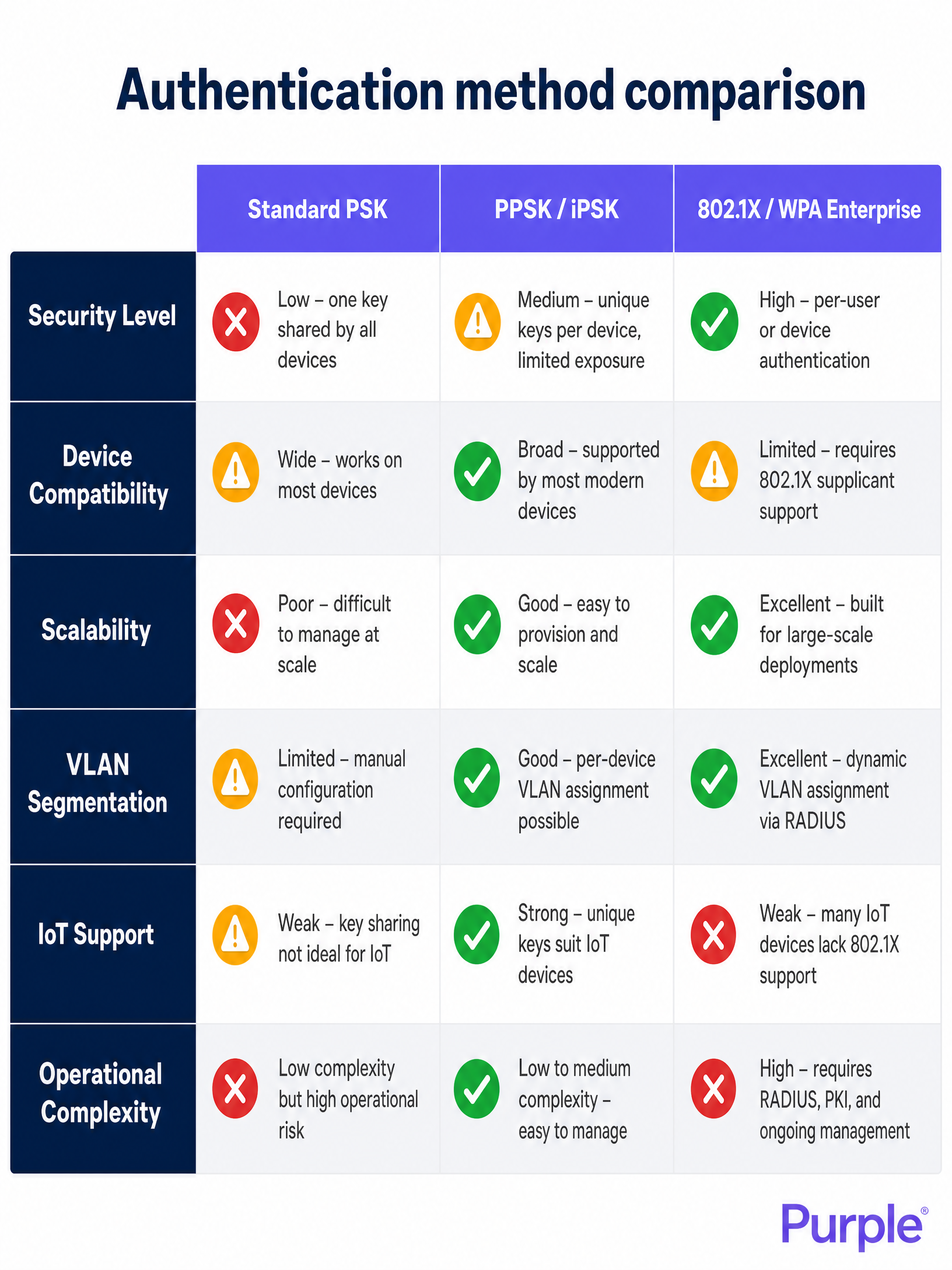
This approach differs fundamentally from 802.1X. While 802.1X remains the standard for corporate staff networks, it requires a RADIUS server, an identity provider, and a supplicant on every device [1]. Smart TVs, games consoles, and IoT sensors lack this supplicant software. PPSK bypasses this limitation by operating at the WPA Personal layer, providing per-household isolation without breaking device compatibility [2].
Vendor Terminology
The underlying mechanism is identical across enterprise hardware, though naming conventions vary:
- HPE Aruba: PPSK (Private Pre-Shared Key)
- Cisco Meraki: iPSK (Identity PSK) or Personal Private Network
- Juniper Mist: ePSK
- Extreme Networks: Private PSK
- Ubiquiti UniFi: PPSK
Implementation Guide: Multi-Tenant Architecture
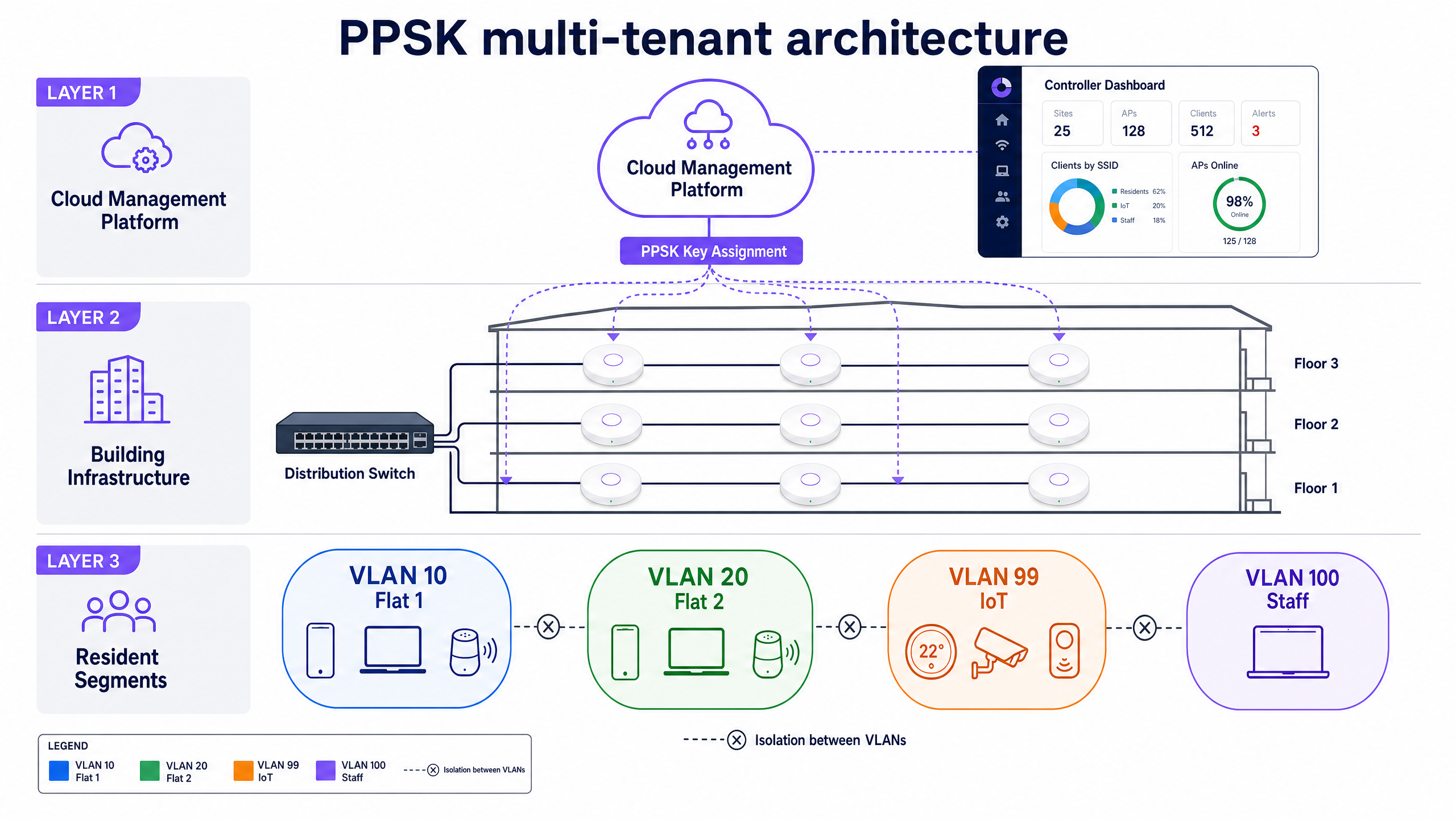
Successful PPSK deployment requires strict logical segmentation before physical installation begins. We recommend a hybrid architecture for BTR and MDU environments: PPSK for residents and IoT, combined with 802.1X for staff and management systems [3].
Step 1: VLAN Design
Map your resident count and IoT categories. A standard 200-unit BTR deployment requires:
- VLANs 10-210: Resident segments (one VLAN per flat)
- VLAN 99: IoT and building management systems
- VLAN 200: Guest WiFi in common areas
Step 2: IP Addressing Scheme
With 15 to 25 devices per household, a 200-unit building will see 3,000 to 5,000 devices concurrently [4]. Use RFC 1918 private addressing with sufficient subnet sizes. A /24 subnet provides 254 usable addresses per VLAN, which accommodates standard household density.
Step 3: Hardware Configuration
Deploy the PPSK policy via your cloud controller. For environments specifying WiFi 6E, ensure your platform supports WPA3-SAE with PPSK. Note that some platforms, such as Ubiquiti UniFi, currently restrict PPSK to WPA2 on the 2.4GHz and 5GHz bands [5].
Best Practices
- Limit SSID Proliferation: Keep broadcast SSIDs to a maximum of four per radio. Every additional SSID consumes airtime for beacon frames, degrading performance. Use PPSK to serve multiple resident segments from a single SSID.
- Automate Key Distribution: Build your key distribution workflow before deployment. Issue keys via a resident portal or QR code at move-in. When a tenancy ends, revoke the specific key via API integration with your property management system [6].
- Validate Trunk Ports: Ensure all required VLANs are permitted on trunk links between the distribution switch and the access layer. Missing VLAN tags will cause silent traffic drops.
Troubleshooting & Risk Mitigation
The most common failure mode in PPSK deployments is IoT device isolation. A compromised smart device on a resident's VLAN can potentially access other devices within that specific segment. For high-risk building infrastructure (CCTV, access control), mandate a separate, dedicated IoT VLAN with strict egress filtering [7].
Additionally, handle NAT type requirements proactively. Games consoles require specific NAT configurations (Type 2 for PlayStation) for online multiplayer. Ensure your gateway handles CGNAT and UPnP correctly per resident segment to prevent support tickets.
ROI & Business Impact
Treating WiFi as a managed amenity delivers measurable returns. Operators typically see a $20-40 per unit per month rent premium for high-quality, move-in ready connectivity [8]. By deploying a hardware-agnostic software overlay like Purple's Multi-Tenant WiFi on owned infrastructure, operators capture this value directly rather than ceding it to a third-party broadband provider. Furthermore, the automated revocation of PPSK credentials reduces WiFi-related support tickets by eliminating the need for building-wide password rotations.
Listen to the full technical briefing:
References
[1] SecureW2, "What is PPSK? A Guide to Private Pre-Shared Key Security," 2026. [2] Purple, "Multi-tenant WiFi: a complete guide for residential operators," 2024. [3] Purple, "PPSK WiFi: comparing features and deployment models," 2024. [4] British Property Federation, "MDU Connectivity Benchmarks," 2024. [5] Ubiquiti, "Using PPSK / RADIUS for Multiple VLANs On an SSID in UniFi Network," 2024. [6] Purple, "Multi-Tenant WiFi for MDU & Property Managers," 2024. [7] WBA, "Smart Home & IoT - Operator-Managed Industry Framework," 2026. [8] National Apartment Association, "Amenity ROI Analysis," 2024.
Key Definitions
PPSK (Private Pre-Shared Key)
An authentication method that allows multiple unique passwords on a single WiFi SSID, with each password dynamically assigning the user to a specific VLAN.
Essential for multi-tenant environments where residents need device isolation without the complexity of 802.1X.
VLAN (Virtual Local Area Network)
A logical subnetwork that groups a collection of devices from different physical LAN segments.
Used in conjunction with PPSK to isolate each flat's traffic into a secure, private segment.
802.1X
An IEEE standard for port-based network access control that provides an authentication mechanism to devices wishing to attach to a LAN or WLAN.
The enterprise standard for staff networks, but unsuitable for residential IoT due to supplicant requirements.
Supplicant
A software client on an end-user device that handles the EAP authentication exchange with a RADIUS server.
Laptops and phones have supplicants; smart TVs and thermostats generally do not, necessitating PPSK.
RADIUS
A networking protocol that provides centralized Authentication, Authorization, and Accounting management.
Used as the backend database for 802.1X, and optionally for centralized PPSK management in enterprise deployments.
BTR (Build to Rent)
Purpose-built residential properties designed specifically for renting rather than sale.
The primary growth market for managed multi-tenant WiFi amenities.
MDU (Multi-Dwelling Unit)
A classification of housing where multiple separate housing units are contained within one building.
Requires specialized network architecture to handle high device density and interference.
CGNAT (Carrier-Grade NAT)
An IPv4 network design that end sites are configured with private network addresses that are translated to public IPv4 addresses by middlebox network address translator devices.
Critical to configure correctly in multi-tenant networks to ensure games consoles achieve an Open NAT type.
Worked Examples
A 180-unit Build to Rent development requires move-in-day WiFi activation with full smart home support, without manual password rotations when tenancies end.
Deploy HPE Aruba access points managed through Aruba Central. Configure a single resident SSID using PPSK. Assign each of the 180 flats a dedicated VLAN (e.g., VLANs 10-189). Integrate the Aruba Central API with the property management system. At tenancy sign-up, the system automatically generates a unique PPSK and emails it to the resident as a QR code. When the resident moves out, the API call revokes the key, terminating access only for that specific flat.
A 400-bed purpose-built student accommodation block faces network degradation during cohort move-in week due to thousands of devices attempting to connect simultaneously.
Implement Ruckus access points with SmartZone controllers. Pre-generate 400 unique ePSK credentials before arrival week. Include the credentials in the digital welcome packs. Configure the network with a /23 subnet per floor to handle the IP address density, while keeping broadcast domains restricted to the individual room VLANs via the ePSK mapping.
Practice Questions
Q1. A property developer is specifying hardware for a new 300-unit BTR project. They want to use the 6GHz band (WiFi 6E) for resident connectivity while using PPSK for isolation. They have proposed using Ubiquiti UniFi access points. Do you approve this design?
Hint: Consider the WPA security requirements for the 6GHz band and the current limitations of specific vendor PPSK implementations.
View model answer
Reject the design. The 6GHz band mandates WPA3 security. Currently, Ubiquiti UniFi's PPSK implementation only supports WPA2. To use PPSK on the 6GHz band, the developer must select a vendor platform that supports WPA3-SAE with PPSK, such as HPE Aruba, Cisco Meraki, or Ruckus.
Q2. A coworking space operator complains that their network is slow. You discover they are broadcasting 9 different SSIDs to accommodate different tenant companies. How do you resolve this?
Hint: Think about beacon frame overhead and how PPSK consolidates network names.
View model answer
Collapse the 9 SSIDs into a single unified SSID. Issue each tenant company a unique PPSK that maps to their specific company VLAN. This reduces beacon frame overhead significantly, recovering airtime for actual data transmission, while maintaining the required Layer 2 isolation between the different companies.
Q3. A resident reports that their smartphone cannot find their Chromecast, even though both devices are connected to the building's WiFi network. The building uses a standard guest WiFi captive portal system. What is the architectural problem?
Hint: Consider how guest WiFi systems handle client-to-client communication compared to a home network.
View model answer
Guest WiFi systems enforce client isolation by default, preventing any two devices on the network from communicating with each other. This breaks mDNS and discovery protocols required by casting devices. The architectural solution is to replace the guest portal with a PPSK deployment, placing the resident's phone and Chromecast into a shared, private VLAN where they can discover each other.
Continue reading in this series
Uu PPSK 2023: comparing features and deployment models
This technical reference guide compares Unique per-User Private Pre-Shared Key (UU PPSK) WiFi architecture against traditional shared PSK and 802.1X deployments, with a specific focus on the 2023 landscape of vendor implementations and platform capabilities. It provides property developers, BTR operators, and MDU landlords with actionable deployment strategies, VLAN architecture guidance, and automated lifecycle management workflows. The guide covers three deployment models, real-world case studies, and the compliance implications of each authentication approach.
Uu PPSK 2023: comparing features and deployment models
This technical reference guide compares Unique per-User Private Pre-Shared Key (UU PPSK) WiFi architecture against traditional shared PSK and 802.1X deployments, with a specific focus on the 2023 landscape of vendor implementations and platform capabilities. It provides property developers, BTR operators, and MDU landlords with actionable deployment strategies, VLAN architecture guidance, and automated lifecycle management workflows. The guide covers three deployment models, real-world case studies, and the compliance implications of each authentication approach.
PPSK xaverius: comparing features and deployment models
This authoritative guide examines PPSK xaverius architecture for multi-tenant environments like Build to Rent and student accommodation. It compares deployment models, details implementation strategies, and explains how per-unit VLAN isolation delivers a home-like WiFi experience while maintaining enterprise security.