
Why Your Captive Portal Isn't Loading on iPhone
An authoritative technical reference guide explaining why captive portals fail to load on iOS devices. It dives deep into Apple's Captive Network Assistant (CNA) daemon detection logic, identifies key iOS-specific interference factors like iCloud Private Relay and Private MAC addresses, and outlines comprehensive mitigation strategies for network engineers and venue operators.
Listen to this guide
View podcast transcript
📚 Part of our core series: The Ultimate Guide to Captive Portals →

執行摘要
對於現代企業場域(涵蓋奢華飯店、大型零售商場、市政交通樞紐和多功能體育場)而言,訪客無線連線已不再是奢侈品,而是客戶互動、數位營運和創造營收的關鍵接觸點。然而,全球的網路管理員都面臨著一個棘手且高摩擦的客服工單:「為什麼我的 iPhone 無法載入訪客 WiFi 登入畫面?」
當 Apple iOS 裝置與開放式 SSID 建立關聯,但未能顯示 Captive Portal 時,使用者就會處於「受困」狀態——雖然連線到本地無線網路並取得了有效的 DHCP IP 位址,但完全被阻斷在網際網路存取之外。對於非技術使用者來說,這代表網路「壞了」。對企業而言,這種失敗會直接轉化為居高不下的客戶支援成本、受損的品牌信任,以及錯失收集寶貴第一方數據的機會。
本技術參考指南為網路架構師、CTO 和場域營運總監提供了針對 iOS Captive Network Assistant (CNA) 背景程式的詳盡且不限特定廠商的分析。我們將深入探討 Apple 裝置用來偵測 captive 網路的精準背景 HTTP 探測機制,剖析無意中阻斷這些探測的現代 iOS 隱私功能(例如 iCloud 私密轉送、專用 MAC 位址、本地 VPN 設定檔和自訂 DNS-over-HTTPS (DoH) 設定),並提供可行且經過生產環境測試的緩解策略。最後,我們將說明 Purple's Guest WiFi 解決方案如何完美地與 Apple 的 CNA 互動,在維持強大網路安全的同時,確保無縫的登入體驗。
技術深度剖析
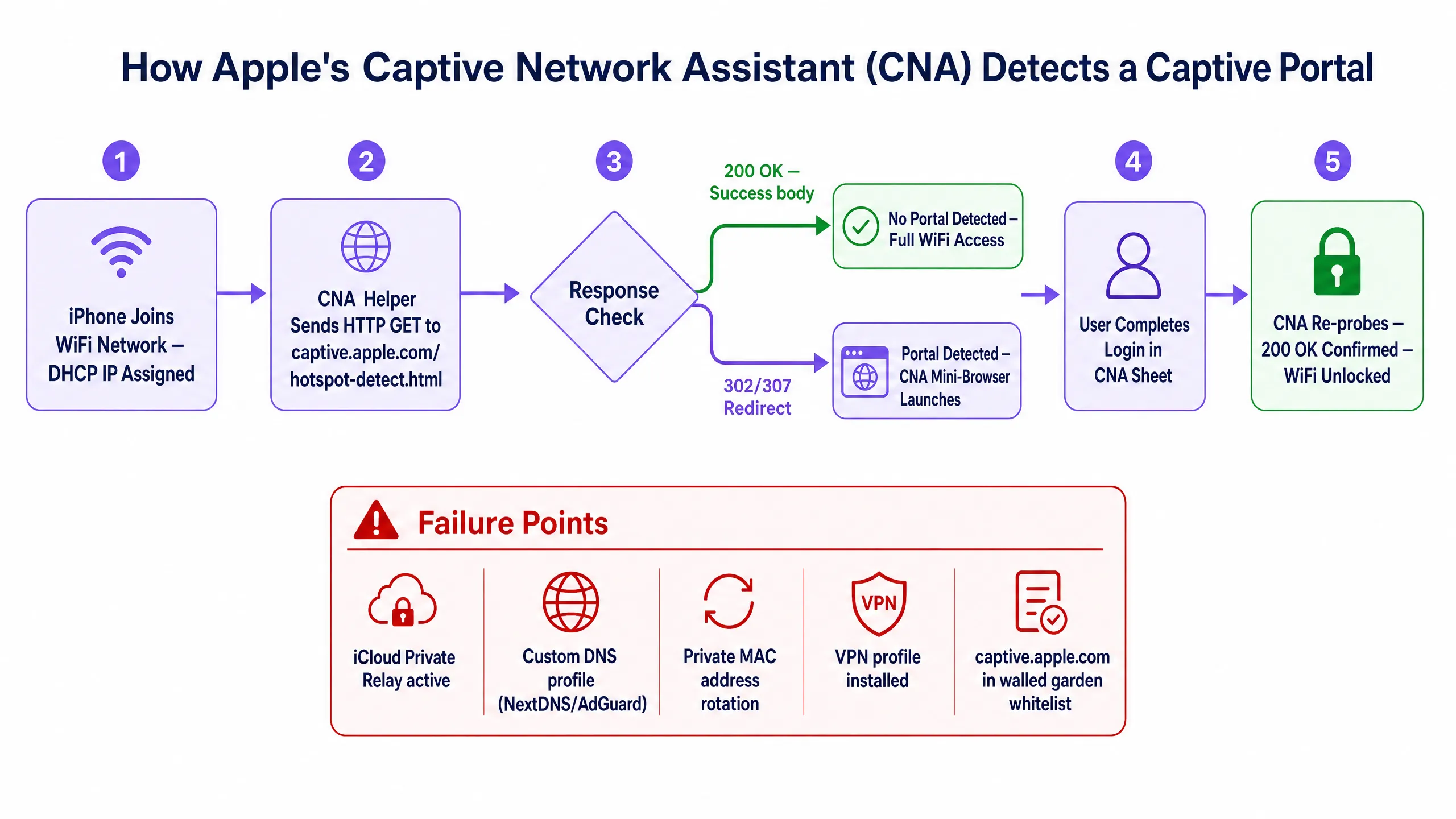
要解決 iOS 上的 Captive Portal 載入問題,首先必須了解 iPhone 並非「監聽」重新導向,而是主動「尋找」重新導向。整個機制是由一個名為 Captive Network Assistant (CNA) 的背景系統精靈程式所控制,該程式在標準 Safari 瀏覽器之外獨立運作 [1]。
Apple 的偵測邏輯與探測機制
當 iOS 裝置完成 802.11 關聯階段並透過 DHCP 取得本地 IP 位址時,CNA 輔助精靈程式就會立即在背景觸發。在將裝置的主要網際網路路由介面從行動數據切換到 Wi-Fi 之前,作業系統必須驗證該無線網路是否具有不受限制的網際網路存取權限 [2]。 為了執行此檢查,CNA 守護行程(daemon)會向一系列專用的 Apple 成功網域發送一個簡單的 HTTP GET 請求。目標的主要 URL 為:
http://captive.apple.com/hotspot-detect.html
其他次要的備用網域包括:
http://www.apple.com/library/test/success.htmlhttp://www.appleiphonescell.com/hotspot-detect.htmlhttp://www.itools.info/hotspot-detect.htmlhttp://www.ibook.info/hotspot-detect.html
背景 HTTP 探測是使用高度特定的系統 User-Agent 字串啟動的,其結構通常為:
CaptiveNetworkSupport-355.200.27 wispr
CNA 守護行程會根據兩種可能的結果來評估 HTTP 回應:
- 未受限的網際網路(成功):如果 DNS 查詢正常解析,且目標網頁伺服器回傳 HTTP 狀態碼 200 OK,且主體內容剛好包含
Success字樣,則作業系統會判定該網路已完全開放。裝置會將 Wi-Fi 設定為預設路由介面,且不會顯示 Captive Portal。 - 偵測到 Captive 網路(攔截):如果網路基礎架構攔截了 HTTP 請求,並回傳了預期 200 OK "Success" 內容以外的任何內容——例如 HTTP 狀態碼 302 Found、307 Temporary Redirect,或是帶有自訂 HTML 登入頁面的 HTTP 200 OK——作業系統就會識別出其位於 Captive Portal 後方。
一旦識別出 Captive 狀態,iOS 會立即啟動原生 Websheet 應用程式(即 CNA 迷你瀏覽器)。這是一個精簡且受到高度限制的 WebKit 實例,它會以互動視窗向上滑動頁面的方式顯示重新導向的登入頁面,在完成驗證之前,阻止使用者存取其他系統應用程式或下載外部檔案 [1]。
驗證後探測(「完成」按鈕的挑戰)
CNA 迷你瀏覽器一個關鍵的架構細微之處在於它對驗證後探測的依賴。當使用者與登入頁面互動時——無論是輸入憑證、接受條款還是透過社群媒體進行驗證——CNA 迷你瀏覽器都不會自動關閉。
相反地,WebKit 頁面會監控所有的導覽行為。為了確定使用者是否已成功完成登入流程,CNA 守護行程會使用標準瀏覽器 User-Agent 向 http://captive.apple.com/hotspot-detect.html 執行第二次 HTTP 探測:
Mozilla/5.0 (iPhone; CPU iPhone OS 18_0 like Mac OS X) AppleWebKit/605.1.15 (KHTML, like Gecko) Mobile/16A366
只有當此二次探測返回乾淨的 200 OK "Success" 承載內容時,CNA 微型瀏覽器才會將右上角的按鈕從「取消」變更為「完成」。如果網路工程師將使用者重新導向至驗證後的到達網頁,而未允許背景探測到達 Apple 的成功伺服器,該按鈕將一直卡在「取消」。點擊「取消」會立即解除 iPhone 與 Wi-Fi 網路的關聯,這會讓使用者感到沮喪並中斷連線 [2]。
iOS 專屬干擾因素
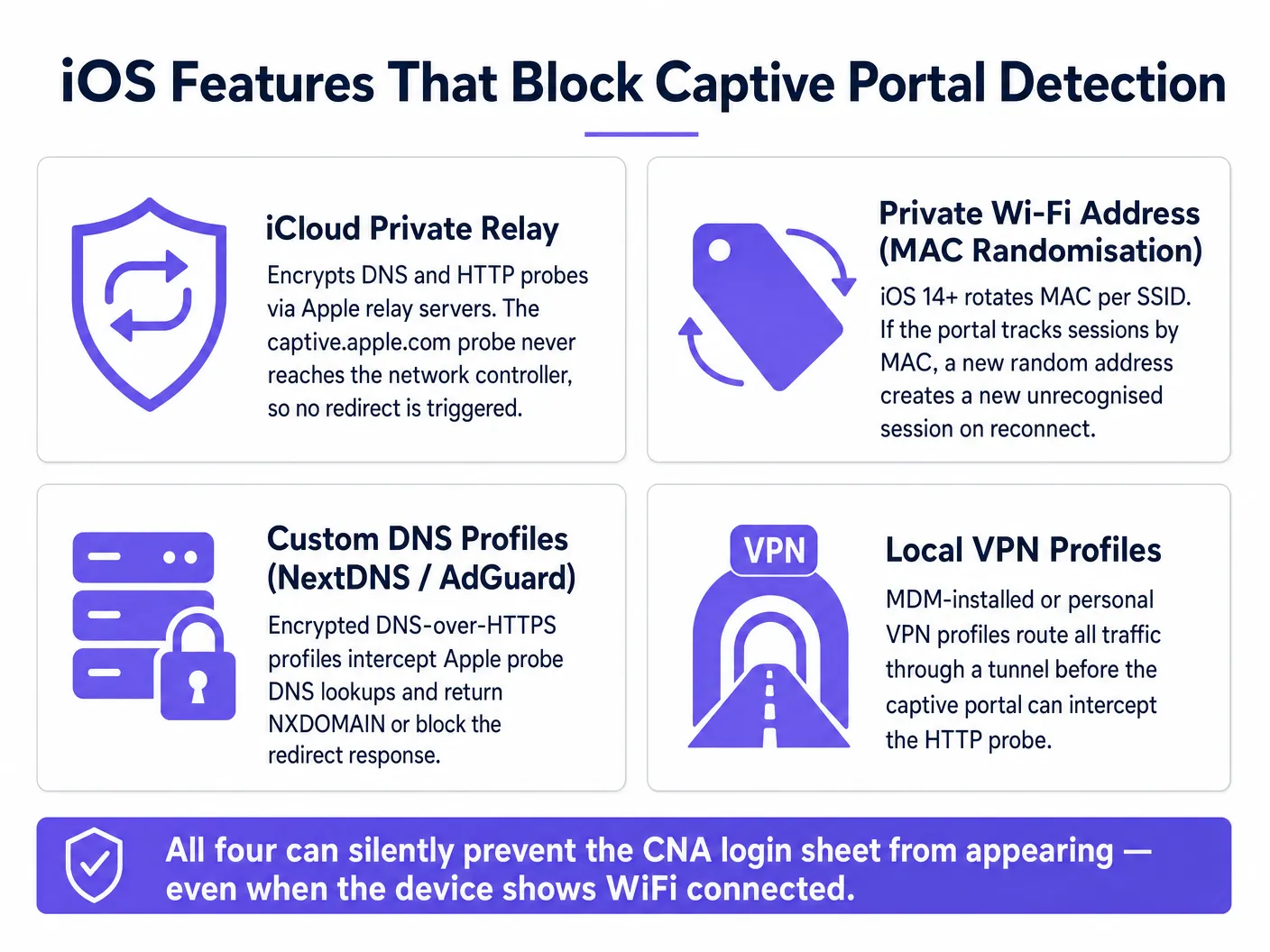
雖然 Apple 的 CNA 機制在理論上非常完美,但現代 iOS 的隱私與安全性增強功能經常會干擾背景 HTTP 探測,進而阻止 Websheet 觸發。
1. iCloud 私密轉送
iCloud 私密轉送(iCloud Private Relay)於 iOS 15 推出,是一種雙躍點代理伺服器架構,旨在加密並遮蔽使用者在 Safari 中的網頁瀏覽流量 [3]。
- 衝突點:當私密轉送啟用時,DNS 查詢和 HTTP 流量會被封裝並透過安全的出口代理隧道進行路由。由於本機網路控制器無法攔截這些加密封包,因此無法植入 HTTP 302/307 重新導向。iPhone 的背景探測會無聲無息地失敗,且裝置會在 SSID 下方顯示「無網際網路連線」警告,而完全不會彈出 Captive Portal 頁面。
2. 私用 MAC 位址與輪替識別碼
預設情況下,iOS 會針對每個 SSID 隨機化裝置的媒體存取控制(MAC)位址,以防止跨場域追蹤 [4]。
- 衝突點:在 iOS 18 中,Apple 推出了輪替私用 Wi-Fi 位址,即使在連線至同一個 SSID 的情況下,也會定期輪替 MAC 位址。如果 Captive Portal 的工作階段狀態表僅透過 MAC 位址來追蹤已驗證的訪客,突然的 MAC 輪替將導致網路控制器將該 iPhone 視為全新的、未經驗證的裝置。使用者會被無聲無息地中斷連線並被要求重新登入,這嚴重破壞了工作階段的連續性。
3. 加密 DNS 設定檔 (DoH/DoT)
許多技術專業人員會安裝自訂設定檔(例如 NextDNS、AdGuard 或 Cloudflare 1.1.1.1),在作業系統層級強制執行 DNS-over-HTTPS (DoH) 或 DNS-over-TLS (DoT)。
- 衝突點:這些設定檔會強制 iPhone 繞過 DHCP 租約提供的本機 DNS 伺服器,將所有 DNS 查詢透過加密的 HTTPS 連線路由至公用解析程式。由於本機網路閘道無法攔截或欺騙這些加密的 DNS 查詢,因此無法為
captive.apple.com返回重新導向 IP。查詢會失敗或逾時,從而阻斷 CNA 的觸發。
4. 本機 VPN 設定檔
企業級 MDM 設定檔和個人 VPN(虛擬專用網路)通常會採用「隨需」或「一律啟用」的設定。
- 衝突點:當 Wi-Fi 介面取得 IP 位址的瞬間,VPN 用戶端會嘗試建立加密通道。如果 VPN 通道在 CNA 精靈完成 HTTP 探測之前成功建立,所有流量都將安全地路由至 VPN 閘道,完全繞過本地攔截。如果 VPN 用戶端因 Captive Portal 的防火牆阻擋而無法連線,它會阻止所有其他網路流量,使裝置處於死鎖狀態,導致 VPN 和 Captive Portal 都無法載入。
實作與緩解指南
為確保 iOS 裝置擁有 100% 可靠的 Captive Portal 觸發率,網路工程師必須設計其無線區域網路控制器 (WLC) 和防火牆,以適應 Apple 特定的偵測邏輯。
圍牆花園 (驗證前 ACL) 設計
最常見的工程錯誤是設定錯誤的 Walled Garden(驗證前允許存取的網域存取控制清單)。
- 規則:Apple 的成功網域(例如
captive.apple.com)絕不能列入圍牆花園白名單。如果您將captive.apple.com列入白名單,iPhone 的驗證前 HTTP 探測將成功到達 Apple 的伺服器並收到 200 OK "Success" 回應。裝置會判定其已擁有完整的網際網路存取權限,完全繞過 CNA Websheet,然後在使用者開啟 Safari 時無法載入任何實際網站。 - 例外情況:然而,您必須將轉譯入口網站頁面所需的特定網域列入白名單,例如您託管的入口網站網域、CDN 託管的 CSS/JS 資產以及外部身分驗證提供商(例如 Google、Facebook 或 Apple ID 登入端點)。
逐步 WLC 設定(以 Cisco Catalyst / Meraki 為例)
在 Cisco Catalyst 或 Meraki AP [5] 上部署訪客無線網路時,請遵循以下架構框架:
| 步驟 | 動作 | 技術目的 |
|---|---|---|
| 1 | 設定停用 MAC 過濾的 Open SSID | 允許立即關聯和 DHCP IP 分配,而無需初始的 802.1X 阻擋。 |
| 2 | 設定重新導向 ACL 以攔截 Port 80 | 攔截純 HTTP 流量並將其重新導向至 Purple 入口網站 URL (https://portal.purple.ai/...)。 |
| 3 | 設定 DNS 伺服器至本機閘道 | 確保 captive.apple.com 的 DNS 查詢由本機控制器解析,以啟用重新導向。 |
| 4 | 從圍牆花園中排除 Apple 成功網域 | 保證背景 HTTP 探測被攔截,從而觸發 iOS CNA Websheet。 |
| 5 | 啟用「CNA Bypass」或「Captive Portal Bypass」 | 對於進階部署,可以將 WLC 設定為對初始探測欺騙 200 OK 回應,強制使用者手動開啟 Safari,而不是使用受限的 Websheet。 |
最佳實踐與業界標準
大規模管理訪客無線網路需要遵守現代網路標準和法規遵循框架。
- 過渡至 WPA3-Personal (OWE):傳統的訪客入口網站運行在完全開放、未加密的 SSID 上,使用戶面臨被竊聽的風險。企業網路應過渡至 Opportunistic Wireless Encryption (OWE)(IEEE 802.11aq 標準),以在不需要密碼的情況下提供個別數據加密 [6]。
- 符合 PCI DSS 與 GDPR 規範:訪客入口網站必須將訪客流量與企業及持卡人數據環境 (CDE) 進行隔離,以維持 PCI DSS 合規性。此外,在擷取第一方數據時,入口網站必須提供明確、符合 GDPR 規範的同意核取方塊,這些皆可透過 WiFi Analytics 平台進行無縫管理。
- 整合 Passpoint (Hotspot 2.0):為了完全消除 Captive Portal 的摩擦,場域應部署 Passpoint (Hotspot 2.0)。Passpoint 使用類似行動網路的漫遊技術,透過預先安裝的設定檔安全且自動地驗證 iOS 裝置,完全繞過 CNA,同時對所有空中傳輸流量進行加密。
疑難排解與風險緩釋
當終端用戶遇到故障時,場域支援人員和網路管理員可以使用以下結構化的疑難排解路徑:
終端用戶自我緩釋路徑
- 停用 iCloud 私密轉送:前往
設定 > Wi-Fi,點擊訪客 SSID 旁邊的藍色(i)圖示,然後關閉限制 IP 位址追蹤 [3]。 - 停用專用 MAC 位址:在同一個 Wi-Fi 設定選單中,關閉專用 Wi-Fi 位址,以防止 MAC 輪替問題 [4]。
- 透過 Safari 強制觸發:開啟 Safari 並在網址列中輸入非安全的 HTTP URL。業界標準為:
neverssl.com由於此網域從不使用 HTTPS,因此保證網路控制器會攔截 port 80 請求並成功將用戶重導向至入口網站。 - 暫時重設 DNS:如果安裝了自訂 DNS 設定檔,請前往
設定 > Wi-Fi > [SSID] > 設定 DNS,從手動切換為自動,然後重新連線。
網路工程師診斷路徑
                  [ iPhone 連線至訪客 SSID ]
                                  |
                                  v
                    [ 是否取得 DHCP IP? ]
                     /                                        (否)                      (是)
                   /                                 [ 檢查 DHCP Pool 範圍 ]               v
                                   [ 是否能解析 DNS? ]
                                    /                                                    (否)                   (是)
                                  /                                            [ 檢查 DNS 伺服器 ACL ]              v
                                             [ captive.apple.com 是否已列入白名單? ]
                                              /                                                                          (Yes)                              (No)
                                            /                                                                [ REMOVE from Walled Garden ]                       v
                                                                 [ Intercept Port 80 Redirects? ]
                                                                  /                                                                                            (No)                             (Yes)
                                                                /                                                                                    [ Check WLC Redirect Rules ]         [ CNA Websheet Triggers ]
投資報酬率與業務影響
優化 iOS 訪客無線網路引導流程體驗,對場域營運和業務績效有著直接且可衡量的影響。
旅宿業案例研究:五星級度假村集團
- 挑戰:一家擁有 12 家物業的奢華酒店集團,其訪客 Wi-Fi 連線失敗率高達 35%,導致每週有超過 450 起櫃檯投訴。
- 實施:IT 團隊重構了其 Walled Garden、停用了基於 MAC 的工作階段追蹤,並部署了 Purple's Guest WiFi 解決方案,同時優化了 CNA 處理機制。
- 成果:30 天內櫃檯 Wi-Fi 相關客訴減少了 92%。顧客滿意度得分(CSAT)提升了 18 分,且該場域在第一季成功收集了 40,000 個全新驗證的電子郵件地址。
零售業案例研究:全國連鎖購物中心營運商
- 挑戰:一家擁有 45 家購物中心的零售營運商在吸引訪客互動上面臨困難,因為 iCloud 私密轉送(iCloud Private Relay)導致 40% 的 iOS 裝置無法載入 Captive Portal。
- 實施:實施了網路層級的私密轉送阻擋(針對 Apple 的轉送網域回傳 NXDOMAIN 以強制進行本地路由),並部署了 WiFi Analytics 。
- 成果:Portal 完成率從 58% 躍升至 94%。行銷團隊成功利用恢復的 Portal 版位投放本地化零售媒體廣告,進而創造了每季廣告收入增加 120,000 美元的佳績。
參考資料
- [1] Apple Developer Documentation: Captive Network Assistant Framework, Apple Inc. https://developer.apple.com/documentation/captivenetwork
- [2] Wireless Broadband Alliance: Captive Network Portal Standards, WBA. https://wballiance.com/captive-network-portal-standards/
- [3] Apple Support: About iCloud Private Relay, Apple Inc. https://support.apple.com/en-us/102022
- [4] Apple 支援:在 iPhone 上使用專用 Wi-Fi 位址,Apple Inc. https://support.apple.com/zh-tw/102554
- [5] Cisco 無線 AP:2026 產品與部署指南,Purple 部落格。[/blog/cisco-wireless-ap]
- [6] 學校 WiFi:2026 管理員與 IT 指南,Purple 部落格。[/blog/wifi-in-schools]
相關資源
對於部署企業級訪客無線網路的團隊,這些相關資源提供了更深入的技術背景:
- 如何使用 Cloud RADIUS 實作 802.1X 驗證 — 適用於需要 Captive Portal 之外企業級驗證的場域。
- 2026 年 10 大最佳網路存取控制 (NAC) 解決方案 — 存取控制執行的廠商比較。
- Cisco 無線 AP:2026 產品與部署指南 — 企業部署的硬體選擇指南。
- 學校 WiFi:2026 管理員與 IT 指南 — 公共部門網路部署指南。
Purple 的 Guest WiFi 平台為全球的 旅宿業 、 零售業 、 醫療保健業 和 交通運輸 場域提供服務,提供大規模且經 CNA 優化的訪客登入體驗。
Key Definitions
Captive Network Assistant (CNA)
A background system daemon in iOS and macOS that automatically detects if a Wi-Fi network requires web-based authentication and displays a mini-browser sheet.
Responsible for displaying the slide-up guest login screen on iPhones.
Websheet App
The native, restricted WebKit-based mini-browser launched by the CNA daemon to display the captive portal redirect page.
Unlike Safari, it lacks back/forward buttons, tabbed browsing, and does not support downloading files or profile installation.
iCloud Private Relay
An Apple privacy service that encrypts and routes Safari browsing traffic through two secure internet relays, masking the user's IP address and DNS queries.
Inadvertently blocks captive portal redirection by preventing local gateways from intercepting HTTP probes.
Walled Garden
A pre-authentication Access Control List (ACL) that allows unauthenticated guest devices to access specific external domains (like payment gateways or CDNs) before logging in.
Must be carefully configured to block Apple's success domains while allowing essential portal assets.
Private Wi-Fi Address
An iOS feature that randomizes the device's MAC address per SSID to prevent cross-venue tracking.
Can cause unexpected disconnections if the network gateway tracks guest sessions solely by MAC address.
neverssl.com
A vendor-neutral, unencrypted HTTP website designed specifically to be intercepted by captive portal gateways.
Used as a universal troubleshooting URL to force the guest login screen to appear.
Passpoint (Hotspot 2.0)
An industry standard that enables cellular-like automatic roaming and secure 802.1X authentication on Wi-Fi networks.
Bypasses captive portals entirely, providing a frictionless and secure connection for returning guests.
Opportunistic Wireless Encryption (OWE)
An extension to Wi-Fi (standardized as Wi-Fi Certified Enhanced Open) that provides encryption over the air without requiring a password.
The modern, secure replacement for completely open guest SSIDs.
Worked Examples
A 500-room luxury hotel group deploying Cisco Catalyst 9800 WLCs is seeing a 40% drop-off in guest portal completions specifically on iOS 18 devices, with users reporting that the login screen never pops up, but they show as connected with an IP address.
The network architect must implement a multi-layered remediation on the Cisco 9800 WLC:
- Audit the pre-authentication ACL (Walled Garden) and verify that 'captive.apple.com' and associated IP ranges are NOT permitted. This ensures that Apple's initial background HTTP probe is intercepted.
- Configure the WLC to return a spoofed DNS response or block Apple's Private Relay servers by returning NXDOMAIN for 'mask.icloud.com' and 'mask-h2.icloud.com'. This forces iOS to prompt the user to 'Use Without Private Relay' for this network, allowing the local HTTP intercept to occur.
- Verify that the redirect URL on the Cisco WLC points correctly to Purple's secure landing page: ' https://portal.purple.ai/ '.
- Set the session timeout and idle timeout in the WLC to at least 24 hours to accommodate MAC address rotation without forcing frequent re-authentications during the guest's stay.
A large retail mall operator wants to deploy a guest portal to capture first-party data for marketing, but needs to ensure that iOS 18's default 'Rotating Private Wi-Fi Address' feature does not force shoppers to log in again every time they move between APs or return the next day.
The deployment team should implement the following architecture:
- Deploy Purple's Connect license, which acts as a free Identity Provider (IdP) for OpenRoaming and Passpoint profiles.
- Provide a clear call-to-action on the initial captive portal splash page prompting iOS users to download and install a secure Passpoint W-Fi profile.
- Once installed, the profile configures the iPhone to automatically authenticate via secure 802.1X using EAP-TLS, completely bypassing the captive portal on subsequent visits.
- For non-Passpoint users, configure the network gateway's session-state table to link the authenticated session to a combination of the DHCP Option 82 (AP location) and a browser cookie, rather than relying solely on the device's rotating MAC address.
Practice Questions
Q1. A network engineer is setting up a new guest wireless network at an airport. They notice that when they connect an iPhone, the Wi-Fi icon appears in the status bar, but the login screen does not pop up. However, if they manually open Safari and type 'neverssl.com', the login screen appears immediately. What is the most likely cause of this behavior?
Hint: Consider the difference between background system probes and manual browser navigation, and check the Walled Garden configuration.
View model answer
The background CNA daemon's HTTP probe to 'captive.apple.com' is successfully reaching Apple's servers and receiving a 200 OK response, which tells iOS that the network has full internet access. This happens because 'captive.apple.com' or Apple's IP ranges have been incorrectly whitelisted in the pre-authentication walled garden. Because the probe is not intercepted, the Websheet does not launch. Manual browser navigation to 'neverssl.com' works because that specific domain is not whitelisted, allowing the gateway to intercept the request and redirect the user.
Q2. How does iCloud Private Relay interfere with the standard captive portal redirection mechanism, and how can a network administrator programmatically mitigate this at the network level without manual user intervention?
Hint: Think about DNS resolution and how Private Relay handles connection failures when its proxy servers are unreachable.
View model answer
iCloud Private Relay encrypts and tunnels DNS and HTTP traffic through Apple's proxy servers. Since the local gateway cannot inspect or intercept this encrypted traffic, it cannot inject the HTTP 302/307 redirect, causing the connection to time out. To mitigate this programmatically, the network's DNS server should be configured to return an NXDOMAIN response (or a block response) for Apple's Private Relay DNS domains: 'mask.icloud.com' and 'mask-h2.icloud.com'. When iOS receives an NXDOMAIN for these domains, it recognizes that Private Relay is incompatible with the local network and prompts the user with a system dialog to 'Use Without Private Relay' for that network, allowing the standard HTTP redirect to trigger.
Q3. An enterprise hotel network uses MAC-based authentication to allow guests to stay connected for 7 days without logging in again. However, guests with iPhones complain that they have to log in every morning. What iOS feature is causing this, and what is the best-practice network solution?
Hint: Review the MAC address privacy features introduced in recent iOS versions and consider alternative authentication methods.
View model answer
This is caused by iOS's 'Rotating Private Wi-Fi Address' feature (enhanced in iOS 18), which periodically rotates the device's MAC address even on the same SSID. When the MAC rotates, the network gateway treats it as a new, unauthenticated device, invalidating the 7-day MAC session. The best-practice solution is to transition away from MAC-based tracking and deploy a secure profile-based authentication mechanism like Passpoint (Hotspot 2.0) using Purple's platform. Alternatively, the portal can drop a persistent secure cookie in the user's browser, or the gateway can correlate the session using DHCP Option 82 and other network-level identifiers rather than the MAC address alone.
Continue reading in this series
Designing B2B Captive Portals: Collecting Registered Name and Company Data
This guide provides IT managers and venue operators with a vendor-neutral technical framework for designing B2B captive portals. It details how to structure registration fields to capture registered name and company data, ensuring high completion rates while maintaining GDPR compliance and building account-level intelligence.
Designing B2B Captive Portals: Collecting Registered Name and Company Data
This guide provides IT managers and venue operators with a vendor-neutral technical framework for designing B2B captive portals. It details how to structure registration fields to capture registered name and company data, ensuring high completion rates while maintaining GDPR compliance and building account-level intelligence.
Captive Portal Architecture: Security, Redirection, and Best Practices
A definitive technical reference on enterprise captive portal architecture. This guide unpacks network isolation, DNS redirection, RADIUS authentication, and security compliance for IT leaders deploying secure, data-rich guest WiFi networks.