Un huésped llega a su hotel, busca redes WiFi, ve tres nombres de red similares y toca el que parece correcto. En ese momento, toma una decisión de confianza en cuestión de segundos. Si su red está bien diseñada, obtiene un acceso rápido y cifrado y continúa con su día. Si no lo está, ha dejado la seguridad en manos de las conjeturas.
Por eso muchos operadores de empresas se hacen la misma pregunta: ¿qué es un WiFi seguro?
La respuesta corta es que una red WiFi segura no es una única configuración, aplicación o contraseña. Es la combinación de cifrado moderno, autenticación sólida y un diseño de red cuidadoso. Para un hotel, comercio, clínica, oficina o recinto, esa diferencia es fundamental. Afecta al riesgo, al acceso del personal, a los sistemas de pago, a la confianza de los clientes y a la cantidad de problemas operativos a los que se enfrentará su equipo de TI más adelante.
Lo que realmente significa un WiFi seguro en 2026
Mucha gente piensa que una WiFi segura significa una de estas dos cosas: o bien la red tiene una contraseña, o bien un teléfono tiene activada la opción "WiFi segura". Ninguna de las dos definiciones es suficiente para una empresa.
La función de un dispositivo puede ayudar con la privacidad en redes públicas no seguras, pero no rediseña la red en sí. El soporte de Samsung en el Reino Unido, por ejemplo, describe Secure WiFi como una función que cifra el tráfico en redes WiFi públicas no seguras y bloquea las aplicaciones de rastreo, con solo los primeros 250 MB al mes incluidos en el plan gratuito, lo que la convierte en una capa de privacidad limitada a nivel de dispositivo en lugar de una arquitectura de seguridad de red completa, como se explica en el soporte de Samsung Reino Unido sobre Secure WiFi.
El verdadero WiFi seguro comienza en la red. Significa elegir configuraciones de seguridad más sólidas como WPA3, evitar métodos obsoletos y mantener el tráfico de invitados separado del tráfico empresarial. Las directrices autorizadas definen el WiFi seguro de esa manera, y para las organizaciones del Reino Unido la defensa principal es la configuración segura, no una función de aplicación de consumo, como se describe en la guía sobre cómo proteger a su organización mientras usa WiFi.
La forma sencilla de pensarlo
Piense en el WiFi como si fuera un edificio.
- Una contraseña por sí sola es un código de puerta principal compartido con todo el mundo.
- Las herramientas de privacidad de dispositivos son como cristales tintados para un solo visitante.
- La arquitectura de WiFi segura es el sistema completo. Puertas cerradas, controles de identidad, plantas separadas, cámaras y normas sobre quién puede entrar en qué habitaciones.
Esa visión por capas es la que realmente importa en los entornos empresariales.
Regla práctica: Si los dispositivos del personal, los de los invitados, los terminales de pago, las impresoras y los equipos IoT se encuentran en el mismo diseño inalámbrico, no tiene un WiFi seguro. Tiene un WiFi cómodo.
Por qué las empresas se equivocan en esto
La mayor parte de la confusión proviene de la mezcla de casos de uso. Una persona que busca "qué es WiFi seguro" puede querer saber cómo proteger su teléfono en una cafetería. El operador de una empresa necesita algo más amplio. Necesita una red que pueda gestionar al personal, invitados, contratistas, dispositivos compartidos y acceso de cara al público sin convertir cada conexión en un ticket de soporte o en una excepción de seguridad.
Amenazas comunes de WiFi que su contraseña no detendrá
Una contraseña de WiFi compartida parece tranquilizadora porque parece un cerrojo. En la práctica, suele funcionar más como un cartel en la puerta que dice "solo miembros" mientras todo el mundo copia el código en un chat de grupo.
La incertidumbre de los usuarios es parte del problema. Según la encuesta sobre seguridad en WiFi públicas de Panda Security, un estudio de seguridad en redes WiFi públicas de 2025 reveló que el 66,5 % de los encuestados sospechaba de una brecha de seguridad en redes WiFi públicas, y solo el 20,2 % estaba "muy seguro" de poder identificar una red falsa. Para cualquier operador de un establecimiento, esto significa que no se puede esperar que los usuarios detecten el peligro de forma fiable.
El problema de las redes falsas
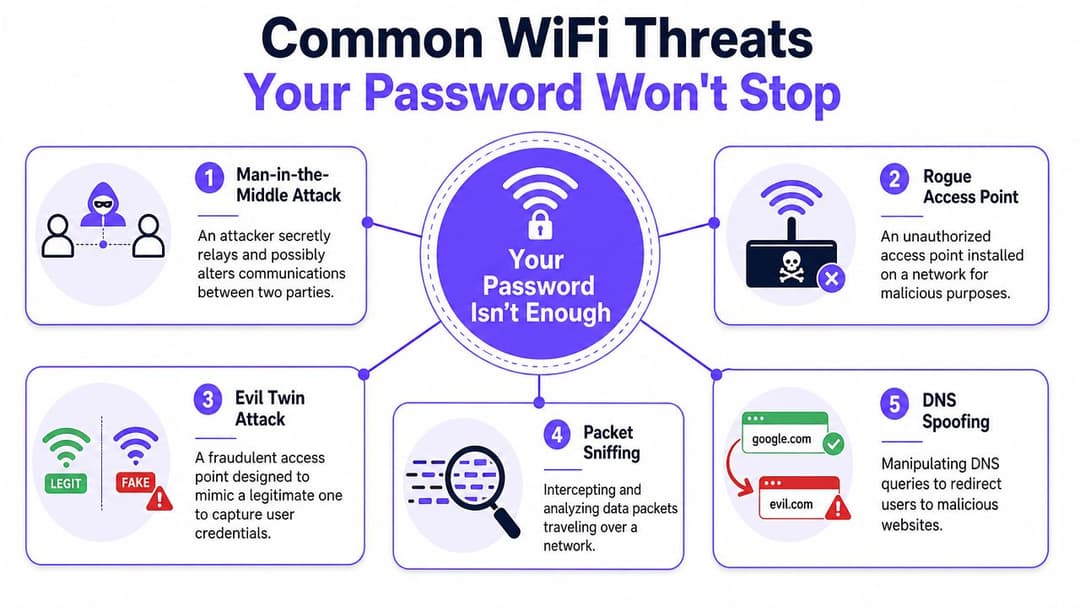
Un ataque de evil twin es el que la mayoría de las empresas subestiman. Un atacante configura un punto de acceso falso con un nombre que parece legítimo, como "Hotel Guest WiFi" en lugar de "Hotel Guests WiFi". Para un viajero cansado en el vestíbulo, esa diferencia es invisible.
Es la versión digital de un estafador que abre una oficina de correos falsa al lado de la auténtica. La gente entra porque el cartel se parece lo suficiente. Luego, entregan su información.
Si su método de acceso depende de que las personas elijan la red correcta y confíen en una contraseña compartida, ya ha colocado parte de su carga de seguridad en la atención humana. Esa es una posición vulnerable.
Amenazas que habitan dentro de una red "protegida"
A algunos ataques no les importa que su SSID tenga una contraseña.
- Ataques de intermediario (man-in-the-middle): ocurren cuando alguien se interpone entre el usuario y el servicio al que cree estar accediendo.
- Intercepción de paquetes (packet sniffing): consiste en monitorizar el tráfico de red en tránsito en busca de cualquier información expuesta.
- Suplantación de DNS (DNS spoofing): redirige a los usuarios lejos del sitio que pretendían visitar hacia uno malicioso.
- Puntos de acceso no autorizados (rogue access points): aparecen dentro o cerca de un entorno y crean una entrada secundaria no aprobada.
Una simple contraseña no identifica a cada usuario. No confirma cada dispositivo. No impide que alguien configure algo engañoso cerca. Tampoco le dice a su red a qué se le debe permitir acceder a un usuario una vez conectado.
Por qué esto se convierte rápidamente en un problema empresarial
Para un hotel, una seguridad de WiFi deficiente puede traducirse en quejas de los huéspedes, tráfico fraudulento y daños a la reputación. Para el comercio minorista, puede crear una exposición innecesaria en torno a los sistemas adyacentes a los pagos. Para el sector sanitario, crea riesgos en torno a entornos compartidos y dispositivos sensibles.
Si su modelo de seguridad asume que los usuarios siempre elegirán la red correcta y nunca harán clic en la página equivocada, el modelo es demasiado débil para entornos de cara al público.
La conclusión operativa es sencilla. Las contraseñas controlan mal la entrada cuando muchas personas necesitan acceso y muchas de ellas no están familiarizadas con el entorno. Las empresas necesitan controles de identidad más sólidos y una mejor separación dentro de la red.
Los fundamentos de los protocolos de seguridad WiFi
La columna vertebral de un WiFi seguro es el protocolo de seguridad que utiliza su red. Ese protocolo determina cómo se autentican los dispositivos, cómo se cifra el tráfico y qué tan difícil es para un atacante manipular las comunicaciones.
Históricamente, la seguridad WiFi ha evolucionado a través de WEP, WPA, WPA2 y WPA3. WEP se introdujo en 1997 y se ratificó en 1999, y hoy en día se considera fácilmente vulnerable. Es por eso que la seguridad moderna avanzó hacia familias más nuevas, tal como se describe en la guía de seguridad WiFi de Smallstep.
Qué significan en realidad los nombres de los protocolos
No es necesario memorizar las siglas. Lo que sí debe saber es lo que implican.
- WEP debería estar jubilado. Si todavía lo ve, considérelo un peligro de seguridad.
- WPA fue un paso adelante, pero ya no es donde deberían quedarse las implementaciones serias.
- WPA2 es el estándar mínimo para una seguridad seria.
- WPA3 es el objetivo moderno, especialmente para entornos empresariales y de alto riesgo.
La misma fuente señala que WPA3-Enterprise puede elevar la protección al modo de 192 bits, mientras que WPA2 es la base mínima para una seguridad significativa. Esa es la diferencia entre "aceptable por ahora" y "diseñado para el riesgo actual".
WPA2 frente a WPA3 de un vistazo
| Característica | WPA2-Personal/Enterprise | WPA3-Personal/Enterprise |
|---|---|---|
| Línea base de seguridad | Estándar mínimo para una seguridad seria | Último estándar de seguridad moderno |
| Idoneidad | Línea base aceptable, especialmente en despliegues existentes | Mejor opción para despliegues nuevos o actualizados |
| Fuerza empresarial | Modo Enterprise disponible | Modo Enterprise disponible con opciones de protección más sólidas |
| Entornos de alto riesgo | Utilizable, pero no es el estado final | Mejor alineado con entornos de alto riesgo y de cara al público |
| Objetivo operativo | Mejor que los protocolos heredados | Objetivo moderno preferido |
Para un desglose práctico de los tipos de seguridad WiFi, ayuda comparar la elección del protocolo con la forma en que se conectan sus usuarios.
Donde la contraseña WiFi habitual se queda corta
La mayoría de las empresas empiezan con una clave precompartida, o PSK. Ese es el conocido password compartido. Funciona, pero obliga a aceptar compromisos complicados.
Cuando un miembro del personal se va, ¿se cambia la contraseña en todas partes? Si un contratista tuvo acceso el mes pasado, ¿cómo se elimina únicamente su acceso sin tocar el de todos los demás? Si un huésped le dice a otro la contraseña, ¿es eso un incidente de seguridad o simplemente un martes habitual?
Una PSK es como entregar una sola llave para todo el edificio. Es sencillo hasta que se necesita exigir responsabilidades.
Las contraseñas compartidas son cómodas al principio y caras más adelante. El coste se manifiesta en la revocación, la sobrecarga de soporte y la incertidumbre sobre quién está realmente en la red.
Por eso el WiFi empresarial serio no se queda solo en el cifrado. Avanza hacia la identidad.
Ir más allá de las contraseñas con la autenticación enterprise
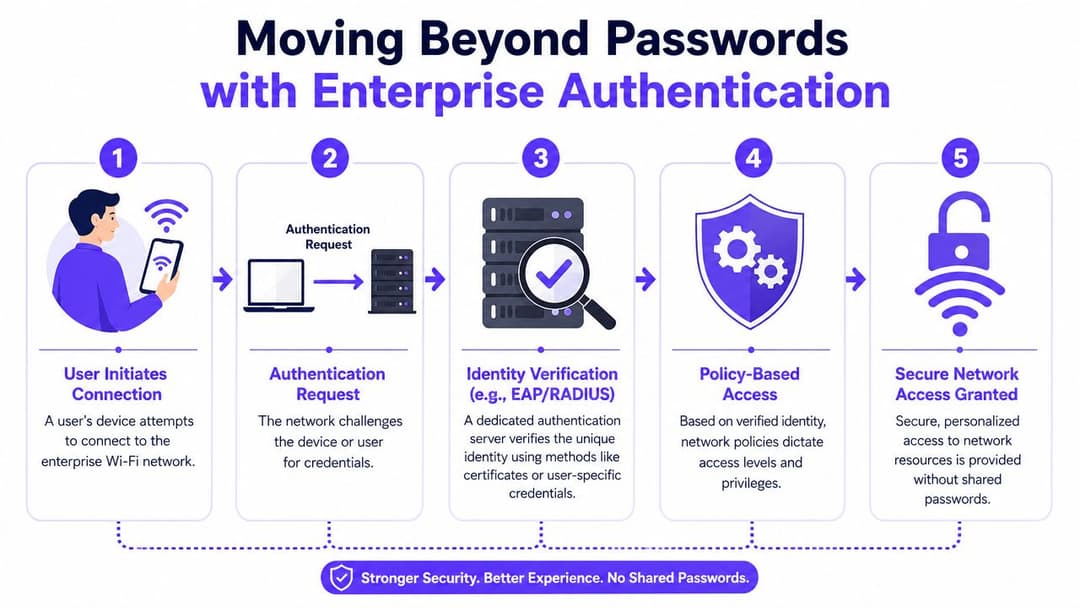
El modelo más sólido es la autenticación empresarial. En lugar de preguntar si alguien conoce la contraseña, la red pregunta: ¿quién es este usuario o dispositivo y qué se le debe permitir hacer?
Ese es el cambio de la seguridad basada en un código secreto a la seguridad basada en la identidad.
El modelo del portero digital
Una buena forma de entender 802.1X y EAP es pensar en la entrada de un recinto.
Con una contraseña compartida, el portero hace una pregunta: "¿Conoce el código?".
Con la autenticación empresarial, el portero comprueba la identificación de cada persona, la confirma con un sistema de confianza y luego decide qué acceso recibe. El personal puede entrar en la oficina trasera. Los invitados pueden utilizar el vestíbulo. Los contratistas podrían recibir solo acceso temporal durante las horas de trabajo.
Así es como debería comportarse un WiFi mejor.
Qué cambia en la práctica con la autenticación enterprise
En lugar de una contraseña compartida entre docenas o cientos de personas, se pasa a una confianza por usuario o por dispositivo.
Algunos enfoques habituales incluyen:
- Inicio de sesión respaldado por directorio. El personal utiliza los sistemas de identidad de la empresa existentes, como Microsoft Entra ID o Google Workspace.
- Acceso basado en certificados. Un certificado de confianza en el dispositivo demuestra la identidad sin pedir a los usuarios que recuerden otra contraseña.
- Autorización basada en políticas. La red puede ubicar a los usuarios en el segmento correcto en función de su rol, dispositivo o contexto.
La autenticación WPA Enterprise sirve como un modelo de despliegue útil. Admite el paso de credenciales compartidas a un acceso WiFi basado en la identidad.
Por qué los certificados son el estándar de oro para el personal
Para las redes del personal, la autenticación basada en certificados suele ser la respuesta más limpia. El usuario abre su portátil y este se conecta de forma segura porque el dispositivo ya posee la identidad correcta. Si ese empleado se marcha, el acceso se puede revocar de forma centralizada. Nadie tiene que enviar una nueva contraseña de WiFi a toda la empresa.
Eso le proporciona tres ventajas prácticas:
- Menor intercambio de credenciales
- Bajas del sistema más limpias
- Control más estricto sobre qué dispositivos se conectan
A un arquitecto de redes le gustan los certificados porque reducen la ambigüedad. Al servicio de asistencia le gustan porque los usuarios dejan de olvidar las contraseñas de WiFi. A la empresa le gustan porque el acceso es más fácil de controlar sin constantes restablecimientos.
Qué hacer con los dispositivos heredados problemáticos
No todos los dispositivos pueden manejar bien 802.1X. Las impresoras, las televisiones inteligentes, los escáneres y el hardware especializado a menudo se quedan atrás. Ahí es donde iPSK, o clave previamente compartida individual, resulta de ayuda.
En lugar de una contraseña para cada dispositivo, cada dispositivo obtiene su propia clave. Eso significa que puede aislar, identificar y revocar el acceso de forma más limpia. No es lo mismo que el acceso completo basado en certificados, pero es una mejora importante respecto a una contraseña compartida para todo un edificio.
Una opción en este espacio es Purple, que admite el acceso de invitados y personal basado en la identidad, integraciones de directorios y casos de uso multiinquilino, incluido iPSK para dispositivos heredados. Lo importante no es el nombre del proveedor. Es la elección de la arquitectura: alejarse de los secretos compartidos siempre que sea posible.
El futuro del acceso fluido y seguro
El antiguo dilema en el WiFi era sencillo. Se podía tener una seguridad sólida o una baja fricción, pero no ambas cosas. Ese dilema es cada vez menor.
Tecnologías como Passpoint y OpenRoaming buscan que el acceso resulte automático a la vez que mantienen la conexión protegida desde el principio. Para los establecimientos abiertos al público, esto es importante porque los usuarios odian las dificultades para iniciar sesión casi tanto como las redes sospechosas.
Qué cambia para el usuario
En una configuración típica de Captive Portal, el usuario se une a la red, abre un navegador, espera una página de bienvenida, rellena un formulario y espera que la página funcione correctamente en su dispositivo.
Con los marcos de itinerancia modernos, la experiencia puede parecerse más a la de un servicio móvil. El dispositivo reconoce un entorno de confianza y se conecta de forma segura sin pedir al usuario que repita los mismos pasos cada vez.
Esto ofrece varias ventajas empresariales:
- Menos momentos de soporte en los mostradores de recepción y cajas registradoras
- Menor vacilación del usuario sobre si una red es legítima o no
- Una mejor experiencia en visitas recurrentes para clientes y huéspedes
Por qué esto se alinea con el enfoque zero-trust
Zero trust no consiste en desconfiar de todo el mundo a nivel personal. Se trata de verificar la identidad y el acceso de forma constante, en lugar de asumir que estar "en la WiFi" significa que se debe confiar en alguien de forma generalizada.
Por eso el acceso a la red de confianza cero se adapta de forma natural al diseño inalámbrico moderno. El acceso sin esfuerzo solo funciona bien cuando está respaldado por una identidad, una política y una segmentación claras.
Una mejor WiFi no es solo una incorporación más rápida. Significa menos decisiones que se dejan en manos del usuario y menos oportunidades para que los atacantes se aprovechen de la confusión del usuario.
Para un estadio, un grupo hotelero, un complejo de retail o un centro de transporte, un acceso seguro que resulte invisible suele ser el mejor diseño. Los usuarios ganan comodidad. Los operadores mantienen el control.
Buenas prácticas de WiFi seguro para su sector
El diseño de WiFi seguro adecuado depende de la actividad de su empresa. Un hotel no tiene los mismos patrones de tráfico que una clínica. Una cadena de tiendas no tiene la misma combinación de dispositivos que una propiedad residencial.
Hostelería
Los hoteles, bares, complejos turísticos y recintos necesitan un diseño de WiFi que proteja las operaciones sin obligar a los huéspedes a superar un sinfín de obstáculos.
Un modelo práctico tiene este aspecto:
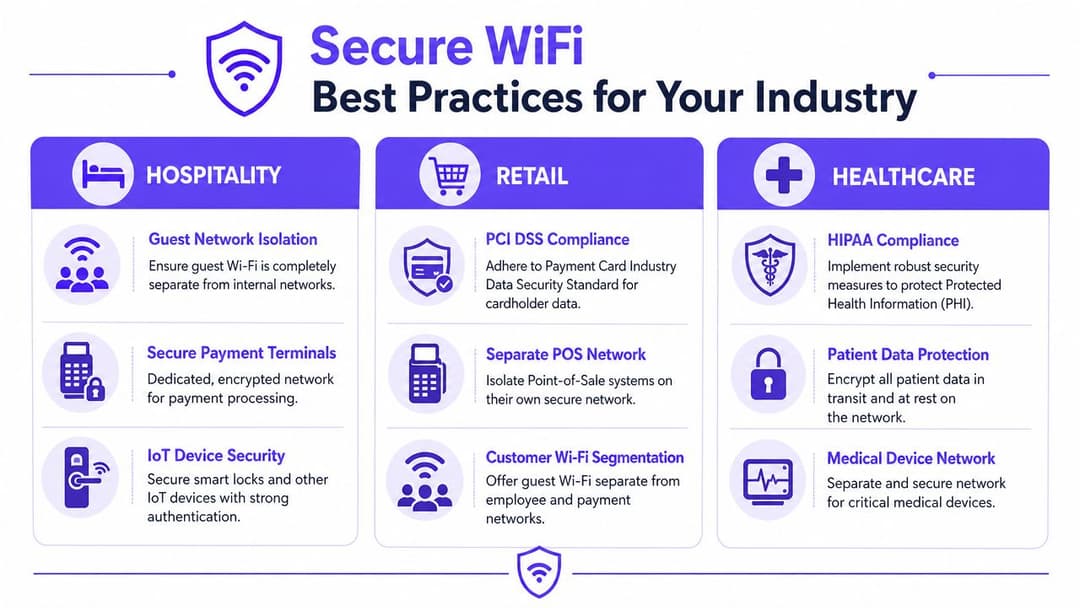
- El tráfico de invitados permanece aislado de los sistemas del personal, las herramientas de administración y los servicios de back-office.
- El personal utiliza un acceso basado en la identidad en lugar de una contraseña compartida que se pasa de mano en mano al cambiar de turno.
- Los pagos y los dispositivos operativos se ubican en segmentos dedicados, separados de la navegación de los invitados.
En el sector hotelero, el resultado comercial es directo. Los huéspedes quieren una conectividad fiable que les resulte segura y sencilla. Los equipos de operaciones quieren menos incidencias de soporte y menos probabilidades de que el dispositivo de un huésped acabe cerca de los sistemas internos.
Sector minorista
Los entornos de retail tienen prioridades muy diversas. Puede tener WiFi para invitados, dispositivos de mano del personal, sistemas junto al POS, señalización digital y herramientas de inventario bajo el mismo techo.
El diseño inalámbrico debe reflejar esos diferentes roles.
- La WiFi de clientes debe estar separada de los servicios para empleados.
- Los dispositivos de punto de venta y relacionados con pagos nunca deben convivir en el mismo espacio inalámbrico general que el acceso público.
- Los objetivos de marketing y analítica deben respaldarse en un enfoque controlado de incorporación e identidad, no en una red abierta con una supervisión débil.
Los equipos de retail suelen centrarse en la rapidez del despliegue. Es comprensible, pero la comodidad absoluta genera una corrección de errores costosa más adelante.
Sector sanitario
Los entornos sanitarios necesitan una disciplina más estricta porque no todos los dispositivos son iguales. El teléfono de un visitante, el portátil de un médico y un dispositivo especializado conectado no deben tratarse como si pertenecieran al mismo nivel de confianza.
Las prioridades clave incluyen:
- Separe el tráfico de pacientes, personal, invitados y dispositivos
- Utilice una autenticación más sólida para los usuarios clínicos
- Evite exponer sistemas confidenciales a través de rutas inalámbricas compartidas
Incluso cuando los usuarios nunca ven la arquitectura, sienten el resultado. El personal inicia sesión de forma más fluida, los dispositivos compartidos se comportan de forma más predecible y los equipos de seguridad tienen límites de control más claros.
Una red sanitaria segura no depende de un concepto gigante de "WiFi de hospital". Funciona porque cada clase de usuario y dispositivo tiene su propio canal.
Residencial multi-inquilino
Las propiedades de alquiler residencial de obra nueva, las residencias de estudiantes y las propiedades polivalentes se enfrentan a un reto único. Los residentes quieren una experiencia hogareña, no un ritual de inicio de sesión corporativo cada vez que conectan un dispositivo nuevo.
Ahí es donde ayuda un enfoque más personalizado.
- Los residentes necesitan aislamiento de sus vecinos
- Los dispositivos personales heredados necesitan una incorporación gestionable
- Los equipos de administración de instalaciones necesitan un control central sin constantes restablecimientos de contraseñas
Este es uno de los casos de uso más claros para iPSK y el acceso de residentes basado en la identidad. Un altavoz inteligente, una videoconsola o un televisor pueden conectarse más fácilmente, mientras que cada vivienda se mantiene lógicamente separada de la siguiente.
Pasos clave para crear su estrategia de WiFi seguro
Si está evaluando su entorno actual, no se pregunte únicamente si la WiFi funciona. Pregúntese si está diseñada para controlar la identidad, reducir el riesgo y dar soporte al modo en que opera su sitio.
Empiece por los cimientos. Utilice una infraestructura compatible con WPA3 siempre que sea posible, y considere WPA2 como el suelo mínimo en lugar de la línea de meta. A continuación, abandone las contraseñas compartidas generales, especialmente para el personal y los dispositivos empresariales.
Una estrategia práctica suele incluir estos movimientos:
- Actualice la línea base del protocolo para no depender de una seguridad inalámbrica obsoleta.
- Reemplace las contraseñas compartidas con autenticación empresarial, certificados, acceso respaldado por SSO o claves específicas por dispositivo donde sea necesario.
- Segmente por rol y riesgo para que los invitados, el personal, los pagos y los dispositivos IoT no compartan la misma zona de confianza.
- Reduzca la toma de decisiones del usuario con un mejor proceso de incorporación y un acceso seguro y fluido donde corresponda.
- Revise las excepciones heredadas como impresoras, televisiones, escáneres y hardware especializado antes de que se conviertan en puntos débiles permanentes.
La WiFi segura es un sistema, no una insignia. Cuando se diseña bien, los usuarios notan menos fricción, el departamento de TI obtiene un control más limpio y la empresa asume menos riesgos evitables.
Si está revisando el acceso inalámbrico para invitados, personal o múltiples sedes, Purple es una plataforma a considerar para WiFi basado en la identidad, incorporación segura y acceso segmentado en entornos de cara al público.