
Arquitectura de WiFi para huéspedes de hotel: integración con PMS, Captive Portals y control de ancho de banda
Esta guía proporciona un marco integral para diseñar redes WiFi de hotel de nivel empresarial. Detalla los requisitos técnicos para la segmentación de VLAN, la integración con PMS a través de FIAS, el diseño de Captive Portal y el control de ancho de banda por cliente para garantizar la seguridad, el cumplimiento normativo y un rendimiento óptimo.
Escuchar esta guía
Ver transcripción del podcast
Parte de nuestra serie principal: Captive Portal Guide →
Executive Summary
Hotel WiFi architecture is no longer just about coverage; it is about secure segmentation, seamless authentication, and converting a utility cost into a strategic data asset. For IT managers and network architects deploying infrastructure across Hospitality venues, treating guest, staff, and building systems as a single flat network is a critical failure point. This guide details the technical requirements for enterprise-grade hotel WiFi, focusing on three core pillars: integrating the captive portal with your Property Management System (PMS) via FIAS for seamless guest validation, deploying robust VLAN segmentation to meet PCI DSS requirements, and enforcing per-room bandwidth controls to ensure consistent performance. By aligning your hardware strategy - whether deploying Cisco Meraki, HPE Aruba, or Juniper Mist - with intelligent Guest WiFi authentication, you secure your environment while capturing the high-quality first-party data necessary to drive loyalty and revenue.
Listen to the Briefing
Technical Deep-Dive: Architecture and Segmentation
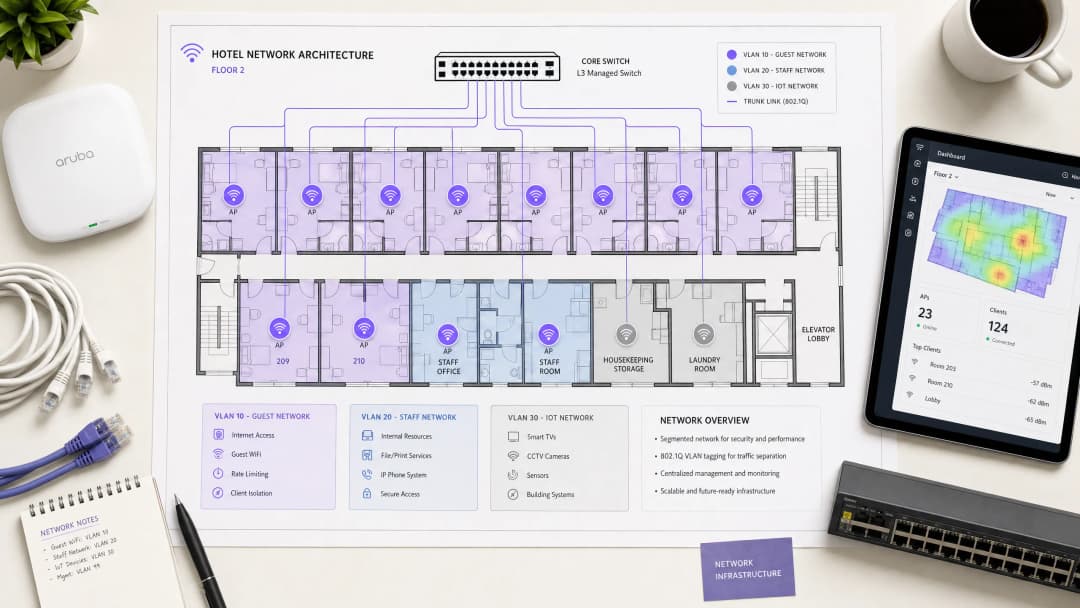
A hospitality network must simultaneously serve guests, staff, and operational technology without compromising the security or performance of any single group. The foundational requirement is logical separation using Virtual Local Area Networks (VLANs) governed by the IEEE 802.1Q standard.
You must isolate traffic at the switch level. Guest WiFi requires its own VLAN, firewalled entirely from internal resources. Staff access should operate on a separate VLAN, secured by 802.1X authentication against a RADIUS server (integrating with identity providers like Microsoft Entra ID or Okta). A third VLAN must isolate IoT devices - smart thermostats, door locks, and CCTV. Finally, any point-of-sale systems must sit on an isolated VLAN to maintain PCI DSS compliance. This segmentation eliminates the lateral movement attack vector, ensuring a compromised guest device cannot probe your property management systems.
Wireless Layer and Access Point Placement
For the radio frequency (RF) layer, WiFi 6 (IEEE 802.11ax) is the baseline standard for new deployments. It introduces Orthogonal Frequency Division Multiple Access (OFDMA), which allows a single access point to serve multiple clients simultaneously. This provides roughly four times the throughput capacity of WiFi 5 and significantly reduces latency in high-density environments.
The physical placement of access points (APs) dictates performance. The traditional model of deploying APs in corridors forces signals to penetrate thick fire doors and bathroom plumbing before reaching the guest. You must deploy an in-room AP model - one AP per room, or one AP per two rooms at minimum. Every AP requires a wired Cat 6A connection back to a PoE switch; mesh backhaul is unsuitable for enterprise hospitality environments.
Property Management System (PMS) Integration
The PMS is the central source of truth for hotel operations. Integrating your WiFi authentication layer with the PMS transforms the guest experience and radically improves data quality.
Authentication via FIAS
When a guest connects to the network, they are redirected to a captive portal. Instead of relying on a generic password or an unverified email form, PMS integration allows the guest to authenticate using their surname and room number. The captive portal platform queries the PMS in real time - typically using the Fidelio Interface Application Specification (FIAS) protocol - to validate the credentials against active reservations. This API validation occurs in under 500 milliseconds.

Session Management and Data Quality
This integration automates session lifecycles. When a guest checks out, the PMS triggers an event that revokes WiFi access immediately. If a guest extends their stay, the network session extends automatically.
More importantly, PMS integration solves the data quality problem. Standard email capture forms often yield error rates of 30%. By validating against the PMS, you capture a verified guest record linked to specific stay data. Purple has processed 440 million logins in 2024, and our data shows that PMS-integrated captive portals achieve validation rates of 70% to 80%. This consented, first-party data flows directly into your CRM, enabling targeted WiFi Analytics and post-stay marketing.
¿Tiene preguntas sobre su configuración específica?
Nuestro equipo trabaja con operadores de recintos, responsables de TI e ingenieros de redes en 80 000 espacios. Reserve una llamada de 20 minutos y le mostraremos cómo lo han solucionado otros profesionales como usted.
Captive Portal Design and Security
The captive portal is your primary mechanism for data capture and compliance. It operates by assigning a restricted IP address to the guest device and using a DNS intercept to redirect HTTP traffic to the splash page. Once the guest authenticates and accepts the terms, the RADIUS server authorises the MAC address, and full internet access is granted.
GDPR and Unbundled Consent
Your captive portal must present explicit, granular consent options. Consent to use the network cannot be bundled with consent for marketing communications. Purple's platform handles this natively, tying verifiable consent records to individual user profiles.
Encryption and Client Isolation
You must enable client isolation on the guest SSID. This prevents peer-to-peer communication, stopping one guest device from scanning or accessing another. For encryption, WPA3 is the standard. While WPA3-Enterprise secures the staff network, guest networks should utilise Opportunistic Wireless Encryption (OWE) where supported, providing individualised encryption for open networks without requiring a shared password. For further details on secure access, review our guide on EAP Method WiFi: A Guide to Secure Network Access.
Bandwidth Control and QoS
Bandwidth management is the final pillar of a stable architecture. The primary cause of guest complaints is an under-provisioned internet uplink.
Provisioning the Uplink
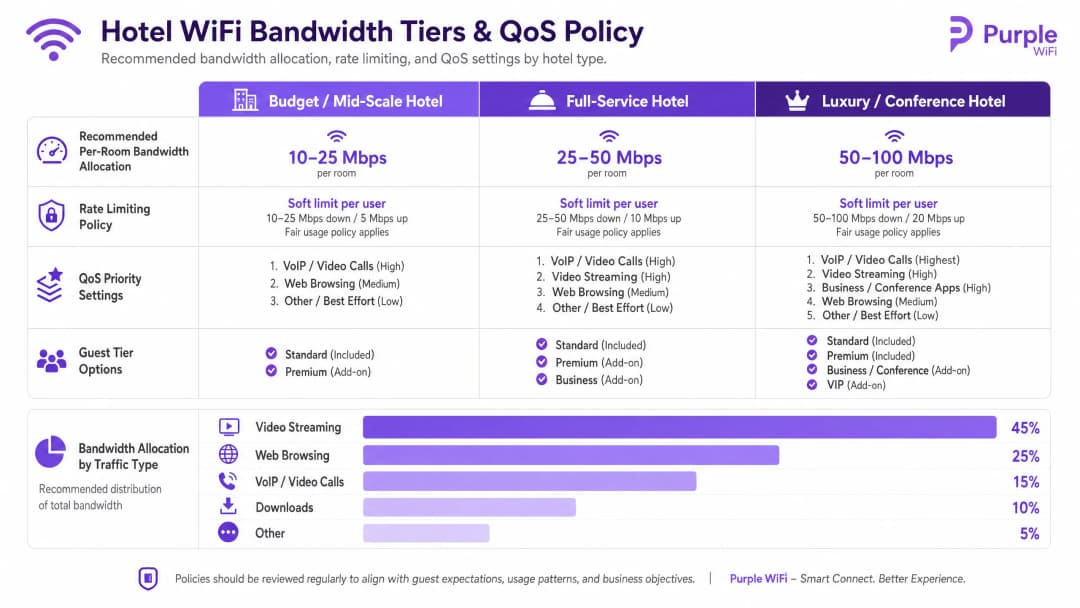
You must provision bandwidth based on peak concurrent demand, not average usage. The recommended allocations are:
- Budget / Mid-Scale: 10-25 Mbps per room
- Full-Service: 25-50 Mbps per room
- Luxury / Conference: 50-100 Mbps per room
For a 200-room property at 80% occupancy, allocating 25 Mbps per room requires a minimum committed uplink of 4 Gbps. A dedicated leased line is mandatory.
Rate Limiting and QoS Policy
To prevent a single user from saturating the uplink, you must enforce per-client rate limiting at the controller level. Whether you deploy Cisco Meraki, HPE Aruba, or Ubiquiti UniFi, configure a hard cap on both downstream and upstream traffic per device.
Above rate limiting sits Quality of Service (QoS). Using the WMM (WiFi Multimedia) standard, you must prioritise traffic into four queues. VoIP and video calls require high priority, ensuring that a guest's Microsoft Teams call is not degraded by another guest downloading a large file on the best-effort queue.
Implementation Guide
Follow this sequence for a successful deployment:
- Conduct an RF Site Survey: Walk the property with a spectrum analyser to identify interference sources before planning AP placement.
- Design the VLAN Architecture: Document your Guest, Staff, IoT, and POS VLANs. Configure explicit default-deny firewall rules between them.
- Size the Uplink: Calculate peak demand based on the 25 Mbps per room baseline and procure a dedicated leased line.
- Deploy the Captive Portal: Integrate the portal with your PMS. Test the authentication flow, consent capture, and session revocation across iOS, Android, and Windows devices.
- Monitor and Adjust: Post-deployment, monitor AP association counts and uplink utilisation to identify dead zones or bandwidth bottlenecks.
Troubleshooting & Risk Mitigation
The most frequent failure modes in hotel WiFi deployments stem from poor planning rather than hardware failure.
- The "Slow WiFi" Complaint: This is rarely an RF issue. First, check your internet uplink utilisation. If the circuit is saturated, no amount of AP tuning will fix the problem. Second, check client distribution across APs; if one AP has 40 clients and an adjacent AP has 5, your band steering configuration requires adjustment.
- The "Data Silo" Pitfall: Deploying a captive portal without a downstream integration wastes the investment. The data captured at login must flow automatically into your marketing automation tools to drive Retail or hospitality loyalty programmes.
- The Flat Network Risk: Failing to segment the wired network undermines wireless security. If a guest plugs a laptop into an exposed Ethernet port in a conference room and accesses the staff VLAN, your architecture has failed. Ensure switch ports in public areas are assigned to the guest VLAN or disabled entirely.
ROI & Business Impact
Enterprise WiFi requires significant capital expenditure, but it delivers measurable returns when architected correctly. The ROI is realised through three channels:
- Operational Efficiency: PMS integration eliminates manual voucher generation and front-desk troubleshooting, returning hours of staff time per week.
- First-Party Data Acquisition: An authenticated captive portal builds a database of verified guest profiles. This data powers direct-booking campaigns, reducing reliance on Online Travel Agencies (OTAs) and their associated commission fees.
- Guest Satisfaction: Reliable, high-speed WiFi is a primary driver of positive reviews. A segmented, properly provisioned network eliminates the friction that leads to negative feedback, directly impacting the property's reputation and average daily rate.
Definiciones clave
VLAN (Virtual Local Area Network)
Una subred lógica que agrupa una colección de dispositivos en la misma infraestructura física, aislando su tráfico de difusión de otras VLAN.
Esencial para separar el tráfico de los huéspedes de los sistemas internos del hotel y garantizar el cumplimiento de la normativa PCI DSS.
Captive Portal
Una página web que intercepta el tráfico de red y requiere que los usuarios se autentiquen o acepten los términos antes de concederles acceso total a Internet.
El principal punto de contacto para la autenticación de huéspedes, el consentimiento de GDPR y la captura de datos de origen (first-party data).
FIAS (Fidelio Interface Application Specification)
Un protocolo universal utilizado por los sistemas de gestión hotelera (como Oracle Opera) para comunicarse en tiempo real con sistemas de terceros.
Utilizado por el Captive Portal para validar el número de habitación y el apellido de un huésped con los registros activos del PMS.
WPA3-Enterprise
El nivel más alto de seguridad WiFi, que requiere que los usuarios o dispositivos individuales se autentiquen mediante credenciales únicas a través de un servidor RADIUS (802.1X).
El estándar obligatorio para proteger las redes del personal y los dispositivos corporativos dentro del hotel.
Client Isolation
Una función del controlador inalámbrico que evita que los dispositivos conectados al mismo SSID se comuniquen directamente entre sí.
Debe estar habilitado en todas las redes de huéspedes para evitar ataques entre pares (peer-to-peer) y proteger la privacidad de los huéspedes.
Rate Limiting
La práctica de restringir el ancho de banda máximo (velocidad de subida y bajada) disponible para un dispositivo cliente individual.
Crucial para evitar que un solo huésped que descargue archivos grandes degrade la experiencia de red de todos los demás.
QoS (Quality of Service) / WMM
Mecanismos de red que priorizan ciertos tipos de tráfico (como voz o vídeo) sobre el tráfico menos sensible al tiempo (como las descargas de archivos).
Garantiza que las llamadas VoIP de los huéspedes o las herramientas de comunicación del personal funcionen de manera fiable incluso cuando la red está bajo una gran carga.
OFDMA
Acceso múltiple por división de frecuencias ortogonales; una función de WiFi 6 que permite a un punto de acceso atender a múltiples clientes simultáneamente dividiendo los canales en subcanales más pequeños.
Mejora drásticamente el rendimiento y reduce la latencia en áreas de alta densidad, como salas de conferencias y vestíbulos de hoteles.
Ejemplos prácticos
Un hotel de servicio completo de 150 habitaciones experimenta quejas frecuentes de los huéspedes sobre la lentitud del WiFi durante las horas pico de la tarde (19:00 - 22:00). Actualmente, el establecimiento dispone de una conexión de banda ancha de 1 Gbps y utiliza una única red plana con una contraseña WPA2 compartida.
- Actualizar el enlace ascendente de Internet a una línea dedicada que proporcione al menos 3,75 Gbps (150 habitaciones * 25 Mbps). 2. Implementar la segmentación de VLAN, trasladando a los huéspedes a una VLAN 10 aislada. 3. Desplegar un Captive Portal integrado con el PMS Oracle Opera del hotel a través de FIAS, lo que permitirá a los huéspedes autenticarse con el número de habitación y el apellido. 4. Aplicar una limitación de velocidad por cliente de 25 Mbps de bajada / 10 Mbps de subida en el controlador inalámbrico para evitar que los dispositivos individuales saturen el enlace ascendente.
Un complejo turístico de lujo necesita desplegar un WiFi seguro para las tabletas del personal utilizadas para las tareas de limpieza y mantenimiento, garantizando al mismo tiempo que los dispositivos de los huéspedes no puedan acceder a los sistemas de gestión del establecimiento.
Crear una VLAN de personal dedicada (VLAN 20) separada de la VLAN de huéspedes (VLAN 10). Configurar el SSID del personal para que utilice WPA3-Enterprise, autenticando las tabletas contra el servidor RADIUS corporativo mediante 802.1X. Aplicar reglas estrictas de enrutamiento inter-VLAN en el cortafuegos: denegar por defecto todo el tráfico entre la VLAN 10 y la VLAN 20, y permitir únicamente que la VLAN 20 acceda a las direcciones IP y puertos específicos requeridos por la aplicación de limpieza.
Preguntas de práctica
Q1. El director de operaciones de un hotel quiere implementar una única red WiFi abierta tanto para los huéspedes como para las nuevas smart TVs de las habitaciones para "simplificar las cosas". Como arquitecto de red, ¿cómo respondería?
Sugerencia: Considere las implicaciones del movimiento lateral y el tamaño del dominio de difusión.
Ver respuesta modelo
Desaconseje este enfoque. Los dispositivos de los huéspedes y los dispositivos IoT (smart TVs) deben segmentarse en VLANs independientes. Colocarlos en la misma red abierta expone a las TVs a un acceso directo desde los dispositivos de los huéspedes, lo que genera una vulnerabilidad de seguridad importante. Además, aumenta el dominio de difusión, lo que puede degradar el rendimiento general de la red. Las TVs deben estar en una VLAN de IoT aislada (por ejemplo, VLAN 30) con reglas de firewall estrictas.
Q2. Durante el estudio de cobertura para un nuevo establecimiento de 300 habitaciones, el contratista de cableado sugiere ahorrar costes colocando un punto de acceso en el pasillo por cada cuatro habitaciones. ¿Por qué es esto problemático?
Sugerencia: Piense en la atenuación de RF y los obstáculos físicos en el entorno de un hotel.
Ver respuesta modelo
La ubicación en el pasillo es un diseño defectuoso para los hoteles. La señal de RF debe penetrar puertas cortafuegos pesadas, armarios con espejos y baños alicatados para llegar al dispositivo del huésped en la habitación, lo que provoca una atenuación severa de la señal y un rendimiento deficiente. El diseño correcto es un modelo de AP en la habitación (un AP por habitación o, como mínimo, uno cada dos habitaciones) para garantizar una cobertura con línea de visión directa o con la mínima obstrucción.
Q3. El equipo de marketing quiere suscribir automáticamente a todos los huéspedes que inicien sesión en el WiFi al boletín promocional semanal del hotel. ¿Cómo se debe configurar el Captive Portal para gestionar esto?
Sugerencia: Considere los requisitos del GDPR relativos al consentimiento vinculado.
Ver respuesta modelo
El Captive Portal debe configurarse con opciones de consentimiento explícitas y no vinculadas. Según el GDPR, el consentimiento para acceder a la red WiFi no puede estar condicionado al consentimiento para recibir comunicaciones de marketing. La página de inicio debe proporcionar una casilla de verificación independiente y desmarcada para el boletín informativo. La plataforma de Purple aplica esta separación de forma nativa, garantizando el cumplimiento normativo al tiempo que registra registros de consentimiento verificables.
Continúe leyendo esta serie
El portal de invitados Ubiquiti UniFi no redirige: causas y soluciones
Esta guía aísla los fallos de redirección del portal de invitados de UniFi analizando en secuencia el estado del invitado, la redirección, la ruta de preautorización y la autorización del controlador. Ofrece a los equipos de TI de los establecimientos un método estructurado para resolver la confusión entre red de invitados y Hotspot, integraciones con portales externos, los requisitos actuales de las cuentas de UniFi OS y pruebas de aislamiento de DNS.
La página splash de Cisco Meraki no funciona: diagrama de flujo para la resolución de problemas
Esta práctica guía de mantenimiento identifica dónde ha fallado un flujo de splash de Cisco Meraki: autorización del cliente, inicio de redirección HTTP, accesibilidad de walled-garden o inicio de sesión RADIUS. Proporciona a los equipos de TI de los establecimientos una ruta de evidencias controlada para restablecer el WiFi de invitados sin realizar cambios drásticos en una red en producción.
Guía de configuración de WiFi para invitados empresariales: segmentación por VLAN, seguridad y Captive Portals
Esta guía técnica muestra a los equipos de TI cómo configurar el WiFi de invitados como un servicio controlado de acceso a internet, mediante segmentación por VLAN, políticas de firewall y un Captive Portal. También explica cómo los formularios de registro y los controles de incorporación de Purple admiten una experiencia de visitante proporcionada sin debilitar el límite en torno a los sistemas de personal, pago y operativos.
¿Tiene preguntas sobre su configuración específica?
Nuestro equipo trabaja con operadores de recintos, responsables de TI e ingenieros de redes en 80 000 espacios. Reserve una llamada de 20 minutos y le mostraremos cómo lo han solucionado otros profesionales como usted.