
Explicación de la autenticación 802.1X para redes corporativas
Esta guía de referencia proporciona a los responsables de TI y arquitectos de red un desglose técnico detallado de la autenticación 802.1X para redes corporativas. Cubre la arquitectura, los métodos EAP, las estrategias de despliegue y la mitigación de riesgos para garantizar un acceso WiFi seguro y conforme a la normativa en entornos multi-sitio.
Video overview
Escuchar esta guía
Ver transcripción del podcast
Parte de nuestra serie principal: Guía de seguridad WiFi para empresas →
Resumen Ejecutivo
Para los entornos empresariales con operaciones en los sectores de hostelería, comercio minorista y sector público, el perímetro de seguridad ha dejado de existir. Una plantilla híbrida, las políticas BYOD y el enorme volumen de dispositivos conectados hacen que proteger las redes corporativas mediante claves precompartidas (PSK) ya no sea una estrategia viable. Los marcos de cumplimiento normativo modernos - incluidos PCI-DSS v4.0 y GDPR - exigen controles de acceso estrictos y basados en la identidad para cualquier red que maneje datos sensibles.
Esta guía detalla la arquitectura e implementación de IEEE 802.1X, el estándar para el control de acceso a la red basado en puertos. Al trasladar la autenticación de una contraseña compartida a una identidad verificada respaldada por una infraestructura RADIUS centralizada, las organizaciones pueden implementar una segmentación dinámica, mitigar el robo de credenciales y garantizar que solo los dispositivos autorizados accedan a los recursos corporativos. Diseñado para arquitectos de red y directores de TI, este documento proporciona la profundidad técnica necesaria para diseñar, desplegar y solucionar problemas de 802.1X en topologías complejas y multisitio.
Análisis Técnico Detallado
Arquitectura de 802.1X
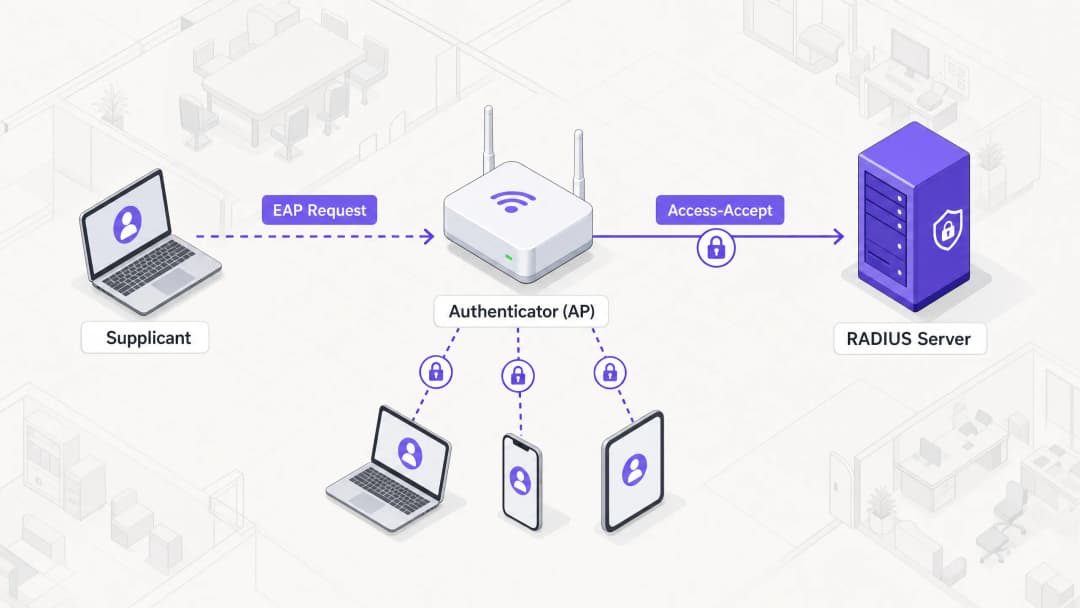
El marco de trabajo de 802.1X se basa en tres componentes distintos que colaboran para proteger el acceso a la red:
- Suplicante (Supplicant): El dispositivo final (por ejemplo, ordenador portátil, smartphone) que solicita acceso a la red.
- Autenticador (Authenticator): El dispositivo de red (normalmente un punto de acceso inalámbrico o un switch) que controla el acceso físico o lógico a la red.
- Servidor de Autenticación: La base de datos centralizada (casi exclusivamente un servidor RADIUS) que valida las credenciales del suplicante y autoriza el acceso.
Cuando un suplicante intenta conectarse a un SSID protegido por 802.1X, el autenticador coloca la conexión en un estado no autorizado, bloqueando todo el tráfico excepto las tramas del Protocolo de Autenticación Extensible (EAP). El autenticador actúa como un intermediario pasante, encapsulando los mensajes EAP del suplicante en paquetes RADIUS y reenviándolos al servidor de autenticación.
Métodos del Protocolo de Autenticación Extensible (EAP)
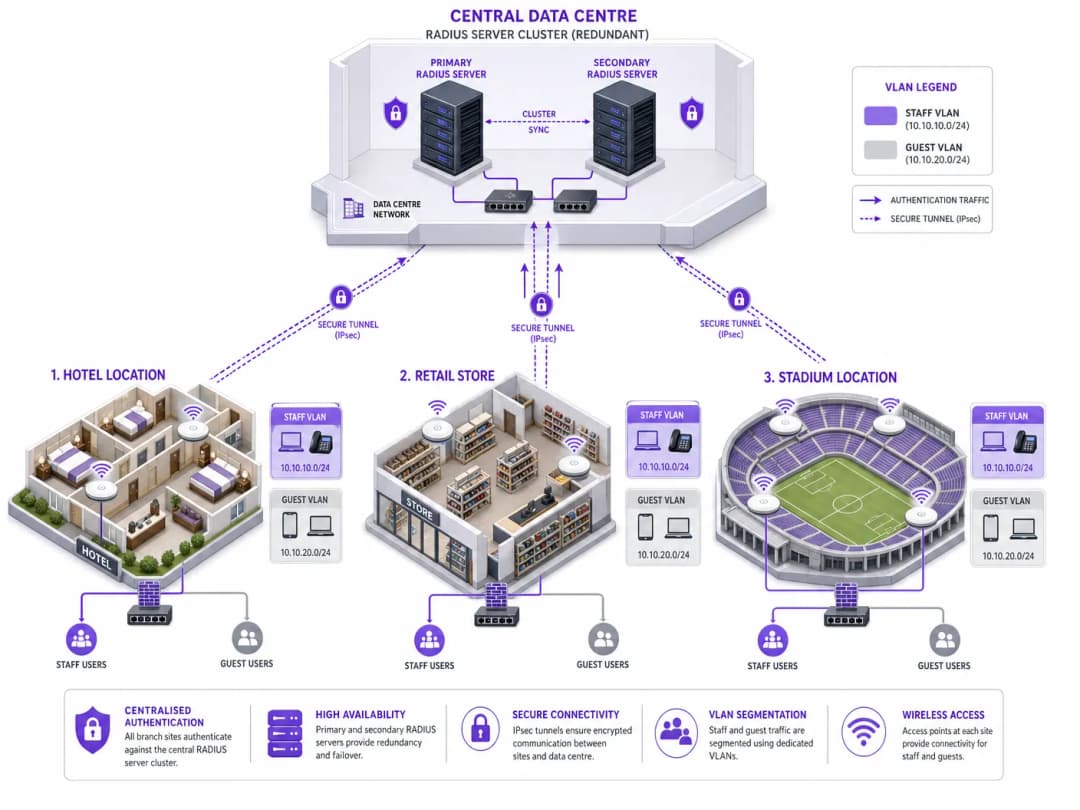
EAP es el mecanismo de transporte para las credenciales de autenticación reales. Seleccionar el método EAP adecuado es una decisión arquitectónica crítica que equilibra los requisitos de seguridad con la complejidad del despliegue.
- EAP-TLS (Transport Layer Security): El estándar de oro para la seguridad empresarial. Requiere tanto un certificado de servidor como un certificado de cliente, proporcionando autenticación mutua. Al basarse en certificados en lugar de contraseñas, es inmune al phishing de credenciales y a los ataques de diccionario fuera de línea. Sin embargo, el aprovisionamiento y la gestión de certificados de cliente a escala requiere una infraestructura de clave pública (PKI) robusta y una solución de gestión de dispositivos móviles (MDM).
- PEAP (Protected EAP): El método más implementado debido a su equilibrio entre seguridad y facilidad de despliegue. PEAP solo requiere un certificado en el servidor RADIUS. Establece un túnel TLS seguro entre el suplicante y el servidor, dentro del cual se transmiten de forma segura las credenciales de usuario (nombre de usuario y contraseña). Es esencial realizar una configuración adecuada para obligar al suplicante a confiar únicamente en el certificado específico del servidor RADIUS para evitar ataques de puntos de acceso no autorizados.
- EAP-TTLS (Tunneled TLS): Similar a PEAP, este método establece un túnel seguro utilizando un certificado de servidor. Sin embargo, EAP-TTLS admite una gama más amplia de protocolos de autenticación interna, lo que lo hace adecuado para entornos con sistemas heredados o dispositivos finales que no son de Windows y no admiten MSCHAPv2.
- EAP-FAST (Flexible Authentication via Secure Tunneling): Desarrollado por Cisco como una alternativa más rápida a los métodos basados en certificados. Utiliza credenciales de acceso protegido (PAC) establecidas dinámicamente entre el cliente y el servidor. Aunque es eficiente, rara vez se implementa en arquitecturas modernas y neutrales respecto al fabricante.
Infraestructura e integración de RADIUS
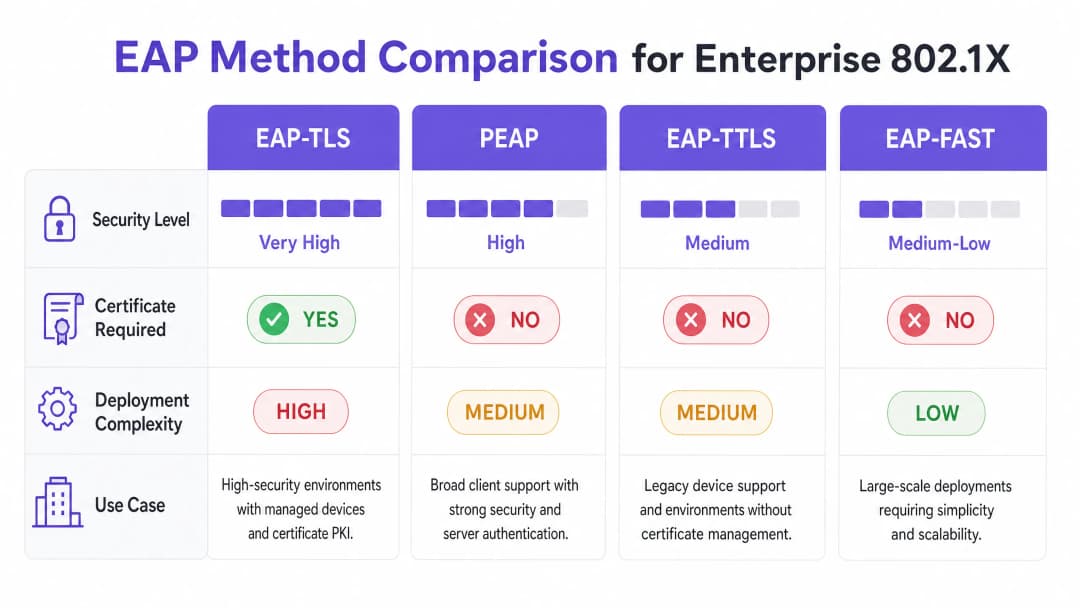
El servidor RADIUS es el motor de 802.1X. Las soluciones empresariales comunes incluyen Microsoft Network Policy Server (NPS), FreeRADIUS y soluciones comerciales como Cisco ISE o Aruba ClearPass. El servidor RADIUS se integra con el proveedor de identidad (IdP) de la organización - como Active Directory, Microsoft Entra ID o Okta - para validar las credenciales.
De manera fundamental, el servidor RADIUS puede devolver atributos específicos en el mensaje Access-Accept, lo que permite una configuración de red dinámica. El más potente de ellos es la asignación dinámica de VLAN. En función de la pertenencia al grupo del usuario o del estado del dispositivo, el servidor RADIUS indica al autenticador que sitúe la conexión en una VLAN específica. Esto permite una microsegmentación fluida: un miembro del personal se coloca en la VLAN corporativa, un contratista en una VLAN restringida y un dispositivo que no supera los controles de estado en una VLAN de cuarentena.
¿Tiene preguntas sobre su configuración específica?
Nuestro equipo trabaja con operadores de recintos, responsables de TI e ingenieros de redes en 80 000 espacios. Reserve una llamada de 20 minutos y le mostraremos cómo lo han solucionado otros profesionales como usted.
Guía de implementación
El despliegue de 802.1X en una empresa con múltiples sedes requiere un enfoque sistemático y por fases para minimizar las interrupciones.
Paso 1: Descubrimiento y perfilado de la red
Antes de cambiar cualquier configuración, realice una auditoría exhaustiva de todos los dispositivos que se conectan a la red. Esto es especialmente crítico en entornos como el de hostelería y el de comercio minorista, donde prevalecen los dispositivos sin cabezal (impresoras, terminales de punto de venta, sensores IoT). Por lo general, estos dispositivos carecen de un suplicante 802.1X. Debe identificarlos y planificar métodos de autenticación alternativos, como MAC Authentication Bypass (MAB), garantizando que estén aislados en VLANs restringidas.
Paso 2: Despliegue de la infraestructura RADIUS
Despliegue una arquitectura RADIUS de alta disponibilidad. Un único servidor RADIUS es un punto único de fallo que puede tumbar toda la red corporativa. Implemente un clúster de servidores principal y secundario, idealmente distribuidos en diferentes centros de datos o zonas de disponibilidad en la nube. Configure los autenticadores (APs y switches) para que realicen un failover automático si el servidor principal deja de responder.
Paso 3: Configuración de políticas y segmentación
Defina políticas de acceso granulares dentro del servidor RADIUS. Asocie los grupos de Active Directory a VLANs y listas de control de acceso (ACLs) específicas. Asegúrese de que las políticas apliquen el principio de mínimo privilegio. Por ejemplo, en un entorno de sanidad, el personal clínico debe tener acceso a los sistemas de historial clínico de los pacientes, mientras que el personal administrativo debe estar segmentado en una VLAN independiente con acceso únicamente a los sistemas de facturación.
Paso 4: Aprovisionamiento del suplicante
Para despliegues PEAP, utilice Objetos de Directiva de Grupo (GPOs) o perfiles MDM para enviar los ajustes de red inalámbrica necesarios a los dispositivos gestionados. Es fundamental que configure el perfil para validar estrictamente el certificado del servidor y especificar los nombres exactos de los servidores RADIUS en los que se debe confiar. Esto evita que los usuarios se conecten inadvertidamente a puntos de acceso no autorizados.
Para dispositivos no gestionados, consulte nuestra guía sobre Políticas seguras de BYOD para redes WiFi de empleados para conocer estrategias que permitan incorporar dispositivos personales de forma segura sin comprometer la red corporativa.
Paso 5: Despliegue progresivo y pruebas
Nunca realice un despliegue de tipo "big bang". Comience con un grupo piloto en una única ubicación. Supervise de cerca los registros de RADIUS para detectar fallos de autenticación. Pruebe casos extremos, incluidos el failover del servidor, la caducidad de los certificados y el roaming entre puntos de acceso. Proceda a un despliegue más amplio únicamente después de que el piloto se haya estabilizado.
Buenas prácticas
- Forzar la validación del certificado del servidor: Este es el control de seguridad más crítico para los despliegues PEAP. Si los suplicantes no validan el certificado del servidor, la red se vuelve vulnerable a ataques Man-in-the-Middle (MitM).
- Implementar la asignación dinámica de VLAN: No dependa de VLANs estáticas por SSID. Utilice atributos RADIUS para asignar dinámicamente VLANs en función de la identidad del usuario, reduciendo significativamente la superficie de ataque.* Proteja dispositivos sin interfaz de usuario con MAB: Utilice el bypass de autenticación MAC (MAB) estrictamente para dispositivos que no admitan 802.1X. Asegúrese de que estos dispositivos se ubiquen en VLAN altamente restringidas, ya que las direcciones MAC se pueden suplantar fácilmente.
- Segregue el tráfico de invitados y el corporativo: Mantenga una separación lógica estricta entre la red corporativa protegida por 802.1X y las redes de invitados abiertas o basadas en portal. Para una gestión avanzada del acceso de invitados, considere soluciones como la plataforma Guest WiFi de Purple.
Resolución de problemas y mitigación de riesgos
Modos de fallo comunes
- Expiración del certificado: Un certificado de servidor RADIUS caducado provocará fallos de autenticación generalizados para los clientes PEAP y EAP-TLS. Implemente una supervisión y alertas sólidas para los periodos de validez de los certificados.
- Desviación horaria: 802.1X depende en gran medida de un registro de hora preciso, especialmente para la validación de certificados. Asegúrese de que todos los componentes de la infraestructura (servidores RADIUS, IdP, AP) estén sincronizados con una fuente NTP fiable.
- Inaccesibilidad del servidor RADIUS: Los problemas de conectividad de red entre el autenticador y el servidor RADIUS harán que se deniegue el acceso. Implemente rutas de red redundantes y configure los AP con múltiples IP de servidores RADIUS.
- Configuración incorrecta del suplicante: Los suplicantes configurados incorrectamente (por ejemplo, un método EAP erróneo o la falta de una CA raíz) son una fuente común de incidencias de soporte técnico. Utilice MDM para aplicar configuraciones coherentes.
Estrategias de mitigación de riesgos
Para minimizar el riesgo de tiempo de inactividad provocado por el despliegue, establezca un registro de auditoría (o audit trail) sólido para todos los cambios de configuración en la infraestructura RADIUS. Esto garantiza capacidades de reversión rápida en caso de un problema imprevisto.
ROI e impacto empresarial
La implementación de 802.1X aporta un valor empresarial significativo más allá del cumplimiento básico de la seguridad:
- Reducción de los costes operativos: Al eliminar la necesidad de rotar claves precompartidas cuando el personal se marcha o las claves se ven comprometidas, los equipos de TI ahorran un tiempo administrativo considerable.
- Cumplimiento mejorado: 802.1X proporciona el control de acceso basado en la identidad necesario para cumplir con marcos normativos estrictos (PCI-DSS, HIPAA, GDPR), evitando costosas multas y daños a la reputación.
- Control de amenazas mejorado: La asignación dinámica de VLAN garantiza que si un dispositivo se ve comprometido, su radio de impacto se restrinja a un segmento de red específico, evitando el movimiento lateral en la empresa.
- Información basada en datos: Cuando se combina con plataformas como WiFi Analytics de Purple, los datos de identidad proporcionados por 802.1X pueden ofrecer información detallada sobre la utilización de la red y la planificación de la capacidad.
Definiciones clave
Suplicante
El dispositivo cliente o software que solicita acceso a la red.
Esencial para comprender dónde se origina la solicitud de autenticación y cómo se proporcionan las credenciales.
Autenticador
El dispositivo de red (punto de acceso o switch) que actúa como guardián, bloqueando el acceso hasta que la autenticación se realiza correctamente.
El autenticador no verifica las credenciales; simplemente las transfiere al servidor RADIUS.
Servidor RADIUS
Remote Authentication Dial-In User Service - el servidor central que valida las credenciales contra un almacén de identidades.
El motor de decisión principal de un despliegue 802.1X.
EAP (Protocolo de Autenticación Extensible)
Un marco de trabajo para transportar credenciales de autenticación de forma segura a través de la red.
Comprender EAP es fundamental para seleccionar el método de autenticación adecuado (por ejemplo, PEAP frente a EAP-TLS).
Asignación dinámica de VLAN
El proceso mediante el cual un servidor RADIUS indica al autenticador que ubique a un usuario en una VLAN específica según su identidad.
Un beneficio clave de 802.1X que permite la segmentación automatizada de la red.
Bypass de autenticación MAC (MAB)
Un método de autenticación de respaldo que utiliza la dirección MAC de un dispositivo como credencial.
Necesario para la incorporación de dispositivos IoT y heredados que no son compatibles con 802.1X.
PKI (Infraestructura de clave pública)
El sistema utilizado para emitir, gestionar y validar certificados digitales.
Un requisito previo para desplegar la autenticación EAP-TLS.
Ataque de punto de acceso no autorizado (Rogue AP)
Un ataque en el que un punto de acceso malicioso suplanta a la red corporativa para recopilar credenciales.
Destaca la importancia de obligar a realizar la validación del certificado del servidor en despliegues PEAP.
Ejemplos prácticos
Un hotel de 200 habitaciones necesita asegurar su red WiFi para el personal. La configuración actual utiliza una única PSK para todos los dispositivos del personal (ordenadores portátiles, tablets) y dispositivos IoT (termostatos inteligentes, cámaras IP). ¿Cómo deberían realizar la transición a 802.1X?
- Desplegar una infraestructura RADIUS redundante (por ejemplo, FreeRADIUS) integrada con el Active Directory del hotel. 2. Auditar todos los dispositivos. 3. Configurar el controlador inalámbrico para utilizar 802.1X (PEAP-MSCHAPv2) para el SSID del personal. 4. Enviar perfiles MDM a los ordenadores portátiles y tablets del personal que fuercen la validación del certificado del servidor. 5. Para los dispositivos IoT, configurar MAC Authentication Bypass (MAB) en el servidor RADIUS, ubicándolos en una VLAN de IoT aislada. 6. Utilizar atributos RADIUS para asignar dinámicamente los dispositivos del personal a la VLAN corporativa tras una autenticación correcta.
Una cadena de tiendas está implementando 802.1X en 50 establecimientos. Durante la fase piloto en la Tienda 1, los usuarios informan de fallos de autenticación intermitentes, especialmente al desplazarse entre el almacén y la zona de ventas.
Es probable que el problema esté relacionado con retardos en el roaming y la reautenticación. La solución consiste en habilitar Fast BSS Transition (802.11r) y Opportunistic Key Caching (OKC) en el controlador inalámbrico y los puntos de acceso. Esto permite que el dispositivo cliente guarde en caché la Pairwise Master Key (PMK) obtenida durante la autenticación 802.1X inicial, lo que facilita un roaming rápido entre puntos de acceso sin necesidad de realizar un ciclo completo de ida y vuelta al servidor RADIUS.
Preguntas de práctica
Q1. Su organización está migrando de PSK a 802.1X. Dispone de un parque de 5.000 ordenadores portátiles corporativos con Windows gestionados a través de Microsoft Intune. Desea el nivel más alto de seguridad para evitar el robo de credenciales. ¿Qué método EAP debería implementar?
Sugerencia: Considere qué método elimina por completo el uso de contraseñas.
Ver respuesta modelo
EAP-TLS. Dado que los dispositivos son propiedad de la empresa y se gestionan a través de Intune, puede aprovechar el MDM para implementar certificados de cliente a escala. EAP-TLS proporciona autenticación mutua y es inmune a ataques basados en contraseñas como el phishing o los ataques de diccionario offline.
Q2. Durante una auditoría de seguridad, se descubre que los usuarios pueden conectarse a la red corporativa 802.1X utilizando sus smartphones personales sin ningún perfil MDM instalado. ¿Cuál es el principal riesgo de seguridad y cómo debería solucionarse?
Sugerencia: Piense en cómo valida PEAP al servidor.
Ver respuesta modelo
El principal riesgo es un ataque de tipo Man-in-the-Middle (MitM) o Rogue AP. Si los usuarios configuran la conexión de forma manual, a menudo aceptan cualquier certificado de servidor que se les presente. Para solucionar esto, la organización debe aplicar una política en la que solo se permitan en el SSID corporativo los dispositivos gestionados (con un perfil MDM que valide estrictamente el certificado específico del servidor RADIUS). Los dispositivos personales deben redirigirse a una red BYOD o Guest independiente.
Q3. Una sucursal remota pierde la conectividad WAN con el centro de datos central donde se encuentran los servidores RADIUS principal y secundario. ¿Qué ocurre con los clientes inalámbricos en la sucursal?
Sugerencia: Considere dónde se toma la decisión de autenticación.
Ver respuesta modelo
Los nuevos clientes que intenten conectarse fallarán en la autenticación porque el autenticador (AP) no puede comunicarse con el servidor RADIUS para validar las credenciales. Los clientes que ya estén conectados pueden permanecer así hasta que expire su sesión o necesiten volver a autenticarse (por ejemplo, al hacer roaming a un nuevo AP), momento en el cual también perderán el acceso. Para mitigar esto, las arquitecturas de sucursales con capacidad de supervivencia suelen implementar un controlador de dominio local de solo lectura y un proxy o servidor RADIUS local en las sucursales críticas.
Continúe leyendo esta serie
Optimización del roaming para VoIP y videollamadas en redes WiFi corporativas
Esta guía proporciona a directores de TI, arquitectos de redes y CTO una hoja de ruta completa e independiente del proveedor para optimizar el roaming WiFi y ofrecer soporte a videollamadas y VoIP fluidas en redes de personal corporativo. Cubre la pila de protocolos IEEE 802.11k/r/v, la configuración de QoS de WMM, el diseño de celdas de RF y el mapeo de QoS cableado de extremo a extremo necesario para lograr una latencia de transferencia inferior a 50 ms. Aplicable a los sectores de hostelería, retail, sanidad y grandes recintos, esta referencia incluye escenarios de implementación reales, marcos de resolución de problemas y un análisis de ROI medible.
Autenticación basada en certificados para dispositivos corporativos (EAP-TLS)
Esta guía de referencia técnica autorizada cubre la arquitectura, la implementación y las mejores prácticas operativas de la autenticación basada en certificados EAP-TLS para dispositivos corporativos. Diseñada para arquitectos de TI y responsables de operaciones de recintos, proporciona una hoja de ruta práctica para eliminar los riesgos de las credenciales basadas en contraseñas y lograr un control de acceso a la red 802.1X robusto en entornos empresariales multisitio.
Gestión de la seguridad de BYOD (Bring Your Own Device) en redes de personal
Una guía de referencia técnica y autorizada para directores de TI de empresas y arquitectos de redes sobre la protección del acceso de Bring Your Own Device (BYOD) en las redes del personal. Esta guía describe la arquitectura de red exacta, los protocolos de autenticación y los flujos de trabajo de integración con MDM necesarios para mitigar las fugas de datos y mantener el cumplimiento normativo en centros de gran afluencia.
¿Tiene preguntas sobre su configuración específica?
Nuestro equipo trabaja con operadores de recintos, responsables de TI e ingenieros de redes en 80 000 espacios. Reserve una llamada de 20 minutos y le mostraremos cómo lo han solucionado otros profesionales como usted.