
802.1X Authentication Explained for Corporate Networks
This authoritative guide provides IT leaders and network architects with a deep technical breakdown of 802.1X authentication for corporate networks. It covers architecture, EAP methods, deployment strategies, and risk mitigation to ensure secure, compliant WiFi access across multi-site environments.
Video overview
Listen to this guide
View podcast transcript
Part of our core series: Enterprise WiFi Security Guide →
Executive Summary
For enterprise environments with hospitality, retail, and public sector operations, the security perimeter has ceased to exist. A hybrid workforce, BYOD policies, and the sheer volume of connected devices mean that securing corporate networks via Pre-Shared Keys (PSKs) is no longer a viable strategy. Modern compliance frameworks - including PCI DSS v4.0 and CCPA/CPRA - demand stringent, identity-based access controls for any network handling sensitive data.
This guide details the architecture and implementation of IEEE 802.1X, the standard for port-based network access control. By shifting authentication from a shared password to a verified identity backed by a centralized RADIUS infrastructure, organizations can implement dynamic segmentation, mitigate credential theft, and ensure that only authorized devices access corporate resources. Designed for network architects and IT directors, this document provides the technical depth required to design, deploy, and troubleshoot 802.1X in complex, multi-site topologies.
Technical Deep Dive
802.1X Architecture
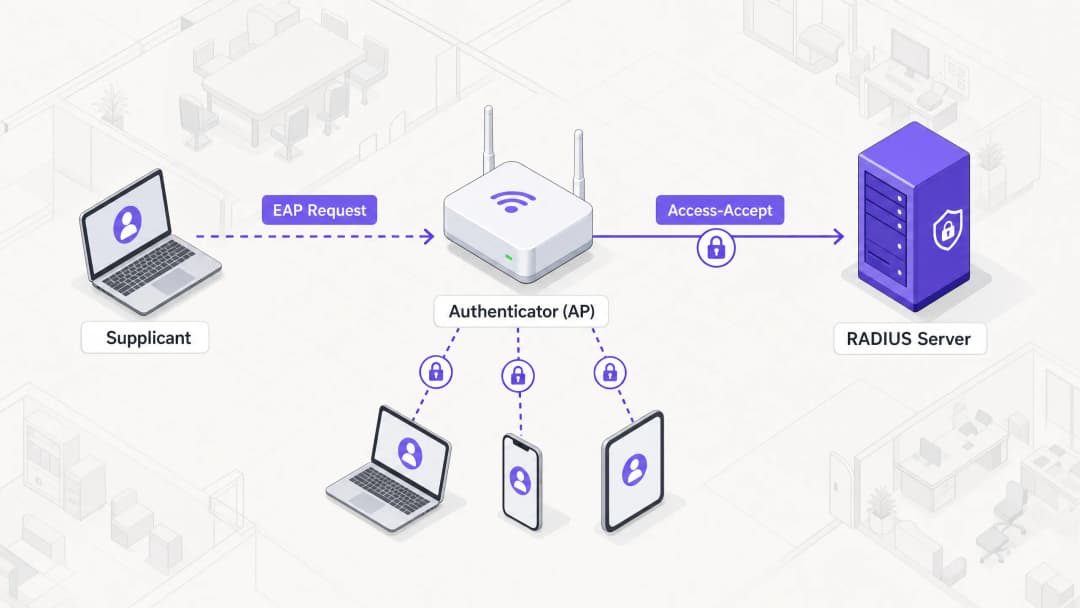
The 802.1X framework relies on three distinct components working together to secure network access:
- Supplicant: The endpoint device (e.g. laptop, cell phone) requesting access to the network.
- Authenticator: The network device (typically a wireless access point or switch) that controls physical or logical access to the network.
- Authentication Server: The centralized database (almost exclusively a RADIUS server) that validates the supplicant's credentials and authorizes access.
When a supplicant attempts to connect to an 802.1X-secured SSID, the authenticator places the connection into an unauthorized state, blocking all traffic except Extensible Authentication Protocol (EAP) frames. The authenticator acts as a pass-through, encapsulating EAP messages from the supplicant into RADIUS packets and forwarding them to the authentication server.
Extensible Authentication Protocol (EAP) Methods
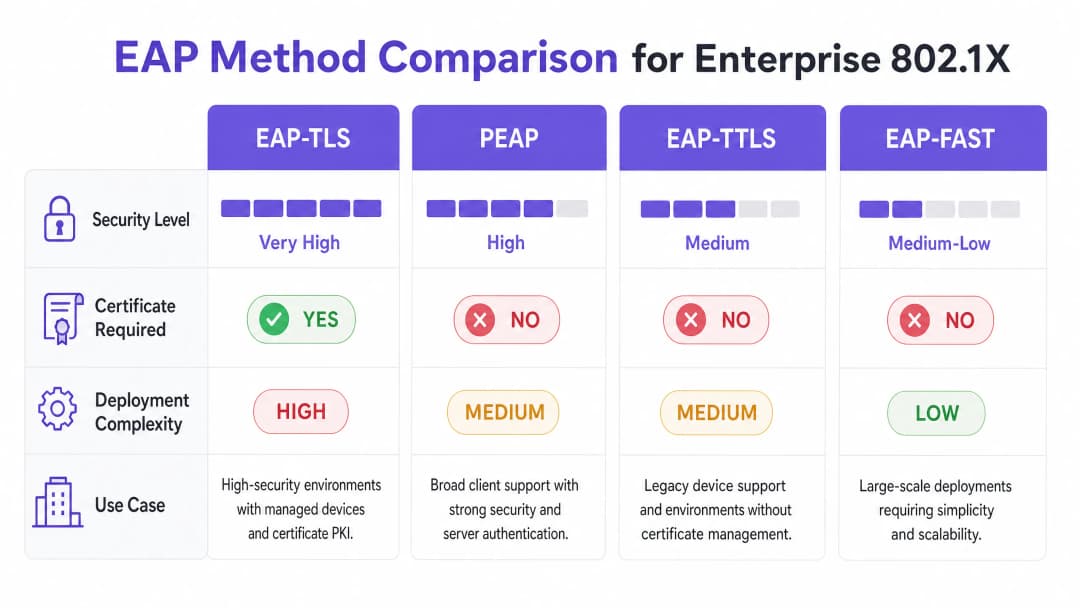
EAP is the transport mechanism for the actual authentication credentials. Selecting the appropriate EAP method is a critical architectural decision, balancing security requirements with deployment complexity.
- EAP-TLS (Transport Layer Security): The gold standard for enterprise security. It requires both a server certificate and a client certificate, providing mutual authentication. Because it relies on certificates rather than passwords, it is immune to credential phishing and offline dictionary attacks. However, provisioning and managing client certificates at scale requires a robust Public Key Infrastructure (PKI) and Mobile Device Management (MDM) solution.
- PEAP (Protected EAP): The most widely deployed method due to its balance of security and ease of deployment. PEAP only requires a certificate on the RADIUS server. It establishes a secure TLS tunnel between the supplicant and the server, inside of which user credentials (username and password) are securely transmitted. Proper configuration to lock the supplicant to trust only the specific RADIUS server certificate is essential to prevent rogue AP attacks.
- EAP-TTLS (Tunneled TLS): Similar to PEAP, this establishes a secure tunnel using a server certificate. However, EAP-TTLS supports a wider range of inner authentication protocols, making it suitable for environments with legacy systems or non-Windows endpoints that do not support MSCHAPv2.
- EAP-FAST (Flexible Authentication via Secure Tunneling): Developed by Cisco as a faster alternative to certificate-based methods. It utilizes Protected Access Credentials (PACs) dynamically established between the client and server. While efficient, it is rarely deployed in modern, vendor-neutral architectures.
RADIUS Infrastructure and Integration
The RADIUS server is the engine of 802.1X. Common enterprise solutions include Microsoft Network Policy Server (NPS), FreeRADIUS, and commercial solutions like Cisco ISE or Aruba ClearPass. The RADIUS server integrates with the organization's Identity Provider (IdP) - such as Active Directory, Entra ID, or Okta - to validate credentials.
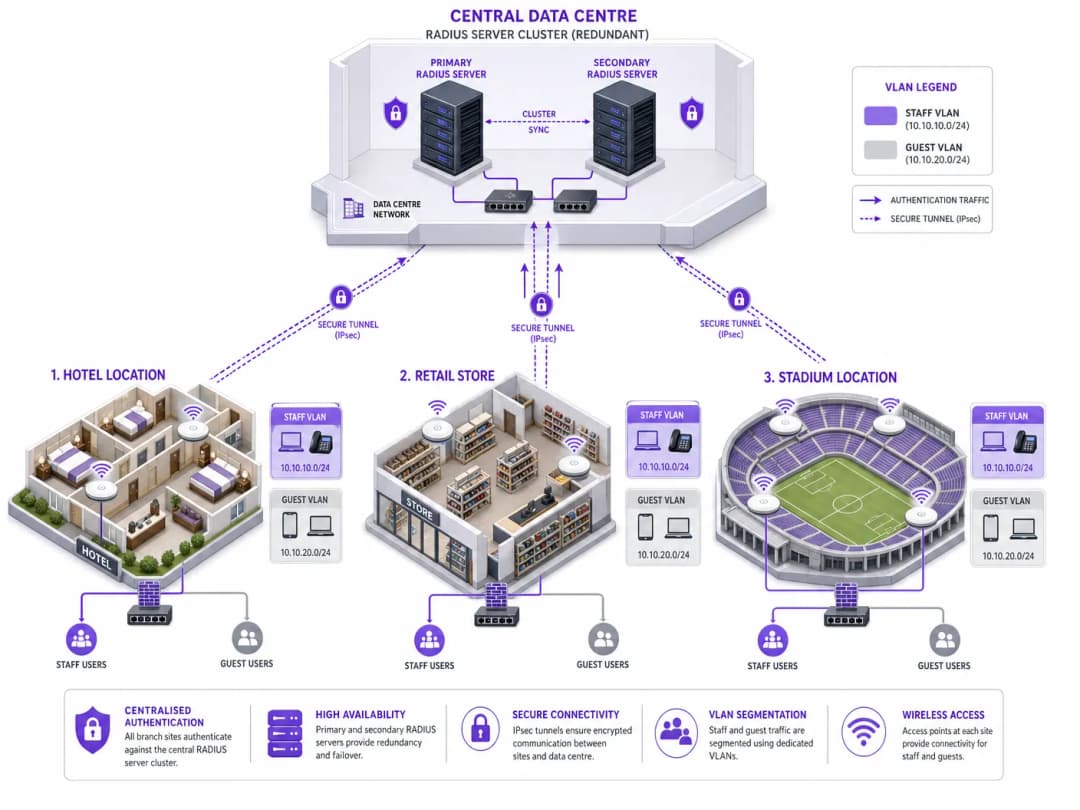
Crucially, the RADIUS server can return specific attributes in the Access-Accept message, enabling dynamic network configuration. The most powerful of these is dynamic VLAN assignment. Based on the user's group membership or device posture, the RADIUS server instructs the authenticator to place the connection into a specific VLAN. This allows for seamless micro-segmentation: a staff member is placed in the corporate VLAN, a contractor in a restricted VLAN, and a device failing posture checks in a quarantine VLAN.
Got questions about your specific setup?
Our team works with venue operators, IT managers, and network engineers across 80,000 venues. Book a 20-minute call and we will show you how others like you solved it.
Implementation Guide
Deploying 802.1X in a multi-site enterprise requires a phased, systematic approach to minimize disruption.
Step 1: Network Discovery and Profiling
Before changing any configuration, conduct a comprehensive audit of all devices connecting to the network. This is particularly critical in environments such as hospitality and retail, where headless devices (printers, POS terminals, IoT sensors) are prevalent. These devices typically lack an 802.1X supplicant. You must identify them and plan for alternative authentication methods, such as MAC Authentication Bypass (MAB), ensuring they are isolated in restricted VLANs.
Step 2: RADIUS Infrastructure Deployment
Deploy a highly available RADIUS architecture. A single RADIUS server is a single point of failure that can bring down the entire corporate network. Implement a primary and secondary server cluster, ideally distributed across different data centers or cloud availability zones. Configure authenticators (APs and switches) to automatically fail over if the primary server becomes unresponsive.
Step 3: Policy Configuration and Segmentation
Define granular access policies within the RADIUS server. Map Active Directory groups to specific VLANs and Access Control Lists (ACLs). Ensure policies enforce the principle of least privilege. For example, in a healthcare setting, clinical staff should have access to patient record systems, while administrative staff should be segmented into a separate VLAN with access only to billing systems.
Step 4: Supplicant Provisioning
For PEAP deployments, use Group Policy Objects (GPOs) or MDM profiles to push the required wireless network settings to managed devices. Crucially, configure the profile to strictly validate the server certificate and specify the exact RADIUS server names to trust. This prevents users from inadvertently connecting to rogue access points.
For unmanaged devices, see our guide on Secure BYOD Policies for Staff WiFi Networks for strategies to safely onboard personal devices without compromising the corporate network.
Step 5: Phased Rollout and Testing
Never perform a "big bang" deployment. Begin with a pilot group at a single location. Closely monitor RADIUS logs for authentication failures. Test edge cases including server fail over, certificate expiration, and roaming between access points. Proceed to a broader rollout only after the pilot has stabilized.
Best Practices
- Enforce Server Certificate Validation: This is the most critical security control for PEAP deployments. If supplicants do not validate the server certificate, the network becomes vulnerable to Man-in-the-Middle (MitM) attacks.
- Implement Dynamic VLAN Assignment: Do not rely on static VLANs per SSID. Use RADIUS attributes to dynamically assign VLANs based on user identity, significantly reducing the attack surface.
- Secure Headless Devices with MAB: Strictly use MAC Authentication Bypass only for devices that cannot support 802.1X. Ensure these devices are placed in highly restricted VLANs, as MAC addresses can be easily spoofed.
- Segregate Guest and Corporate Traffic: Maintain a strict logical separation between the 802.1X-secured corporate network and open or portal-based guest networks. For advanced guest access management, consider solutions like Purple's Guest WiFi platform.
Troubleshooting and Risk Mitigation
Common Failure Modes
- Certificate Expiration: An expired RADIUS server certificate will cause widespread authentication failures for PEAP and EAP-TLS clients. Implement robust monitoring and alerting for certificate validity periods.
- Clock Skew: 802.1X relies heavily on accurate timekeeping, especially for certificate validation. Ensure all infrastructure components (RADIUS servers, IdPs, APs) are synchronized to a reliable NTP source.
- RADIUS Server Unreachability: Network connectivity issues between the authenticator and the RADIUS server will result in access being denied. Implement redundant network paths and configure APs with multiple RADIUS server IPs.
- Supplicant Misconfiguration: Incorrectly configured supplicants (e.g., wrong EAP method, missing Root CA) are a common source of help desk tickets. Use MDM to enforce consistent configurations.
Risk Mitigation Strategies
To minimize the risk of deployment-induced downtime, establish a robust audit trail for all configuration changes in the RADIUS infrastructure. This ensures rapid rollback capabilities in the event of an unforeseen issue.
ROI and Business Impact
Implementing 802.1X provides significant business value beyond basic security compliance:
- Reduced Operational Overhead: By eliminating the need to rotate Pre-Shared Keys when staff leave or keys are compromised, IT teams save significant administrative time.
- Enhanced Compliance: 802.1X provides the identity-based access control required to meet stringent regulatory frameworks (PCI-DSS, HIPAA, CCPA/CPRA), avoiding costly fines and reputational damage.
- Improved Threat Control: Dynamic VLAN assignment ensures that if a device is compromised, its blast radius is restricted to a specific network segment, preventing lateral movement across the enterprise.
- Data-Driven Insights: When paired with platforms like Purple's WiFi Analytics, the identity data provided by 802.1X can offer deep insights into network utilization and capacity planning.
Key Definitions
Supplicant
The client device or software requesting access to the network.
Essential for understanding where the authentication request originates and how credentials are provided.
Authenticator
The network device (AP or switch) that acts as a gatekeeper, blocking access until authentication succeeds.
The authenticator does not verify credentials; it merely passes them to the RADIUS server.
RADIUS Server
Remote Authentication Dial-In User Service; the central server that validates credentials against an identity store.
The core decision engine of an 802.1X deployment.
EAP (Extensible Authentication Protocol)
A framework for transporting authentication credentials securely over the network.
Understanding EAP is crucial for selecting the right authentication method (e.g. PEAP vs. EAP-TLS).
Dynamic VLAN Assignment
The process where a RADIUS server instructs the authenticator to place a user in a specific VLAN based on their identity.
A key benefit of 802.1X, enabling automated network segmentation.
MAC Authentication Bypass (MAB)
A fallback authentication method that uses a device's MAC address as its credential.
Required for onboarding IoT and legacy devices that cannot support 802.1X.
PKI (Public Key Infrastructure)
The system used to issue, manage, and validate digital certificates.
A prerequisite for deploying EAP-TLS authentication.
Rogue AP Attack
An attack where a malicious access point impersonates the corporate network to harvest credentials.
Highlighting the importance of enforcing server certificate validation in PEAP deployments.
Worked Examples
A 200-room hotel needs to secure its staff WiFi network. The current setup uses a single PSK for all staff devices (laptops, tablets) and IoT devices (smart thermostats, IP cameras). How should they transition to 802.1X?
- Deploy a redundant RADIUS infrastructure (e.g., FreeRADIUS) integrated with the hotel's Active Directory. 2. Audit all devices. 3. Configure the wireless controller to use 802.1X (PEAP-MSCHAPv2) for the staff SSID. 4. Push MDM profiles to staff laptops and tablets enforcing server certificate validation. 5. For IoT devices, configure MAC Authentication Bypass (MAB) on the RADIUS server, placing them in an isolated IoT VLAN. 6. Use RADIUS attributes to dynamically assign staff devices to the corporate VLAN upon successful authentication.
A retail chain is rolling out 802.1X across 50 stores. During the pilot phase in Store 1, users report intermittent authentication failures, particularly when moving between the stockroom and the sales floor.
The issue is likely related to roaming and re-authentication delays. The solution is to enable Fast BSS Transition (802.11r) and Opportunistic Key Caching (OKC) on the wireless controller and access points. This allows the client device to cache the Pairwise Master Key (PMK) derived during the initial 802.1X authentication, enabling rapid roaming between APs without requiring a full RADIUS round-trip.
Practice Questions
Q1. Your organization is migrating from PSK to 802.1X. You have a fleet of 5,000 corporate-owned Windows laptops managed via Microsoft Intune. You want the highest level of security to prevent credential theft. Which EAP method should you deploy?
Hint: Consider which method eliminates the use of passwords entirely.
View model answer
EAP-TLS. Since the devices are corporate-owned and managed via Intune, you can leverage MDM to deploy client certificates at scale. EAP-TLS provides mutual authentication and is immune to password-based attacks like phishing or offline dictionary attacks.
Q2. During a security audit, it is discovered that users can connect to the corporate 802.1X network using their personal cell phones without any MDM profile installed. What is the primary security risk, and how should it be remediated?
Hint: Think about how PEAP validates the server.
View model answer
The primary risk is a Man-in-the-Middle (MitM) or Rogue AP attack. If users manually configure the connection, they often accept any server certificate presented to them. To remediate this, the organization must enforce a policy where only managed devices (with an MDM profile that strictly validates the specific RADIUS server certificate) are allowed on the corporate SSID. Personal devices should be directed to a separate BYOD or Guest network.
Q3. A remote branch office loses WAN connectivity to the central data center where the primary and secondary RADIUS servers reside. What happens to the wireless clients at the branch office?
Hint: Consider where the authentication decision is made.
View model answer
New clients attempting to connect will fail authentication because the authenticator (AP) cannot reach the RADIUS server to validate credentials. Existing connected clients may remain connected until their session times out or they need to re-authenticate (e.g., roaming to a new AP), at which point they will also lose access. To mitigate this, survivable branch architectures often deploy a local, read-only domain controller and a local RADIUS proxy or server at critical branch sites.
Continue reading in this series
Roaming Optimization for VoIP and Video Calls on Corporate WiFi
This guide provides IT managers, network architects, and CTOs with a comprehensive, vendor-neutral blueprint for optimizing WiFi roaming to support seamless VoIP and video calls on corporate staff networks. It covers the IEEE 802.11k/r/v protocol stack, WMM QoS configuration, RF cell design, and end-to-end wired QoS mapping required to achieve sub-50ms handoff latency. Applicable across hospitality, retail, healthcare, and large-venue environments, this reference includes real-world implementation scenarios, troubleshooting frameworks, and a measurable ROI analysis.
Certificate-Based Authentication for Corporate Devices (EAP-TLS)
This authoritative technical reference guide covers the architecture, deployment, and operational best practices of EAP-TLS certificate-based authentication for corporate devices. Designed for IT architects and venue operations leaders, it provides a practical roadmap to eliminate password-based credential risks and achieve robust 802.1X network access control across multi-site enterprise environments.
Managing BYOD (Bring Your Own Device) Security on Staff Networks
An authoritative, technical reference guide for enterprise IT managers and network architects on securing Bring Your Own Device (BYOD) access on staff networks. This guide outlines the exact network architecture, authentication protocols, and MDM integration workflows required to mitigate data leakages and maintain regulatory compliance across high-footfall venues.
Got questions about your specific setup?
Our team works with venue operators, IT managers, and network engineers across 80,000 venues. Book a 20-minute call and we will show you how others like you solved it.