
Cómo implementar SCEP para el registro automatizado de certificados WiFi
Esta guía explica cómo implementar SCEP (Simple Certificate Enrollment Protocol) para el registro automatizado de certificados WiFi en entornos empresariales. Cubre el diseño arquitectónico completo, desde el diseño de PKI y la integración con MDM hasta la secuencia de despliegue obligatoria de tres pasos, y muestra a los responsables de TI y arquitectos de red cómo eliminar las credenciales compartidas, automatizar la gestión del ciclo de vida de los certificados y cumplir con los requisitos de PCI DSS y GDPR a escala.
Escuchar esta guía
Ver transcripción del podcast
Parte de nuestra serie principal: Enterprise WiFi Security Guide →
Executive summary
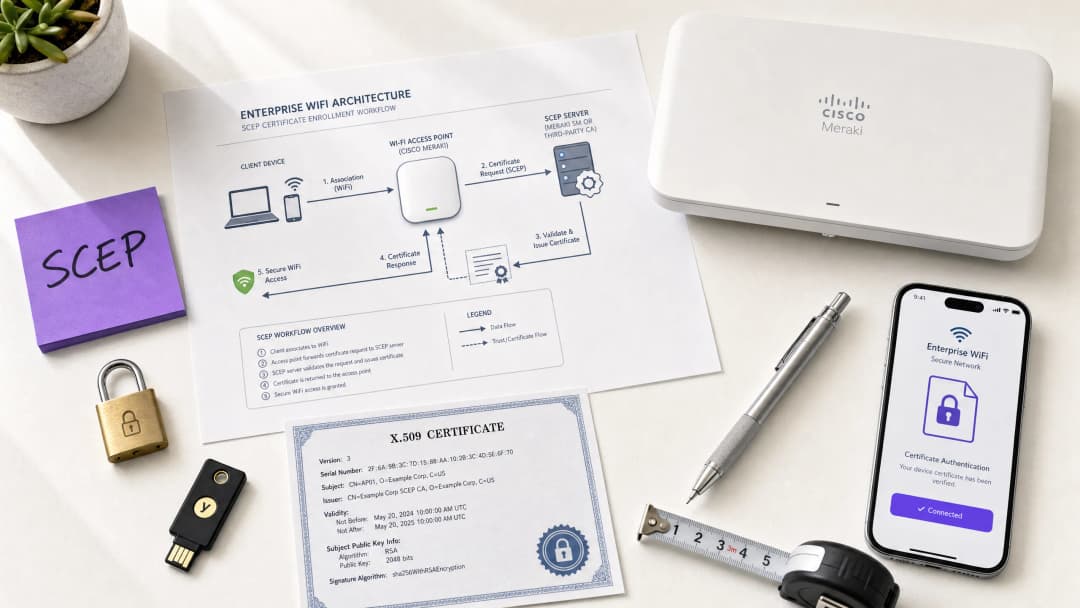
For venue operators running Guest WiFi across hotels, retail estates, stadiums, and conference centres, relying on pre-shared keys or basic captive portals for staff network access is a security liability. Modern network architecture demands 802.1X authentication using EAP-TLS (Extensible Authentication Protocol - Transport Layer Security), ensuring every device is cryptographically verified before it touches the network. The challenge is distribution: how do you deploy unique client certificates to thousands of Windows, iOS, and Android devices without burying your helpdesk?
The answer is SCEP - the Simple Certificate Enrolment Protocol. Formalised by the IETF as RFC 8894 in 2020, SCEP automates certificate enrolment across managed device fleets. When integrated with an MDM platform such as Microsoft Intune or Jamf, SCEP delivers zero-touch certificate provisioning: devices request, receive, and renew their own certificates without any IT intervention. The private key is generated locally on the device and never transmitted across the network - a fundamental security advantage over PKCS-based delivery.
This guide walks through the complete SCEP implementation workflow: PKI architecture, NDES gateway configuration, the mandatory three-step MDM deployment sequence, and the operational controls - particularly CRL checking and group targeting - that determine whether a rollout succeeds or stalls. Two real-world scenarios illustrate the approach in hospitality and retail environments. Purple operates across 80,000+ live venues and 350 million unique users; the patterns described here reflect what works at that scale.
Technical deep-dive
What SCEP actually does
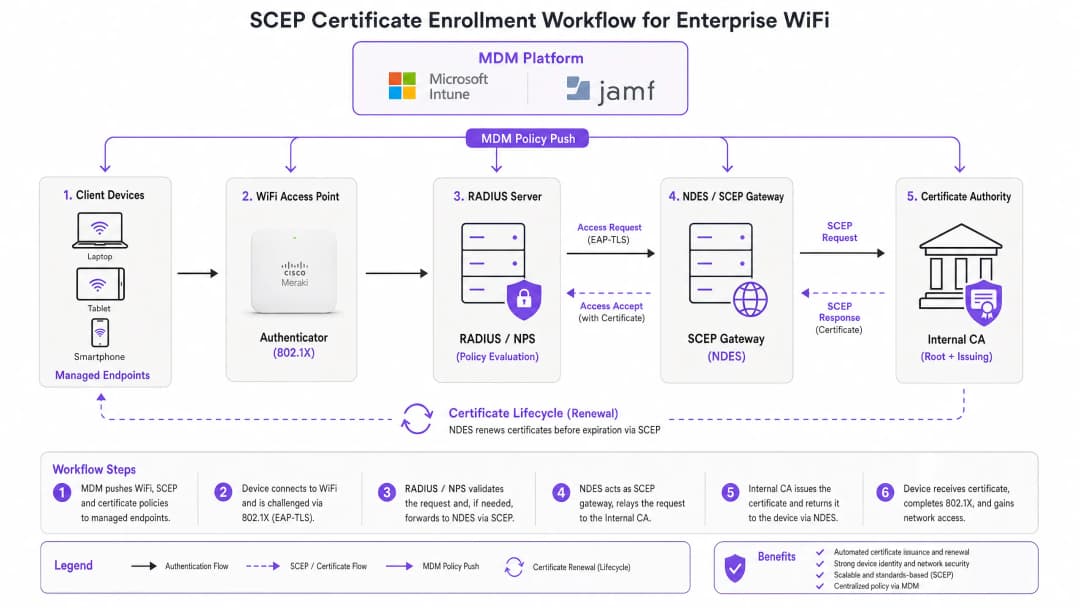
SCEP sits between your MDM platform and your Certificate Authority (CA). It provides a standardised HTTP-based mechanism for devices to request, receive, and renew X.509 certificates without requiring a domain-joined credential or manual administrator involvement. The protocol was originally developed in the early 2000s and gained widespread adoption in enterprise MDM environments before the IETF formally published it as RFC 8894.
The six-step enrolment flow works as follows. First, the managed device connects to the SCEP gateway URL pre-configured in its MDM profile. Second, the device generates a private/public key pair locally and creates a Certificate Signing Request (CSR). Third, the SCEP gateway validates the device's authorisation using a challenge password or OTP embedded in the MDM policy. Fourth, the gateway forwards the validated CSR to the CA. Fifth, the CA signs the certificate and returns it to the gateway. Sixth, the gateway delivers the signed certificate to the device. Future renewals follow the same automated path - the device re-enrols before expiry without any user or administrator action.
SCEP vs PKCS: the decision that matters
Microsoft Intune and most MDM platforms support two certificate delivery mechanisms: SCEP and PKCS. The distinction is architectural, not cosmetic.
With SCEP, the private key is generated on the device and stays there. The CA never sees it. The device's TPM (on Windows) or Secure Enclave (on iOS/macOS) protects the key at the hardware level. With PKCS, the CA generates the key pair centrally and transmits it to the device over the network. The CA retains a copy, enabling key escrow - which is useful for S/MIME email encryption but introduces unnecessary risk for network authentication.
For 802.1X WiFi authentication, use SCEP. The private key never leaves the device. That is the rule.
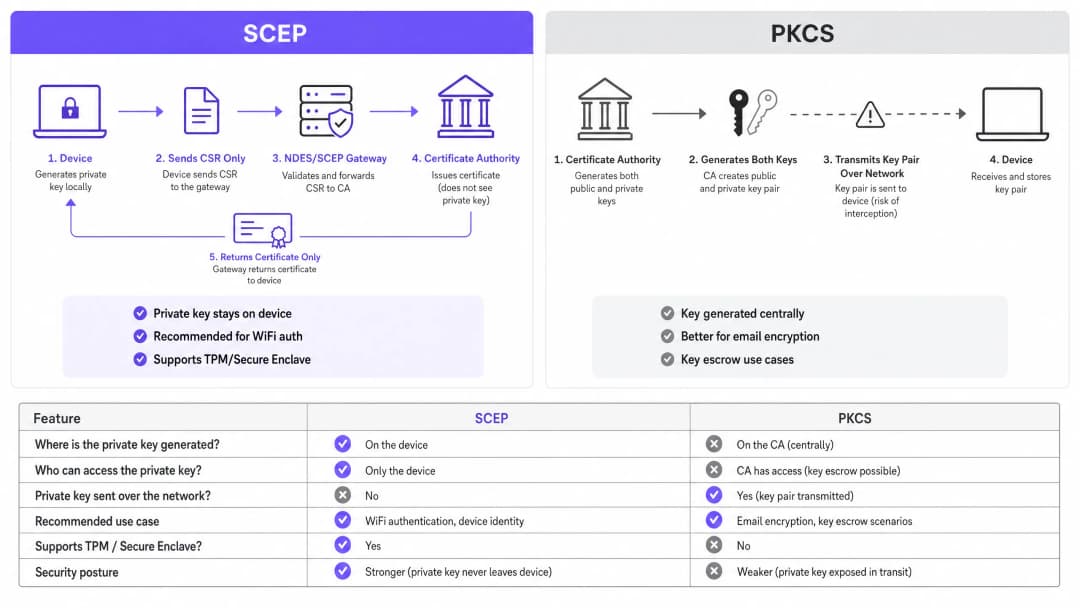
| Criterion | SCEP | PKCS |
|---|---|---|
| Private key generated on | Device | CA (centrally) |
| Private key transmitted over network | Never | Yes |
| Supports TPM / Secure Enclave | Yes | No |
| Recommended for WiFi auth | Yes | No |
| Recommended for email encryption (S/MIME) | No | Yes |
| Key escrow possible | No | Yes |
802.1X and EAP-TLS: the authentication framework
IEEE 802.1X is the port-based network access control standard that underpins enterprise WiFi security. It defines three roles: the supplicant (the client device), the authenticator (the access point - Cisco Meraki, HPE Aruba, Ruckus, Juniper Mist, Ubiquiti UniFi, Cambium, Extreme, or Fortinet), and the authentication server (a RADIUS server such as Microsoft NPS, FreeRADIUS, or Cisco ISE).
EAP-TLS is the most secure EAP method for 802.1X. Both sides present certificates: the RADIUS server presents its certificate to the client, and the client presents its SCEP-provisioned certificate to the RADIUS server. Neither side can impersonate the other without a valid, non-revoked certificate from the trusted CA hierarchy. This mutual authentication model eliminates credential theft, Evil Twin attacks, and rogue access point risks in a single architectural decision.
EAP-TLS satisfies PCI DSS 4.0 Requirement 8.6 for multi-factor authentication at the network layer. It is required for WPA3 Enterprise 192-bit (Suite B) deployments. For any wireless network in scope for cardholder data processing - retail point-of-sale, hotel front desk, stadium ticketing - EAP-TLS is the correct choice.
For a deeper look at secure WiFi architecture and how certificate-based authentication fits within a broader security posture, see our essential guide.
Implementation guide
The deployment sequence is non-negotiable. Intune and Jamf resolve profile dependencies in order: the WiFi profile depends on the SCEP profile, which depends on the Trusted Root profile. Deploy them out of sequence and the WiFi profile will fail to apply.
Step 1: Design your PKI
Before you touch an MDM console, design your certificate hierarchy. A two-tier PKI is standard: an offline root CA and an online issuing CA. The root CA's private key is the master trust anchor for your entire certificate infrastructure - keep it air-gapped. The issuing CA handles day-to-day certificate issuance and publishes the Certificate Revocation List (CRL) and OCSP responder.
For most enterprise venue deployments, Microsoft Active Directory Certificate Services (AD CS) running on Windows Server provides the issuing CA. Cloud-hosted PKI services from providers such as SCEPman or SecureW2 eliminate the on-premises infrastructure requirement entirely and are worth evaluating for distributed estate deployments across hotel groups, retail chains, or multi-site public-sector organisations.
Step 2: Deploy the NDES server (or cloud SCEP gateway)
NDES (Network Device Enrolment Service) is the Microsoft Windows Server role that acts as the SCEP gateway between your MDM and your CA. Key configuration requirements:
- Publish the NDES URL externally via Azure AD Application Proxy (or equivalent reverse proxy). This allows remote devices to enrol before they arrive on-site, without opening inbound firewall ports.
- The NDES service account requires Read and Enrol permissions on the CA certificate template.
- Configure the certificate template with Key Usage set to Digital Signature and Key Encipherment, and Extended Key Usage set to Client Authentication (OID: 1.3.6.1.5.5.7.3.2).
- Set an appropriate certificate validity period. One year is standard for client certificates; two years is acceptable for device certificates in stable fleets.
If you prefer to avoid on-premises NDES infrastructure, cloud SCEP gateways integrate directly with Intune and your CA via API, removing the IIS dependency entirely.
Step 3: Deploy the Trusted Root Certificate profile
In your MDM platform, create a Trusted Certificate profile and upload your Root CA certificate (and any Intermediate CA certificates) as .cer files. Deploy this profile to your target device groups before any other certificate or WiFi profiles. Without this step, devices cannot validate the RADIUS server's certificate during the EAP-TLS handshake, and they cannot trust the issuing CA when requesting their own SCEP certificate.
Rule of thumb: Always target the same Azure AD group (either Users or Devices) across all three related profiles. A mismatch here is the single most common cause of WiFi profile deployment failures.
Step 4: Configure the SCEP Certificate profile
Create a SCEP certificate configuration profile in your MDM:
- Subject name format: For user-driven authentication, use
CN={{UserPrincipalName}}. For device authentication (recommended for shared devices and IoT), useCN={{AAD_Device_ID}}. - Key usage: Digital Signature, Key Encipherment.
- Extended key usage: Client Authentication (OID: 1.3.6.1.5.5.7.3.2).
- SCEP server URL: The externally published NDES URL.
- Root certificate: Link to the Trusted Root profile from Step 3.
- Certificate validity period: Match the template configured on the CA.
Step 5: Deploy the 802.1X WiFi profile
Create a WiFi configuration profile:
- SSID: Enter the network name exactly as broadcast by your access points.
- Security type: WPA2-Enterprise or WPA3-Enterprise.
- EAP type: EAP-TLS.
- Client authentication certificate: Select the SCEP certificate profile from Step 4.
- Server validation: Specify the Trusted Root certificate from Step 3 and enter the expected RADIUS server name. This prevents devices from connecting to rogue access points presenting fraudulent certificates.
¿Tiene preguntas sobre su configuración específica?
Nuestro equipo trabaja con operadores de recintos, responsables de TI e ingenieros de redes en 80 000 espacios. Reserve una llamada de 20 minutos y le mostraremos cómo lo han solucionado otros profesionales como usted.
Best practices
Enforce strict CRL checking on your RADIUS server
Certificate revocation is the operational control that closes the gap between disabling an account and blocking network access. When a device is lost, stolen, or an employee leaves, disable the AD account and revoke the certificate at the CA. Your RADIUS server must be configured to check the CRL on every authentication attempt. If the CRL is unavailable - because the CDP (CRL Distribution Point) is unreachable - most RADIUS servers default to failing open, which is a security risk. Ensure your CDPs are highly available and that your RADIUS server is configured to fail closed if the CRL cannot be fetched.
For real-time revocation, configure OCSP (Online Certificate Status Protocol) in addition to CRL. OCSP provides per-certificate status responses without requiring the RADIUS server to download and parse the entire CRL.
Use device certificates for shared and IoT devices
For shared devices - hotel housekeeping tablets, retail POS terminals, stadium access control readers - use device certificates rather than user certificates. Device certificates are tied to the machine identity, not a user account. This means the device authenticates regardless of which user is logged in, and revocation is tied to the device record rather than an employee's departure.
For retail deployments, device certificates on POS hardware also satisfy the PCI DSS requirement for network-layer device identity without introducing user-credential complexity at the point of sale.
Automate certificate renewal
SCEP supports automatic renewal: the MDM instructs the device to re-enrol before the certificate expires. Configure your SCEP profile to trigger renewal at 20% of the certificate's remaining validity period. For a one-year certificate, renewal begins approximately 73 days before expiry. This window provides enough time to resolve any renewal failures before the certificate expires and devices lose network access.
Expired certificates causing mass authentication failures are the most common operational incident in 802.1X deployments. Automated renewal via SCEP eliminates this risk entirely.
Segment networks by certificate attribute
RADIUS servers can read certificate attributes - Subject, SAN, or custom OIDs - and use them to assign devices to VLANs dynamically. A housekeeping tablet with a certificate issued from the HousekeepingDevices template lands on the housekeeping VLAN. A POS terminal with a certificate from the RetailPOS template lands on the PCI-scoped VLAN. This is cryptographically enforced network segmentation - far more reliable than SSID-based or MAC-based approaches.
For hospitality operators running Guest WiFi alongside Staff WiFi on the same physical infrastructure, VLAN assignment via certificate attributes ensures guests and staff are always on separate network segments, regardless of which SSID a device connects to.
Troubleshooting & risk mitigation
WiFi profile shows 'Error' or 'Not Applicable' in Intune
Root cause: Group targeting mismatch. The SCEP profile is assigned to a different group than the WiFi profile. Intune cannot resolve the certificate dependency.
Fix: Audit all three profiles (Trusted Root, SCEP, WiFi). Ensure they are all assigned to the exact same Azure AD group. If you are deploying to Users, all three profiles must target a Users group. If deploying to Devices, all three must target a Devices group.
NDES returns HTTP 403 errors
Root cause: The Intune Certificate Connector service account lacks Read or Enrol permissions on the CA certificate template, or firewall URL filtering is blocking SCEP query strings.
Fix: Verify the connector account has Read and Enrol permissions on the template in the CA console. Check firewall logs for blocked requests containing ?operation=GetCACaps or ?operation=PKIOperation. These query strings must pass through without modification.
Devices fail to renew certificates before expiry
Root cause: The SCEP renewal window is too short, or the NDES server is unreachable at the time of renewal.
Fix: Set the renewal threshold to 20% of certificate validity. Ensure the NDES URL is published via a highly available reverse proxy. Monitor NDES IIS logs for renewal request failures and alert on them proactively.
RADIUS rejects valid certificates
Root cause: The RADIUS server's trusted CA store does not include the issuing CA certificate, or the CRL is stale.
Fix: Import the full CA chain (Root CA + Issuing CA) into the RADIUS server's trusted store. Verify the CRL is being fetched successfully and that the CDP URL is reachable from the RADIUS server. Check the CRL's next-update timestamp - if it has passed, the CA needs to publish a new CRL.
For broader network performance considerations alongside security, see our bandwidth management guide.
ROI & business impact
The business case for SCEP-based certificate enrolment is straightforward. Password-based WiFi generates a predictable volume of helpdesk tickets: password expirations, lockouts, staff sharing credentials with guests, and onboarding friction for new starters. Certificate-based authentication is invisible to the end user. Devices connect automatically. There are no passwords to expire, share, or forget.
Organisations that migrate from password-based WiFi to EAP-TLS with SCEP typically report a 70-80% reduction in WiFi-related helpdesk tickets (Purple internal data, 2024, based on deployments across hospitality and retail estates). The helpdesk saving alone often justifies the implementation cost within the first year.
The compliance impact is equally concrete. EAP-TLS satisfies PCI DSS 4.0 Requirement 8.6 for multi-factor authentication at the network layer. For healthcare environments, it aligns with HIPAA technical safeguard requirements for wireless network access. For public-sector organisations, it supports NCSC Cyber Essentials Plus certification requirements for network access control.
For transport operators - rail franchises, airport operators, bus networks - certificate-based authentication on staff devices ensures that operational networks carrying safety-critical data are isolated from passenger WiFi and protected against credential-based attacks.
Purple's WiFi Analytics platform integrates with 802.1X-secured networks to deliver first-party data insights without compromising the security posture of the underlying infrastructure. The 29 billion data points collected across Purple's network demonstrate that security and analytics are complementary, not competing, objectives.
For feedback and experience management alongside your secure network deployment, see our venue feedback playbook.
Definiciones clave
SCEP (Simple Certificate Enrollment Protocol)
Un protocolo estandarizado por el IETF (RFC 8894) que automatiza el registro de certificados X.509 para dispositivos gestionados. El dispositivo genera su propia clave privada localmente y envía únicamente una solicitud de firma de certificado (CSR) a la CA a través de una pasarela. La clave privada nunca sale del dispositivo.
Los equipos de TI se encuentran con SCEP al configurar plataformas MDM (Intune, Jamf) para desplegar certificados de autenticación WiFi a escala. Es el mecanismo recomendado para despliegues de 802.1X EAP-TLS porque la clave privada está protegida por hardware en el dispositivo final.
EAP-TLS (Extensible Authentication Protocol - Transport Layer Security)
El método de autenticación 802.1X más seguro. Tanto el dispositivo cliente como el servidor RADIUS presentan certificados X.509. Ninguna de las partes puede autenticarse sin un certificado válido y no revocado de la jerarquía de CA de confianza.
EAP-TLS es el protocolo de autenticación de destino que habilita el despliegue de certificados SCEP. Cumple con el requisito 8.6 de PCI DSS 4.0 y es obligatorio para despliegues de WPA3 Enterprise de 192 bits (Suite B).
PKCS (Public Key Cryptography Standards)
Un mecanismo de entrega de certificados en el que la CA genera de forma centralizada el par de claves pública y privada y las transmite al dispositivo final. La CA conserva una copia de la clave privada, lo que permite el depósito de claves.
Los equipos de TI eligen entre SCEP y PKCS al configurar perfiles de certificado en Intune. PKCS es adecuado para el cifrado de correo electrónico S/MIME donde se requiere el depósito de claves. No se recomienda para la autenticación WiFi porque la clave privada se transmite a través de la red.
NDES (Network Device Enrollment Service)
Un rol de Microsoft Windows Server que actúa como pasarela SCEP entre una plataforma MDM y una autoridad de certificación (CA). Valida las solicitudes de registro de dispositivos y reenvía las CSR a la CA.
NDES es un componente de infraestructura obligatorio para despliegues locales de SCEP con Microsoft Intune. Debe publicarse externamente a través de un proxy de aplicaciones para permitir el registro de dispositivos remotos. Las pasarelas SCEP en la nube son una alternativa que elimina la dependencia de NDES local.
CRL (Certificate Revocation List)
Una lista publicada por la CA que contiene los números de serie de los certificados que han sido revocados antes de su fecha de caducidad. Los servidores RADIUS verifican la CRL para garantizar que los dispositivos con certificados revocados no puedan autenticarse.
La verificación de CRL es el control operativo que aplica la revocación de certificados. Los equipos de TI deben configurar su servidor RADIUS para verificar la CRL en cada intento de autenticación y garantizar que el punto de distribución de CRL (CDP) sea de alta disponibilidad.
802.1X
Un estándar IEEE para el control de acceso a la red basado en puertos. Define el marco de autenticación de tres partes (suplicante, autenticador, servidor de autenticación) utilizado en redes cableadas y WiFi empresariales.
802.1X es el marco dentro del cual operan EAP-TLS y SCEP. Los equipos de TI se lo encuentran al configurar SSIDs WPA2-Enterprise o WPA3-Enterprise y al establecer políticas de servidor RADIUS.
RADIUS (Remote Authentication Dial-In User Service)
Un protocolo de red que proporciona autenticación, autorización y contabilidad (AAA) centralizadas para el acceso a la red. En despliegues de 802.1X, el servidor RADIUS valida los certificados de cliente y aplica las políticas de asignación de VLAN.
El servidor RADIUS es el punto de decisión de autenticación en cada despliegue de 802.1X. Las implementaciones comunes incluyen Microsoft NPS, FreeRADIUS y Cisco ISE. Debe configurarse con la cadena de CA de confianza y una verificación estricta de CRL u OCSP.
CSR (Certificate Signing Request)
Un bloque de texto codificado generado por un dispositivo que contiene la clave pública y la información de identidad del dispositivo. El dispositivo envía la CSR a la CA (a través de la pasarela SCEP) para solicitar un certificado firmado. La clave privada correspondiente se genera y se conserva en el dispositivo.
La CSR es el elemento central en el flujo de registro de SCEP. Los equipos de TI configuran el formato de la CSR (nombre del sujeto, uso de clave, EKU) en el perfil de certificado SCEP dentro de su plataforma MDM.
PKI (Public Key Infrastructure)
La combinación de hardware, software, políticas y procedimientos necesarios para crear, gestionar, distribuir y revocar certificados digitales. Una PKI empresarial estándar consta de una CA raíz fuera de línea (offline) y una CA emisora en línea (online).
La PKI es el requisito previo para cualquier despliegue de EAP-TLS. Los equipos de TI deben diseñar y desplegar una jerarquía de CA de dos niveles antes de configurar SCEP. Los servicios de PKI alojados en la nube reducen la carga de infraestructura para despliegues en entornos distribuidos.
VLAN (Virtual Local Area Network)
Un segmento de red lógico que aísla el tráfico en la Capa 2. En despliegues de 802.1X, los servidores RADIUS asignan dispositivos a las VLAN de forma dinámica en función de los atributos del certificado, la identidad del usuario o la política.
La asignación de VLAN a través de RADIUS es el mecanismo que aplica la segmentación de red en el WiFi empresarial. Los equipos de TI lo utilizan para separar los dispositivos TPV en VLAN dentro del alcance de PCI, los dispositivos de invitados en VLAN solo de internet y los dispositivos del personal en VLAN corporativas, todo desde una única infraestructura física.
Ejemplos prácticos
Un hotel Premier Inn de 200 habitaciones necesita desplegar un WiFi seguro para 150 dispositivos iOS del personal de limpieza. Actualmente, el personal comparte una contraseña WPA2-Personal con los huéspedes, lo que genera un riesgo operativo y de cumplimiento. El director de TI necesita eliminar la contraseña compartida sin interrumpir las operaciones diarias.
El director de TI implementa un despliegue de SCEP gestionado por Jamf en tres fases. Primera fase: el certificado de la CA raíz se distribuye a los 150 dispositivos iOS a través de un perfil de certificado de confianza de Jamf, dirigido al grupo inteligente 'Housekeeping Devices'. Segunda fase: se despliega un perfil de certificado SCEP que dirige los dispositivos a un servidor NDES publicado mediante Azure AD App Proxy. El nombre del sujeto utiliza CN={{SERIALNUMBER}} para vincular el certificado al hardware del dispositivo. Tercera fase: se distribuye un perfil de WiFi WPA2-Enterprise, especificando EAP-TLS y vinculándolo al certificado SCEP. Los dispositivos se autentican de forma silenciosa. Se retira el SSID con contraseña compartida. El servidor RADIUS se configura con una verificación estricta de CRL y asignación de VLAN: los dispositivos de limpieza se asignan a la VLAN 20 (operaciones) y los dispositivos de invitados a la VLAN 10 (solo internet).
Una cadena de tiendas con 500 ubicaciones necesita proteger el WiFi corporativo para tabletas TPV con Windows que ejecutan software de procesamiento de pagos. El cumplimiento de PCI DSS 4.0 requiere autenticación multifactor en la capa de red. La configuración actual de WPA2-Personal no supera la evaluación del requisito 8.6 de PCI DSS.
El arquitecto de red despliega EAP-TLS a través de Microsoft Intune y SCEP en las 500 ubicaciones. El despliegue utiliza certificados de dispositivo con CN={{AAD_Device_ID}} como nombre del sujeto, vinculando cada certificado al registro del dispositivo en Intune. La secuencia de tres perfiles (raíz de confianza, SCEP, WiFi) se despliega en el grupo de Azure AD 'POS Devices', el mismo grupo para los tres perfiles. El servidor RADIUS asigna los dispositivos TPV a una VLAN dedicada dentro del alcance de PCI (VLAN 100) según la plantilla de emisión del certificado. La CRL se publica en un endpoint de alta disponibilidad alojado en CDN con una ventana de validez de cuatro horas. Se habilita OCSP para la verificación de revocación en tiempo real. El QSA valida el despliegue frente al requisito 8.6 de PCI DSS 4.0.
Preguntas de práctica
Q1. Ha desplegado perfiles de certificado de raíz de confianza y SCEP en el grupo de usuarios 'All Staff' en Intune. A continuación, despliega el perfil de WiFi en el grupo de dispositivos 'Corporate Devices'. Los dispositivos reciben los certificados, pero el perfil de WiFi muestra 'Error' en la consola de Intune. ¿Cuál es la causa más probable y cómo lo soluciona?
Sugerencia: Considere cómo resuelve Intune las dependencias entre perfiles y qué sucede cuando los perfiles se dirigen a diferentes tipos de grupos.
Ver respuesta modelo
La causa principal es una discrepancia en la asignación de grupos. El perfil de WiFi depende del perfil SCEP, que a su vez depende del perfil de raíz de confianza. Intune no puede resolver estas dependencias cuando los perfiles se dirigen a diferentes tipos de grupos (usuarios frente a dispositivos). Solución: vuelva a desplegar los tres perfiles en el mismo grupo. Si el perfil de WiFi se dirige a 'Corporate Devices' (un grupo de dispositivos), los perfiles SCEP y de raíz de confianza también deben dirigirse a 'Corporate Devices'. Alternativamente, mueva los tres a un grupo de usuarios si se requiere autenticación basada en el usuario.
Q2. Se denuncia el robo del iPad de un miembro del personal de limpieza de un hotel. Desactiva inmediatamente la cuenta de Active Directory de dicho empleado. A la mañana siguiente, el iPad robado sigue conectándose a la red WPA2-Enterprise del hotel. ¿Por qué ocurre esto y qué dos acciones debe realizar para evitarlo?
Sugerencia: Pense en lo que realmente valida el servidor RADIUS durante la autenticación EAP-TLS y qué controles rigen la validez del certificado.
Ver respuesta modelo
Desactivar la cuenta de AD no revoca el certificado de cliente almacenado en el iPad. El servidor RADIUS valida el certificado, no el estado de la cuenta de AD, durante la autenticación EAP-TLS. Las dos acciones requeridas son: (1) revocar el certificado del dispositivo en la CA (esto añade el número de serie del certificado a la CRL); (2) asegurarse de que el servidor RADIUS esté configurado con una verificación estricta de CRL para que obtenga la CRL actualizada y rechace el certificado revocado en el siguiente intento de autenticación. Para una revocación más rápida, configure OCSP en el servidor RADIUS para realizar comprobaciones del estado del certificado en tiempo real.
Q3. Una cadena de tiendas está desplegando WiFi 802.1X en 500 ubicaciones de TPV. El arquitecto de seguridad propone utilizar la entrega de certificados PKCS en lugar de SCEP para evitar el despliegue de un servidor NDES. El QSA que revisa la evaluación de PCI DSS 4.0 plantea una objeción. ¿Cuál es la objeción y cuál es la recomendación correcta?
Sugerencia: Considere lo que dice PCI DSS sobre el manejo de claves privadas y lo que hace PKCS con la clave privada durante la entrega.
Ver respuesta modelo
La preocupación del QSA es que PKCS transmite la clave privada a través de la red desde la CA al dispositivo. El requisito 3.5 de PCI DSS 4.0 exige que las claves privadas utilizadas para la autenticación estén protegidas contra la divulgación. Transmitir la clave privada a través de la red, incluso cifrada, introduce un riesgo que SCEP elimina por completo. La recomendación correcta es utilizar SCEP, donde la clave privada se genera en el dispositivo TPV y nunca sale de él. Para evitar la infraestructura NDES local, el arquitecto debería evaluar un servicio de pasarela SCEP en la nube que se integre directamente con Intune y la CA a través de una API.
Q4. Está diseñando una red WiFi para un gran centro de conferencias que alberga más de 50 eventos al año. Los dispositivos del personal deben estar en una red 802.1X segura. Quiere asegurarse de que si el dispositivo de un contratista se ve comprometido, pueda aislarse de la red en un plazo de 15 minutos. ¿Qué mecanismo de revocación de certificados configura y por qué?
Sugerencia: Compare CRL y OCSP en términos de latencia de revocación y qué determina la rapidez con la que un servidor RADIUS actúa ante una revocación.
Ver respuesta modelo
Configure OCSP (Online Certificate Status Protocol) en el servidor RADIUS. La revocación basada en CRL tiene una latencia determinada por el período de validez de la CRL (normalmente de una a 24 horas), lo que significa que un certificado revocado aún podría autenticarse hasta que el servidor RADIUS obtenga la siguiente CRL. OCSP proporciona respuestas de estado por certificado en tiempo real: cuando se revoca un certificado en la CA, el respondedor OCSP devuelve inmediatamente un estado de 'revocado' en la siguiente consulta. Con OCSP configurado en el servidor RADIUS, el certificado revocado de un contratista se bloquea en el siguiente intento de autenticación, normalmente en cuestión de segundos. Asegúrese de que el respondedor OCSP sea de alta disponibilidad: si no está accesible y el servidor RADIUS está configurado para denegar el acceso en caso de fallo (fail closed), todas las autenticaciones fallarán.
Continúe leyendo esta serie
Cumplimiento con CIPA: lista de verificación para operadores de establecimientos
Podrá decidir si CIPA vincula su WiFi, segmentar redes, enrutar DNS a través de Purple Shield y cerrar rutas de derivación. También sabrá qué pruebas conservar para la certificación del Formulario 486 o del Formulario 479. La lista de verificación asigna un responsable a cada requisito, para que no falte nada en la certificación de su próximo año de financiación.
Fallos de conexión en modo de transición WPA3: lista de comprobación de implementación para Cisco Meraki, HPE Aruba y Ruckus
Utilice esta lista de comprobación para diagnosticar por qué los dispositivos fallan en un SSID con modo de transición WPA3 SAE y soluciónelo en Cisco Meraki, HPE Aruba o Ruckus. Relacionará los códigos de estado 802.11 con sus causas, aislará problemas de PMF, 802.11r y 6GHz, y decidirá cuándo pasar a un SSID exclusivo de WPA3.
El mejor filtrado de DNS: una guía completa para empresas
Esta guía de referencia técnica explica cómo el filtrado de DNS empresarial protege las redes públicas al bloquear dominios maliciosos en la capa de resolución, antes de que se establezca una conexión. Proporciona a los directores de TI, arquitectos de redes y equipos de operaciones de las instalaciones la arquitectura de despliegue, la configuración del firewall y el contexto de cumplimiento que necesitan para proteger el WiFi de invitados en entornos de hostelería, comercio minorista y sector público. Purple Shield bloquea el malware, las redes de bots y el contenido inapropiado a nivel de DNS en más de 80.000 establecimientos activos.
¿Tiene preguntas sobre su configuración específica?
Nuestro equipo trabaja con operadores de recintos, responsables de TI e ingenieros de redes en 80 000 espacios. Reserve una llamada de 20 minutos y le mostraremos cómo lo han solucionado otros profesionales como usted.