
स्वयंचलित WiFi प्रमाणपत्र नोंदणीसाठी SCEP कसे लागू करावे
हे मार्गदर्शक एंटरप्राइझ ठिकाणी स्वयंचलित WiFi प्रमाणपत्र नोंदणीसाठी SCEP (Simple Certificate Enrollment Protocol) कसे लागू करावे हे स्पष्ट करते. यामध्ये PKI डिझाइन आणि MDM एकत्रीकरणापासून ते अनिवार्य तीन-चरण उपयोजन क्रमापर्यंतच्या संपूर्ण आर्किटेक्चरल ब्ल्यूप्रिंटचा समावेश आहे - आणि IT व्यवस्थापक व नेटवर्क आर्किटेक्ट्सना शेअर केलेले क्रेडेंशियल्स कसे काढून टाकावे, प्रमाणपत्र जीवनचक्र व्यवस्थापन स्वयंचलित कसे करावे आणि मोठ्या प्रमाणावर PCI-DSS व GDPR आवश्यकता कशा पूर्ण कराव्यात हे दाखवते.
हे मार्गदर्शक ऐका
पॉडकास्ट ट्रान्सक्रिप्ट पहा
आमच्या मुख्य मालिकेचा भाग: Enterprise WiFi Security Guide →
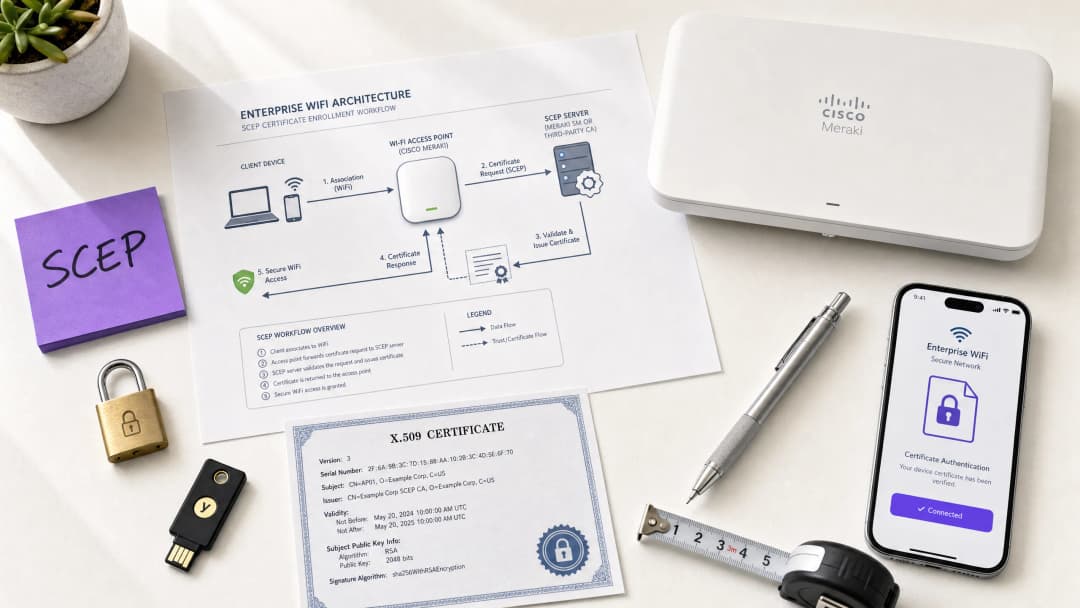
मुख्य सारांश (Executive summary)
हॉटेल्स, रिटेल इस्टेट, स्टेडिअम आणि कॉन्फरन्स सेंटर्समध्ये Guest WiFi चालवणाऱ्या व्हेन्यू ऑपरेटर्ससाठी, कर्मचाऱ्यांच्या नेटवर्क ऍक्सेससाठी प्री-शेअर्ड की किंवा बेसिक Captive Portal वर अवलंबून राहणे हा एक सुरक्षा धोका आहे. आधुनिक नेटवर्क आर्किटेक्चरला EAP-TLS (Extensible Authentication Protocol - Transport Layer Security) वापरून 802.1X ऑथेंटिकेशन आवश्यक आहे, ज्यामुळे प्रत्येक डिव्हाइस नेटवर्कला स्पर्श करण्यापूर्वी क्रिप्टोग्राफिकली पडताळले जाईल याची खात्री होते. वितरण हे सर्वात मोठे आव्हान आहे: तुमच्या हेल्पडेस्कवर अतिरिक्त ताण न आणता तुम्ही हजारो Windows, iOS, आणि Android डिव्हाइसेसवर युनिक क्लायंट सर्टिफिकेट्स कसे तैनात करता?
याचे उत्तर आहे SCEP - म्हणजेच Simple Certificate Enrolment Protocol. 2020 मध्ये IETF द्वारे RFC 8894 म्हणून औपचारिक रूप दिलेले, SCEP हे मॅनेज्ड डिव्हाइस फ्लीटमध्ये सर्टिफिकेट एनरोलमेंट स्वयंचलित करते. जेव्हा Microsoft Intune किंवा Jamf सारख्या MDM प्लॅटफॉर्मसह इंटिग्रेट केले जाते, तेव्हा SCEP झिरो-टच सर्टिफिकेट प्रोव्हिजनिंग प्रदान करते: डिव्हाइसेस कोणत्याही IT हस्तक्षेपाशिवाय स्वतःच्या सर्टिफिकेट्ससाठी विनंती करतात, प्राप्त करतात आणि त्यांचे नूतनीकरण करतात. प्रायव्हेट की डिव्हाइसवर स्थानिक पातळीवर तयार केली जाते आणि नेटवर्कवर कधीही पाठवली जात नाही - हा PKCS-आधारित वितरणावर एक मूलभूत सुरक्षा फायदा आहे.
हे मार्गदर्शक संपूर्ण SCEP अंमलबजावणी वर्कफ्लो स्पष्ट करते: PKI आर्किटेक्चर, NDES गेटवे कॉन्फिगरेशन, अनिवार्य तीन-चरण MDM डिप्लोयमेंट सिक्वेन्स आणि ऑपरेशनल कंट्रोल्स - विशेषतः CRL चेकिंग आणि ग्रुप टारगेटिंग - जे रोलआउट यशस्वी होईल की नाही हे ठरवतात. हॉस्पिटॅलिटी आणि रिटेल वातावरणातील दोन वास्तविक-जगातील उदाहरणे हा दृष्टिकोन स्पष्ट करतात. Purple हे 80,000 पेक्षा जास्त लाईव्ह व्हेन्यू आणि 350 दशलक्ष युनिक युजर्समध्ये कार्यरत आहे; येथे वर्णन केलेले पॅटर्न्स त्या प्रमाणात काय कार्य करते हे दर्शवतात.
तांत्रिक सखोल विश्लेषण (Technical deep-dive)
SCEP प्रत्यक्षात काय करते
SCEP हे तुमच्या MDM प्लॅटफॉर्म आणि तुमच्या Certificate Authority (CA) च्या दरम्यान कार्य करते. हे डोमेन-जॉइन्ड क्रेडेंशियल किंवा मॅन्युअल ॲडमिनिस्ट्रेटरच्या हस्तक्षेपाशिवाय डिव्हाइसेसना X.509 सर्टिफिकेट्सची विनंती करण्यासाठी, प्राप्त करण्यासाठी आणि नूतनीकरण करण्यासाठी एक प्रमाणित HTTP-आधारित यंत्रणा प्रदान करते. हा प्रोटोकॉल मूळतः 2000 च्या दशकाच्या सुरुवातीला विकसित केला गेला होता आणि IETF ने औपचारिकपणे RFC 8894 म्हणून प्रकाशित करण्यापूर्वी एंटरप्राइझ MDM वातावरणात मोठ्या प्रमाणावर स्वीकारला गेला होता.
सहा-पायऱ्यांचा नोंदणी प्रवाह खालीलप्रमाणे काम करतो. प्रथम, व्यवस्थापित डिव्हाइस त्याच्या MDM प्रोफाइलमध्ये पूर्व-कॉन्फिगर केलेल्या SCEP गेटवे URL शी जोडले जाते. दुसरे, डिव्हाइस स्थानिक पातळीवर प्रायव्हेट/पब्लिक की पेअर तयार करते आणि Certificate Signing Request (CSR) तयार करते. तिसरे, SCEP गेटवे MDM पॉलिसीमध्ये एम्बेड केलेल्या चॅलेंज पासवर्ड किंवा OTP चा वापर करून डिव्हाइसच्या ऑथोरायझेशनची पडताळणी करतो. चौथे, गेटवे पडताळणी केलेले CSR हे CA कडे पाठवतो. पाचवे, CA प्रमाणपत्रावर स्वाक्षरी करतो आणि ते गेटवेकडे परत पाठवतो. सहावे, गेटवे स्वाक्षरी केलेले प्रमाणपत्र डिव्हाइसला वितरीत करतो. भविष्यातील नूतनीकरणे याच स्वयंचलित मार्गाचा अवलंब करतात - डिव्हाइस कोणत्याही वापरकर्त्याच्या किंवा प्रशासकाच्या हस्तक्षेपाशिवाय कालबाह्य होण्यापूर्वी पुन्हा नोंदणीकृत होते.
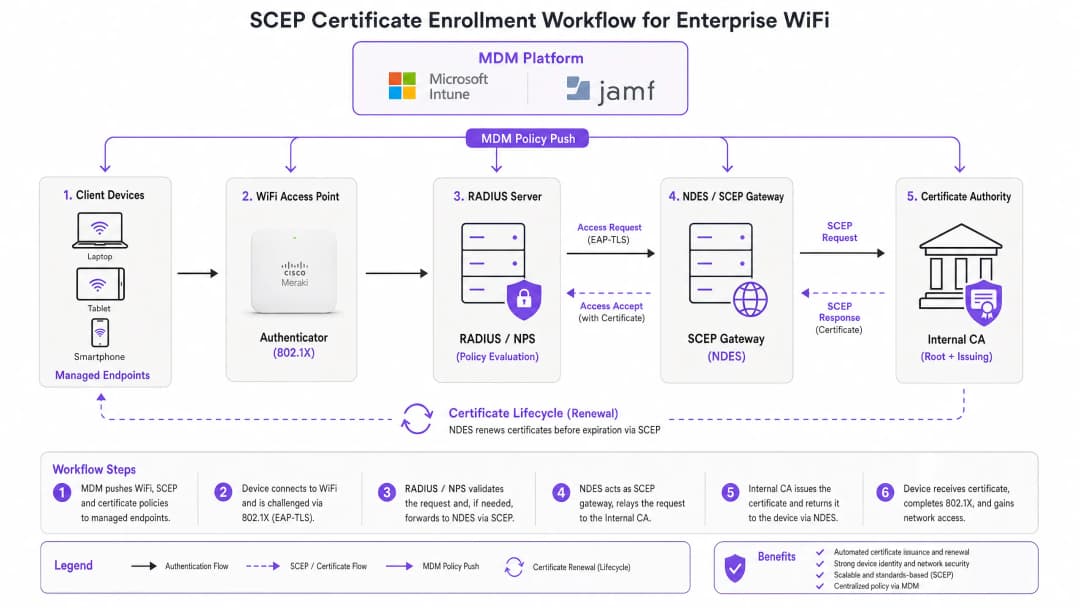
SCEP विरुद्ध PKCS: महत्त्वाचा निर्णय
Microsoft Intune आणि बहुतेक MDM प्लॅटफॉर्म दोन प्रमाणपत्र वितरण यंत्रणांचे समर्थन करतात: SCEP आणि PKCS. यामधील फरक रचनेचा (architectural) आहे, बाह्य स्वरूपाचा नाही.
SCEP सह, प्रायव्हेट की डिव्हाइसवरच तयार होते आणि तिथेच राहते. CA ती कधीही पाहत नाही. डिव्हाइसचे TPM (Windows वर) किंवा Secure Enclave (iOS/macOS वर) हार्डवेअर पातळीवर की चे संरक्षण करते. PKCS सह, CA मध्यवर्ती ठिकाणी की पेअर तयार करतो आणि नेटवर्कद्वारे डिव्हाइसवर प्रसारित करतो. CA कडे एक प्रत सुरक्षित राहते, ज्यामुळे की एस्क्रो (key escrow) करणे शक्य होते - जे S/MIME ईमेल एन्क्रिप्शनसाठी उपयुक्त आहे परंतु नेटवर्क ऑथेंटिकेशनसाठी अनावश्यक जोखीम निर्माण करते.
802.1X WiFi ऑथेंटिकेशनसाठी, SCEP वापरा. प्रायव्हेट की कधीही डिव्हाइस सोडत नाही. हा नियम आहे.
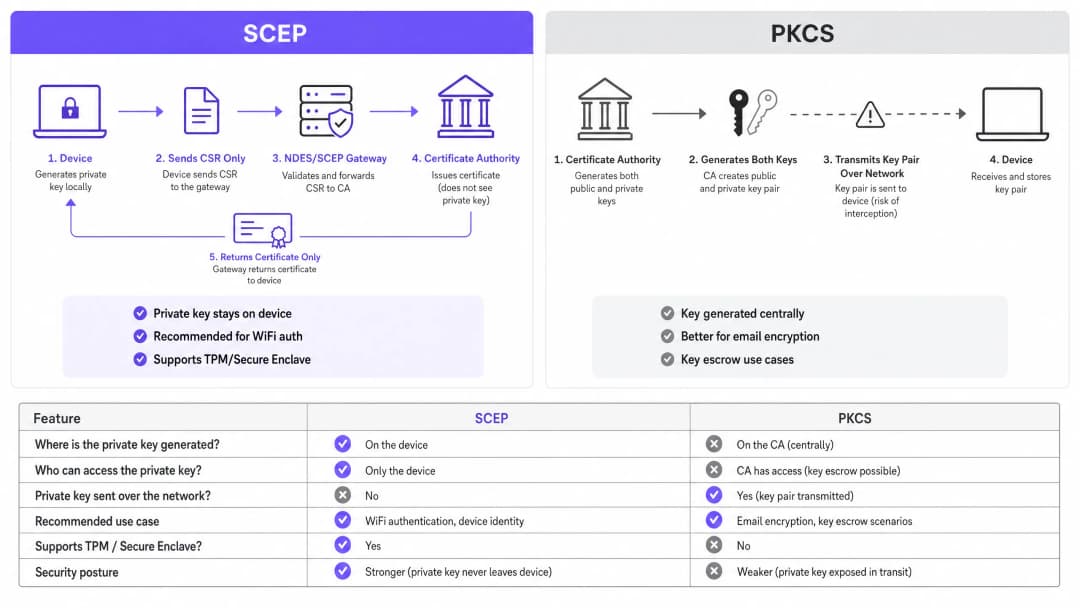
| निकष | SCEP | PKCS |
|---|---|---|
| प्रायव्हेट की येथे तयार होते | डिव्हाइस | CA (मध्यवर्ती ठिकाणी) |
| प्रायव्हेट की नेटवर्कवर प्रसारित केली जाते | कधीही नाही | होय |
| TPM / Secure Enclave ला सपोर्ट करते | होय | नाही |
| WiFi ऑथेंटिकेशनसाठी शिफारस केलेले | होय | नाही |
| ईमेल एन्क्रिप्शन (S/MIME) साठी शिफारस केलेले | नाही | होय |
| की एस्क्रो करणे शक्य | नाही | होय |
802.1X आणि EAP-TLS: ऑथेंटिकेशन फ्रेमवर्क
IEEE 802.1X हे पोर्ट-आधारित नेटवर्क ऍक्सेस कंट्रोल मानक आहे जे एंटरप्राइझ WiFi सुरक्षेचा पाया आहे. हे तीन भूमिका परिभाषित करते: सप्लिकंट (क्लायंट डिव्हाइस), ऑथेंटिकेटर (ऍक्सेस पॉईंट - Cisco Meraki, HPE Aruba, Ruckus, Juniper Mist, Ubiquiti UniFi, Cambium, Extreme किंवा Fortinet), आणि ऑथेंटिकेशन सर्व्हर (RADIUS सर्व्हर जसे की Microsoft NPS, FreeRADIUS किंवा Cisco ISE).
802.1X साठी EAP-TLS ही सर्वात सुरक्षित EAP पद्धत आहे. दोन्ही बाजू प्रमाणपत्रे सादर करतात: RADIUS सर्व्हर क्लायंटला आपले प्रमाणपत्र सादर करतो, आणि क्लायंट त्याचे SCEP-प्रोविझन्ड प्रमाणपत्र RADIUS सर्व्हरला सादर करतो. विश्वसनीय CA हायर्आर्कीमधील वैध, रद्द न केलेल्या प्रमाणपत्राशिवाय कोणतीही बाजू दुसऱ्या बाजूचे खोटे रूप धारण करू शकत नाही. हे परस्पर प्रमाणीकरण मॉडेल एकाच आर्किटेक्चरल निर्णयाद्वारे क्रेडेंशियल चोरी, Evil Twin हल्ले आणि रोग (rogue) ॲक्सेस पॉइंटच्या जोखमींना दूर करते.
EAP-TLS हे नेटवर्क लेयरवर मल्टी-फॅक्टर ऑथेंटिकेशनसाठी PCI DSS 4.0 आवश्यकता 8.6 पूर्ण करते. WPA3 Enterprise 192-bit (Suite B) डिप्लॉयमेंटसाठी हे आवश्यक आहे. कार्डधारक डेटा प्रक्रियेच्या कक्षेत येणाऱ्या कोणत्याही वायरलेस नेटवर्कसाठी - रिटेल पॉइंट-ऑफ-सेल, हॉटेल फ्रंट डेस्क, स्टेडियम तिकीट प्रणाली - EAP-TLS हा योग्य पर्याय आहे.
secure WiFi आर्किटेक्चर आणि प्रमाणपत्र-आधारित प्रमाणीकरण व्यापक सुरक्षा संरचनेत कसे बसते याच्या सखोल माहितीसाठी, आमचे आवश्यक मार्गदर्शक पहा.
-
अंमलबजावणी मार्गदर्शक
डिप्लॉयमेंटचा क्रम बदलता येणार नाही. Intune आणि Jamf प्रोफाइल अवलंबित्व क्रमाने सोडवतात: WiFi प्रोफाइल SCEP प्रोफाइलवर अवलंबून असते, जे Trusted Root प्रोफाइलवर अवलंबून असते. हे चुकीच्या क्रमाने डिप्लॉय केल्यास WiFi प्रोफाइल लागू होण्यात अयशस्वी ठरेल.
पायरी 1: तुमचे PKI डिझाइन करा
तुम्ही MDM कन्सोलला स्पर्श करण्यापूर्वी, तुमची प्रमाणपत्र हायर्आर्की डिझाइन करा. टू-टीअर PKI हे मानक आहे: ऑफलाइन रूट CA आणि ऑनलाइन जारी करणारे CA. रूट CA ची खाजगी की ही तुमच्या संपूर्ण प्रमाणपत्र पायाभूत सुविधांसाठी मुख्य ट्रस्ट अँकर आहे - तिला इंटरनेट किंवा नेटवर्कपासून पूर्णपणे वेगळे (air-gapped) ठेवा. जारी करणारे CA दैनंदिन प्रमाणपत्रे जारी करण्याचे काम करते आणि प्रमाणपत्र रद्दीकरण सूची (CRL) तसेच OCSP रिस्पॉन्डर प्रकाशित करते.
बहुतांश एंटरप्राइझ वेन्यू डिप्लॉयमेंटसाठी, Windows Server वर चालणारे Microsoft Active Directory Certificate Services (AD CS) जारी करणारे CA प्रदान करते. SCEPman किंवा SecureW2 सारख्या प्रदात्यांकडील क्लाउड-होस्ट केलेल्या PKI सेवा ऑन-प्रिमाइसेस पायाभूत सुविधांची आवश्यकता पूर्णपणे काढून टाकतात आणि हॉटेल गट, रिटेल साखळी किंवा बहु-साइट सार्वजनिक क्षेत्रातील संस्थांच्या वितरीत मालमत्ता डिप्लॉयमेंटसाठी या सेवांचे मूल्यांकन करणे फायदेशीर ठरेल.
पायरी 2: NDES सर्व्हर (किंवा क्लाउड SCEP गेटवे) डिप्लॉय करा
NDES (नेटवर्क डिव्हाइस एनरोलमेंट सर्व्हिस) ही Microsoft Windows Server ची भूमिका आहे जी तुमच्या MDM आणि CA दरम्यान SCEP गेटवे म्हणून काम करते. मुख्य कॉन्फिगरेशन आवश्यकता:
- Azure AD Application Proxy (किंवा समतुल्य रिव्हर्स प्रॉक्सी) द्वारे बाह्यरित्या NDES URL प्रकाशित करा. यामुळे इनबाउंड फायरवॉल पोर्ट्स न उघडता, दूरस्थ डिव्हाइसेस ऑन-साइट येण्यापूर्वीच नोंदणी करू शकतात.
- NDES सर्व्हिस अकाउंटला CA प्रमाणपत्र टेम्पलेटवर Read आणि Enrol परवानग्या आवश्यक आहेत.
- प्रमाणपत्र टेम्पलेटला Key Usage मध्ये Digital Signature आणि Key Encipherment वर सेट करा, आणि Extended Key Usage ला Client Authentication (OID: 1.3.6.1.5.5.7.3.2) वर सेट करा.
- योग्य प्रमाणपत्र वैधता कालावधी सेट करा. क्लायंट प्रमाणपत्रांसाठी एक वर्ष हे मानक आहे; स्थिर उपकरणांच्या ताफ्यातील डिव्हाइस प्रमाणपत्रांसाठी दोन वर्षे स्वीकार्य आहे.तुम्ही ऑन-प्रिमाइसेस NDES इन्फ्रास्ट्रक्चर टाळणे पसंत करत असल्यास, क्लाउड SCEP गेटवे थेट Intune आणि तुमच्या CA सोबत API द्वारे समाकलित होतात, ज्यामुळे IIS वरील अवलंबित्व पूर्णपणे संपुष्टात येते.
पायरी 3: Trusted Root Certificate प्रोफाइल तैनात करा
तुमच्या MDM प्लॅटफॉर्ममध्ये, एक Trusted Certificate प्रोफाइल तयार करा आणि तुमचे Root CA प्रमाणपत्र (आणि कोणतेही Intermediate CA प्रमाणपत्रे) .cer फाइल्स म्हणून अपलोड करा. इतर कोणत्याही प्रमाणपत्र किंवा WiFi प्रोफाइलच्या आधी हे प्रोफाइल तुमच्या लक्ष्यित डिव्हाइस ग्रुप्सवर तैनात करा. या पायरीशिवाय, डिव्हाइसेस EAP-TLS हँडशेक दरम्यान RADIUS सर्व्हरचे प्रमाणपत्र सत्यापित करू शकत नाहीत आणि स्वतःचे SCEP प्रमाणपत्र मिळवण्याची विनंती करताना ते जारी करणाऱ्या CA वर विश्वास ठेवू शकत नाहीत.
महत्त्वाचा नियम: नेहमी तीनही संबंधित प्रोफाइलवर एकाच Azure AD ग्रुपला (एकतर युजर्स किंवा डिव्हाइसेस) लक्ष्य करा. येथील विसंगती हे WiFi प्रोफाइल उपयोजन अयशस्वी होण्याचे सर्वात सामान्य कारण आहे.
पायरी 4: SCEP Certificate प्रोफाइल कॉन्फिगर करा
तुमच्या MDM मध्ये SCEP प्रमाणपत्र कॉन्फिगरेशन प्रोफाइल तयार करा:
- Subject name format: युझर-चालित प्रमाणीकरणासाठी,
CN={{UserPrincipalName}}वापरा. डिव्हाइस प्रमाणीकरणासाठी (शेअर केलेल्या डिव्हाइसेस आणि IoT साठी शिफारस केलेले),CN={{AAD_Device_ID}}वापरा. - Key usage: Digital Signature, Key Encipherment.
- Extended key usage: Client Authentication (OID: 1.3.6.1.5.5.7.3.2).
- SCEP server URL: बाह्यरित्या प्रकाशित केलेली NDES URL.
- Root certificate: पायरी 3 मधील Trusted Root प्रोफाइलशी लिंक करा.
- Certificate validity period: CA वर कॉन्फिगर केलेल्या टेम्प्लेटशी जुळवा.
पायरी 5: 802.1X WiFi प्रोफाइल तैनात करा
एक WiFi कॉन्फिगरेशन प्रोफाइल तयार करा:
- SSID: तुमच्या ॲक्सेस पॉइंट्सद्वारे ब्रॉडकास्ट केल्याप्रमाणे नेटवर्कचे नाव अचूकपणे प्रविष्ट करा.
- Security type: WPA2-Enterprise किंवा WPA3-Enterprise.
- EAP type: EAP-TLS.
- Client authentication certificate: पायरी 4 मधील SCEP प्रमाणपत्र प्रोफाइल निवडा.
- Server validation: पायरी 3 मधील Trusted Root प्रमाणपत्र निर्दिष्ट करा आणि अपेक्षित RADIUS सर्व्हरचे नाव प्रविष्ट करा. हे फसव्या प्रमाणपत्रांचे सादरीकरण करणाऱ्या बनावट ॲक्सेस पॉइंट्सशी डिव्हाइसेस कनेक्ट होण्यापासून प्रतिबंधित करते.
तुमच्या विशिष्ट सेटअपबद्दल काही प्रश्न आहेत का?
आमची टीम ८०,००० हून अधिक वेन्यूजमधील वेन्यू ऑपरेटर्स, IT मॅनेजर्स आणि नेटवर्क इंजिनिअर्ससोबत काम करते. २० मिनिटांचा कॉल बुक करा आणि तुमच्यासारख्या इतरांनी ही समस्या कशी सोडवली हे आम्ही तुम्हाला दाखवू.
सर्वोत्तम पद्धती
तुमच्या RADIUS सर्व्हरवर कठोर CRL तपासणी लागू करा
प्रमाणपत्र रद्द करणे हे ते कार्यात्मक नियंत्रण आहे जे खाते निष्क्रिय करणे आणि नेटवर्क प्रवेश अवरोधित करणे यामधील अंतर भरून काढते. जेव्हा एखादे डिव्हाइस हरवले जाते, चोरीला जाते किंवा कर्मचारी नोकरी सोडतो, तेव्हा AD खाते निष्क्रिय करा आणि CA वरील प्रमाणपत्र रद्द करा. तुमच्या RADIUS सर्व्हरने प्रत्येक प्रमाणीकरण प्रयत्नादरम्यान CRL तपासण्यासाठी कॉन्फिगर केलेले असणे आवश्यक आहे. जर CRL अनुपलब्ध असेल - कारण CDP (CRL Distribution Point) पोहोचण्यायोग्य नाही - तर बहुतेक RADIUS सर्व्हर डीफॉल्टनुसार प्रवेश खुला ठेवतात, जो सुरक्षिततेचा धोका आहे. तुमचे CDPs अत्यंत उपलब्ध असल्याची खात्री करा आणि जर CRL मिळवता आले नाही, तर प्रवेश नाकारण्यासाठी (fail closed) तुमचा RADIUS सर्व्हर कॉन्फिगर केलेला असल्याची खात्री करा.
रिअल-टाइम रद्दीकरणासाठी, CRL व्यतिरिक्त OCSP (Online Certificate Status Protocol) कॉन्फिगर करा. OCSP हे RADIUS सर्व्हरला संपूर्ण CRL डाउनलोड आणि विश्लेषित करण्याची आवश्यकता न ठेवता प्रति-प्रमाणपत्र स्थिती प्रतिसाद प्रदान करते.
सामायिक आणि IoT उपकरणांसाठी उपकरण प्रमाणपत्रे वापरा
सामायिक उपकरणांसाठी - हॉटेल हाऊसकीपिंग टॅब्लेट्स, रिटेल POS टर्मिनल्स, स्टेडियम प्रवेश नियंत्रण रीडर्स - वापरकर्ता प्रमाणपत्रांऐवजी उपकरण प्रमाणपत्रे वापरा. उपकरण प्रमाणपत्रे मशीनच्या ओळखीशी जोडलेली असतात, वापरकर्ता खात्याशी नाही. याचा अर्थ असा की कोणतीही वापरकर्ता लॉग इन असला तरीही उपकरण प्रमाणित होते, आणि प्रमाणपत्र रद्द करणे कर्मचाऱ्याच्या जाण्याऐवजी थेट उपकरणाच्या रेकॉर्डशी जोडलेले असते.
retail उपयोजनांसाठी, POS हार्डवेअरवरील उपकरण प्रमाणपत्रे पॉईंट ऑफ सेलवर वापरकर्ता-क्रेडेन्शियलची गुंतागुंत न वाढवता नेटवर्क-लेयर उपकरणाच्या ओळखीसाठी PCI DSS ची आवश्यकता देखील पूर्ण करतात.
प्रमाणपत्र नूतनीकरण स्वयंचलित करा
SCEP स्वयंचलित नूतनीकरणाला समर्थन देते: MDM उपकरणाला प्रमाणपत्र संपण्यापूर्वी पुन्हा नोंदणी करण्याचे निर्देश देते. प्रमाणपत्राच्या उर्वरित वैधतेच्या २०% कालावधी शिल्लक असताना नूतनीकरण सुरू करण्यासाठी तुमचे SCEP प्रोफाइल कॉन्फिगर करा. एक वर्षाच्या प्रमाणपत्रासाठी, नूतनीकरण संपण्याच्या साधारण ७३ दिवस आधी सुरू होते. हा कालावधी प्रमाणपत्र संपण्यापूर्वी आणि उपकरणांचा नेटवर्क प्रवेश गमावण्यापूर्वी कोणत्याही नूतनीकरण अपयशांचे निवारण करण्यासाठी पुरेसा वेळ देतो.
८०२.१X उपयोजनांमध्ये मुदत संपलेली प्रमाणपत्रे मोठ्या प्रमाणावर प्रमाणीकरण अपयशास कारणीभूत ठरणे ही सर्वात सामान्य ऑपरेशनल घटना आहे. SCEP द्वारे स्वयंचलित नूतनीकरण हा धोका पूर्णपणे काढून टाकतो.
प्रमाणपत्र गुणधर्मांनुसार नेटवर्कचे वर्गीकरण करा
RADIUS सर्व्हर्स प्रमाणपत्र गुणधर्म वाचू शकतात - जसे की Subject, SAN, किंवा सानुकूल OIDs - आणि त्यांचा वापर उपकरणांना डायनॅमिकरित्या VLANs कडे वर्ग करण्यासाठी करू शकतात. HousekeepingDevices टेम्पलेटवरून जारी केलेले प्रमाणपत्र असलेले हाऊसकीपिंग टॅब्लेट हाऊसकीपिंग VLAN वर जाते. RetailPOS टेम्पलेटवरील प्रमाणपत्र असलेले POS टर्मिनल PCI च्या कक्षेतील VLAN वर जाते. हे क्रिप्टोग्राफिकली लागू केलेले नेटवर्क वर्गीकरण आहे - जे SSID-आधारित किंवा MAC-आधारित दृष्टिकोनांपेक्षा बरेच अधिक विश्वासार्ह आहे.
त्याच भौतिक पायाभूत सुविधांवर Staff WiFi सोबतच Guest WiFi चालवणाऱ्या hospitality ऑपरेटर्ससाठी, प्रमाणपत्र गुणधर्मांद्वारे VLAN वर्गीकरण हे सुनिश्चित करते की उपकरण कोणत्या SSID ला जोडले गेले आहे याची पर्वा न करता अतिथी आणि कर्मचारी नेहमी वेगवेगळ्या नेटवर्क विभागांवर असतील.
त्रुटी निवारण आणि जोखीम कमी करणे
Intune मध्ये WiFi प्रोफाइल 'Error' किंवा 'Not Applicable' दर्शवत आहे
मूळ कारण: ग्रुप टार्गेटिंगमधील तफावत. SCEP प्रोफाइल WiFi प्रोफाइलपेक्षा वेगळ्या ग्रुपला दिले गेले आहे. Intune प्रमाणपत्राची अवलंबित्व सोडवू शकत नाही.
निवारण: तिन्ही प्रोफाइलचे (Trusted Root, SCEP, WiFi) ऑडिट करा. ते सर्व अगदी त्याच Azure AD ग्रुपला दिले गेल्याची खात्री करा. तुम्ही Users साठी उपयोजन करत असल्यास, तिन्ही प्रोफाइलचे लक्ष्य Users ग्रुप असले पाहिजे. Devices साठी उपयोजन करत असल्यास, तिन्ही प्रोफाइलचे लक्ष्य Devices ग्रुप असले पाहिजे.
NDES कडून HTTP ४०३ त्रुटी येत आहेत
मूळ कारण: Intune Certificate Connector सर्व्हिस खात्याकडे CA प्रमाणपत्र टेम्पलेटवर Read किंवा Enrol परवानग्या नाहीत, किंवा फायरवॉल URL फिल्टरिंग SCEP क्वेरी स्ट्रिंग्स ब्लॉक करत आहे.निवारण: CA कन्सोलमधील टेम्पलेटवर कनेक्टर अकाउंटला Read आणि Enrol परवानग्या आहेत याची पडताळणी करा. ?operation=GetCACaps किंवा ?operation=PKIOperation समाविष्ट असलेल्या ब्लॉक केलेल्या विनंत्यांसाठी फायरवॉल लॉग तपासा. या क्वेरी स्ट्रिंग्समध्ये कोणताही बदल न करता पुढे जाणे आवश्यक आहे.
डिव्हाइसेस संपण्यापूर्वी प्रमाणपत्रांचे नूतनीकरण करण्यात अयशस्वी ठरतात
मूळ कारण: SCEP नूतनीकरण विंडो खूप लहान आहे, किंवा नूतनीकरणाच्या वेळी NDES सर्व्हरपर्यंत पोहोचणे शक्य नसते.
निवारण: नूतनीकरण मर्यादा प्रमाणपत्र वैधतेच्या 20% वर सेट करा. NDES URL हायली-अवेलेबल रिव्हर्स प्रॉक्सीद्वारे प्रकाशित केल्याची खात्री करा. नूतनीकरण विनंती अपयशांसाठी NDES IIS लॉगचे निरीक्षण करा आणि त्यांच्यावर सक्रियपणे अलर्ट मिळवा.
RADIUS वैध प्रमाणपत्रे नाकारते
मूळ कारण: RADIUS सर्व्हरच्या विश्वसनीय CA स्टोअरमध्ये जारी करणाऱ्या CA प्रमाणपत्राचा समावेश नाही, किंवा CRL शिळी झाली आहे.
निवारण: RADIUS सर्व्हरच्या विश्वसनीय स्टोअरमध्ये संपूर्ण CA चेन (Root CA + Issuing CA) इंपोर्ट करा. CRL यशस्वीरित्या आणली जात असल्याची आणि CDP URL पर्यंत RADIUS सर्व्हरवरून पोहोचता येत असल्याची पडताळणी करा. CRL चे पुढील-अपडेट टाइमस्टॅम्प तपासा - ते निघून गेले असल्यास, CA ला नवीन CRL प्रकाशित करणे आवश्यक आहे.
सुरक्षेसोबतच अधिक व्यापक नेटवर्क कामगिरीच्या बाबींसाठी, आमचे बँडविड्थ व्यवस्थापन मार्गदर्शक पहा.
ROI आणि व्यावसायिक प्रभाव
SCEP-आधारित प्रमाणपत्र नोंदणीसाठी व्यावसायिक बाजू अगदी स्पष्ट आहे. पासवर्ड-आधारित WiFi हे हेल्पडेस्क तिकिटांचे एक अंदाज लावणारे प्रमाण तयार करते: पासवर्ड संपणे, लॉकआउट्स, कर्मचारी पाहुण्यांसोबत क्रेडेंशियल शेअर करणे, आणि नवीन कर्मचाऱ्यांसाठी ऑनबोर्डिंगमधील अडचणी. प्रमाणपत्र-आधारित प्रमाणीकरण अंतिम वापरकर्त्यासाठी अदृश्य असते. डिव्हाइसेस आपोआप कनेक्ट होतात. संपण्यासाठी, शेअर करण्यासाठी किंवा विसरण्यासाठी कोणतेही पासवर्ड नसतात.
पासवर्ड-आधारित WiFi कडून SCEP सह EAP-TLS कडे स्थलांतरित होणाऱ्या संस्था सहसा WiFi-संबंधित हेल्पडेस्क तिकिटांमध्ये 70-80% घट झाल्याचे नोंदवतात (Purple अंतर्गत डेटा, 2024, हॉस्पिटॅलिटी आणि रिटेल इस्टेटमधील उपयोजनांवर आधारित). हेल्पडेस्कवरील बचत हीच अनेकदा पहिल्या वर्षात अंमलबजावणीच्या खर्चाचे समर्थन करते.
अनुपालनाचा प्रभाव देखील तितकाच ठोस आहे. EAP-TLS नेटवर्क लेयरवर मल्टी-फॅक्टर प्रमाणीकरणासाठी PCI-DSS 4.0 ची आवश्यकता 8.6 पूर्ण करते. आरोग्यसेवा वातावरणासाठी, हे वायरलेस नेटवर्क ऍक्सेससाठी HIPAA तांत्रिक सुरक्षा आवश्यकतांशी सुसंगत आहे. सार्वजनिक क्षेत्रातील संस्थांसाठी, हे नेटवर्क ऍक्सेस नियंत्रणासाठी NCSC Cyber Essentials Plus प्रमाणन आवश्यकतांना समर्थन देते.
वाहतूक ऑपरेटरसाठी - रेल्वे फ्रँचायझी, विमानतळ ऑपरेटर, बस नेटवर्क - कर्मचारी डिव्हाइसेसवर प्रमाणपत्र-आधारित प्रमाणीकरण हे सुनिश्चित करते की सुरक्षिततेच्या दृष्टीने संवेदनशील डेटा वाहून नेणारे कार्यरत नेटवर्क्स प्रवासी WiFi पासून वेगळे ठेवले जातात आणि क्रेडेंशियल-आधारित हल्ल्यांपासून सुरक्षित राहतात. सुरक्षित नेटवर्क डिप्लॉयमेंटसोबत अभिप्राय आणि अनुभव व्यवस्थापनासाठी, आमचे वेन्यू फीडबॅक प्लेबुक पहा.
महत्वाच्या व्याख्या
SCEP (Simple Certificate Enrollment Protocol)
एक IETF-प्रमाणित प्रोटोकॉल (RFC 8894) जो व्यवस्थापित उपकरणांसाठी X.509 सर्टिफिकेट नोंदणी स्वयंचलित करतो. डिव्हाइस स्वतःची प्रायव्हेट की स्थानिक पातळीवर तयार करते आणि गेटवेद्वारे CA ला केवळ Certificate Signing Request पाठवते. प्रायव्हेट की कधीही डिव्हाइस सोडत नाही.
IT टीम्सना मोठ्या प्रमाणावर WiFi ऑथेंटिकेशन सर्टिफिकेट्स तैनात करण्यासाठी MDM प्लॅटफॉर्म्स (Intune, Jamf) कॉन्फिगर करताना SCEP चा सामना करावा लागतो. 802.1X EAP-TLS तैनातीसाठी ही सर्वात शिफारसीय यंत्रणा आहे कारण प्रायव्हेट की एंडपॉइंटवर हार्डवेअर-संरक्षित असते.
EAP-TLS (Extensible Authentication Protocol - Transport Layer Security)
सर्वात सुरक्षित 802.1X ऑथेंटिकेशन पद्धत. क्लायंट डिव्हाइस आणि RADIUS सर्व्हर दोन्ही X.509 सर्टिफिकेट्स सादर करतात. विश्वसनीय CA पदानुक्रमातील वैध, रद्द न केलेल्या सर्टिफिकेटशिवाय कोणतीही बाजू ऑथेंटिकेट करू शकत नाही.
EAP-TLS हा मुख्य ऑथेंटिकेशन प्रोटोकॉल आहे जो SCEP सर्टिफिकेट तैनातीद्वारे सक्षम केला जातो. हा PCI DSS 4.0 ची आवश्यकता 8.6 पूर्ण करतो आणि WPA3 Enterprise 192-bit (Suite B) तैनातीसाठी आवश्यक आहे.
PKCS (Public Key Cryptography Standards)
एक सर्टिफिकेट वितरण यंत्रणा ज्यामध्ये CA द्वारे पब्लिक आणि प्रायव्हेट की जोडी दोन्ही मध्यवर्ती पद्धतीने तयार केल्या जातात आणि एंडपॉइंटवर पाठवल्या जातात. CA प्रायव्हेट की ची एक प्रत स्वतःकडे ठेवतो, ज्यामुळे की एस्क्रो सक्षम होतो.
Intune मधील सर्टिफिकेट प्रोफाइल्स कॉन्फिगर करताना IT टीम्स SCEP आणि PKCS यांपैकी एक निवडतात. S/MIME ईमेल एन्क्रिप्शनसाठी PKCS योग्य आहे जेथे की एस्क्रो आवश्यक असतो. WiFi ऑथेंटिकेशनसाठी याची शिफारस केली जात नाही कारण प्रायव्हेट की नेटवर्कवर प्रसारित केली जाते.
NDES (Network Device Enrollment Service)
एक Microsoft Windows Server रोल जो MDM प्लॅटफॉर्म आणि Certificate Authority मधील SCEP गेटवे म्हणून काम करतो. हा डिव्हाइस नोंदणी विनंत्या प्रमाणित करतो आणि CSRs पुढील प्रक्रियेसाठी CA कडे पाठवतो.
Microsoft Intune सह ऑन-प्रिमाइसेस SCEP तैनातीसाठी NDES हा एक आवश्यक पायाभूत घटक आहे. दुर्गम उपकरणांना नोंदणी करण्याची अनुमती देण्यासाठी हे ॲप्लिकेशन प्रॉक्सीद्वारे बाह्यरित्या प्रकाशित केले जाणे आवश्यक आहे. क्लाउड SCEP गेटवे हा एक पर्याय आहे जो ऑन-प्रिमाइसेस NDES वरील अवलंबित्व काढून टाकतो.
CRL (Certificate Revocation List)
CA द्वारे प्रकाशित केलेली एक यादी ज्यामध्ये अशा सर्टिफिकेट्सचे अनुक्रमांक असतात जे त्यांच्या समाप्ती तारखेपूर्वीच रद्द केले गेले आहेत. रद्द केलेल्या सर्टिफिकेट्स असलेली उपकरणे ऑथेंटिकेट करू शकत नाहीत याची खात्री करण्यासाठी RADIUS सर्व्हर CRL तपासतात.
CRL चेकिंग हे ऑपरेशनल नियंत्रण आहे जे सर्टिफिकेट रद्द करणे लागू करते. IT टीम्सनी त्यांच्या RADIUS सर्व्हरला प्रत्येक ऑथेंटिकेशनच्या प्रयत्नावर CRL तपासण्यासाठी कॉन्फिगर केले पाहिजे आणि CRL Distribution Point (CDP) अत्यंत उपलब्ध असल्याची खात्री केली पाहिजे.
802.1X
पोर्ट-आधारित नेटवर्क ऍक्सेस नियंत्रणासाठी एक IEEE मानक. हे एंटरप्राइझ WiFi आणि वायर्ड नेटवर्कमध्ये वापरले जाणारे त्रि-पक्षीय ऑथेंटिकेशन फ्रेमवर्क (सप्लिकंट, ऑथेंटिकेटर, ऑथेंटिकेशन सर्व्हर) परिभाषित करते.
802.1X ही एक फ्रेमवर्क आहे ज्या अंतर्गत EAP-TLS आणि SCEP कार्यरत असतात. WPA2-Enterprise किंवा WPA3-Enterprise SSIDs कॉन्फिगर करताना आणि RADIUS सर्व्हर पॉलिसी सेट करताना IT टीम्सना याचा सामना करावा लागतो.
RADIUS (Remote Authentication Dial-In User Service)
एक नेटवर्किंग प्रोटोकॉल जो नेटवर्क ऍक्सेससाठी केंद्रीकृत ऑथेंटिकेशन, ऑथरायझेशन आणि अकाउंटिंग (AAA) प्रदान करतो. 802.1X तैनातीमध्ये, RADIUS सर्व्हर क्लायंट सर्टिफिकेट्स प्रमाणित करतो आणि VLAN असाइनमेंट धोरणे लागू करतो.
प्रत्येक 802.1X तैनातीमध्ये RADIUS सर्व्हर हा ऑथेंटिकेशन निर्णयाचा मुख्य बिंदू असतो. सामान्य अंमलबजावणीमध्ये Microsoft NPS, FreeRADIUS आणि Cisco ISE यांचा समावेश होतो. हे विश्वसनीय CA साखळी आणि कठोर CRL किंवा OCSP चेकिंगसह कॉन्फिगर केले जाणे आवश्यक आहे.
CSR (Certificate Signing Request)
एका उपकरणाद्वारे व्युत्पन्न केलेला एन्कोड केलेल्या मजकुराचा ब्लॉक ज्यामध्ये उपकरणाची पब्लिक की आणि ओळख माहिती असते. स्वाक्षरी केलेल्या सर्टिफिकेटची विनंती करण्यासाठी डिव्हाइस SCEP गेटवेद्वारे CA ला CSR पाठवते. संबंधित प्रायव्हेट की डिव्हाइसवर तयार केली जाते आणि ठेवली जाते.
CSR हा SCEP नोंदणी प्रक्रियेमधील मुख्य घटक आहे. IT टीम्स त्यांच्या MDM प्लॅटफॉर्ममधील SCEP सर्टिफिकेट प्रोफाइलमध्ये CSR स्वरूप (विषय नाव, की वापर, EKU) कॉन्फिगर करतात.
PKI (Public Key Infrastructure)
डिजिटल प्रमाणपत्रे तयार करणे, व्यवस्थापित करणे, वितरित करणे आणि रद्द करण्यासाठी आवश्यक असलेले हार्डवेअर, सॉफ्टवेअर, पॉलिसी आणि प्रक्रियांचे संयोजन. एका मानक एंटरप्राइझ PKI मध्ये ऑफलाइन रूट CA आणि ऑनलाइन इश्यूइंग CA समाविष्ट असतात.
EAP-TLS डिप्लॉयमेंटसाठी PKI ही पहिली अट आहे. IT टीम्सनी SCEP कॉन्फिगर करण्यापूर्वी द्वि-स्तरीय CA पदानुक्रम डिझाइन आणि डिप्लॉय केला पाहिजे. क्लाउड-होस्ट केलेल्या PKI सेवांमुळे विखुरलेल्या मालमत्तेच्या डिप्लॉयमेंटसाठी इन्फ्रास्ट्रक्चरचा ताण कमी होतो.
VLAN (Virtual Local Area Network)
एक लॉजिकल नेटवर्क सेगमेंट जे लेयर २ वर ट्रॅफिक वेगळे करते. 802.1X डिप्लॉयमेंटमध्ये, RADIUS सर्व्हर्स प्रमाणपत्राचे गुणधर्म, वापरकर्त्याची ओळख किंवा पॉलिसीच्या आधारे उपकरणांना डायनॅमिकपणे VLANs वर असाइन करतात.
RADIUS द्वारे VLAN असाइनमेंट ही एंटरप्राइझ WiFi मधील नेटवर्क सेगमेंटेशन लागू करणारी यंत्रणा आहे. IT टीम्स याचा वापर POS उपकरणांना PCI-स्कोप असलेल्या VLANs वर, गेस्ट उपकरणांना फक्त-इंटरनेट असलेल्या VLANs वर आणि कर्मचारी उपकरणांना कॉर्पोरेट VLANs वर वेगळे करण्यासाठी करतात - तेही सर्वकाही एकाच भौतिक इन्फ्रास्ट्रक्चरमधून.
सोडवलेली उदाहरणे
एक 200 खोल्यांच्या Premier Inn मालमत्तेला 150 iOS हाउसकीपिंग उपकरणांसाठी सुरक्षित WiFi उपयोजित करणे आवश्यक आहे. कर्मचारी सध्या पाहुण्यांसोबत WPA2-Personal पासवर्ड शेअर करत आहेत, ज्यामुळे अनुपालन आणि ऑपरेशनल जोखीम निर्माण होत आहे. IT संचालकांना दैनंदिन कामकाजात अडथळा न आणता शेअर केलेला पासवर्ड काढून टाकण्याची गरज आहे.
IT संचालक Jamf-चलित SCEP उपयोजन तीन टप्प्यांत लागू करतात. पहिला टप्पा: 'Housekeeping Devices' स्मार्ट ग्रुपला लक्ष्य करून, Jamf Trusted Certificate प्रोफाइलद्वारे Root CA प्रमाणपत्र सर्व 150 iOS उपकरणांवर पाठवले जाते. दुसरा टप्पा: SCEP प्रमाणपत्र प्रोफाइल उपयोजित केले जाते, जे उपकरणांना Azure AD App Proxy-प्रकाशित NDES सर्व्हरकडे निर्देशित करते. प्रमाणपत्र उपकरणाच्या हार्डवेअरशी जोडण्यासाठी सब्जेक्ट नावामध्ये CN={{SERIALNUMBER}} वापरले जाते. तिसरा टप्पा: EAP-TLS निर्दिष्ट करणारे आणि SCEP प्रमाणपत्राशी लिंक करणारे WPA2-Enterprise WiFi प्रोफाइल पाठवले जाते. उपकरणे कोणत्याही आवाजाशिवाय किंवा सूचनांशिवाय स्वयंचलितपणे प्रमाणीकृत होतात. शेअर केलेला पासवर्ड असलेला SSID बंद केला जातो. RADIUS सर्व्हर कडक CRL तपासणी आणि VLAN वितरणासह कॉन्फिगर केला आहे: हाउसकीपिंग उपकरणे VLAN 20 (ऑपरेशन्स) वर आणि पाहुण्यांची उपकरणे VLAN 10 (केवळ-इंटरनेट) वर येतात.
500 ठिकाणे असलेल्या एका रिटेल साखळीला पेमेंट प्रोसेसिंग सॉफ्टवेअर चालवणाऱ्या Windows POS टॅब्लेटसाठी कॉर्पोरेट WiFi सुरक्षित करणे आवश्यक आहे. PCI-DSS 4.0 अनुपालनासाठी नेटवर्क लेयरवर मल्टी-फॅक्टर प्रमाणीकरण आवश्यक आहे. सध्याचे WPA2-Personal सेटअप PCI-DSS आवश्यकता 8.6 मूल्यांकनामध्ये अपयशी ठरते.
नेटवर्क आर्किटेक्ट सर्व 500 ठिकाणांवर Microsoft Intune आणि SCEP द्वारे EAP-TLS उपयोजित करतो. हे उपयोजन सब्जेक्ट नाव म्हणून CN={{AAD_Device_ID}} सह उपकरणाची प्रमाणपत्रे वापरते, जे प्रत्येक प्रमाणपत्र Intune उपकरणाच्या रेकॉर्डशी जोडते. तीन-प्रोफाइल क्रम (Trusted Root, SCEP, WiFi) 'POS Devices' Azure AD ग्रुपवर उपयोजित केला जातो - जो तिन्ही प्रोफाइलमध्ये समान ग्रुप असतो. RADIUS सर्व्हर प्रमाणपत्राच्या जारी करणाऱ्या टेम्पलेटवर आधारित POS उपकरणांना समर्पित PCI-व्याप्त VLAN (VLAN 100) कडे नियुक्त करतो. CRL चार तासांच्या वैधतेसह अत्यंत उपलब्ध अशा CDN-होस्ट केलेल्या एंडपॉईंटवर प्रकाशित केले जाते. रिअल-टाइम रद्दीकरण तपासणीसाठी OCSP सक्षम केले आहे. QSA द्वारे PCI-DSS 4.0 आवश्यकता 8.6 नुसार उपयोजनाचे प्रमाणीकरण केले जाते.
सराव प्रश्न
Q1. तुम्ही Intune मधील 'All Staff' युझर ग्रुपसाठी Trusted Root आणि SCEP प्रमाणपत्र प्रोफाइल्स डिप्लॉय केले आहेत. त्यानंतर तुम्ही 'Corporate Devices' डिव्हाइस ग्रुपसाठी WiFi प्रोफाइल डिप्लॉय केले. उपकरणांना प्रमाणपत्रे मिळतात परंतु Intune कन्सोलमध्ये WiFi प्रोफाइल 'Error' दर्शवते. याचे बहुधा काय कारण असावे आणि तुम्ही ते कसे दुरुस्त कराल?
टीप: Intune प्रोफाइल्समधील डिपेंडन्सी कशा प्रकारे सोडवते आणि प्रोफाइल्स वेगवेगळ्या ग्रुप प्रकारांना लक्ष्य करतात तेव्हा काय होते याचा विचार करा.
नमुना उत्तर पहा
याचे मूळ कारण ग्रुप टार्गेटिंगमधील तफावत आहे. WiFi प्रोफाइल SCEP प्रोफाइलवर अवलंबून असते, जे Trusted Root प्रोफाइलवर अवलंबून असते. प्रोफाइल्स वेगवेगळ्या ग्रुप प्रकारांना (युझर्स विरुद्ध डिव्हाइसेस) लक्ष्य करत असताना Intune या डिपेंडन्सी सोडवू शकत नाही. उपाय: हे तिन्ही प्रोफाइल्स एकाच ग्रुपमध्ये पुन्हा डिप्लॉय करा. जर WiFi प्रोफाइल 'Corporate Devices' (डिव्हाइस ग्रुप) ला लक्ष्य करत असेल, तर SCEP आणि Trusted Root प्रोफाइल्सनी देखील 'Corporate Devices' लाच लक्ष्य केले पाहिजे. पर्याय म्हणून, युझर-आधारित ऑथेंटिकेशन आवश्यक असल्यास तिन्ही प्रोफाइल्स युझर ग्रुपमध्ये हलवा.
Q2. एका हॉटेलच्या हाउसकीपरचा iPad चोरीला गेल्याची नोंद झाली आहे. तुम्ही त्वरित हाउसकीपरचे Active Directory खाते निष्क्रिय करता. दुसऱ्या दिवशी सकाळी, चोरीला गेलेला iPad अजूनही हॉटेलच्या WPA2-Enterprise नेटवर्कशी कनेक्ट होत आहे. असे का होत आहे, आणि हे रोखण्यासाठी तुम्ही कोणत्या दोन उपाययोजना कराल?
टीप: EAP-TLS ऑथेंटिकेशन दरम्यान RADIUS सर्व्हर प्रत्यक्षात काय प्रमाणित करतो आणि प्रमाणपत्राच्या वैधतेवर कोणते नियंत्रणे नियंत्रण ठेवतात याचा विचार करा.
नमुना उत्तर पहा
AD खाते निष्क्रिय केल्याने iPad वर साठवलेले क्लायंट प्रमाणपत्र रद्द होत नाही. EAP-TLS ऑथेंटिकेशन दरम्यान RADIUS सर्व्हर प्रमाणपत्राची पडताळणी करतो, AD खात्याच्या स्थितीची नाही. आवश्यक असलेल्या दोन उपाययोजना पुढीलप्रमाणे आहेत: (१) CA वर डिव्हाइस प्रमाणपत्र रद्द (revoke) करा - यामुळे प्रमाणपत्राचा अनुक्रमांक CRL मध्ये जोडला जाईल; (२) RADIUS सर्व्हर कडक CRL तपासणीसह कॉन्फिगर केला असल्याची खात्री करा जेणेकरून तो नवीन CRL मिळवून पुढील ऑथेंटिकेशनच्या प्रयत्नात रद्द केलेले प्रमाणपत्र नाकारेल. जलद निरसनाचा पर्याय म्हणून, रीअल-टाइम प्रमाणपत्र स्थिती तपासणीसाठी RADIUS सर्व्हरवर OCSP कॉन्फिगर करा.
Q3. एक रिटेल चेन ५०० POS ठिकाणी 802.1X WiFi डिप्लॉय करत आहे. सुरक्षा आर्किटेक्टने NDES सर्व्हर डिप्लॉय करणे टाळण्यासाठी SCEP ऐवजी PKCS प्रमाणपत्र वितरणाचा वापर करण्याचा प्रस्ताव दिला आहे. PCI DSS 4.0 मूल्यांकनाचे पुनरावलोकन करणाऱ्या QSA ने एक चिंता व्यक्त केली आहे. ती चिंता कोणती आहे आणि योग्य शिफारस काय आहे?
टीप: PCI DSS खाजगी की (private key) हाताळणीबद्दल काय सांगते आणि वितरणादरम्यान PKCS खाजगी की सोबत काय करते याचा विचार करा.
नमुना उत्तर पहा
QSA ची चिंता अशी आहे की PKCS नेटवर्कवर CA कडून डिव्हाइसवर खाजगी की ट्रान्समिट करते. PCI DSS 4.0 मधील आवश्यकता ३.५ नुसार, ऑथेंटिकेशनसाठी वापरल्या जाणाऱ्या खाजगी की उघड होण्यापासून सुरक्षित ठेवणे आवश्यक आहे. नेटवर्कवर खाजगी की ट्रान्समिट केल्याने - अगदी कूटबद्ध (encrypted) स्वरूपात असली तरीही - एक धोका निर्माण होतो, जो SCEP पूर्णपणे काढून टाकतो. योग्य शिफारस म्हणजे SCEP वापरणे, जिथे खाजगी की POS डिव्हाइसवरच तयार केली जाते आणि तिथून कधीही बाहेर जात नाही. ऑन-प्रिमाइसेस NDES इन्फ्रास्ट्रक्चर टाळण्यासाठी, आर्किटेक्टने API द्वारे थेट Intune आणि CA शी समाकलित होणाऱ्या क्लाउड SCEP गेटवे सेवेचा विचार केला पाहिजे.
Q4. तुम्ही एका मोठ्या कॉन्फरन्स सेंटरसाठी WiFi नेटवर्क डिझाइन करत आहात जिथे वर्षाला ५० पेक्षा जास्त इव्हेंट्स आयोजित केले जातात. कर्मचाऱ्यांच्या डिवाइसेसना सुरक्षित 802.1X नेटवर्कवर असणे आवश्यक आहे. एखाद्या कंत्राटदाराचे (contractor) डिव्हाइस हॅक किंवा धोक्यात आले असल्यास, ते १५ मिनिटांच्या आत नेटवर्कपासून वेगळे केले जाऊ शकते याची तुम्हाला खात्री करायची आहे. तुम्ही कोणते प्रमाणपत्र रद्द करण्याची यंत्रणा (certificate revocation mechanism) कॉन्फिगर कराल आणि का?
टीप: प्रमाणपत्र रद्द करण्याच्या लेटन्सीच्या (revocation latency) संदर्भात CRL आणि OCSP ची तुलना करा आणि RADIUS सर्व्हर रद्द केलेल्या प्रमाणपत्रावर किती वेगाने कारवाई करतो हे कशावरून ठरते ते पहा.
नमुना उत्तर पहा
RADIUS सर्व्हरवर OCSP (Online Certificate Status Protocol) कॉन्फिगर करा. CRL-आधारित रद्द करण्यामध्ये एक लेटन्सी असते जी CRL च्या वैधतेच्या कालावधीवरून ठरते - सामान्यतः १ ते २४ तास - याचा अर्थ असा की जोपर्यंत RADIUS सर्व्हर पुढील CRL मिळवत नाही तोपर्यंत रद्द केलेले प्रमाणपत्र अद्याप ऑथेंटिकेट होऊ शकते. OCSP रिअल-टाइममध्ये प्रत्येक प्रमाणपत्राच्या स्थितीचे प्रतिसाद प्रदान करते: जेव्हा CA वर प्रमाणपत्र रद्द केले जाते, तेव्हा OCSP रिस्पॉन्डर पुढील क्वेरीवर त्वरित 'रद्द' (revoked) स्थिती परत करतो. RADIUS सर्व्हरवर OCSP कॉन्फिगर केल्यामुळे, कंत्राटदाराचे रद्द केलेले प्रमाणपत्र पुढील ऑथेंटिकेशनच्या प्रयत्नात, सामान्यतः काही सेकंदांत ब्लॉक केले जाते. OCSP रिस्पॉन्डर उच्च पातळीवर उपलब्ध (highly available) असल्याची खात्री करा - जर तो अनुपलब्ध असेल आणि RADIUS सर्व्हर fail closed वर कॉन्फिगर केलेला असेल, तर सर्व ऑथेंटिकेशन अयशस्वी होतील.
या मालिकेमध्ये पुढे वाचा
CIPA compliance: venue operators साठी compliance checklist
तुमचे WiFi CIPA च्या बंधनात येते की नाही हे तुम्ही ठरवू शकाल, त्यानंतर नेटवर्कचे वर्गीकरण करू शकाल, Purple Shield द्वारे DNS रूट करू शकाल आणि बायपास मार्ग बंद करू शकाल. Form 486 किंवा Form 479 प्रमाणपत्रासाठी कोणते पुरावे ठेवावे हे देखील तुम्हाला समजेल. ही checklist प्रत्येक आवश्यकतेला एक मालक नियुक्त करते, जेणेकरून तुमच्या पुढील फंडिंग वर्षाच्या प्रमाणपत्रात काहीही सुटणार नाही.
WPA3 transition mode कनेक्शन बिघाड: Cisco Meraki, HPE Aruba आणि Ruckus साठी एक उपयोजन चेकलिस्ट
डिव्हाइसेस WPA3 SAE transition mode SSID वर का अयशस्वी होत आहेत याचे निदान करण्यासाठी आणि ते Cisco Meraki, HPE Aruba किंवा Ruckus वर दुरुस्त करण्यासाठी या चेकलिस्टचा वापर करा. तुम्ही 802.11 स्टेटस कोडचे त्यांच्या कारणांशी मिलान कराल, PMF, 802.11r आणि 6GHz च्या समस्या वेगळ्या कराल आणि फक्त WPA3-only SSID वर कधी स्थलांतरित व्हायचे ते ठरवाल.
सर्वोत्तम DNS filtering: व्यवसायांसाठी एक व्यापक मार्गदर्शक
हे तांत्रिक संदर्भ मार्गदर्शक स्पष्ट करते की कशा प्रकारे एंटरप्राइझ DNS filtering हे कनेक्शन स्थापित होण्यापूर्वीच, रेझोल्युशन लेयरवर दुर्भावनापूर्ण डोमेन्स ब्लॉक करून सार्वजनिक नेटवर्क सुरक्षित करते. हे IT संचालक, नेटवर्क आर्किटेक्ट आणि वेन्यू ऑपरेशन्स टीम्सना डेप्युलॉयमेंट आर्किटेक्चर, फायरवॉल कॉन्फिगरेशन आणि आवश्यक कंप्लायन्स संदर्भ प्रदान करते जे त्यांना हॉस्पिटॅलिटी, रिटेल आणि सार्वजनिक क्षेत्रातील वातावरणात Guest WiFi सुरक्षित करण्यासाठी आवश्यक आहेत. Purple Shield हे 80,000 पेक्षा जास्त लाईव्ह वेन्यूजमध्ये DNS स्तरावर मालवेअर, बॉटनेट्स आणि अयोग्य कंटेंट ब्लॉक करते.
तुमच्या विशिष्ट सेटअपबद्दल काही प्रश्न आहेत का?
आमची टीम ८०,००० हून अधिक वेन्यूजमधील वेन्यू ऑपरेटर्स, IT मॅनेजर्स आणि नेटवर्क इंजिनिअर्ससोबत काम करते. २० मिनिटांचा कॉल बुक करा आणि तुमच्यासारख्या इतरांनी ही समस्या कशी सोडवली हे आम्ही तुम्हाला दाखवू.