
Como Implementar SCEP para a Inscrição Automatizada de Certificados WiFi
Este guia explica como implementar o SCEP (Simple Certificate Enrollment Protocol) para a inscrição automatizada de certificados WiFi em espaços empresariais. Abrange todo o plano de arquitetura - desde o design de PKI e integração de MDM até à sequência de implementação obrigatória de três passos - e mostra aos gestores de TI e arquitetos de rede como eliminar credenciais partilhadas, automatizar a gestão do ciclo de vida dos certificados e cumprir os requisitos de PCI DSS e GDPR à escala.
Ouça este guia
Ver transcrição do podcast
Parte da nossa série principal: Enterprise WiFi Security Guide →
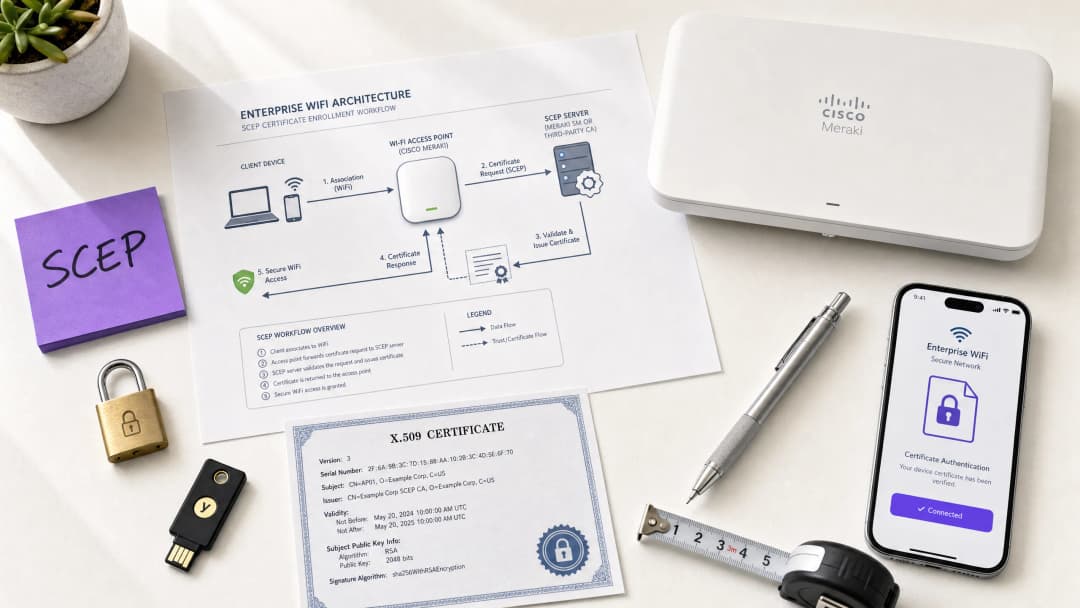
Executive summary
For venue operators running Guest WiFi across hotels, retail estates, stadiums, and conference centres, relying on pre-shared keys or basic captive portals for staff network access is a security liability. Modern network architecture demands 802.1X authentication using EAP-TLS (Extensible Authentication Protocol - Transport Layer Security), ensuring every device is cryptographically verified before it touches the network. The challenge is distribution: how do you deploy unique client certificates to thousands of Windows, iOS, and Android devices without burying your helpdesk?
The answer is SCEP - the Simple Certificate Enrolment Protocol. Formalised by the IETF as RFC 8894 in 2020, SCEP automates certificate enrolment across managed device fleets. When integrated with an MDM platform such as Microsoft Intune or Jamf, SCEP delivers zero-touch certificate provisioning: devices request, receive, and renew their own certificates without any IT intervention. The private key is generated locally on the device and never transmitted across the network - a fundamental security advantage over PKCS-based delivery.
This guide walks through the complete SCEP implementation workflow: PKI architecture, NDES gateway configuration, the mandatory three-step MDM deployment sequence, and the operational controls - particularly CRL checking and group targeting - that determine whether a rollout succeeds or stalls. Two real-world scenarios illustrate the approach in hospitality and retail environments. Purple operates across 80,000+ live venues and 350 million unique users; the patterns described here reflect what works at that scale.
Technical deep-dive
What SCEP actually does
SCEP sits between your MDM platform and your Certificate Authority (CA). It provides a standardised HTTP-based mechanism for devices to request, receive, and renew X.509 certificates without requiring a domain-joined credential or manual administrator involvement. The protocol was originally developed in the early 2000s and gained widespread adoption in enterprise MDM environments before the IETF formally published it as RFC 8894.
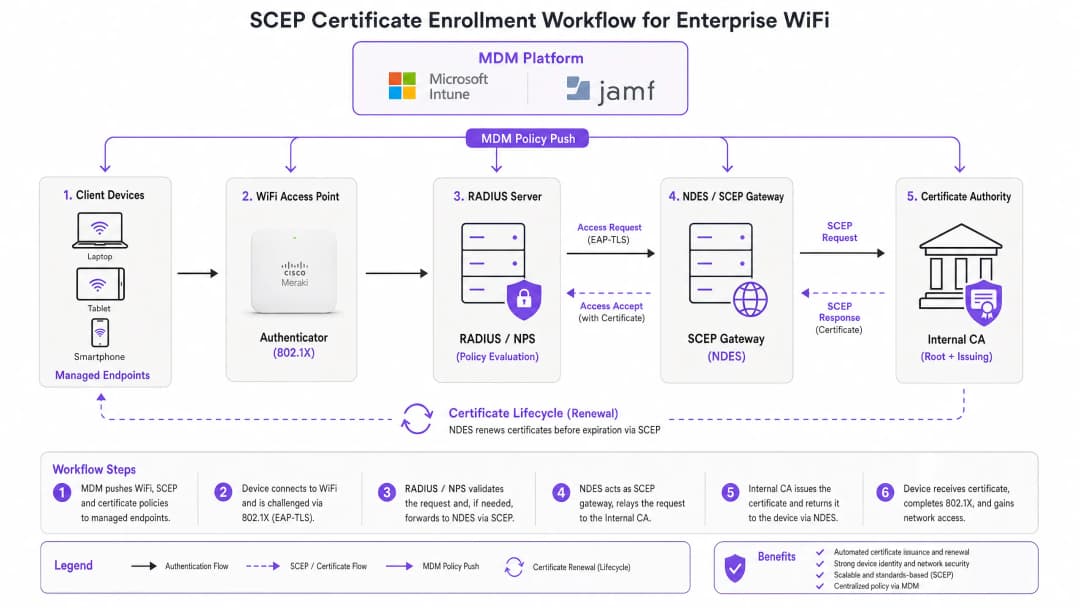
The six-step enrolment flow works as follows. First, the managed device connects to the SCEP gateway URL pre-configured in its MDM profile. Second, the device generates a private/public key pair locally and creates a Certificate Signing Request (CSR). Third, the SCEP gateway validates the device's authorisation using a challenge password or OTP embedded in the MDM policy. Fourth, the gateway forwards the validated CSR to the CA. Fifth, the CA signs the certificate and returns it to the gateway. Sixth, the gateway delivers the signed certificate to the device. Future renewals follow the same automated path - the device re-enrols before expiry without any user or administrator action.
SCEP vs PKCS: the decision that matters
Microsoft Intune and most MDM platforms support two certificate delivery mechanisms: SCEP and PKCS. The distinction is architectural, not cosmetic.
With SCEP, the private key is generated on the device and stays there. The CA never sees it. The device's TPM (on Windows) or Secure Enclave (on iOS/macOS) protects the key at the hardware level. With PKCS, the CA generates the key pair centrally and transmits it to the device over the network. The CA retains a copy, enabling key escrow - which is useful for S/MIME email encryption but introduces unnecessary risk for network authentication.
For 802.1X WiFi authentication, use SCEP. The private key never leaves the device. That is the rule.
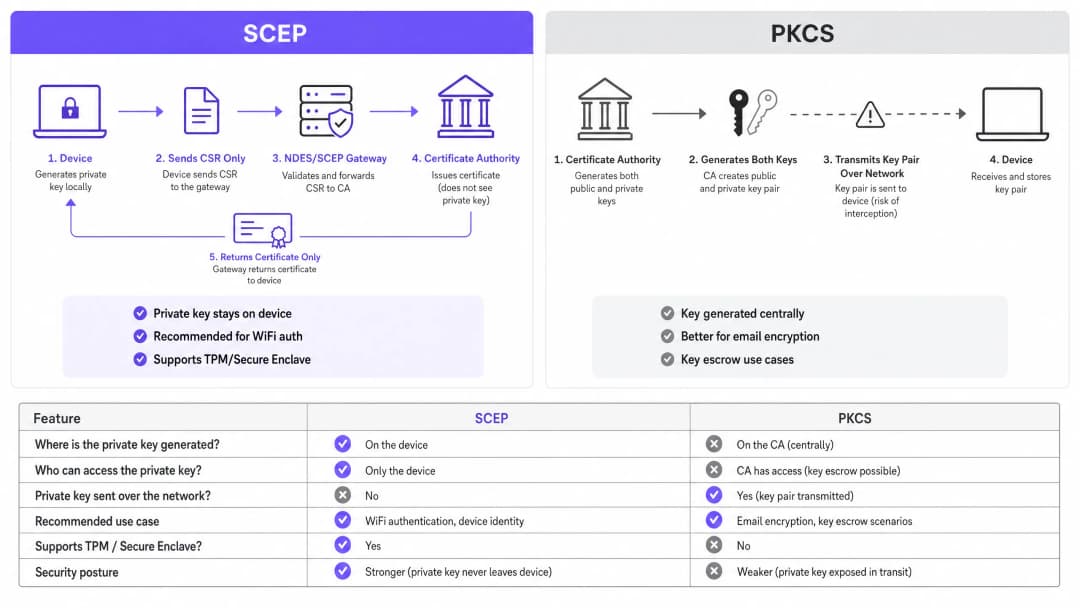
| Criterion | SCEP | PKCS |
|---|---|---|
| Private key generated on | Device | CA (centrally) |
| Private key transmitted over network | Never | Yes |
| Supports TPM / Secure Enclave | Yes | No |
| Recommended for WiFi auth | Yes | No |
| Recommended for email encryption (S/MIME) | No | Yes |
| Key escrow possible | No | Yes |
802.1X and EAP-TLS: the authentication framework
IEEE 802.1X is the port-based network access control standard that underpins enterprise WiFi security. It defines three roles: the supplicant (the client device), the authenticator (the access point - Cisco Meraki, HPE Aruba, Ruckus, Juniper Mist, Ubiquiti UniFi, Cambium, Extreme, or Fortinet), and the authentication server (a RADIUS server such as Microsoft NPS, FreeRADIUS, or Cisco ISE).
EAP-TLS is the most secure EAP method for 802.1X. Both sides present certificates: the RADIUS server presents its certificate to the client, and the client presents its SCEP-provisioned certificate to the RADIUS server. Neither side can impersonate the other without a valid, non-revoked certificate from the trusted CA hierarchy. This mutual authentication model eliminates credential theft, Evil Twin attacks, and rogue access point risks in a single architectural decision.
EAP-TLS satisfies PCI DSS 4.0 Requirement 8.6 for multi-factor authentication at the network layer. It is required for WPA3 Enterprise 192-bit (Suite B) deployments. For any wireless network in scope for cardholder data processing - retail point-of-sale, hotel front desk, stadium ticketing - EAP-TLS is the correct choice.
For a deeper look at secure WiFi architecture and how certificate-based authentication fits within a broader security posture, see our essential guide.
Implementation guide
The deployment sequence is non-negotiable. Intune and Jamf resolve profile dependencies in order: the WiFi profile depends on the SCEP profile, which depends on the Trusted Root profile. Deploy them out of sequence and the WiFi profile will fail to apply.
Step 1: Design your PKI
Before you touch an MDM console, design your certificate hierarchy. A two-tier PKI is standard: an offline root CA and an online issuing CA. The root CA's private key is the master trust anchor for your entire certificate infrastructure - keep it air-gapped. The issuing CA handles day-to-day certificate issuance and publishes the Certificate Revocation List (CRL) and OCSP responder.
For most enterprise venue deployments, Microsoft Active Directory Certificate Services (AD CS) running on Windows Server provides the issuing CA. Cloud-hosted PKI services from providers such as SCEPman or SecureW2 eliminate the on-premises infrastructure requirement entirely and are worth evaluating for distributed estate deployments across hotel groups, retail chains, or multi-site public-sector organisations.
Step 2: Deploy the NDES server (or cloud SCEP gateway)
NDES (Network Device Enrolment Service) is the Microsoft Windows Server role that acts as the SCEP gateway between your MDM and your CA. Key configuration requirements:
- Publish the NDES URL externally via Azure AD Application Proxy (or equivalent reverse proxy). This allows remote devices to enrol before they arrive on-site, without opening inbound firewall ports.
- The NDES service account requires Read and Enrol permissions on the CA certificate template.
- Configure the certificate template with Key Usage set to Digital Signature and Key Encipherment, and Extended Key Usage set to Client Authentication (OID: 1.3.6.1.5.5.7.3.2).
- Set an appropriate certificate validity period. One year is standard for client certificates; two years is acceptable for device certificates in stable fleets.
If you prefer to avoid on-premises NDES infrastructure, cloud SCEP gateways integrate directly with Intune and your CA via API, removing the IIS dependency entirely.
Step 3: Deploy the Trusted Root Certificate profile
In your MDM platform, create a Trusted Certificate profile and upload your Root CA certificate (and any Intermediate CA certificates) as .cer files. Deploy this profile to your target device groups before any other certificate or WiFi profiles. Without this step, devices cannot validate the RADIUS server's certificate during the EAP-TLS handshake, and they cannot trust the issuing CA when requesting their own SCEP certificate.
Rule of thumb: Always target the same Azure AD group (either Users or Devices) across all three related profiles. A mismatch here is the single most common cause of WiFi profile deployment failures.
Step 4: Configure the SCEP Certificate profile
Create a SCEP certificate configuration profile in your MDM:
- Subject name format: For user-driven authentication, use
CN={{UserPrincipalName}}. For device authentication (recommended for shared devices and IoT), useCN={{AAD_Device_ID}}. - Key usage: Digital Signature, Key Encipherment.
- Extended key usage: Client Authentication (OID: 1.3.6.1.5.5.7.3.2).
- SCEP server URL: The externally published NDES URL.
- Root certificate: Link to the Trusted Root profile from Step 3.
- Certificate validity period: Match the template configured on the CA.
Step 5: Deploy the 802.1X WiFi profile
Create a WiFi configuration profile:
- SSID: Enter the network name exactly as broadcast by your access points.
- Security type: WPA2-Enterprise or WPA3-Enterprise.
- EAP type: EAP-TLS.
- Client authentication certificate: Select the SCEP certificate profile from Step 4.
- Server validation: Specify the Trusted Root certificate from Step 3 and enter the expected RADIUS server name. This prevents devices from connecting to rogue access points presenting fraudulent certificates.
Tem dúvidas sobre a sua configuração específica?
A nossa equipa trabalha com operadores de espaços, gestores de TI e engenheiros de rede em 80.000 espaços. Agende uma chamada de 20 minutos e mostraremos como outros profissionais na sua área o resolveram.
Best practices
Enforce strict CRL checking on your RADIUS server
Certificate revocation is the operational control that closes the gap between disabling an account and blocking network access. When a device is lost, stolen, or an employee leaves, disable the AD account and revoke the certificate at the CA. Your RADIUS server must be configured to check the CRL on every authentication attempt. If the CRL is unavailable - because the CDP (CRL Distribution Point) is unreachable - most RADIUS servers default to failing open, which is a security risk. Ensure your CDPs are highly available and that your RADIUS server is configured to fail closed if the CRL cannot be fetched.
For real-time revocation, configure OCSP (Online Certificate Status Protocol) in addition to CRL. OCSP provides per-certificate status responses without requiring the RADIUS server to download and parse the entire CRL.
Use device certificates for shared and IoT devices
For shared devices - hotel housekeeping tablets, retail POS terminals, stadium access control readers - use device certificates rather than user certificates. Device certificates are tied to the machine identity, not a user account. This means the device authenticates regardless of which user is logged in, and revocation is tied to the device record rather than an employee's departure.
For retail deployments, device certificates on POS hardware also satisfy the PCI DSS requirement for network-layer device identity without introducing user-credential complexity at the point of sale.
Automate certificate renewal
SCEP supports automatic renewal: the MDM instructs the device to re-enrol before the certificate expires. Configure your SCEP profile to trigger renewal at 20% of the certificate's remaining validity period. For a one-year certificate, renewal begins approximately 73 days before expiry. This window provides enough time to resolve any renewal failures before the certificate expires and devices lose network access.
Expired certificates causing mass authentication failures are the most common operational incident in 802.1X deployments. Automated renewal via SCEP eliminates this risk entirely.
Segment networks by certificate attribute
RADIUS servers can read certificate attributes - Subject, SAN, or custom OIDs - and use them to assign devices to VLANs dynamically. A housekeeping tablet with a certificate issued from the HousekeepingDevices template lands on the housekeeping VLAN. A POS terminal with a certificate from the RetailPOS template lands on the PCI-scoped VLAN. This is cryptographically enforced network segmentation - far more reliable than SSID-based or MAC-based approaches.
For hospitality operators running Guest WiFi alongside Staff WiFi on the same physical infrastructure, VLAN assignment via certificate attributes ensures guests and staff are always on separate network segments, regardless of which SSID a device connects to.
Troubleshooting & risk mitigation
WiFi profile shows 'Error' or 'Not Applicable' in Intune
Root cause: Group targeting mismatch. The SCEP profile is assigned to a different group than the WiFi profile. Intune cannot resolve the certificate dependency.
Fix: Audit all three profiles (Trusted Root, SCEP, WiFi). Ensure they are all assigned to the exact same Azure AD group. If you are deploying to Users, all three profiles must target a Users group. If deploying to Devices, all three must target a Devices group.
NDES returns HTTP 403 errors
Root cause: The Intune Certificate Connector service account lacks Read or Enrol permissions on the CA certificate template, or firewall URL filtering is blocking SCEP query strings.
Fix: Verify the connector account has Read and Enrol permissions on the template in the CA console. Check firewall logs for blocked requests containing ?operation=GetCACaps or ?operation=PKIOperation. These query strings must pass through without modification.
Devices fail to renew certificates before expiry
Root cause: The SCEP renewal window is too short, or the NDES server is unreachable at the time of renewal.
Fix: Set the renewal threshold to 20% of certificate validity. Ensure the NDES URL is published via a highly available reverse proxy. Monitor NDES IIS logs for renewal request failures and alert on them proactively.
RADIUS rejects valid certificates
Root cause: The RADIUS server's trusted CA store does not include the issuing CA certificate, or the CRL is stale.
Fix: Import the full CA chain (Root CA + Issuing CA) into the RADIUS server's trusted store. Verify the CRL is being fetched successfully and that the CDP URL is reachable from the RADIUS server. Check the CRL's next-update timestamp - if it has passed, the CA needs to publish a new CRL.
For broader network performance considerations alongside security, see our bandwidth management guide.
ROI & business impact
The business case for SCEP-based certificate enrolment is straightforward. Password-based WiFi generates a predictable volume of helpdesk tickets: password expirations, lockouts, staff sharing credentials with guests, and onboarding friction for new starters. Certificate-based authentication is invisible to the end user. Devices connect automatically. There are no passwords to expire, share, or forget.
Organisations that migrate from password-based WiFi to EAP-TLS with SCEP typically report a 70-80% reduction in WiFi-related helpdesk tickets (Purple internal data, 2024, based on deployments across hospitality and retail estates). The helpdesk saving alone often justifies the implementation cost within the first year.
The compliance impact is equally concrete. EAP-TLS satisfies PCI DSS 4.0 Requirement 8.6 for multi-factor authentication at the network layer. For healthcare environments, it aligns with HIPAA technical safeguard requirements for wireless network access. For public-sector organisations, it supports NCSC Cyber Essentials Plus certification requirements for network access control.
For transport operators - rail franchises, airport operators, bus networks - certificate-based authentication on staff devices ensures that operational networks carrying safety-critical data are isolated from passenger WiFi and protected against credential-based attacks.
Purple's WiFi Analytics platform integrates with 802.1X-secured networks to deliver first-party data insights without compromising the security posture of the underlying infrastructure. The 29 billion data points collected across Purple's network demonstrate that security and analytics are complementary, not competing, objectives.
For feedback and experience management alongside your secure network deployment, see our venue feedback playbook.
Definições Principais
SCEP (Simple Certificate Enrollment Protocol)
Um protocolo normalizado pela IETF (RFC 8894) que automatiza a inscrição de certificados X.509 para dispositivos geridos. O dispositivo gera a sua própria chave privada localmente e envia apenas um Certificate Signing Request para a CA através de um gateway. A chave privada nunca sai do dispositivo.
As equipas de TI deparam-se com o SCEP ao configurar plataformas MDM (Intune, Jamf) para implementar certificados de autenticação WiFi à escala. É o mecanismo recomendado para implementações 802.1X EAP-TLS porque a chave privada é protegida por hardware no endpoint.
EAP-TLS (Extensible Authentication Protocol - Transport Layer Security)
O método de autenticação 802.1X mais seguro. Tanto o dispositivo cliente como o servidor RADIUS apresentam certificados X.509. Nenhum dos lados se pode autenticar sem um certificado válido e não revogado da hierarquia de CA fidedigna.
O EAP-TLS é o protocolo de autenticação de destino que a implementação de certificados SCEP permite. Cumpre o Requisito 8.6 do PCI DSS 4.0 e é obrigatório para implementações WPA3 Enterprise de 192 bits (Suite B).
PKCS (Public Key Cryptography Standards)
Um mecanismo de entrega de certificados onde a CA gera centralmente o par de chaves pública e privada e as transmite para o endpoint. A CA retém uma cópia da chave privada, permitindo a custódia de chaves.
As equipas de TI escolhem entre SCEP e PKCS ao configurar perfis de certificado no Intune. O PKCS é adequado para encriptação de e-mail S/MIME onde é necessária a custódia de chaves (key escrow). Não é recomendado para autenticação WiFi porque a chave privada é transmitida pela rede.
NDES (Network Device Enrollment Service)
Uma função do Microsoft Windows Server que atua como gateway SCEP entre uma plataforma MDM e uma Autoridade de Certificação. Valida os pedidos de inscrição de dispositivos e encaminha os CSRs para a CA.
O NDES é um componente de infraestrutura obrigatório para implementações SCEP locais com o Microsoft Intune. Deve ser publicado externamente através de um proxy de aplicação para permitir a inscrição de dispositivos remotos. Os gateways SCEP na nuvem são uma alternativa que elimina a dependência de NDES local.
CRL (Certificate Revocation List)
Uma lista publicada pela CA que contém os números de série dos certificados que foram revogados antes da sua data de expiração. Os servidores RADIUS verificam a CRL para garantir que os dispositivos com certificados revogados não se conseguem autenticar.
A verificação de CRL é o controlo operacional que impõe a revogação de certificados. As equipas de TI devem configurar o seu servidor RADIUS para verificar a CRL em cada tentativa de autenticação e garantir que o Ponto de Distribuição de CRL (CDP) está altamente disponível.
802.1X
Uma norma IEEE para controlo de acesso à rede baseado em portas. Define a estrutura de autenticação de três partes (suplicante, autenticador, servidor de autenticação) utilizada em redes WiFi empresariais e com fios.
O 802.1X é a estrutura dentro da qual o EAP-TLS e o SCEP operam. As equipas de TI deparam-se com ele ao configurar SSIDs WPA2-Enterprise ou WPA3-Enterprise e ao definir políticas de servidor RADIUS.
RADIUS (Remote Authentication Dial-In User Service)
Um protocolo de rede que fornece autenticação, autorização e auditoria (AAA) centralizadas para acesso à rede. Em implementações 802.1X, o servidor RADIUS valida os certificados de cliente e impõe políticas de atribuição de VLAN.
O servidor RADIUS é o ponto de decisão de autenticação em todas as implementações 802.1X. As implementações comuns incluem o Microsoft NPS, FreeRADIUS e Cisco ISE. Deve ser configurado com a cadeia de CA fidedigna e verificação estrita de CRL ou OCSP.
CSR (Certificate Signing Request)
Um bloco de texto codificado gerado por um dispositivo que contém a chave pública e as informações de identidade do dispositivo. O dispositivo envia o CSR para a CA (através do gateway SCEP) para solicitar um certificado assinado. A chave privada correspondente é gerada e retida no dispositivo.
O CSR é o artefacto central no fluxo de inscrição SCEP. As equipas de TI configuram o formato do CSR (nome do assunto, utilização de chaves, EKU) no perfil de certificado SCEP dentro da sua plataforma MDM.
PKI (Public Key Infrastructure)
A combinação de hardware, software, políticas e procedimentos necessários para criar, gerir, distribuir e revogar certificados digitais. Uma PKI empresarial padrão consiste numa CA raiz offline e numa CA emissora online.
A PKI é o pré-requisito para qualquer implementação EAP-TLS. As equipas de TI devem desenhar e implementar uma hierarquia de CA de dois níveis antes de configurar o SCEP. Os serviços de PKI alojados na nuvem reduzem a carga de infraestrutura para implementações em propriedades distribuídas.
VLAN (Virtual Local Area Network)
Um segmento de rede lógico que isola o tráfego na Camada 2. Em implementações 802.1X, os servidores RADIUS atribuem dispositivos a VLANs dinamicamente com base nos atributos do certificado, identidade do utilizador ou política.
A atribuição de VLAN via RADIUS é o mecanismo que impõe a segmentação de rede em WiFi empresarial. As equipas de TI utilizam-no para separar dispositivos POS em VLANs de âmbito PCI, dispositivos de hóspedes em VLANs apenas de internet e dispositivos de funcionários em VLANs corporativas - tudo a partir de uma única infraestrutura física.
Exemplos Práticos
Uma propriedade Premier Inn com 200 quartos precisa de implementar WiFi seguro para 150 dispositivos iOS de limpeza (housekeeping). Atualmente, a equipa partilha uma palavra-passe WPA2-Personal com os hóspedes, criando um risco operacional e de conformidade. O Diretor de TI precisa de eliminar a palavra-passe partilhada sem interromper as operações diárias.
O Diretor de TI implementa uma implementação SCEP baseada em Jamf em três fases. Fase um: o certificado Root CA é enviado para todos os 150 dispositivos iOS através de um perfil Jamf Trusted Certificate, visando o grupo inteligente 'Housekeeping Devices'. Fase dois: é implementado um perfil de certificado SCEP, direcionando os dispositivos para um servidor NDES publicado via Azure AD App Proxy. O nome do assunto utiliza CN={{SERIALNUMBER}} para associar o certificado ao hardware do dispositivo. Fase três: é enviado um perfil WiFi WPA2-Enterprise, especificando EAP-TLS e ligando ao certificado SCEP. Os dispositivos autenticam-se silenciosamente. O SSID de palavra-passe partilhada é desativado. O servidor RADIUS é configurado com verificação estrita de CRL e atribuição de VLAN: os dispositivos de limpeza ficam na VLAN 20 (operações), os dispositivos de hóspedes na VLAN 10 (apenas internet).
Uma cadeia de retalho com 500 localizações precisa de proteger o WiFi corporativo para tablets POS Windows que executam software de processamento de pagamentos. A conformidade com o PCI DSS 4.0 exige autenticação multifator na camada de rede. A configuração atual de WPA2-Personal falha na avaliação do Requisito 8.6 do PCI DSS.
O arquiteto de rede implementa EAP-TLS via Microsoft Intune e SCEP em todas as 500 localizações. A implementação utiliza certificados de dispositivo com CN={{AAD_Device_ID}} como nome do assunto, associando cada certificado ao registo do dispositivo no Intune. A sequência de três perfis (Trusted Root, SCEP, WiFi) é implementada no grupo Azure AD 'POS Devices' - o mesmo grupo em todos os três perfis. O servidor RADIUS atribui os dispositivos POS a uma VLAN dedicada de âmbito PCI (VLAN 100) com base no modelo de emissão do certificado. A CRL é publicada num endpoint alojado em CDN de alta disponibilidade com uma janela de validade de quatro horas. O OCSP está ativado para verificação de revogação em tempo real. A implementação é validada em relação ao Requisito 8.6 do PCI DSS 4.0 pelo QSA.
Perguntas de Prática
Q1. Implementou perfis de certificado Trusted Root e SCEP no grupo de utilizadores 'All Staff' no Intune. Em seguida, implementou o perfil WiFi no grupo de dispositivos 'Corporate Devices'. Os dispositivos recebem os certificados, mas o perfil WiFi mostra 'Erro' na consola do Intune. Qual é a causa mais provável e como a resolve?
Dica: Considere como o Intune resolve dependências entre perfis e o que acontece quando os perfis visam tipos de grupo diferentes.
Ver resposta modelo
A causa raiz é uma incompatibilidade de segmentação de grupo. O perfil WiFi depende do perfil SCEP, que por sua vez depende do perfil Trusted Root. O Intune não consegue resolver estas dependências quando os perfis visam tipos de grupo diferentes (Utilizadores vs Dispositivos). Resolução: volte a implementar os três perfis no mesmo grupo. Se o perfil WiFi visar 'Corporate Devices' (um grupo de dispositivos), os perfis SCEP e Trusted Root também devem visar 'Corporate Devices'. Alternativamente, mova os três para um grupo de utilizadores se for necessária autenticação baseada no utilizador.
Q2. O iPad de um funcionário de limpeza de um hotel é reportado como roubado. Desativa imediatamente a conta de Active Directory do funcionário. Na manhã seguinte, o iPad roubado continua a ligar-se à rede WPA2-Enterprise do hotel. Porquê, e que duas ações toma para evitar isto?
Dica: Pense no que o servidor RADIUS realmente valida durante a autenticação EAP-TLS e quais os controlos que regem a validade do certificado.
Ver resposta modelo
Desativar a conta de AD não revoga o certificado de cliente armazenado no iPad. O servidor RADIUS valida o certificado, e não o estado da conta de AD, durante a autenticação EAP-TLS. As duas ações necessárias são: (1) revogar o certificado do dispositivo na CA - isto adiciona o número de série do certificado à CRL; (2) garantir que o servidor RADIUS está configurado com verificação estrita de CRL para que obtenha a CRL atualizada e rejeite o certificado revogado na próxima tentativa de autenticação. Para uma revogação mais rápida, configure o OCSP no servidor RADIUS para verificações de estado do certificado em tempo real.
Q3. Uma cadeia de retalho está a implementar WiFi 802.1X em 500 localizações de POS. O arquiteto de segurança propõe a utilização de entrega de certificados PKCS em vez de SCEP para evitar a implementação de um servidor NDES. O QSA que analisa a avaliação do PCI DSS 4.0 levanta uma preocupação. Qual é a preocupação e qual é a recomendação correta?
Dica: Considere o que o PCI DSS diz sobre o manuseamento de chaves privadas e o que o PKCS faz com a chave privada durante a entrega.
Ver resposta modelo
A preocupação do QSA é que o PKCS transmite a chave privada pela rede, da CA para o dispositivo. O Requisito 3.5 do PCI DSS 4.0 exige que as chaves privadas utilizadas para autenticação sejam protegidas contra divulgação. Transmitir a chave privada pela rede - mesmo encriptada - introduz um risco que o SCEP elimina por completo. A recomendação correta é utilizar o SCEP, onde a chave privada é gerada no dispositivo POS e nunca sai dele. Para evitar a infraestrutura NDES local, o arquiteto deve avaliar um serviço de gateway SCEP na nuvem que se integre diretamente com o Intune e a CA via API.
Q4. Está a desenhar uma rede WiFi para um grande centro de conferências que acolhe mais de 50 eventos por ano. Os dispositivos dos funcionários precisam de estar numa rede 802.1X segura. Pretende garantir que, se o dispositivo de um prestador de serviços for comprometido, este possa ser isolado da rede em 15 minutos. Que mecanismo de revogação de certificados configura e porquê?
Dica: Compare a CRL e o OCSP em termos de latência de revogação e o que determina a rapidez com que um servidor RADIUS atua sobre uma revogação.
Ver resposta modelo
Configure o OCSP (Online Certificate Status Protocol) no servidor RADIUS. A revogação baseada em CRL tem uma latência determinada pelo período de validade da CRL - normalmente de uma a 24 horas - o que significa que um certificado revogado ainda se pode autenticar até que o servidor RADIUS obtenha a próxima CRL. O OCSP fornece respostas de estado por certificado em tempo real: quando um certificado é revogado na CA, o respondedor OCSP devolve imediatamente um estado 'revogado' na consulta seguinte. Com o OCSP configurado no servidor RADIUS, um certificado de prestador de serviços revogado é bloqueado na tentativa de autenticação seguinte, normalmente em segundos. Garanta que o respondedor OCSP está altamente disponível - se estiver inacessível e o servidor RADIUS estiver configurado para falhar de forma fechada (fail closed), todas as autenticações falharão.
Continue a ler esta série
Conformidade com a CIPA: lista de verificação de conformidade para operadores de locais públicos
Poderá decidir se a CIPA se aplica ao seu WiFi, depois segmentar redes, encaminhar o DNS através do Purple Shield e fechar caminhos de desvio. Saberá também quais as provas a conservar para a certificação do Form 486 ou Form 479. A lista de verificação atribui um proprietário a cada requisito, para que não falte nada na certificação do seu próximo ano de financiamento.
Falhas de ligação em modo de transição WPA3: uma checklist de implementação para Cisco Meraki, HPE Aruba e Ruckus
Utilize esta checklist para diagnosticar por que razão os dispositivos falham num SSID em modo de transição WPA3 SAE e resolva o problema em Cisco Meraki, HPE Aruba ou Ruckus. Irá associar códigos de estado 802.11 a causas, isolar problemas de PMF, 802.11r e 6GHz, e decidir quando mudar para um SSID exclusivo WPA3.
Melhor filtragem DNS: um guia abrangente para empresas
Este guia de referência técnica explica como a filtragem DNS empresarial protege as redes públicas ao bloquear domínios maliciosos na camada de resolução - antes de uma ligação ser estabelecida. Oferece aos diretores de TI, arquitetos de rede e equipas de operações de locais a arquitetura de implementação, configuração de firewall e o contexto de conformidade necessários para proteger o WiFi de convidados em ambientes de hotelaria, retalho e setor público. O Purple Shield bloqueia malware, botnets e conteúdo inadequado ao nível do DNS em mais de 80.000 locais ativos.
Tem dúvidas sobre a sua configuração específica?
A nossa equipa trabalha com operadores de espaços, gestores de TI e engenheiros de rede em 80.000 espaços. Agende uma chamada de 20 minutos e mostraremos como outros profissionais na sua área o resolveram.