
स्वचालित WiFi प्रमाणपत्र नामांकन के लिए SCEP को कैसे लागू करें
यह गाइड बताती है कि एंटरप्राइज वेन्यू में स्वचालित WiFi प्रमाणपत्र नामांकन के लिए SCEP (सिंपल सर्टिफिकेट एनरोलमेंट प्रोटोकॉल) को कैसे लागू किया जाए। इसमें PKI डिज़ाइन और MDM एकीकरण से लेकर अनिवार्य तीन-चरणीय परिनियोजन अनुक्रम तक का पूरा आर्किटेक्चरल ब्लूप्रिंट शामिल है - और IT प्रबंधकों और नेटवर्क आर्किटेक्ट्स को दिखाता है कि साझा क्रेडेंशियल्स को कैसे समाप्त किया जाए, प्रमाणपत्र जीवनचक्र प्रबंधन को स्वचालित किया जाए, और बड़े पैमाने पर PCI DSS और GDPR आवश्यकताओं को पूरा किया जाए।
इस गाइड को सुनें
पॉडकास्ट ट्रांसक्रिप्ट देखें
हमारी मुख्य श्रृंखला का हिस्सा: Enterprise WiFi Security Guide →
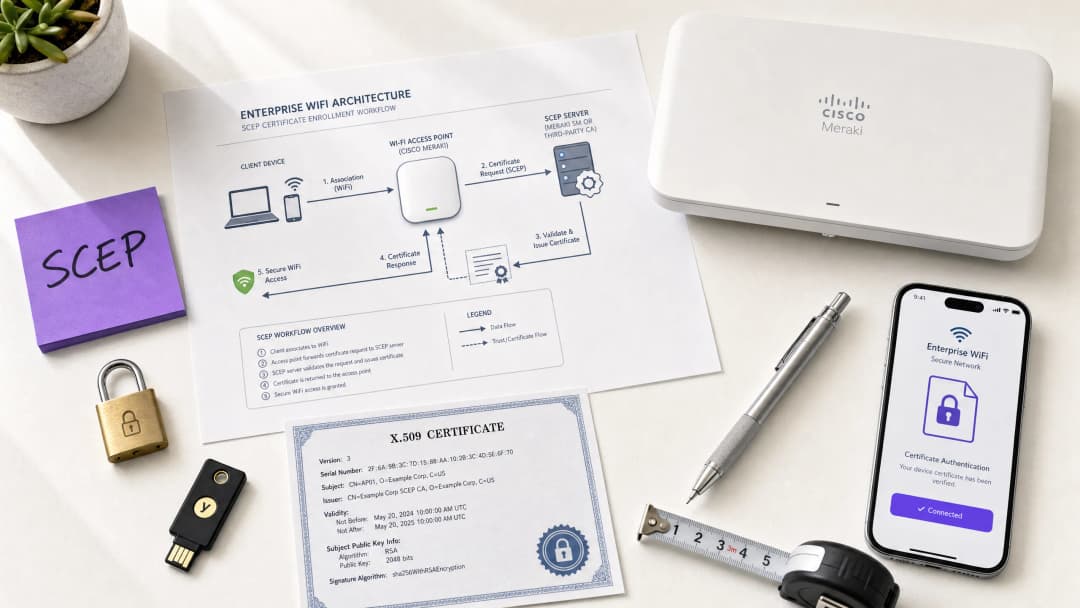
कार्यकारी सारांश
होटल, रिटेल एस्टेट, स्टेडियम और कॉन्फ्रेंस सेंटरों में Guest WiFi चलाने वाले वेन्यू ऑपरेटरों के लिए, स्टाफ नेटवर्क एक्सेस के लिए प्री-शेयर्ड की (pre-shared keys) या बुनियादी कैप्टिव पोर्टल पर भरोसा करना एक सुरक्षा जोखिम है। आधुनिक नेटवर्क आर्किटेक्चर EAP-TLS (एक्सटेंसिबल ऑथेंटिकेशन प्रोटोकॉल - ट्रांसपोर्ट लेयर सिक्योरिटी) का उपयोग करके 802.1X ऑथेंटिकेशन की मांग करता है, जिससे यह सुनिश्चित होता है कि नेटवर्क को छूने से पहले हर डिवाइस को क्रिप्टोग्राफिक रूप से सत्यापित किया जाए। चुनौती वितरण की है: आप अपने हेल्पडेस्क पर काम का बोझ बढ़ाए बिना हजारों Windows, iOS और Android डिवाइसों पर अद्वितीय क्लाइंट प्रमाणपत्र कैसे तैनात करते हैं?
इसका उत्तर SCEP है - सिंपल सर्टिफिकेट एनरोलमेंट प्रोटोकॉल। 2020 में IETF द्वारा RFC 8894 के रूप में औपचारिक रूप दिया गया, SCEP प्रबंधित डिवाइस बेड़े में प्रमाणपत्र नामांकन को स्वचालित करता है। जब Microsoft Intune या Jamf जैसे MDM प्लेटफॉर्म के साथ एकीकृत किया जाता है, तो SCEP ज़ीरो-टच प्रमाणपत्र प्रोविज़निंग प्रदान करता है: डिवाइस बिना किसी IT हस्तक्षेप के अपने स्वयं के प्रमाणपत्रों का अनुरोध करते हैं, उन्हें प्राप्त करते हैं और उनका नवीनीकरण करते हैं। प्राइवेट की (private key) स्थानीय रूप से डिवाइस पर जनरेट होती है और इसे कभी भी नेटवर्क पर प्रसारित नहीं किया जाता है - यह PKCS-आधारित डिलीवरी की तुलना में एक मौलिक सुरक्षा लाभ है।
यह गाइड संपूर्ण SCEP कार्यान्वयन वर्कफ़्लो के बारे में बताती है: PKI आर्किटेक्चर, NDES गेटवे कॉन्फ़िगरेशन, अनिवार्य तीन-चरणीय MDM परिनियोजन अनुक्रम, और परिचालन नियंत्रण - विशेष रूप से CRL चेकिंग और ग्रुप टारगेटिंग - जो यह निर्धारित करते हैं कि रोलआउट सफल होता है या रुक जाता है। दो वास्तविक दुनिया के परिदृश्य हॉस्पिटैलिटी और रिटेल वातावरण में इस दृष्टिकोण को स्पष्ट करते हैं। Purple 80,000+ लाइव वेन्यू और 350 मिलियन अद्वितीय उपयोगकर्ताओं के बीच काम करता है; यहाँ वर्णित पैटर्न दर्शाते हैं कि उस पैमाने पर क्या काम करता है।
तकनीकी गहन विश्लेषण
SCEP वास्तव में क्या करता है
SCEP आपके MDM प्लेटफॉर्म और आपके सर्टिफिकेट अथॉरिटी (CA) के बीच काम करता है। यह डिवाइसों को डोमेन-जॉइन्ड क्रेडेंशियल या मैन्युअल एडमिनिस्ट्रेटर की भागीदारी के बिना X.509 प्रमाणपत्रों का अनुरोध करने, प्राप्त करने और नवीनीकृत करने के लिए एक मानकीकृत HTTP-आधारित तंत्र प्रदान करता है। यह प्रोटोकॉल मूल रूप से 2000 के दशक की शुरुआत में विकसित किया गया था और IETF द्वारा इसे औपचारिक रूप से RFC 8894 के रूप में प्रकाशित करने से पहले एंटरप्राइज MDM वातावरण में व्यापक रूप से अपनाया गया था।
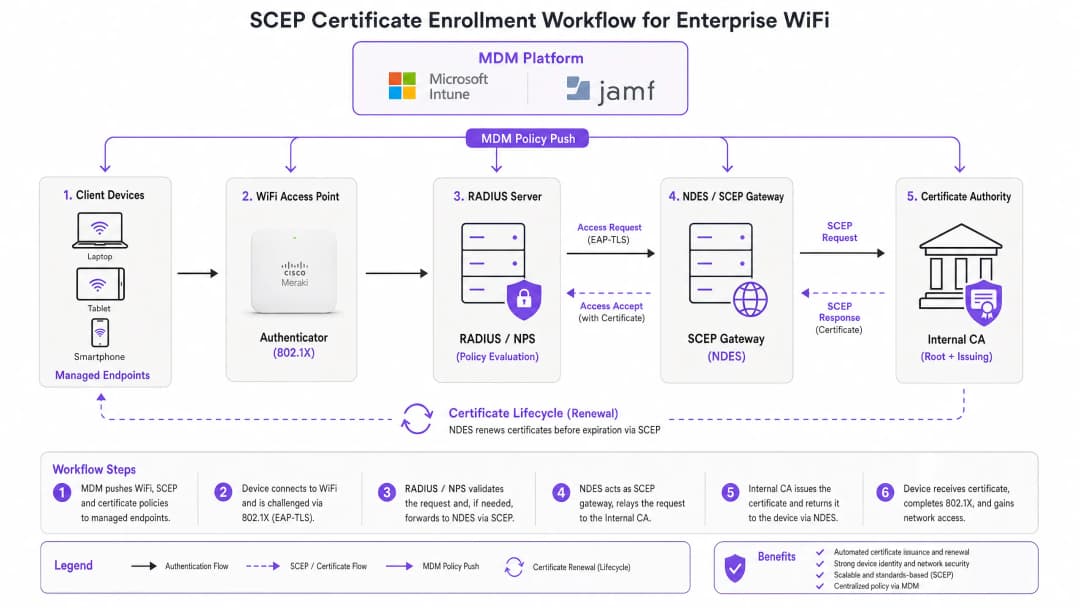
छह-चरणीय नामांकन प्रवाह इस प्रकार काम करता है। पहला, प्रबंधित डिवाइस अपने MDM प्रोफाइल में पहले से कॉन्फ़िगर किए गए SCEP गेटवे URL से कनेक्ट होता है। दूसरा, डिवाइस स्थानीय रूप से एक प्राइवेट/पब्लिक की (key) पेयर जनरेट करता है और एक सर्टिफिकेट साइनिंग रिक्वेस्ट (CSR) बनाता है। तीसरा, SCEP गेटवे MDM पॉलिसी में एम्बेडेड चैलेंज पासवर्ड या OTP का उपयोग करके डिवाइस के ऑथराइजेशन को मान्य करता है। चौथा, गेटवे मान्य CSR को CA को फॉरवर्ड करता है। पांचवां, CA प्रमाणपत्र पर हस्ताक्षर करता है और इसे गेटवे पर वापस भेजता है। छठा, गेटवे हस्ताक्षरित प्रमाणपत्र डिवाइस को डिलीवर करता है। भविष्य के नवीनीकरण इसी स्वचालित मार्ग का अनुसरण करते हैं - डिवाइस बिना किसी उपयोगकर्ता या एडमिनिस्ट्रेटर की कार्रवाई के समाप्त होने से पहले फिर से नामांकित हो जाता है।
SCEP बनाम PKCS: वह निर्णय जो मायने रखता है
Microsoft Intune और अधिकांश MDM प्लेटफॉर्म दो प्रमाणपत्र वितरण तंत्रों का समर्थन करते हैं: SCEP और PKCS। यह अंतर आर्किटेक्चरल है, न कि केवल बाहरी।
SCEP के साथ, प्राइवेट की (private key) डिवाइस पर जनरेट होती है और वहीं रहती है। CA इसे कभी नहीं देखता है। डिवाइस का TPM (Windows पर) या Secure Enclave (iOS/macOS पर) हार्डवेयर स्तर पर की (key) की सुरक्षा करता है। PKCS के साथ, CA केंद्रीय रूप से की (key) पेयर जनरेट करता है और इसे नेटवर्क पर डिवाइस पर प्रसारित करता है। CA एक कॉपी अपने पास रखता है, जिससे की एस्क्रो (key escrow) सक्षम होता है - जो S/MIME ईमेल एन्क्रिप्शन के लिए उपयोगी है लेकिन नेटवर्क ऑथेंटिकेशन के लिए अनावश्यक जोखिम पैदा करता है।
802.1X WiFi ऑथेंटिकेशन के लिए, SCEP का उपयोग करें। प्राइवेट की (private key) कभी भी डिवाइस से बाहर नहीं जाती है। यही नियम है।
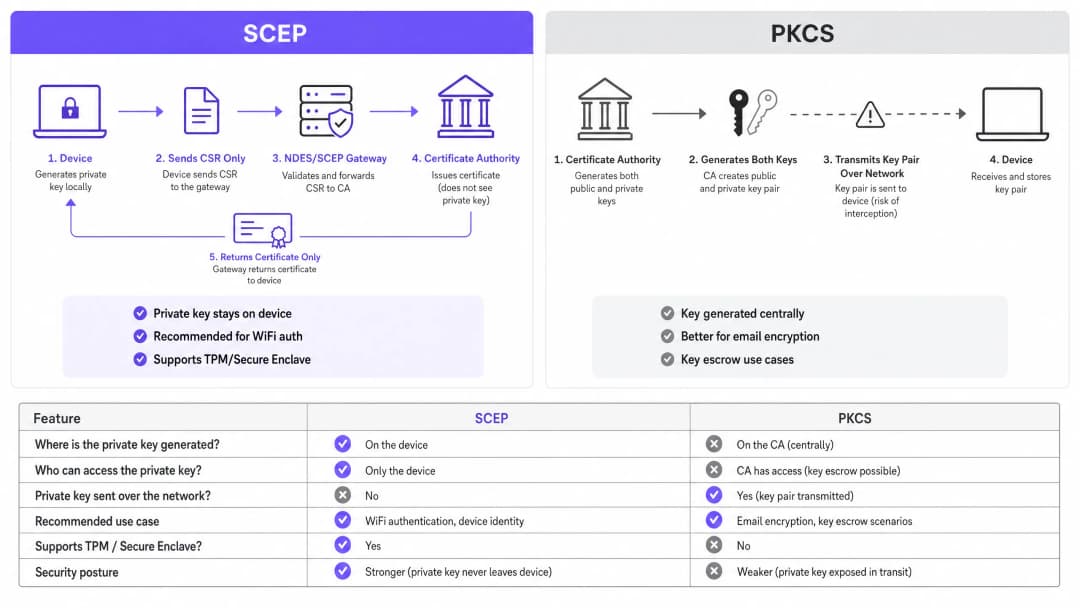
| मानदंड | SCEP | PKCS |
|---|---|---|
| प्राइवेट की यहाँ जनरेट होती है | डिवाइस | CA (केंद्रीय रूप से) |
| प्राइवेट की नेटवर्क पर प्रसारित होती है | कभी नहीं | हाँ |
| TPM / Secure Enclave का समर्थन करता है | हाँ | नहीं |
| WiFi ऑथेंटिकेशन के लिए अनुशंसित | हाँ | नहीं |
| ईमेल एन्क्रिप्शन (S/MIME) के लिए अनुशंसित | नहीं | हाँ |
| की एस्क्रो (Key escrow) संभव है | नहीं | हाँ |
802.1X और EAP-TLS: ऑथेंटिकेशन फ्रेमवर्क
IEEE 802.1X पोर्ट-आधारित नेटवर्क एक्सेस कंट्रोल मानक है जो एंटरप्राइज WiFi सुरक्षा का आधार है। यह तीन भूमिकाओं को परिभाषित करता है: सप्लीकेंट (क्लाइंट डिवाइस), ऑथेंटिकेटर (एक्सेस पॉइंट - Cisco Meraki, HPE Aruba, Ruckus, Juniper Mist, Ubiquiti UniFi, Cambium, Extreme, या Fortinet), और ऑथेंटिकेशन सर्वर (एक RADIUS सर्वर जैसे Microsoft NPS, FreeRADIUS, या Cisco ISE)।
EAP-TLS 802.1X के लिए सबसे सुरक्षित EAP तरीका है। दोनों पक्ष प्रमाणपत्र प्रस्तुत करते हैं: RADIUS सर्वर क्लाइंट को अपना प्रमाणपत्र प्रस्तुत करता है, और क्लाइंट RADIUS सर्वर को अपना SCEP-प्रोविजन्ड प्रमाणपत्र प्रस्तुत करता है। विश्वसनीय CA पदानुक्रम से वैध, गैर-रद्द प्रमाणपत्र के बिना कोई भी पक्ष दूसरे का रूप धारण नहीं कर सकता है। यह पारस्परिक ऑथेंटिकेशन मॉडल एक ही आर्किटेक्चरल निर्णय में क्रेडेंशियल चोरी, इविल ट्विन (Evil Twin) हमलों और अनधिकृत एक्सेस पॉइंट के जोखिमों को समाप्त करता है।
EAP-TLS नेटवर्क लेयर पर मल्टी-फैक्टर ऑथेंटिकेशन के लिए PCI DSS 4.0 आवश्यकता 8.6 को पूरा करता है। यह WPA3 Enterprise 192-बिट (Suite B) परिनियोजन के लिए आवश्यक है। कार्डधारक डेटा प्रोसेसिंग के दायरे में आने वाले किसी भी वायरलेस नेटवर्क के लिए - रिटेल पॉइंट-ऑफ-सेल, होटल फ्रंट डेस्क, स्टेडियम टिकटिंग - EAP-TLS सही विकल्प है।
सुरक्षा स्थिति में secure WiFi आर्किटेक्चर और प्रमाणपत्र-आधारित ऑथेंटिकेशन एक व्यापक सुरक्षा स्थिति में कैसे फिट बैठता है, इस पर गहराई से नज़र डालने के लिए, हमारी आवश्यक गाइड देखें।
कार्यान्वयन गाइड
परिनियोजन अनुक्रम गैर-परक्राम्य है। Intune और Jamf प्रोफाइल निर्भरताओं को क्रम में हल करते हैं: WiFi प्रोफाइल SCEP प्रोफाइल पर निर्भर करता है, जो Trusted Root प्रोफाइल पर निर्भर करता है। उन्हें क्रम से बाहर तैनात करें और WiFi प्रोफाइल लागू होने में विफल हो जाएगा।
चरण 1: अपना PKI डिज़ाइन करें
MDM कंसोल को छूने से पहले, अपने प्रमाणपत्र पदानुक्रम को डिज़ाइन करें। एक दो-स्तरीय PKI मानक है: एक ऑफ़लाइन रूट CA और एक ऑनलाइन जारी करने वाला (issuing) CA। रूट CA की प्राइवेट की (private key) आपके संपूर्ण प्रमाणपत्र बुनियादी ढांचे के लिए मास्टर ट्रस्ट एंकर है - इसे एयर-गैप्ड रखें। जारी करने वाला CA दैनिक प्रमाणपत्र जारी करने का काम संभालता है और सर्टिफिकेट रिवोकेशन लिस्ट (CRL) और OCSP रिस्पॉन्डर प्रकाशित करता है।
अधिकांश एंटरप्राइज वेन्यू परिनियोजन के लिए, Windows Server पर चलने वाली Microsoft Active Directory Certificate Services (AD CS) जारी करने वाला CA प्रदान करती है। SCEPman या SecureW2 जैसे प्रदाताओं से क्लाउड-होस्टेड PKI सेवाएं ऑन-प्रिमाइसेस बुनियादी ढांचे की आवश्यकता को पूरी तरह से समाप्त कर देती हैं और होटल समूहों, रिटेल श्रृंखलाओं, या बहु-साइट सार्वजनिक-क्षेत्र के संगठनों में वितरित एस्टेट परिनियोजन के लिए मूल्यांकन करने योग्य हैं।
चरण 2: NDES सर्वर (या क्लाउड SCEP गेटवे) तैनात करें
NDES (नेटवर्क डिवाइस एनरोलमेंट सर्विस) Microsoft Windows Server की वह भूमिका है जो आपके MDM और आपके CA के बीच SCEP गेटवे के रूप में कार्य करती है। मुख्य कॉन्फ़िगरेशन आवश्यकताएं:
- Azure AD एप्लिकेशन प्रॉक्सी (या समकक्ष रिवर्स प्रॉक्सी) के माध्यम से NDES URL को बाहरी रूप से प्रकाशित करें। यह रिमोट डिवाइसों को इनबाउंड फ़ायरवॉल पोर्ट खोले बिना, ऑन-साइट पहुंचने से पहले नामांकित होने की अनुमति देता है।
- NDES सेवा खाते को CA प्रमाणपत्र टेम्पलेट पर Read और Enrol अनुमतियों की आवश्यकता होती है।
- की यूसेज (Key Usage) को डिजिटल सिग्नेचर और की एनसिफरमेंट (Key Encipherment) पर सेट करके प्रमाणपत्र टेम्पलेट को कॉन्फ़िगर करें, और एक्सटेंडेड की यूसेज (Extended Key Usage) को क्लाइंट ऑथेंटिकेशन (OID: 1.3.6.1.5.5.7.3.2) पर सेट करें।
- एक उचित प्रमाणपत्र वैधता अवधि सेट करें। क्लाइंट प्रमाणपत्रों के लिए एक वर्ष मानक है; स्थिर बेड़े में डिवाइस प्रमाणपत्रों के लिए दो वर्ष स्वीकार्य है।
यदि आप ऑन-प्रिमाइसेस NDES बुनियादी ढांचे से बचना चाहते हैं, तो क्लाउड SCEP गेटवे API के माध्यम से सीधे Intune और आपके CA के साथ एकीकृत होते हैं, जिससे IIS निर्भरता पूरी तरह से समाप्त हो जाती है।
चरण 3: Trusted Root प्रमाणपत्र प्रोफाइल तैनात करें
अपने MDM प्लेटफॉर्म में, एक Trusted Certificate प्रोफाइल बनाएं और अपने रूट CA प्रमाणपत्र (और किसी भी इंटरमीडिएट CA प्रमाणपत्र) को .cer फ़ाइलों के रूप में अपलोड करें। किसी भी अन्य प्रमाणपत्र या WiFi प्रोफाइल से पहले इस प्रोफाइल को अपने लक्षित डिवाइस समूहों में तैनात करें। इस चरण के बिना, डिवाइस EAP-TLS हैंडशेक के दौरान RADIUS सर्वर के प्रमाणपत्र को मान्य नहीं कर सकते हैं, और वे अपने स्वयं के SCEP प्रमाणपत्र का अनुरोध करते समय जारी करने वाले CA पर भरोसा नहीं कर सकते हैं।
व्यावहारिक नियम: तीनों संबंधित प्रोफाइल में हमेशा एक ही Azure AD समूह (या तो उपयोगकर्ता या डिवाइस) को लक्षित करें। यहाँ विसंगति होना WiFi प्रोफाइल परिनियोजन विफलताओं का सबसे आम कारण है।
चरण 4: SCEP प्रमाणपत्र प्रोफाइल कॉन्फ़िगर करें
अपने MDM में एक SCEP प्रमाणपत्र कॉन्फ़िगरेशन प्रोफाइल बनाएं:
- विषय नाम प्रारूप (Subject name format): उपयोगकर्ता-संचालित ऑथेंटिकेशन के लिए,
CN={{UserPrincipalName}}का उपयोग करें। डिवाइस ऑथेंटिकेशन (साझा डिवाइस और IoT के लिए अनुशंसित) के लिए,CN={{AAD_Device_ID}}का उपयोग करें। - की यूसेज (Key usage): डिजिटल सिग्नेचर, की एनसिफरमेंट।
- एक्सटेंडेड की यूसेज (Extended key usage): क्लाइंट ऑथेंटिकेशन (OID: 1.3.6.1.5.5.7.3.2)।
- SCEP सर्वर URL: बाहरी रूप से प्रकाशित NDES URL।
- रूट प्रमाणपत्र: चरण 3 से Trusted Root प्रोफाइल का लिंक।
- प्रमाणपत्र वैधता अवधि: CA पर कॉन्फ़िगर किए गए टेम्पलेट से मिलान करें।
चरण 5: 802.1X WiFi प्रोफाइल तैनात करें
एक WiFi कॉन्फ़िगरेशन प्रोफाइल बनाएं:
- SSID: नेटवर्क का नाम ठीक उसी तरह दर्ज करें जैसा आपके एक्सेस पॉइंट्स द्वारा प्रसारित किया जाता है।
- सुरक्षा प्रकार (Security type): WPA2-Enterprise या WPA3-Enterprise।
- EAP प्रकार: EAP-TLS।
- क्लाइंट ऑथेंटिकेशन प्रमाणपत्र: चरण 4 से SCEP प्रमाणपत्र प्रोफाइल का चयन करें।
- सर्वर सत्यापन (Server validation): चरण 3 से Trusted Root प्रमाणपत्र निर्दिष्ट करें और अपेक्षित RADIUS सर्वर नाम दर्ज करें। यह डिवाइसों को धोखाधड़ी वाले प्रमाणपत्र प्रस्तुत करने वाले अनधिकृत एक्सेस पॉइंट से कनेक्ट होने से रोकता है।
अपने विशिष्ट सेटअप को लेकर कोई सवाल हैं?
हमारी टीम 80,000 से अधिक वेन्यू में वेन्यू ऑपरेटरों, IT मैनेजरों और नेटवर्क इंजीनियरों के साथ काम करती है। 20 मिनट का कॉल बुक करें और हम आपको दिखाएंगे कि आपके जैसे अन्य लोगों ने इसे कैसे हल किया।
सर्वोत्तम प्रथाएं
अपने RADIUS सर्वर पर सख्त CRL चेकिंग लागू करें
प्रमाणपत्र निरसन (Certificate revocation) वह परिचालन नियंत्रण है जो किसी खाते को अक्षम करने और नेटवर्क एक्सेस को ब्लॉक करने के बीच के अंतर को पाटता है। जब कोई डिवाइस खो जाता है, चोरी हो जाता है, या कोई कर्मचारी छोड़ देता है, तो AD खाते को अक्षम करें और CA पर प्रमाणपत्र रद्द करें। आपके RADIUS सर्वर को हर ऑथेंटिकेशन प्रयास पर CRL की जांच करने के लिए कॉन्फ़िगर किया जाना चाहिए। यदि CRL अनुपलब्ध है - क्योंकि CDP (CRL वितरण बिंदु) पहुंच से बाहर है - तो अधिकांश RADIUS सर्वर डिफ़ॉल्ट रूप से 'फेल ओपन' (fail open) हो जाते हैं, जो एक सुरक्षा जोखिम है। सुनिश्चित करें कि आपके CDP अत्यधिक उपलब्ध हैं और आपका RADIUS सर्वर इस तरह कॉन्फ़िगर किया गया है कि यदि CRL प्राप्त नहीं किया जा सकता है तो वह 'फेल क्लोज्ड' (fail closed) हो जाए।
वास्तविक समय में निरसन के लिए, CRL के अलावा OCSP (ऑनलाइन सर्टिफिकेट स्टेटस प्रोटोकॉल) को कॉन्फ़िगर करें। OCSP RADIUS सर्वर को संपूर्ण CRL डाउनलोड और पार्स करने की आवश्यकता के बिना प्रति-प्रमाणपत्र स्थिति प्रतिक्रियाएं प्रदान करता है।
साझा और IoT डिवाइसों के लिए डिवाइस प्रमाणपत्रों का उपयोग करें
साझा डिवाइसों के लिए - होटल हाउसकीपिंग टैबलेट, रिटेल POS टर्मिनल, स्टेडियम एक्सेस कंट्रोल रीडर - उपयोगकर्ता प्रमाणपत्रों के बजाय डिवाइस प्रमाणपत्रों का उपयोग करें। डिवाइस प्रमाणपत्र मशीन की पहचान से जुड़े होते हैं, न कि किसी उपयोगकर्ता खाते से। इसका मतलब है कि डिवाइस ऑथेंटिकेट होता है चाहे कोई भी उपयोगकर्ता लॉग इन हो, और निरसन कर्मचारी के जाने के बजाय डिवाइस रिकॉर्ड से जुड़ा होता है।
retail परिनियोजन के लिए, POS हार्डवेयर पर डिवाइस प्रमाणपत्र बिक्री के बिंदु (point of sale) पर उपयोगकर्ता-क्रेडेंशियल जटिलता पेश किए बिना नेटवर्क-लेयर डिवाइस पहचान के लिए PCI DSS आवश्यकता को भी पूरा करते हैं।
प्रमाणपत्र नवीनीकरण को स्वचालित करें
SCEP स्वचालित नवीनीकरण का समर्थन करता है: MDM प्रमाणपत्र समाप्त होने से पहले डिवाइस को फिर से नामांकित करने का निर्देश देता है। प्रमाणपत्र की शेष वैधता अवधि के 20% पर नवीनीकरण को ट्रिगर करने के लिए अपने SCEP प्रोफाइल को कॉन्फ़िगर करें। एक साल के प्रमाणपत्र के लिए, नवीनीकरण समाप्त होने से लगभग 73 दिन पहले शुरू होता है। यह विंडो प्रमाणपत्र समाप्त होने और डिवाइसों द्वारा नेटवर्क एक्सेस खोने से पहले किसी भी नवीनीकरण विफलता को हल करने के लिए पर्याप्त समय प्रदान करती है।
समाप्त हो चुके प्रमाणपत्र जो बड़े पैमाने पर ऑथेंटिकेशन विफलताओं का कारण बनते हैं, 802.1X परिनियोजन में सबसे आम परिचालन घटना हैं। SCEP के माध्यम से स्वचालित नवीनीकरण इस जोखिम को पूरी तरह से समाप्त कर देता है।
प्रमाणपत्र विशेषता द्वारा नेटवर्क को विभाजित करें
RADIUS सर्वर प्रमाणपत्र विशेषताओं - Subject, SAN, या कस्टम OID - को पढ़ सकते हैं और उनका उपयोग डिवाइसों को गतिशील रूप से VLANs में असाइन करने के लिए कर सकते हैं। HousekeepingDevices टेम्पलेट से जारी प्रमाणपत्र वाला एक हाउसकीपिंग टैबलेट हाउसकीपिंग VLAN पर जाता है। RetailPOS टेम्पलेट के प्रमाणपत्र वाला एक POS टर्मिनल PCI-स्कोप वाले VLAN पर जाता है। यह क्रिप्टोग्राफिक रूप से लागू नेटवर्क विभाजन (network segmentation) है - जो SSID-आधारित या MAC-आधारित दृष्टिकोणों की तुलना में कहीं अधिक विश्वसनीय है।
उसी भौतिक बुनियादी ढांचे पर Staff WiFi के साथ Guest WiFi चलाने वाले hospitality ऑपरेटरों के लिए, प्रमाणपत्र विशेषताओं के माध्यम से VLAN असाइनमेंट यह सुनिश्चित करता है कि मेहमान और कर्मचारी हमेशा अलग-अलग नेटवर्क सेगमेंट पर हों, चाहे कोई डिवाइस किसी भी SSID से कनेक्ट हो।
समस्या निवारण और जोखिम न्यूनीकरण
Intune में WiFi प्रोफाइल 'Error' या 'Not Applicable' दिखाता है
मूल कारण: ग्रुप टारगेटिंग विसंगति। SCEP प्रोफाइल को WiFi प्रोफाइल की तुलना में एक अलग समूह में असाइन किया गया है। Intune प्रमाणपत्र निर्भरता को हल नहीं कर सकता है।
समाधान: तीनों प्रोफाइल (Trusted Root, SCEP, WiFi) का ऑडिट करें। सुनिश्चित करें कि वे सभी बिल्कुल एक ही Azure AD समूह को असाइन किए गए हैं। यदि आप उपयोगकर्ताओं (Users) के लिए तैनात कर रहे हैं, तो तीनों प्रोफाइल को एक Users समूह को लक्षित करना चाहिए। यदि डिवाइसों (Devices) के लिए तैनात कर रहे हैं, तो तीनों को एक Devices समूह को लक्षित करना चाहिए।
NDES HTTP 403 त्रुटियां लौटाता है
मूल कारण: Intune सर्टिफिकेट कनेक्टर सेवा खाते में CA प्रमाणपत्र टेम्पलेट पर Read या Enrol अनुमतियों की कमी है, या फ़ायरवॉल URL फ़िल्टरिंग SCEP क्वेरी स्ट्रिंग्स को ब्लॉक कर रही है।
समाधान: सत्यापित करें कि कनेक्टर खाते के पास CA कंसोल में टेम्पलेट पर Read और Enrol अनुमतियां हैं। ?operation=GetCACaps या ?operation=PKIOperation वाले ब्लॉक किए गए अनुरोधों के लिए फ़ायरवॉल लॉग की जांच करें। इन क्वेरी स्ट्रिंग्स को बिना किसी संशोधन के गुजरना चाहिए।
डिवाइस समाप्त होने से पहले प्रमाणपत्रों को नवीनीकृत करने में विफल रहते हैं
मूल कारण: SCEP नवीनीकरण विंडो बहुत छोटी है, या नवीनीकरण के समय NDES सर्वर पहुंच से बाहर है।
समाधान: नवीनीकरण सीमा को प्रमाणपत्र वैधता के 20% पर सेट करें। सुनिश्चित करें कि NDES URL एक अत्यधिक उपलब्ध रिवर्स प्रॉक्सी के माध्यम से प्रकाशित किया गया है। नवीनीकरण अनुरोध विफलताओं के लिए NDES IIS लॉग की निगरानी करें और उनके बारे में सक्रिय रूप से सचेत करें।
RADIUS वैध प्रमाणपत्रों को अस्वीकार करता है
मूल कारण: RADIUS सर्वर के विश्वसनीय CA स्टोर में जारी करने वाले CA का प्रमाणपत्र शामिल नहीं है, या CRL पुराना (stale) है।
समाधान: RADIUS सर्वर के विश्वसनीय स्टोर में पूर्ण CA श्रृंखला (रूट CA + जारी करने वाला CA) आयात करें। सत्यापित करें कि CRL सफलतापूर्वक प्राप्त किया जा रहा है और CDP URL RADIUS सर्वर से सुलभ है। CRL के अगले-अपडेट टाइमस्टैम्प की जांच करें - यदि यह बीत चुका है, तो CA को एक नया CRL प्रकाशित करने की आवश्यकता है।
सुरक्षा के साथ-साथ व्यापक नेटवर्क प्रदर्शन विचारों के लिए, हमारी bandwidth management guide देखें।
ROI और व्यावसायिक प्रभाव
SCEP-आधारित प्रमाणपत्र नामांकन के लिए व्यावसायिक मामला सीधा है। पासवर्ड-आधारित WiFi हेल्पडेस्क टिकटों की एक अनुमानित मात्रा उत्पन्न करता है: पासवर्ड की समाप्ति, लॉकआउट, मेहमानों के साथ क्रेडेंशियल साझा करने वाले कर्मचारी, और नए शुरू करने वालों के लिए ऑनबोर्डिंग घर्षण। प्रमाणपत्र-आधारित ऑथेंटिकेशन अंतिम उपयोगकर्ता के लिए अदृश्य है। डिवाइस स्वचालित रूप से कनेक्ट होते हैं। समाप्त होने, साझा करने या भूलने के लिए कोई पासवर्ड नहीं हैं।
पासवर्ड-आधारित WiFi से SCEP के साथ EAP-TLS पर माइग्रेट करने वाले संगठन आमतौर पर WiFi-संबंधित हेल्पडेस्क टिकटों में 70-80% की कमी की रिपोर्ट करते हैं (Purple आंतरिक डेटा, 2024, हॉस्पिटैलिटी और रिटेल संपत्तियों में परिनियोजन के आधार पर)। अकेले हेल्पडेस्क की बचत अक्सर पहले वर्ष के भीतर कार्यान्वयन लागत को सही ठहराती है।
अनुपालन प्रभाव भी उतना ही ठोस है। EAP-TLS नेटवर्क लेयर पर मल्टी-फैक्टर ऑथेंटिकेशन के लिए PCI DSS 4.0 आवश्यकता 8.6 को पूरा करता है। healthcare वातावरण के लिए, यह वायरलेस नेटवर्क एक्सेस के लिए HIPAA तकनीकी सुरक्षा आवश्यकताओं के साथ संरेखित है। सार्वजनिक-क्षेत्र के संगठनों के लिए, यह नेटवर्क एक्सेस कंट्रोल के लिए Cyber Essentials Plus प्रमाणन आवश्यकताओं का समर्थन करता।
transport ऑपरेटरों - रेल फ्रेंचाइजी, एयरपोर्ट ऑपरेटरों, बस नेटवर्क - के लिए स्टाफ उपकरणों पर प्रमाणपत्र-आधारित ऑथेंटिकेशन यह सुनिश्चित करता है कि सुरक्षा-महत्वपूर्ण डेटा ले जाने वाले परिचालन नेटवर्क यात्री WiFi से अलग हों और क्रेडेंशियल-आधारित हमलों से सुरक्षित हों।
Purple का WiFi Analytics प्लेटफॉर्म अंतर्निहित बुनियादी ढांचे की सुरक्षा स्थिति से समझौता किए बिना फर्स्ट-पार्टी डेटा अंतर्दृष्टि प्रदान करने के लिए 802.1X-सुरक्षित नेटवर्क के साथ एकीकृत होता है। Purple के नेटवर्क पर एकत्र किए गए 29 बिलियन डेटा बिंदु प्रदर्शित करते हैं कि सुरक्षा और एनालिटिक्स पूरक हैं, न कि प्रतिस्पर्धी उद्देश्य।
अपने सुरक्षित नेटवर्क परिनियोजन के साथ-साथ फीडबैक और अनुभव प्रबंधन के लिए, हमारा venue feedback playbook देखें।
मुख्य परिभाषाएं
SCEP (सिंपल सर्टिफिकेट एनरोलमेंट प्रोटोकॉल)
एक IETF-मानकीकृत प्रोटोकॉल (RFC 8894) जो प्रबंधित उपकरणों के लिए X.509 प्रमाणपत्र नामांकन को स्वचालित करता है। डिवाइस स्थानीय रूप से अपनी स्वयं की प्राइवेट की (private key) जनरेट करता है और गेटवे के माध्यम से CA को केवल एक सर्टिफिकेट साइनिंग रिक्वेस्ट (CSR) भेजता है। प्राइवेट की कभी भी डिवाइस से बाहर नहीं जाती है।
IT टीमें बड़े पैमाने पर WiFi ऑथेंटिकेशन प्रमाणपत्रों को तैनात करने के लिए MDM प्लेटफॉर्म (Intune, Jamf) को कॉन्फ़िगर करते समय SCEP का सामना करती हैं। यह 802.1X EAP-TLS परिनियोजन के लिए अनुशंसित तंत्र है क्योंकि प्राइवेट की (private key) एंडपॉइंट पर हार्डवेयर-सुरक्षित होती है।
EAP-TLS (एक्सटेंसिबल ऑथेंटिकेशन प्रोटोकॉल - ट्रांसपोर्ट लेयर सिक्योरिटी)
सबसे सुरक्षित 802.1X ऑथेंटिकेशन विधि। क्लाइंट डिवाइस और RADIUS सर्वर दोनों X.509 प्रमाणपत्र प्रस्तुत करते हैं। विश्वसनीय CA पदानुक्रम से वैध, गैर-रद्द प्रमाणपत्र के बिना कोई भी पक्ष ऑथेंटिकेट नहीं कर सकता है।
EAP-TLS वह लक्षित ऑथेंटिकेशन प्रोटोकॉल है जिसे SCEP प्रमाणपत्र परिनियोजन सक्षम बनाता है। यह PCI DSS 4.0 आवश्यकता 8.6 को पूरा करता है और WPA3 Enterprise 192-बिट (Suite B) परिनियोजन के लिए आवश्यक है।
PKCS (पब्लिक की क्रिप्टोग्राफी स्टैंडर्ड्स)
एक प्रमाणपत्र वितरण तंत्र जहां CA केंद्रीय रूप से सार्वजनिक और प्राइवेट की (private key) दोनों पेयर जनरेट करता है और उन्हें एंडपॉइंट पर प्रसारित करता है। CA प्राइवेट की की एक कॉपी अपने पास रखता है, जिससे की एस्क्रो (key escrow) सक्षम होता है।
Intune में प्रमाणपत्र प्रोफाइल कॉन्फ़िगर करते समय IT टीमें SCEP और PKCS के बीच चयन करती हैं। PKCS S/MIME ईमेल एन्क्रिप्शन के लिए उपयुक्त है जहां की एस्क्रो (key escrow) की आवश्यकता होती है। WiFi ऑथेंटिकेशन के लिए इसकी अनुशंसा नहीं की जाती है क्योंकि प्राइवेट की (private key) नेटवर्क पर प्रसारित होती है।
NDES (नेटवर्क डिवाइस एनरोलमेंट सर्विस)
एक Microsoft Windows Server भूमिका जो MDM प्लेटफॉर्म और सर्टिफिकेट अथॉरिटी के बीच SCEP गेटवे के रूप में कार्य करती है। यह डिवाइस नामांकन अनुरोधों को मान्य करती है और CSR को CA को फॉरवर्ड करती है।
NDES Microsoft Intune के साथ ऑन-प्रिमाइसेस SCEP परिनियोजन के लिए एक आवश्यक बुनियादी ढांचा घटक है। दूरस्थ उपकरणों को नामांकित करने की अनुमति देने के लिए इसे एप्लिकेशन प्रॉक्सी के माध्यम से बाहरी रूप से प्रकाशित किया जाना चाहिए। क्लाउड SCEP गेटवे एक विकल्प हैं जो ऑन-प्रिमाइसेस NDES निर्भरता को समाप्त करते हैं।
CRL (सर्टिफिकेट रिवोकेशन लिस्ट)
CA द्वारा प्रकाशित एक सूची जिसमें उन प्रमाणपत्रों के सीरियल नंबर होते हैं जिन्हें उनकी समाप्ति तिथि से पहले रद्द कर दिया गया है। RADIUS सर्वर यह सुनिश्चित करने के लिए CRL की जांच करते हैं कि रद्द किए गए प्रमाणपत्रों वाले डिवाइस ऑथेंटिकेट न कर सकें।
CRL चेकिंग वह परिचालन नियंत्रण है जो प्रमाणपत्र निरसन को लागू करता है। IT टीमों को हर ऑथेंटिकेशन प्रयास पर CRL की जांच करने के लिए अपने RADIUS सर्वर को कॉन्फ़िगर करना चाहिए और यह सुनिश्चित करना चाहिए कि CRL वितरण बिंदु (CDP) अत्यधिक उपलब्ध है।
802.1X
पोर्ट-आधारित नेटवर्क एक्सेस कंट्रोल के लिए एक IEEE मानक। यह एंटरप्राइज WiFi और वायर्ड नेटवर्क में उपयोग किए जाने वाले तीन-पक्षीय ऑथेंटिकेशन ढांचे (सप्लीकेंट, ऑथेंटिकेटर, ऑथेंटिकेशन सर्वर) को परिभाषित करता है।
802.1X वह ढांचा है जिसके भीतर EAP-TLS और SCEP काम करते हैं। WPA2-Enterprise या WPA3-Enterprise SSIDs को कॉन्फ़िगर करते समय और RADIUS सर्वर पॉलिसियों को सेट करते समय IT टीमें इसका सामना करती हैं।
RADIUS (रिमोट ऑथेंटिकेशन डायल-इन यूजर सर्विस)
एक नेटवर्किंग प्रोटोकॉल जो नेटवर्क एक्सेस के लिए केंद्रीकृत ऑथेंटिकेशन, ऑथराइजेशन और अकाउंटिंग (AAA) प्रदान करता है। 802.1X परिनियोजन में, RADIUS सर्वर क्लाइंट प्रमाणपत्रों को मान्य करता है और VLAN असाइनमेंट पॉलिसियों को लागू करता है।
RADIUS सर्वर हर 802.1X परिनियोजन में ऑथेंटिकेशन निर्णय बिंदु है। सामान्य कार्यान्वयनों में Microsoft NPS, FreeRADIUS, और Cisco ISE शामिल हैं। इसे विश्वसनीय CA श्रृंखला और सख्त CRL या OCSP चेकिंग के साथ कॉन्फ़िगर किया जाना चाहिए।
CSR (सर्टिफिकेट साइनिंग रिक्वेस्ट)
एक डिवाइस द्वारा जनरेट किया गया एन्कोडेड टेक्स्ट का एक ब्लॉक जिसमें डिवाइस की पब्लिक की (public key) और पहचान की जानकारी होती है। डिवाइस हस्ताक्षरित प्रमाणपत्र का अनुरोध करने के लिए CA को (SCEP गेटवे के माध्यम से) CSR भेजता है। संबंधित प्राइवेट की डिवाइस पर जनरेट और रखी जाती है।
CSR SCEP नामांकन प्रवाह में मुख्य आर्टिफैक्ट है। IT टीमें अपने MDM प्लेटफॉर्म के भीतर SCEP प्रमाणपत्र प्रोफाइल में CSR प्रारूप (विषय नाम, की यूसेज, EKU) को कॉन्फ़िगर करती हैं।
PKI (पब्लिक की इन्फ्रास्ट्रक्चर)
डिजिटल प्रमाणपत्र बनाने, प्रबंधित करने, वितरित करने और रद्द करने के लिए आवश्यक हार्डवेयर, सॉफ्टवेयर, पॉलिसियों और प्रक्रियाओं का संयोजन। एक मानक एंटरप्राइज PKI में एक ऑफ़लाइन रूट CA और एक ऑनलाइन जारी करने वाला CA शामिल होता है।
PKI किसी भी EAP-TLS परिनियोजन के लिए पूर्वापेक्षा है। SCEP को कॉन्फ़िगर करने से पहले IT टीमों को दो-स्तरीय CA पदानुक्रम को डिज़ाइन और तैनात करना होगा। क्लाउड-होस्टेड PKI सेवाएं वितरित एस्टेट परिनियोजन के लिए बुनियादी ढांचे के बोझ को कम करती हैं।
VLAN (वर्चुअल लोकलिया नेटवर्क)
एक तार्किक नेटवर्क सेगमेंट जो लेयर 2 पर ट्रैफ़िक को अलग करता है। 802.1X परिनियोजन में, RADIUS सर्वर प्रमाणपत्र विशेषताओं, उपयोगकर्ता पहचान, या पॉलिसी के आधार पर गतिशील रूप से उपकरणों को VLANs में असाइन करते हैं।
RADIUS के माध्यम से VLAN असाइनमेंट वह तंत्र है जो एंटरप्राइज WiFi में नेटवर्क विभाजन को लागू करता है। IT टीमें इसका उपयोग POS उपकरणों को PCI-स्कोप वाले VLANs पर, मेहमानों के उपकरणों को केवल-इंटरनेट वाले VLANs पर, और कर्मचारियों के उपकरणों को कॉर्पोरेट VLANs पर अलग करने के लिए करती हैं - यह सब एक ही भौतिक बुनियादी ढांचे से होता है।
हल किए गए उदाहरण
एक 200-कमरों वाली Premier Inn संपत्ति को 150 iOS हाउसकीपिंग उपकरणों के लिए सुरक्षित WiFi तैनात करने की आवश्यकता है। कर्मचारी वर्तमान में मेहमानों के साथ WPA2-Personal पासवर्ड साझा कर रहे हैं, जिससे एक अनुपालन और परिचालन जोखिम पैदा हो रहा है। IT निदेशक को दैनिक संचालन को बाधित किए बिना साझा पासवर्ड को समाप्त करने की आवश्यकता है।
IT निदेशक तीन चरणों में Jamf-संचालित SCEP परिनियोजन लागू करता है। चरण एक: रूट CA प्रमाणपत्र को Jamf Trusted Certificate प्रोफाइल के माध्यम से सभी 150 iOS उपकरणों पर धकेला (push) जाता है, जो 'Housekeeping Devices' स्मार्ट समूह को लक्षित करता है। चरण दो: एक SCEP प्रमाणपत्र प्रोफाइल तैनात किया जाता है, जो उपकरणों को Azure AD ऐप प्रॉक्सी-प्रकाशित NDES सर्वर पर निर्देशित करता है। प्रमाणपत्र को डिवाइस हार्डवेयर से जोड़ने के लिए विषय नाम CN={{SERIALNUMBER}} का उपयोग करता है। चरण तीन: एक WPA2-Enterprise WiFi प्रोफाइल धकेला जाता है, जो EAP-TLS निर्दिष्ट करता है और SCEP प्रमाणपत्र से लिंक करता है। डिवाइस चुपचाप ऑथेंटिकेट होते हैं। साझा पासवर्ड SSID को बंद कर दिया जाता है। RADIUS सर्वर को सख्त CRL चेकिंग और VLAN असाइनमेंट के साथ कॉन्फ़िगर किया गया है: हाउसकीपिंग डिवाइस VLAN 20 (संचालन) पर जाते हैं, मेहमानों के डिवाइस VLAN 10 (केवल-इंटरनेट) पर जाते हैं।
500 स्थानों वाली एक रिटेल श्रृंखला को भुगतान प्रसंस्करण सॉफ्टवेयर चलाने वाले Windows POS टैबलेट के लिए कॉर्पोरेट WiFi को सुरक्षित करने की आवश्यकता है। PCI DSS 4.0 अनुपालन के लिए नेटवर्क लेयर पर मल्टी-फैक्टर ऑथेंटिकेशन की आवश्यकता होती है। वर्तमान WPA2-Personal सेटअप PCI DSS आवश्यकता 8.6 मूल्यांकन में विफल रहता है।
नेटवर्क आर्किटेक्ट सभी 500 स्थानों पर Microsoft Intune और SCEP के माध्यम से EAP-TLS तैनात करता है। परिनियोजन विषय नाम के रूप में CN={{AAD_Device_ID}} के साथ डिवाइस प्रमाणपत्रों का उपयोग करता है, जो प्रत्येक प्रमाणपत्र को Intune डिवाइस रिकॉर्ड से जोड़ता है। तीन-प्रोफाइल अनुक्रम (Trusted Root, SCEP, WiFi) को 'POS Devices' Azure AD समूह में तैनात किया गया है - तीनों प्रोफाइल में एक ही समूह। RADIUS सर्वर प्रमाणपत्र के जारी करने वाले टेम्पलेट के आधार पर POS उपकरणों को एक समर्पित PCI-स्कोप वाले VLAN (VLAN 100) में असाइन करता है। CRL को चार घंटे की वैधता विंडो के साथ अत्यधिक उपलब्ध CDN-होस्टेड एंडपॉइंट पर प्रकाशित किया जाता है। वास्तविक समय निरसन जांच के लिए OCSP सक्षम है। QSA द्वारा PCI DSS 4.0 आवश्यकता 8.6 के खिलाफ परिनियोजन को मान्य किया गया है।
अभ्यास प्रश्न
Q1. आपने Intune में 'All Staff' उपयोगकर्ता समूह में Trusted Root और SCEP प्रमाणपत्र प्रोफाइल तैनात किए हैं। फिर आप 'Corporate Devices' डिवाइस समूह में WiFi प्रोफाइल तैनात करते हैं। उपकरणों को प्रमाणपत्र प्राप्त होते हैं लेकिन WiFi प्रोफाइल Intune कंसोल में 'Error' दिखाता है। सबसे संभावित कारण क्या है, और आप इसे कैसे ठीक करते हैं?
संकेत: विचार करें कि Intune प्रोफाइल के बीच निर्भरता को कैसे हल करता है और क्या होता है जब प्रोफाइल विभिन्न समूह प्रकारों को लक्षित करते हैं।
मॉडल उत्तर देखें
मूल कारण ग्रुप टारगेटिंग विसंगति है। WiFi प्रोफाइल SCEP प्रोफाइल पर निर्भर करता, जो Trusted Root प्रोफाइल पर निर्भर करता है। जब प्रोफाइल विभिन्न समूह प्रकारों (उपयोगकर्ता बनाम डिवाइस) को लक्षित करते हैं तो Intune इन निर्भरताओं को हल नहीं कर सकता है। समाधान: तीनों प्रोफाइल को एक ही समूह में फिर से तैनात करें। यदि WiFi प्रोफाइल 'Corporate Devices' (एक डिवाइस समूह) को लक्षित करता है, तो SCEP और Trusted Root प्रोफाइल को भी 'Corporate Devices' को लक्षित करना चाहिए। वैकल्पिक रूप से, यदि उपयोगकर्ता-आधारित ऑथेंटिकेशन की आवश्यकता है, तो तीनों को एक उपयोगकर्ता समूह में ले जाएं।
Q2. एक होटल हाउसकीपर का iPad चोरी होने की सूचना मिलती है। आप तुरंत हाउसकीपर के Active Directory खाते को अक्षम कर देते हैं। अगली सुबह, चोरी हुआ iPad अभी भी होटल के WPA2-Enterprise नेटवर्क से कनेक्ट हो रहा है। क्यों, और इसे रोकने के लिए आप कौन से दो कदम उठाते हैं?
संकेत: इस बारे में सोचें कि RADIUS सर्वर वास्तव में EAP-TLS ऑथेंटिकेशन के दौरान क्या मान्य करता है, और कौन से नियंत्रण प्रमाणपत्र की वैधता को नियंत्रित करते हैं।
मॉडल उत्तर देखें
AD खाते को अक्षम करने से iPad पर संग्रहीत क्लाइंट प्रमाणपत्र रद्द नहीं होता है। RADIUS सर्वर EAP-TLS ऑथेंटिकेशन के दौरान प्रमाणपत्र को मान्य करता है, न कि AD खाता स्थिति को। दो आवश्यक कार्रवाइयां हैं: (1) CA पर डिवाइस प्रमाणपत्र रद्द करें - यह प्रमाणपत्र सीरियल नंबर को CRL में जोड़ता है; (2) सुनिश्चित करें कि RADIUS सर्वर सख्त CRL चेकिंग के साथ कॉन्फ़िगर किया गया है ताकि यह अपडेट किए गए CRL को प्राप्त करे और अगले ऑथेंटिकेशन प्रयास पर रद्द किए गए प्रमाणपत्र को अस्वीकार कर दे। तेजी से निरसन के लिए, वास्तविक समय प्रमाणपत्र स्थिति जांच के लिए RADIUS सर्वर पर OCSP कॉन्फ़िगर करें।
Q3. एक रिटेल श्रृंखला 500 POS स्थानों पर 802.1X WiFi तैनात कर रही है। सुरक्षा आर्किटेक्ट NDES सर्वर को तैनात करने से बचने के लिए SCEP के बजाय PKCS प्रमाणपत्र वितरण का उपयोग करने का प्रस्ताव करता है। PCI DSS 4.0 मूल्यांकन की समीक्षा करने वाला QSA एक चिंता उठाता है। चिंता क्या है, और सही सिफारिश क्या है?
संकेत: विचार करें कि PCI DSS प्राइवेट की (private key) हैंडलिंग के बारे में क्या कहता है और वितरण के दौरान PKCS प्राइवेट की के साथ क्या करता है।
मॉडल उत्तर देखें
QSA की चिंता यह है कि PKCS प्राइवेट की (private key) को CA से डिवाइस तक नेटवर्क पर प्रसारित करता है। PCI DSS 4.0 आवश्यकता 3.5 के लिए आवश्यक है कि ऑथेंटिकेशन के लिए उपयोग की जाने वाली प्राइवेट की को प्रकटीकरण से सुरक्षित रखा जाए। नेटवर्क पर प्राइवेट की को प्रसारित करना - भले ही एन्क्रिप्टेड हो - एक जोखिम पैदा करता है जिसे SCEP पूरी तरह से समाप्त कर देता है। सही सिफारिश SCEP का उपयोग करना है, जहां प्राइवेट की POS डिवाइस पर जनरेट होती है और इसे कभी नहीं छोड़ती है। ऑन-प्रिमाइसेस NDES बुनियादी ढांचे से बचने के लिए, आर्किटेक्ट को एक क्लाउड SCEP गेटवे सेवा का मूल्यांकन करना चाहिए जो API के माध्यम से सीधे Intune और CA के साथ एकीकृत होती है।
Q4. आप एक बड़े कॉन्फ्रेंस सेंटर के लिए WiFi नेटवर्क डिज़ाइन कर रहे हैं जो प्रति वर्ष 50+ कार्यक्रमों की मेजबानी करता है। स्टाफ उपकरणों को एक सुरक्षित 802.1X नेटवर्क पर होना चाहिए। आप यह सुनिश्चित करना चाहते हैं कि यदि किसी ठेकेदार (contractor) का उपकरण हैक हो जाता है, तो उसे 15 मिनट के भीतर नेटवर्क से अलग किया जा सके। आप कौन सा प्रमाणपत्र निरसन तंत्र कॉन्फ़िगर करते हैं, और क्यों?
संकेत: निरसन विलंबता (revocation latency) के संदर्भ में CRL और OCSP की तुलना करें और यह निर्धारित करें कि RADIUS सर्वर निरसन पर कितनी जल्दी कार्रवाई करता है।
मॉडल उत्तर देखें
RADIUS सर्वर पर OCSP (ऑनलाइन सर्टिफिकेट स्टेटस प्रोटोकॉल) कॉन्फ़िगर करें। CRL-आधारित निरसन में एक विलंबता होती है जो CRL की वैधता अवधि द्वारा निर्धारित होती है - आमतौर पर एक से 24 घंटे - जिसका अर्थ है कि एक रद्द किया गया प्रमाणपत्र तब तक ऑथेंटिकेट हो सकता है जब तक कि RADIUS सर्वर अगला CRL प्राप्त नहीं कर लेता। OCSP वास्तविक समय में प्रति-प्रमाणपत्र स्थिति प्रतिक्रियाएं प्रदान करता है: जब CA पर एक प्रमाणपत्र रद्द किया जाता है, तो OCSP रिस्पॉन्डर तुरंत अगली क्वेरी पर 'रद्द' (revoked) स्थिति लौटाता है। RADIUS सर्वर पर OCSP कॉन्फ़िगर होने के साथ, एक रद्द ठेकेदार प्रमाणपत्र अगले ऑथेंटिकेशन प्रयास पर ब्लॉक हो जाता, आमतौर पर कुछ सेकंड के भीतर। सुनिश्चित करें कि OCSP रिस्पॉन्डर अत्यधिक उपलब्ध है - यदि यह पहुंच से बाहर है और RADIUS सर्वर को 'फेल क्लोज्ड' (fail closed) होने के लिए कॉन्फ़िगर किया गया है, तो सभी ऑथेंटिकेशन विफल हो जाएंगे।
इस श्रृंखला में आगे पढ़ें
CIPA अनुपालन: वेन्यू ऑपरेटरों के लिए अनुपालन चेकलिस्ट
आप यह तय कर सकेंगे कि CIPA आपके WiFi को बाध्य करता है या नहीं, फिर नेटवर्क को विभाजित करें, DNS को Purple Shield के माध्यम से रूट करें और बाईपास मार्गों को बंद करें। आपको यह भी पता चल जाएगा कि Form 486 या Form 479 प्रमाणन के लिए कौन से साक्ष्य रखने हैं। चेकलिस्ट प्रत्येक आवश्यकता के लिए एक मालिक सौंपती है, ताकि आपके अगले फंडिंग वर्ष के प्रमाणन में कुछ भी न छूटे।
WPA3 transition mode कनेक्शन विफलताएं: Cisco Meraki, HPE Aruba और Ruckus के लिए एक डिप्लॉयमेंट चेकलिस्ट
इस चेकलिस्ट का उपयोग यह पता लगाने के लिए करें कि डिवाइस WPA3 SAE transition mode SSID पर क्यों विफल हो रहे हैं और इसे Cisco Meraki, HPE Aruba या Ruckus पर ठीक करें। आप 802.11 स्टेटस कोड को कारणों से मिलाएंगे, PMF, 802.11r और 6GHz समस्याओं को अलग करेंगे, और यह तय करेंगे कि कब केवल-WPA3 SSID पर स्विच करना है।
बेस्ट DNS filtering: व्यवसायों के लिए एक व्यापक गाइड
यह तकनीकी संदर्भ गाइड बताती है कि कैसे एंटरप्राइज़ DNS filtering - कनेक्शन स्थापित होने से पहले - रिज़ॉल्यूशन लेयर पर दुर्भावनापूर्ण डोमेन को ब्लॉक करके सार्वजनिक नेटवर्क को सुरक्षित करता है। यह IT निदेशकों, नेटवर्क आर्किटेक्ट्स और वेन्यू ऑपरेशंस टीमों को वह डिप्लॉयमेंट आर्किटेक्चर, फ़ायरवॉल कॉन्फ़िगरेशन और अनुपालन संदर्भ प्रदान करता है जिसकी उन्हें हॉस्पिटैलिटी, रिटेल और सार्वजनिक क्षेत्र के वातावरण में Guest WiFi की सुरक्षा के लिए आवश्यकता होती है। Purple Shield 80,000+ से अधिक लाइव वेन्यू पर DNS स्तर पर मालवेयर, बॉटनेट्स और अनुपयुक्त सामग्री को ब्लॉक करता है।
अपने विशिष्ट सेटअप को लेकर कोई सवाल हैं?
हमारी टीम 80,000 से अधिक वेन्यू में वेन्यू ऑपरेटरों, IT मैनेजरों और नेटवर्क इंजीनियरों के साथ काम करती है। 20 मिनट का कॉल बुक करें और हम आपको दिखाएंगे कि आपके जैसे अन्य लोगों ने इसे कैसे हल किया।