
Come implementare SCEP per l'assegnazione automatizzata dei certificati WiFi
Questa guida spiega come implementare SCEP (Simple Certificate Enrollment Protocol) per l'assegnazione automatizzata dei certificati WiFi nelle sedi aziendali. Copre l'intero schema architetturale - dalla progettazione PKI e integrazione MDM alla sequenza obbligatoria di implementazione in tre passaggi - e mostra ai manager IT e agli architetti di rete come eliminare le credenziali condivise, automatizzare la gestione del ciclo di vita dei certificati e soddisfare i requisiti PCI DSS e GDPR su scala globale.
Ascolta questa guida
Visualizza trascrizione del podcast
Parte della nostra serie principale: Enterprise WiFi Security Guide →
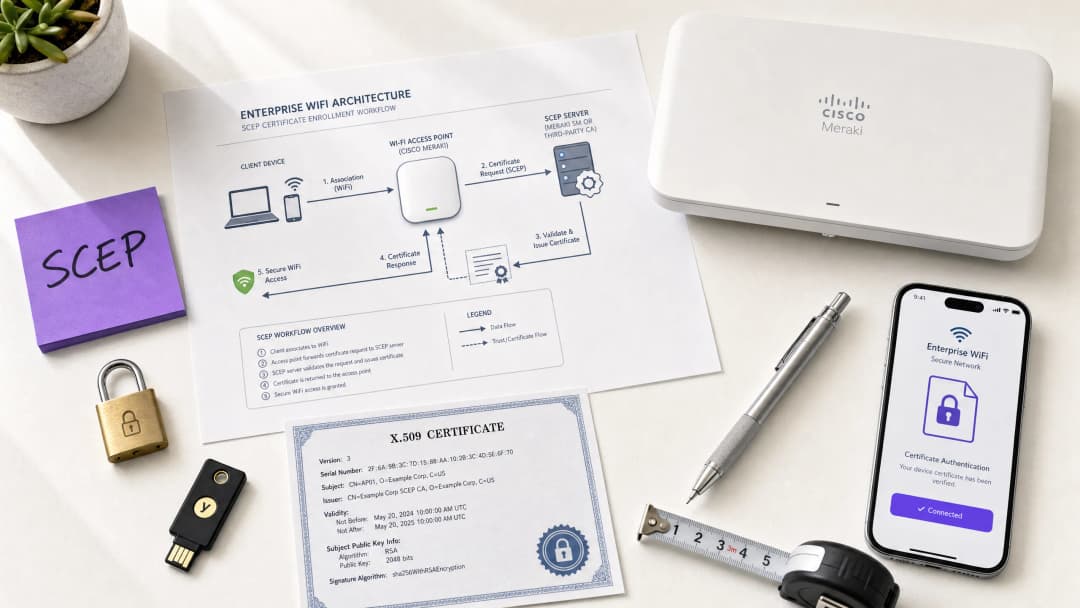
Executive summary
For venue operators running Guest WiFi across hotels, retail estates, stadiums, and conference centres, relying on pre-shared keys or basic captive portals for staff network access is a security liability. Modern network architecture demands 802.1X authentication using EAP-TLS (Extensible Authentication Protocol - Transport Layer Security), ensuring every device is cryptographically verified before it touches the network. The challenge is distribution: how do you deploy unique client certificates to thousands of Windows, iOS, and Android devices without burying your helpdesk?
The answer is SCEP - the Simple Certificate Enrolment Protocol. Formalised by the IETF as RFC 8894 in 2020, SCEP automates certificate enrolment across managed device fleets. When integrated with an MDM platform such as Microsoft Intune or Jamf, SCEP delivers zero-touch certificate provisioning: devices request, receive, and renew their own certificates without any IT intervention. The private key is generated locally on the device and never transmitted across the network - a fundamental security advantage over PKCS-based delivery.
This guide walks through the complete SCEP implementation workflow: PKI architecture, NDES gateway configuration, the mandatory three-step MDM deployment sequence, and the operational controls - particularly CRL checking and group targeting - that determine whether a rollout succeeds or stalls. Two real-world scenarios illustrate the approach in hospitality and retail environments. Purple operates across 80,000+ live venues and 350 million unique users; the patterns described here reflect what works at that scale.
Technical deep-dive
What SCEP actually does
SCEP sits between your MDM platform and your Certificate Authority (CA). It provides a standardised HTTP-based mechanism for devices to request, receive, and renew X.509 certificates without requiring a domain-joined credential or manual administrator involvement. The protocol was originally developed in the early 2000s and gained widespread adoption in enterprise MDM environments before the IETF formally published it as RFC 8894.
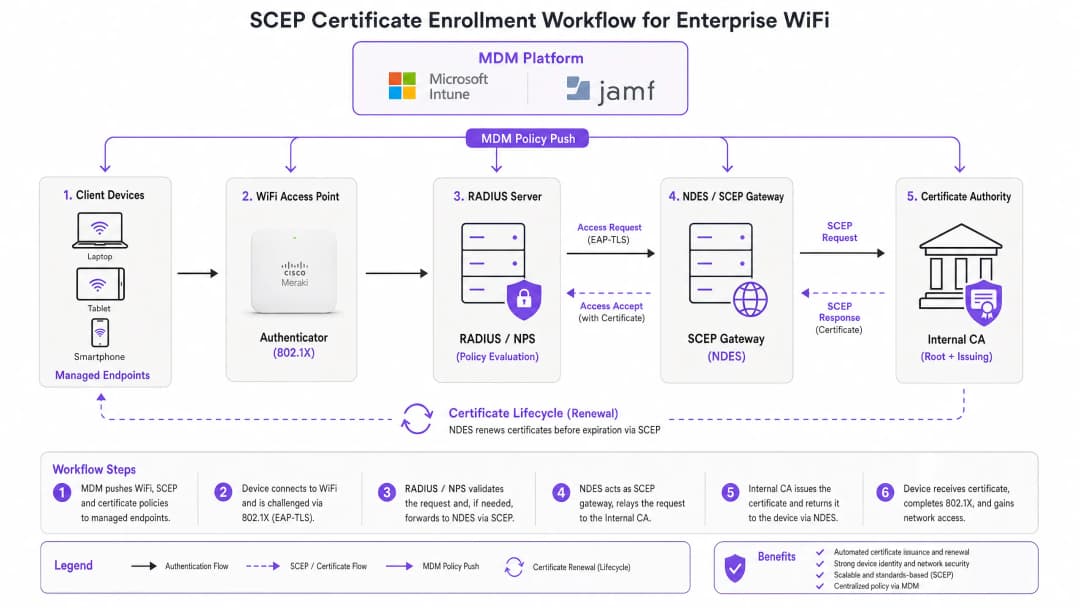
The six-step enrolment flow works as follows. First, the managed device connects to the SCEP gateway URL pre-configured in its MDM profile. Second, the device generates a private/public key pair locally and creates a Certificate Signing Request (CSR). Third, the SCEP gateway validates the device's authorisation using a challenge password or OTP embedded in the MDM policy. Fourth, the gateway forwards the validated CSR to the CA. Fifth, the CA signs the certificate and returns it to the gateway. Sixth, the gateway delivers the signed certificate to the device. Future renewals follow the same automated path - the device re-enrols before expiry without any user or administrator action.
SCEP vs PKCS: the decision that matters
Microsoft Intune and most MDM platforms support two certificate delivery mechanisms: SCEP and PKCS. The distinction is architectural, not cosmetic.
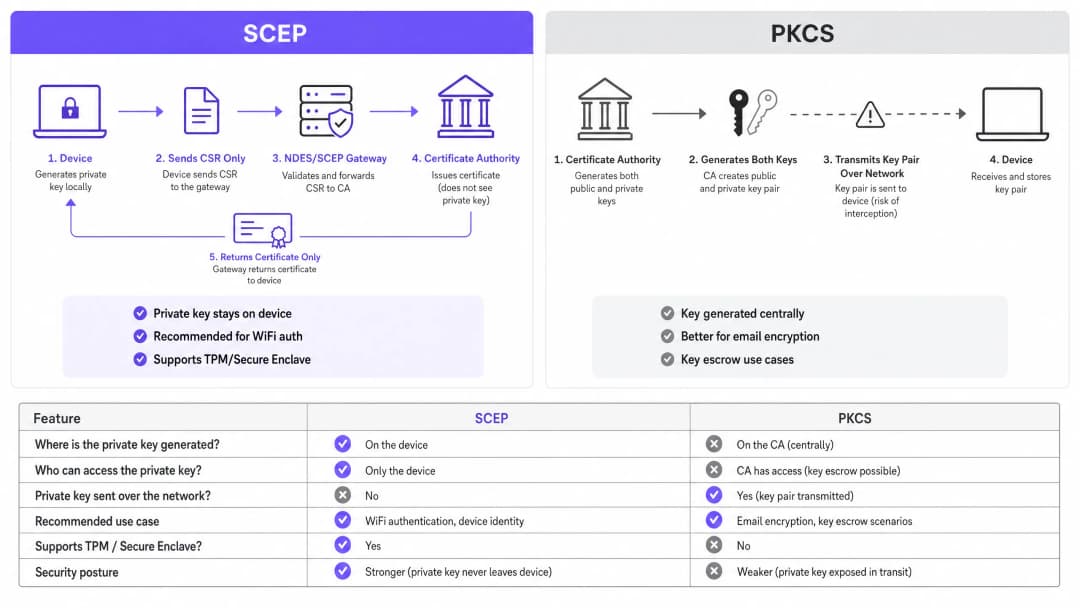
With SCEP, the private key is generated on the device and stays there. The CA never sees it. The device's TPM (on Windows) or Secure Enclave (on iOS/macOS) protects the key at the hardware level. With PKCS, the CA generates the key pair centrally and transmits it to the device over the network. The CA retains a copy, enabling key escrow - which is useful for S/MIME email encryption but introduces unnecessary risk for network authentication.
For 802.1X WiFi authentication, use SCEP. The private key never leaves the device. That is the rule.
| Criterion | SCEP | PKCS |
|---|---|---|
| Private key generated on | Device | CA (centrally) |
| Private key transmitted over network | Never | Yes |
| Supports TPM / Secure Enclave | Yes | No |
| Recommended for WiFi auth | Yes | No |
| Recommended for email encryption (S/MIME) | No | Yes |
| Key escrow possible | No | Yes |
802.1X and EAP-TLS: the authentication framework
IEEE 802.1X is the port-based network access control standard that underpins enterprise WiFi security. It defines three roles: the supplicant (the client device), the authenticator (the access point - Cisco Meraki, HPE Aruba, Ruckus, Juniper Mist, Ubiquiti UniFi, Cambium, Extreme, or Fortinet), and the authentication server (a RADIUS server such as Microsoft NPS, FreeRADIUS, or Cisco ISE).
EAP-TLS is the most secure EAP method for 802.1X. Both sides present certificates: the RADIUS server presents its certificate to the client, and the client presents its SCEP-provisioned certificate to the RADIUS server. Neither side can impersonate the other without a valid, non-revoked certificate from the trusted CA hierarchy. This mutual authentication model eliminates credential theft, Evil Twin attacks, and rogue access point risks in a single architectural decision.
EAP-TLS satisfies PCI DSS 4.0 Requirement 8.6 for multi-factor authentication at the network layer. It is required for WPA3 Enterprise 192-bit (Suite B) deployments. For any wireless network in scope for cardholder data processing - retail point-of-sale, hotel front desk, stadium ticketing - EAP-TLS is the correct choice.
For a deeper look at secure WiFi architecture and how certificate-based authentication fits within a broader security posture, see our essential guide.
Implementation guide
The deployment sequence is non-negotiable. Intune and Jamf resolve profile dependencies in order: the WiFi profile depends on the SCEP profile, which depends on the Trusted Root profile. Deploy them out of sequence and the WiFi profile will fail to apply.
Step 1: Design your PKI
Before you touch an MDM console, design your certificate hierarchy. A two-tier PKI is standard: an offline root CA and an online issuing CA. The root CA's private key is the master trust anchor for your entire certificate infrastructure - keep it air-gapped. The issuing CA handles day-to-day certificate issuance and publishes the Certificate Revocation List (CRL) and OCSP responder.
For most enterprise venue deployments, Microsoft Active Directory Certificate Services (AD CS) running on Windows Server provides the issuing CA. Cloud-hosted PKI services from providers such as SCEPman or SecureW2 eliminate the on-premises infrastructure requirement entirely and are worth evaluating for distributed estate deployments across hotel groups, retail chains, or multi-site public-sector organisations.
Step 2: Deploy the NDES server (or cloud SCEP gateway)
NDES (Network Device Enrolment Service) is the Microsoft Windows Server role that acts as the SCEP gateway between your MDM and your CA. Key configuration requirements:
- Publish the NDES URL externally via Azure AD Application Proxy (or equivalent reverse proxy). This allows remote devices to enrol before they arrive on-site, without opening inbound firewall ports.
- The NDES service account requires Read and Enrol permissions on the CA certificate template.
- Configure the certificate template with Key Usage set to Digital Signature and Key Encipherment, and Extended Key Usage set to Client Authentication (OID: 1.3.6.1.5.5.7.3.2).
- Set an appropriate certificate validity period. One year is standard for client certificates; two years is acceptable for device certificates in stable fleets.
If you prefer to avoid on-premises NDES infrastructure, cloud SCEP gateways integrate directly with Intune and your CA via API, removing the IIS dependency entirely.
Step 3: Deploy the Trusted Root Certificate profile
In your MDM platform, create a Trusted Certificate profile and upload your Root CA certificate (and any Intermediate CA certificates) as .cer files. Deploy this profile to your target device groups before any other certificate or WiFi profiles. Without this step, devices cannot validate the RADIUS server's certificate during the EAP-TLS handshake, and they cannot trust the issuing CA when requesting their own SCEP certificate.
Rule of thumb: Always target the same Azure AD group (either Users or Devices) across all three related profiles. A mismatch here is the single most common cause of WiFi profile deployment failures.
Step 4: Configure the SCEP Certificate profile
Create a SCEP certificate configuration profile in your MDM:
- Subject name format: For user-driven authentication, use
CN={{UserPrincipalName}}. For device authentication (recommended for shared devices and IoT), useCN={{AAD_Device_ID}}. - Key usage: Digital Signature, Key Encipherment.
- Extended key usage: Client Authentication (OID: 1.3.6.1.5.5.7.3.2).
- SCEP server URL: The externally published NDES URL.
- Root certificate: Link to the Trusted Root profile from Step 3.
- Certificate validity period: Match the template configured on the CA.
Step 5: Deploy the 802.1X WiFi profile
Create a WiFi configuration profile:
- SSID: Enter the network name exactly as broadcast by your access points.
- Security type: WPA2-Enterprise or WPA3-Enterprise.
- EAP type: EAP-TLS.
- Client authentication certificate: Select the SCEP certificate profile from Step 4.
- Server validation: Specify the Trusted Root certificate from Step 3 and enter the expected RADIUS server name. This prevents devices from connecting to rogue access points presenting fraudulent certificates.
Hai domande sulla tua configurazione specifica?
Il nostro team collabora con gestori di sedi, responsabili IT e ingegneri di rete in 80.000 sedi. Prenota una chiamata di 20 minuti e ti mostreremo come altri professionisti come te hanno risolto il problema.
Best practices
Enforce strict CRL checking on your RADIUS server
Certificate revocation is the operational control that closes the gap between disabling an account and blocking network access. When a device is lost, stolen, or an employee leaves, disable the AD account and revoke the certificate at the CA. Your RADIUS server must be configured to check the CRL on every authentication attempt. If the CRL is unavailable - because the CDP (CRL Distribution Point) is unreachable - most RADIUS servers default to failing open, which is a security risk. Ensure your CDPs are highly available and that your RADIUS server is configured to fail closed if the CRL cannot be fetched.
For real-time revocation, configure OCSP (Online Certificate Status Protocol) in addition to CRL. OCSP provides per-certificate status responses without requiring the RADIUS server to download and parse the entire CRL.
Use device certificates for shared and IoT devices
For shared devices - hotel housekeeping tablets, retail POS terminals, stadium access control readers - use device certificates rather than user certificates. Device certificates are tied to the machine identity, not a user account. This means the device authenticates regardless of which user is logged in, and revocation is tied to the device record rather than an employee's departure.
For retail deployments, device certificates on POS hardware also satisfy the PCI DSS requirement for network-layer device identity without introducing user-credential complexity at the point of sale.
Automate certificate renewal
SCEP supports automatic renewal: the MDM instructs the device to re-enrol before the certificate expires. Configure your SCEP profile to trigger renewal at 20% of the certificate's remaining validity period. For a one-year certificate, renewal begins approximately 73 days before expiry. This window provides enough time to resolve any renewal failures before the certificate expires and devices lose network access.
Expired certificates causing mass authentication failures are the most common operational incident in 802.1X deployments. Automated renewal via SCEP eliminates this risk entirely.
Segment networks by certificate attribute
RADIUS servers can read certificate attributes - Subject, SAN, or custom OIDs - and use them to assign devices to VLANs dynamically. A housekeeping tablet with a certificate issued from the HousekeepingDevices template lands on the housekeeping VLAN. A POS terminal with a certificate from the RetailPOS template lands on the PCI-scoped VLAN. This is cryptographically enforced network segmentation - far more reliable than SSID-based or MAC-based approaches.
For hospitality operators running Guest WiFi alongside Staff WiFi on the same physical infrastructure, VLAN assignment via certificate attributes ensures guests and staff are always on separate network segments, regardless of which SSID a device connects to.
Troubleshooting & risk mitigation
WiFi profile shows 'Error' or 'Not Applicable' in Intune
Root cause: Group targeting mismatch. The SCEP profile is assigned to a different group than the WiFi profile. Intune cannot resolve the certificate dependency.
Fix: Audit all three profiles (Trusted Root, SCEP, WiFi). Ensure they are all assigned to the exact same Azure AD group. If you are deploying to Users, all three profiles must target a Users group. If deploying to Devices, all three must target a Devices group.
NDES returns HTTP 403 errors
Root cause: The Intune Certificate Connector service account lacks Read or Enrol permissions on the CA certificate template, or firewall URL filtering is blocking SCEP query strings.
Fix: Verify the connector account has Read and Enrol permissions on the template in the CA console. Check firewall logs for blocked requests containing ?operation=GetCACaps or ?operation=PKIOperation. These query strings must pass through without modification.
Devices fail to renew certificates before expiry
Root cause: The SCEP renewal window is too short, or the NDES server is unreachable at the time of renewal.
Fix: Set the renewal threshold to 20% of certificate validity. Ensure the NDES URL is published via a highly available reverse proxy. Monitor NDES IIS logs for renewal request failures and alert on them proactively.
RADIUS rejects valid certificates
Root cause: The RADIUS server's trusted CA store does not include the issuing CA certificate, or the CRL is stale.
Fix: Import the full CA chain (Root CA + Issuing CA) into the RADIUS server's trusted store. Verify the CRL is being fetched successfully and that the CDP URL is reachable from the RADIUS server. Check the CRL's next-update timestamp - if it has passed, the CA needs to publish a new CRL.
For broader network performance considerations alongside security, see our bandwidth management guide.
ROI & business impact
The business case for SCEP-based certificate enrolment is straightforward. Password-based WiFi generates a predictable volume of helpdesk tickets: password expirations, lockouts, staff sharing credentials with guests, and onboarding friction for new starters. Certificate-based authentication is invisible to the end user. Devices connect automatically. There are no passwords to expire, share, or forget.
Organisations that migrate from password-based WiFi to EAP-TLS with SCEP typically report a 70-80% reduction in WiFi-related helpdesk tickets (Purple internal data, 2024, based on deployments across hospitality and retail estates). The helpdesk saving alone often justifies the implementation cost within the first year.
The compliance impact is equally concrete. EAP-TLS satisfies PCI DSS 4.0 Requirement 8.6 for multi-factor authentication at the network layer. For healthcare environments, it aligns with HIPAA technical safeguard requirements for wireless network access. For public-sector organisations, it supports NCSC Cyber Essentials Plus certification requirements for network access control.
For transport operators - rail franchises, airport operators, bus networks - certificate-based authentication on staff devices ensures that operational networks carrying safety-critical data are isolated from passenger WiFi and protected against credential-based attacks.
Purple's WiFi Analytics platform integrates with 802.1X-secured networks to deliver first-party data insights without compromising the security posture of the underlying infrastructure. The 29 billion data points collected across Purple's network demonstrate that security and analytics are complementary, not competing, objectives.
For feedback and experience management alongside your secure network deployment, see our venue feedback playbook.
Definizioni chiave
SCEP (Simple Certificate Enrollment Protocol)
Un protocollo standardizzato IETF (RFC 8894) che automatizza la registrazione dei certificati X.509 per i dispositivi gestiti. Il dispositivo genera la propria chiave privata localmente e invia solo una Certificate Signing Request alla CA tramite un gateway. La chiave privata non lascia mai il dispositivo.
I team IT incontrano il protocollo SCEP durante la configurazione delle piattaforme MDM (Intune, Jamf) per distribuire i certificati di autenticazione WiFi su scala. Rappresenta il meccanismo consigliato per le distribuzioni 802.1X EAP-TLS poiché la chiave privata è protetta a livello hardware sull'endpoint.
EAP-TLS (Extensible Authentication Protocol - Transport Layer Security)
Il metodo di autenticazione 802.1X più sicuro. Sia il dispositivo client che il server RADIUS presentano certificati X.509. Nessuna delle due parti può autenticarsi senza un certificato valido e non revocato proveniente dalla gerarchia CA attendibile.
EAP-TLS è il protocollo di autenticazione di destinazione abilitato dalla distribuzione dei certificati SCEP. Soddisfa il requisito PCI DSS 4.0 8.6 ed è necessario per le distribuzioni WPA3 Enterprise a 192 bit (Suite B).
PKCS (Public Key Cryptography Standards)
Un meccanismo di consegna dei certificati in cui la CA genera centralmente sia la coppia di chiavi pubblica che privata e le trasmette all'endpoint. La CA conserva una copia della chiave privata, consentendo il deposito della chiave.
I team IT scelgono tra SCEP e PKCS quando configurano i profili dei certificati in Intune. PKCS è appropriato per la crittografia delle e-mail S/MIME in cui è richiesto il deposito della chiave (key escrow). Non è consigliato per l'autenticazione WiFi perché la chiave privata viene trasmessa sulla rete.
NDES (Network Device Enrollment Service)
Un ruolo di Microsoft Windows Server che funge da gateway SCEP tra una piattaforma MDM e un'Autorità di Certificazione (CA). Convalida le richieste di registrazione dei dispositivi e inoltra le CSR alla CA.
NDES è un componente infrastrutturale richiesto per le distribuzioni SCEP on-premises con Microsoft Intune. Deve essere pubblicato esternamente tramite un proxy applicativo per consentire la registrazione dei dispositivi remoti. I gateway SCEP cloud rappresentano un'alternativa che elimina la dipendenza da NDES on-premises.
CRL (Certificate Revocation List)
Un elenco pubblicato dalla CA contenente i numeri di serie dei certificati che sono stati revocati prima della loro data di scadenza. I server RADIUS controllano la CRL per garantire che i dispositivi con certificati revocati non possano autenticarsi.
Il controllo della CRL è la misura di controllo operativo che applica la revoca dei certificati. I team IT devono configurare il proprio server RADIUS in modo da controllare la CRL a ogni tentativo di autenticazione e garantire che il CRL Distribution Point (CDP) sia altamente disponibile.
802.1X
Uno standard IEEE per il controllo dell'accesso alla rete basato su porte. Definisce il framework di autenticazione a tre parti (supplicant, authenticator, authentication server) utilizzato nelle reti WiFi aziendali e cablate.
Il protocollo 802.1X è il framework all'interno del quale operano EAP-TLS e SCEP. I team IT lo incontrano quando configurano gli SSID WPA2-Enterprise o WPA3-Enterprise e quando impostano i criteri del server RADIUS.
RADIUS (Remote Authentication Dial-In User Service)
Un protocollo di rete che fornisce autenticazione, autorizzazione e tracciamento (AAA) centralizzati per l'accesso alla rete. Nelle distribuzioni 802.1X, il server RADIUS convalida i certificati client e applica le policy di assegnazione delle VLAN.
Il server RADIUS rappresenta il punto decisionale di autenticazione in ogni distribuzione 802.1X. Le implementazioni più comuni includono Microsoft NPS, FreeRADIUS e Cisco ISE. Deve essere configurato con la catena di CA attendibili e un controllo rigoroso di CRL o OCSP.
CSR (Certificate Signing Request)
Un blocco di testo codificato generato da un dispositivo che contiene la chiave pubblica del dispositivo e le informazioni identificative. Il dispositivo invia la CSR alla CA (tramite il gateway SCEP) per richiedere un certificato firmato. La corrispondente chiave privata viene generata e conservata sul dispositivo.
La CSR è l'elemento fondamentale nel flusso di registrazione SCEP. I team IT configurano il formato della CSR (nome del soggetto, utilizzo della chiave, EKU) nel profilo del certificato SCEP all'interno della propria piattaforma MDM.
PKI (Public Key Infrastructure)
La combinazione di hardware, software, criteri e procedure necessari per creare, gestire, distribuire e revocare certificati digitali. Una PKI aziendale standard è costituita da una CA radice (root) offline e da una CA emittente (issuing) online.
La PKI è il prerequisito per qualsiasi distribuzione EAP-TLS. I team IT devono progettare e distribuire una gerarchia CA a due livelli prima di configurare SCEP. I servizi PKI ospitati nel cloud riducono il carico infrastrutturale per le distribuzioni su parchi dispositivi distribuiti.
VLAN (Virtual Local Area Network)
Un segmento di rete logico che isola il traffico al Livello 2 (Layer 2). Nelle distribuzioni 802.1X, i server RADIUS assegnano dinamicamente i dispositivi alle VLAN in base agli attributi del certificato, all'identità dell'utente o alle policy.
L'assegnazione delle VLAN tramite RADIUS è il meccanismo che applica la segmentazione della rete nei WiFi aziendali. I team IT lo utilizzano per separare i dispositivi POS su VLAN dedicate all'ambito PCI, i dispositivi degli ospiti su VLAN con solo accesso a Internet e i dispositivi del personale su VLAN aziendali, il tutto partendo da una singola infrastruttura fisica.
Esempi pratici
Una struttura Premier Inn da 200 camere deve implementare un WiFi sicuro per 150 dispositivi iOS del personale di servizio. Attualmente, lo staff condivide una password WPA2-Personal con gli ospiti, creando un rischio di conformità e operativo. Il Direttore IT deve eliminare la password condivisa senza interrompere le attività quotidiane.
Il Direttore IT implementa una distribuzione SCEP gestita da Jamf in tre fasi. Fase uno: il certificato Root CA viene inviato a tutti i 150 dispositivi iOS tramite un profilo Jamf Trusted Certificate, destinato al gruppo smart "Housekeeping Devices". Fase due: viene distribuito un profilo di certificato SCEP che indirizza i dispositivi a un server NDES pubblicato tramite Azure AD App Proxy. Il nome del soggetto utilizza CN={{SERIALNUMBER}} per legare il certificato all'hardware del dispositivo. Fase tre: viene inviato un profilo WiFi WPA2-Enterprise, specificando EAP-TLS e collegandolo al certificato SCEP. I dispositivi si autenticano in modo silenzioso. L'SSID con password condivisa viene disattivato. Il server RADIUS è configurato con un controllo CRL rigoroso e l'assegnazione della VLAN: i dispositivi del personale di servizio vengono inseriti nella VLAN 20 (operazioni), i dispositivi degli ospiti nella VLAN 10 (solo internet).
Una catena di vendita al dettaglio con 500 punti vendita deve proteggere il WiFi aziendale per i tablet POS Windows che eseguono software di elaborazione dei pagamenti. La conformità allo standard PCI DSS 4.0 richiede l'autenticazione a più fattori a livello di rete. L'attuale configurazione WPA2-Personal non supera la valutazione del requisito PCI DSS 8.6.
L'architetto di rete distribuisce EAP-TLS tramite Microsoft Intune e SCEP in tutti i 500 punti vendita. La distribuzione utilizza certificati di dispositivo con CN={{AAD_Device_ID}} come nome del soggetto, legando ciascun certificato al record del dispositivo in Intune. La sequenza dei tre profili (Trusted Root, SCEP, WiFi) viene distribuita al gruppo Azure AD "POS Devices", lo stesso gruppo per tutti e tre i profili. Il server RADIUS assegna i dispositivi POS a una VLAN dedicata all'ambito PCI (VLAN 100) in base al modello di emissione del certificato. La CRL viene pubblicata su un endpoint ospitato su CDN ad alta disponibilità con una finestra di validità di quattro ore. OCSP è abilitato per il controllo della revoca in tempo reale. La distribuzione viene convalidata rispetto al requisito PCI DSS 4.0 8.6 da parte del QSA.
Domande di esercitazione
Q1. Hai distribuito i profili certificato Trusted Root e SCEP al gruppo di utenti 'All Staff' in Intune. Successivamente, distribuisci il profilo WiFi al gruppo di dispositivi 'Corporate Devices'. I dispositivi ricevono i certificati ma il profilo WiFi mostra 'Errore' nella console di Intune. Qual è la causa più probabile e come si risolve?
Suggerimento: Considera come Intune risolve le dipendenze tra i profili e cosa succede quando i profili hanno come target tipi di gruppo diversi.
Visualizza risposta modello
La causa principale è una mancata corrispondenza del target di gruppo. Il profilo WiFi dipende dal profilo SCEP, che a sua volta dipende dal profilo Trusted Root. Intune non può risolvere queste dipendenze quando i profili hanno come target tipi di gruppo diversi (Utenti vs Dispositivi). Soluzione: ridistribuire tutti e tre i profili allo stesso gruppo. Se il profilo WiFi ha come target 'Corporate Devices' (un gruppo di dispositivi), anche i profili SCEP e Trusted Root devono avere come target 'Corporate Devices'. In alternativa, sposta tutti e tre in un gruppo di utenti se è richiesta l'autenticazione basata sull'utente.
Q2. Viene segnalato il furto dell'iPad di un addetto alle pulizie dell'hotel. Disabiliti immediatamente l'account Active Directory dell'addetto. La mattina successiva, l'iPad rubato si connette ancora alla rete WPA2-Enterprise dell'hotel. Perché e quali due azioni intraprendi per impedire questo comportamento?
Suggerimento: Pensa a cosa convalida effettivamente il server RADIUS durante l'autenticazione EAP-TLS e quali controlli regolano la validità del certificato.
Visualizza risposta modello
La disattivazione dell'account AD non revoca il certificato client memorizzato sull'iPad. Il server RADIUS convalida il certificato, non lo stato dell'account AD, durante l'autenticazione EAP-TLS. Le due azioni richieste sono: (1) revocare il certificato del dispositivo presso la CA - questo aggiunge il numero di serie del certificato alla CRL; (2) assicurarsi che il server RADIUS sia configurato con un controllo rigoroso della CRL in modo che scarichi la CRL aggiornata e rifiuti il certificato revocato al successivo tentativo di autenticazione. Per una revoca più rapida, configura l'OCSP sul server RADIUS per i controlli dello stato del certificato in tempo reale.
Q3. Una catena di vendita al dettaglio sta distribuendo il WiFi 802.1X in 500 punti vendita POS. L'architetto della sicurezza propone l'uso della consegna dei certificati PKCS anziché SCEP per evitare la distribuzione di un server NDES. Il QSA che esamina la valutazione PCI DSS 4.0 solleva una preoccupazione. Qual è la preoccupazione e qual è la raccomandazione corretta?
Suggerimento: Considera ciò che il PCI DSS stabilisce in merito alla gestione delle chiavi private e ciò che il PKCS fa con la chiave privata durante la consegna.
Visualizza risposta modello
La preoccupazione del QSA è che il PKCS trasmette la chiave privata sulla rete dalla CA al dispositivo. Il requisito 3.5 del PCI DSS 4.0 richiede che le chiavi private utilizzate per l'autenticazione siano protette dalla divulgazione. La trasmissione della chiave privata sulla rete - anche se crittografata - introduce un rischio che il SCEP elimina completamente. La raccomandazione corretta è quella di utilizzare il SCEP, in cui la chiave privata viene generata sul dispositivo POS e non lo lascia mai. Per evitare l'infrastruttura NDES on-premises, l'architetto dovrebbe valutare un servizio gateway SCEP cloud che si integra direttamente con Intune e la CA tramite API.
Q4. Stai progettando una rete WiFi per un grande centro congressi che ospita oltre 50 eventi all'anno. I dispositivi del personale devono essere su una rete protetta 802.1X. Vuoi garantire che, se il dispositivo di un fornitore esterno viene compromesso, possa essere isolato dalla rete entro 15 minuti. Quale meccanismo di revoca dei certificati configuri e perché?
Suggerimento: Confronta CRL e OCSP in termini di latenza di revoca e cosa determina la rapidità con cui un server RADIUS agisce su una revoca.
Visualizza risposta modello
Configura OCSP (Online Certificate Status Protocol) sul server RADIUS. La revoca basata su CRL presenta una latenza determinata dal periodo di validità della CRL, in genere da una a 24 ore, il che significa che un certificato revocato potrebbe comunque autenticarsi fino a quando il server RADIUS non recupera la CRL successiva. L'OCSP fornisce risposte sullo stato dei singoli certificati in tempo reale: quando un certificato viene revocato presso la CA, il risponditore OCSP restituisce immediatamente uno stato di 'revocato' alla query successiva. Con l'OCSP configurato sul server RADIUS, il certificato di un fornitore revocato viene bloccato al successivo tentativo di autenticazione, in genere entro pochi secondi. Assicurati che il risponditore OCSP sia altamente disponibile: se non è raggiungibile e il server RADIUS è configurato per bloccarsi in caso di errore (fail closed), tutte le autenticazioni falliranno.
Continua a leggere questa serie
Conformità CIPA: checklist di conformità per i gestori di sedi
Sarai in grado di decidere se la conformità CIPA vincola il tuo WiFi, quindi segmentare le reti, instradare il DNS tramite Purple Shield e chiudere i percorsi di bypass. Saprai anche quali prove conservare per la certificazione del Form 486 o del Form 479. La checklist assegna ogni requisito a un responsabile, in modo che la certificazione del prossimo anno di finanziamento non presenti lacune.
Errori di connessione in modalità di transizione WPA3: una checklist di implementazione per Cisco Meraki, HPE Aruba e Ruckus
Usa questa checklist per diagnosticare il motivo per cui i dispositivi non riescono a connettersi a un SSID in modalità di transizione WPA3 SAE e risolvere il problema su Cisco Meraki, HPE Aruba o Ruckus. Imparerai a far corrispondere i codici di stato 802.11 alle relative cause, a isolare i problemi di PMF, 802.11r e 6GHz, e a decidere quando passare a un SSID solo WPA3.
Miglior filtraggio DNS: una guida completa per le aziende
Questa guida di riferimento tecnica spiega come il filtraggio DNS aziendale protegga le reti pubbliche bloccando i domini dannosi a livello di risoluzione - prima ancora che venga stabilita una connessione. Offre ai direttori IT, agli architetti di rete e ai team operativi delle strutture l'architettura di implementazione, la configurazione del firewall e il contesto di conformità necessari per proteggere il WiFi per gli ospiti nei settori dell'ospitalità, del retail e del settore pubblico. Purple Shield blocca malware, botnet e contenuti inappropriati a livello DNS in oltre 80.000 sedi attive.
Hai domande sulla tua configurazione specifica?
Il nostro team collabora con gestori di sedi, responsabili IT e ingegneri di rete in 80.000 sedi. Prenota una chiamata di 20 minuti e ti mostreremo come altri professionisti come te hanno risolto il problema.