

Cómo analizar y cambiar tu canal WiFi para una velocidad máxima
Esta guía de referencia técnica autorizada equipa a los gerentes de TI y arquitectos de red con las metodologías para analizar entornos de RF e implementar planes de canales WiFi óptimos. Proporciona marcos de acción para mitigar la interferencia de co-canal, maximizar el rendimiento y asegurar una conectividad robusta en implementaciones empresariales de alta densidad.
Escuchar esta guía
Ver transcripción del podcast
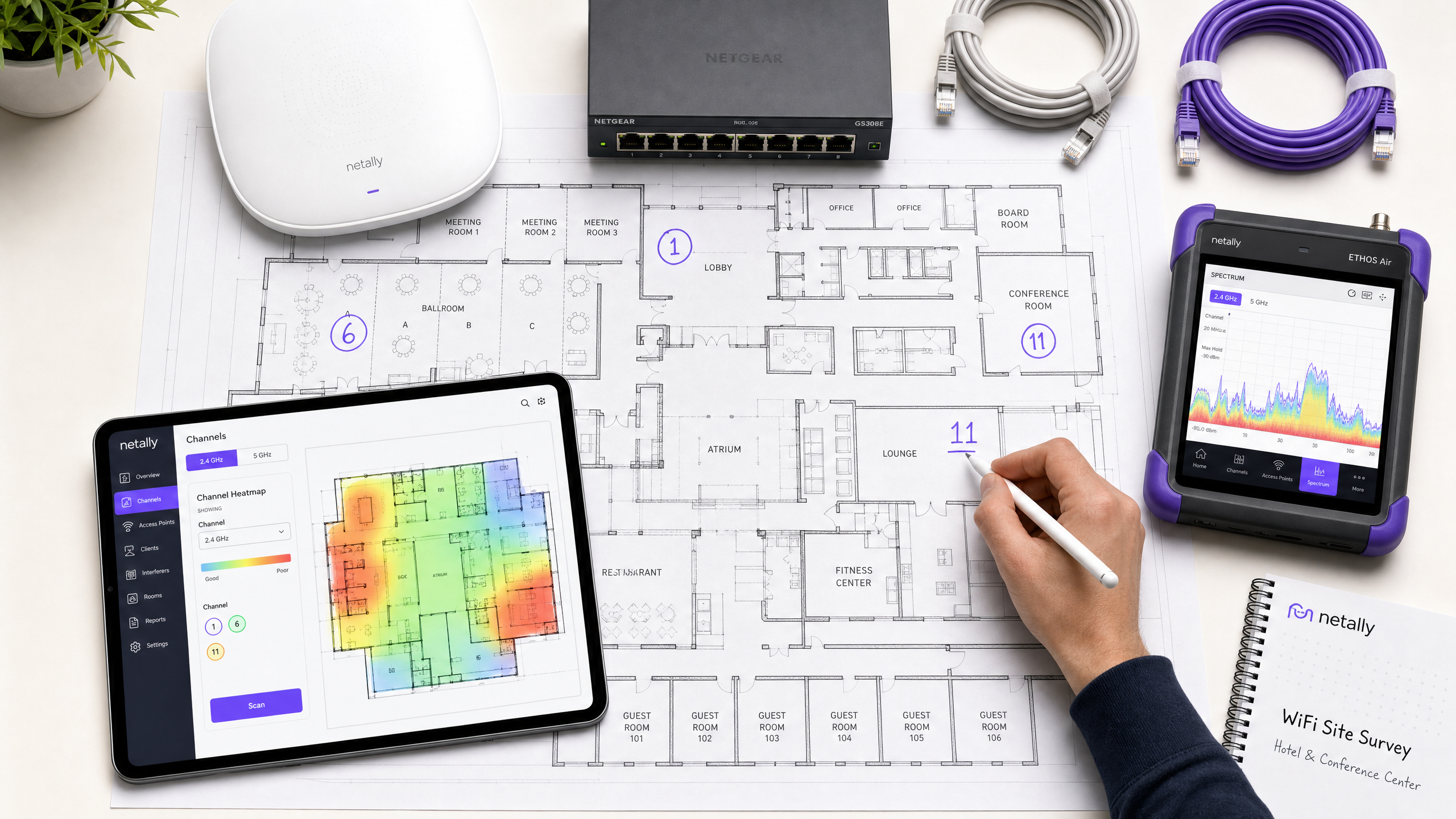
Resumen Ejecutivo
En entornos empresariales de alta densidad —ya sea un hotel de 500 habitaciones, un espacio comercial de varias plantas o un campus del sector público— el rendimiento inalámbrico ya no es una comodidad de 'mejor esfuerzo'; es una infraestructura operativa crítica. Sin embargo, muchas implementaciones sufren de un rendimiento degradado, altas tasas de reintentos y problemas de conectividad intermitente que provienen de una única causa raíz corregible: una planificación de canales subóptima. Confiar en las configuraciones predeterminadas del proveedor o en algoritmos simplistas de auto-canal en entornos de RF complejos conduce inevitablemente a la interferencia de co-canal y a la congestión del espectro.
Esta guía de referencia técnica proporciona una metodología neutral al proveedor y dirigida por la ingeniería para analizar su entorno de RF actual e implementar un plan de canales determinista. Examinaremos la física operativa de las bandas de 2.4 GHz, 5 GHz y 6 GHz, describiremos un enfoque estructurado para el análisis del espectro y proporcionaremos marcos de acción para mitigar la interferencia. Al tratar la optimización de canales como una disciplina operativa continua en lugar de una tarea de implementación única, los equipos de red pueden mejorar mediblemente el rendimiento, reducir el volumen de tickets de soporte y garantizar una conectividad fiable tanto para los dispositivos de los invitados como para la infraestructura operativa crítica.
Análisis Técnico Detallado: Comprendiendo el Espectro RF
Para tomar decisiones informadas sobre la asignación de canales, los arquitectos de red deben comprender la mecánica subyacente de los estándares 802.11 y cómo se comportan las diferentes bandas de frecuencia en entornos físicos.
La Banda de 2.4 GHz: Gestionando la Escasez
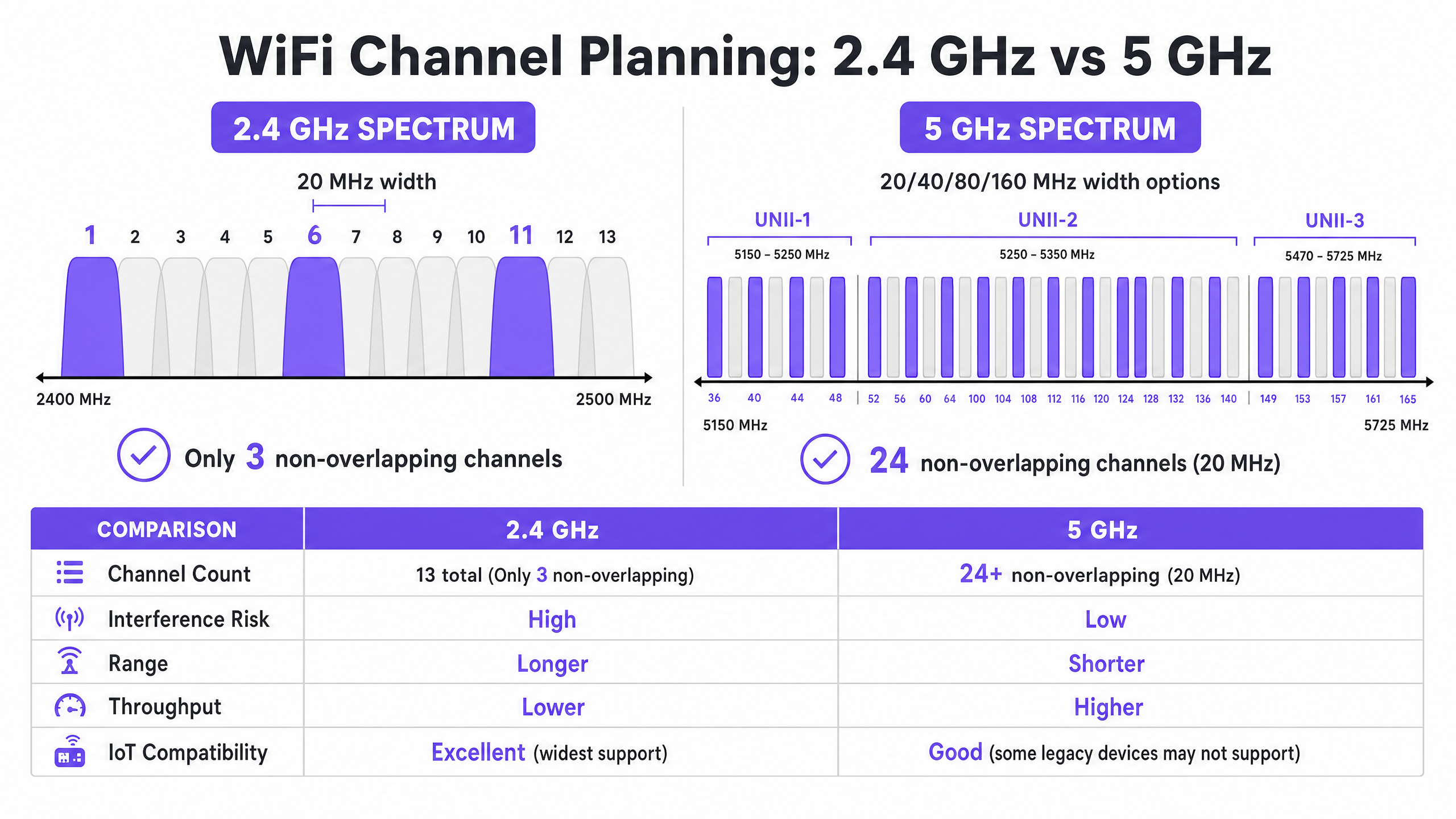
La banda de 2.4 GHz es el segmento más congestionado del espectro sin licencia. Si bien ofrece características de propagación superiores —permitiendo que las señales penetren paredes y suelos de manera más efectiva que las frecuencias más altas— su estructura de canales está fundamentalmente limitada. En la mayoría de los dominios regulatorios (incluyendo Europa y América del Norte), la banda proporciona canales de 20 MHz de ancho pero espaciados solo 5 MHz entre sí.
Esta aritmética dicta que solo hay tres canales no superpuestos disponibles: 1, 6 y 11. Cualquier implementación que utilice canales fuera de esta tríada (por ejemplo, canales 2, 3 o 4) introduce interferencia de canal adyacente. A diferencia de la interferencia de co-canal, donde los dispositivos pueden coordinar el tiempo de aire utilizando Acceso Múltiple con Detección de Portadora y Prevención de Colisiones (CSMA/CA), la interferencia de canal adyacente corrompe las transmisiones, lo que lleva a tasas de reintentos elevadas y una grave degradación del rendimiento.
Además, la banda de 2.4 GHz se comparte con numerosos interferentes que no son Wi-Fi, incluyendo dispositivos Bluetooth, hornos microondas y sensores IoT heredados. Al optimizar esta banda, el objetivo principal es la mitigación de interferencias en lugar del rendimiento máximo.
La Banda de 5 GHz: Capacidad y Complejidad
La banda de 5 GHz ofrece una capacidad significativamente mayor, proporcionando 24 o más canales de 20 MHz no superpuestos, dependiendo del dominio regulatorio. Este espectro se divide en sub-bandas de Infraestructura Nacional de Información Sin Licencia (UNII):
- UNII-1 (Canales 36-48): Estos canales no requieren Selección Dinámica de Frecuencia (DFS) y son el punto de partida más seguro para implementaciones de alta densidad.
- UNII-2 (Canales 52-144): Estos canales requieren DFS, lo que significa que los puntos de acceso deben monitorear las firmas de radar (como radar meteorológico o militar) y desocupar el canal si se detectan. Si bien DFS añade complejidad operativa, utilizar UNII-2 es esencial para lograr la reutilización de canales requerida en entornos densos.
- UNII-3 (Canales 149-165): Estos canales suelen ser no-DFS, pero están sujetos a diferentes restricciones de potencia según la región.
En la banda de 5 GHz, los arquitectos de red deben equilibrar el ancho del canal con la disponibilidad del canal. Si bien los canales de 80 MHz (el valor predeterminado para 802.11ac y Wi-Fi 6) ofrecen un alto rendimiento pico para clientes individuales, consumen cuatro canales de 20 MHz, reduciendo drásticamente el número de canales no superpuestos disponibles para su reutilización. En lugares de alta densidad, los canales anchos a menudo conducen a interferencia de co-canal, reduciendo la capacidad agregada.
La Frontera de 6 GHz (Wi-Fi 6E y Wi-Fi 7)
La introducción de la banda de 6 GHz representa la expansión más significativa del espectro Wi-Fi en dos décadas, añadiendo hasta 1200 MHz de espectro virgen. Esto proporciona hasta 59 canales adicionales de 20 MHz, completamente libres de interferencias de dispositivos heredados y requisitos DFS. Para los lugares que actualizan su hardware, 6 GHz permite el despliegue práctico de canales de 80 MHz o incluso 160 MHz en áreas de alta densidad. Sin embargo, su longitud de onda más corta significa un alcance y una penetración reducidos, lo que requiere una colocación más densa de los puntos de acceso.
Guía de Implementación: El Flujo de Trabajo de Optimización de Canales
Optimizar su plan de canales WiFi requiere un enfoque sistemático, pasando de la medición de referencia al diseño de ingeniería y la implementación validada.
Fase 1: Auditoría RF de Referencia
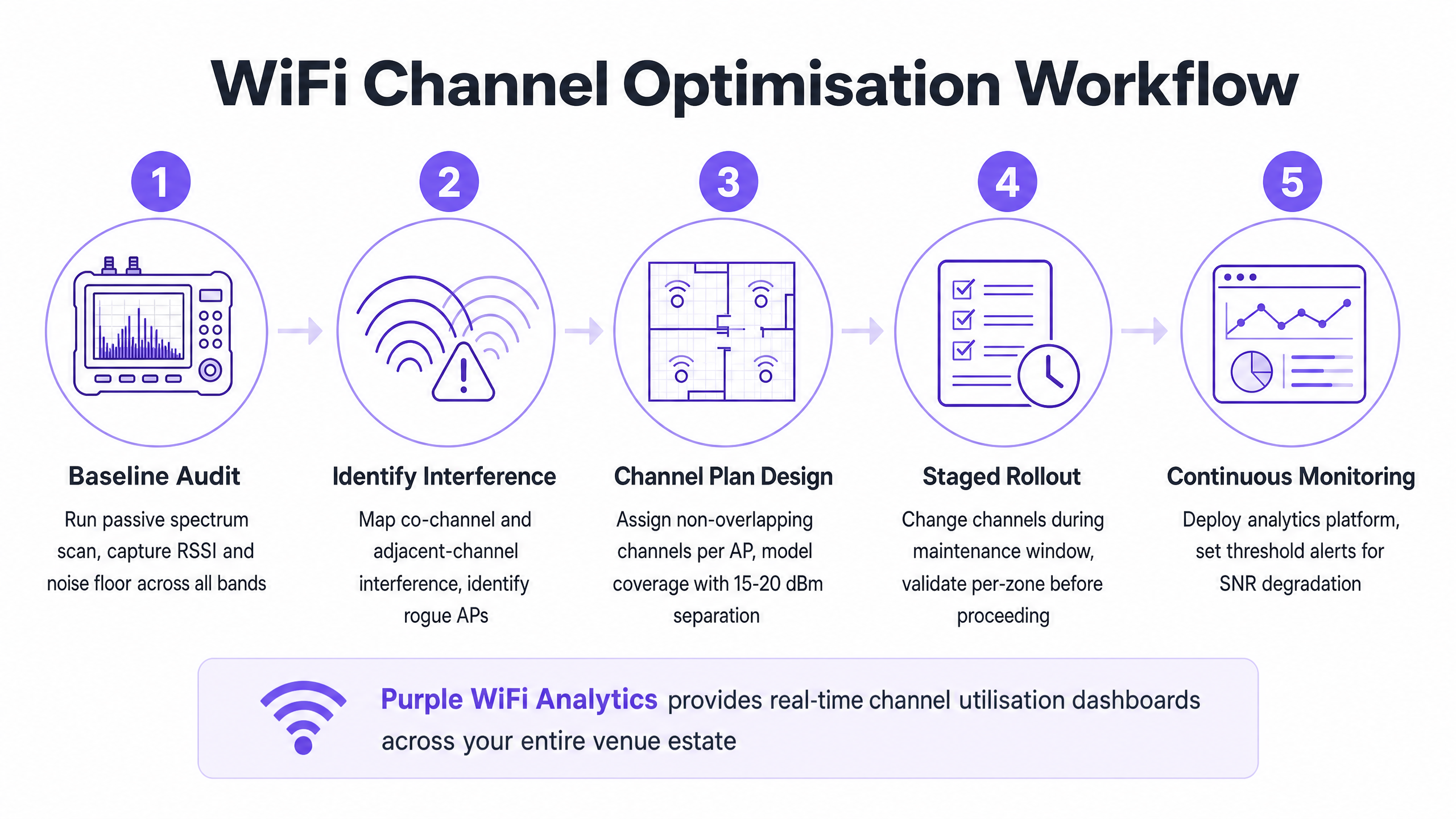
Antes de realizar cualquier cambio de configuración, debe comprender el estado actual del entorno RF. Esto requiere herramientas de medición completas, no solo una aplicación de smartphone.
- Análisis Pasivo del Espectro: Utilice un analizador de espectro dedicado (por ejemplo, Ekahau Sidekick, NetAlly AirCheck) para medir el nivel de ruido e identificar fuentes de interferencia que no sean Wi-Fi. Un entorno limpio suele presentar un nivel de ruido de alrededor de -95 dBm.
- Estudio de Redes Vecinas: Enumere todos los Identificadores de Conjunto de Servicios Básicos (BSSID) visibles, sus canales operativos e Indicadores de Fuerza de Señal Recibida (RSSI). En entornos como parques comerciales o edificios de oficinas multi-inquilino, las redes externas son una fuente principal de interferencia incontrolable.erencia.
- Métricas de rendimiento del cliente: Analice la relación señal/ruido (SNR) en lugar de solo el RSSI. Un SNR inferior a 20 dB obligará a los clientes a utilizar índices de esquema de modulación y codificación (MCS) más bajos, lo que reducirá el rendimiento. Apunte a un SNR de 25 dB o superior para un rendimiento fiable.
Fase 2: Diseño del plan de canales
Con los datos de referencia, diseñe un plan de canales determinista.
- Estrategia de 2.4 GHz: Aplique estrictamente el uso de los canales 1, 6 y 11. Desactive la radio de 2.4 GHz en puntos de acceso seleccionados si la densidad es demasiado alta, creando un diseño de "sal y pimienta" para reducir la interferencia cocanal mientras se mantiene la cobertura para dispositivos IoT heredados.
- Estrategia de 5 GHz: Utilice el número máximo de canales no superpuestos, incluidos los canales DFS si la actividad de radar en su área es baja.
- Selección del ancho de canal: Estandarice los canales de 20 MHz para áreas de alta densidad (por ejemplo, salas de conferencias, estadios). Utilice canales de 40 MHz en áreas de densidad media (por ejemplo, habitaciones de hotel, oficinas de planta abierta). Evite los canales de 80 MHz a menos que se implementen en escenarios de muy baja densidad y alto rendimiento.
- Ajuste de la potencia de transmisión: La planificación de canales y la potencia de transmisión están inextricablemente unidas. Reduzca la potencia de transmisión para disminuir el tamaño de la celda de cada punto de acceso, minimizando la superposición (y, por lo tanto, la interferencia) entre los AP en el mismo canal. Apunte a una separación de 15-20 dBm entre AP cocanal.
Fase 3: Implementación por etapas y validación
Nunca implemente un cambio global de canal durante el horario comercial o en toda la propiedad simultáneamente.
- Ventanas de mantenimiento: Programe los cambios durante los períodos de menor utilización (normalmente de 02:00 a 05:00) para minimizar la interrupción de los reinicios de radio.
- Implementación por zonas: Implemente el nuevo plan en zonas lógicas (por ejemplo, un piso o un ala a la vez).
- Validación posterior al cambio: Después de aplicar el nuevo plan, valide los cambios utilizando las mismas herramientas empleadas en la auditoría de referencia. Asegúrese de que la interferencia cocanal se haya reducido y de que se cumplan los objetivos de SNR.
Escuche nuestro informe técnico de 10 minutos sobre estrategias de optimización de canales:
Mejores prácticas y mitigación de riesgos
Los inconvenientes de los algoritmos de canal automático
La mayoría de los controladores WLAN empresariales cuentan con gestión automatizada de recursos de radio (RRM) o selección automática de canales. Si bien son convenientes para implementaciones pequeñas, estos algoritmos suelen ser perjudiciales en entornos de alta densidad. Toman decisiones basadas en perspectivas de AP locales en lugar de una vista global del entorno de RF, lo que con frecuencia conduce a asignaciones de canales subóptimas y a cambios de canal disruptivos y en cascada durante las horas de operación.
Mejor práctica: En lugares complejos, desactive la selección automática de canales. Implemente un plan de canales estático diseñado manualmente basado en encuestas de sitio rigurosas. Utilice las funciones RRM del controlador solo para alertar sobre cambios significativos de RF, no para la remediación automatizada.
Abordar la interferencia cocanal (CCI)
La CCI es el principal factor que reduce el rendimiento en implementaciones densas. Para una comprensión más profunda de las técnicas de mitigación, consulte nuestra guía completa sobre Resolución de interferencias cocanal en implementaciones empresariales .
La importancia del monitoreo continuo
Un plan de canales estático se degradará con el tiempo a medida que el entorno de RF evolucione: aparecen nuevas redes vecinas, se producen cambios estructurales o se implementan nuevos dispositivos IoT. La optimización de canales no es una tarea de "configurar y olvidar".
Mejor práctica: Implemente un monitoreo continuo utilizando una plataforma de análisis. Purple's WiFi Analytics proporciona la visibilidad necesaria sobre la densidad de clientes, la calidad de la sesión y las tendencias de rendimiento en todo el lugar. Establezca alertas de umbral para la degradación de SNR o tasas de reintento elevadas para identificar proactivamente cuándo un plan de canales requiere revisión.
ROI e impacto empresarial
Optimizar su plan de canales WiFi requiere una inversión de tiempo y herramientas, pero el retorno de la inversión es sustancial y medible.
- Mayor rendimiento agregado: Al mitigar la interferencia cocanal y optimizar los anchos de canal, los lugares a menudo pueden lograr un aumento del 20-40% en la capacidad de red agregada sin implementar nuevo hardware.
- Reducción de la sobrecarga de soporte: Un entorno de RF estable reduce drásticamente los tickets de la mesa de ayuda relacionados con "WiFi lento" o desconexiones intermitentes, lo que disminuye los costos de soporte operativo.
- Mejora de la experiencia del usuario: Para entornos que dependen de Guest WiFi , como Hospitality o Retail , la conectividad fiable se correlaciona directamente con puntuaciones más altas de satisfacción del cliente y un mayor compromiso con los captive portals.
- Fiabilidad operativa: Los sistemas empresariales críticos, desde terminales de punto de venta hasta escáneres de inventario portátiles, dependen de una conectividad inalámbrica robusta. Un plan de canales limpio garantiza que estos sistemas funcionen sin interrupciones, protegiendo los ingresos y la eficiencia operativa.
Al tratar el espectro de RF como un recurso crítico y gestionable, los líderes de TI pueden transformar su infraestructura inalámbrica de una fuente de frustración en una base fiable para las operaciones empresariales.
Definiciones clave
Co-Channel Interference (CCI)
Interference that occurs when two or more access points operate on the same frequency channel within range of each other, forcing devices to share airtime and wait for the medium to clear.
CCI is the primary cause of degraded throughput in dense deployments where channel reuse is poorly planned.
Adjacent-Channel Interference (ACI)
Interference caused by overlapping frequencies (e.g., using channels 1 and 3 in the 2.4 GHz band), which corrupts transmissions rather than sharing airtime.
ACI is highly destructive and must be avoided by strictly adhering to non-overlapping channel assignments.
Dynamic Frequency Selection (DFS)
A regulatory requirement in the 5 GHz band where access points must monitor for radar signals and vacate the channel if detected.
While DFS channels (UNII-2) add operational complexity, they are essential for achieving adequate channel reuse in high-density environments.
Signal-to-Noise Ratio (SNR)
The difference in decibels (dB) between the received signal strength and the background noise floor.
SNR is a more accurate predictor of client performance than RSSI alone. A higher SNR allows for faster modulation rates.
Modulation and Coding Scheme (MCS)
An index value that represents the combination of modulation type and coding rate used for a transmission, determining the data rate.
A clean RF environment with high SNR allows clients to negotiate higher MCS indices, resulting in faster throughput.
Carrier Sense Multiple Access with Collision Avoidance (CSMA/CA)
The protocol used by 802.11 networks where devices listen to the wireless medium before transmitting to avoid collisions.
CSMA/CA manages airtime on shared channels but leads to significant overhead and reduced throughput in environments with high CCI.
Noise Floor
The measure of the background RF energy in the environment, typically expressed in dBm.
A high noise floor reduces the effective SNR, degrading performance. Identifying and mitigating sources of RF noise is a critical step in channel optimisation.
Received Signal Strength Indicator (RSSI)
A measurement of the power present in a received radio signal.
While useful for basic coverage mapping, RSSI must be evaluated alongside the noise floor (to determine SNR) for accurate performance analysis.
Ejemplos prácticos
A 300-room hotel in a dense urban environment is experiencing poor WiFi performance during peak evening hours. The current deployment uses 80 MHz channels on the 5 GHz band, and auto-channel selection is enabled. Guests report frequent disconnections and slow streaming speeds.
- Conduct a baseline spectrum analysis during peak hours to quantify the interference.
- Disable auto-channel selection on the WLAN controller to prevent disruptive radio resets.
- Reconfigure the 5 GHz radios from 80 MHz to 20 MHz channel widths. This increases the number of available non-overlapping channels from 6 to 24+.
- Implement a static channel plan, ensuring adjacent access points operate on different channels and co-channel access points are separated by at least 15-20 dBm of signal attenuation.
- Validate the new configuration by measuring SNR and retry rates in previously problematic areas.
A large retail warehouse relies on 2.4 GHz handheld scanners for inventory management. The scanners frequently drop their connection to the network, requiring staff to reboot the devices. The access points are currently configured to use channels 1, 4, 8, and 11.
- Perform a passive RF scan to identify sources of non-Wi-Fi interference in the 2.4 GHz band (e.g., Bluetooth beacons, legacy security cameras).
- Reconfigure all 2.4 GHz radios to use only the non-overlapping channels: 1, 6, and 11.
- Adjust transmit power to minimise cell overlap, ensuring scanners roam seamlessly between access points without clinging to distant, weak signals (sticky clients).
- Implement monitoring to track the roaming behaviour and retry rates of the handheld scanners.
Preguntas de práctica
Q1. You are designing the WiFi deployment for a high-density conference centre. The venue requires maximum aggregate capacity to support thousands of concurrent client devices. Which channel width strategy should you adopt for the 5 GHz band?
Sugerencia: Consider the trade-off between peak individual throughput and the number of available non-overlapping channels for reuse.
Ver respuesta modelo
Standardise on 20 MHz channels. While 80 MHz channels provide higher peak throughput for a single user, they drastically reduce the number of available non-overlapping channels. In a high-density environment, using 20 MHz channels maximises channel reuse, reduces co-channel interference, and provides the highest aggregate capacity for the venue.
Q2. During a site survey of a retail park, you discover that several neighbouring businesses are operating their access points on channel 4 in the 2.4 GHz band. How should you configure your access points in response?
Sugerencia: Evaluate the impact of adjacent-channel interference versus co-channel interference.
Ver respuesta modelo
You must configure your access points to use channels 1, 6, or 11, specifically selecting the channel (likely 11) that is furthest from the interfering channel 4. Operating on channel 4 would cause severe adjacent-channel interference. Even operating on channel 6 might suffer some overlap from strong signals on channel 4. It is better to accept some co-channel interference on a standard channel (1, 6, 11) than to introduce adjacent-channel interference.
Q3. After deploying a new static channel plan in a hospital, you notice that clients in a specific ward are experiencing slow speeds, despite reporting a strong RSSI (-65 dBm). What is the most likely cause, and how do you investigate?
Sugerencia: RSSI only measures signal strength, not signal quality. What metric determines the actual usable signal?
Ver respuesta modelo
The most likely cause is a high noise floor leading to a low Signal-to-Noise Ratio (SNR). Even with a strong RSSI, if the noise floor is high (e.g., -75 dBm), the resulting SNR (10 dB) is too low for high-speed modulation. You should use a spectrum analyser to identify the source of the RF noise in that specific ward and mitigate it.