
Cómo implementar la autenticación 802.1X con Cloud RADIUS
Esta guía de referencia técnica proporciona un marco integral para implementar la autenticación 802.1X con Cloud RADIUS en entornos empresariales distribuidos. Detalla la arquitectura, la selección del método EAP, la secuencia de implementación y las estrategias de mitigación de riesgos necesarias para proteger el acceso a la red y, al mismo tiempo, eliminar los costes operativos de la infraestructura local.
Escuchar esta guía
Ver transcripción del podcast
Parte de nuestra serie principal: Enterprise WiFi Security Guide →
Resumen ejecutivo
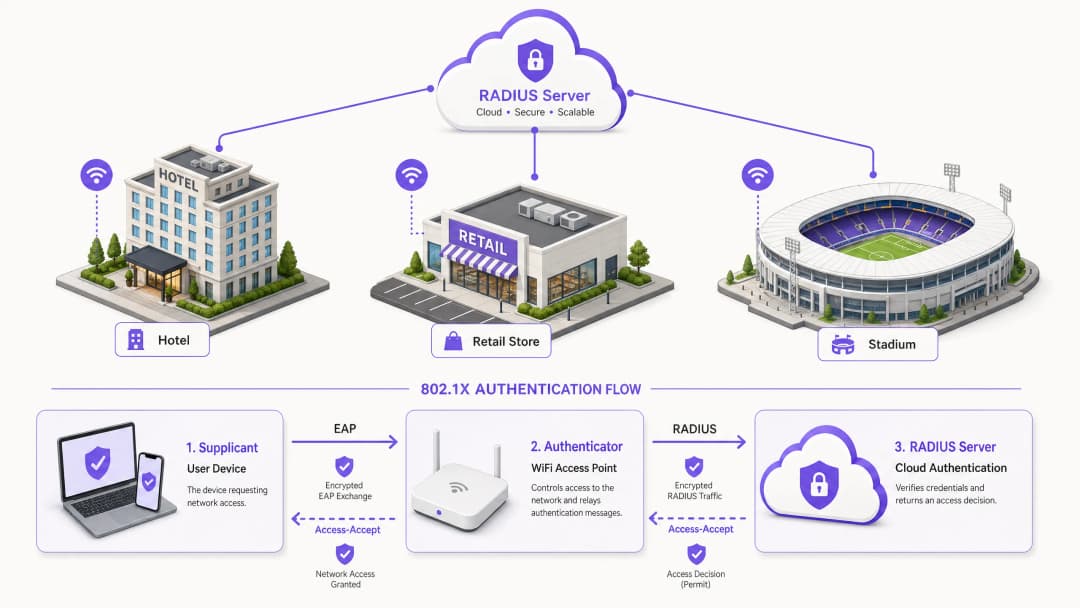
Para los responsables de la toma de decisiones de TI que gestionan redes distribuidas en los sectores de hostelería, retail y sector público, la seguridad en el acceso a la red ha pasado de ser una preferencia operativa a un estricto mandato de cumplimiento. Depender de claves precompartidas (PSK) introduce un riesgo inaceptable, no supera los estándares de auditoría modernos como PCI-DSS y expone a la organización a movimientos laterales en caso de compromiso de credenciales. La transición al control de acceso a la red basado en puertos IEEE 802.1X mitiga estos riesgos de manera eficaz al autenticar los dispositivos antes de que se conceda la conectividad IP.
Históricamente, la implantación de 802.1X en entornos con múltiples sedes se veía obstaculizada por la necesidad de una infraestructura RADIUS local para gestionar la latencia y la disponibilidad. La maduración de la arquitectura Cloud RADIUS ha cambiado fundamentalmente este panorama. Al centralizar las decisiones de autenticación e integrarse directamente con los proveedores de identidad en la nube (como Azure AD o Okta), las organizaciones pueden aplicar políticas de acceso sólidas de forma uniforme en todas las ubicaciones sin el gasto de capital y la carga de mantenimiento que suponen los servidores locales. Esta guía describe la arquitectura técnica, la metodología de despliegue y las mejores prácticas operativas para implementar con éxito la autenticación 802.1X con Cloud RADIUS, garantizando que tanto el WiFi para invitados empresarial (Guest WiFi) como las redes corporativas sigan siendo seguros y escalables.
Análisis técnico detallado
La base de la seguridad inalámbrica empresarial moderna se basa en el estándar IEEE 802.1X. A diferencia de la autenticación en la capa de aplicación, 802.1X opera en la Capa 2 del modelo OSI. Cuando un dispositivo (el suplicante) intenta asociarse con un punto de acceso (el autenticador), el puerto permanece en un estado no autorizado, permitiendo únicamente el tráfico del protocolo de autenticación extensible (EAP). Este tráfico se encapsula en paquetes RADIUS y se reenvía al servidor de autenticación, la instancia de Cloud RADIUS. Solo tras recibir un mensaje de Access-Accept, el autenticador cambia el estado del puerto a autorizado, concediendo acceso a la red.
Arquitectura de Cloud RADIUS
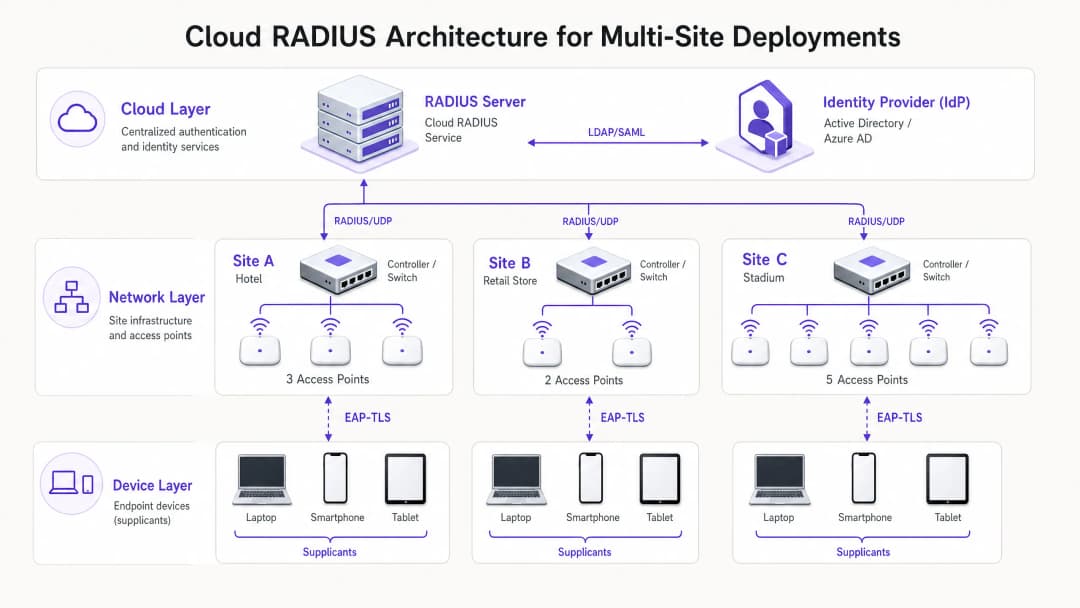
La transición arquitectónica de entornos locales a Cloud RADIUS elimina la necesidad de servidores distribuidos FreeRADIUS o Microsoft NPS. En el modelo en la nube, los puntos de acceso o controladores de red inalámbrica se comunican directamente a través de internet con un servicio RADIUS distribuido globalmente. Para proteger este tránsito, es esencial implementar RadSec (RADIUS sobre TLS), cifrando el payload de autenticación y protegiéndolo contra intercepciones. El servicio Cloud RADIUS actúa como intermediario, validando las credenciales frente a un Proveedor de Identidad (IdP) central a través de LDAP, SAML o integraciones nativas de API. Esto permite la aplicación dinámica de políticas, como la asignación de VLANs en función de la pertenencia a grupos de Azure AD, integrando el acceso a la red de forma fluida con la estrategia general de gestión de identidades corporativas.
Selección del método EAP
La elección del método EAP determina el nivel de seguridad y la complejidad operativa del despliegue.
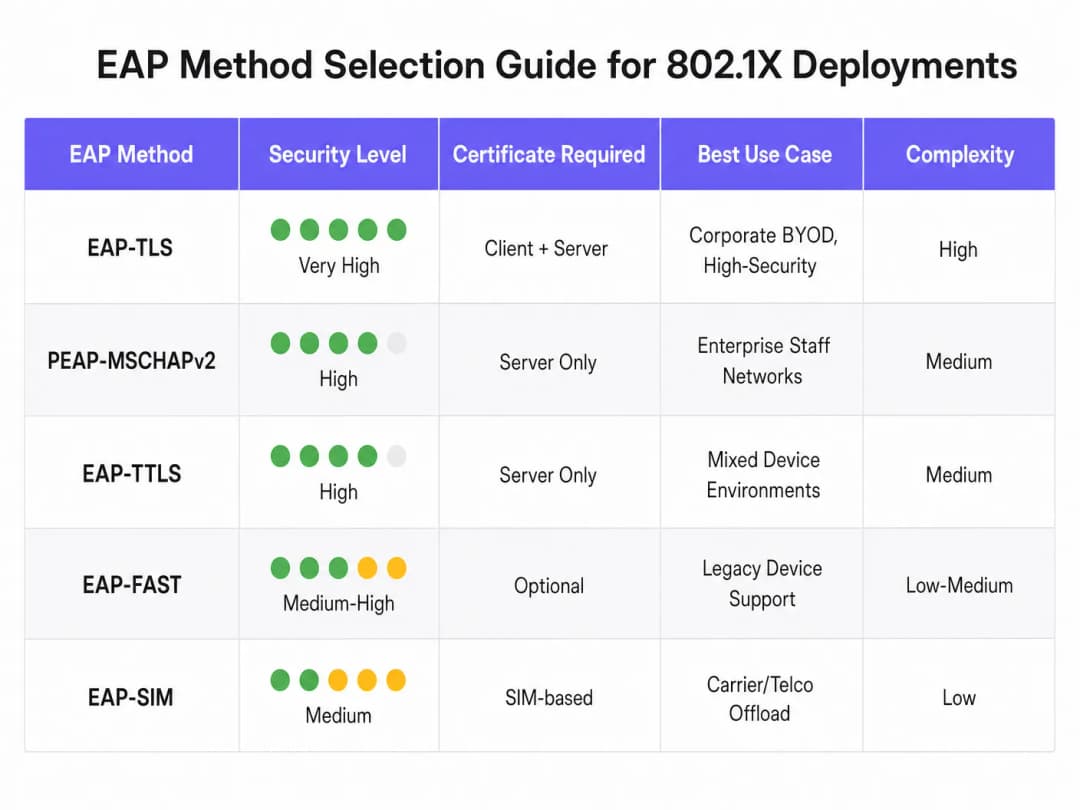
- EAP-TLS (Transport Layer Security): El método más seguro, que requiere certificados tanto de servidor como de cliente para la autenticación mutua. Al no intercambiarse contraseñas, elimina el riesgo de robo de credenciales. Sin embargo, requiere una Infraestructura de Clave Pública (PKI) y una Gestión de Dispositivos Móviles (MDM) para distribuir los certificados de cliente. Muy recomendado para dispositivos corporativos.
- PEAP-MSCHAPv2 (PEAP protegido): Muy utilizado gracias al soporte nativo en Windows y a que solo depende de un certificado en el lado del servidor. Canaliza el intercambio de credenciales dentro de una sesión TLS. Aunque es más fácil de implementar, es vulnerable a ataques de recopilación de credenciales si no se exige estrictamente la validación del certificado en el lado del cliente.
- EAP-TTLS: Similar a PEAP pero ofrece una mayor flexibilidad en el protocolo de autenticación interna, lo que lo hace adecuado para entornos con una mezcla diversa de sistemas operativos de cliente.
¿Tiene preguntas sobre su configuración específica?
Nuestro equipo trabaja con operadores de recintos, responsables de TI e ingenieros de redes en 80 000 espacios. Reserve una llamada de 20 minutos y le mostraremos cómo lo han solucionado otros profesionales como usted.
Guía de implementación
El despliegue de 802.1X con Cloud RADIUS requiere un enfoque sistemático y por fases para minimizar las interrupciones en el negocio actual.
- Integración del proveedor de identidad: Establezca y valide la conexión entre el servicio Cloud RADIUS y el IdP corporativo. Asegúrese de que la sincronización del directorio sea precisa y de que los atributos de usuario necesarios (como la pertenencia a grupos) estén disponibles para la toma de decisiones sobre políticas.
- Gestión de certificados: Para despliegues PEAP, obtenga un certificado de servidor de una Autoridad de Certificación (CA) pública de confianza. Es fundamental configurar los clientes a través de MDM o políticas de grupo para que confíen explícitamente en esta CA y validen el nombre del certificado de servidor. Para EAP-TLS, despliegue la infraestructura de CA interna y comience a emitir certificados de cliente para los dispositivos gestionados.
- Configuración de la infraestructura de red: configure los controladores inalámbricos y los puntos de acceso para que apunten a los endpoints de Cloud RADIUS. Implemente RadSec cuando el proveedor de hardware lo admita. Defina los secretos compartidos de RADIUS mediante cadenas seguras con cifrado fuerte, garantizando que el secreto sea único por sitio o clúster de controladores.
- Definición de políticas: cree las políticas de autenticación dentro de la plataforma Cloud RADIUS. Defina las condiciones según el grupo de usuarios, el tipo de dispositivo o la ubicación para asignar dinámicamente VLAN o aplicar listas de control de acceso (ACL) tras una autenticación correcta.
- Prueba piloto y despliegue por fases: seleccione un subgrupo representativo de usuarios y dispositivos para la prueba piloto inicial. Supervise de cerca los registros de autenticación para identificar problemas de latencia, fallos de validación de certificados o asignaciones de VLAN incorrectas. Tras una prueba piloto exitosa, ejecute un despliegue por fases, priorizando las ubicaciones de alto riesgo, como las oficinas ejecutivas o los sitios que manejan datos confidenciales.
Mejores prácticas
- Forzar la validación de certificados en el lado del cliente: la vulnerabilidad más común en los despliegues de PEAP es la falta de obligatoriedad en la validación del certificado del servidor en el cliente. Si se permite que los clientes confíen ciegamente en cualquier certificado presentado, quedan totalmente expuestos a ataques de puntos de acceso no autorizados.
- Implementar MAC Authentication Bypass (MAB) con precaución: para los dispositivos sin interfaz de usuario que no pueden ejecutar un suplicante 802.1X (como impresoras y sensores IoT), se puede utilizar MAB. Sin embargo, las direcciones MAC se pueden suplantar fácilmente. Los dispositivos con MAB deben aislarse en VLAN muy restringidas, con reglas de firewall estrictas que limiten su acceso a la red.
- Aprovechar 802.11r para el roaming: en entornos donde los dispositivos se mueven con frecuencia entre puntos de acceso, el proceso completo de autenticación 802.1X puede introducir una latencia inaceptable que interrumpa las aplicaciones en tiempo real, como la voz. La implementación de 802.11r (Fast BSS Transition) agiliza el roaming al almacenar en caché las claves de autenticación.
- Integrar con analíticas: para los establecimientos que operan tanto una red corporativa 802.1X como una red de acceso público, integrar la infraestructura de autenticación con WiFi Analytics proporciona una visión integral de la utilización de la red y el comportamiento de los dispositivos en todas las instalaciones.
Resolución de problemas y mitigación de riesgos
Los fallos de autenticación en un entorno 802.1X pueden provocar interrupciones generalizadas de la conectividad. Es esencial disponer de un proceso de resolución de problemas sólido.
- Caducidad de certificados: un certificado de servidor o cliente caducado provocará un fallo de autenticación inmediato. Implemente la supervisión y las alertas automatizadas sobre los periodos de validez de los certificados, garantizando que las renovaciones se gestionen mucho antes de que caduquen.
- Latencia y tiempos de espera: si el servicio Cloud RADIUS o el IdP experimentan una latencia alta, el autenticador puede agotar el tiempo de espera y perder la conexión. Configure valores de tiempo de espera adecuados en los controladores inalámbricos (normalmente de 5 a 10 segundos) y despliegue servidores RADIUS de respaldo para proporcionar redundancia.
- Falta de coincidencia en la clave secreta compartida de RADIUS: si la clave secreta compartida configurada en el autenticador no coincide con la del servidor RADIUS, los paquetes se descartarán de forma silenciosa. Normalice la gestión de claves secretas y evite la introducción manual siempre que sea posible.
ROI e impacto empresarial
La transición a 802.1X con Cloud RADIUS ofrece un valor empresarial cuantificable. Al eliminar las contraseñas compartidas, reduce drásticamente la superficie de ataque, respaldando directamente el cumplimiento de PCI-DSS (requisitos 1 y 8) y las directrices de protección de datos del GDPR. Desde el punto de vista operativo, permite un control de acceso centralizado, lo que permite a los equipos de TI revocar instantáneamente el acceso de un usuario en cualquier ubicación del mundo con solo desactivar su cuenta en el directorio central. Además, al retirar los servidores RADIUS locales heredados, las organizaciones reducen los costes de mantenimiento de hardware, las tarifas de licencias de software y la carga administrativa de parchear y gestionar infraestructuras distribuidas. Para despliegues en todo el patrimonio en sectores como el comercio minorista y la hostelería, esta postura de seguridad centralizada es un elemento clave para una transformación digital segura.
Escuche nuestro informe completo sobre el tema:
Definiciones clave
Suplicante
El cliente de software en un dispositivo de usuario final (ordenador portátil, smartphone) que negocia el acceso a la red mediante EAP.
Los equipos de TI deben asegurarse de que el suplicante esté configurado correctamente (a menudo a través de MDM) para validar los certificados del servidor a fin de evitar el robo de credenciales.
Autenticador
El dispositivo de red (normalmente un punto de acceso WiFi o un conmutador) que controla el acceso físico o lógico a la red según el estado de la autenticación.
El autenticador actúa como intermediario, transmitiendo los mensajes EAP entre el suplicante y el servidor RADIUS.
Cloud RADIUS
Un servicio de autenticación centralizado y alojado en la nube que procesa solicitudes RADIUS desde una infraestructura de red distribuida sin necesidad de servidores locales.
Esencial para organizaciones con múltiples ubicaciones que buscan implementar seguridad de nivel empresarial sin los costes de mantenimiento del hardware.
EAP (Protocolo de Autenticación Extensible)
El marco utilizado para encapsular los mensajes de autenticación entre el suplicante y el servidor de autenticación.
La elección del método EAP adecuado (por ejemplo, PEAP frente a EAP-TLS) determina el nivel de seguridad y la complejidad de la implementación de la red inalámbrica.
RadSec
Un protocolo que transmite datos RADIUS a través de un túnel TLS, garantizando el cifrado del tráfico de autenticación en tránsito.
Crucial cuando se utiliza Cloud RADIUS, ya que protege de la interceptación en internet pública los intercambios de credenciales confidenciales.
Asignación dinámica de VLAN
El proceso mediante el cual el servidor RADIUS indica al autenticador que coloque un dispositivo en un segmento de red virtual específico en función de la identidad del usuario o de su pertenencia a un grupo.
Permite al departamento de TI transmitir un único SSID segmentando el tráfico de forma segura (por ejemplo, colocando al personal de RR. HH. y al de TI en subredes diferentes).
Autenticación mutua
Un proceso de seguridad en el que tanto el cliente verifica la identidad del servidor como el servidor verifica la identidad del cliente (normalmente mediante certificados).
La característica definitoria de EAP-TLS, que lo hace altamente resistente a los ataques de tipo man-in-the-middle.
Bypass de autenticación MAC (MAB)
Un método de autenticación alternativo que utiliza la dirección MAC de un dispositivo como su credencial cuando no puede admitir un suplicante 802.1X.
Utilizado para hardware heredado como impresoras o dispositivos IoT, pero requiere una segmentación de red estricta debido a la facilidad de la suplantación de MAC.
Ejemplos prácticos
Un hotel de 200 habitaciones que utiliza una red PSK heredada para las operaciones internas (tabletas de limpieza, terminales de punto de venta, ordenadores portátiles de los directores) necesita cumplir con la norma PCI-DSS antes de una próxima auditoría. Carecen de personal de TI en las instalaciones y no pueden implementar servidores locales.
El hotel debe implementar una solución Cloud RADIUS integrada directamente con su inquilino central de Azure AD. Para los ordenadores portátiles de los directores (Windows/macOS), deben implementar PEAP-MSCHAPv2, utilizando un perfil de MDM para distribuir el certificado de servidor de confianza y aplicar la validación. Para los terminales de punto de venta que puedan carecer de suplicantes robustos, deben utilizar la omisión de autenticación MAC (MAB), pero asignando estrictamente estos dispositivos a una VLAN aislada que solo permita la comunicación con la pasarela de pago. La implementación requiere configurar los puntos de acceso gestionados en la nube existentes para que apunten a las direcciones IP de Cloud RADIUS, protegiendo la conexión con RadSec.
Una cadena minorista nacional está implementando una nueva flota de tabletas corporativas para la gestión de inventario en 500 tiendas. Quieren asegurarse de que, incluso si roban una tableta, esta no se pueda utilizar para acceder a la red, y quieren eliminar las solicitudes de asistencia técnica relacionadas con las contraseñas.
El minorista debe implementar EAP-TLS. Implementará una Autoridad de Certificación (CA) interna y la integrará con su plataforma de MDM. Cuando se aprovisiona una tableta, el MDM envía un certificado de cliente único al dispositivo. El servicio Cloud RADIUS se configura para autenticar los dispositivos basándose únicamente en la presencia de un certificado de cliente válido. Si se informa del robo de una tableta, el equipo de TI simplemente revoca ese certificado específico en la CA. El servicio Cloud RADIUS, al comprobar la Lista de Revocación de Certificados (CRL) o a través de OCSP, denegará inmediatamente el acceso a la red.
Preguntas de práctica
Q1. Tu organización está migrando de una PSK compartida a 802.1X utilizando PEAP-MSCHAPv2. Durante la fase piloto, los usuarios informan de que pueden conectarse, pero una auditoría de seguridad revela que los dispositivos aceptan silenciosamente cualquier certificado de servidor que se les presente. ¿Cuál es el riesgo inmediato y cómo debe remediarse?
Sugerencia: Piensa en lo que ocurre si un atacante configura un punto de acceso que emita el SSID de tu empresa.
Ver respuesta modelo
El riesgo inmediato es un ataque Man-in-the-Middle (MitM) a través de un punto de acceso no autorizado. Un atacante puede emitir el SSID corporativo, presentar un certificado autofirmado y recopilar las credenciales de los usuarios a medida que los dispositivos intentan autenticarse. Para remediarlo, el equipo de TI debe configurar los perfiles de los suplicantes (mediante MDM o directivas de grupo) para validar explícitamente el certificado del servidor. Esto implica especificar la CA raíz de confianza exacta que emitió el certificado del servidor RADIUS y definir estrictamente el nombre de host del servidor esperado.
Q2. Una sucursal minorista remota ha perdido su conexión a internet. Los puntos de acceso locales siguen encendidos. ¿Seguirán conectados los dispositivos del personal conectados actualmente a la red 802.1X y podrán autenticarse los nuevos dispositivos? Asume una arquitectura Cloud RADIUS estándar sin nodos de supervivencia local.
Sugerencia: Piensa en la ruta que debe seguir una solicitud de autenticación y en el estado de los puertos ya autorizados.
Ver respuesta modelo
Los dispositivos que ya están autenticados y conectados normalmente seguirán conectados hasta que expire el tiempo de espera de su sesión o se desconecten, ya que el puerto del autenticador ya está en estado autorizado. Sin embargo, los nuevos dispositivos que intenten conectarse, o los dispositivos que intenten volver a autenticarse, fallarán. Dado que la conexión a internet está caída, los puntos de acceso no pueden comunicarse con el servidor Cloud RADIUS para procesar el intercambio EAP. Esto resalta la importancia de contar con enlaces WAN resilientes cuando se depende de la autenticación basada en la nube.
Q3. Necesitas proteger el acceso a la red para una flota de escáneres de códigos de barras heredados en un almacén. Estos escáneres no admiten suplicantes 802.1X y solo son compatibles con WPA2-Personal (PSK). No puedes actualizar el hardware. ¿Cómo integras estos dispositivos en una arquitectura de red segura junto con tus dispositivos corporativos 802.1X?
Sugerencia: Necesitas una alternativa a 802.1X que siga proporcionando control de acceso, combinada con aislamiento a nivel de red.
Ver respuesta modelo
El enfoque recomendado es utilizar MAC Authentication Bypass (MAB) para los escáneres de códigos de barras. El punto de acceso utilizará la dirección MAC del escáner como identidad y la enviará al servidor RADIUS. Dado que las direcciones MAC son fáciles de suplantar, esto proporciona una autenticación débil. Por lo tanto, el servidor RADIUS debe configurarse para devolver un atributo VLAN específico tras una autenticación MAB exitosa. Esta VLAN debe estar fuertemente restringida mediante cortafuegos o ACL, permitiendo que los escáneres se comuniquen únicamente con los servidores de inventario específicos que necesitan, y bloqueando cualquier otro acceso lateral a la red.
Continúe leyendo esta serie
Los beneficios de seguridad de RADIUS-as-a-Service para plantillas híbridas
Esta guía de referencia técnica explica cómo RADIUS-as-a-Service protege el acceso a la red para plantillas híbridas en centros distribuidos. Cubre la arquitectura, los beneficios de seguridad y los pasos de implementación para reemplazar la infraestructura RADIUS local por un servicio de autenticación gestionado en la nube. Para responsables de TI y arquitectos de red en hoteles, cadenas minoristas, estadios y organizaciones del sector público, esta guía proporciona las pruebas necesarias para evaluar y ejecutar una migración a RADIUS en la nube este trimestre.
Integración de RADIUS-as-a-Service con directorios en la nube (Azure AD y Google Workspace)
Esta guía de referencia técnica detalla cómo integrar RADIUS-as-a-Service con directorios en la nube - Microsoft Entra ID y Google Workspace - para la autenticación WiFi empresarial. Cubre la transición arquitectónica de NPS local a RADIUS nativo de la nube, el despliegue de autenticación EAP-TLS basada en certificados y las mejores prácticas operativas para proteger el acceso inalámbrico en entornos de hostelería, comercio minorista y sector público. Para los responsables de TI y arquitectos de redes que ya han invertido en identidad en la nube, esta guía cierra la brecha entre la gestión de directorios y la seguridad física de la red.
¿Qué es Cloud RADIUS? Una guía completa sobre RADIUS-as-a-Service
Esta guía completa analiza Cloud RADIUS (RADIUS-as-a-Service), detallando su arquitectura, métodos de EAP y estrategias de implementación. Proporciona a los líderes de TI información práctica sobre la migración de servidores locales a un modelo de autenticación en la nube escalable, seguro y compatible.
¿Tiene preguntas sobre su configuración específica?
Nuestro equipo trabaja con operadores de recintos, responsables de TI e ingenieros de redes en 80 000 espacios. Reserve una llamada de 20 minutos y le mostraremos cómo lo han solucionado otros profesionales como usted.