
DNS Over HTTPS (DoH): implicaciones para el filtrado de WiFi público
Esta guía técnica de referencia explica cómo DNS over HTTPS (DoH) elude el filtrado de contenidos tradicional del puerto 53 en redes de WiFi público. Ofrece estrategias de mitigación prácticas e independientes del proveedor para que los arquitectos de red y responsables de TI recuperen la visibilidad, garanticen el cumplimiento y protejan el acceso de invitados en entornos empresariales.
Video overview
Escuchar esta guía
Ver transcripción del podcast
Parte de nuestra serie principal: Guía de seguridad de WiFi empresarial →
Resumen ejecutivo
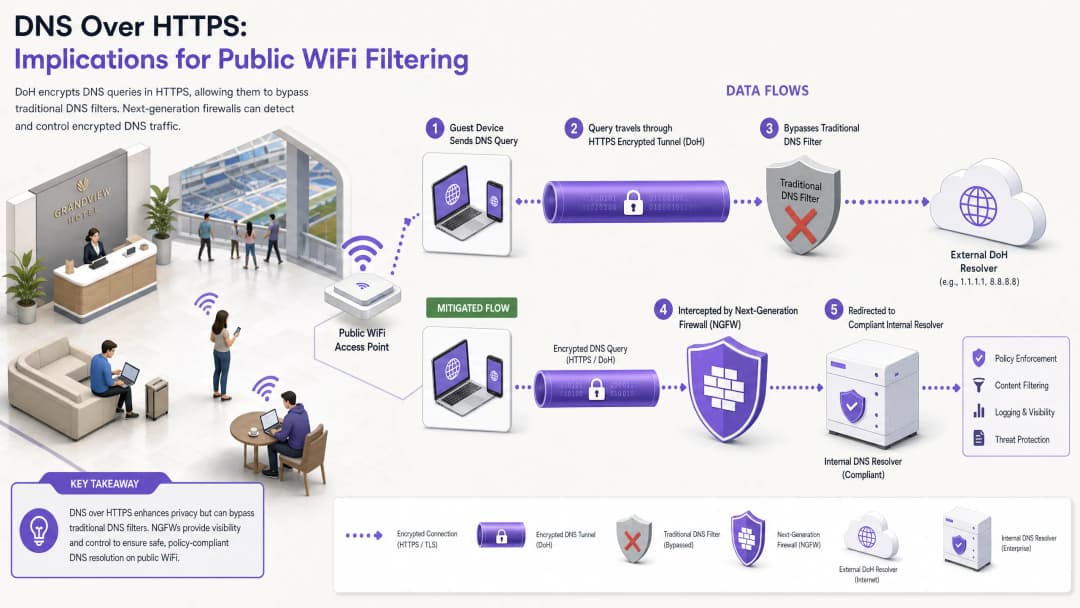
Durante casi una década, el filtrado de DNS tradicional en el puerto 53 ha servido como el mecanismo principal para aplicar políticas de contenido y mitigar las amenazas de malware en las redes WiFi públicas. Sin embargo, la adopción generalizada de DNS sobre HTTPS (DoH) por parte de los principales navegadores y sistemas operativos altera fundamentalmente este modelo. Al encapsular las consultas DNS dentro del tráfico HTTPS estándar en el puerto 443, DoH hace que estas consultas sean invisibles para las técnicas de interceptación de red tradicionales.
Para los directores de TI de empresas y los arquitectos de red que gestionan el WiFi de invitados en sectores como la Hostelería, el Comercio minorista, estadios y espacios del sector público, esto crea una brecha de seguridad y cumplimiento muy importante. Cuando los dispositivos de los invitados eluden de forma silenciosa los solucionadores DNS designados del recinto, las políticas de uso aceptable cuidadosamente diseñadas fallan, lo que expone a la red al tráfico de malware de comando y control (C2) y a contenidos inapropiados. Esta guía detalla la mecánica del vector de elusión de DoH y proporciona una arquitectura de defensa en profundidad por capas para restaurar la visibilidad de la red, garantizar el cumplimiento normativo y mantener una sólida seguridad en el Guest WiFi.
Análisis técnico detallado: Mecanismos de elusión de DoH
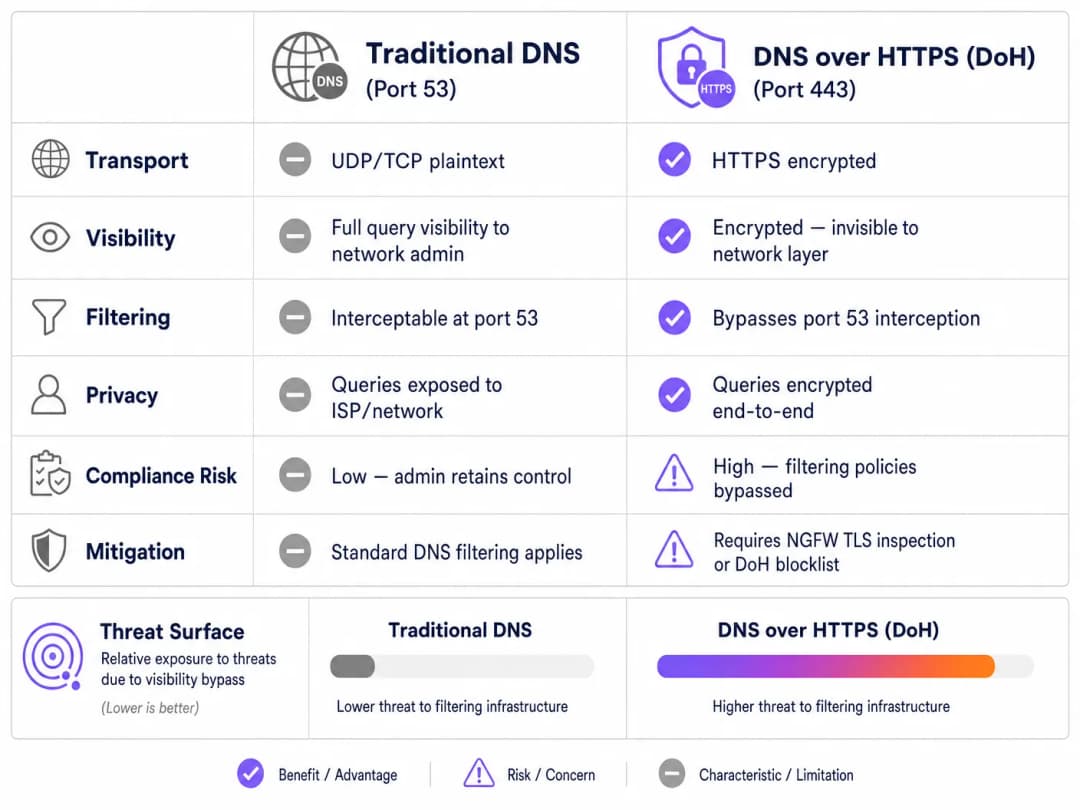
Para comprender el vector de amenaza de DoH, primero se debe examinar la arquitectura de referencia del filtrado de DNS tradicional. Históricamente, cuando un dispositivo de invitado se conectaba a una red pública y solicitaba un dominio, la consulta se transmitía en texto plano a través del puerto UDP o TCP 53. Los administradores de red podían interceptar fácilmente este tráfico en el cortafuegos o en el controlador inalámbrico y redirigirlo a un solucionador DNS compatible, que contrastaba el dominio solicitado con los feeds de inteligencia de amenazas y las políticas de categorización de contenido.
DNS sobre HTTPS elude todo este plano de control. Por diseño, DoH cifra la consulta DNS y la transmite a un solucionador externo (como el 1.1.1.1 de Cloudflare o el 8.8.8.8 de Google) utilizando cifrado TLS estándar en el puerto 443. Desde la perspectiva de la infraestructura de red del recinto, una consulta DoH es indistinguible de la navegación de un usuario por un sitio web seguro o de la reproducción de un vídeo en streaming.
Patrones de implementación: DoH a nivel de aplicación frente a nivel de sistema operativo
Los desafíos para los administradores de red se ven agravados por la forma en que se implementa DoH en las diferentes plataformas. Existen dos patrones de despliegue principales:
- DoH a nivel de aplicación: En este modelo, la aplicación mantiene su propia configuración de DoH independientemente del sistema operativo host. Mozilla Firefox es un ejemplo clásico; cuando DoH está habilitado, Firefox ignora los servidores DNS asignados por DHCP y dirige todas las consultas a su proveedor de DoH preferido. Las reglas de interceptación del puerto 53 del recinto se eluden por completo.
- DoH a nivel de sistema operativo (oportunista): los sistemas operativos modernos, incluidos Windows 11 y Android, utilizan DoH oportunista. El sistema operativo comprueba si el resolver DNS asignado por DHCP tiene un endpoint DoH conocido. Si se encuentra una coincidencia, el sistema operativo actualiza automáticamente la conexión a DoH. Aunque esto conserva la elección de resolver del administrador, desplaza el tráfico al puerto 443, lo que puede eludir las herramientas de supervisión heredadas que esperan tráfico en el puerto 53.
Además, los administradores deben considerar DNS over TLS (DoT), que opera en el puerto 853. Aunque DoT es más fácil de bloquear debido a su puerto dedicado, es el estándar por defecto para la función "DNS privado" de Android y plantea un riesgo de elusión similar si el puerto 853 permanece abierto en la VLAN de invitados.
Guía de implementación: una arquitectura de defensa en profundidad
Recuperar el control sobre la resolución DNS requiere una estrategia de mitigación de varias capas. Depender de un único punto de control es insuficiente frente a los protocolos modernos y cifrados. Para proteger el acceso de invitados y garantizar el cumplimiento de marcos como PCI DSS y GDPR, los arquitectos de red deben implementar la siguiente arquitectura.
Capa 1: Bloquear endpoints de resolver DoH conocidos
La mitigación más inmediata y eficaz es bloquear el tráfico HTTPS saliente hacia resolvers DoH públicos conocidos en el extremo de la red. Aunque el tráfico DoH se mezcla con el tráfico HTTPS estándar, las direcciones IP de destino y los dominios de los principales proveedores de DoH son de sobra conocidos.
Al configurar los firewalls de última generación (NGFW) para descartar las conexiones a estos endpoints específicos (por ejemplo, dns.google, cloudflare-dns.com), los administradores obligan a que falle la resolución DoH del dispositivo cliente. En la mayoría de las implementaciones, cuando DoH falla, el cliente recurre de forma natural al DNS tradicional sin cifrar en el puerto 53, que luego se puede interceptar y filtrar.
Nota de implementación: este enfoque requiere mantener una lista de bloqueo actualizada. Los proveedores de firewalls empresariales suelen ofrecer fuentes de amenazas dinámicas que actualizan automáticamente los endpoints DoH conocidos, lo que reduce significativamente la sobrecarga operativa.
Capa 2: Imponer la interceptación y redirección del puerto 53
Bloquear DoH solo es eficaz si el tráfico de reserva se gestiona correctamente. La red debe estar configurada para interceptar todo el tráfico saliente UDP y TCP en el puerto 53 originado desde la VLAN de invitados. Este tráfico debe redirigirse de forma obligatoria (mediante reglas de NAT o redirección de puertos) al resolver DNS autorizado y conforme del establecimiento.
Este paso es crucial porque muchos dispositivos o aplicaciones maliciosas codifican servidores DNS públicos (como 8.8.8.8) en sus pilas de red, ignorando la configuración proporcionada por DHCP. Sin una interceptación forzada, estos dispositivos eludirán con éxito las políticas de filtrado del establecimiento incluso si DoH está bloqueado.
Capa 3: Bloquear el puerto 853 (DNS over TLS)
Para abordar el vector de evasión de DoT, los administradores deben bloquear explícitamente el tráfico saliente en el puerto TCP 853 desde la red de invitados. Al igual que con la mitigación de DoH, el bloqueo de DoT obliga a los dispositivos Android y a otros clientes habilitados para DoT a recurrir al DNS estándar del puerto 53.

¿Tiene preguntas sobre su configuración específica?
Nuestro equipo trabaja con operadores de recintos, responsables de TI e ingenieros de redes en 80 000 espacios. Reserve una llamada de 20 minutos y le mostraremos cómo lo han solucionado otros profesionales como usted.
Buenas prácticas y consideraciones de cumplimiento
Implementar la mitigación de DoH no es simplemente una tarea técnica; es un requisito fundamental para mantener el cumplimiento normativo y aplicar las políticas de uso aceptable.
- Documentación de políticas: Asegúrese de que los términos y condiciones del Captive Portal del establecimiento indiquen explícitamente que el filtrado de DNS está activo con fines de seguridad y cumplimiento. Esto proporciona respaldo legal bajo el GDPR y la Online Safety Act del Reino Unido al bloquear protocolos de DNS cifrados.
- Segmentación de red: Aísle estrictamente el WiFi de invitados de las redes corporativas y de pago utilizando VLANs y reglas de firewall. Este es un requisito principal de PCI-DSS v4.0, que también exige una supervisión sólida del tráfico de red - una supervisión que resulta imposible si se permite que DoH eluda los controles de seguridad.
- Supervisión continua: Aproveche las capacidades de generación de informes de su servicio de filtrado de DNS empresarial para supervisar los volúmenes de consultas y detectar patrones anómalos. Una caída repentina en el tráfico del puerto 53 desde una subred específica a menudo indica que los dispositivos de los clientes están utilizando un nuevo resolver de DoH no bloqueado.
- Integración con analíticas: Al implementar un acceso de invitados seguro, considere cómo se integran los flujos de autenticación con los objetivos comerciales más amplios. El uso de un WiFi Assistant para una autenticación segura basada en perfiles garantiza que los usuarios se conecten de forma segura, al tiempo que ayuda al establecimiento a comprender la afluencia y los tiempos de permanencia mediante WiFi Analytics, del mismo modo que el Offline Maps Mode mejora la experiencia del visitante.
Resolución de problemas y mitigación de riesgos
Al implementar la mitigación de DoH, los equipos de red a menudo se encuentran con fallos específicos. Anticipar estos problemas minimiza el tiempo de inactividad y las molestias para los invitados.
Reglas de interceptación incompletas
El fallo de implementación más común es la interceptación incompleta del puerto 53. Los administradores pueden configurar el servidor DHCP para que proporcione las IPs de DNS correctas, pero no implementan las reglas NAT de firewall necesarias para capturar las solicitudes de DNS codificadas de forma fija. Mitigación: Pruebe siempre la implementación configurando un dispositivo cliente con un servidor DNS externo estático (por ejemplo, 9.9.9.9) y verifique que las solicitudes sigan dirigiéndose correctamente al servicio de filtrado del establecimiento.
Omisión de IPv6
A medida que las redes realizan la transición a configuraciones de doble pila, las reglas de firewall a menudo se escriben exclusivamente para IPv4. Si las listas de bloqueo de DoH y las reglas de intercepción del puerto 53 no cubren IPv6, los dispositivos modernos omitirán sin problemas los controles de IPv4 utilizando su pila IPv6. Mitigación: Asegúrese de que todas las listas de bloqueo de DoH, las reglas de redirección del puerto 53 y las reglas de descarte del puerto 853 se apliquen por igual en las tablas de enrutamiento tanto de IPv4 como de IPv6.
Interrupción de aplicaciones
El bloqueo agresivo de DoH puede, en ocasiones, interrumpir aplicaciones móviles específicas que dependen exclusivamente de sus propias implementaciones de DoH y se niegan a recurrir al DNS estándar. Mitigación: Mantenga un proceso de excepción documentado. Si una aplicación crítica para el negocio se interrumpe, en lugar de abrir DoH a nivel global, utilice la inspección TLS (si está disponible en el NGFW) para permitir de forma selectiva el tráfico DoH para el resolutor de esa aplicación específica.
ROI e impacto empresarial
El caso de negocio para una mitigación sólida de DoH se basa en la evitación de riesgos y la garantía de cumplimiento. Un solo incidente - como una investigación regulatoria derivada de un invitado que accede a contenido ilegal, o un dispositivo IoT comprometido que establece una conexión C2 a través de DoH - puede generar costes que superen con creces el tiempo de ingeniería necesario para implementar los controles adecuados.
Para una empresa que opera en múltiples ubicaciones, estandarizar la arquitectura de mitigación de DoH garantiza una aplicación coherente de las políticas. Esta estandarización reduce la carga operativa de los departamentos de soporte de TI, ya que los avisos por abuso de los ISP se reducen a cero y el rendimiento de la red se mantiene al bloquear el contenido inapropiado de gran ancho de banda. En última instancia, proteger la capa DNS garantiza que la inversión del establecimiento en Guest WiFi siga siendo un activo seguro y conforme a las normas en lugar de una responsabilidad.
Definiciones clave
DNS over HTTPS (DoH)
Un protocolo para realizar la resolución remota del Sistema de Nombres de Dominio (DNS) a través del protocolo HTTPS, cifrando los datos entre el cliente DoH y el resolvedor DNS basado en DoH.
Cuando los equipos de TI implementan el filtrado de contenidos, DoH actúa como un mecanismo de elusión, ocultando las consultas DNS dentro del tráfico web cifrado estándar.
DNS over TLS (DoT)
Un protocolo de seguridad para cifrar y envolver consultas y respuestas DNS a través del protocolo Transport Layer Security (TLS), que funciona en un puerto dedicado (853).
A menudo activado por defecto en los dispositivos Android modernos (DNS privado), DoT debe bloquearse en el firewall para garantizar que las consultas recurran al DNS filtrado del establecimiento.
DoH oportunista
Un comportamiento por el cual un sistema operativo o navegador actualiza automáticamente las consultas DNS estándar a DoH si detecta que el resolvedor DNS configurado admite el protocolo cifrado.
Esta función, habitual en Windows 11 y Chrome, implica que, incluso si un establecimiento asigna una IP de DNS estándar, el tráfico puede desviarse al puerto cifrado 443, eludiendo la monitorización heredada.
Intercepción del puerto 53
Una configuración de firewall de red que captura todo el tráfico saliente en el puerto UDP/TCP 53 y lo redirige de forma obligatoria a un sistema de resolución de DNS designado, independientemente de la dirección IP de destino solicitada por el cliente.
Esencial para capturar consultas DNS de dispositivos con configuraciones DNS codificadas de forma fija o de aquellos que han recurrido a una conexión estándar tras un fallo de conexión DoH.
Next-Generation Firewall (NGFW)
Un dispositivo de seguridad de red que ofrece capacidades más allá de un firewall de estado tradicional, incluyendo la inspección profunda de paquetes, el reconocimiento de aplicaciones y el descifrado TLS/SSL.
Los NGFWs son fundamentales para la mitigación de DoH, ya que pueden identificar y bloquear el tráfico de DoH en función de las firmas de la aplicación en lugar de limitarse a las direcciones IP.
Comportamiento de contingencia
La respuesta programada de un dispositivo cliente cuando falla la conexión con su protocolo DNS cifrado preferido (DoH o DoT), lo que suele provocar que el dispositivo vuelva al DNS estándar sin cifrar.
Los arquitectos de redes confían en este comportamiento; al interrumpir intencionadamente las conexiones DoH/DoT, obligan al dispositivo a utilizar el puerto de interceptación 53.
Comando y Control (C2)
La infraestructura utilizada por los atacantes para comunicarse con los dispositivos infectados (malware o redes de bots) dentro de una red objetivo.
El malware moderno utiliza cada vez más DoH para ocultar las comunicaciones C2 ante los monitores de red corporativos, lo que convierte la mitigación de DoH en un requisito de seguridad crítico.
Captive Portal
Una página web que el usuario de una red de acceso público está obligado a ver e interactuar con ella antes de que se le conceda el acceso.
El Captive Portal es la ubicación legalmente adecuada para informar a los usuarios de que su tráfico DNS está siendo filtrado y de que los protocolos de DNS cifrado están bloqueados.
Ejemplos prácticos
Un hotel de 400 habitaciones ha implementado recientemente un servicio de filtrado DNS en la nube para cumplir con los estándares de la marca en cuanto a contenidos aptos para familias. Sin embargo, el responsable de TI observa que una parte significativa del tráfico de invitados sigue accediendo a sitios de contenido para adultos, y el panel de filtrado DNS muestra volúmenes de consultas inferiores a los previstos. ¿Cómo debería solucionar esta elusión el arquitecto de red?
- Auditar las reglas del firewall: el arquitecto debe comprobar primero que el puerto de salida TCP/UDP 53 se esté interceptando y redirigiendo mediante NAT al servicio DNS en la nube.
- Bloquear resolvedores DoH: implementar una lista de bloqueo en el NGFW para descartar el tráfico HTTPS de salida (puerto 443) destinado a proveedores de DoH conocidos (por ejemplo, Cloudflare, Google, Quad9).
- Bloquear DoT: añadir una regla de firewall para descartar todo el tráfico TCP de salida del puerto 853 para evitar la elusión mediante el DNS privado de Android.
- Verificar IPv6: asegurarse de que todas las reglas anteriores se apliquen tanto al tráfico IPv4 como al IPv6.
Una cadena de tiendas de distribución con 150 ubicaciones necesita implementar un filtrado DNS para bloquear el malware y el phishing en su WiFi de invitados. Utilizan firewalls de sucursal básicos sin funciones avanzadas de inspección TLS. ¿Cómo pueden mitigar eficazmente el DoH sin actualizar su hardware?
Sin inspección TLS, la cadena debe confiar en un enrutamiento robusto y listas de bloqueo.
- Desplegar una lista de bloqueo dinámica de IPs/dominios de DoH en los firewalls de las sucursales, configurada para actualizarse automáticamente mediante una fuente de amenazas externa.
- Implementar una redirección estricta de NAT del puerto 53 al filtro DNS de la empresa.
- Bloquear por completo el puerto 853.
- Actualizar las Condiciones del servicio del Captive Portal para indicar explícitamente que los protocolos DNS cifrados están bloqueados con el fin de aplicar las directivas de seguridad de la red.
Preguntas de práctica
Q1. Un ingeniero de red de un estadio configura el servidor DHCP para proporcionar la dirección IP de su servicio de DNS seguro y filtrado a todos los dispositivos de invitados. Sin embargo, las pruebas revelan que los dispositivos con configuraciones de DNS manuales (por ejemplo, 8.8.8.8) están omitiendo el filtro correctamente. ¿Cuál es la solución arquitectónica más adecuada?
Sugerencia: Considere la diferencia entre sugerir una ruta y aplicar una ruta en el extremo de la red.
Ver respuesta modelo
El ingeniero debe implementar una regla de reenvío de puertos NAT en el firewall del estadio. Esta regla debe interceptar todo el tráfico saliente UDP y TCP en el puerto 53 que se origine en la VLAN de invitados y traducir de forma obligatoria la IP de destino a la dirección IP del servicio DNS seguro. Esto garantiza que, independientemente de la configuración local del cliente, el tráfico se encamine a través de la política de filtrado.
Q2. Tras la implementación de una lista de bloqueo DoH estricta, el servicio de soporte de TI de un centro de conferencias recibe avisos de que una aplicación de gestión de eventos específica y a medida no se carga para los asistentes. La captura de paquetes muestra que la aplicación intenta utilizar su propio sistema de resolución DoH codificado de forma rígida, el cual está bloqueado, y la aplicación se niega a volver al DNS estándar. ¿Cómo debe resolverse esto?
Sugerencia: Equilibre la política de seguridad con la continuidad del negocio. ¿Puede el firewall distinguir entre el tráfico DoH general y el tráfico hacia un endpoint específico y aprobado?
Ver respuesta modelo
El administrador debe crear una excepción en la política del NGFW. En lugar de desactivar la lista de bloqueo DoH de forma global, debe identificar la dirección IP o el dominio específico del sistema de resolución DoH utilizado por la aplicación de gestión de eventos e incluirlo en la lista de permitidos. Si el firewall admite la inspección a nivel de aplicación (Capa 7), una solución más robusta es crear una política que permita el tráfico DoH solo si el destino coincide con la infraestructura de la aplicación aprobada, garantizando que los intentos generales de eludir el DoH permanezcan bloqueados.
Q3. Una organización del sector público está auditando el cumplimiento de su WiFi para invitados. Han bloqueado con éxito el puerto 853 (DoT) e implementado la interceptación del puerto 53. Sin embargo, no disponen de presupuesto para un NGFW con inspección TLS avanzada o listas de bloqueo dinámicas de DoH. ¿Cuál es la estrategia restante más eficaz para mitigar el DoH?
Sugerencia: Si no hay listas dinámicas disponibles, ¿cómo se puede abordar la gran mayoría del tráfico DoH oportunista?
Ver respuesta modelo
La organización debe implementar una lista de bloqueo estática en su firewall existente, dirigida a las direcciones IP y dominios de los proveedores públicos de DoH más comunes (por ejemplo, Cloudflare, Google, Quad9). Aunque esto requiere un mantenimiento manual y no detectará solucionadores de DoH poco conocidos, las investigaciones demuestran que la gran mayoría del tráfico DoH se dirige de forma predeterminada a un puñado de proveedores principales. Esto proporciona una solución "80/20" altamente eficaz dentro de sus limitaciones presupuestarias.
Continúe leyendo esta serie
Responsabilidad en redes WiFi públicas: Por qué el filtrado de contenido es obligatorio
Esta guía de referencia técnica describe los riesgos legales y operativos de ofrecer WiFi público sin filtrar, detallando por qué el filtrado de contenido es un requisito de implementación obligatorio para los operadores de recintos. Proporciona estrategias de arquitectura accionables, pasos de implementación y tácticas de mitigación de riesgos para proteger las redes frente a actividades ilegales, infracciones de derechos de autor e incumplimiento normativo. Los operadores de recintos y Directores de Tecnología (CTO) encontrarán casos de estudio concretos, marcos de decisión y pautas de configuración para implementar un entorno de WiFi de invitados seguro y conforme a la ley.
Bloqueo de malware y phishing en el extremo de la red
Esta guía técnica de referencia describe la arquitectura, el despliegue y el impacto empresarial de implementar la protección contra amenazas a nivel de red para proteger los dispositivos IoT y de invitados no gestionados en el extremo de la red. Ofrece orientación práctica para que los responsables de TI bloqueen el malware y el phishing de forma proactiva.
Cumplimiento de la IWF para redes WiFi públicas en el Reino Unido
Esta guía de referencia detalla los requisitos técnicos, la arquitectura y las estrategias de despliegue para implementar redes WiFi públicas que cumplan con la IWF en centros de todo el Reino Unido. Proporciona a los responsables de TI los marcos necesarios para mitigar riesgos legales y mantener un acceso de red de alto rendimiento.
¿Tiene preguntas sobre su configuración específica?
Nuestro equipo trabaja con operadores de recintos, responsables de TI e ingenieros de redes en 80 000 espacios. Reserve una llamada de 20 minutos y le mostraremos cómo lo han solucionado otros profesionales como usted.