

Elegir Puntos de Acceso Empresariales: Cisco, Aruba, Ruckus, UniFi Comparados
Esta guía de referencia técnica autorizada compara los puntos de acceso empresariales de Cisco Meraki, Aruba, Ruckus y UniFi en cuanto a arquitectura, características y TCO. Ofrece a los líderes de TI recomendaciones prácticas y neutrales respecto al proveedor para implementar WiFi de alto rendimiento en entornos complejos.
🎧 Escuchar esta guía
Ver transcripción
Resumen Ejecutivo
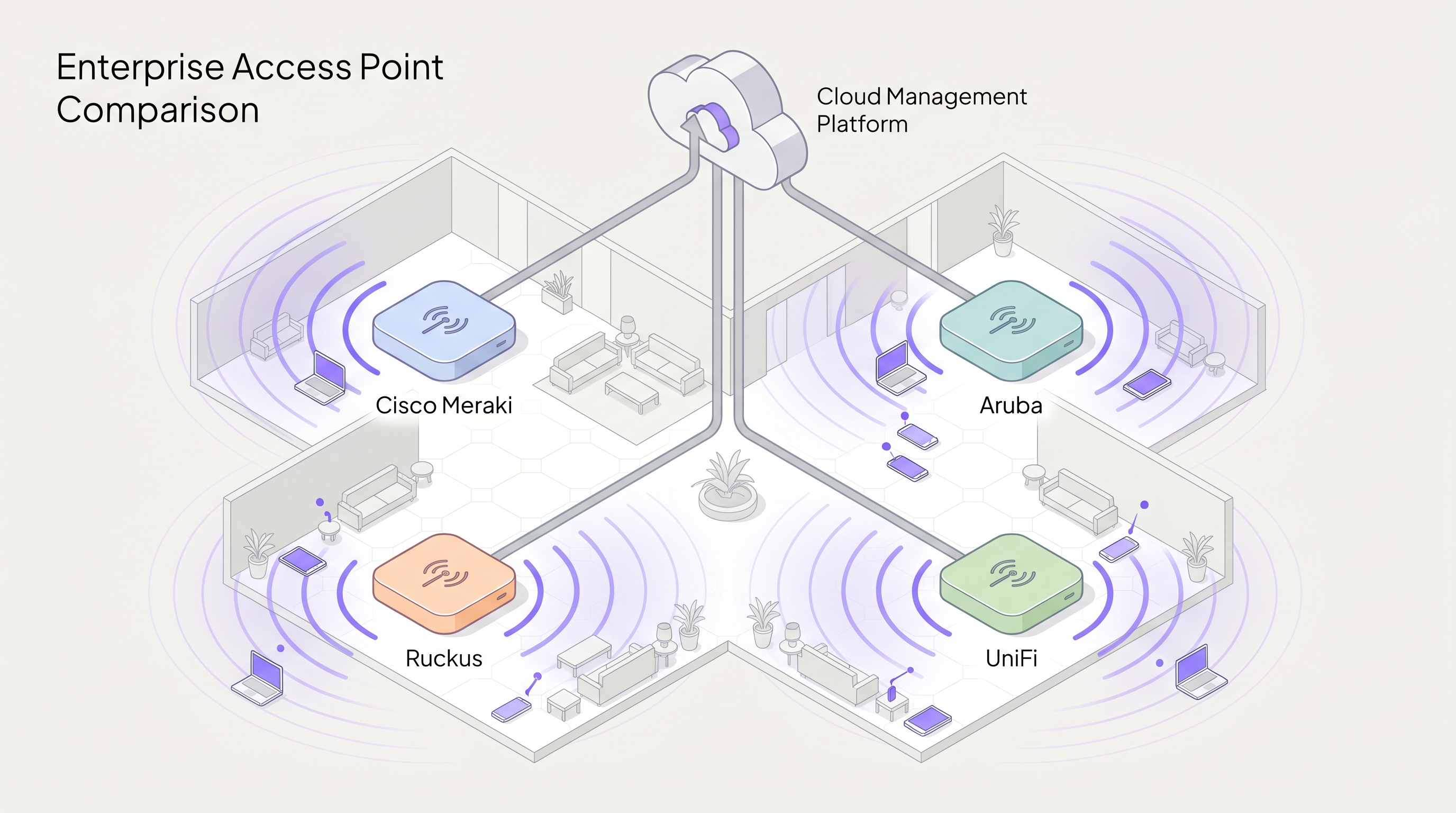
Seleccionar el proveedor adecuado de puntos de acceso (AP) empresariales es una decisión estratégica que determina el rendimiento de la red, los gastos operativos y la inversión de capital a largo plazo. Esta guía ofrece una comparación técnica neutral respecto al proveedor de los cuatro actores dominantes en el espacio de WiFi empresarial: Cisco Meraki, Aruba (HPE), Ruckus (CommScope) y UniFi (Ubiquiti).
Para los directores de TI y arquitectos de red, la matriz de decisión va mucho más allá del rendimiento RF puro. Abarca la filosofía arquitectónica, específicamente, la elección entre modelos de gestión nativos de la nube, basados en controlador e híbridos. Además, los costes de licencia ocultos y el temido "licence cliff" pueden inflar drásticamente el coste total de propiedad (TCO) durante un ciclo de vida de cinco años.
Ya sea que esté implementando cobertura de alta densidad para un estadio de 60.000 asientos, desplegando el aprovisionamiento sin contacto en una red de 200 tiendas Retail , o implementando segmentación compatible con HIPAA en Healthcare , esta guía desglosa las capacidades, limitaciones y casos de uso óptimos para cada proveedor. Como una capa de inteligencia que se sitúa por encima del hardware, Purple se integra perfectamente con las cuatro plataformas para ofrecer autenticación de Guest WiFi y WiFi Analytics .
Análisis Técnico Detallado
Filosofías Arquitectónicas: Nube vs. Controlador
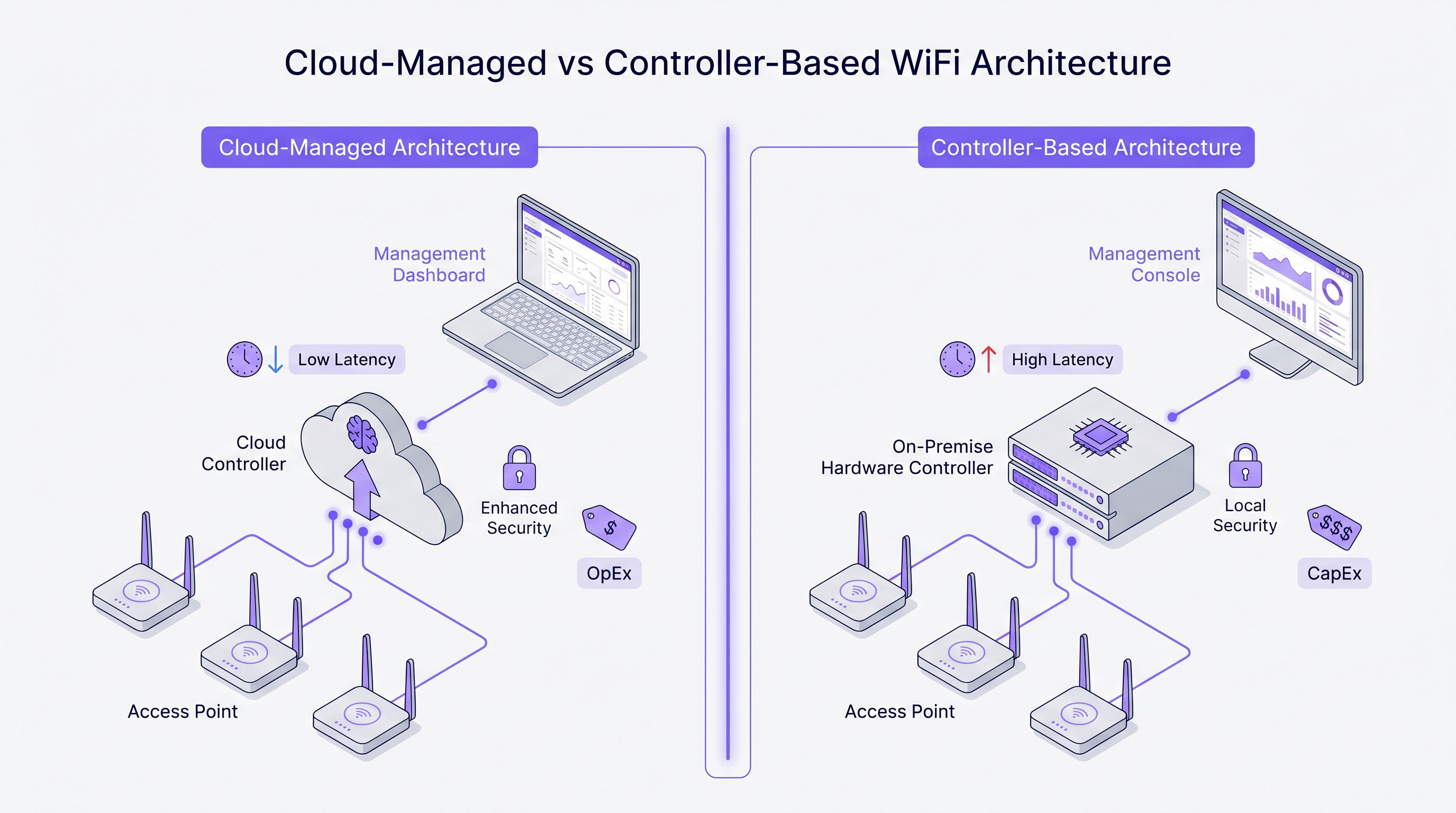
La divergencia más fundamental entre estos proveedores radica en su enfoque arquitectónico para la gestión de red y el tráfico del plano de control.
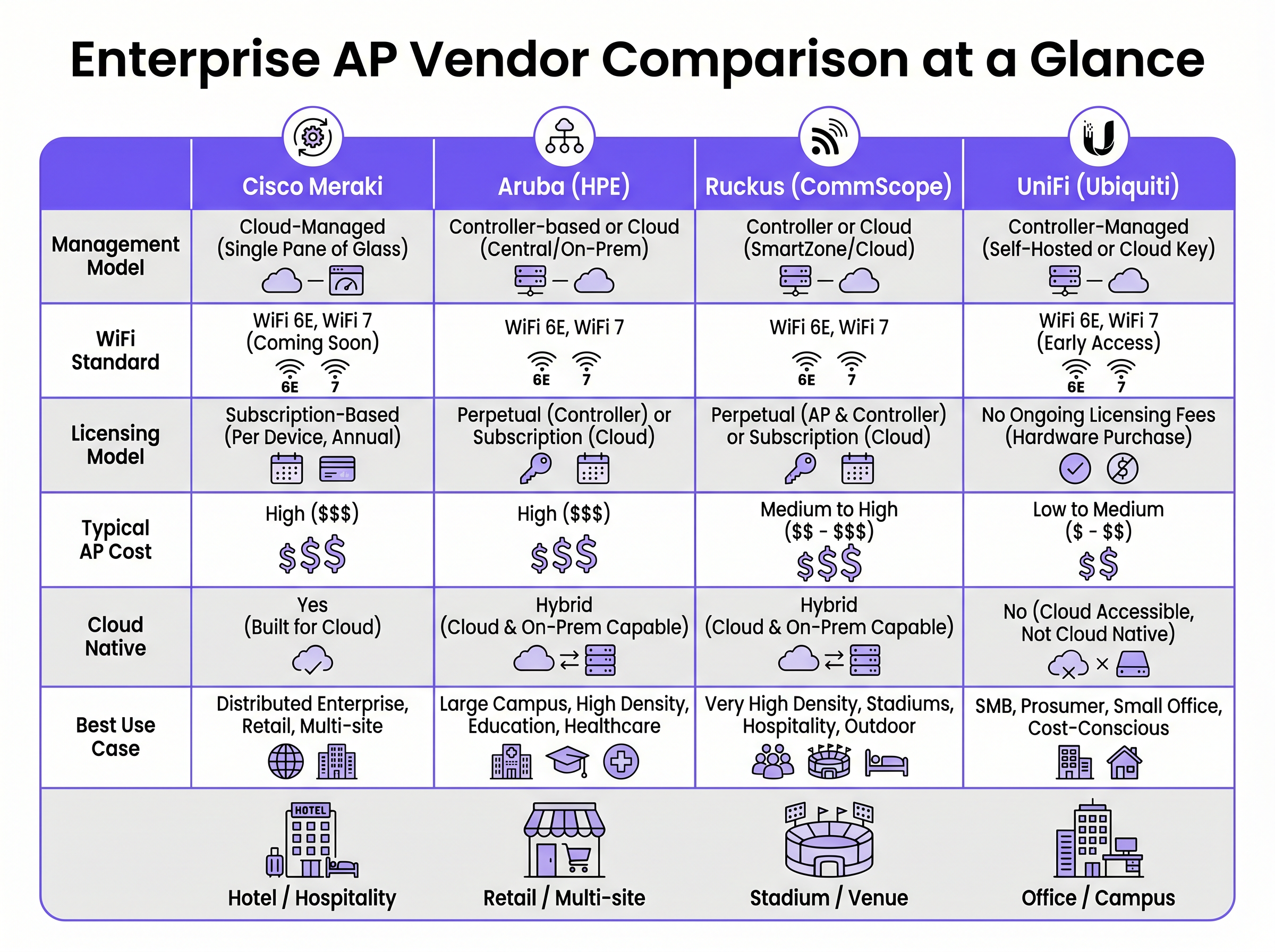
Cisco Meraki opera con una arquitectura estrictamente nativa de la nube. Cada AP del portfolio se gestiona exclusivamente a través del Meraki Dashboard. No existe una opción de controlador local. La configuración, el despliegue de firmware, la visibilidad del cliente y la aplicación de políticas se orquestan a través de la infraestructura en la nube de Cisco. Este modelo destaca en entornos distribuidos donde una única interfaz de gestión y el aprovisionamiento sin contacto son primordiales.
Aruba (HPE) aboga por un enfoque híbrido. Los AP de Aruba pueden gestionarse a través de Aruba Central (nube) o desplegarse junto con un Aruba Mobility Conductor local. Esta flexibilidad es crucial para organizaciones del sector público y sanitario que requieren una estricta soberanía de datos o planos de gestión aislados. La arquitectura de Aruba también soporta segmentación dinámica avanzada y control de acceso basado en roles (RBAC) a nivel de puerto de switch y AP.
Ruckus (CommScope) también soporta la gestión tanto en la nube (Ruckus One) como local (SmartZone). Ruckus se diferencia a nivel de hardware con su tecnología de antena adaptativa BeamFlex. En lugar de la transmisión omnidireccional, BeamFlex selecciona dinámicamente entre miles de patrones de antena para dirigir la energía RF hacia el cliente y lejos de las interferencias, lo que lo hace excepcionalmente resistente en entornos RF desafiantes.
UniFi (Ubiquiti) irrumpe en el modelo empresarial tradicional al desvincular el software de gestión de las tarifas de licencia continuas. El UniFi Network Controller puede ser autoalojado, ejecutarse en un dispositivo de hardware dedicado (Cloud Key) o alojarse en la nube. Aunque el hardware es muy rentable, la plataforma carece de la granularidad de Quality of Service (QoS), la redundancia de grado de operador y las herramientas avanzadas de resolución de problemas de RF que se encuentran en los otros tres proveedores.
Wi-Fi 6E y el Espectro de 6 GHz
Los cuatro proveedores han integrado Wi-Fi 6 (802.11ax) y Wi-Fi 6E en sus portfolios empresariales. Wi-Fi 6E es un punto de inflexión crítico para despliegues de alta densidad, abriendo hasta 1.200 MHz de espectro prístino en la banda de 6 GHz. Esto elimina la contención de canales y la interferencia cocanal que afectan a las bandas de 2.4 GHz y 5 GHz en entornos como centros de conferencias y locales de Hospitality .
Tecnologías como Orthogonal Frequency Division Multiple Access (OFDMA) permiten que un solo AP sirva a múltiples clientes simultáneamente en subcanales, reduciendo drásticamente la latencia. Para cualquier nuevo despliegue que espere más de 50 clientes concurrentes por AP, el hardware Wi-Fi 6E debería ser la especificación base.
Guía de Implementación
1. Estudio de Cobertura RF y Planificación de Capacidad
Desplegar APs basándose únicamente en un plano es un camino garantizado a las brechas de cobertura y fallos de roaming. Un estudio de cobertura RF profesional utilizando herramientas como Ekahau o iBwave es obligatorio. El estudio debe tener en cuenta la atenuación de los materiales de construcción (por ejemplo, paredes de hormigón en hoteles, estanterías metálicas en almacenes) y modelar los requisitos de capacidad, no solo la cobertura.
2. Segmentación de Red y Seguridad
Para entornos que procesan pagos o manejan datos sensibles, se requiere una estricta segmentación de Capa 2. Cree una VLAN dedicada para el tráfico de invitados, aislada de la red corporativa mediante reglas de firewall. Confiar únicamente en la separación por SSID es insuficiente para el cumplimiento de PCI DSS. La implementación de IEEE 802.1X para la autenticación corporativa y un Captive Portal para el acceso de invitados garantiza una seguridad robusta. Para despliegues en el sector sanitario, consulte nuestra guía sobre HIPAA-Compliant Guest WiFi for Healthcare Providers .
3. Optimización del Roaming
En entornos donde los clientes son altamente móviles, el roaming sin interrupciones es crítico. Habilite 802.11r (Fast BSS Transition) y 802.11k (Radio Resource Measurement) en todos los SSIDs relevantes. Meraki los habilita por defecto, mientras que Aruba y Ruckus requieren una configuración explícita. Asegúrese de que los dispositivos cliente sean compatibles con estos protocolos para evitar problemas de clientes "pegajosos".
Mejores Prácticas
- Modele el TCO a 5 años: El coste del hardware es solo una fracción del gasto total. Para proveedores como Meraki, la licencia anual obligatoria constituye la mayor parte del TCO a 5 años. Calcule de forma exhaustiva el hardware, las licencias, los contratos de soporte y los servicios de implementación.
- Evite el "Acantilado de Licencias": Para modelos basados en suscripción, co-termine sus licencias. Heredar un patrimonio con fechas de renovación escalonadas crea riesgo operativo y sobrecarga administrativa. Consolide a una única fecha de renovación.
- Diseñe para Alta Densidad: En estadios o salas de conferencias, el objetivo es contener el tamaño de la celda de RF. Utilice antenas direccionales (o aproveche Ruckus BeamFlex) para limitar la cobertura a áreas de asientos específicas, reduciendo la interferencia cocanal.
- Aproveche una Capa de Inteligencia Superpuesta: Independientemente del proveedor de hardware, desacople su capa de análisis y marketing de la infraestructura. Plataformas como Purple se integran de forma nativa con Cisco, Aruba, Ruckus y UniFi, asegurando que sus WiFi Analytics se mantengan consistentes incluso si cambia de proveedor de hardware en el futuro.
Resolución de Problemas y Mitigación de Riesgos
El Problema del Cliente "Pegajoso"
Los clientes que se aferran a un AP con una señal débil en lugar de conectarse a un AP más cercano es un problema común. La mitigación implica ajustar la tasa básica mínima (deshabilitando las tasas heredadas 802.11b como 1, 2, 5.5 y 11 Mbps) y habilitar 802.11v para ayudar a los clientes a tomar mejores decisiones de roaming. La tecnología ClientMatch de Aruba gestiona esto dinámicamente a nivel de infraestructura.
Interferencia Cocanal (CCI)
En implementaciones densas, los AP que transmiten en el mismo canal interfieren entre sí, elevando el nivel de ruido y reduciendo el rendimiento. La mitigación requiere una planificación cuidadosa de los canales (evitando canales superpuestos en 2.4 GHz) y la habilitación de funciones de gestión de radio dinámicas como Auto RF de Cisco o ARM de Aruba para ajustar automáticamente la potencia de transmisión y las asignaciones de canales.
El Apagado Forzoso de Meraki
El riesgo operativo más significativo con Cisco Meraki es la estricta aplicación de las licencias. Si una suscripción caduca más allá del período de gracia, los AP dejan de funcionar por completo. La mitigación requiere una gestión rigurosa de los activos y una planificación presupuestaria proactiva para las renovaciones.
ROI e Impacto Empresarial
El retorno de la inversión para el WiFi empresarial va más allá de la simple conectividad. Una red robusta sustenta operaciones comerciales críticas, desde sistemas de punto de venta móviles en el comercio minorista hasta la comunicación clínica en la atención médica. Consulte nuestra guía sobre WiFi para Huéspedes en Hospitales: Experiencia del Paciente y Separación de Red para más detalles.
Además, la integración de un Captive Portal y una plataforma de análisis transforma la red de un centro de costes en un activo generador de ingresos. Al capturar datos de invitados de primera mano, los establecimientos pueden impulsar campañas de marketing personalizadas, medir el tráfico de personas y optimizar las operaciones. La clave para maximizar el ROI es seleccionar el proveedor de AP que se alinee con sus capacidades operativas y presupuesto, mientras se aprovecha una capa superpuesta independiente del proveedor para extraer inteligencia de negocio.
Términos clave y definiciones
Zero-Touch Provisioning (ZTP)
The ability to configure network devices automatically by connecting them to the internet, allowing them to download their configuration from a central cloud controller.
Critical for multi-site retail or branch deployments where sending an IT engineer to every site is cost-prohibitive.
BeamFlex
A proprietary adaptive antenna technology developed by Ruckus that dynamically changes antenna patterns to focus RF energy towards the client.
Provides a significant performance advantage in environments with high multi-path interference or extreme client density.
IEEE 802.1X
An IEEE standard for port-based network access control (PNAC), providing an authentication mechanism to devices wishing to attach to a LAN or WLAN.
The enterprise standard for securing corporate devices, requiring integration with a RADIUS server (like Cisco ISE or Aruba ClearPass).
Dynamic Segmentation
The automated assignment of network access policies and VLANs to users and devices based on their role, rather than their physical connection point.
A key feature of Aruba's architecture, allowing IT teams to enforce consistent security policies across wired and wireless networks.
OFDMA (Orthogonal Frequency Division Multiple Access)
A feature of Wi-Fi 6 that allows an AP to divide a channel into smaller sub-channels (Resource Units) to transmit data to multiple clients simultaneously.
Crucial for reducing latency in high-density environments like stadiums and conference centres.
Co-Channel Interference (CCI)
Interference caused when multiple APs in the same physical area transmit on the same frequency channel, forcing them to share airtime.
A primary cause of poor WiFi performance, mitigated through proper RF design and dynamic radio management.
802.11r (Fast BSS Transition)
A protocol that allows a client device to authenticate with a target AP before roaming, reducing the time required to transition between APs.
Essential for seamless roaming, particularly for voice-over-IP (VoIP) applications in hospitality and healthcare.
Single Pane of Glass
A management interface that unifies data and controls from multiple components (e.g., APs, switches, firewalls) into a single unified dashboard.
The primary selling point of cloud-native platforms like Cisco Meraki, simplifying operations for lean IT teams.
Casos de éxito
A 400-room luxury hotel with thick concrete walls is experiencing severe roaming issues and poor signal penetration. The current legacy infrastructure uses omnidirectional APs placed in the hallways. The IT director needs to select a vendor for a complete hardware refresh.
Deploy Ruckus Wi-Fi 6 APs (e.g., R550 or H550 wall-plate APs) inside the guest rooms rather than the hallways. Ruckus's BeamFlex adaptive antenna technology excels in mitigating multi-path interference caused by concrete walls. Configure the network using Ruckus SmartZone for on-premise control, ensuring that 802.11r and 802.11k are enabled for seamless roaming as guests move between the lobby and their rooms.
A national retail chain with 250 small footprint stores needs to deploy a consistent, secure WiFi network for both corporate PoS devices and guest access. The IT team is lean and centralised at headquarters, with no technical staff on site at the stores.
Implement Cisco Meraki MR36 APs managed via the Meraki Dashboard. Utilise Meraki's zero-touch provisioning to ship unconfigured APs directly to the stores, where non-technical staff simply plug them in. Configure a corporate VLAN for PoS devices using 802.1X, and a segmented guest VLAN integrated with Purple for captive portal authentication and analytics. Leverage Meraki's cloud-managed architecture to push firmware updates and policy changes globally from HQ.
Análisis de escenarios
Q1. A university campus requires a major WiFi upgrade. The network must support dynamic role-based access control for students, faculty, and IoT devices. The university's security policy mandates that the core network management infrastructure must remain on-premise, though they are open to cloud monitoring. Which vendor is the optimal choice?
💡 Sugerencia:Consider the requirement for on-premise management combined with advanced role-based access control.
Mostrar enfoque recomendado
Aruba is the optimal choice. Aruba's hybrid architecture allows for on-premise controllers (Mobility Conductors) to satisfy the strict security policy. Furthermore, Aruba's Dynamic Segmentation and ClearPass Policy Manager provide industry-leading capabilities for role-based access control across diverse user groups and IoT devices.
Q2. A medium-sized logistics company operates three warehouses. They have a highly constrained IT budget and a capable in-house network engineer. They need basic WiFi coverage for barcode scanners but do not require advanced analytics, SLA-backed support, or carrier-grade redundancy. Which vendor should they evaluate?
💡 Sugerencia:Focus on the budget constraints and the presence of an in-house engineer to manage the system.
Mostrar enfoque recomendado
UniFi is the most appropriate choice. The lack of ongoing licensing fees and the low cost of hardware fit the constrained budget. Since they have an in-house engineer and do not require SLA-backed support or advanced enterprise features, the UniFi platform provides the best value for this specific scenario.
Q3. A regional airport is upgrading its terminal WiFi. The environment is characterised by vast open spaces, high ceilings, and extreme client density during peak hours. The IT team is concerned about co-channel interference and signal propagation. Which hardware feature should drive their vendor selection?
💡 Sugerencia:Identify the vendor known for proprietary RF mitigation in hostile, high-density environments.
Mostrar enfoque recomendado
The airport should evaluate Ruckus, specifically focusing on its BeamFlex adaptive antenna technology. In large open spaces with high density, omnidirectional antennas create excessive co-channel interference. BeamFlex dynamically steers the RF signal, reducing interference and improving performance in challenging physical environments.
Conclusiones clave
- ✓Cisco Meraki offers unmatched cloud simplicity and zero-touch provisioning, ideal for distributed retail, but carries high ongoing licensing costs.
- ✓Aruba provides robust hybrid architecture (cloud or on-premise) and advanced dynamic segmentation, making it a standard for healthcare and higher education.
- ✓Ruckus excels in hostile RF environments and high-density venues (stadiums, concrete hotels) due to its proprietary BeamFlex antenna technology.
- ✓UniFi delivers cost-effective hardware with no ongoing licensing fees, suitable for SMBs and budget-conscious deployments with in-house IT support.
- ✓Always model a 5-year Total Cost of Ownership (TCO) to account for mandatory subscription fees, which can eclipse the initial hardware CapEx.
- ✓Deploying Wi-Fi 6E hardware is essential for future-proofing high-density environments by leveraging the uncongested 6 GHz spectrum.
- ✓Purple's intelligence layer is vendor-agnostic, integrating with all four platforms to provide consistent Guest WiFi authentication and analytics regardless of the underlying hardware.




