

Enterprise Access Points auswählen: Cisco, Aruba, Ruckus, UniFi im Vergleich
Dieser maßgebliche technische Leitfaden vergleicht Cisco Meraki, Aruba, Ruckus und UniFi Enterprise Access Points hinsichtlich Architektur, Funktionen und TCO. Er bietet IT-Führungskräften umsetzbare, herstellerneutrale Empfehlungen für die Bereitstellung von Hochleistungs-WiFi in komplexen Umgebungen.
🎧 Diesen Leitfaden anhören
Transkript anzeigen
Zusammenfassung für Führungskräfte
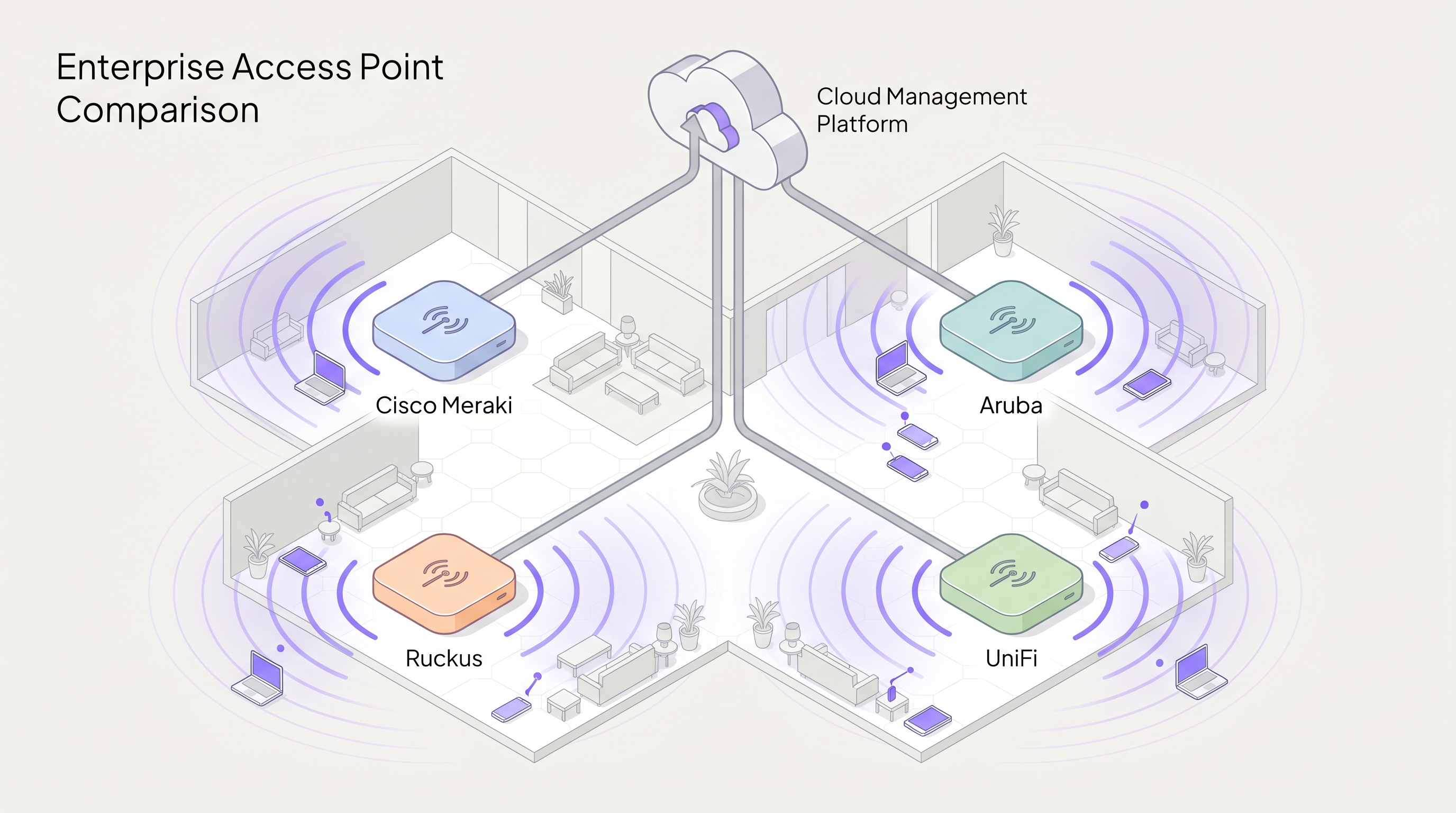
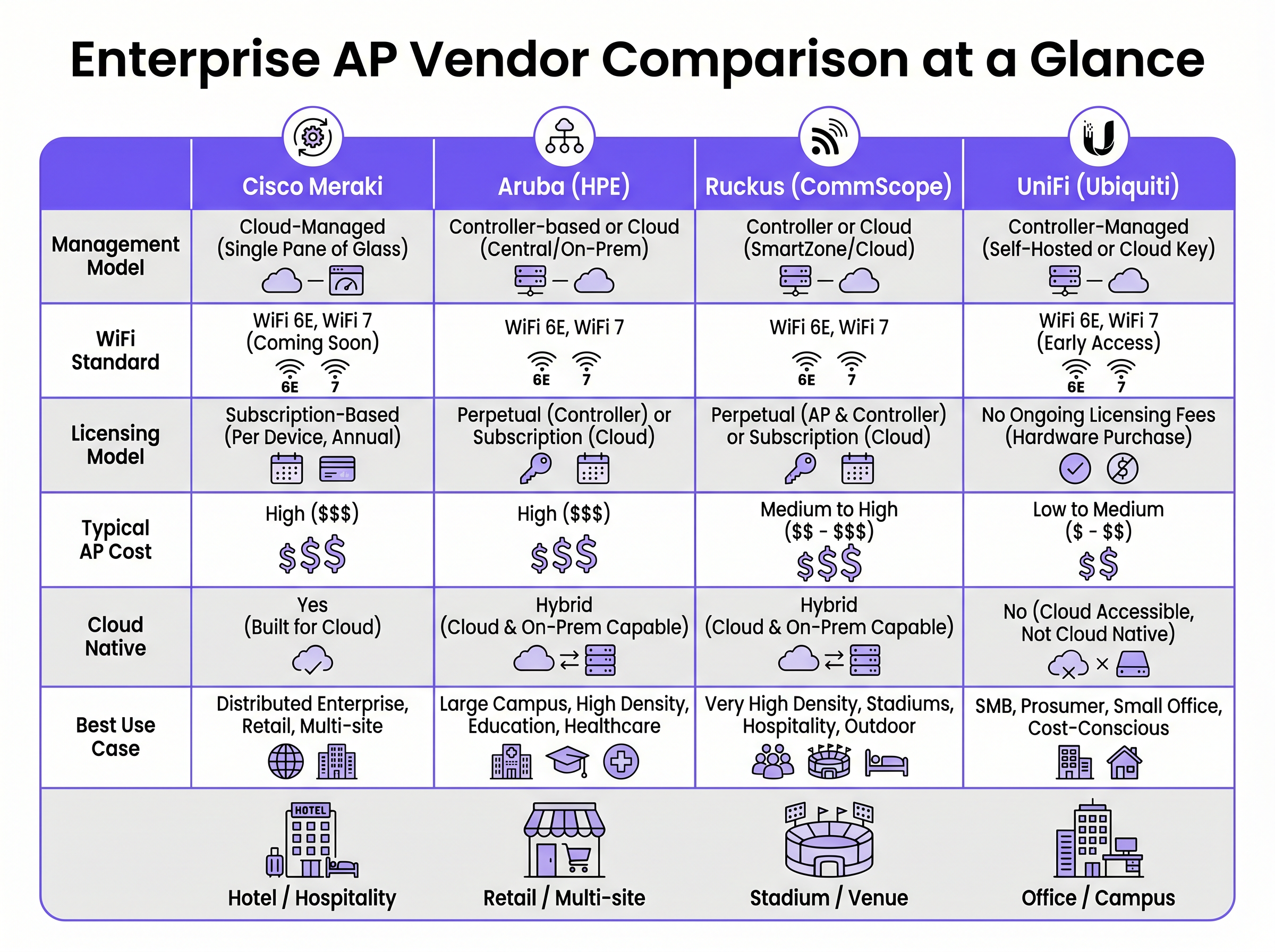
Die Auswahl des richtigen Anbieters für Enterprise Access Points (APs) ist eine strategische Entscheidung, die die Netzwerkleistung, den Betriebsaufwand und die langfristigen Investitionsausgaben bestimmt. Dieser Leitfaden bietet einen herstellerneutralen technischen Vergleich der vier dominierenden Akteure im Bereich Enterprise WiFi: Cisco Meraki, Aruba (HPE), Ruckus (CommScope) und UniFi (Ubiquiti).
Für IT-Direktoren und Netzwerkarchitekten reicht die Entscheidungsmatrix weit über die reine HF-Leistung hinaus. Sie umfasst die Architekturphilosophie – insbesondere die Wahl zwischen Cloud-nativen, Controller-basierten und hybriden Managementmodellen. Darüber hinaus können versteckte Lizenzkosten und die gefürchtete „Lizenzklippe“ die Gesamtbetriebskosten (TCO) über einen Fünfjahreszyklus dramatisch in die Höhe treiben.
Ob Sie eine hochdichte Abdeckung für ein Stadion mit 60.000 Plätzen bereitstellen, Zero-Touch-Provisioning in einem Einzelhandelsnetzwerk mit 200 Filialen einführen oder eine HIPAA-konforme Segmentierung im Gesundheitswesen implementieren – dieser Leitfaden erläutert die Funktionen, Einschränkungen und optimalen Anwendungsfälle für jeden Anbieter. Als Intelligenzschicht oberhalb der Hardware integriert sich Purple nahtlos in alle vier Plattformen, um Guest WiFi -Authentifizierung und WiFi Analytics bereitzustellen.
Technischer Überblick
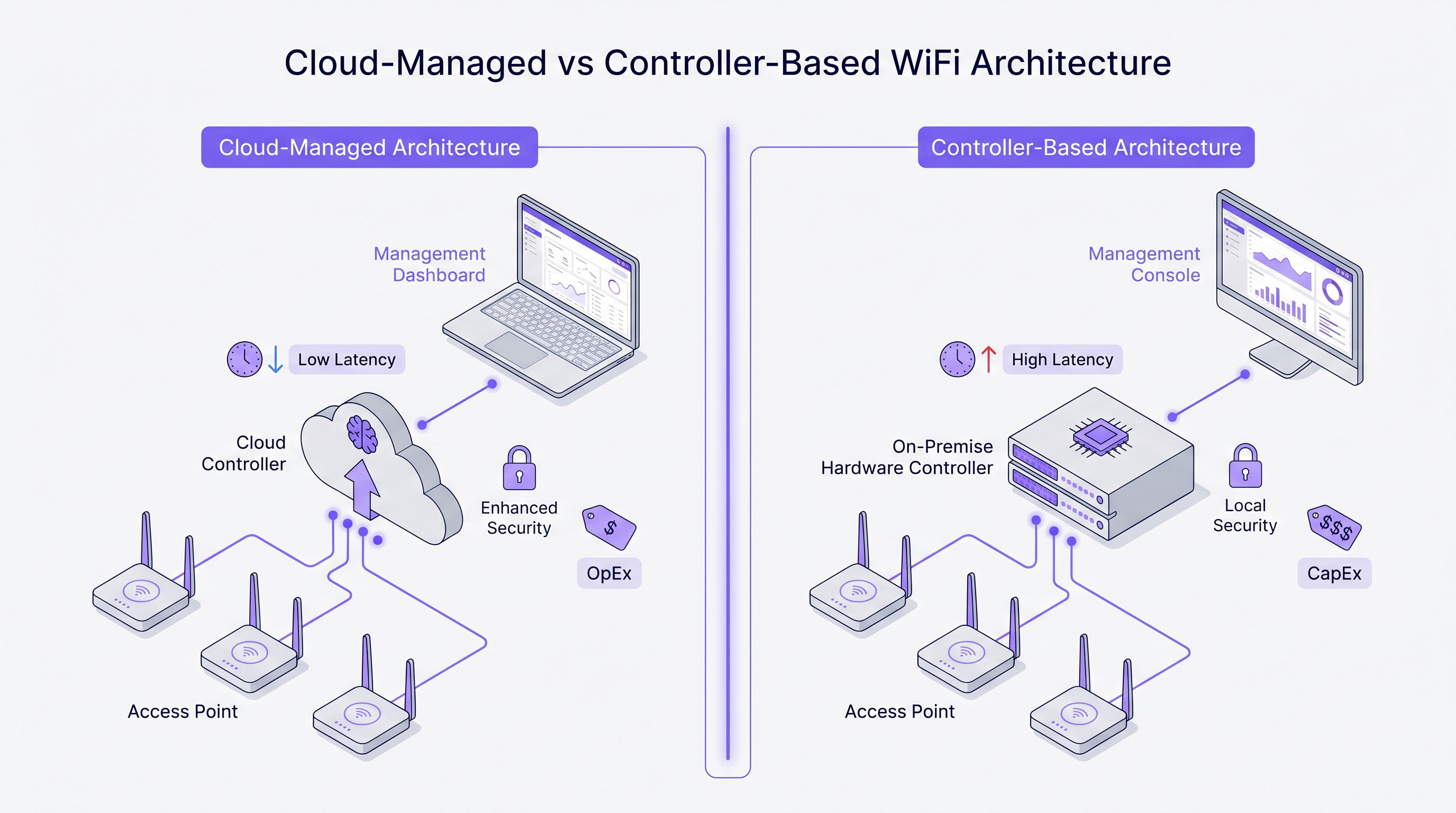
Architekturphilosophien: Cloud vs. Controller
Die grundlegendste Abweichung zwischen diesen Anbietern liegt in ihrem architektonischen Ansatz für das Netzwerkmanagement und den Control-Plane-Verkehr.
Cisco Meraki basiert auf einer strikt Cloud-nativen Architektur. Jeder AP im Portfolio wird ausschließlich über das Meraki Dashboard verwaltet. Es gibt keine Option für einen lokalen Controller. Konfiguration, Firmware-Bereitstellung, Client-Sichtbarkeit und Richtliniendurchsetzung werden alle über Ciscos Cloud-Infrastruktur orchestriert. Dieses Modell zeichnet sich in verteilten Umgebungen aus, in denen eine zentrale Verwaltungsoberfläche und Zero-Touch-Provisioning von größter Bedeutung sind.
Aruba (HPE) befürwortet einen hybriden Ansatz. Aruba APs können über Aruba Central (Cloud) verwaltet oder zusammen mit einem lokalen Aruba Mobility Conductor bereitgestellt werden. Diese Flexibilität ist entscheidend für Organisationen des öffentlichen Sektors und des Gesundheitswesens, die eine strikte Datenhoheit oder luftgetrennte Management-Ebenen benötigen. Arubas Architektur unterstützt auch fortschrittliche dynamische Segmentierung und rollenbasierte Zugriffskontrolle (RBAC) auf Switch-Port- und AP-Ebene.
Ruckus (CommScope) unterstützt ebenfalls sowohl Cloud- (Ruckus One) als auch On-Premise-Management (SmartZone). Ruckus unterscheidet sich auf Hardware-Ebene durch seine proprietäre adaptive BeamFlex-Antennentechnologie. Anstatt omnidirektional zu senden, wählt BeamFlex dynamisch aus Tausenden von Antennenmustern, um HF-Energie auf den Client zu lenken und von Interferenzen wegzuführen, was es in anspruchsvollen HF-Umgebungen außergewöhnlich widerstandsfähig macht.
UniFi (Ubiquiti) durchbricht das traditionelle Unternehmensmodell, indem es die Management-Software von laufenden Lizenzgebühren entkoppelt. Der UniFi Network Controller kann selbst gehostet, auf einer dedizierten Hardware-Appliance (Cloud Key) ausgeführt oder in der Cloud gehostet werden. Obwohl die Hardware sehr kostengünstig ist, fehlen der Plattform die granulare Quality of Service (QoS), Carrier-Grade-Redundanz und fortschrittliche HF-Fehlerbehebungstools, die bei den anderen drei Anbietern zu finden sind.
Wi-Fi 6E und das 6 GHz Spektrum
Alle vier Anbieter haben Wi-Fi 6 (802.11ax) und Wi-Fi 6E in ihre Unternehmensportfolios integriert. Wi-Fi 6E ist ein kritischer Wendepunkt für Bereitstellungen mit hoher Dichte, da es bis zu 1.200 MHz unberührtes Spektrum im 6 GHz-Band erschließt. Dies eliminiert die Kanalüberlastung und Gleichkanalinterferenzen, die die 2,4 GHz- und 5 GHz-Bänder in Umgebungen wie Konferenzzentren und Gastgewerbe -Einrichtungen plagen.
Technologien wie Orthogonal Frequency Division Multiple Access (OFDMA) ermöglichen es einem einzelnen AP, mehrere Clients gleichzeitig auf Unterkanälen zu bedienen, wodurch die Latenz drastisch reduziert wird. Für jede neue Bereitstellung, die mehr als 50 gleichzeitige Clients pro AP erwartet, sollte Wi-Fi 6E-Hardware die Basisspezifikation sein.
Implementierungsleitfaden
1. HF-Standortanalyse und Kapazitätsplanung
Die Bereitstellung von APs ausschließlich basierend auf einem Grundriss führt garantiert zu Abdeckungslücken und Roaming-Fehlern. Eine professionelle HF-Standortanalyse mit Tools wie Ekahau oder iBwave ist obligatorisch. Die Analyse muss die Dämpfung durch Baumaterialien (z. B. Betonwände in Hotels, Metallregale in Lagerhäusern) berücksichtigen und Kapazitätsanforderungen modellieren, nicht nur die Abdeckung.
2. Netzwerksegmentierung und Sicherheit
Für Umgebungen, die Zahlungen verarbeiten oder sensible Daten handhaben, ist eine strikte Layer-2-Segmentierung erforderlich. Erstellen Sie ein dediziertes VLAN für Gastverkehr, das über Firewall-Regeln vom Unternehmensnetzwerk isoliert ist. Sich ausschließlich auf die SSID-Trennung zu verlassen, ist für die PCI DSS-Konformität unzureichend. Die Implementierung von IEEE 802.1X für die Unternehmensauthentifizierung und eines Captive Portal für den Gastzugang gewährleistet robuste Sicherheit. Für Implementierungen im Gesundheitswesen verweisen wir auf unseren Leitfaden zu HIPAA-konformes Guest WiFi für Gesundheitsdienstleister .
3. Roaming-Optimierung
In Umgebungen, in denen Clients sehr mobil sind, ist nahtloses Roaming entscheidend. Aktivieren Sie 802.11r (Fast BSS Transition) und 802.11k (Radio Resource Measurement) auf allen relevanten SSIDs. Meraki aktiviert diese standardmäßig, während Aruba und Ruckus eine explizite Konfiguration erfordern. Stellen Sie sicher, dass Client-Geräte diese Protokolle unterstützen, um Probleme mit „Sticky Clients“ zu vermeiden.
Best Practices
- 5-Jahres-TCO modellieren: Die Hardwarekosten sind nur ein Bruchteil der Gesamtausgaben. Bei Anbietern wie Meraki machen obligatorische jährliche Lizenzen den Großteil der 5-Jahres-TCO aus. Berechnen Sie Hardware, Lizenzierung, Supportverträge und Implementierungsleistungen umfassend.
- Die Lizenzklippe vermeiden: Bei abonnementbasierten Modellen sollten Sie Ihre Lizenzen kofinanzieren. Das Erben eines Bestands mit gestaffelten Verlängerungsdaten birgt ein operatives Risiko und administrativen Aufwand. Konsolidieren Sie auf ein einziges Verlängerungsdatum.
- Für hohe Dichte konzipieren: In Stadien oder Hörsälen ist es das Ziel, die HF-Zellengröße zu begrenzen. Verwenden Sie Richtantennen (oder nutzen Sie Ruckus BeamFlex), um die Abdeckung auf bestimmte Sitzbereiche zu beschränken und so Gleichkanalstörungen zu reduzieren.
- Intelligenz-Overlay nutzen: Unabhängig vom Hardware-Anbieter entkoppeln Sie Ihre Analyse- und Marketingschicht von der Infrastruktur. Plattformen wie Purple integrieren sich nativ mit Cisco, Aruba, Ruckus und UniFi und stellen sicher, dass Ihre WiFi Analytics konsistent bleiben, selbst wenn Sie zukünftig den Hardware-Anbieter wechseln.
Fehlerbehebung & Risikominderung
Das „Sticky Client“-Problem
Clients, die an einem AP mit schwachem Signal festhalten, anstatt zu einem näheren AP zu wechseln, sind ein häufiges Problem. Die Abhilfe umfasst die Abstimmung der minimalen Basisrate (Deaktivierung älterer 802.11b-Raten wie 1, 2, 5,5 und 11 Mbps) und die Aktivierung von 802.11v, um Clients bei besseren Roaming-Entscheidungen zu unterstützen. Die ClientMatch-Technologie von Aruba handhabt dies dynamisch auf Infrastrukturebene.
Gleichkanalstörung (CCI)
In dichten Implementierungen stören sich APs, die auf demselben Kanal senden, gegenseitig, was den Rauschpegel erhöht und den Durchsatz reduziert. Die Abhilfe erfordert eine sorgfältige Kanalplanung (Vermeidung überlappender Kanäle im 2,4-GHz-Bereich) und die Aktivierung dynamischer Funkverwaltungsfunktionen wie Ciscos Auto RF oder Arubas ARM, um Sendeleistung und Kanalzuweisungen automatisch anzupassen.
Der Meraki Hard Shutdown
Das größte Betriebsrisiko bei Cisco Meraki ist die strikte Durchsetzung der Lizenzbestimmungen. Wenn ein Abonnement über die Nachfrist hinaus abläuft, stellen die APs ihren Betrieb vollständig ein. Die Abhilfe erfordert ein rigoroses Asset Management und eine proaktive Budgetplanung für Verlängerungen.
ROI & Geschäftsauswirkungen
Der Return on Investment für Unternehmens-WiFi geht über die einfache Konnektivität hinaus. Ein robustes Netzwerk untermauert kritische Geschäftsabläufe, von mobilen Kassensystemen im Einzelhandel bis hin zur klinischen Kommunikation im Gesundheitswesen. Weitere Details finden Sie in unserem Leitfaden zu Hospital Guest WiFi: Patient Experience and Network Separation .
Darüber hinaus verwandelt die Integration eines Captive Portal und einer Analyseplattform das Netzwerk von einem Kostenfaktor in einen umsatzgenerierenden Vermögenswert. Durch die Erfassung von Erstanbieter-Gastdaten können Veranstaltungsorte personalisierte Marketingkampagnen vorantreiben, die Besucherfrequenz messen und Abläufe optimieren. Der Schlüssel zur Maximierung des ROI liegt in der Auswahl des AP-Anbieters, der zu Ihren operativen Fähigkeiten und Ihrem Budget passt, während ein anbieterunabhängiges Overlay genutzt wird, um Business Intelligence zu extrahieren.
Schlüsselbegriffe & Definitionen
Zero-Touch Provisioning (ZTP)
The ability to configure network devices automatically by connecting them to the internet, allowing them to download their configuration from a central cloud controller.
Critical for multi-site retail or branch deployments where sending an IT engineer to every site is cost-prohibitive.
BeamFlex
A proprietary adaptive antenna technology developed by Ruckus that dynamically changes antenna patterns to focus RF energy towards the client.
Provides a significant performance advantage in environments with high multi-path interference or extreme client density.
IEEE 802.1X
An IEEE standard for port-based network access control (PNAC), providing an authentication mechanism to devices wishing to attach to a LAN or WLAN.
The enterprise standard for securing corporate devices, requiring integration with a RADIUS server (like Cisco ISE or Aruba ClearPass).
Dynamic Segmentation
The automated assignment of network access policies and VLANs to users and devices based on their role, rather than their physical connection point.
A key feature of Aruba's architecture, allowing IT teams to enforce consistent security policies across wired and wireless networks.
OFDMA (Orthogonal Frequency Division Multiple Access)
A feature of Wi-Fi 6 that allows an AP to divide a channel into smaller sub-channels (Resource Units) to transmit data to multiple clients simultaneously.
Crucial for reducing latency in high-density environments like stadiums and conference centres.
Co-Channel Interference (CCI)
Interference caused when multiple APs in the same physical area transmit on the same frequency channel, forcing them to share airtime.
A primary cause of poor WiFi performance, mitigated through proper RF design and dynamic radio management.
802.11r (Fast BSS Transition)
A protocol that allows a client device to authenticate with a target AP before roaming, reducing the time required to transition between APs.
Essential for seamless roaming, particularly for voice-over-IP (VoIP) applications in hospitality and healthcare.
Single Pane of Glass
A management interface that unifies data and controls from multiple components (e.g., APs, switches, firewalls) into a single unified dashboard.
The primary selling point of cloud-native platforms like Cisco Meraki, simplifying operations for lean IT teams.
Fallstudien
A 400-room luxury hotel with thick concrete walls is experiencing severe roaming issues and poor signal penetration. The current legacy infrastructure uses omnidirectional APs placed in the hallways. The IT director needs to select a vendor for a complete hardware refresh.
Deploy Ruckus Wi-Fi 6 APs (e.g., R550 or H550 wall-plate APs) inside the guest rooms rather than the hallways. Ruckus's BeamFlex adaptive antenna technology excels in mitigating multi-path interference caused by concrete walls. Configure the network using Ruckus SmartZone for on-premise control, ensuring that 802.11r and 802.11k are enabled for seamless roaming as guests move between the lobby and their rooms.
A national retail chain with 250 small footprint stores needs to deploy a consistent, secure WiFi network for both corporate PoS devices and guest access. The IT team is lean and centralised at headquarters, with no technical staff on site at the stores.
Implement Cisco Meraki MR36 APs managed via the Meraki Dashboard. Utilise Meraki's zero-touch provisioning to ship unconfigured APs directly to the stores, where non-technical staff simply plug them in. Configure a corporate VLAN for PoS devices using 802.1X, and a segmented guest VLAN integrated with Purple for captive portal authentication and analytics. Leverage Meraki's cloud-managed architecture to push firmware updates and policy changes globally from HQ.
Szenarioanalyse
Q1. A university campus requires a major WiFi upgrade. The network must support dynamic role-based access control for students, faculty, and IoT devices. The university's security policy mandates that the core network management infrastructure must remain on-premise, though they are open to cloud monitoring. Which vendor is the optimal choice?
💡 Hinweis:Consider the requirement for on-premise management combined with advanced role-based access control.
Empfohlenen Ansatz anzeigen
Aruba is the optimal choice. Aruba's hybrid architecture allows for on-premise controllers (Mobility Conductors) to satisfy the strict security policy. Furthermore, Aruba's Dynamic Segmentation and ClearPass Policy Manager provide industry-leading capabilities for role-based access control across diverse user groups and IoT devices.
Q2. A medium-sized logistics company operates three warehouses. They have a highly constrained IT budget and a capable in-house network engineer. They need basic WiFi coverage for barcode scanners but do not require advanced analytics, SLA-backed support, or carrier-grade redundancy. Which vendor should they evaluate?
💡 Hinweis:Focus on the budget constraints and the presence of an in-house engineer to manage the system.
Empfohlenen Ansatz anzeigen
UniFi is the most appropriate choice. The lack of ongoing licensing fees and the low cost of hardware fit the constrained budget. Since they have an in-house engineer and do not require SLA-backed support or advanced enterprise features, the UniFi platform provides the best value for this specific scenario.
Q3. A regional airport is upgrading its terminal WiFi. The environment is characterised by vast open spaces, high ceilings, and extreme client density during peak hours. The IT team is concerned about co-channel interference and signal propagation. Which hardware feature should drive their vendor selection?
💡 Hinweis:Identify the vendor known for proprietary RF mitigation in hostile, high-density environments.
Empfohlenen Ansatz anzeigen
The airport should evaluate Ruckus, specifically focusing on its BeamFlex adaptive antenna technology. In large open spaces with high density, omnidirectional antennas create excessive co-channel interference. BeamFlex dynamically steers the RF signal, reducing interference and improving performance in challenging physical environments.
Wichtigste Erkenntnisse
- ✓Cisco Meraki offers unmatched cloud simplicity and zero-touch provisioning, ideal for distributed retail, but carries high ongoing licensing costs.
- ✓Aruba provides robust hybrid architecture (cloud or on-premise) and advanced dynamic segmentation, making it a standard for healthcare and higher education.
- ✓Ruckus excels in hostile RF environments and high-density venues (stadiums, concrete hotels) due to its proprietary BeamFlex antenna technology.
- ✓UniFi delivers cost-effective hardware with no ongoing licensing fees, suitable for SMBs and budget-conscious deployments with in-house IT support.
- ✓Always model a 5-year Total Cost of Ownership (TCO) to account for mandatory subscription fees, which can eclipse the initial hardware CapEx.
- ✓Deploying Wi-Fi 6E hardware is essential for future-proofing high-density environments by leveraging the uncongested 6 GHz spectrum.
- ✓Purple's intelligence layer is vendor-agnostic, integrating with all four platforms to provide consistent Guest WiFi authentication and analytics regardless of the underlying hardware.




