

Escolher Pontos de Acesso Empresariais: Cisco, Aruba, Ruckus, UniFi Comparados
Este guia de referência técnica e autoritário compara os pontos de acesso empresariais Cisco Meraki, Aruba, Ruckus e UniFi em termos de arquitetura, funcionalidades e TCO. Fornece aos líderes de TI recomendações acionáveis e neutras em relação ao fornecedor para implementar WiFi de alto desempenho em ambientes complexos.
🎧 Ouça este Guia
Ver Transcrição
Resumo Executivo
Selecionar o fornecedor certo de ponto de acesso (AP) empresarial é uma decisão estratégica que dita o desempenho da rede, os custos operacionais e o investimento de capital a longo prazo. Este guia fornece uma comparação técnica neutra em relação ao fornecedor dos quatro intervenientes dominantes no espaço de WiFi empresarial: Cisco Meraki, Aruba (HPE), Ruckus (CommScope) e UniFi (Ubiquiti).
Para diretores de TI e arquitetos de rede, a matriz de decisão estende-se muito além do desempenho bruto de RF. Abrange a filosofia arquitetónica — especificamente, a escolha entre modelos de gestão nativos da cloud, baseados em controlador e híbridos. Além disso, os custos de licenciamento ocultos e o temido "licence cliff" podem inflacionar drasticamente o custo total de propriedade (TCO) ao longo de um ciclo de vida de cinco anos.
Quer esteja a implementar cobertura de alta densidade para um estádio com 60.000 lugares, a implementar o aprovisionamento zero-touch numa rede de 200 lojas Retalho , ou a implementar segmentação compatível com HIPAA em Saúde , este guia detalha as capacidades, limitações e casos de uso ideais para cada fornecedor. Como uma camada de inteligência que se sobrepõe ao hardware, a Purple integra-se perfeitamente com todas as quatro plataformas para fornecer autenticação de Guest WiFi e WiFi Analytics .
Análise Técnica Detalhada
Filosofias Arquitetónicas: Cloud vs. Controlador
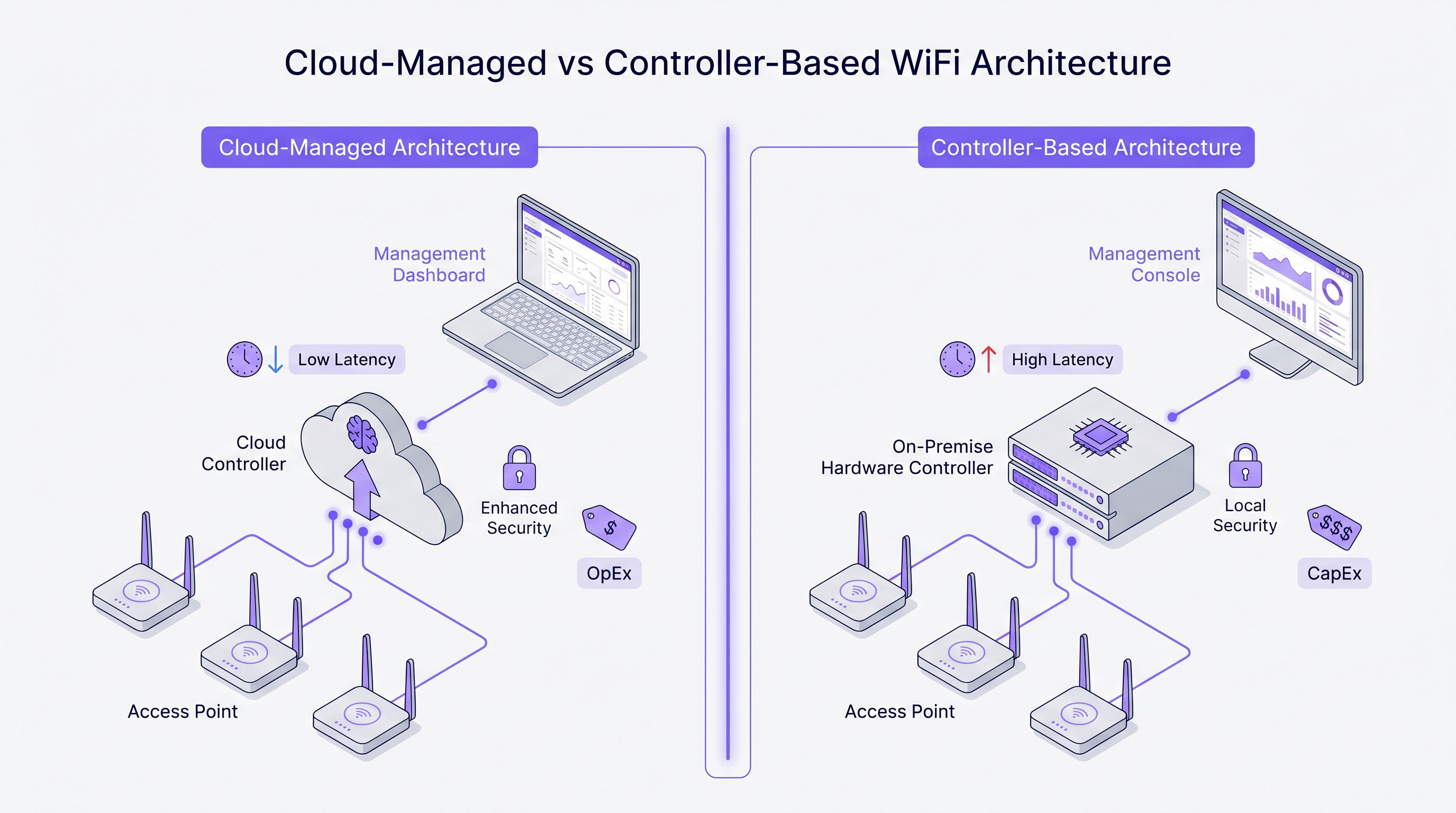
A divergência mais fundamental entre estes fornecedores reside na sua abordagem arquitetónica à gestão de rede e ao tráfego do plano de controlo.
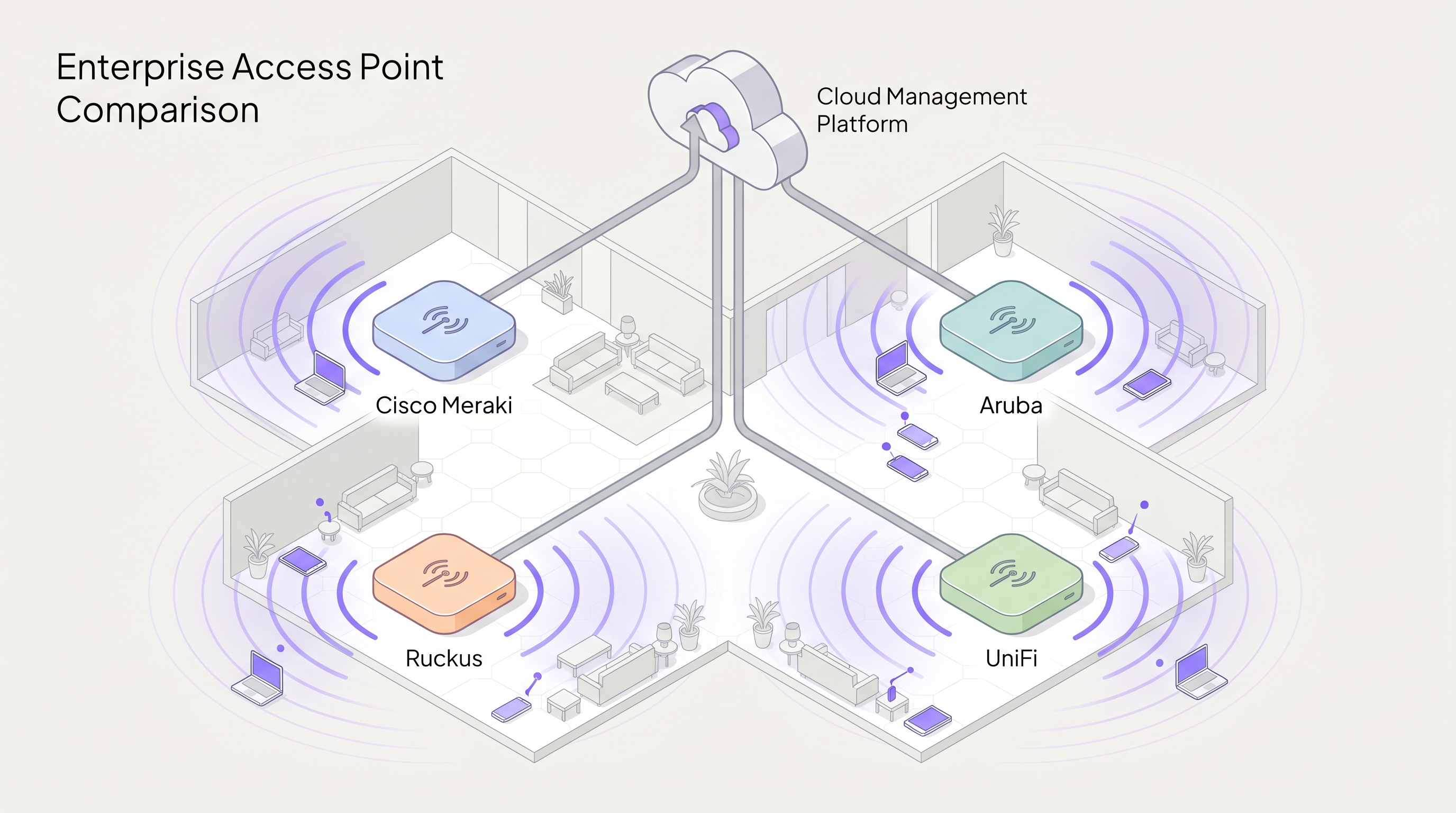
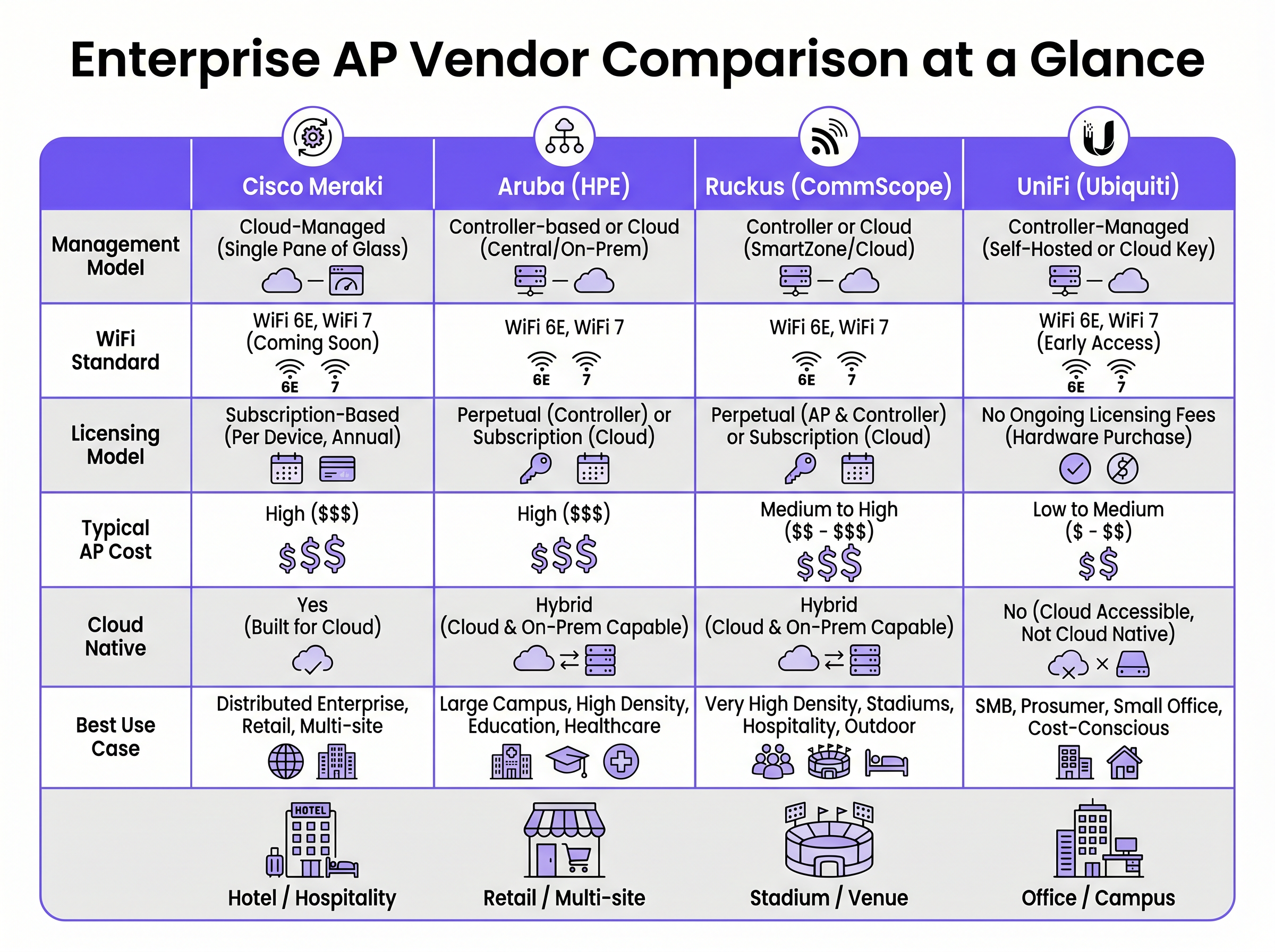
Cisco Meraki opera numa arquitetura estritamente nativa da cloud. Cada AP no portfólio é gerido exclusivamente através do Meraki Dashboard. Não existe opção de controlador on-premise. A configuração, implementação de firmware, visibilidade do cliente e aplicação de políticas são todas orquestradas através da infraestrutura cloud da Cisco. Este modelo destaca-se em ambientes distribuídos onde um único painel de controlo e o aprovisionamento zero-touch são primordiais.
Aruba (HPE) defende uma abordagem híbrida. Os APs Aruba podem ser geridos via Aruba Central (cloud) ou implementados juntamente com um Aruba Mobility Conductor on-premise. Esta flexibilidade é crucial para organizações do setor público e da saúde que exigem soberania de dados rigorosa ou planos de gestão isolados. A arquitetura da Aruba também suporta segmentação dinâmica avançada e controlo de acesso baseado em funções (RBAC) ao nível da porta do switch e do AP.
Ruckus (CommScope) suporta igualmente a gestão em cloud (Ruckus One) e on-premise (SmartZone). A Ruckus diferencia-se na camada de hardware com a sua tecnologia proprietária de antena adaptativa BeamFlex. Em vez de transmissão omnidirecional, o BeamFlex seleciona dinamicamente entre milhares de padrões de antena para direcionar a energia de RF para o cliente e afastá-la da interferência, tornando-o excecionalmente resiliente em ambientes de RF desafiadores.
UniFi (Ubiquiti) rompe com o modelo empresarial tradicional ao dissociar o software de gestão das taxas de licenciamento contínuas. O UniFi Network Controller pode ser auto-hospedado, executado num dispositivo de hardware dedicado (Cloud Key) ou hospedado na cloud. Embora o hardware seja altamente económico, a plataforma carece da Qualidade de Serviço (QoS) granular, redundância de nível de operadora e ferramentas avançadas de resolução de problemas de RF encontradas nos outros três fornecedores.
Wi-Fi 6E e o Espectro de 6 GHz
Todos os quatro fornecedores integraram Wi-Fi 6 (802.11ax) e Wi-Fi 6E nos seus portfólios empresariais. O Wi-Fi 6E é um ponto de inflexão crítico para implementações de alta densidade, abrindo até 1.200 MHz de espectro intocado na banda de 6 GHz. Isto elimina a contenção de canais e a interferência de co-canal que afetam as bandas de 2.4 GHz e 5 GHz em ambientes como centros de conferências e locais de Hotelaria .
Tecnologias como o Orthogonal Frequency Division Multiple Access (OFDMA) permitem que um único AP sirva múltiplos clientes simultaneamente em subcanais, reduzindo drasticamente a latência. Para qualquer nova implementação que espere mais de 50 clientes concorrentes por AP, o hardware Wi-Fi 6E deve ser a especificação de base.
Guia de Implementação
1. Levantamento de RF no Local e Planeamento de Capacidade
Implementar APs puramente com base numa planta é um caminho garantido para lacunas de cobertura e falhas de roaming. Um levantamento profissional de RF no local, utilizando ferramentas como Ekahau ou iBwave, é obrigatório. O levantamento deve ter em conta a atenuação de materiais de construção (por exemplo, paredes de betão em hotéis, estantes metálicas em armazéns) e modelar os requisitos de capacidade, não apenas a cobertura.
2. Segmentação e Segurança da Rede
Para ambientes que processam pagamentos ou lidam com dados sensíveis, é necessária uma segmentação rigorosa da Camada 2. Crie uma VLAN dedicada para o tráfego de convidados, isolada da rede corporativa através de regras de firewall. Confiar apenas na separação de SSID é insuficiente para a conformidade com PCI DSS. A implementação de IEEE 802.1X para autenticação corporativa e um Captive Portal para acesso de convidados garante uma segurança robusta. Para implementações na área da saúde, consulte o nosso guia sobre Guest WiFi Compatível com HIPAA para Prestadores de Cuidados de Saúde .
3. Otimização de Roaming
Em ambientes onde os clientes são altamente móveis, o roaming contínuo é crítico. Ative 802.11r (Fast BSS Transition) e 802.11k (Radio Resource Measurement) em todos os SSIDs relevantes. A Meraki ativa-os por predefinição, enquanto a Aruba e a Ruckus exigem configuração explícita. Garanta que os dispositivos cliente suportam estes protocolos para evitar problemas de 'sticky client'.
Melhores Práticas
- Modele o TCO de 5 Anos: O custo do hardware é apenas uma fração da despesa total. Para fornecedores como a Meraki, o licenciamento anual obrigatório constitui a maioria do TCO de 5 anos. Calcule o hardware, licenciamento, contratos de suporte e serviços de implementação de forma abrangente.
- Evite o 'Licence Cliff': Para modelos baseados em subscrição, co-termine as suas licenças. Herdando um património com datas de renovação escalonadas cria risco operacional e sobrecarga administrativa. Consolide para uma única data de renovação.
- Design para Alta Densidade: Em estádios ou anfiteatros, o objetivo é conter o tamanho da célula RF. Utilize antenas direcionais (ou aproveite o Ruckus BeamFlex) para limitar a cobertura a áreas de assentos específicas, reduzindo a interferência de co-canal.
- Aproveite uma Camada de Inteligência: Independentemente do fornecedor de hardware, desvincule a sua camada de analytics e marketing da infraestrutura. Plataformas como a Purple integram-se nativamente com a Cisco, Aruba, Ruckus e UniFi, garantindo que os seus WiFi Analytics permanecem consistentes mesmo que mude de fornecedores de hardware no futuro.
Resolução de Problemas e Mitigação de Riscos
O Problema do "Sticky Client"
Clientes que se agarram a um AP com um sinal fraco em vez de fazerem roaming para um AP mais próximo é um problema comum. A mitigação envolve o ajuste da taxa básica mínima (desativando taxas 802.11b legadas como 1, 2, 5.5 e 11 Mbps) e a ativação do 802.11v para ajudar os clientes a tomar melhores decisões de roaming. A tecnologia ClientMatch da Aruba gere isto dinamicamente ao nível da infraestrutura.
Interferência de Co-Canal (CCI)
Em implementações densas, os APs que transmitem no mesmo canal interferem uns com os outros, aumentando o ruído de fundo e reduzindo o débito. A mitigação requer um planeamento cuidadoso dos canais (evitando canais sobrepostos em 2.4 GHz) e a ativação de funcionalidades de gestão dinâmica de rádio como o Auto RF da Cisco ou o ARM da Aruba para ajustar a potência de transmissão e as atribuições de canais automaticamente.
O Encerramento Forçado da Meraki
O risco operacional mais significativo com a Cisco Meraki é a rigorosa aplicação do licenciamento. Se uma subscrição expirar para além do período de carência, os APs deixam de funcionar completamente. A mitigação requer uma gestão rigorosa de ativos e um planeamento orçamental proativo para as renovações.
ROI e Impacto no Negócio
O retorno do investimento para WiFi empresarial vai além da simples conectividade. Uma rede robusta sustenta operações comerciais críticas, desde sistemas móveis de ponto de venda no retalho até à comunicação clínica na área da saúde. Consulte o nosso guia sobre Hospital Guest WiFi: Patient Experience and Network Separation para mais detalhes.
Além disso, a integração de um captive portal e de uma plataforma de analytics transforma a rede de um centro de custos num ativo gerador de receita. Ao capturar dados de hóspedes de primeira parte, os locais podem impulsionar campanhas de marketing personalizadas, medir o fluxo de pessoas e otimizar as operações. A chave para maximizar o ROI é selecionar o fornecedor de AP que se alinha com as suas capacidades operacionais e orçamento, enquanto aproveita uma camada agnóstica de fornecedor para extrair inteligência de negócios.
Termos-Chave e Definições
Zero-Touch Provisioning (ZTP)
The ability to configure network devices automatically by connecting them to the internet, allowing them to download their configuration from a central cloud controller.
Critical for multi-site retail or branch deployments where sending an IT engineer to every site is cost-prohibitive.
BeamFlex
A proprietary adaptive antenna technology developed by Ruckus that dynamically changes antenna patterns to focus RF energy towards the client.
Provides a significant performance advantage in environments with high multi-path interference or extreme client density.
IEEE 802.1X
An IEEE standard for port-based network access control (PNAC), providing an authentication mechanism to devices wishing to attach to a LAN or WLAN.
The enterprise standard for securing corporate devices, requiring integration with a RADIUS server (like Cisco ISE or Aruba ClearPass).
Dynamic Segmentation
The automated assignment of network access policies and VLANs to users and devices based on their role, rather than their physical connection point.
A key feature of Aruba's architecture, allowing IT teams to enforce consistent security policies across wired and wireless networks.
OFDMA (Orthogonal Frequency Division Multiple Access)
A feature of Wi-Fi 6 that allows an AP to divide a channel into smaller sub-channels (Resource Units) to transmit data to multiple clients simultaneously.
Crucial for reducing latency in high-density environments like stadiums and conference centres.
Co-Channel Interference (CCI)
Interference caused when multiple APs in the same physical area transmit on the same frequency channel, forcing them to share airtime.
A primary cause of poor WiFi performance, mitigated through proper RF design and dynamic radio management.
802.11r (Fast BSS Transition)
A protocol that allows a client device to authenticate with a target AP before roaming, reducing the time required to transition between APs.
Essential for seamless roaming, particularly for voice-over-IP (VoIP) applications in hospitality and healthcare.
Single Pane of Glass
A management interface that unifies data and controls from multiple components (e.g., APs, switches, firewalls) into a single unified dashboard.
The primary selling point of cloud-native platforms like Cisco Meraki, simplifying operations for lean IT teams.
Estudos de Caso
A 400-room luxury hotel with thick concrete walls is experiencing severe roaming issues and poor signal penetration. The current legacy infrastructure uses omnidirectional APs placed in the hallways. The IT director needs to select a vendor for a complete hardware refresh.
Deploy Ruckus Wi-Fi 6 APs (e.g., R550 or H550 wall-plate APs) inside the guest rooms rather than the hallways. Ruckus's BeamFlex adaptive antenna technology excels in mitigating multi-path interference caused by concrete walls. Configure the network using Ruckus SmartZone for on-premise control, ensuring that 802.11r and 802.11k are enabled for seamless roaming as guests move between the lobby and their rooms.
A national retail chain with 250 small footprint stores needs to deploy a consistent, secure WiFi network for both corporate PoS devices and guest access. The IT team is lean and centralised at headquarters, with no technical staff on site at the stores.
Implement Cisco Meraki MR36 APs managed via the Meraki Dashboard. Utilise Meraki's zero-touch provisioning to ship unconfigured APs directly to the stores, where non-technical staff simply plug them in. Configure a corporate VLAN for PoS devices using 802.1X, and a segmented guest VLAN integrated with Purple for captive portal authentication and analytics. Leverage Meraki's cloud-managed architecture to push firmware updates and policy changes globally from HQ.
Análise de Cenários
Q1. A university campus requires a major WiFi upgrade. The network must support dynamic role-based access control for students, faculty, and IoT devices. The university's security policy mandates that the core network management infrastructure must remain on-premise, though they are open to cloud monitoring. Which vendor is the optimal choice?
💡 Dica:Consider the requirement for on-premise management combined with advanced role-based access control.
Mostrar Abordagem Recomendada
Aruba is the optimal choice. Aruba's hybrid architecture allows for on-premise controllers (Mobility Conductors) to satisfy the strict security policy. Furthermore, Aruba's Dynamic Segmentation and ClearPass Policy Manager provide industry-leading capabilities for role-based access control across diverse user groups and IoT devices.
Q2. A medium-sized logistics company operates three warehouses. They have a highly constrained IT budget and a capable in-house network engineer. They need basic WiFi coverage for barcode scanners but do not require advanced analytics, SLA-backed support, or carrier-grade redundancy. Which vendor should they evaluate?
💡 Dica:Focus on the budget constraints and the presence of an in-house engineer to manage the system.
Mostrar Abordagem Recomendada
UniFi is the most appropriate choice. The lack of ongoing licensing fees and the low cost of hardware fit the constrained budget. Since they have an in-house engineer and do not require SLA-backed support or advanced enterprise features, the UniFi platform provides the best value for this specific scenario.
Q3. A regional airport is upgrading its terminal WiFi. The environment is characterised by vast open spaces, high ceilings, and extreme client density during peak hours. The IT team is concerned about co-channel interference and signal propagation. Which hardware feature should drive their vendor selection?
💡 Dica:Identify the vendor known for proprietary RF mitigation in hostile, high-density environments.
Mostrar Abordagem Recomendada
The airport should evaluate Ruckus, specifically focusing on its BeamFlex adaptive antenna technology. In large open spaces with high density, omnidirectional antennas create excessive co-channel interference. BeamFlex dynamically steers the RF signal, reducing interference and improving performance in challenging physical environments.
Principais Conclusões
- ✓Cisco Meraki offers unmatched cloud simplicity and zero-touch provisioning, ideal for distributed retail, but carries high ongoing licensing costs.
- ✓Aruba provides robust hybrid architecture (cloud or on-premise) and advanced dynamic segmentation, making it a standard for healthcare and higher education.
- ✓Ruckus excels in hostile RF environments and high-density venues (stadiums, concrete hotels) due to its proprietary BeamFlex antenna technology.
- ✓UniFi delivers cost-effective hardware with no ongoing licensing fees, suitable for SMBs and budget-conscious deployments with in-house IT support.
- ✓Always model a 5-year Total Cost of Ownership (TCO) to account for mandatory subscription fees, which can eclipse the initial hardware CapEx.
- ✓Deploying Wi-Fi 6E hardware is essential for future-proofing high-density environments by leveraging the uncongested 6 GHz spectrum.
- ✓Purple's intelligence layer is vendor-agnostic, integrating with all four platforms to provide consistent Guest WiFi authentication and analytics regardless of the underlying hardware.




