

Choosing Enterprise Access Points: Cisco, Aruba, Ruckus, UniFi Compared
This authoritative technical reference guide compares Cisco Meraki, Aruba, Ruckus, and UniFi enterprise access points across architecture, features, and TCO. It provides IT leaders with actionable, vendor-neutral recommendations for deploying high-performance WiFi in complex environments.
🎧 Listen to this Guide
View Transcript
Executive Summary
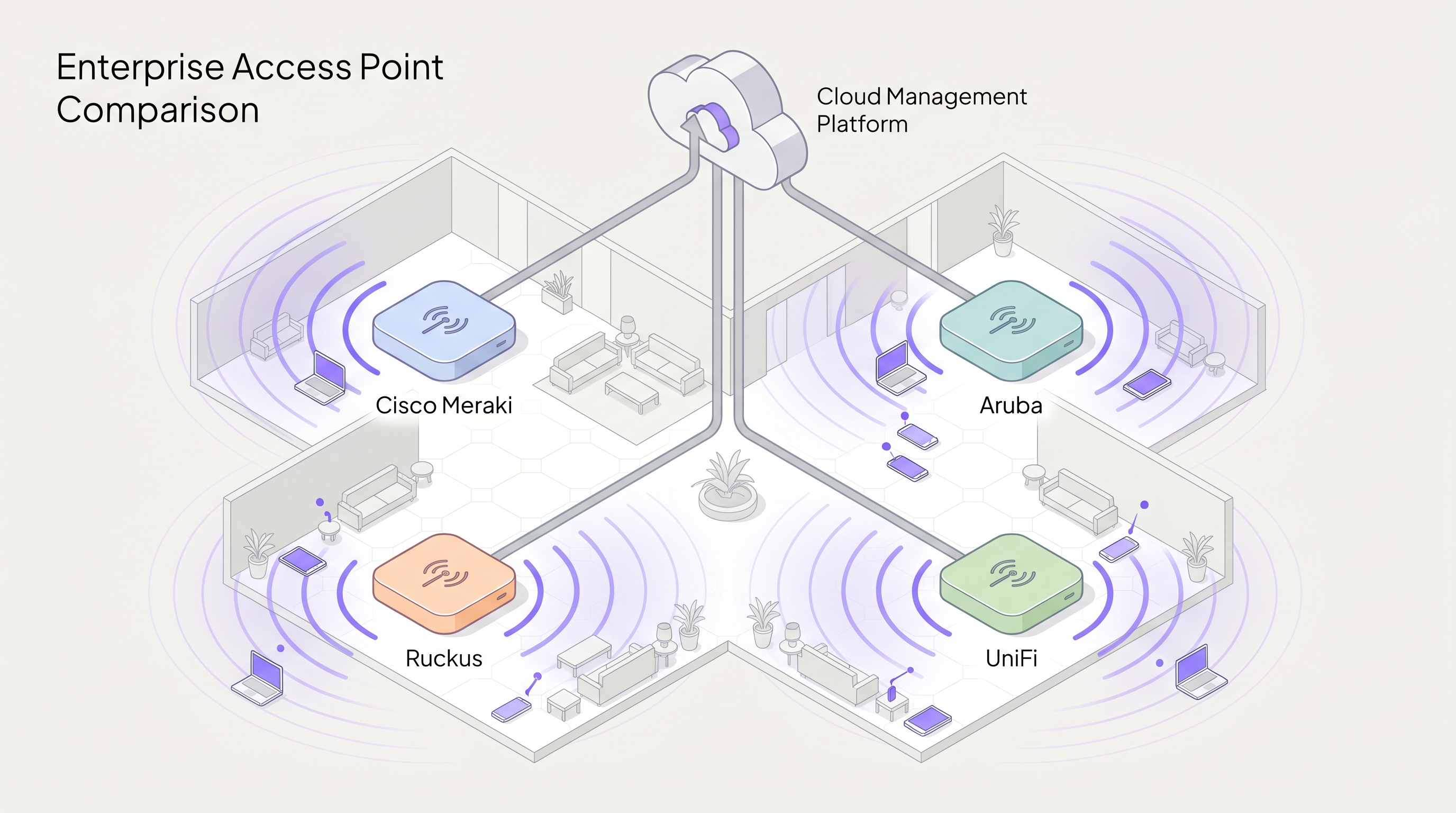
Selecting the right enterprise access point (AP) vendor is a strategic decision that dictates network performance, operational overhead, and long-term capital expenditure. This guide provides a vendor-neutral technical comparison of the four dominant players in the enterprise WiFi space: Cisco Meraki, Aruba (HPE), Ruckus (CommScope), and UniFi (Ubiquiti).
For IT directors and network architects, the decision matrix extends far beyond raw RF performance. It encompasses architectural philosophy—specifically, the choice between cloud-native, controller-based, and hybrid management models. Furthermore, hidden licensing costs and the dreaded "licence cliff" can dramatically inflate the total cost of ownership (TCO) over a five-year lifecycle.
Whether you are deploying high-density coverage for a 60,000-seat stadium, rolling out zero-touch provisioning across a 200-store Retail estate, or implementing HIPAA-compliant segmentation in Healthcare , this guide breaks down the capabilities, limitations, and optimal use cases for each vendor. As an intelligence layer sitting above the hardware, Purple integrates seamlessly with all four platforms to deliver Guest WiFi authentication and WiFi Analytics .
Technical Deep-Dive
Architectural Philosophies: Cloud vs. Controller
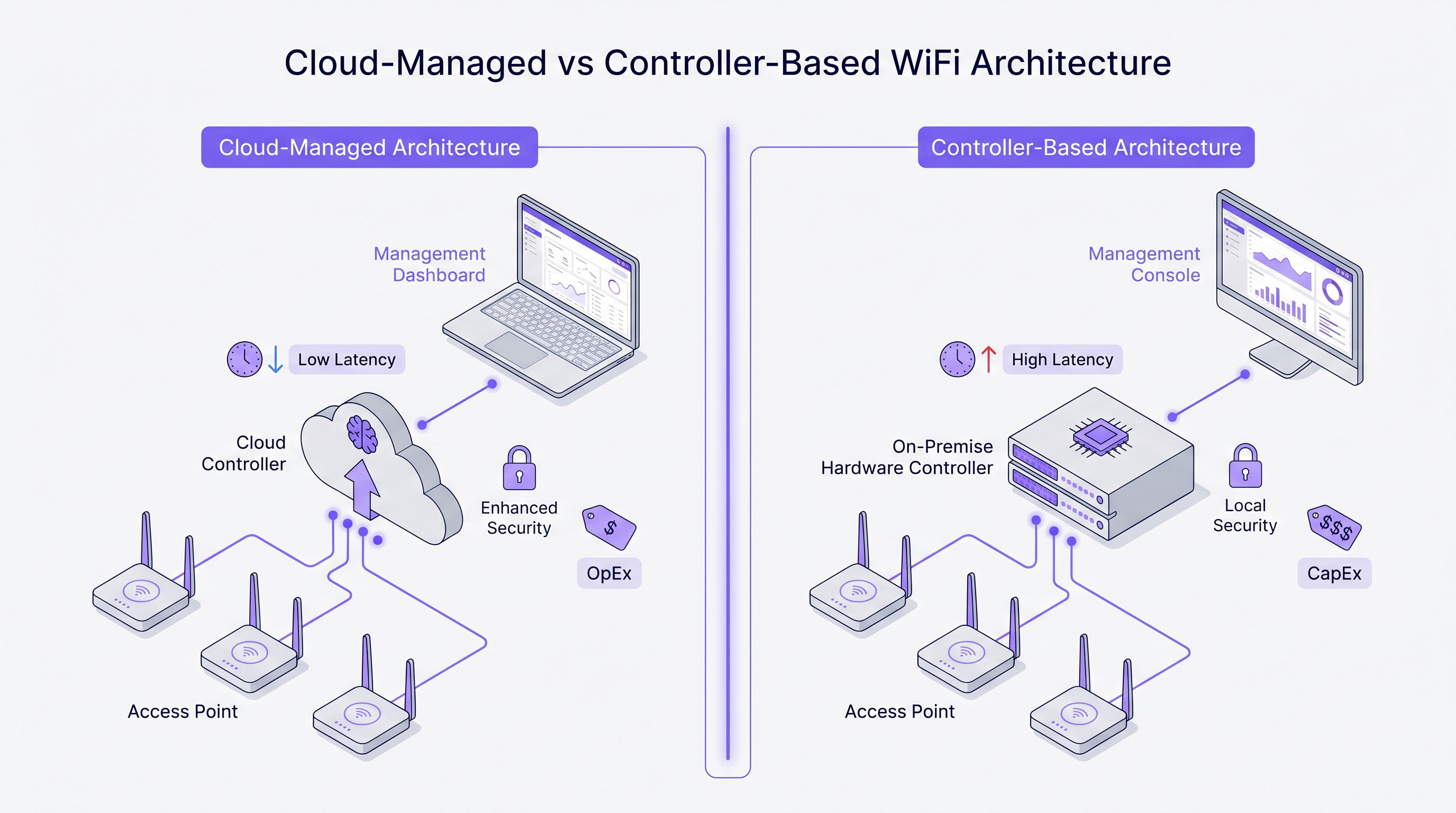
The most fundamental divergence between these vendors lies in their architectural approach to network management and control plane traffic.
Cisco Meraki operates on a strictly cloud-native architecture. Every AP in the portfolio is managed exclusively through the Meraki Dashboard. There is no on-premise controller option. Configuration, firmware deployment, client visibility, and policy enforcement are all orchestrated via Cisco's cloud infrastructure. This model excels in distributed environments where a single pane of glass and zero-touch provisioning are paramount.
Aruba (HPE) advocates for a hybrid approach. Aruba APs can be managed via Aruba Central (cloud) or deployed alongside an on-premise Aruba Mobility Conductor. This flexibility is crucial for public-sector and healthcare organisations that require strict data sovereignty or air-gapped management planes. Aruba's architecture also supports advanced dynamic segmentation and role-based access control (RBAC) at the switch port and AP level.
Ruckus (CommScope) similarly supports both cloud (Ruckus One) and on-premise (SmartZone) management. Ruckus differentiates itself at the hardware layer with its proprietary BeamFlex adaptive antenna technology. Instead of omnidirectional broadcasting, BeamFlex dynamically selects from thousands of antenna patterns to steer RF energy towards the client and away from interference, making it exceptionally resilient in challenging RF environments.
UniFi (Ubiquiti) disrupts the traditional enterprise model by decoupling the management software from ongoing licensing fees. The UniFi Network Controller can be self-hosted, run on a dedicated hardware appliance (Cloud Key), or hosted in the cloud. While the hardware is highly cost-effective, the platform lacks the granular Quality of Service (QoS), carrier-grade redundancy, and advanced RF troubleshooting tools found in the other three vendors.
Wi-Fi 6E and the 6 GHz Spectrum
All four vendors have integrated Wi-Fi 6 (802.11ax) and Wi-Fi 6E into their enterprise portfolios. Wi-Fi 6E is a critical inflection point for high-density deployments, opening up to 1,200 MHz of pristine spectrum in the 6 GHz band. This eliminates the channel contention and co-channel interference that plague the 2.4 GHz and 5 GHz bands in environments like conference centres and Hospitality venues.
Technologies such as Orthogonal Frequency Division Multiple Access (OFDMA) allow a single AP to serve multiple clients simultaneously on sub-channels, drastically reducing latency. For any new deployment expecting more than 50 concurrent clients per AP, Wi-Fi 6E hardware should be the baseline specification.
Implementation Guide
1. RF Site Survey and Capacity Planning
Deploying APs based purely on a floor plan is a guaranteed path to coverage gaps and roaming failures. A professional RF site survey using tools like Ekahau or iBwave is mandatory. The survey must account for attenuation from building materials (e.g., concrete walls in hotels, metal racking in warehouses) and model capacity requirements, not just coverage.
2. Network Segmentation and Security
For environments processing payments or handling sensitive data, strict Layer 2 segmentation is required. Create a dedicated VLAN for guest traffic, isolated from the corporate network via firewall rules. Relying solely on SSID separation is insufficient for PCI DSS compliance. Implementing IEEE 802.1X for corporate authentication and a captive portal for guest access ensures robust security. For healthcare deployments, refer to our guide on HIPAA-Compliant Guest WiFi for Healthcare Providers .
3. Roaming Optimisation
In environments where clients are highly mobile, seamless roaming is critical. Enable 802.11r (Fast BSS Transition) and 802.11k (Radio Resource Measurement) on all relevant SSIDs. Meraki enables these by default, whereas Aruba and Ruckus require explicit configuration. Ensure client devices support these protocols to prevent sticky client issues.
Best Practices
- Model the 5-Year TCO: Hardware cost is only a fraction of the total expenditure. For vendors like Meraki, mandatory annual licensing constitutes the majority of the 5-year TCO. Calculate hardware, licensing, support contracts, and implementation services comprehensively.
- Avoid the Licence Cliff: For subscription-based models, co-term your licences. Inheriting an estate with staggered renewal dates creates operational risk and administrative overhead. Consolidate to a single renewal date.
- Design for High Density: In stadiums or lecture theatres, the goal is to contain the RF cell size. Use directional antennas (or leverage Ruckus BeamFlex) to limit coverage to specific seating areas, reducing co-channel interference.
- Leverage an Intelligence Overlay: Regardless of the hardware vendor, decouple your analytics and marketing layer from the infrastructure. Platforms like Purple integrate natively with Cisco, Aruba, Ruckus, and UniFi, ensuring your WiFi Analytics remain consistent even if you change hardware vendors in the future.
Troubleshooting & Risk Mitigation
The "Sticky Client" Problem
Clients clinging to an AP with a weak signal rather than roaming to a closer AP is a common issue. Mitigation involves tuning the minimum basic rate (disabling legacy 802.11b rates like 1, 2, 5.5, and 11 Mbps) and enabling 802.11v to help clients make better roaming decisions. Aruba's ClientMatch technology handles this dynamically at the infrastructure level.
Co-Channel Interference (CCI)
In dense deployments, APs transmitting on the same channel interfere with one another, driving up the noise floor and reducing throughput. Mitigation requires careful channel planning (avoiding overlapping channels in 2.4 GHz) and enabling dynamic radio management features like Cisco's Auto RF or Aruba's ARM to adjust transmit power and channel assignments automatically.
The Meraki Hard Shutdown
The most significant operational risk with Cisco Meraki is the strict licensing enforcement. If a subscription lapses beyond the grace period, the APs cease to function entirely. Mitigation requires rigorous asset management and proactive budget planning for renewals.
ROI & Business Impact
The return on investment for enterprise WiFi extends beyond simple connectivity. A robust network underpins critical business operations, from mobile point-of-sale systems in retail to clinical communication in healthcare. See our guide on Hospital Guest WiFi: Patient Experience and Network Separation for more details.
Furthermore, integrating a Captive Portal and analytics platform transforms the network from a cost centre into a revenue-generating asset. By capturing first-party guest data, venues can drive personalised marketing campaigns, measure footfall, and optimise operations. The key to maximising ROI is selecting the AP vendor that aligns with your operational capabilities and budget, while leveraging a vendor-agnostic overlay to extract business intelligence.
Key Terms & Definitions
Zero-Touch Provisioning (ZTP)
The ability to configure network devices automatically by connecting them to the internet, allowing them to download their configuration from a central cloud controller.
Critical for multi-site retail or branch deployments where sending an IT engineer to every site is cost-prohibitive.
BeamFlex
A proprietary adaptive antenna technology developed by Ruckus that dynamically changes antenna patterns to focus RF energy towards the client.
Provides a significant performance advantage in environments with high multi-path interference or extreme client density.
IEEE 802.1X
An IEEE standard for port-based network access control (PNAC), providing an authentication mechanism to devices wishing to attach to a LAN or WLAN.
The enterprise standard for securing corporate devices, requiring integration with a RADIUS server (like Cisco ISE or Aruba ClearPass).
Dynamic Segmentation
The automated assignment of network access policies and VLANs to users and devices based on their role, rather than their physical connection point.
A key feature of Aruba's architecture, allowing IT teams to enforce consistent security policies across wired and wireless networks.
OFDMA (Orthogonal Frequency Division Multiple Access)
A feature of Wi-Fi 6 that allows an AP to divide a channel into smaller sub-channels (Resource Units) to transmit data to multiple clients simultaneously.
Crucial for reducing latency in high-density environments like stadiums and conference centres.
Co-Channel Interference (CCI)
Interference caused when multiple APs in the same physical area transmit on the same frequency channel, forcing them to share airtime.
A primary cause of poor WiFi performance, mitigated through proper RF design and dynamic radio management.
802.11r (Fast BSS Transition)
A protocol that allows a client device to authenticate with a target AP before roaming, reducing the time required to transition between APs.
Essential for seamless roaming, particularly for voice-over-IP (VoIP) applications in hospitality and healthcare.
Single Pane of Glass
A management interface that unifies data and controls from multiple components (e.g., APs, switches, firewalls) into a single unified dashboard.
The primary selling point of cloud-native platforms like Cisco Meraki, simplifying operations for lean IT teams.
Case Studies
A 400-room luxury hotel with thick concrete walls is experiencing severe roaming issues and poor signal penetration. The current legacy infrastructure uses omnidirectional APs placed in the hallways. The IT director needs to select a vendor for a complete hardware refresh.
Deploy Ruckus Wi-Fi 6 APs (e.g., R550 or H550 wall-plate APs) inside the guest rooms rather than the hallways. Ruckus's BeamFlex adaptive antenna technology excels in mitigating multi-path interference caused by concrete walls. Configure the network using Ruckus SmartZone for on-premise control, ensuring that 802.11r and 802.11k are enabled for seamless roaming as guests move between the lobby and their rooms.
A national retail chain with 250 small footprint stores needs to deploy a consistent, secure WiFi network for both corporate PoS devices and guest access. The IT team is lean and centralised at headquarters, with no technical staff on site at the stores.
Implement Cisco Meraki MR36 APs managed via the Meraki Dashboard. Utilise Meraki's zero-touch provisioning to ship unconfigured APs directly to the stores, where non-technical staff simply plug them in. Configure a corporate VLAN for PoS devices using 802.1X, and a segmented guest VLAN integrated with Purple for captive portal authentication and analytics. Leverage Meraki's cloud-managed architecture to push firmware updates and policy changes globally from HQ.
Scenario Analysis
Q1. A university campus requires a major WiFi upgrade. The network must support dynamic role-based access control for students, faculty, and IoT devices. The university's security policy mandates that the core network management infrastructure must remain on-premise, though they are open to cloud monitoring. Which vendor is the optimal choice?
💡 Hint:Consider the requirement for on-premise management combined with advanced role-based access control.
Show Recommended Approach
Aruba is the optimal choice. Aruba's hybrid architecture allows for on-premise controllers (Mobility Conductors) to satisfy the strict security policy. Furthermore, Aruba's Dynamic Segmentation and ClearPass Policy Manager provide industry-leading capabilities for role-based access control across diverse user groups and IoT devices.
Q2. A medium-sized logistics company operates three warehouses. They have a highly constrained IT budget and a capable in-house network engineer. They need basic WiFi coverage for barcode scanners but do not require advanced analytics, SLA-backed support, or carrier-grade redundancy. Which vendor should they evaluate?
💡 Hint:Focus on the budget constraints and the presence of an in-house engineer to manage the system.
Show Recommended Approach
UniFi is the most appropriate choice. The lack of ongoing licensing fees and the low cost of hardware fit the constrained budget. Since they have an in-house engineer and do not require SLA-backed support or advanced enterprise features, the UniFi platform provides the best value for this specific scenario.
Q3. A regional airport is upgrading its terminal WiFi. The environment is characterised by vast open spaces, high ceilings, and extreme client density during peak hours. The IT team is concerned about co-channel interference and signal propagation. Which hardware feature should drive their vendor selection?
💡 Hint:Identify the vendor known for proprietary RF mitigation in hostile, high-density environments.
Show Recommended Approach
The airport should evaluate Ruckus, specifically focusing on its BeamFlex adaptive antenna technology. In large open spaces with high density, omnidirectional antennas create excessive co-channel interference. BeamFlex dynamically steers the RF signal, reducing interference and improving performance in challenging physical environments.
Key Takeaways
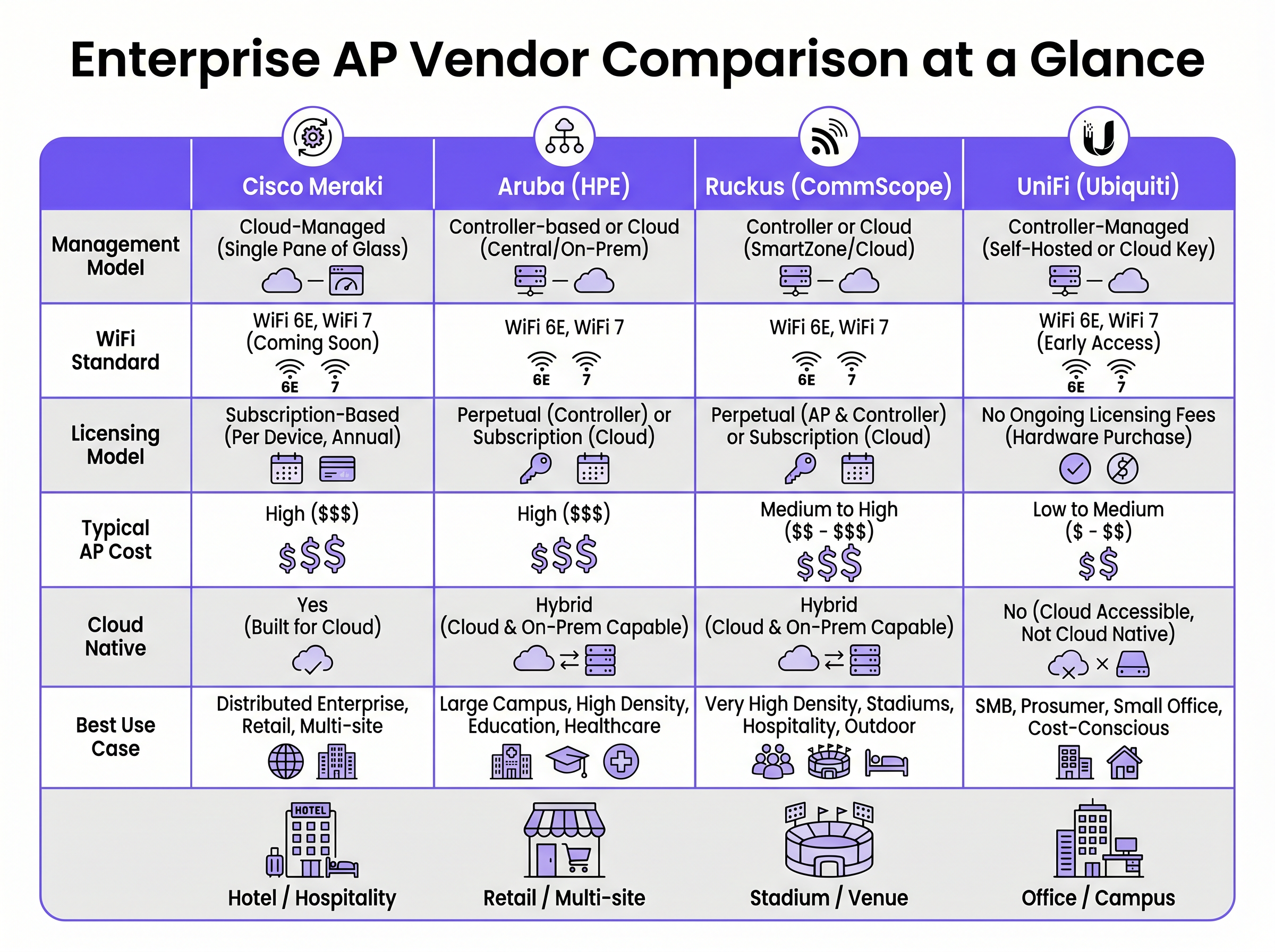
- ✓Cisco Meraki offers unmatched cloud simplicity and zero-touch provisioning, ideal for distributed retail, but carries high ongoing licensing costs.
- ✓Aruba provides robust hybrid architecture (cloud or on-premise) and advanced dynamic segmentation, making it a standard for healthcare and higher education.
- ✓Ruckus excels in hostile RF environments and high-density venues (stadiums, concrete hotels) due to its proprietary BeamFlex antenna technology.
- ✓UniFi delivers cost-effective hardware with no ongoing licensing fees, suitable for SMBs and budget-conscious deployments with in-house IT support.
- ✓Always model a 5-year Total Cost of Ownership (TCO) to account for mandatory subscription fees, which can eclipse the initial hardware CapEx.
- ✓Deploying Wi-Fi 6E hardware is essential for future-proofing high-density environments by leveraging the uncongested 6 GHz spectrum.
- ✓Purple's intelligence layer is vendor-agnostic, integrating with all four platforms to provide consistent Guest WiFi authentication and analytics regardless of the underlying hardware.




