

Choisir les points d'accès d'entreprise : Cisco, Aruba, Ruckus, UniFi comparés
Ce guide de référence technique faisant autorité compare les points d'accès d'entreprise Cisco Meraki, Aruba, Ruckus et UniFi en termes d'architecture, de fonctionnalités et de TCO. Il fournit aux responsables informatiques des recommandations concrètes et neutres vis-à-vis des fournisseurs pour le déploiement de WiFi haute performance dans des environnements complexes.
🎧 Écouter ce guide
Voir la transcription
Résumé Exécutif
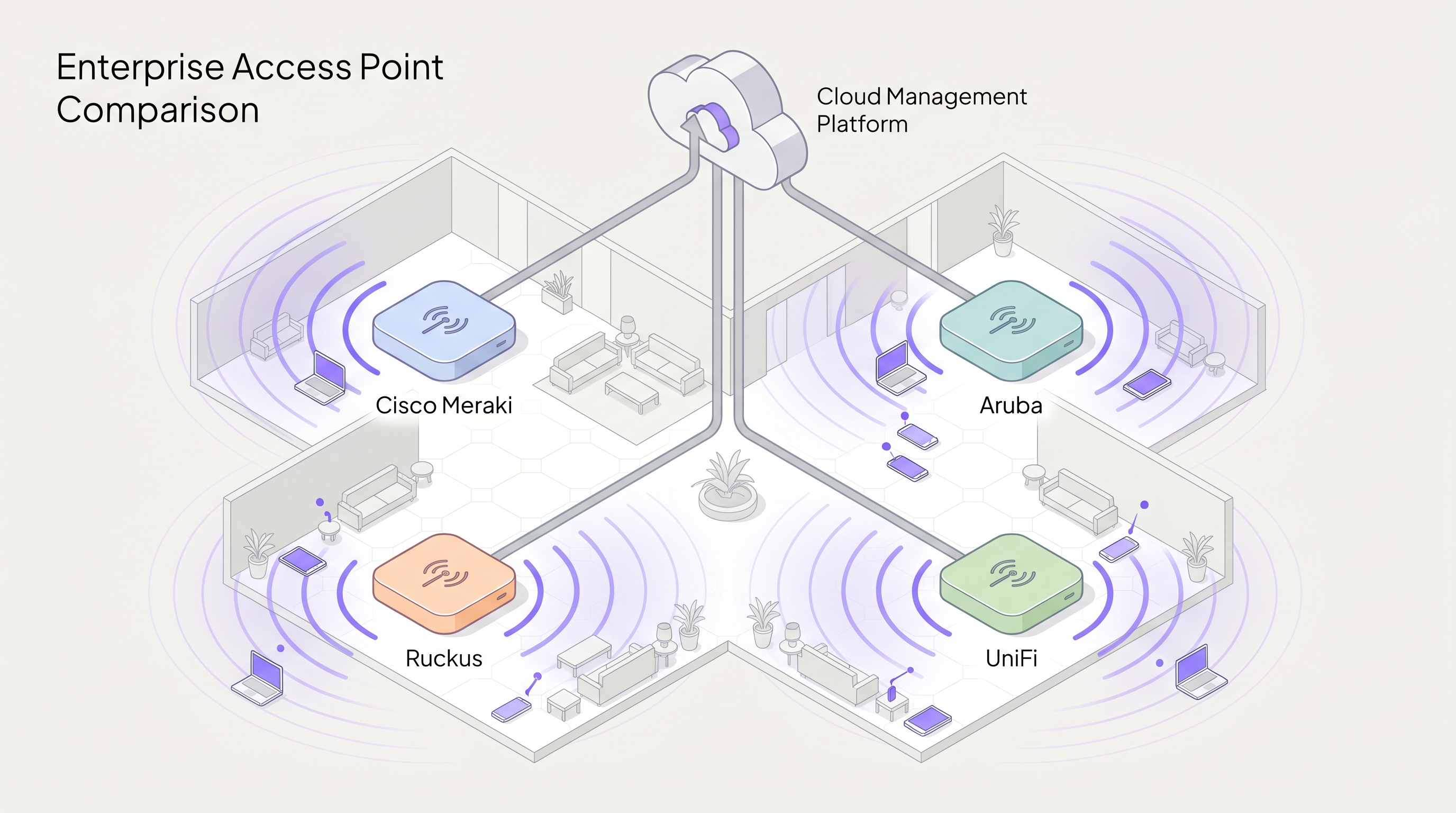
Le choix du bon fournisseur de points d'accès (AP) d'entreprise est une décision stratégique qui détermine les performances du réseau, les frais d'exploitation et les dépenses d'investissement à long terme. Ce guide propose une comparaison technique neutre vis-à-vis des fournisseurs des quatre acteurs dominants dans le domaine du WiFi d'entreprise : Cisco Meraki, Aruba (HPE), Ruckus (CommScope) et UniFi (Ubiquiti).
Pour les directeurs informatiques et les architectes réseau, la matrice de décision va bien au-delà des performances RF brutes. Elle englobe la philosophie architecturale, en particulier le choix entre les modèles de gestion cloud-native, basés sur contrôleur et hybrides. De plus, les coûts de licence cachés et le redoutable "licence cliff" peuvent gonfler considérablement le coût total de possession (TCO) sur un cycle de vie de cinq ans.
Que vous déployiez une couverture haute densité pour un stade de 60 000 places, que vous mettiez en œuvre un provisionnement sans contact dans un parc de 200 magasins Retail , ou que vous implémentiez une segmentation conforme à la HIPAA dans le secteur de la Healthcare , ce guide détaille les capacités, les limitations et les cas d'utilisation optimaux pour chaque fournisseur. En tant que couche d'intelligence située au-dessus du matériel, Purple s'intègre parfaitement aux quatre plateformes pour offrir l'authentification Guest WiFi et les WiFi Analytics .
Plongée Technique Approfondie
Philosophies Architecturales : Cloud vs. Contrôleur
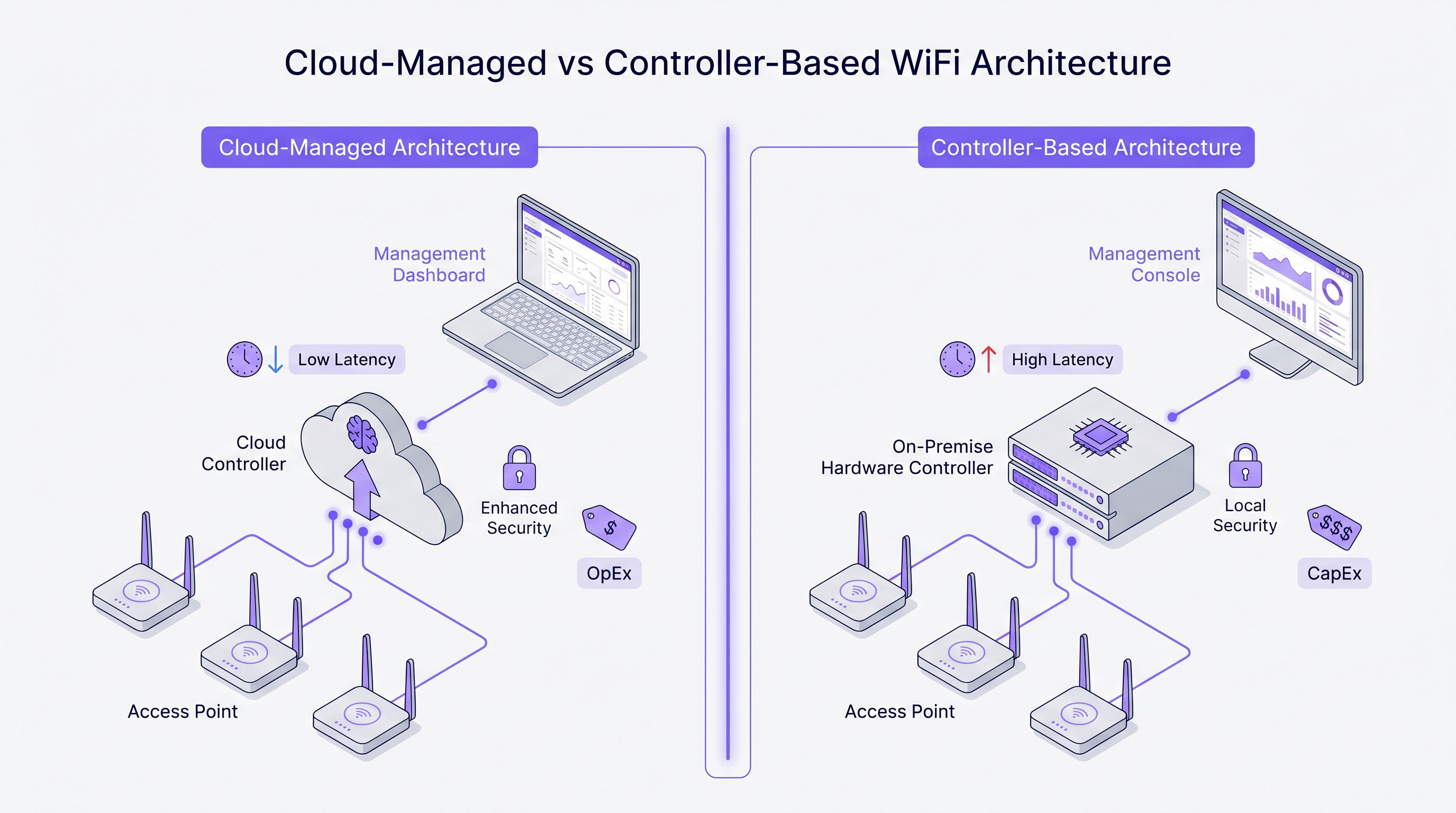
La divergence la plus fondamentale entre ces fournisseurs réside dans leur approche architecturale de la gestion du réseau et du trafic du plan de contrôle.
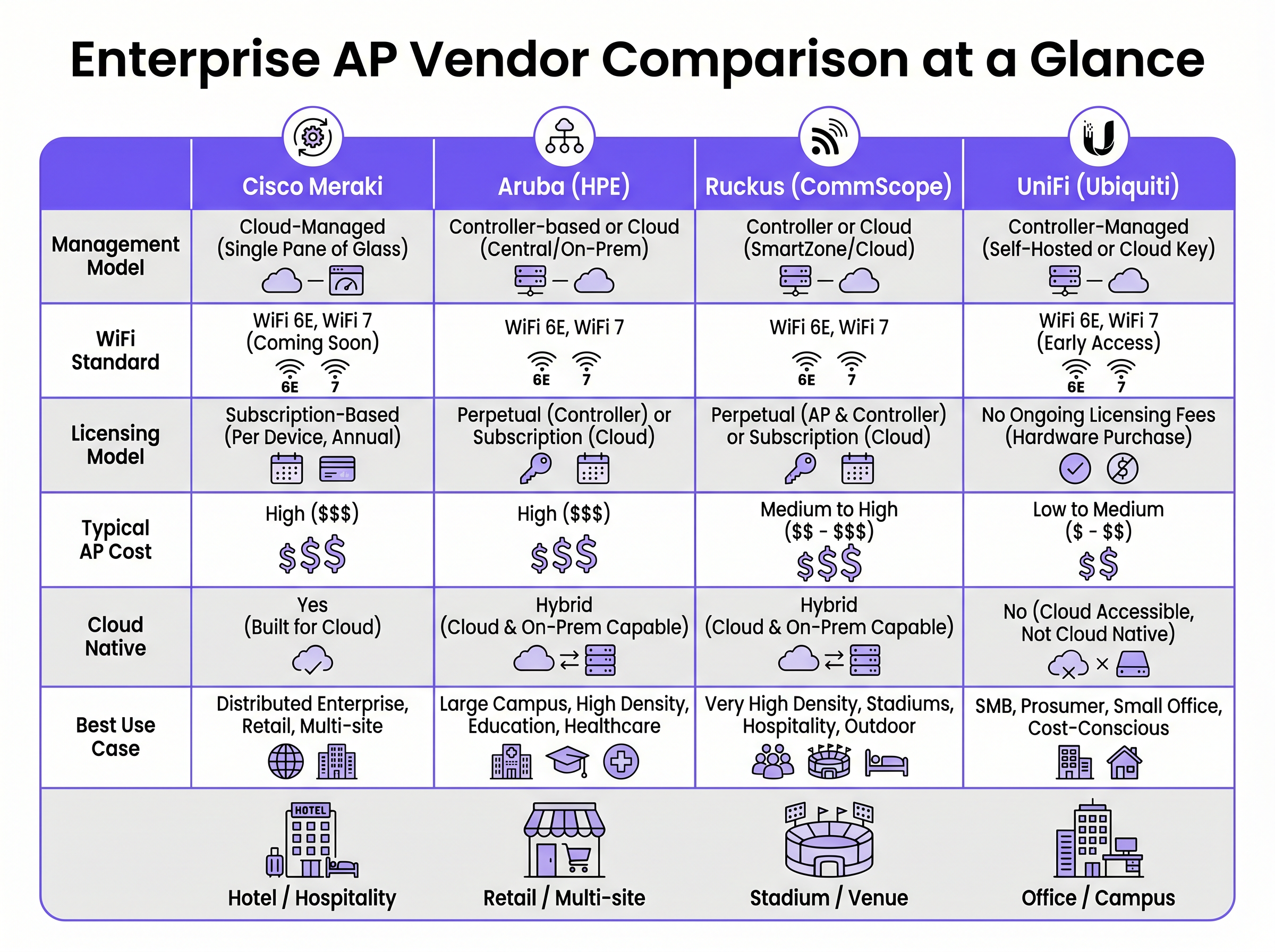
Cisco Meraki fonctionne sur une architecture strictement cloud-native. Chaque AP du portefeuille est géré exclusivement via le tableau de bord Meraki. Il n'y a pas d'option de contrôleur sur site. La configuration, le déploiement du firmware, la visibilité des clients et l'application des politiques sont tous orchestrés via l'infrastructure cloud de Cisco. Ce modèle excelle dans les environnements distribués où un tableau de bord unique et un provisionnement sans contact sont primordiaux.
Aruba (HPE) préconise une approche hybride. Les AP Aruba peuvent être gérés via Aruba Central (cloud) ou déployés aux côtés d'un contrôleur de mobilité Aruba sur site. Cette flexibilité est cruciale pour les organisations du secteur public et de la santé qui exigent une souveraineté stricte des données ou des plans de gestion isolés. L'architecture d'Aruba prend également en charge la segmentation dynamique avancée et le contrôle d'accès basé sur les rôles (RBAC) au niveau du port de commutation et de l'AP.
Ruckus (CommScope) prend également en charge la gestion cloud (Ruckus One) et sur site (SmartZone). Ruckus se distingue au niveau matériel par sa technologie d'antenne adaptative propriétaire BeamFlex. Au lieu d'une diffusion omnidirectionnelle, BeamFlex sélectionne dynamiquement parmi des milliers de motifs d'antenne pour diriger l'énergie RF vers le client et l'éloigner des interférences, ce qui la rend exceptionnellement résiliente dans les environnements RF difficiles.
UniFi (Ubiquiti) perturbe le modèle d'entreprise traditionnel en dissociant le logiciel de gestion des frais de licence continus. Le contrôleur de réseau UniFi peut être auto-hébergé, exécuté sur une appliance matérielle dédiée (Cloud Key) ou hébergé dans le cloud. Bien que le matériel soit très rentable, la plateforme manque de la qualité de service (QoS) granulaire, de la redondance de niveau opérateur et des outils avancés de dépannage RF que l'on trouve chez les trois autres fournisseurs.
Wi-Fi 6E et le spectre 6 GHz
Les quatre fournisseurs ont intégré le Wi-Fi 6 (802.11ax) et le Wi-Fi 6E dans leurs portefeuilles d'entreprise. Le Wi-Fi 6E est un point d'inflexion critique pour les déploiements à haute densité, ouvrant jusqu'à 1 200 MHz de spectre immaculé dans la bande des 6 GHz. Cela élimine la contention de canaux et les interférences co-canal qui affectent les bandes 2,4 GHz et 5 GHz dans des environnements tels que les centres de conférence et les établissements Hospitality .
Des technologies telles que l'accès multiple par répartition orthogonale de la fréquence (OFDMA) permettent à un seul AP de servir plusieurs clients simultanément sur des sous-canaux, réduisant considérablement la latence. Pour tout nouveau déploiement prévoyant plus de 50 clients simultanés par AP, le matériel Wi-Fi 6E devrait être la spécification de base.
Guide d'Implémentation
1. Étude de site RF et planification de la capacité
Le déploiement d'AP basé uniquement sur un plan d'étage est un chemin garanti vers des lacunes de couverture et des échecs d'itinérance. Une étude de site RF professionnelle utilisant des outils comme Ekahau ou iBwave est obligatoire. L'étude doit tenir compte de l'atténuation due aux matériaux de construction (par exemple, murs en béton dans les hôtels, rayonnages métalliques dans les entrepôts) et modéliser les exigences de capacité, pas seulement la couverture.
2. Segmentation du réseau et sécurité
Pour les environnements traitant des paiements ou des données sensibles, une segmentation stricte de la couche 2 est requise. Créez un VLAN dédié au trafic invité, isolé du réseau d'entreprise via des règles de pare-feu. Se fier uniquement à la séparation des SSID est insuffisant pour la conformité PCI DSS. La mise en œuvre de l'IEEE 802.1X pour l'authentification d'entreprise et d'un Captive Portal pour l'accès invité assure une sécurité robuste. Pour les déploiements dans le secteur de la santé, consultez notre guide sur le Guest WiFi conforme à la HIPAA pour les prestataires de soins de santé .
3. Optimisation de l'itinérance
Dans les environnements où les clients sont très mobiles, l'itinérance transparente est essentielle. Activez le 802.11r (Fast BSS Transition) et le 802.11k (Radio Resource Measurement) sur tous les SSID pertinents. Meraki les active par défaut, tandis qu'Aruba et Ruckus nécessitent une configuration explicite. Assurez-vous que les appareils clients prennent en charge ces protocoles pour éviter les problèmes de clients « collants ».
Bonnes pratiques
- Modélisez le TCO sur 5 ans : Le coût du matériel ne représente qu'une fraction des dépenses totales. Pour les fournisseurs comme Meraki, la licence annuelle obligatoire constitue la majeure partie du TCO sur 5 ans. Calculez de manière exhaustive le matériel, les licences, les contrats de support et les services de mise en œuvre.
- Évitez l'effet de falaise des licences : Pour les modèles basés sur l'abonnement, alignez les dates d'expiration de vos licences. Hériter d'un parc avec des dates de renouvellement échelonnées crée un risque opérationnel et une surcharge administrative. Consolidez vers une date de renouvellement unique.
- Concevez pour une haute densité : Dans les stades ou les amphithéâtres, l'objectif est de contenir la taille de la cellule RF. Utilisez des antennes directionnelles (ou exploitez Ruckus BeamFlex) pour limiter la couverture à des zones de sièges spécifiques, réduisant ainsi les interférences de co-canal.
- Exploitez une surcouche d'intelligence : Indépendamment du fournisseur de matériel, dissociez votre couche d'analyse et de marketing de l'infrastructure. Des plateformes comme Purple s'intègrent nativement avec Cisco, Aruba, Ruckus et UniFi, garantissant que vos WiFi Analytics restent cohérentes même si vous changez de fournisseur de matériel à l'avenir.
Dépannage et atténuation des risques
Le problème du « client collant »
Les clients qui s'accrochent à un point d'accès avec un signal faible plutôt que de se déplacer vers un point d'accès plus proche sont un problème courant. L'atténuation implique l'ajustement du débit de base minimum (désactivation des débits 802.11b hérités comme 1, 2, 5,5 et 11 Mbps) et l'activation de la norme 802.11v pour aider les clients à prendre de meilleures décisions d'itinérance. La technologie ClientMatch d'Aruba gère cela dynamiquement au niveau de l'infrastructure.
Interférence de co-canal (CCI)
Dans les déploiements denses, les points d'accès transmettant sur le même canal interfèrent les uns avec les autres, augmentant le bruit de fond et réduisant le débit. L'atténuation nécessite une planification minutieuse des canaux (en évitant les canaux qui se chevauchent en 2,4 GHz) et l'activation de fonctionnalités de gestion radio dynamique comme Auto RF de Cisco ou ARM d'Aruba pour ajuster automatiquement la puissance de transmission et les affectations de canaux.
L'arrêt forcé de Meraki
Le risque opérationnel le plus important avec Cisco Meraki est l'application stricte des licences. Si un abonnement expire au-delà de la période de grâce, les points d'accès cessent de fonctionner entièrement. L'atténuation nécessite une gestion rigoureuse des actifs et une planification budgétaire proactive pour les renouvellements.
ROI et impact commercial
Le retour sur investissement du WiFi d'entreprise va au-delà de la simple connectivité. Un réseau robuste soutient les opérations commerciales critiques, des systèmes de point de vente mobiles dans le commerce de détail à la communication clinique dans les soins de santé. Consultez notre guide sur WiFi invité à l'hôpital : expérience patient et séparation du réseau pour plus de détails.
De plus, l'intégration d'un Captive Portal et d'une plateforme d'analyse transforme le réseau d'un centre de coûts en un actif générateur de revenus. En capturant les données de première partie des invités, les sites peuvent mener des campagnes marketing personnalisées, mesurer la fréquentation et optimiser les opérations. La clé pour maximiser le ROI est de sélectionner le fournisseur de points d'accès qui correspond à vos capacités opérationnelles et à votre budget, tout en exploitant une surcouche indépendante du fournisseur pour extraire l'intelligence commerciale.
Termes clés et définitions
Zero-Touch Provisioning (ZTP)
The ability to configure network devices automatically by connecting them to the internet, allowing them to download their configuration from a central cloud controller.
Critical for multi-site retail or branch deployments where sending an IT engineer to every site is cost-prohibitive.
BeamFlex
A proprietary adaptive antenna technology developed by Ruckus that dynamically changes antenna patterns to focus RF energy towards the client.
Provides a significant performance advantage in environments with high multi-path interference or extreme client density.
IEEE 802.1X
An IEEE standard for port-based network access control (PNAC), providing an authentication mechanism to devices wishing to attach to a LAN or WLAN.
The enterprise standard for securing corporate devices, requiring integration with a RADIUS server (like Cisco ISE or Aruba ClearPass).
Dynamic Segmentation
The automated assignment of network access policies and VLANs to users and devices based on their role, rather than their physical connection point.
A key feature of Aruba's architecture, allowing IT teams to enforce consistent security policies across wired and wireless networks.
OFDMA (Orthogonal Frequency Division Multiple Access)
A feature of Wi-Fi 6 that allows an AP to divide a channel into smaller sub-channels (Resource Units) to transmit data to multiple clients simultaneously.
Crucial for reducing latency in high-density environments like stadiums and conference centres.
Co-Channel Interference (CCI)
Interference caused when multiple APs in the same physical area transmit on the same frequency channel, forcing them to share airtime.
A primary cause of poor WiFi performance, mitigated through proper RF design and dynamic radio management.
802.11r (Fast BSS Transition)
A protocol that allows a client device to authenticate with a target AP before roaming, reducing the time required to transition between APs.
Essential for seamless roaming, particularly for voice-over-IP (VoIP) applications in hospitality and healthcare.
Single Pane of Glass
A management interface that unifies data and controls from multiple components (e.g., APs, switches, firewalls) into a single unified dashboard.
The primary selling point of cloud-native platforms like Cisco Meraki, simplifying operations for lean IT teams.
Études de cas
A 400-room luxury hotel with thick concrete walls is experiencing severe roaming issues and poor signal penetration. The current legacy infrastructure uses omnidirectional APs placed in the hallways. The IT director needs to select a vendor for a complete hardware refresh.
Deploy Ruckus Wi-Fi 6 APs (e.g., R550 or H550 wall-plate APs) inside the guest rooms rather than the hallways. Ruckus's BeamFlex adaptive antenna technology excels in mitigating multi-path interference caused by concrete walls. Configure the network using Ruckus SmartZone for on-premise control, ensuring that 802.11r and 802.11k are enabled for seamless roaming as guests move between the lobby and their rooms.
A national retail chain with 250 small footprint stores needs to deploy a consistent, secure WiFi network for both corporate PoS devices and guest access. The IT team is lean and centralised at headquarters, with no technical staff on site at the stores.
Implement Cisco Meraki MR36 APs managed via the Meraki Dashboard. Utilise Meraki's zero-touch provisioning to ship unconfigured APs directly to the stores, where non-technical staff simply plug them in. Configure a corporate VLAN for PoS devices using 802.1X, and a segmented guest VLAN integrated with Purple for captive portal authentication and analytics. Leverage Meraki's cloud-managed architecture to push firmware updates and policy changes globally from HQ.
Analyse de scénario
Q1. A university campus requires a major WiFi upgrade. The network must support dynamic role-based access control for students, faculty, and IoT devices. The university's security policy mandates that the core network management infrastructure must remain on-premise, though they are open to cloud monitoring. Which vendor is the optimal choice?
💡 Astuce :Consider the requirement for on-premise management combined with advanced role-based access control.
Afficher l'approche recommandée
Aruba is the optimal choice. Aruba's hybrid architecture allows for on-premise controllers (Mobility Conductors) to satisfy the strict security policy. Furthermore, Aruba's Dynamic Segmentation and ClearPass Policy Manager provide industry-leading capabilities for role-based access control across diverse user groups and IoT devices.
Q2. A medium-sized logistics company operates three warehouses. They have a highly constrained IT budget and a capable in-house network engineer. They need basic WiFi coverage for barcode scanners but do not require advanced analytics, SLA-backed support, or carrier-grade redundancy. Which vendor should they evaluate?
💡 Astuce :Focus on the budget constraints and the presence of an in-house engineer to manage the system.
Afficher l'approche recommandée
UniFi is the most appropriate choice. The lack of ongoing licensing fees and the low cost of hardware fit the constrained budget. Since they have an in-house engineer and do not require SLA-backed support or advanced enterprise features, the UniFi platform provides the best value for this specific scenario.
Q3. A regional airport is upgrading its terminal WiFi. The environment is characterised by vast open spaces, high ceilings, and extreme client density during peak hours. The IT team is concerned about co-channel interference and signal propagation. Which hardware feature should drive their vendor selection?
💡 Astuce :Identify the vendor known for proprietary RF mitigation in hostile, high-density environments.
Afficher l'approche recommandée
The airport should evaluate Ruckus, specifically focusing on its BeamFlex adaptive antenna technology. In large open spaces with high density, omnidirectional antennas create excessive co-channel interference. BeamFlex dynamically steers the RF signal, reducing interference and improving performance in challenging physical environments.
Points clés à retenir
- ✓Cisco Meraki offers unmatched cloud simplicity and zero-touch provisioning, ideal for distributed retail, but carries high ongoing licensing costs.
- ✓Aruba provides robust hybrid architecture (cloud or on-premise) and advanced dynamic segmentation, making it a standard for healthcare and higher education.
- ✓Ruckus excels in hostile RF environments and high-density venues (stadiums, concrete hotels) due to its proprietary BeamFlex antenna technology.
- ✓UniFi delivers cost-effective hardware with no ongoing licensing fees, suitable for SMBs and budget-conscious deployments with in-house IT support.
- ✓Always model a 5-year Total Cost of Ownership (TCO) to account for mandatory subscription fees, which can eclipse the initial hardware CapEx.
- ✓Deploying Wi-Fi 6E hardware is essential for future-proofing high-density environments by leveraging the uncongested 6 GHz spectrum.
- ✓Purple's intelligence layer is vendor-agnostic, integrating with all four platforms to provide consistent Guest WiFi authentication and analytics regardless of the underlying hardware.




