

Scelta degli Access Point Enterprise: Cisco, Aruba, Ruckus, UniFi a Confronto
Questa guida tecnica di riferimento autorevole confronta gli access point enterprise Cisco Meraki, Aruba, Ruckus e UniFi in termini di architettura, funzionalità e TCO. Fornisce ai leader IT raccomandazioni pratiche e neutrali rispetto al fornitore per l'implementazione di WiFi ad alte prestazioni in ambienti complessi.
🎧 Ascolta questa guida
Visualizza trascrizione
Riepilogo Esecutivo
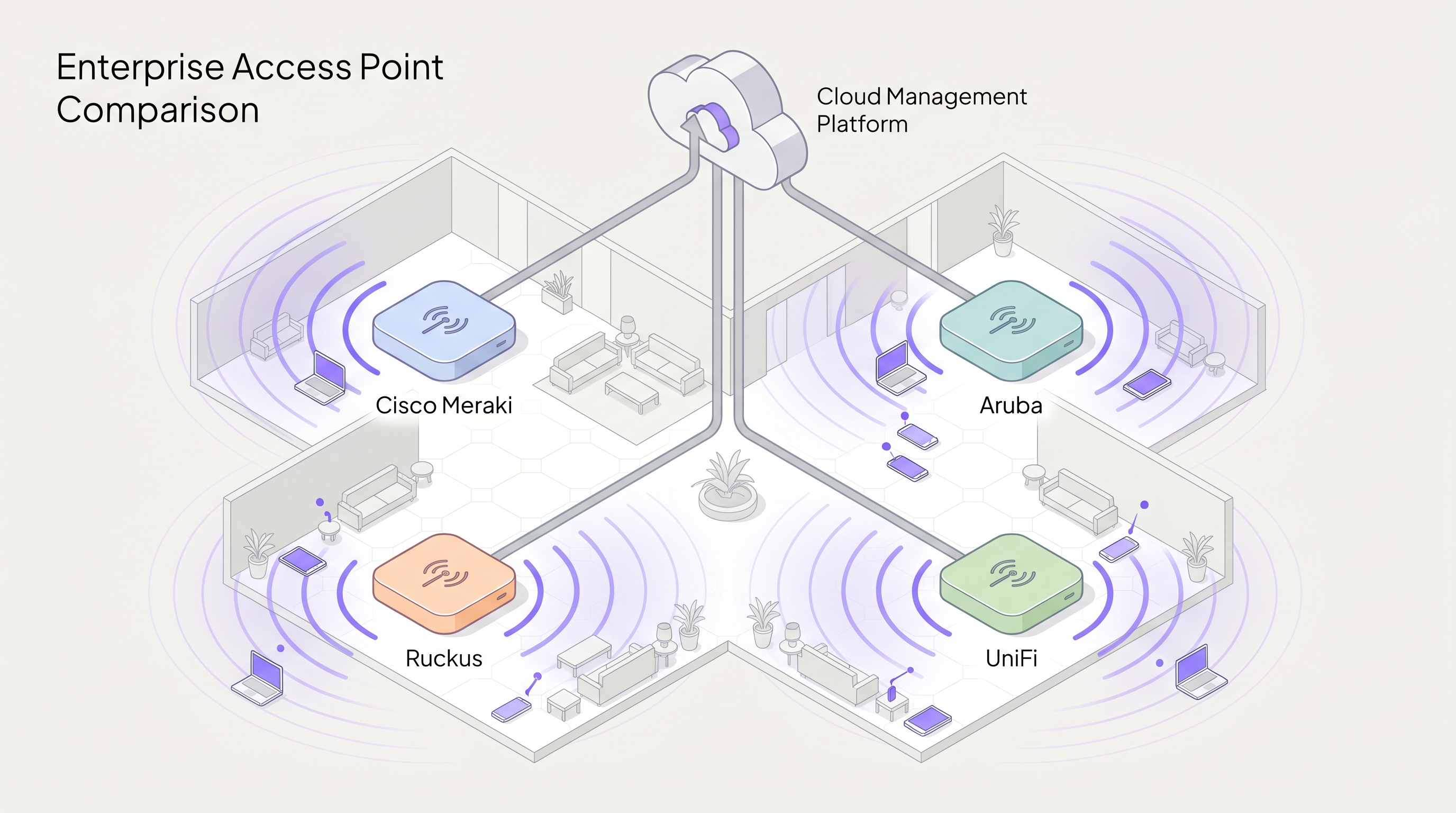
La scelta del fornitore di access point (AP) enterprise giusto è una decisione strategica che determina le prestazioni della rete, i costi operativi e le spese in conto capitale a lungo termine. Questa guida fornisce un confronto tecnico neutrale rispetto al fornitore dei quattro attori dominanti nel settore del WiFi enterprise: Cisco Meraki, Aruba (HPE), Ruckus (CommScope) e UniFi (Ubiquiti).
Per i direttori IT e gli architetti di rete, la matrice decisionale si estende ben oltre le pure prestazioni RF. Comprende la filosofia architetturale, in particolare la scelta tra modelli di gestione cloud-native, basati su controller e ibridi. Inoltre, i costi di licenza nascosti e il temuto "licence cliff" possono gonfiare drasticamente il costo totale di proprietà (TCO) su un ciclo di vita di cinque anni.
Sia che si stia implementando una copertura ad alta densità per uno stadio da 60.000 posti, distribuendo il provisioning zero-touch in una rete di 200 punti vendita Retail , o implementando la segmentazione conforme a HIPAA nel settore Healthcare , questa guida analizza le capacità, le limitazioni e i casi d'uso ottimali per ciascun fornitore. Come livello di intelligence che si sovrappone all'hardware, Purple si integra perfettamente con tutte e quattro le piattaforme per fornire l'autenticazione Guest WiFi e WiFi Analytics .
Approfondimento Tecnico
Filosofie Architetturali: Cloud vs. Controller
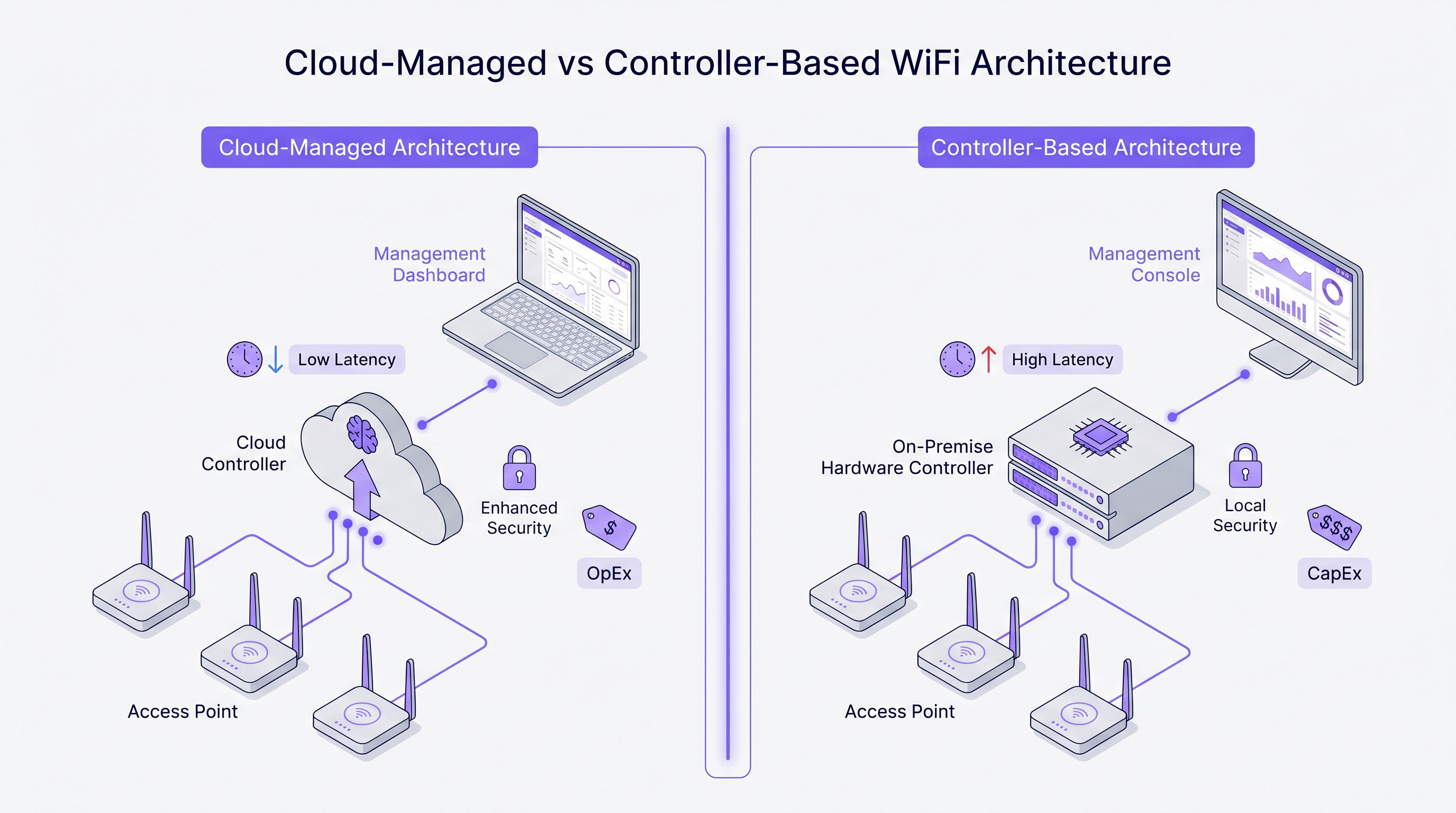
La divergenza più fondamentale tra questi fornitori risiede nel loro approccio architetturale alla gestione della rete e al traffico del piano di controllo.
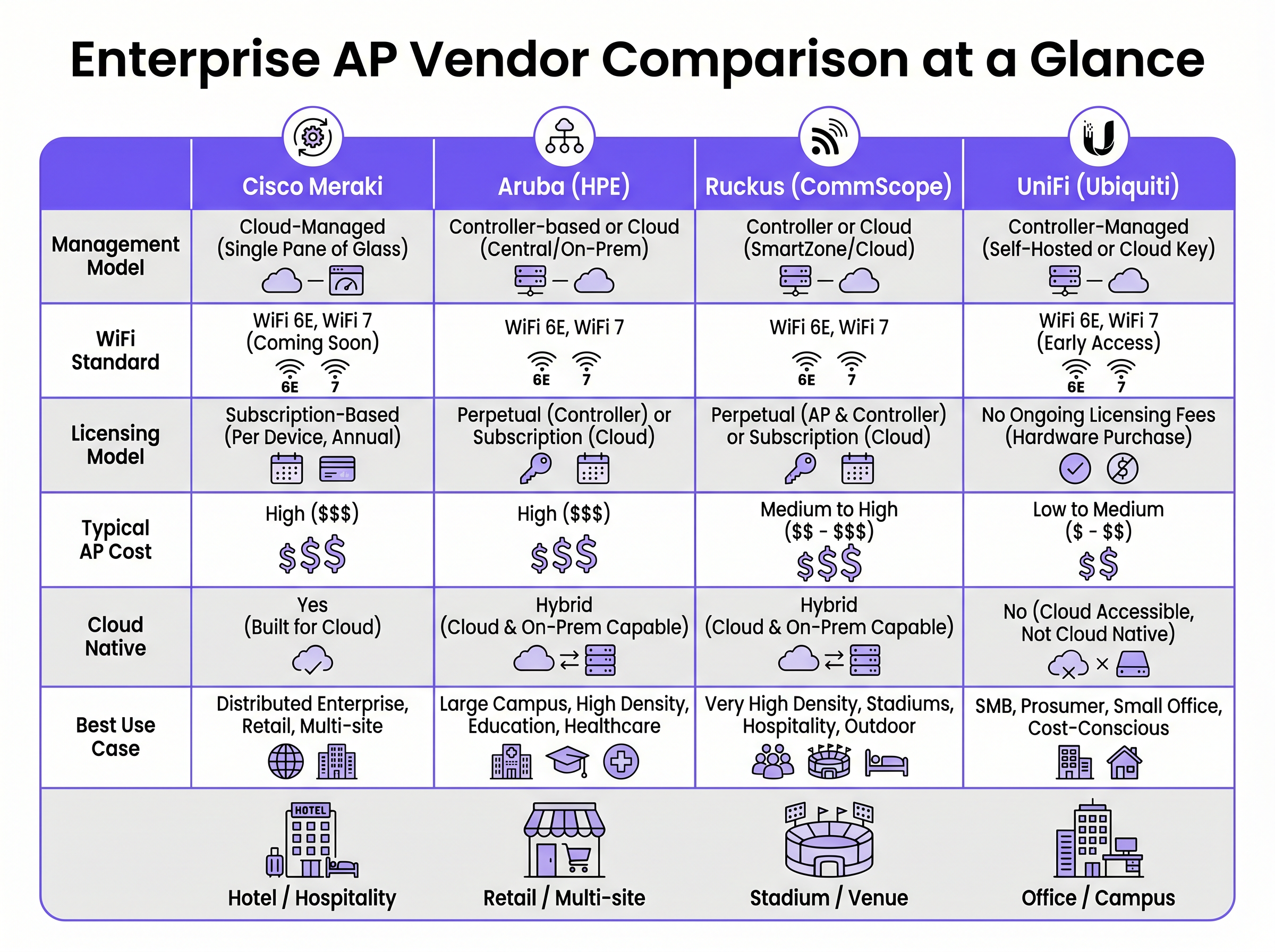
Cisco Meraki opera su un'architettura strettamente cloud-native. Ogni AP nel portfolio è gestito esclusivamente tramite la Meraki Dashboard. Non esiste un'opzione di controller on-premise. Configurazione, distribuzione del firmware, visibilità dei client e applicazione delle policy sono tutti orchestrati tramite l'infrastruttura cloud di Cisco. Questo modello eccelle in ambienti distribuiti dove un'unica interfaccia di gestione e il provisioning zero-touch sono fondamentali.
Aruba (HPE) promuove un approccio ibrido. Gli AP Aruba possono essere gestiti tramite Aruba Central (cloud) o implementati insieme a un Aruba Mobility Conductor on-premise. Questa flessibilità è cruciale per le organizzazioni del settore pubblico e sanitario che richiedono una rigorosa sovranità dei dati o piani di gestione air-gapped. L'architettura di Aruba supporta anche la segmentazione dinamica avanzata e il controllo degli accessi basato sui ruoli (RBAC) a livello di porta switch e AP.
Ruckus (CommScope) supporta analogamente la gestione sia cloud (Ruckus One) che on-premise (SmartZone). Ruckus si distingue a livello hardware con la sua tecnologia proprietaria di antenna adattiva BeamFlex. Invece della trasmissione omnidirezionale, BeamFlex seleziona dinamicamente tra migliaia di schemi di antenna per dirigere l'energia RF verso il client e lontano dalle interferenze, rendendola eccezionalmente resiliente in ambienti RF difficili.
UniFi (Ubiquiti) rivoluziona il modello enterprise tradizionale disaccoppiando il software di gestione dalle continue tariffe di licenza. Il UniFi Network Controller può essere auto-ospitato, eseguito su un'appliance hardware dedicata (Cloud Key) o ospitato nel cloud. Sebbene l'hardware sia estremamente conveniente, la piattaforma manca della Quality of Service (QoS) granulare, della ridondanza di livello carrier e degli strumenti avanzati di risoluzione dei problemi RF presenti negli altri tre fornitori.
Wi-Fi 6E e lo Spettro a 6 GHz
Tutti e quattro i fornitori hanno integrato Wi-Fi 6 (802.11ax) e Wi-Fi 6E nei loro portfolio enterprise. Wi-Fi 6E è un punto di svolta critico per le implementazioni ad alta densità, aprendo fino a 1.200 MHz di spettro incontaminato nella banda a 6 GHz. Ciò elimina la contesa di canale e l'interferenza co-canale che affliggono le bande a 2.4 GHz e 5 GHz in ambienti come centri congressi e strutture Hospitality .
Tecnologie come l'Orthogonal Frequency Division Multiple Access (OFDMA) consentono a un singolo AP di servire più client contemporaneamente su sottocanali, riducendo drasticamente la latenza. Per qualsiasi nuova implementazione che preveda più di 50 client concorrenti per AP, l'hardware Wi-Fi 6E dovrebbe essere la specifica di base.
Guida all'Implementazione
1. Rilievo del Sito RF e Pianificazione della Capacità
Implementare gli AP basandosi puramente su una planimetria è una strada garantita per lacune di copertura e fallimenti del roaming. Un rilievo professionale del sito RF utilizzando strumenti come Ekahau o iBwave è obbligatorio. Il rilievo deve tenere conto dell'attenuazione dovuta ai materiali da costruzione (ad esempio, pareti in cemento negli hotel, scaffalature metalliche nei magazzini) e modellare i requisiti di capacità, non solo la copertura.
2. Segmentazione della Rete e Sicurezza
Per gli ambienti che elaborano pagamenti o gestiscono dati sensibili, è richiesta una rigorosa segmentazione di Livello 2. Creare una VLAN dedicata per il traffico guest, isolata dalla rete aziendale tramite regole firewall. Affidarsi esclusivamente alla separazione degli SSID è insufficiente per la conformità PCI DSS. L'implementazione di IEEE 802.1X per l'autenticazione aziendale e di un captive portal per l'accesso guest garantisce una sicurezza robusta. Per le implementazioni sanitarie, fare riferimento alla nostra guida su HIPAA-Compliant Guest WiFi for Healthcare Providers .
3. Ottimizzazione del Roaming
In ambienti dove i client sono altamente mobili, il roaming senza interruzioni è fondamentale. Abilitare 802.11r (Fast BSS Transition) e 802.11k (Radio Resource Measurement) su tutti gli SSID pertinenti. Meraki li abilita per impostazione predefinita, mentre Aruba e Ruckus richiedono una configurazione esplicita. Assicurarsi che i dispositivi client supportino questi protocolli per prevenire problemi di client "sticky".
Migliori Pratiche
- Modellare il TCO a 5 anni: Il costo dell'hardware è solo una frazione della spesa totale. Per fornitori come Meraki, la licenza annuale obbligatoria costituisce la maggior parte del TCO a 5 anni. Calcolare in modo completo hardware, licenze, contratti di supporto e servizi di implementazione.
- Evitare il "Licence Cliff": Per i modelli basati su abbonamento, co-terminare le licenze. Ereditare un patrimonio con date di rinnovo scaglionate crea rischi operativi e oneri amministrativi. Consolidare a un'unica data di rinnovo.
- Progettare per l'alta densità: Negli stadi o nelle aule universitarie, l'obiettivo è contenere le dimensioni della cella RF. Utilizzare antenne direzionali (o sfruttare Ruckus BeamFlex) per limitare la copertura a specifiche aree di seduta, riducendo l'interferenza co-canale.
- Sfruttare un Livello di Intelligence: Indipendentemente dal fornitore di hardware, disaccoppiare il livello di analisi e marketing dall'infrastruttura. Piattaforme come Purple si integrano nativamente con Cisco, Aruba, Ruckus e UniFi, garantendo che i tuoi WiFi Analytics rimangano coerenti anche se in futuro si cambia fornitore di hardware.
Risoluzione dei Problemi e Mitigazione del Rischio
Il Problema del "Client Sticky"
I client che si aggrappano a un AP con un segnale debole anziché passare a un AP più vicino sono un problema comune. La mitigazione implica la regolazione del tasso di base minimo (disabilitando i tassi legacy 802.11b come 1, 2, 5.5 e 11 Mbps) e l'abilitazione di 802.11v per aiutare i client a prendere decisioni di roaming migliori. La tecnologia ClientMatch di Aruba gestisce questo aspetto dinamicamente a livello di infrastruttura.
Interferenza Co-Canale (CCI)
In implementazioni dense, gli AP che trasmettono sullo stesso canale interferiscono tra loro, aumentando il rumore di fondo e riducendo la velocità di trasmissione. La mitigazione richiede un'attenta pianificazione dei canali (evitando canali sovrapposti a 2.4 GHz) e l'abilitazione di funzionalità di gestione dinamica della radio come Auto RF di Cisco o ARM di Aruba per regolare automaticamente la potenza di trasmissione e le assegnazioni dei canali.
Lo Spegnimento Forzato di Meraki
Il rischio operativo più significativo con Cisco Meraki è la rigorosa applicazione delle licenze. Se un abbonamento scade oltre il periodo di grazia, gli AP cessano completamente di funzionare. La mitigazione richiede una rigorosa gestione degli asset e una pianificazione proattiva del budget per i rinnovi.
ROI e Impatto sul Business
Il ritorno sull'investimento per il WiFi aziendale va oltre la semplice connettività. Una rete robusta è alla base di operazioni aziendali critiche, dai sistemi di punto vendita mobili nel commercio al dettaglio alla comunicazione clinica nell'assistenza sanitaria. Per maggiori dettagli, consulta la nostra guida su WiFi per Ospiti in Ospedale: Esperienza del Paziente e Separazione della Rete .
Inoltre, l'integrazione di un captive portal e di una piattaforma di analisi trasforma la rete da centro di costo a risorsa generatrice di entrate. Acquisendo dati di prima parte sugli ospiti, le sedi possono condurre campagne di marketing personalizzate, misurare l'affluenza e ottimizzare le operazioni. La chiave per massimizzare il ROI è selezionare il fornitore di AP che si allinea con le proprie capacità operative e il budget, sfruttando al contempo un overlay indipendente dal fornitore per estrarre business intelligence.
Termini chiave e definizioni
Zero-Touch Provisioning (ZTP)
The ability to configure network devices automatically by connecting them to the internet, allowing them to download their configuration from a central cloud controller.
Critical for multi-site retail or branch deployments where sending an IT engineer to every site is cost-prohibitive.
BeamFlex
A proprietary adaptive antenna technology developed by Ruckus that dynamically changes antenna patterns to focus RF energy towards the client.
Provides a significant performance advantage in environments with high multi-path interference or extreme client density.
IEEE 802.1X
An IEEE standard for port-based network access control (PNAC), providing an authentication mechanism to devices wishing to attach to a LAN or WLAN.
The enterprise standard for securing corporate devices, requiring integration with a RADIUS server (like Cisco ISE or Aruba ClearPass).
Dynamic Segmentation
The automated assignment of network access policies and VLANs to users and devices based on their role, rather than their physical connection point.
A key feature of Aruba's architecture, allowing IT teams to enforce consistent security policies across wired and wireless networks.
OFDMA (Orthogonal Frequency Division Multiple Access)
A feature of Wi-Fi 6 that allows an AP to divide a channel into smaller sub-channels (Resource Units) to transmit data to multiple clients simultaneously.
Crucial for reducing latency in high-density environments like stadiums and conference centres.
Co-Channel Interference (CCI)
Interference caused when multiple APs in the same physical area transmit on the same frequency channel, forcing them to share airtime.
A primary cause of poor WiFi performance, mitigated through proper RF design and dynamic radio management.
802.11r (Fast BSS Transition)
A protocol that allows a client device to authenticate with a target AP before roaming, reducing the time required to transition between APs.
Essential for seamless roaming, particularly for voice-over-IP (VoIP) applications in hospitality and healthcare.
Single Pane of Glass
A management interface that unifies data and controls from multiple components (e.g., APs, switches, firewalls) into a single unified dashboard.
The primary selling point of cloud-native platforms like Cisco Meraki, simplifying operations for lean IT teams.
Casi di studio
A 400-room luxury hotel with thick concrete walls is experiencing severe roaming issues and poor signal penetration. The current legacy infrastructure uses omnidirectional APs placed in the hallways. The IT director needs to select a vendor for a complete hardware refresh.
Deploy Ruckus Wi-Fi 6 APs (e.g., R550 or H550 wall-plate APs) inside the guest rooms rather than the hallways. Ruckus's BeamFlex adaptive antenna technology excels in mitigating multi-path interference caused by concrete walls. Configure the network using Ruckus SmartZone for on-premise control, ensuring that 802.11r and 802.11k are enabled for seamless roaming as guests move between the lobby and their rooms.
A national retail chain with 250 small footprint stores needs to deploy a consistent, secure WiFi network for both corporate PoS devices and guest access. The IT team is lean and centralised at headquarters, with no technical staff on site at the stores.
Implement Cisco Meraki MR36 APs managed via the Meraki Dashboard. Utilise Meraki's zero-touch provisioning to ship unconfigured APs directly to the stores, where non-technical staff simply plug them in. Configure a corporate VLAN for PoS devices using 802.1X, and a segmented guest VLAN integrated with Purple for captive portal authentication and analytics. Leverage Meraki's cloud-managed architecture to push firmware updates and policy changes globally from HQ.
Analisi degli scenari
Q1. A university campus requires a major WiFi upgrade. The network must support dynamic role-based access control for students, faculty, and IoT devices. The university's security policy mandates that the core network management infrastructure must remain on-premise, though they are open to cloud monitoring. Which vendor is the optimal choice?
💡 Suggerimento:Consider the requirement for on-premise management combined with advanced role-based access control.
Mostra l'approccio consigliato
Aruba is the optimal choice. Aruba's hybrid architecture allows for on-premise controllers (Mobility Conductors) to satisfy the strict security policy. Furthermore, Aruba's Dynamic Segmentation and ClearPass Policy Manager provide industry-leading capabilities for role-based access control across diverse user groups and IoT devices.
Q2. A medium-sized logistics company operates three warehouses. They have a highly constrained IT budget and a capable in-house network engineer. They need basic WiFi coverage for barcode scanners but do not require advanced analytics, SLA-backed support, or carrier-grade redundancy. Which vendor should they evaluate?
💡 Suggerimento:Focus on the budget constraints and the presence of an in-house engineer to manage the system.
Mostra l'approccio consigliato
UniFi is the most appropriate choice. The lack of ongoing licensing fees and the low cost of hardware fit the constrained budget. Since they have an in-house engineer and do not require SLA-backed support or advanced enterprise features, the UniFi platform provides the best value for this specific scenario.
Q3. A regional airport is upgrading its terminal WiFi. The environment is characterised by vast open spaces, high ceilings, and extreme client density during peak hours. The IT team is concerned about co-channel interference and signal propagation. Which hardware feature should drive their vendor selection?
💡 Suggerimento:Identify the vendor known for proprietary RF mitigation in hostile, high-density environments.
Mostra l'approccio consigliato
The airport should evaluate Ruckus, specifically focusing on its BeamFlex adaptive antenna technology. In large open spaces with high density, omnidirectional antennas create excessive co-channel interference. BeamFlex dynamically steers the RF signal, reducing interference and improving performance in challenging physical environments.
Punti chiave
- ✓Cisco Meraki offers unmatched cloud simplicity and zero-touch provisioning, ideal for distributed retail, but carries high ongoing licensing costs.
- ✓Aruba provides robust hybrid architecture (cloud or on-premise) and advanced dynamic segmentation, making it a standard for healthcare and higher education.
- ✓Ruckus excels in hostile RF environments and high-density venues (stadiums, concrete hotels) due to its proprietary BeamFlex antenna technology.
- ✓UniFi delivers cost-effective hardware with no ongoing licensing fees, suitable for SMBs and budget-conscious deployments with in-house IT support.
- ✓Always model a 5-year Total Cost of Ownership (TCO) to account for mandatory subscription fees, which can eclipse the initial hardware CapEx.
- ✓Deploying Wi-Fi 6E hardware is essential for future-proofing high-density environments by leveraging the uncongested 6 GHz spectrum.
- ✓Purple's intelligence layer is vendor-agnostic, integrating with all four platforms to provide consistent Guest WiFi authentication and analytics regardless of the underlying hardware.




