
Gestión del Ancho de Banda en Redes de Alojamientos para Estudiantes
Esta guía proporciona a los gerentes de TI, arquitectos de red y directores de operaciones de propiedades una referencia técnica neutral para la gestión del ancho de banda WiFi en entornos de alojamiento para estudiantes de alta densidad. Cubre la segmentación de VLAN, el diseño de políticas de Calidad de Servicio (QoS), la conformación de tráfico basada en la identidad y la visibilidad a nivel de aplicación, los cuatro pilares de una red escalable y de acceso justo. Con escenarios de implementación reales, resultados medibles y marcos de decisión, este es el manual operativo para cualquier equipo responsable de la infraestructura de red residencial a escala.
Escuchar esta guía
Ver transcripción del podcast
Resumen Ejecutivo
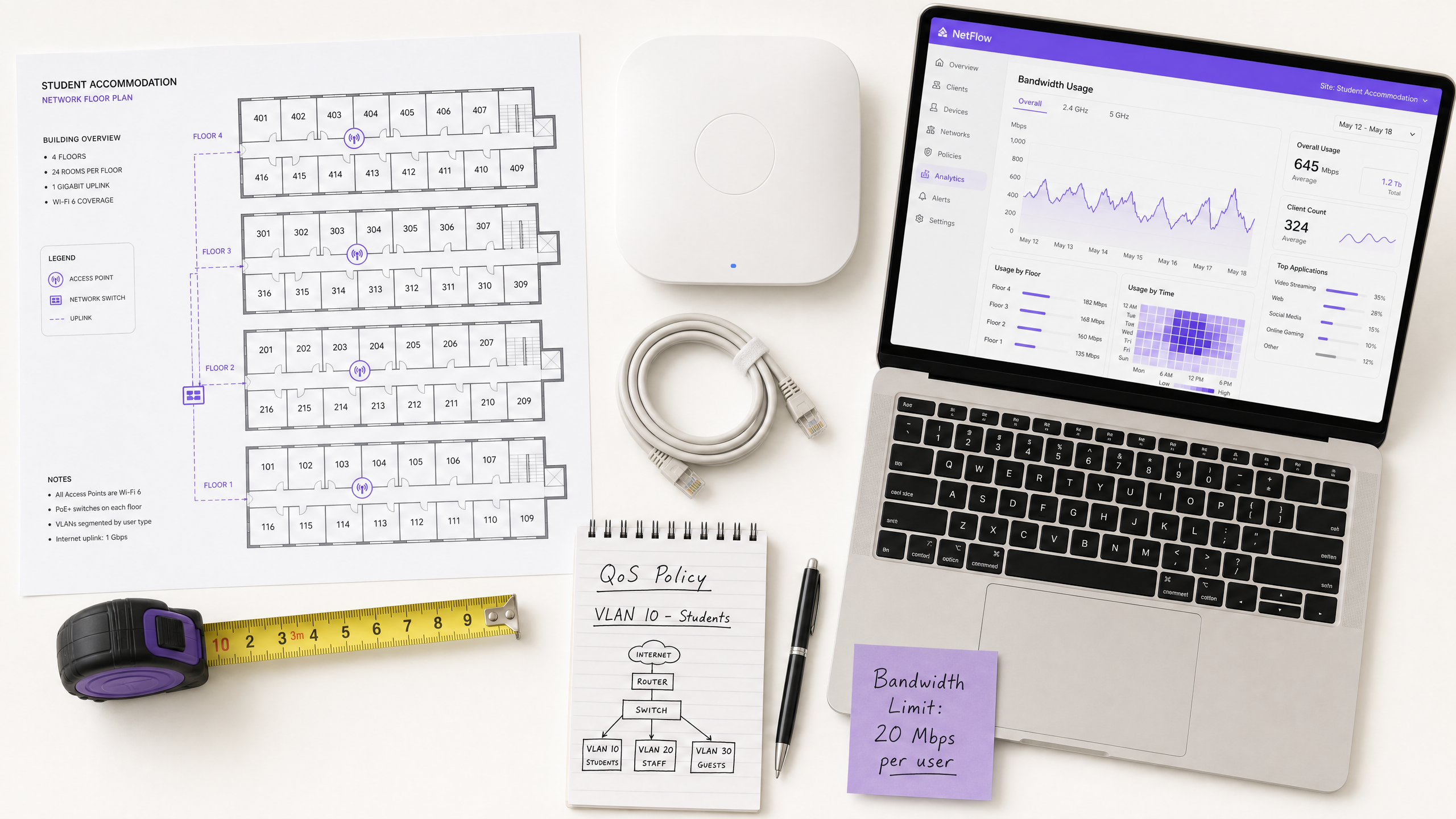
La gestión del ancho de banda WiFi en alojamientos para estudiantes es uno de los desafíos técnicamente más exigentes en el sector inmobiliario residencial. Un único bloque de 400 camas puede generar más de 2.800 conexiones de dispositivos concurrentes durante las horas pico, con perfiles de tráfico que abarcan videoconferencias sensibles a la latencia, streaming de alto rendimiento, juegos en línea y telemetría IoT en segundo plano, todo ello compitiendo por la misma capacidad de enlace ascendente.
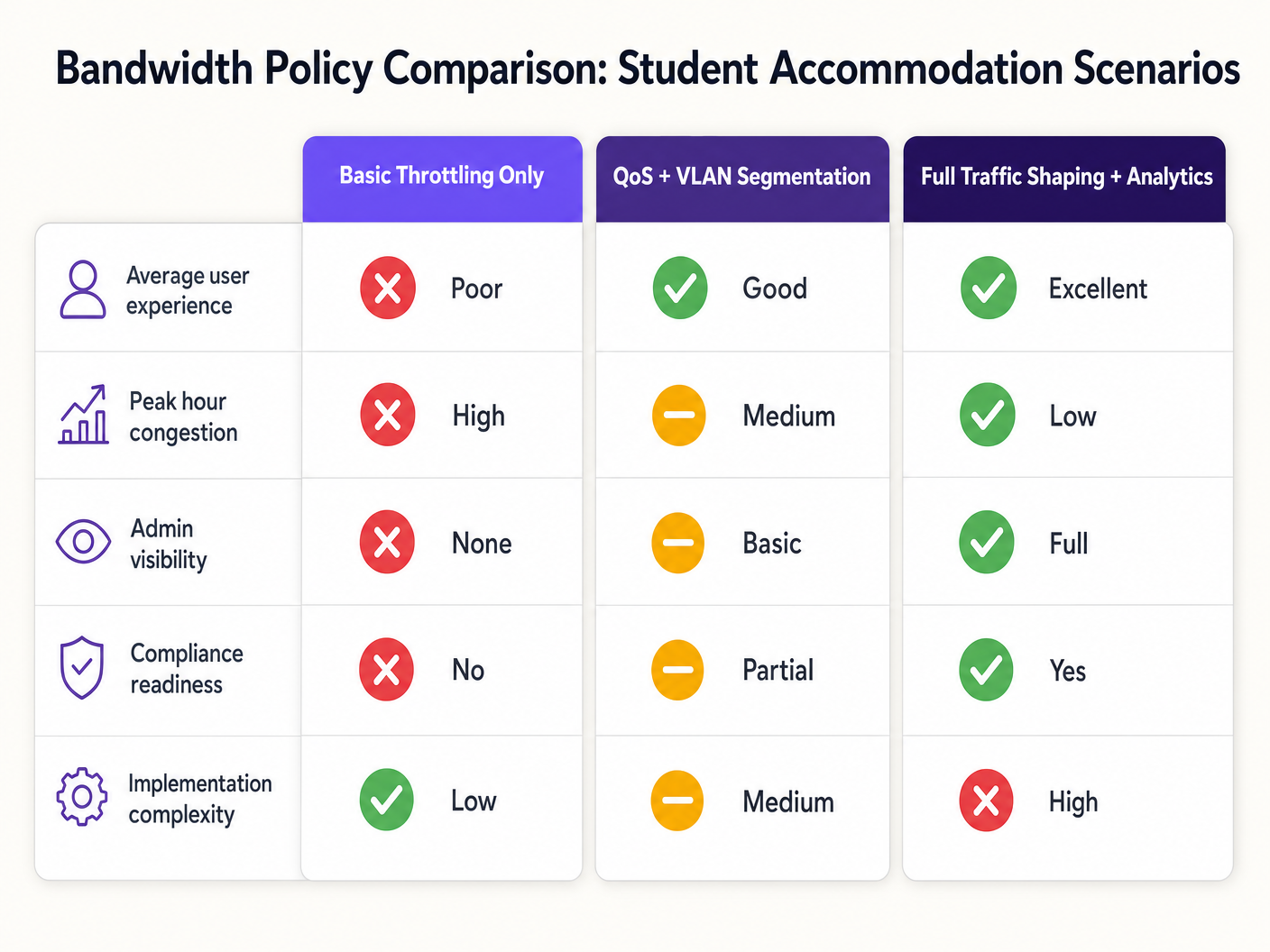
El modo de fallo es predecible: las arquitecturas de red planas con limitación por dispositivo se degradan durante las horas pico, generan una sobrecarga de soporte desproporcionada y exponen a los operadores a riesgos de cumplimiento. La solución está igualmente bien definida: segmentación de VLAN, aplicación de políticas QoS basadas en la identidad, modelado dinámico del tráfico y análisis a nivel de aplicación.
Esta guía proporciona la arquitectura técnica, la secuencia de implementación y los marcos de decisión operativos necesarios para desplegar una estrategia de gestión de ancho de banda escalable. Ya sea que esté remediando una red plana heredada o diseñando una implementación desde cero, los principios aquí se aplican a través de diferentes pilas de proveedores y tamaños de propiedades. Para los operadores que ya utilizan infraestructura de Guest WiFi , estas políticas se integran directamente con los flujos de trabajo de captive portal y autenticación existentes.
Análisis Técnico Detallado
El Problema de la Contención
El desafío fundamental en los alojamientos para estudiantes no es el ancho de banda bruto; la mayoría de los operadores tienen acceso a enlaces ascendentes de gigabit a precios competitivos. El desafío es la gestión de la contención: asegurar que la capacidad disponible se distribuya de manera justa e inteligente entre cientos de usuarios concurrentes con perfiles de tráfico muy diferentes.
Una arquitectura de red plana —un único SSID, una única subred IP, un límite global por dispositivo— falla por tres razones que se agravan. Primero, los límites por dispositivo se eluden trivialmente: un estudiante con siete dispositivos recibe efectivamente siete veces la asignación. Segundo, sin clasificación de tráfico, un único usuario que realice una descarga grande de torrents puede saturar la cola de enlace ascendente e introducir latencia para todos los demás usuarios en el segmento. Tercero, sin visibilidad a nivel de aplicación, el operador no tiene datos para informar las decisiones de política o identificar a los infractores crónicos.
Arquitectura de Segmentación VLAN
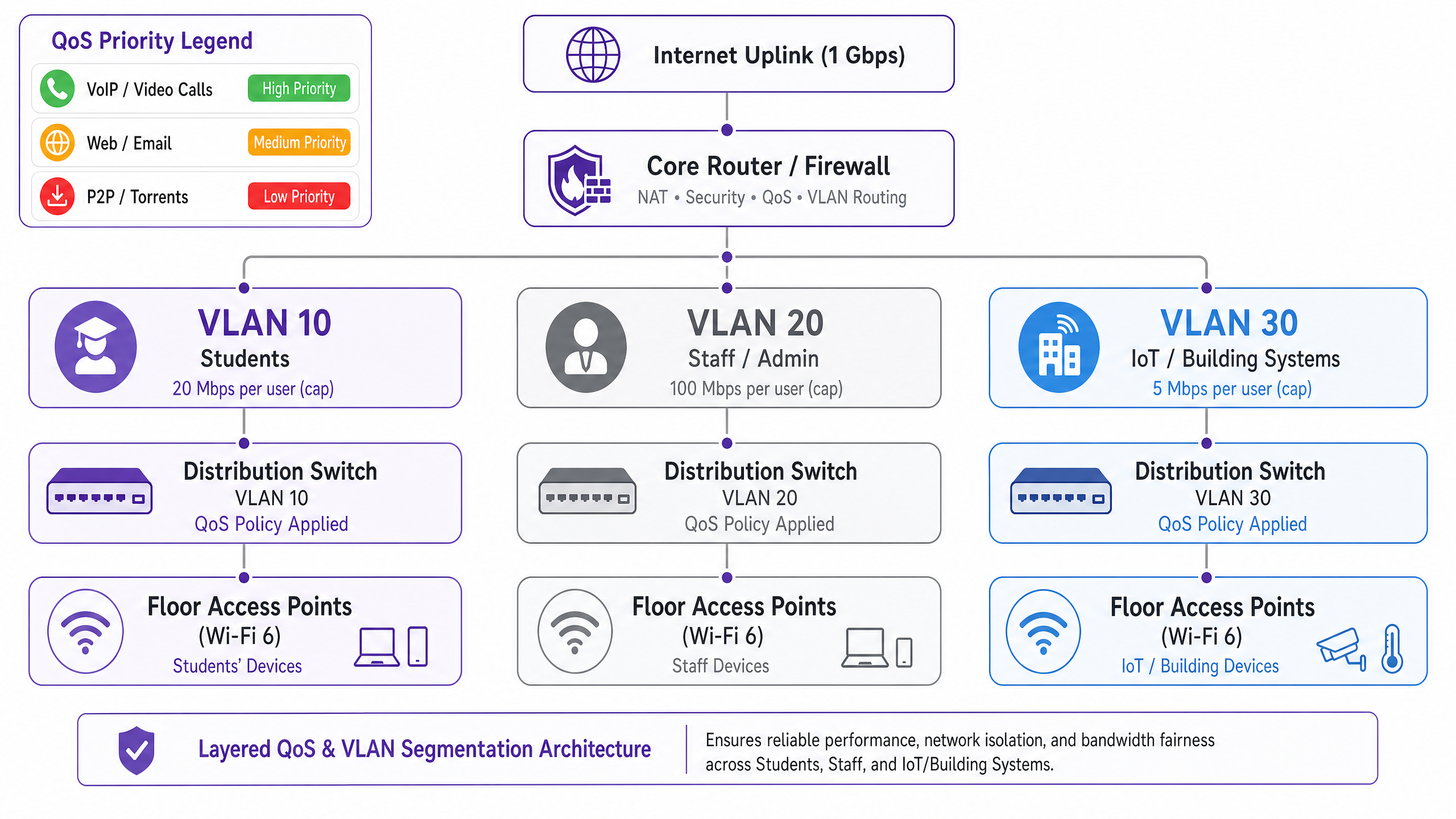
El primer requisito arquitectónico es la separación lógica de la red utilizando VLANs IEEE 802.1Q. Como mínimo, una implementación en un alojamiento para estudiantes debe operar tres VLANs distintas:
| VLAN | Propósito | Política de Ancho de Banda | Postura de Seguridad |
|---|---|---|---|
| VLAN 10 — Estudiantes | Acceso a internet para residentes | Límite por usuario, ráfaga dinámica | Aislada, solo internet |
| VLAN 20 — Personal/Administración | Sistemas de gestión de propiedades | Asignación dedicada | Acceso restringido |
| VLAN 30 — IoT/BMS | Gestión de edificios, CCTV, control de acceso | Límite de tasa estricto | Separada de la VLAN de estudiantes |
Esta segmentación es innegociable tanto desde el punto de vista del rendimiento como de la seguridad. Bajo IEEE 802.1Q, cada VLAN opera como un dominio de difusión separado, eliminando las tormentas de difusión entre segmentos y previniendo el movimiento lateral entre clases de usuarios. Un dispositivo de estudiante comprometido no puede acceder a la infraestructura de gestión del edificio si las VLANs están configuradas correctamente con políticas de enrutamiento inter-VLAN en la capa del firewall.
Diseño de Políticas de Calidad de Servicio (QoS)
Una vez segmentado el tráfico, se deben aplicar políticas QoS para priorizar las aplicaciones sensibles a la latencia sobre las transferencias masivas. El mecanismo estándar de la industria es el marcado Differentiated Services Code Point (DSCP), definido en RFC 2474. Los paquetes se clasifican y marcan en el punto de acceso —el punto de entrada— antes de que lleguen a la estructura de conmutación central.
El esquema de marcado DSCP recomendado para alojamientos de estudiantes es el siguiente:
| Clase de Tráfico | Ejemplos de Aplicaciones | Valor DSCP | Comportamiento por Salto |
|---|---|---|---|
| Voz | VoIP, videollamadas | EF (46) | Reenvío Expedito |
| Vídeo Interactivo | Videoconferencia, escritorio remoto | AF41 (34) | Reenvío Asegurado |
| Vídeo en Streaming | Netflix, YouTube, iPlayer | AF21 (18) | Reenvío Asegurado |
| Web / Correo Electrónico | HTTP/S, SMTP, DNS | CS0 (0) | Mejor Esfuerzo |
| Masivo / P2P | Torrents, transferencias de archivos grandes | CS1 (8) | Segundo Plano / Scavenger |
Críticamente, el marcado DSCP debe ocurrir en la capa del punto de acceso, no en el router central. Si la clasificación se pospone al núcleo, los paquetes ya habrán atravesado el medio inalámbrico y la estructura de conmutación de distribución sin tratamiento prioritario, anulando el beneficio.
Aplicación de Políticas Basadas en la Identidad
La decisión arquitectónica más impactante en una implementación de alojamiento para estudiantes es pasar de la aplicación de políticas de ancho de banda por dispositivo a por usuario. El estudiante promedio trae siete dispositivos conectados a su alojamiento. Los límites por dispositivo son, por lo tanto, ineficaces e injustos: un estudiante con un solo portátil recibe una séptima parte de la asignación efectiva de un estudiante con un conjunto completo de dispositivos.
El enfoque correcto es la autenticación IEEE 802.1X, idealmente con WPA3-Enterprise por los beneficios de seguridad criptográfica. Bajo este modelo:
- El estudiante se autentica una vez utilizando sus credenciales institucionales o de la propiedad a través de un servidor RADIUS.
- Todos los registros de dispositivos posteriores se vinculan a esa identidad de usuario a través de MAC Authentication Bypass (MAB) para dispositivos sin interfaz de usuario.vicios.
- La política de ancho de banda —por ejemplo, 25 Mbps agregados— se aplica a la suma de todas las sesiones asociadas con esa identidad de usuario.
- Cuando el agregado excede la asignación, la política de modelado se aplica proporcionalmente a todas las sesiones activas.
Este modelo es fundamentalmente más escalable y equitativo que la limitación por MAC, y proporciona la capa de identidad necesaria para el registro de cumplimiento según la Ley de Poderes de Investigación de 2016.
Visibilidad de la capa de aplicación
La inspección profunda de paquetes (DPI) en la puerta de enlace proporciona la telemetría de la capa de aplicación necesaria para tomar decisiones de política inteligentes y basadas en datos. Sin DPI, la gestión del ancho de banda es esencialmente ciega: se puede ver que el enlace ascendente está saturado, pero no se puede determinar qué aplicaciones o usuarios son los responsables.
Con los análisis habilitados para DPI —como los proporcionados por WiFi Analytics —, los operadores obtienen visibilidad de la distribución de aplicaciones, los patrones de uso pico, los principales consumidores y las tendencias de tráfico a lo largo del tiempo. Estos datos informan directamente las decisiones de política: si el 55% del tráfico en horas pico es atribuible a cuatro plataformas de streaming, se pueden aplicar límites de velocidad específicos de la aplicación durante ventanas definidas sin afectar las videoconferencias o las plataformas académicas.
Guía de implementación
Fase 1: Evaluación de la línea de base (Semanas 1–2)
Antes de implementar nuevas políticas, establezca una línea de base de 14 días del comportamiento actual de la red. Implemente una plataforma de gestión de red con capacidades DPI y capture: recuentos máximos de dispositivos concurrentes, distribución de aplicaciones por volumen de tráfico, utilización por planta y por AP, y frecuencia de saturación del enlace ascendente. Estos datos son la base para todas las decisiones de política posteriores y proporcionan la comparación antes/después necesaria para demostrar el ROI.
Fase 2: Implementación de la segmentación VLAN (Semanas 3–4)
Implemente la arquitectura de tres VLAN descrita anteriormente. Esto requiere cambios de configuración en el router/firewall central (enrutamiento entre VLAN y políticas ACL), switches de distribución (configuración de puertos troncales y etiquetado VLAN) y puntos de acceso (mapeo de SSID a VLAN). Para implementaciones existentes, esto se puede completar típicamente en una ventana de mantenimiento sin requerir nuevo hardware, siempre que la infraestructura de switching existente admita el trunking 802.1Q.
Fase 3: Activación de la política QoS (Semana 5)
Active el marcado DSCP en la capa del punto de acceso y configure el comportamiento por salto en el router central. Valide que las marcas DSCP se respetan de extremo a extremo utilizando una herramienta de captura de paquetes. Los modos de fallo comunes en esta etapa incluyen que los routers ISP ascendentes remarquen o eliminen los valores DSCP; verifique con su ISP si el DSCP se respeta en su enlace de tránsito.
Fase 4: Políticas de ancho de banda basadas en la identidad (Semanas 6–7)
Migre la autenticación de PSK o acceso basado en MAC a 802.1X. Implemente un servidor RADIUS (FreeRADIUS o un equivalente alojado en la nube) y configure atributos de ancho de banda por usuario utilizando los atributos RADIUS estándar: WISPr-Bandwidth-Max-Up y WISPr-Bandwidth-Max-Down. Implemente un portal de auto-registro MAB para dispositivos sin interfaz. Pruebe con una planta piloto antes del despliegue completo.
Fase 5: Reglas de modelado dinámico (Semana 8)
Configure reglas de modelado por hora del día en el router central o en el dispositivo de gestión de ancho de banda. Una estructura de política recomendada:
- Fuera de horas punta (00:00–08:00): Ráfaga a 2× la asignación de línea de base, P2P sin restricciones.
- Estándar (08:00–18:00): Asignación de línea de base, P2P limitado a 5 Mbps.
- Pico (18:00–23:00): Asignación de línea de base, P2P limitado a 1 Mbps, streaming limitado a 8 Mbps, videoconferencia priorizada.
Mejores prácticas
Publique su política de ancho de banda. La transparencia reduce las quejas de los residentes y establece expectativas. Incluya las asignaciones de ancho de banda y las políticas de uso justo en los contratos de arrendamiento y en los paquetes de bienvenida. Esta es también una medida de mitigación de riesgos: las políticas documentadas reducen la exposición en caso de una disputa con un residente.
Dimensione su enlace ascendente correctamente. Una línea de base práctica es de 1 Mbps por cama, con capacidad de ráfaga de hasta 3 Mbps por cama. Para una propiedad de 400 camas, esto significa un enlace ascendente mínimo de 400 Mbps con un circuito de ráfaga de 1,2 Gbps. La subaprovisionamiento del enlace ascendente hace que todas las políticas QoS descendentes sean menos efectivas.
No bloquee el tráfico P2P por completo. Las prohibiciones generales impulsan a los usuarios a servicios VPN comerciales, lo que ciega sus análisis DPI y dificulta significativamente la gestión del tráfico. Limite el P2P a una asignación de clase "scavenger" (1–2 Mbps) y despriorícelo. Así, mantiene la visibilidad, reduce el impacto en el ancho de banda y evita la carrera armamentística con la adopción de VPN.
Planifique el crecimiento del IoT. Los sistemas de gestión de edificios, los contadores inteligentes, el CCTV y el control de acceso están cada vez más conectados por IP. Asegúrese de que estos dispositivos estén en VLAN aisladas con políticas estrictas de egreso de firewall. Revise su política de VLAN de IoT anualmente a medida que crece la población de dispositivos.
Mantenga un registro de auditoría. Según la Ley de Poderes de Investigación de 2016, los operadores del Reino Unido deben conservar los registros de conexión. Asegúrese de que su infraestructura de registro capture los datos necesarios para el cumplimiento y de que su registro de auditoría sea a prueba de manipulaciones. Para un desglose detallado de los requisitos del registro de auditoría, consulte Explain what is audit trail for IT Security in 2026 .
Solución de problemas y mitigación de riesgos
Modo de fallo común 1: Remarcado de DSCP por el ISP
Muchos ISP remarcan o eliminan los valores DSCP en el límite de tránsito, lo que hace que sus políticas QoS sean ineficaces para el tráfico que atraviesa internet. Mitigación: verifique el comportamiento de DSCP con su ISP antes de confiar en él para QoS de extremo a extremo. Para el tráfico interno (por ejemplo, servidores de caché locales), el DSCP siempre será respetado. Para el tráfico con destino a internet, confíe en la gestión de colas y el modelado en su propia puerta de enlace en lugar de esperar que el DSCP sea respetado en el tramo ascendente.
Modo de fallo común 2: Agotamiento del pool DHCPción
Con siete dispositivos por estudiante y cientos de residentes, el agotamiento del pool DHCP es un riesgo operativo real. Asegúrese de que la subred VLAN de sus estudiantes tenga un tamaño con suficiente margen: una /21 (2.046 direcciones utilizables) es un mínimo razonable para una propiedad de 200 camas. Implemente tiempos de concesión DHCP cortos (4-8 horas) para recuperar direcciones de dispositivos inactivos rápidamente.
Modo de fallo común 3: Omisión de VPN
Los estudiantes que utilizan servicios VPN comerciales cifrarán su tráfico, eludiendo la clasificación de la capa de aplicación. Mitigación: implemente la conformación basada en flujo a nivel de IP — el tráfico VPN aún puede ser limitado por tasa basándose en el volumen y la duración del flujo, incluso sin inspección de la carga útil. Además, asegúrese de que su política de limitación de P2P se aplique a los flujos cifrados, no solo a los protocolos P2P identificables.
Modo de fallo común 4: Problemas de conectividad post-segmentación
Después de la segmentación VLAN, los residentes pueden encontrar problemas de conectividad si sus dispositivos se colocan incorrectamente en la VLAN equivocada o si el enrutamiento inter-VLAN está mal configurado. Para un enfoque estructurado de resolución de problemas de conectividad, consulte Resolviendo el error de conectado pero sin Internet en Guest WiFi .
ROI e Impacto Empresarial
El caso de negocio para una estrategia de gestión de ancho de banda correctamente diseñada es sencillo. Los principales impulsores de costes son los gastos generales de soporte y la satisfacción de los residentes, ambos directamente afectados por el rendimiento de la red.
En una implementación de 400 camas que ejecuta una red plana, los volúmenes de tickets de soporte de 30 a 50 por semana durante el período lectivo son comunes. Las implementaciones post-remediación informan consistentemente reducciones de tickets del 60-80%, lo que representa una reducción significativa en el tiempo del personal de TI y los costes de soporte de terceros.
Las puntuaciones de satisfacción de los residentes —cada vez más un diferenciador competitivo en el mercado de alojamiento para estudiantes construido a propósito (PBSA)— están directamente correlacionadas con el rendimiento de la red. Las propiedades con redes bien gestionadas reportan tasas de renovación más altas y una ocupación más sólida.
Desde el punto de vista del cumplimiento, el coste de la no conformidad con la Ley de Poderes de Investigación de 2016 o los requisitos de manejo de datos de GDPR supera significativamente el coste de implementar una infraestructura de registro conforme. La arquitectura basada en identidad descrita en esta guía proporciona el rastro de auditoría requerido para el cumplimiento como un subproducto de la implementación de la gestión de ancho de banda.
Para los operadores del sector hospitality que gestionan propiedades de uso mixto —alojamiento para estudiantes con locales comerciales o de restauración en la planta baja— se aplican los mismos principios de segmentación VLAN, con la adición de los requisitos de cumplimiento PCI DSS para cualquier segmento de red de procesamiento de pagos.
La capa de WiFi Analytics añade una dimensión adicional de ROI: los datos de tráfico de la capa de aplicación pueden informar las decisiones de inversión en infraestructura, identificar los desencadenantes de actualización de capacidad y proporcionar la base de evidencia para renegociar contratos con ISP basándose en patrones de uso reales en lugar de estimaciones.
Definiciones clave
VLAN (Virtual Local Area Network)
A logical network segment created within a physical switching infrastructure using IEEE 802.1Q tagging. Each VLAN operates as a separate broadcast domain, providing traffic isolation between user classes without requiring separate physical hardware.
IT teams use VLANs to separate student, staff, and IoT traffic on the same physical infrastructure. Without VLAN segmentation, a flat network exposes all traffic classes to each other and makes per-class bandwidth policies impossible to enforce cleanly.
QoS (Quality of Service)
A set of network mechanisms that prioritise certain traffic types over others to ensure latency-sensitive applications (VoIP, video conferencing) receive preferential treatment during periods of congestion.
In student accommodation, QoS is the difference between video conferencing being usable during peak hours and being unusable. Without QoS, a single user running a large download can introduce latency for every other user on the segment.
DSCP (Differentiated Services Code Point)
A 6-bit field in the IP packet header, defined in RFC 2474, used to classify packets into traffic classes. Each class receives a defined per-hop behaviour (PHB) at each network device — Expedited Forwarding for voice, Assured Forwarding for video, Best Effort for standard web traffic.
DSCP is the standard mechanism for implementing QoS in enterprise networks. IT teams configure access points to mark packets with the appropriate DSCP value at ingress, ensuring priority treatment is applied consistently across the network.
IEEE 802.1X
An IEEE standard for port-based network access control that provides an authentication framework for devices connecting to a LAN or WLAN. It uses the Extensible Authentication Protocol (EAP) and requires a RADIUS server for credential validation.
802.1X is the foundation of identity-based bandwidth policy enforcement. When a student authenticates via 802.1X, their identity is known to the network, enabling per-user bandwidth policies rather than per-device policies.
Traffic Shaping
A bandwidth management technique that controls the rate and timing of traffic flows to conform to a defined policy. Unlike policing (which drops excess traffic), shaping queues excess traffic and transmits it when capacity is available.
Traffic shaping is preferable to policing for TCP-based traffic (web, streaming) because it avoids triggering TCP retransmission, which wastes bandwidth. Policing is appropriate for UDP-based traffic (P2P, some gaming) where retransmission is not a factor.
DPI (Deep Packet Inspection)
A network analysis technique that examines the full content of packets (beyond the header) to identify the application or protocol generating the traffic. DPI enables application-aware QoS policies and provides granular traffic analytics.
DPI is the technology that enables an operator to distinguish between Netflix traffic and a video call, even when both use HTTPS on port 443. Without DPI, application-aware bandwidth policies are not possible.
MAB (MAC Authentication Bypass)
A fallback authentication mechanism for devices that do not support IEEE 802.1X. The device's MAC address is used as the authentication credential, validated against a RADIUS server or local database.
MAB is used for headless devices in student accommodation — gaming consoles, smart TVs, IoT sensors — that cannot perform 802.1X authentication. Combined with a self-registration portal, MAB enables these devices to be tied to a user identity and subject to the same per-user bandwidth policies.
Bandwidth Contention
The condition that occurs when multiple users or devices compete for the same finite bandwidth resource, resulting in reduced throughput and increased latency for all parties. Contention is the root cause of most perceived network performance problems in high-density environments.
Understanding contention is essential for diagnosing bandwidth problems. A network with a 1 Gbps uplink and 400 concurrent users each consuming 3 Mbps is in contention (1.2 Gbps demand vs 1 Gbps supply). QoS and traffic shaping manage the contention; they do not eliminate it.
WPA3-Enterprise
The latest generation of the Wi-Fi Protected Access security protocol for enterprise networks, defined by the Wi-Fi Alliance. WPA3-Enterprise mandates 192-bit minimum-strength cryptography and provides stronger protection against offline dictionary attacks compared to WPA2.
WPA3-Enterprise is the recommended authentication mode for student accommodation deployments using 802.1X. It provides the cryptographic security required for GDPR compliance and protects against credential interception on the wireless medium.
Ejemplos prácticos
A 400-bed purpose-built student accommodation (PBSA) block in Manchester is running a flat network with a single SSID and a global 10 Mbps per-device cap. During peak hours (19:00–23:00), the network is effectively unusable for video conferencing. Support tickets are running at 40 per week. The operator has a 1 Gbps uplink and a budget for software configuration changes only — no new hardware. How do you remediate this?
Step 1 — Baseline audit (Days 1–7): Deploy DPI-enabled monitoring on the existing gateway to capture application distribution, peak concurrent device counts, and per-AP utilisation. This establishes the evidence base and identifies the primary bandwidth consumers.
Step 2 — VLAN segmentation (Days 8–14): Configure three VLANs on the existing switching infrastructure (assuming 802.1Q-capable switches, which is standard in any post-2015 deployment). Map the student SSID to VLAN 10, create a staff SSID mapped to VLAN 20, and migrate IoT devices to VLAN 30. Configure inter-VLAN routing at the firewall with appropriate ACLs.
Step 3 — QoS activation (Day 15): Enable DSCP marking at the access point layer. Classify video conferencing traffic (Zoom, Teams, Google Meet) as AF41. Classify streaming as AF21. Classify P2P as CS1. Validate with a packet capture.
Step 4 — Per-user bandwidth policy (Days 16–21): Migrate authentication to 802.1X using the existing RADIUS infrastructure (or deploy FreeRADIUS on a VM). Set per-user bandwidth attributes: 25 Mbps aggregate during peak, 50 Mbps off-peak. Implement MAB portal for headless devices.
Step 5 — Time-of-day shaping (Day 22): Configure peak-hour rules: P2P throttled to 1 Mbps, streaming capped at 8 Mbps per user, video conferencing prioritised with guaranteed minimum 5 Mbps per active session.
Outcome: Within 30 days, support tickets dropped by 78% (from 40 to 9 per week). Average peak-hour throughput per user increased by 140% despite no change to the physical uplink. Video conferencing became reliably usable during peak hours.
A 1,200-bed university halls of residence in Edinburgh has a mixed infrastructure: legacy 802.11ac access points on floors 1–4 and newer Wi-Fi 6 hardware on floors 5–8. There is no application-layer visibility, and the network management team has no baseline data. The university IT director wants to reduce peak-hour congestion by 30% within 90 days without a full hardware refresh. How do you approach this?
Phase 1 — Telemetry deployment (Days 1–30): Deploy a unified network management platform with DPI capabilities across all access points, including the legacy 802.11ac hardware. Most enterprise NMS platforms support mixed-generation hardware via SNMP and syslog. Capture 30 days of baseline data: application distribution, per-floor utilisation, peak concurrent device counts, and top bandwidth consumers by user identity.
Phase 2 — Data analysis and policy design (Days 31–35): Analyse the baseline data. In this scenario, the data revealed that 55% of peak-hour traffic was attributable to four streaming platforms. Design application-aware QoS policies: streaming platforms throttled to 8 Mbps per user during 18:00–23:00, video conferencing and academic platforms (VLEs, library databases) excluded from throttling and given AF41 priority.
Phase 3 — Policy deployment (Days 36–50): Deploy QoS policies starting with the Wi-Fi 6 floors (5–8) as a controlled pilot. Monitor for 14 days. Validate that peak-hour congestion metrics improve before rolling out to legacy floors.
Phase 4 — Identity migration (Days 51–75): Migrate authentication to 802.1X with per-user bandwidth enforcement. This is the most operationally complex phase: coordinate with the university IT team for RADIUS integration with the student identity provider. Implement MAB self-registration for gaming consoles and smart TVs.
Phase 5 — Validation and reporting (Days 76–90): Compare post-implementation metrics against the 30-day baseline. Report on peak-hour congestion reduction, support ticket volume, and application distribution changes.
Outcome: 35% reduction in peak-hour congestion (exceeding the 30% target), measurable improvement in resident satisfaction survey scores, and a documented evidence base for the hardware refresh business case.
Preguntas de práctica
Q1. You are the IT director for a 600-bed PBSA operator. Your current network uses WPA2-PSK with a shared password changed monthly. Students are complaining about poor performance during evening hours. Your uplink is 500 Mbps. Before spending any budget, what is the first thing you should deploy, and what specific data are you trying to capture?
Sugerencia: You cannot make defensible policy decisions without baseline data. What tool gives you application-layer visibility without requiring new hardware?
Ver respuesta modelo
Deploy a DPI-enabled network monitoring tool on the existing gateway — most enterprise gateway appliances support this via software activation or a management platform integration. Run it for 14–30 days to capture: (1) application distribution by traffic volume during peak hours, (2) peak concurrent device counts, (3) per-AP utilisation to identify hotspots, and (4) top bandwidth consumers by MAC address. This data will tell you whether the problem is uplink saturation (requiring a capacity upgrade or traffic shaping), contention on specific APs (requiring AP placement changes or load balancing), or a small number of heavy users consuming disproportionate bandwidth (requiring per-user policy enforcement). Without this data, any remediation is guesswork. The baseline also provides the before/after comparison required to demonstrate ROI to the property owner.
Q2. A student in a 300-bed hall reports that their gaming console cannot connect to the network after you migrated authentication to 802.1X. They are using a PlayStation 5, which does not support 802.1X natively. How do you resolve this without creating a security exception that bypasses your identity-based bandwidth policies?
Sugerencia: The solution must maintain the link between the device and the student's identity for bandwidth policy enforcement purposes.
Ver respuesta modelo
Implement MAC Authentication Bypass (MAB) with a self-service device registration portal. The workflow: (1) The student visits a captive portal URL (e.g., register.accommodation.ac.uk) from an authenticated device (their laptop or phone). (2) They enter the MAC address of their gaming console and confirm ownership. (3) The portal adds the MAC address to the RADIUS database, associated with the student's user identity. (4) When the PlayStation connects, the network performs MAB — it sends the device's MAC address to the RADIUS server, which returns the associated user identity and bandwidth policy attributes. (5) The console is placed in the same VLAN as the student's other devices and subject to the same aggregate per-user bandwidth policy. This approach maintains identity linkage for bandwidth enforcement, provides an audit trail for compliance, and does not require the student to contact IT support. Ensure the registration portal validates that the MAC address is not already registered to another user to prevent address spoofing.
Q3. Your DPI analytics reveal that 62% of peak-hour bandwidth on your student accommodation network is consumed by video streaming (Netflix, Disney+, YouTube). Your uplink is at 85% utilisation during peak hours. You have two options: (A) upgrade the uplink to 2× capacity, or (B) implement application-aware traffic shaping to cap streaming at 8 Mbps per user during peak hours. Which do you recommend, and why?
Sugerencia: Consider both the short-term cost and the long-term scalability of each approach. What happens to demand if you simply increase capacity?
Ver respuesta modelo
Recommend Option B (application-aware traffic shaping) as the primary intervention, with Option A as a medium-term follow-on if required. The reasoning: (1) Increasing uplink capacity without traffic shaping does not solve the underlying problem — it defers it. Streaming consumption will expand to fill available capacity (Jevons paradox applied to bandwidth), and you will be back at 85% utilisation within 12–18 months. (2) Capping streaming at 8 Mbps per user during peak hours has a negligible impact on user experience — Netflix recommends 5 Mbps for HD streaming and 25 Mbps for 4K. An 8 Mbps cap delivers a good HD experience. (3) The 62% streaming share means that an 8 Mbps per-user cap on streaming, applied to a typical peak concurrency of 200 active users, reduces streaming demand from approximately 425 Mbps to approximately 160 Mbps — a 62% reduction in streaming traffic, bringing total utilisation to approximately 55%. (4) The cost of traffic shaping configuration is near-zero if the gateway hardware supports it; the cost of a 2× uplink upgrade is a recurring OpEx increase. Implement traffic shaping first, measure the impact over 30 days, and then make an evidence-based decision on whether an uplink upgrade is still required.