
Cambium Networks cnPilot and cnMaestro Integration with Purple WiFi
Esta guía autorizada detalla la integración de los puntos de acceso Cambium Networks cnPilot y el controlador en la nube cnMaestro con la plataforma de inteligencia Purple WiFi. Cubre la arquitectura, la configuración de Captive Portal, los requisitos de walled garden, el WiFi para el personal 802.1X y la segmentación dinámica de VLAN mediante Cambium ePSK para entornos multi-tenant.
Escuchar esta guía
Ver transcripción del podcast

Resumen ejecutivo
Para los establecimientos empresariales que se estandarizan en la infraestructura de Cambium Networks, la implementación de una solución de WiFi para invitados de nivel de producción requiere una estrecha integración entre la capa de acceso inalámbrico y la plataforma de gestión de identidades. Esta guía proporciona un modelo definitivo para integrar los puntos de acceso Cambium cnPilot y el controlador en la nube cnMaestro con Purple WiFi. Al combinar el hardware escalable de Cambium con el Captive Portal, la autenticación RADIUS y las capacidades analíticas de Purple, los equipos de TI pueden transformar sus redes inalámbricas de un centro de costes a un activo estratégico. La arquitectura detallada aquí admite desde el acceso básico para invitados hasta la compleja segmentación multi-tenant mediante las claves privadas precompartidas (PPSK) de Cambium, lo que ofrece una conectividad segura, conforme a las normativas y rica en datos en entornos de hostelería, comercio minorista y sector público.
Análisis técnico detallado
La integración entre Cambium Networks y Purple se basa en la redirección HTTP estándar y los protocolos RADIUS. Este enfoque independiente del proveedor garantiza una seguridad sólida, compatibilidad multiplataforma y una gestión centralizada a través de cnMaestro.
Arquitectura de integración
El mecanismo principal implica una redirección de Captive Portal gestionada por el AP de Cambium, combinada con la autenticación RADIUS gestionada por Purple.
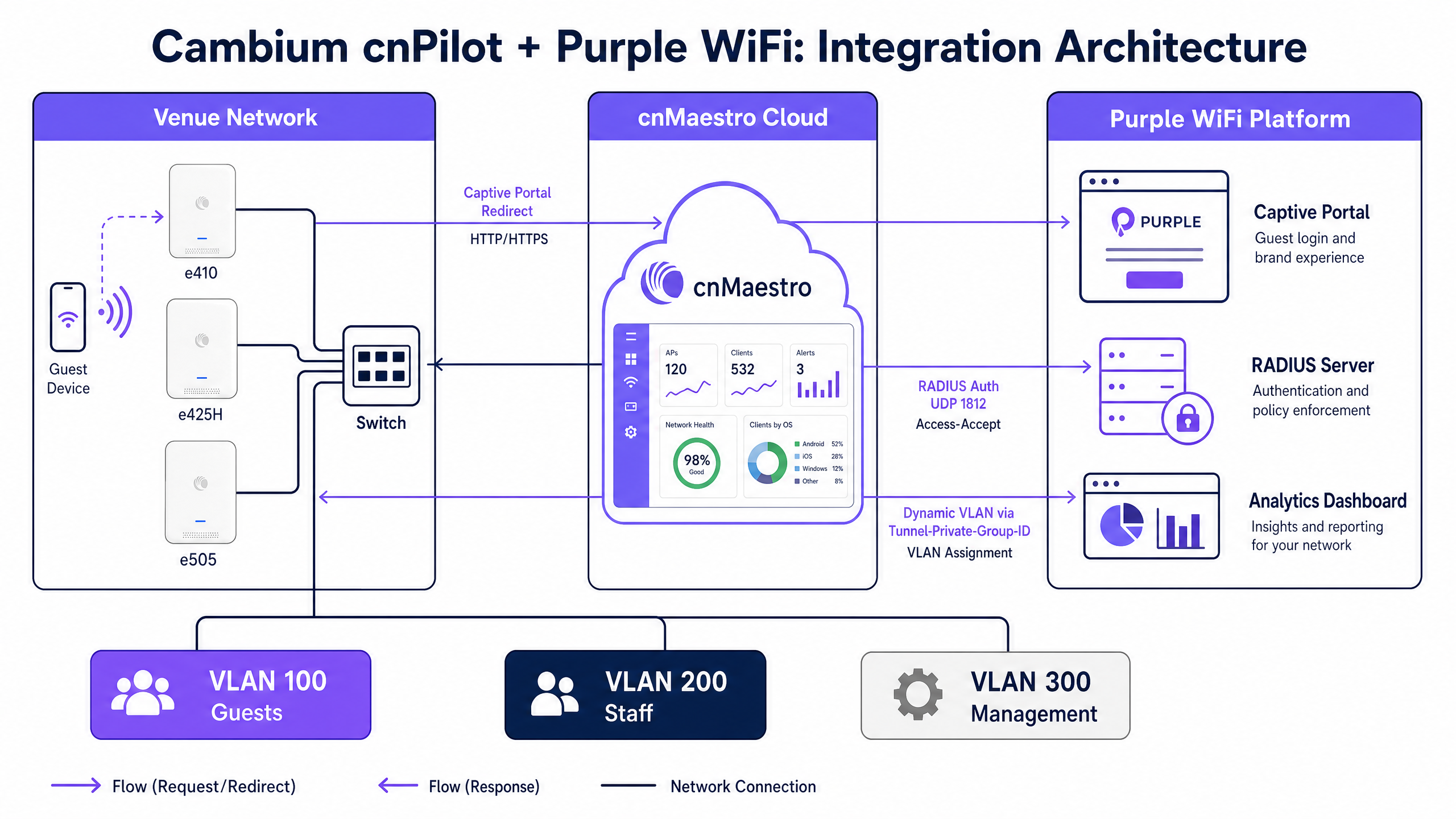
Cuando un dispositivo de invitado se asocia con un SSID de invitado abierto, el AP de Cambium intercepta la solicitud HTTP inicial. En lugar de enrutar el tráfico a Internet, el AP redirecciona el dispositivo a la URL del Captive Portal alojado de Purple. El invitado completa el flujo de autenticación en la página de bienvenida de Purple, que admite inicio de sesión a través de redes sociales, registro por correo electrónico y formularios personalizados de captura de datos.
Tras una autenticación correcta, el backend de Purple envía un mensaje RADIUS Access-Accept al AP de Cambium en el puerto UDP 1812. Este mensaje indica al AP que realice la transición del dispositivo cliente desde el estado de walled garden previo a la autenticación al acceso total a la red. Al mismo tiempo, el AP envía datos de contabilidad RADIUS a Purple en el puerto UDP 1813, lo que alimenta los paneles de análisis de Purple con información sobre la duración de la sesión, el uso de datos y el tipo de dispositivo.
Requisitos de walled garden
El walled garden es un componente crítico del flujo del Captive Portal. Define las direcciones IP y los dominios específicos a los que puede acceder un dispositivo no autenticado. Si el walled garden está mal configurado, el dispositivo no podrá cargar el portal de Purple, lo que provocará un tiempo de espera de conexión agotado.
Para que la integración funcione, el walled garden debe incluir los dominios del portal de Purple, cualquier punto de conexión de red de distribución de contenido (CDN) que aloje recursos del portal y los dominios de cualquier proveedor de identidad compatible (como Facebook, Google o Microsoft Entra ID).
Segmentación multi-tenant con Cambium ePSK
La implementación de claves privadas precompartidas de Cambium, denominada ePSK, permite a los arquitectos de red segmentar el tráfico de forma segura sin transmitir múltiples SSID.
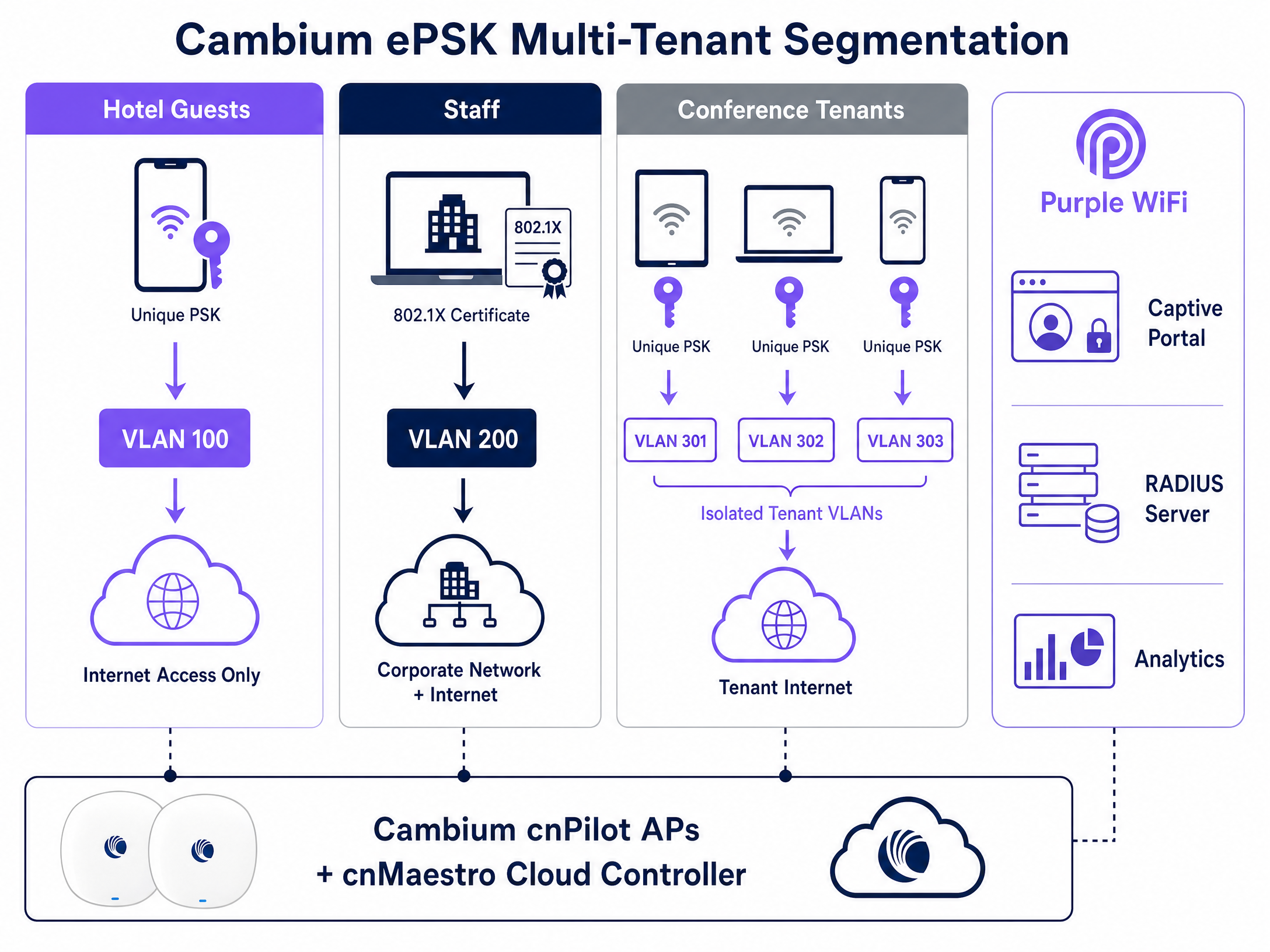
Con ePSK, un único SSID admite hasta 2000 contraseñas únicas. Cada contraseña se asocia a una VLAN específica. Cuando un usuario se conecta utilizando su clave única, el AP de Cambium asigna automáticamente su tráfico a la VLAN asignada. Esta función es de un valor incalculable para entornos multi-tenant, como espacios de coworking o edificios residenciales, donde cada inquilino requiere un segmento de red aislado. Purple se integra con esta arquitectura gestionando el ciclo de vida de ePSK a través de la API de cnMaestro, automatizando el aprovisionamiento, la asignación de VLAN y la revocación de credenciales de los inquilinos.
Guía de implementación
La implementación de la integración de Cambium y Purple requiere una configuración precisa dentro de la consola en la nube cnMaestro. Siga estos pasos para establecer el servicio básico de WiFi para invitados.
1. Configurar la WLAN de invitados
Vaya al menú Configuration en cnMaestro, seleccione WiFi Profiles y abra la pestaña WLANs. Cree un nuevo perfil de WLAN.
- Name / SSID: Defina el nombre de la red de invitados (por ejemplo, "Venue Guest WiFi").
- Security: Establézcalo en Open.
- Client Isolation: Establézcalo en Enable para evitar que los dispositivos de los invitados se comuniquen entre sí en la subred local.
2. Habilitar el Hotspot externo
Dentro de la configuración de la WLAN, busque la sección Guest Access.
- Enable Guest Access: Marque esta casilla.
- Portal Type: Seleccione External Hotspot.
- External Page URL: Introduzca la URL específica del Captive Portal proporcionada por su gestor de cuentas de Purple.
3. Configurar la autenticación y contabilidad RADIUS
En la misma sección Guest Access, configure los parámetros de RADIUS.
- Authentication Server: Introduzca la dirección IP del servidor RADIUS primario de Purple.
- Authentication Port:
1812 - Accounting Server: Introduzca la dirección IP del servidor RADIUS primario de Purple.
- Accounting Port:
1813 - Shared Secret: Introduzca el secreto compartido complejo proporcionado por Purple. Asegúrese de que coincida exactamente en ambas plataformas.
4. Definir el walled garden
En la configuración de External Hotspot, complete la lista de walled garden. Debe añadir los dominios principales de Purple y los dominios específicos requeridos para los métodos de autenticación elegidos (por ejemplo, proveedores de inicio de sesión social).
5. Configurar 802.1X para el WiFi del personal
Para proteger el acceso del personal, cree un perfil de WLAN independiente en cnMaestro.
- Security: Establézcalo en WPA2-Enterprise.
- RADIUS Server: Apunte a la IP del servidor RADIUS de Purple en el puerto 1812.
El personal se autentica con sus credenciales corporativas a través de Microsoft Entra ID o Google Workspace, que Purple validates. A continuación, Purple devuelve un atributo RADIUS Tunnel-Private-Group-ID, que indica al AP de Cambium que sitúe el dispositivo del personal en la VLAN corporativa segura.
Buenas prácticas
- VLAN Trunking: Asegúrese de que todas las VLAN requeridas (Guest, Staff, Management) estén configuradas en modo trunk en los puertos del switch que se conectan a los AP de Cambium. Si la VLAN no está presente en el trunk, los clientes autenticados no podrán obtener una dirección IP a través de DHCP.
- Consistencia del firmware: Estandarice su parque de AP en la versión de firmware cnPilot 6.0 o posterior. Esta versión ofrece el soporte más estable para la redirección de hotspot externo y la funcionalidad ePSK.
- El accounting es obligatorio: No desactive nunca el accounting de RADIUS. Purple depende por completo del flujo de accounting UDP 1813 para generar métricas de tiempo de permanencia, datos de frecuencia de visitas y registros de cumplimiento.
- Evite las PSK locales para el personal: Sustituya las contraseñas compartidas heredadas por la autenticación 802.1X para las redes del personal. Este enfoque se alinea con los requisitos de la norma ISO 27001 al vincular el acceso a la red con identidades individuales y auditables.
Resolución de problemas y mitigación de riesgos
Cuando surgen problemas de integración, suelen manifestarse durante la redirección inicial del Captive Portal o en la fase de autenticación RADIUS.
- El portal no se carga: Casi siempre se trata de un problema del walled garden. Si un dispositivo de invitado se conecta al SSID pero recibe un tiempo de espera de conexión agotado en lugar de la página de bienvenida, el AP está bloqueando el acceso al dominio del portal de Purple. Verifique las entradas de su walled garden en cnMaestro y asegúrese de que se permite la resolución DNS antes de la autenticación.
- Fallo de autenticación (error de credenciales no válidas): Compruebe el secreto compartido de RADIUS. Una discrepancia entre cnMaestro y Purple hará que el servidor RADIUS descarte silenciosamente las solicitudes de autenticación.
- El dispositivo se autentica pero no tiene acceso a Internet: Esto indica un fallo en la asignación dinámica de VLAN o en el proceso DHCP. Verifique que Purple esté devolviendo el ID de VLAN correcto en la respuesta de RADIUS y confirme que la configuración de trunking del puerto del switch permite esa VLAN.
ROI e impacto empresarial
La implementación de Purple WiFi en la infraestructura de Cambium Networks transforma una utilidad de red estándar en un activo empresarial medible. Al capturar datos de origen (first-party data) en el punto de autenticación, los establecimientos pueden crear perfiles de visitantes completos e impulsar campañas de marketing dirigidas.
Por ejemplo, Harrods implementó Purple Guest WiFi y logró un ROI de marketing de 57 veces al integrar los datos capturados con su programa de fidelización. Del mismo modo, AGS Airports generó un ROI del 842 % mediante el uso de ancho de banda por niveles y una interacción dirigida con los pasajeros. Al estandarizar con Cambium cnMaestro y Purple, los responsables de TI pueden ofrecer una conectividad segura y conforme a las normativas, al tiempo que proporcionan al departamento de marketing los datos necesarios para impulsar los ingresos.
Definiciones clave
Captive Portal
A customized login page that requires users to authenticate or accept terms before gaining access to a public or enterprise WiFi network.
Used in Guest WiFi deployments to capture first-party data, enforce acceptable use policies, and present venue branding before granting internet access.
RADIUS
Remote Authentication Dial-In User Service; a networking protocol that provides centralized Authentication, Authorization, and Accounting (AAA) management.
The protocol Cambium APs use to communicate with Purple to verify user credentials and report session data.
Walled Garden
A limited environment that controls user access to web content and services pre-authentication.
Required in cnMaestro to allow guest devices to reach the Purple splash page and identity provider domains (like Facebook or Google) before they have full internet access.
ePSK
Enhanced Pre-Shared Key; Cambium's implementation of private pre-shared keys, allowing unique passphrases for individual users on a single SSID.
Used to provide secure, isolated network segments for multi-tenant environments without broadcasting numerous SSIDs.
Dynamic VLAN Assignment
The process of placing an authenticated device onto a specific Virtual Local Area Network based on RADIUS attributes rather than the physical port or SSID.
Allows IT to use a single SSID while securely separating guest traffic from staff or management traffic.
802.1X
An IEEE standard for port-based network access control, providing an authentication mechanism to devices wishing to attach to a LAN or WLAN.
The standard used for secure Staff WiFi, replacing shared passwords with individual corporate credentials validated against an identity provider.
cnMaestro
Cambium Networks' cloud-based or on-premises management platform for centralized control of wireless and wired network infrastructure.
The interface where network architects configure the WLAN profiles, RADIUS settings, and walled gardens required for the Purple integration.
First-Party Data
Information a company collects directly from its customers and owns entirely.
The primary business output of a Purple Guest WiFi deployment, used to drive marketing campaigns and understand visitor behavior.
Ejemplos prácticos
A 200-room hotel needs to deploy secure WiFi for guests, staff, and a conference centre. Guests require a branded captive portal, staff need secure access to internal systems, and the conference centre requires isolated networks for different event organizers. How should the network architect configure the Cambium cnMaestro environment to support this using Purple?
The architect should deploy three distinct WLAN profiles in cnMaestro.
- Guest WLAN: Configured as an Open network with 'External Hotspot' enabled. The redirect URL points to the Purple captive portal. RADIUS authentication (UDP 1812) and accounting (UDP 1813) point to Purple's servers. The walled garden includes Purple's domains.
- Staff WLAN: Configured as WPA2-Enterprise (802.1X). RADIUS points to Purple, which integrates with the hotel's Microsoft Entra ID. Staff authenticate with corporate credentials, and Purple assigns them to the Staff VLAN.
- Conference WLAN: Configured with WPA2 Pre-Shared Key and Cambium ePSK enabled. Purple provisions unique ePSK passphrases for each event organizer via the cnMaestro API, assigning each key to an isolated VLAN (e.g., VLAN 301, 302).
A retail chain has deployed Cambium e410 APs and configured the Purple captive portal. However, shoppers report that the splash page never appears on their smartphones; instead, the browser shows a connection timeout. What is the root cause and how is it resolved?
The root cause is an incomplete walled garden configuration in cnMaestro. The Cambium AP is blocking the HTTP/HTTPS traffic required to load the Purple portal before the user is authenticated.
To resolve this, the network engineer must log into cnMaestro, navigate to the Guest WLAN profile, and update the External Hotspot walled garden list. They must add Purple's specific portal domains and any associated CDN endpoints. Once applied, unauthenticated devices will be able to reach the portal and complete the login flow.
Preguntas de práctica
Q1. You are deploying Purple Guest WiFi across 50 retail stores using Cambium e505 APs. Users can connect to the SSID and see the splash page, but after logging in, they cannot access the internet. You verify that Purple is sending the Access-Accept message. What is the most likely infrastructure issue?
Sugerencia: Consider what happens at the switch level when a device tries to obtain an IP address after authentication.
Ver respuesta modelo
The most likely issue is missing VLAN trunking on the switch ports connecting to the Cambium APs. While the AP authorizes the device, if the assigned Guest VLAN is not permitted on the switch trunk, the device cannot reach the DHCP server to obtain an IP address, resulting in no internet access.
Q2. A university campus wants to use a single SSID for all students in the dormitories, but requires that each student's devices are isolated into their own private network segment to allow casting to their specific smart TV. How do you implement this using Cambium and Purple?
Sugerencia: Look at Cambium's implementation of private pre-shared keys.
Ver respuesta modelo
Implement Cambium ePSK (Enhanced Pre-Shared Key) on the dormitory WLAN. Purple will manage the ePSK lifecycle via the cnMaestro API, generating a unique passphrase for each student. When a student connects their devices using their specific key, the Cambium AP assigns them to a unique VLAN, creating an isolated private area network.
Q3. During a pilot deployment, Purple's analytics dashboard shows zero dwell time or data usage metrics for the Cambium test site, even though users are successfully authenticating and browsing the internet. What configuration step was missed in cnMaestro?
Sugerencia: Analytics require session data, which is handled by a specific UDP port in the AAA configuration.
Ver respuesta modelo
RADIUS Accounting was not configured. The network engineer must enable RADIUS Accounting in the cnMaestro Guest WLAN profile and point it to Purple's RADIUS server on UDP port 1813. Without this, Purple only handles authentication and receives no session lifecycle data.
Continúe leyendo esta serie
Integración de CommScope Ruckus con Purple WiFi: Guía de instalación y configuración
Esta guía de referencia técnica proporciona un manual de configuración definitivo para integrar arquitecturas de CommScope Ruckus con Purple WiFi. Detalla implementaciones paso a paso para captive portals de Guest WiFi, WiFi seguro para el personal a través de 802.1X y aislamiento de red multiinquilino mediante Ruckus Dynamic PSK.
Integración de puntos de acceso Allied Telesis con Purple WiFi
Esta guía proporciona un manual de configuración completo para integrar los puntos de acceso de la serie TQ de Allied Telesis con Purple WiFi. Cubre la redirección externa de Captive Portal, la autenticación RADIUS 802.1X y el direccionamiento dinámico de VLAN mediante claves precompartidas privadas (PPSK) para despliegues multiinquilino seguros.
Grandstream GWN Access Points Integration with Purple WiFi
Esta guía de referencia técnica autorizada detalla cómo integrar los puntos de acceso Grandstream GWN con la plataforma de análisis y Guest WiFi de Purple. Cubre la configuración del Captive Portal de Grandstream, los ajustes de RADIUS AAA, la configuración de walled garden, la autenticación segura 802.1X para el personal con direccionamiento dinámico de VLAN y la segmentación PPSK multiinquilino, proporcionando una guía práctica paso a paso para MSP y equipos de TI que implementan WiFi para invitados y personal a gran escala.