
Mejores prácticas para Captive Portal: diseño para alta conversión y cumplimiento normativo
Esta guía técnica ofrece a los responsables de TI, arquitectos de redes y directores de operaciones de establecimientos una hoja de ruta completa para implementar un Captive Portal que equilibre la seguridad de la red con una alta conversión de usuarios. Abarca toda la arquitectura, desde la segmentación por VLAN y la autenticación RADIUS hasta el diseño de consentimiento conforme con el GDPR y la selección de métodos de autenticación. Basada en la experiencia operativa de Purple en más de 80.000 establecimientos y 440 millones de inicios de sesión en 2024, cada recomendación se fundamenta en datos de implementación reales.
Video overview
Escuchar esta guía
Ver transcripción del podcast
Parte de nuestra serie principal: Guía de Captive Portal →

Resumen ejecutivo
Un Captive Portal es la página de inicio de sesión en un WiFi público. También representa la decisión de seguridad de red más crítica y, si gestiona un programa de marketing, su zona de captura de datos más valiosa. Ambos objetivos - la seguridad y la conversión - no entran en conflicto. Requieren decisiones de configuración distintas, y esta guía cubre ambas.
La arquitectura principal coloca cada dispositivo de invitado en una VLAN de cuarentena hasta que se completa la autenticación. Un servidor RADIUS gestiona la sesión, y un mensaje de Cambio de Autorización (CoA) mueve el dispositivo a la VLAN de producción. La segmentación de red garantiza que el tráfico de invitados nunca llegue a la infraestructura corporativa o a los sistemas de punto de venta. En cualquier entorno donde los terminales de pago compartan la infraestructura física con el WiFi de invitados, este aislamiento es un requisito de PCI-DSS, no solo una recomendación.
En términos de conversión, cada campo de formulario adicional reduce las tasas de suscripción entre un 8% y un 12%. El método de autenticación adecuado depende del tipo de establecimiento y de sus objetivos de datos. La captura de correo electrónico proporciona una conversión del 65 al 80% con datos de propiedad directa. El inicio de sesión social a través de OAuth 2.0 reduce la fricción pero introduce dependencias de terceros. Esta guía proporciona el plano técnico para equilibrar estos requisitos, extraído de la experiencia operativa de Purple en más de 80.000 establecimientos y 440 millones de inicios de sesión en 2024 (datos internos de Purple).
Para obtener más contexto sobre las decisiones de arquitectura de red relacionadas, consulte nuestra guía Cómo optimizar portales cautivos para la máxima seguridad de red y conversión de usuarios.
Análisis técnico detallado
Un Captive Portal intercepta las solicitudes HTTP o HTTPS de los dispositivos conectados a su SSID y redirige al usuario a una página de inicio antes de concederle acceso a internet. El mecanismo subyacente se basa en la segmentación de red y la autenticación RADIUS trabajando en tándem.
Cuando un dispositivo se conecta, el punto de acceso - ya sea Cisco Meraki, HPE Aruba, Ruckus, Juniper Mist, Ubiquiti UniFi, Cambium, Extreme o Fortinet - lo sitúa en una VLAN de cuarentena. En este estado, el cortafuegos bloquea todo el tráfico excepto las consultas DNS y el acceso a una lista específica de destinos permitidos (conocida como walled garden). El walled garden debe incluir la URL del portal y cualquier servicio de autenticación externo (como Google Workspace o Microsoft Entra ID). Si el walled garden está mal configurado y la prueba de cautividad del sistema operativo (por ejemplo, captive.apple.com en iOS) está bloqueada, el portal no se cargará. Este es el modo de fallo más común en esta área.
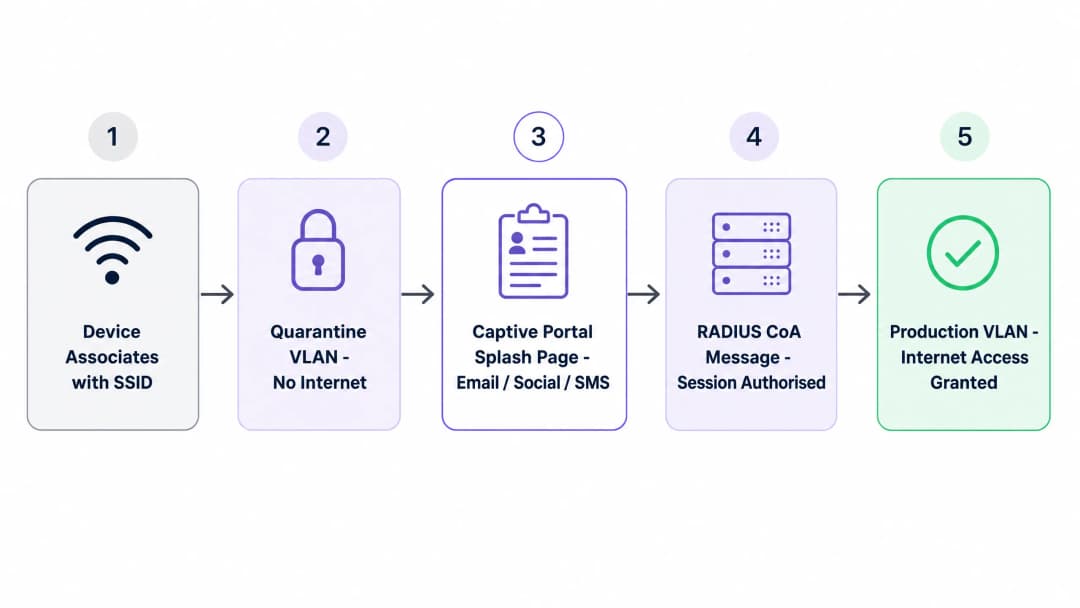
Una vez que el usuario completa el proceso de inicio de sesión, el portal se comunica con su servidor RADIUS. El servidor envía un mensaje de cambio de autorización (CoA) al controlador de acceso, indicándole que elimine el estado de cuarentena y mueva el dispositivo a la VLAN de producción. Este aislamiento es crítico: en una red plana, un dispositivo de invitado comprometido puede sondear los sistemas internos. La segmentación por VLAN garantiza que los dispositivos no autenticados no puedan acceder a los sistemas de punto de venta ni a las bases de datos corporativas.
Comparación de métodos de autenticación
Cada uno de los cinco métodos principales de autenticación de Captive Portal implica diferentes ventajas y desventajas en términos de tasa de conversión, calidad de los datos y costes de cumplimiento normativo. La siguiente tabla resume las variables clave.
| Método | Tasa de conversión | Calidad de los datos | Costes de GDPR | Más adecuado para |
|---|---|---|---|---|
| Solo clic de aceptación / Términos y condiciones | 90-95% | Mínima (MAC + marca de tiempo) | Bajo | Sector público, bibliotecas, NHS |
| Captura de email | 65-80% | Alta (propiedad directa) | Medio | Hostelería, retail, eventos |
| Inicio de sesión social (OAuth 2.0) | 55-70% | Media (depende del proveedor) | Medio-alto | Centros de consumo con usuarios de Google/Apple |
| SMS OTP | 45-60% | Muy alta (móvil verificado) | Medio | Enfoque en fidelización: QSR, estadios, retail |
| Registro con formulario completo | 30-45% | La más alta (perfil completo) | Alto | Hoteles, sector sanitario, retail de alta gama |
Fuente: Datos operativos de Purple, 440 millones de inicios de sesión en 2024.

Para la mayoría de los operadores de recintos, el punto de partida óptimo es un portal de doble método: la captura de correo electrónico como opción principal y el inicio de sesión con Google como opción secundaria. Esta combinación suele alcanzar una tasa de conversión del 65 al 75% al tiempo que crea una base de datos de correo electrónico de propiedad directa. No dependerá por completo de un proveedor de OAuth externo, pero ofrecerá una opción cómoda para los usuarios que la prefieran.
Para los recintos de hostelería que gestionan programas de fidelización, añada la OTP por SMS como tercera opción o conviértala en el método principal. Una tasa de conversión más baja es aceptable porque la calidad de los datos lo justifica. Un número de teléfono móvil verificado en su CRM es significativamente más valioso que una dirección de correo electrónico no verificada.
Para los despliegues en el sector público (ayuntamientos, servicios de salud, bibliotecas), la opción de acceso con un solo clic aceptando las condiciones es la decisión correcta. Los costes de cumplimiento normativo que conlleva la recopilación de datos personales en el sector público son significativamente más elevados, y el objetivo es la conectividad, no la creación de un CRM.
Arquitectura de cumplimiento normativo
Bajo el GDPR, debe separar la conexión de la recopilación de datos. Puede proporcionar acceso a la red basándose en el interés legítimo en virtud del artículo 6, apartado 1, letra f), del UK GDPR. No puede utilizar la misma justificación para enviar correos electrónicos de marketing. El marketing requiere un consentimiento explícito y afirmativo en virtud del artículo 6, apartado 1, letra a).
Su portal debe tener casillas de verificación separadas y sin marcar. Una cubre las condiciones de servicio para el acceso a la WiFi. La segunda casilla de verificación, independiente, cubre el consentimiento de marketing. Las casillas previamente marcadas no constituyen un consentimiento válido. El sistema debe registrar cada evento de consentimiento, especificando quién lo dio, cuándo lo dio y la versión exacta de la política de privacidad que visualizó. Esta pista de auditoría es la prueba de su cumplimiento en caso de una inspección regulatoria.
Para los operadores de retail con terminales de pago con tarjeta in situ, la normativa PCI-DSS exige que el entorno de datos de los titulares de tarjetas esté aislado de todo el resto del tráfico de red. Una segmentación adecuada de las VLAN puede reducir el alcance de la auditoría de PCI-DSS entre un 60 y un 80% (Specgravity, 2024) y disminuir los costes anuales de cumplimiento.
¿Tiene preguntas sobre su configuración específica?
Nuestro equipo trabaja con operadores de recintos, responsables de TI e ingenieros de redes en 80 000 espacios. Reserve una llamada de 20 minutos y le mostraremos cómo lo han solucionado otros profesionales como usted.
Guía de implementación
Desplegar un Captive Portal que sea seguro y que, a la vez, ofrezca una alta conversión requiere un enfoque estructurado. El siguiente marco de cinco pasos se aplica a todas las plataformas de hardware.
Paso 1 - Categorización del tráfico. Antes de tocar un solo puerto de switch, documente cada tipo de dispositivo y clase de tráfico de su entorno: dispositivos de invitados, dispositivos del personal, IoT, terminales de pago, sistemas de gestión de edificios, CCTV. Cada uno requiere una VLAN dedicada.
Paso 2 - Diseño de VLAN. Asigne un ID de VLAN y una subred IP a cada clase de tráfico. Ubique la VLAN de invitados en una subred completamente separada, sin rutas hacia su espacio de direcciones interno. Su cortafuegos debe tener una regla explícita de "denegar todo" entre la VLAN de invitados y todo lo interno, permitiendo únicamente el acceso de salida a internet.
Paso 3 - Configuración del walled garden. Permita explícitamente la URL del portal, los dominios de los proveedores de identidad (Google Workspace, Microsoft Entra ID, Okta) y las URL de comprobación de conectividad de los sistemas operativos. Realice pruebas en dispositivos iOS, Android y Windows antes de la puesta en marcha.
Paso 4 - Política de firewall. Documente de forma explícita cada flujo inter-VLAN permitido. Deniegue todo lo demás por defecto. Aquí es donde fallan la mayoría de los despliegues: una arquitectura de VLAN es tan fuerte como las reglas de firewall que la imponen.
Paso 5 - Monitorización y validación. Despliegue la monitorización de red y verifique que la segmentación funciona correctamente. Realice pruebas de penetración periódicas o, al menos, utilice una herramienta de escaneo desde un dispositivo de invitado para confirmar que no se puede acceder a las subredes internas.
La plataforma de Guest WiFi de Purple se integra con los principales fabricantes inalámbricos empresariales a través de RADIUS estándar y etiquetado de VLAN. No necesita reemplazar sus puntos de acceso existentes. La plataforma gestiona la visualización del Captive Portal, la gestión del consentimiento y las herramientas de análisis de WiFi Analytics posteriores en despliegues de Cisco Meraki, HPE Aruba, Ruckus, Juniper Mist, Ubiquiti UniFi, Cambium, Extreme y Fortinet.
Buenas prácticas
Las siguientes recomendaciones reflejan los patrones operativos observados en la red de Purple de más de 80.000 establecimientos.
Minimice los campos de los formularios. Cada campo que añade a su formulario de inicio de sesión reduce su tasa de conversión. Solicite únicamente los datos que utilice activamente. Una dirección de correo electrónico y el nombre de pila son suficientes para la mayoría de los casos de uso de marketing. La fecha de nacimiento, el código postal y el número de teléfono solo deben aparecer si sus flujos de trabajo de CRM realmente los requieren.
Separe el acceso del consentimiento de marketing. Asegúrese de que su Captive Portal tenga casillas de verificación separadas y sin marcar para las condiciones de WiFi y para la suscripción de marketing. Agrupar ambas es el error de conformidad con el GDPR más común que vemos en el sector.
Habilite el aislamiento de clientes. Configure el controlador de acceso para evitar que los dispositivos de la SSID de invitados se comuniquen directamente entre sí. Esto elimina los vectores de ataque peer-to-peer en la red de invitados.
Gestione el ancho de banda. Aplique límites de velocidad por cliente (normalmente de 5 a 20 Mbps de bajada) en la VLAN de invitados. Esto evita que un solo usuario sature el enlace de subida y degrade la experiencia de todos los demás.
Planifique para la aleatorización de direcciones MAC. Los dispositivos modernos iOS y Android utilizan direcciones MAC aleatorias por defecto. Un invitado que regresa aparece como un usuario nuevo y el portal le solicita autenticación otra vez. Mitigue esto animando a los usuarios a instalar un perfil de Passpoint o utilizando flujos de autenticación basados en aplicaciones que dependan de tokens de identidad en lugar de direcciones MAC.
Mantenga bajo el número de SSID. Cada SSID adicional que emite consume tiempo de transmisión para las tramas de baliza (beacons). En un establecimiento denso con cientos de puntos de acceso, emitir más de cuatro SSID por radio puede degradar significativamente el rendimiento. Tres es un objetivo práctico: invitado, corporativo, IoT.
Para obtener una visión completa de los estándares de autenticación, consulte nuestra guía EAP Method WiFi: A Guide to Secure Network Access.
Resolución de problemas y mitigación de riesgos
El problema más frecuente en este campo es que el portal no aparezca. Casi siempre se trata de un error de configuración del walled garden. Si el firewall bloquea la sonda de cautividad del sistema operativo del dispositivo, este no puede detectar la red cautiva y el portal nunca se inicia. Compruebe las entradas de su walled garden en primer lugar, siempre.
El segundo modo de fallo común es el agotamiento del pool DHCP. En entornos de alta densidad, como estadios o centros de conferencias, miles de dispositivos se conectan simultáneamente. Si su pool DHCP se queda sin direcciones, el flujo de autenticación se detiene antes de que se pueda servir el portal. Dimensione su infraestructura para picos de conexiones simultáneas, no para la carga media.
El tercer riesgo es la dependencia de OAuth sin una alternativa de respaldo. Si implementa el inicio de sesión social como su único método de autenticación y el proveedor cambia los términos de su API, su flujo de autenticación se romperá. Esto ya ha ocurrido con la Graph API de Facebook. Implemente siempre al menos un método de propiedad directa junto con el inicio de sesión social.
Para hubs de transporte y grandes recintos de eventos, el cuarto riesgo es la sobrecarga del resolvedor DNS. A gran escala, el volumen de consultas DNS durante eventos de picos de conexión puede saturar un resolvedor infradimensionado. Implemente una infraestructura DNS dedicada para la VLAN de invitados y supervise las tasas de consultas.
Para entornos de atención médica, la quinta consideración es el aislamiento de dispositivos clínicos. De acuerdo con las directrices de NHS Digital, los dispositivos clínicos deben estar en una VLAN independiente del WiFi para invitados de uso general. La arquitectura del Captive Portal no debe permitir que los dispositivos de invitados accedan a ninguna subred que transporte tráfico de dispositivos clínicos.
ROI e impacto empresarial
Un Captive Portal bien estructurado convierte el WiFi de invitados de un centro de costes a un activo estratégico. Al capturar datos de origen (first-party data), usted crea una base de datos de CRM verificada que impulsa programas de fidelización y campañas de marketing específicas.
El éxito se mide mediante dos métricas principales: la tasa de conversión (el porcentaje de dispositivos conectados que completan la autenticación) y la tasa de consentimiento (el porcentaje de usuarios autenticados que aceptan recibir comunicaciones de marketing). Una cadena de tiendas físicas puede realizar un seguimiento de la conversión de los usuarios de WiFi en miembros del programa de fidelización y medir el aumento posterior de la afluencia y el gasto.
Para una red minorista de 500 establecimientos que registre capturas de correo electrónico con una conversión del 70 %, 10.000 sesiones de WiFi diarias en toda la red generan 7.000 contactos de CRM nuevos o recurrentes al día. Con una tasa de conversión conservadora de correo electrónico a visita del 2 % para las campañas de marketing, esto se traduce en 140 visitas adicionales a la tienda al día impulsadas por el canal WiFi. Además, una segmentación de red adecuada reduce el alcance de las auditorías de PCI-DSS. Una segmentación correcta puede reducir el alcance de la auditoría de PCI-DSS entre un 60% y un 80% (Specgravity, 2024), lo que disminuye los costes anuales de cumplimiento y mitiga el riesgo financiero de una brecha de datos. El incumplimiento del GDPR puede acarrear multas de hasta el 4% de la facturación global anual, lo que convierte a una arquitectura de portal conforme en una medida directa de mitigación del riesgo financiero.
La plataforma de Purple cuenta con las certificaciones ISO 27001, GDPR, CCPA y Cyber Essentials, lo que proporciona la documentación de cumplimiento necesaria para sus equipos legal y de compras. Con un tiempo de actividad del 99,999% en más de 80.000 ubicaciones, la infraestructura está dimensionada para despliegues a escala empresarial.
Para profundizar en conceptos de red relacionados, consulte nuestro artículo Definición de ordenador WAN: una guía práctica para 2026.
Definiciones clave
Captive Portal
Una página web que intercepta el tráfico de red y requiere la interacción del usuario - autenticación o aceptación de condiciones - antes de conceder acceso completo a internet. Definido en IETF RFC 8952.
La interfaz principal para la incorporación de invitados, la aplicación de la seguridad y la captura de datos de primera mano en cualquier establecimiento con WiFi público o semipúblico.
VLAN (Virtual Local Area Network)
Una agrupación lógica de dispositivos de red que se comportan como si estuvieran en una única red LAN aislada, independientemente de su ubicación física. Definido en IEEE 802.1Q.
Se utiliza para segmentar el tráfico de invitados de la infraestructura corporativa. Requerido por PCI-DSS para aislar el entorno de datos de los titulares de tarjetas.
Walled garden
Un entorno de red restringido que permite el acceso únicamente a URLs y direcciones IP específicas aprobadas antes de que se complete la autenticación.
Debe incluir la URL del portal, los dominios del proveedor de identidad y las URLs de prueba de conectividad del sistema operativo. Una configuración incorrecta es la causa principal de fallos en el portal.
RADIUS
Remote Authentication Dial-In User Service. Un protocolo de red que proporciona autorización, autenticación y contabilidad centralizadas para el acceso a la red.
El sistema de backend que verifica las credenciales e indica al punto de acceso que permita o deniegue el acceso a la red. Requerido para despliegues de Captive Portal empresariales.
Change of Authorisation (CoA)
Un mensaje RADIUS que altera dinámicamente el estado de autorización de una sesión de usuario activa sin requerir una nueva autenticación.
Se utiliza para mover un dispositivo de la VLAN de cuarentena a la VLAN de producción tras iniciar sesión correctamente en el portal, o para revocar el acceso cuando cambia una política de sesión.
Aislamiento de clientes
Una función del controlador inalámbrico que evita que los dispositivos conectados al mismo SSID se comuniquen directamente entre sí en la Capa 2.
Esencial para redes de invitados con el fin de evitar ataques peer-to-peer y el movimiento lateral entre dispositivos de invitados.
Passpoint (Hotspot 2.0)
Un protocolo basado en IEEE 802.11u que permite a los dispositivos conectarse de forma automática y segura a redes WiFi utilizando credenciales de un proveedor de servicios, sin requerir una interacción manual con el portal.
Se utiliza para superar la aleatorización de direcciones MAC y proporcionar un roaming sin interrupciones entre recintos. Relevante para despliegues enfocados en la fidelización donde la persistencia de la sesión es importante.
PCI-DSS
Payment Card Industry Data Security Standard. Un estándar de seguridad de la información para organizaciones que gestionan tarjetas de crédito de las principales redes de tarjetas.
Requiere una segmentación de red estricta para aislar el entorno de datos de los titulares de tarjetas del tráfico WiFi de invitados. El incumplimiento conlleva sanciones financieras y la pérdida de los derechos de procesamiento de tarjetas.
OAuth 2.0
Un marco de autorización abierto que permite a aplicaciones de terceros obtener acceso limitado a cuentas de usuario en un servicio HTTP, como Google Workspace o Microsoft Entra ID.
Se utiliza para el inicio de sesión social en portales cautivos. Reduce la fricción pero introduce una dependencia de los términos de la API y la disponibilidad del proveedor de identidad.
Ejemplos prácticos
Un hotel de 200 habitaciones que utiliza puntos de acceso de HPE Aruba necesita ofrecer WiFi por niveles: acceso básico gratuito para huéspedes estándar y acceso de alta velocidad para miembros del programa de fidelización, sin necesidad de transmitir múltiples SSIDs.
Implemente un único SSID de invitados integrado con el sistema de gestión hotelera (PMS) mediante una API. El portal presenta dos opciones: iniciar sesión con el número de habitación y el apellido, o iniciar sesión con las credenciales del programa de fidelización. Cuando un miembro de fidelización se autentica, el portal consulta el PMS a través de la API, verifica el nivel y envía una solicitud de cambio de autorización (CoA) de RADIUS al controlador de Aruba con un atributo específico del proveedor (VSA) que asigna el perfil de banda ancha alta. Los huéspedes estándar reciben un perfil predeterminado con limitación de velocidad. Un único SSID, aplicación dinámica de políticas en la capa RADIUS y una experiencia de usuario limpia sin sobrecarga de radiofrecuencia adicional.
Una cadena minorista nacional con 500 establecimientos desea capturar direcciones de correo electrónico con fines de marketing en todos sus puntos de venta, pero el equipo legal ha señalado dudas sobre el cumplimiento del GDPR en el diseño actual del portal.
Rediseñe el portal con un único campo de entrada para el correo electrónico y dos casillas de verificación diferenciadas. La primera casilla es obligatoria y dice: "Acepto las Condiciones del servicio y la Política de privacidad para el acceso a la red". La segunda casilla es opcional, no viene marcada de forma predeterminada y dice: "Doy mi consentimiento para recibir comunicaciones de marketing y ofertas especiales de [Marca]". El sistema registra la marca de tiempo, la dirección IP, la versión del portal y el evento de consentimiento para cada usuario. La base jurídica para el acceso al WiFi es el interés legítimo. La base jurídica para el marketing es el consentimiento explícito. Ambos se registran por separado en el CRM.
Preguntas de práctica
Q1. ¿Un director de TI de un estadio informa que durante el descanso, los usuarios pueden asociarse al SSID de invitados pero el Captive Portal no se carga para miles de dispositivos simultáneamente. Se ha verificado que el walled garden es correcto. ¿Cuál es el fallo arquitectónico más probable?
Sugerencia: Considere los recursos de infraestructura requeridos antes de que un dispositivo pueda enrutar tráfico HTTP al portal - específicamente, qué sucede antes de la resolución DNS.
Ver respuesta modelo
Agotamiento del pool DHCP o sobrecarga del resolutor DNS. En entornos de alta densidad, si el pool DHCP no puede asignar direcciones IP con la suficiente rapidez, o si el resolutor DNS no puede manejar el volumen de consultas de miles de conexiones simultáneas, el flujo de autenticación se detiene antes de que se pueda ofrecer el portal. La infraestructura debe dimensionarse para picos de conexiones concurrentes, no para la carga media. Se recomienda como mitigación separar la infraestructura DHCP y DNS para la VLAN de invitados.
Q2. Un equipo de marketing de retail desea recopilar las fechas de nacimiento de los clientes a través del Captive Portal para enviar ofertas de cumpleaños. Planean hacer obligatorio el campo de fecha de nacimiento para acceder al WiFi. ¿Cumple esto con el UK GDPR? Si no es así, ¿cómo debería rediseñarse?
Sugerencia: Revise los principios de minimización de datos (Artículo 5(1)(c)) y el requisito de que el consentimiento se otorgue libremente.
Ver respuesta modelo
No. Hacer que los datos de marketing sean obligatorios para el acceso al servicio vulnera el principio de que el consentimiento debe otorgarse libremente - un usuario no puede consentir libremente si el rechazo implica perder el acceso a un servicio. Además, recopilar la fecha de nacimiento cuando no es estrictamente necesario para el acceso a la red vulnera el principio de minimización de datos. El diseño correcto: la fecha de nacimiento es un campo opcional, claramente etiquetado como opcional, con una casilla de verificación independiente y desmarcada para el consentimiento de marketing de cumpleaños. La base legal para el acceso a la red WiFi sigue siendo el interés legítimo. La base legal para el marketing de cumpleaños es el consentimiento explícito.
Q3. La auditoría de seguridad de un hotel revela que un dispositivo conectado a la WiFi de invitados puede hacer ping a la dirección IP de un terminal de punto de venta (TPV) en el restaurante. El equipo de TI confirma que la red de invitados y la red de TPV están en VLANs distintas. ¿Qué paso de configuración se ha omitido?
Sugerencia: Las VLAN proporcionan separación lógica, pero el tráfico entre VLAN debe pasar a través de un dispositivo de enrutamiento. ¿Qué rige lo que ese dispositivo permite?
Ver respuesta modelo
Las reglas de enrutamiento inter-VLAN en el firewall están mal configuradas o no existen. Aunque el tráfico de invitados y el tráfico del TPV están en VLANs distintas, el firewall debe aplicar una política de denegación predeterminada (default-deny) entre ellas con reglas de permiso explícitas solo para los flujos requeridos. La VLAN de invitados debe tener reglas que permitan únicamente el acceso saliente a internet, sin rutas hacia ninguna subred interna, incluida la VLAN del TPV. La solución consiste en auditar y corregir la política del firewall inter-VLAN, y luego validar intentando acceder a las subredes internas desde un dispositivo de invitados.
Q4. Un centro de conferencias implementa el inicio de sesión social (Google OAuth) como su único método de autenticación en el Captive Portal. Tres meses después del lanzamiento, Google actualiza su API de OAuth y el portal deja de funcionar para todos los usuarios. ¿Cómo debería haberse diseñado la arquitectura de la implementación para evitar esto?
Sugerencia: Considere el punto único de fallo y cómo es un diseño resiliente con múltiples métodos.
Ver respuesta modelo
La implementación debería haber incluido al menos un método de autenticación que no fuera OAuth como alternativa de respaldo, siendo el registro por correo electrónico la opción más práctica. Un portal de método dual con registro por correo electrónico como principal y Google OAuth como secundario habría mantenido la continuidad cuando se rompió el flujo de OAuth. El método de registro por correo electrónico no depende de terceros y proporciona un activo de datos de propiedad directa. Los proveedores de OAuth siempre deben tratarse como opciones de conveniencia, no como la infraestructura de autenticación principal.
Continúe leyendo esta serie
El portal de invitados Ubiquiti UniFi no redirige: causas y soluciones
Esta guía aísla los fallos de redirección del portal de invitados de UniFi analizando en secuencia el estado del invitado, la redirección, la ruta de preautorización y la autorización del controlador. Ofrece a los equipos de TI de los establecimientos un método estructurado para resolver la confusión entre red de invitados y Hotspot, integraciones con portales externos, los requisitos actuales de las cuentas de UniFi OS y pruebas de aislamiento de DNS.
La página splash de Cisco Meraki no funciona: diagrama de flujo para la resolución de problemas
Esta práctica guía de mantenimiento identifica dónde ha fallado un flujo de splash de Cisco Meraki: autorización del cliente, inicio de redirección HTTP, accesibilidad de walled-garden o inicio de sesión RADIUS. Proporciona a los equipos de TI de los establecimientos una ruta de evidencias controlada para restablecer el WiFi de invitados sin realizar cambios drásticos en una red en producción.
Guía de configuración de WiFi para invitados empresariales: segmentación por VLAN, seguridad y Captive Portals
Esta guía técnica muestra a los equipos de TI cómo configurar el WiFi de invitados como un servicio controlado de acceso a internet, mediante segmentación por VLAN, políticas de firewall y un Captive Portal. También explica cómo los formularios de registro y los controles de incorporación de Purple admiten una experiencia de visitante proporcionada sin debilitar el límite en torno a los sistemas de personal, pago y operativos.
¿Tiene preguntas sobre su configuración específica?
Nuestro equipo trabaja con operadores de recintos, responsables de TI e ingenieros de redes en 80 000 espacios. Reserve una llamada de 20 minutos y le mostraremos cómo lo han solucionado otros profesionales como usted.