

Mejores prácticas para asegurar redes escolares K-12 con NAC
Esta guía de referencia técnica proporciona estrategias prácticas para que los líderes de TI diseñen, implementen y gestionen el Control de Acceso a la Red (NAC) en entornos escolares K-12. Cubre temas esenciales desde la autenticación 802.1X y la segmentación de VLAN hasta el manejo de dispositivos IoT con MAB y MPSK, asegurando una protección y cumplimiento robustos.
Listen to this guide
View podcast transcript
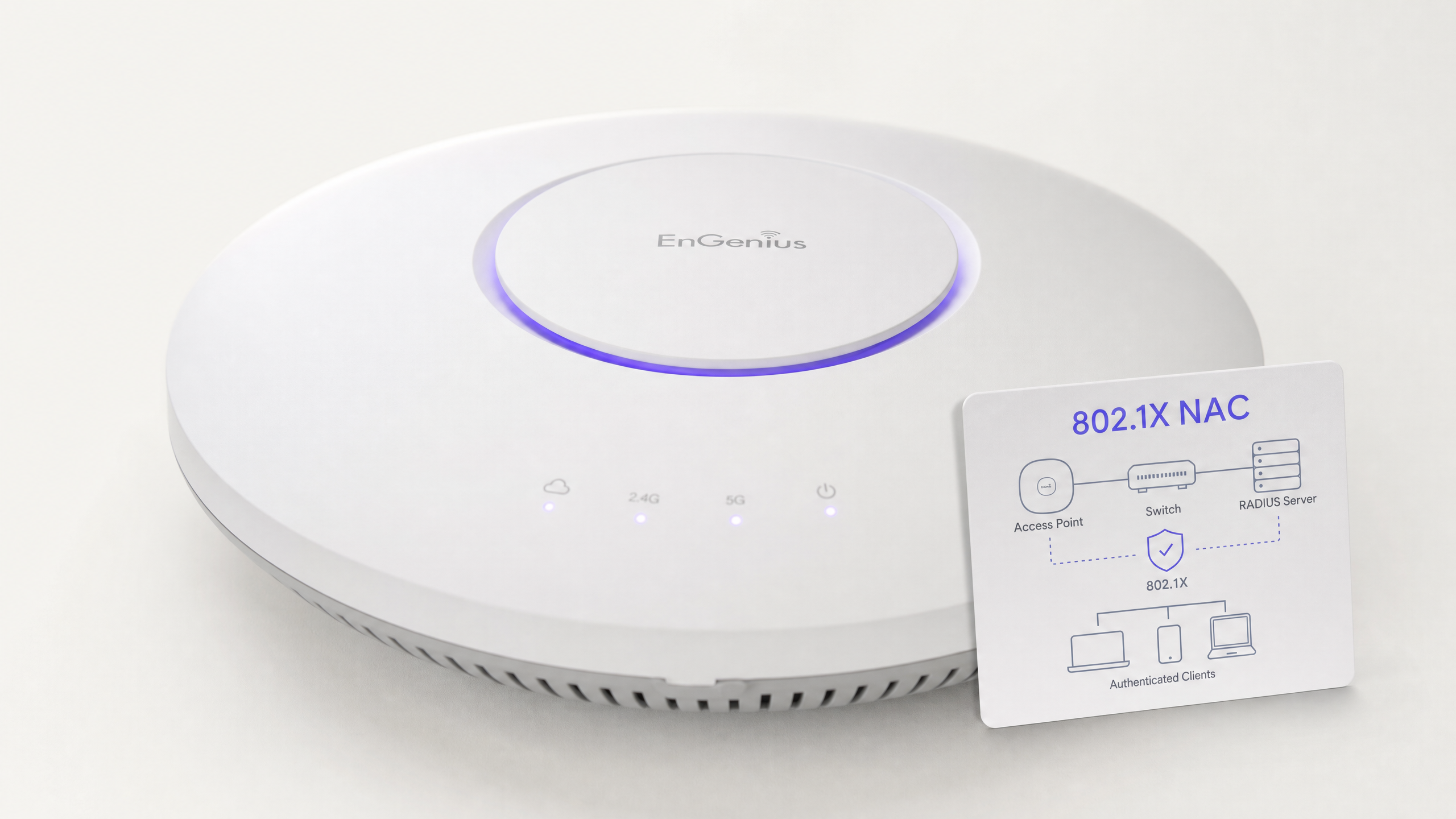
Resumen Ejecutivo
Asegurar una red escolar K-12 es fundamentalmente un ejercicio de mitigación de riesgos, gestión de identidades y cumplimiento. Los líderes de TI se enfrentan al complejo desafío de proporcionar acceso sin interrupciones a una base de usuarios muy diversa —personal, estudiantes, visitantes y contratistas—, al mismo tiempo que aseguran una gama cada vez mayor de dispositivos IoT como pizarras inteligentes y cámaras de seguridad. El Control de Acceso a la Red (NAC) impulsado por IEEE 802.1X proporciona la base arquitectónica para una segmentación de red robusta, asegurando que los dispositivos sean autenticados, autorizados y aislados adecuadamente antes de que se les conceda acceso a la red.
Esta guía proporciona un marco técnico completo para implementar NAC en entornos educativos. Detalla las mejores prácticas para la integración de RADIUS, la arquitectura de VLAN, la comprobación de la postura de los puntos finales y la incorporación segura de invitados. Al implementar estas estrategias, los directores de operaciones de instalaciones y los arquitectos de red pueden reducir significativamente su superficie de ataque, proteger datos sensibles de salvaguarda y mantener un estricto cumplimiento con estándares regulatorios como GDPR y CIPA, todo ello sin comprometer la eficiencia operativa de la escuela.
Análisis Técnico Detallado
En su esencia, NAC opera bajo el principio de confianza cero en el borde de la red. Cuando un dispositivo (el suplicante) se conecta a un switch de acceso o a un punto de acceso inalámbrico (el autenticador), se coloca en un estado restringido. El autenticador reenvía las credenciales a un servidor de autenticación (típicamente un servidor RADIUS) utilizando el protocolo 802.1X. Solo tras una autenticación y evaluación de políticas exitosas, el dispositivo es asignado a la VLAN apropiada con listas de control de acceso (ACLs) específicas aplicadas.
El Protocolo 802.1X y los Métodos EAP
El marco del Protocolo de Autenticación Extensible (EAP) proporciona el mecanismo de transporte para varios métodos de autenticación dentro de 802.1X. En un entorno K-12, las implementaciones más comunes son:
- PEAP-MSCHAPv2: A menudo utilizado para dispositivos de personal y estudiantes que se autentican contra credenciales de Active Directory. Aunque es más fácil de implementar, es vulnerable al robo de credenciales si el certificado del servidor no es estrictamente validado por el cliente.
- EAP-TLS: El estándar de oro para la seguridad empresarial. Se basa en la autenticación mutua basada en certificados, eliminando por completo la necesidad de contraseñas. Esto es altamente recomendado para dispositivos gestionados (como Chromebooks emitidos por la escuela o portátiles del personal) donde una solución de Infraestructura de Clave Pública (PKI) o Gestión de Dispositivos Móviles (MDM) puede aprovisionar automáticamente los certificados necesarios.
Estándares de Seguridad Inalámbrica: WPA3-Enterprise
Para redes inalámbricas, WPA3-Enterprise es el referente actual. Exige el uso de Protected Management Frames (PMF) para prevenir ataques de desautenticación y ofrece un modo de seguridad de 192 bits para entornos altamente sensibles (por ejemplo, la red de personal/administración). Para redes de estudiantes donde WPA3-Enterprise podría ser demasiado complejo para escenarios BYOD, WPA3-Personal con Simultaneous Authentication of Equals (SAE) proporciona una protección robusta contra ataques de diccionario offline, una mejora significativa sobre el estándar WPA2-PSK anterior.
Arquitectura de Segmentación de Red
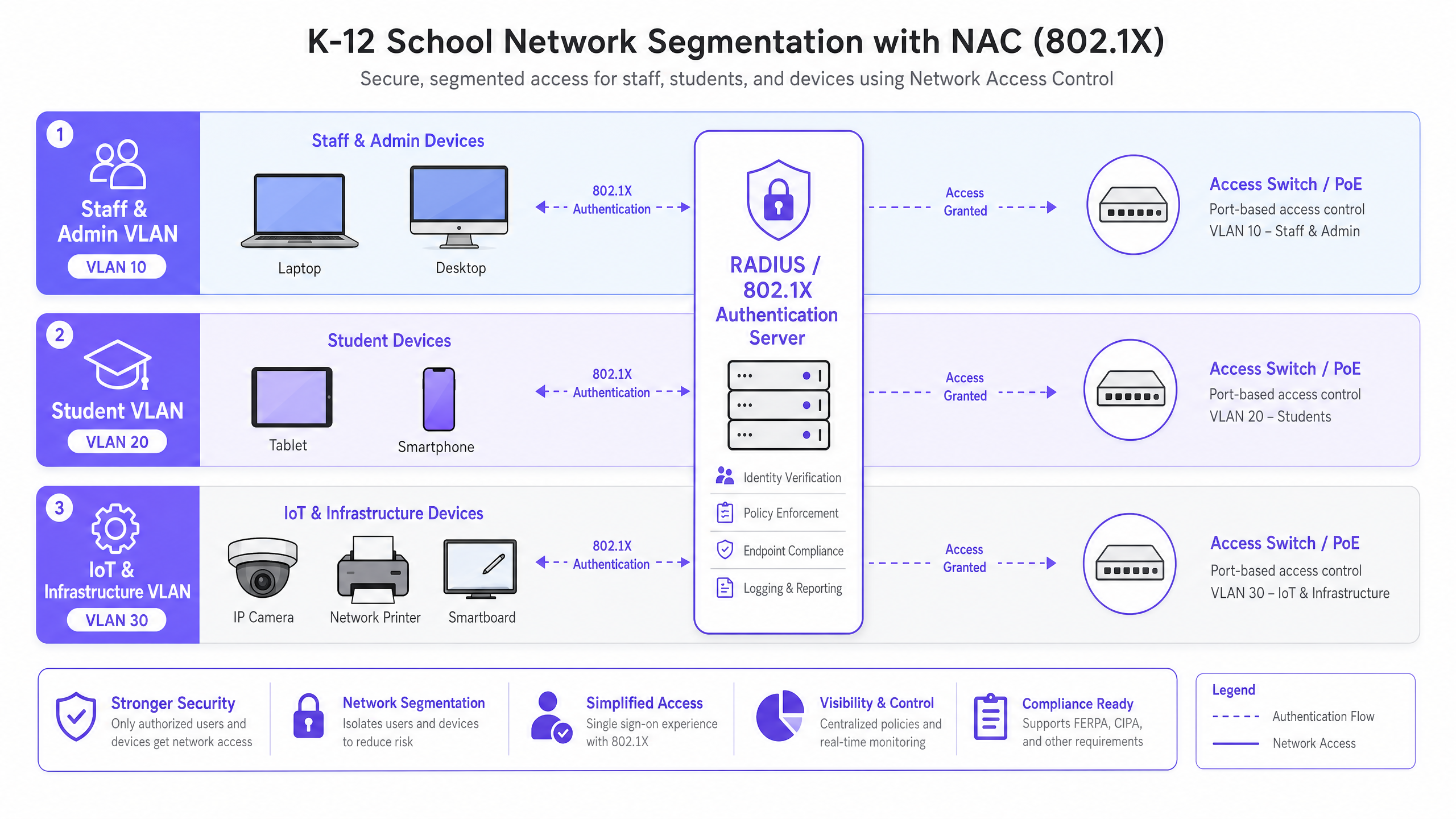
Un NAC eficaz se basa en una segmentación de red rigurosa. Una arquitectura de red plana es una vulnerabilidad crítica. Una implementación estándar K-12 debería, como mínimo, implementar la siguiente estructura de VLAN:
- VLAN de Personal y Administración: Acceso completo a recursos internos, sistemas MIS e internet. Movimiento lateral altamente restringido desde otras VLANs.
- VLAN de Estudiantes: Acceso a internet filtrado con estricta aplicación de filtrado de contenido. Sin acceso a recursos del personal o interfaces de gestión.
- VLAN de IoT e Infraestructura: Aloja pizarras inteligentes, cámaras IP y sistemas de gestión de edificios. Esta VLAN no debe tener acceso a internet saliente a menos que sea explícitamente requerido por un dispositivo específico, y debe estar aislada de las VLANs de usuario.
- VLAN de Invitados: Acceso solo a internet, aislada de todas las redes internas, típicamente precedida por un captive portal para la aceptación de términos y la captura de identidad.
Guía de Implementación
La implementación de NAC requiere un enfoque metódico y por fases para evitar interrupciones en las operaciones educativas.
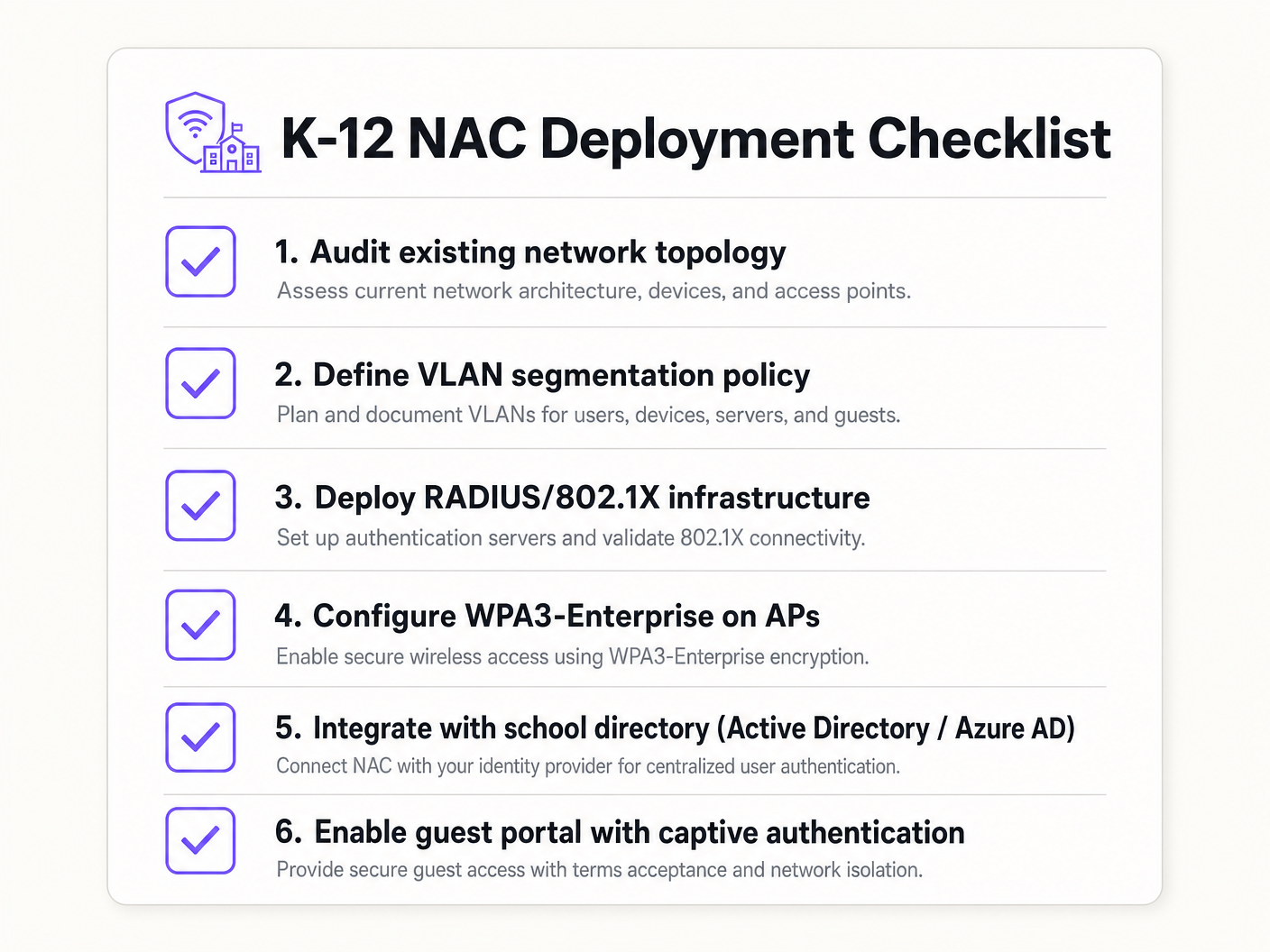
Fase 1: Descubrimiento y Auditoría
Antes de implementar cualquier medida de cumplimiento, realice una auditoría de red exhaustiva. Utilice herramientas para descubrir todos los dispositivos conectados, identificar TI en la sombra (switches o puntos de acceso no autorizados) y documentar el estado actual de la red. Esta fase es crucial para construir listas blancas precisas de MAC Authentication Bypass (MAB) para dispositivos heredados.
Fase 2: Implementación de la Infraestructura RADIUS
Implemente su infraestructura RADIUS. Si utiliza Active Directory local, Network Policy Server (NPS) es una opción común. Para entornos centrados en la nube (Azure AD, Google Workspace), las soluciones RADIUS en la nube ofrecen una integración optimizada. Asegúrese de que el servidor RADIUS esté configurado correctamente para comunicarse con su servicio de directorio y de que las reglas del firewall permitan el tráfico LDAP/LDAPS.
Fase 3: Modo Monitor
Habilite 802.1X en los switches de acceso y controladores inalámbricos en modo monitor (a veces llamado modo abierto). En este estado, el autenticador evalúa las credenciales 802.1X y registra el resultado, pero no bloquea el acceso si la autenticación falla. Esto permite a los equipos de TI identificar dispositivos mal configurados, certificados faltantes o equipos heredados que requieren MAB, sin causar interrupciones en la red.
Fase 4: Aplicación y Segmentación
Una vez que los registros del modo monitor muestren una alta tasa de éxito y se hayan tenido en cuenta todas las excepciones, comience a aplicar 802.autenticación 1X. Implemente esto en fases, comenzando con un grupo piloto (por ejemplo, el departamento de TI), luego expandiéndose al personal y, finalmente, a los estudiantes. Implemente la asignación dinámica de VLAN a través de atributos RADIUS (Tunnel-Type, Tunnel-Medium-Type, Tunnel-Private-Group-ID) para asegurar que los usuarios sean ubicados en el segmento de red correcto según su pertenencia a grupos de directorio.
Mejores Prácticas
- Implemente MAB y MPSK para IoT: Los dispositivos heredados y los puntos finales IoT sin interfaz a menudo carecen de suplicantes 802.1X. Utilice MAC Authentication Bypass (MAB) para equipos heredados, pero prefiera Multi-PSK (MPSK) para dispositivos IoT modernos. MPSK asigna una clave precompartida única a cada dispositivo, asegurando que si una clave se ve comprometida, el resto de la red permanezca segura. Para una guía de configuración detallada, consulte la guía Gestión de la seguridad de dispositivos IoT con NAC y MPSK .
- Aplique la Verificación de Postura de los Puntos Finales: Vaya más allá de la autenticación simple integrando verificaciones de postura. Antes de conceder acceso, la solución NAC debe verificar que el punto final tenga software antivirus activo, esté completamente parcheado y tenga el cifrado de disco habilitado. Los dispositivos no conformes deben ser colocados en una VLAN de remediación.
- Integre el Acceso de Invitados con Análisis: Las redes de invitados deben estar aisladas y ser conformes. La integración de una plataforma como Guest WiFi asegura que el acceso de los visitantes sea seguro, cumpla con el GDPR y proporcione valiosos WiFi Analytics para comprender el uso del lugar y el flujo de visitantes.
- Utilice la Autenticación Basada en Certificados (EAP-TLS) Siempre que Sea Posible: Para dispositivos gestionados, EAP-TLS elimina la dependencia de las contraseñas, reduciendo significativamente el riesgo de robo de credenciales y ataques de phishing.
Resolución de Problemas y Mitigación de Riesgos
Modos de Fallo Comunes
- Errores de Confianza de Certificados: Si a los usuarios de BYOD se les solicita aceptar un certificado de servidor no confiable durante la autenticación PEAP, esto los acostumbra a ignorar las advertencias de seguridad, creando una vulnerabilidad masiva de phishing. Mitigación: Utilice siempre un certificado firmado por una Autoridad de Certificación (CA) de confianza pública para el servidor RADIUS, o asegúrese de que el certificado raíz de la CA interna se distribuya a todos los dispositivos gestionados a través de MDM.
- Fallos en la Integración de Directorios: La autenticación RADIUS fallará si el servidor no puede comunicarse con el servicio de directorio (por ejemplo, los controladores de dominio de AD son inalcanzables o la contraseña de la cuenta de servicio ha caducado). Mitigación: Implemente servidores RADIUS redundantes y supervise continuamente el estado de la integración del directorio.
- El 'Problema de la Impresora' (Bloqueo de Dispositivos Heredados): Aplicar 802.1X sin una lista blanca MAB completa desconectará inmediatamente las impresoras heredadas, el equipo AV y las pizarras inteligentes más antiguas. Mitigación: La fase de modo de monitorización es crítica. No pase a la aplicación hasta que todos los dispositivos no autenticados hayan sido identificados y perfilados.
ROI e Impacto Empresarial
Aunque NAC es principalmente una inversión en seguridad y cumplimiento, ofrece un valor empresarial medible:
- Mitigación de Riesgos: El coste financiero y reputacional de una filtración de datos que involucre registros de estudiantes es catastrófico. NAC reduce drásticamente la superficie de ataque y previene el movimiento lateral, conteniendo posibles filtraciones.
- Eficiencia Operativa: La asignación dinámica de VLAN reduce la sobrecarga administrativa de configurar manualmente los puertos del switch. El personal de TI dedica menos tiempo a gestionar VLANs y más tiempo a iniciativas estratégicas.
- Garantía de Cumplimiento: Una implementación robusta de NAC proporciona los registros de auditoría y los controles de acceso necesarios para demostrar el cumplimiento con GDPR, CIPA y las regulaciones locales de salvaguarda, simplificando las auditorías y reduciendo la exposición legal.
Key Definitions
Network Access Control (NAC)
A security architecture that enforces policy on devices attempting to access a network, ensuring only authenticated and compliant devices are granted entry.
Essential for IT teams to prevent unauthorized access and segment network traffic based on user roles (e.g., staff vs. student).
IEEE 802.1X
The IEEE standard for port-based Network Access Control, providing an authentication mechanism to devices wishing to attach to a LAN or WLAN.
The foundational protocol that allows switches and access points to verify user identity before granting network access.
RADIUS (Remote Authentication Dial-In User Service)
A networking protocol that provides centralized Authentication, Authorization, and Accounting (AAA) management for users who connect and use a network service.
The 'brain' of the NAC deployment, responsible for verifying credentials against a directory (like Active Directory) and assigning VLANs.
MAC Authentication Bypass (MAB)
A technique used to authenticate devices that do not support 802.1X by using their MAC address as the credential against a pre-approved whitelist.
Crucial for allowing legacy devices like older printers and smartboards onto the network without compromising the 802.1X requirement for modern devices.
Multi-PSK (MPSK)
A wireless security feature that allows multiple unique Pre-Shared Keys to be used on a single SSID, with each key assigning specific network policies or VLANs.
The best practice for securing modern IoT devices that cannot perform 802.1X authentication, isolating them securely.
Dynamic VLAN Assignment
The process where a RADIUS server instructs the switch or access point to place an authenticated user into a specific VLAN based on their directory group membership.
Reduces administrative overhead by allowing a single SSID or switch port configuration to serve multiple user types securely.
EAP-TLS (Extensible Authentication Protocol - Transport Layer Security)
An 802.1X authentication method that requires mutual certificate authentication between the client and the server, eliminating the use of passwords.
The most secure authentication method, highly recommended for school-issued managed devices to prevent credential theft.
Endpoint Posture Checking
The process of evaluating a device's security state (e.g., antivirus status, OS patch level) before granting it network access.
Ensures that even authenticated users cannot introduce malware into the network via compromised or unpatched devices.
Worked Examples
A 1500-student secondary school needs to deploy 200 new wireless environmental sensors across the campus. These sensors only support WPA2-Personal and do not have an 802.1X supplicant. How should the network architect secure these devices without compromising the main network?
The architect should deploy a dedicated hidden SSID for IoT devices and implement Multi-PSK (MPSK). Each sensor (or group of sensors) is assigned a unique, complex pre-shared key. The wireless controller or RADIUS server is configured to map these specific keys to the isolated 'IoT & Infrastructure VLAN'. This VLAN must have strict ACLs applied, denying all access to the Staff and Student VLANs, and restricting outbound internet access only to the specific cloud endpoints required by the environmental sensors.
During the rollout of 802.1X (PEAP-MSCHAPv2) for BYOD student devices, the IT helpdesk is overwhelmed with tickets from students reporting that their devices are warning them about an 'untrusted network certificate'. How should this be resolved?
The issue occurs because the RADIUS server is using a certificate signed by the school's internal, private Certificate Authority (CA), which the BYOD devices do not natively trust. The immediate fix is to replace the RADIUS server's certificate with one issued by a widely recognized public CA (e.g., DigiCert, Let's Encrypt). Long-term, the school should implement an onboarding portal that securely configures the supplicant and installs the necessary trust anchors before the device attempts to connect.
Practice Questions
Q1. A school district is migrating its directory services entirely to Google Workspace and phasing out on-premises Active Directory. They currently use NPS for RADIUS. What architectural change is required to maintain 802.1X authentication for their fleet of managed Chromebooks?
Hint: Consider how Chromebooks authenticate natively and what infrastructure is needed when AD is removed.
View model answer
The district should migrate to a cloud RADIUS provider (e.g., SecureW2, Foxpass) that integrates natively with Google Workspace, or utilize Google's own Cloud RADIUS capabilities if available in their licensing tier. They should configure the Chromebooks via the Google Admin Console to use EAP-TLS, leveraging device certificates automatically provisioned by Google's certificate management, completely removing the reliance on passwords and on-premises NPS servers.
Q2. During a network audit, the IT team discovers a consumer-grade wireless router plugged into a classroom wall port, broadcasting a hidden SSID. How does a properly configured NAC solution prevent this shadow IT from compromising the network?
Hint: Think about what happens at the switch port level when an unmanaged device is connected.
View model answer
With 802.1X enforced on the wired switch ports, the consumer router will fail authentication because it lacks valid credentials or a certificate. The switch port will either remain in an unauthorized state (blocking all traffic) or dynamically assign the port to an isolated remediation VLAN. Additionally, enterprise NAC solutions can detect the presence of NAT or multiple MAC addresses behind a single port, triggering an automatic port shutdown to isolate the rogue device.
Q3. A venue operations director at a large educational campus wants to provide seamless WiFi access for visiting parents during a sports tournament, but the IT team is concerned about GDPR compliance and network security. What is the recommended approach?
Hint: Consider the balance between ease of access and the legal requirements for capturing user data.
View model answer
The IT team should provision a dedicated Guest VLAN that is strictly isolated from all internal resources and has internet-only access. They should deploy a captive portal solution, such as Purple's Guest WiFi platform, to handle onboarding. This ensures that visitors must accept the terms and conditions and provide explicit consent for data processing before gaining access, satisfying GDPR requirements while keeping the core network secure.