

Integración de Salesforce con Guest WiFi para la Inteligencia de Cuentas
Esta guía de referencia técnica detalla cómo los equipos de TI y RevOps pueden integrar los eventos de autenticación de Guest WiFi con Salesforce para generar inteligencia de cuentas accionable. Cubre la arquitectura requerida, la lógica de resolución de identidad y las configuraciones del modelo de datos necesarias para convertir las visitas físicas a ubicaciones en señales CRM de alta fidelidad.
🎧 Escuchar esta guía
Ver transcripción
Resumen Ejecutivo
Para los espacios empresariales —desde centros de conferencias hasta campus corporativos—, el Guest WiFi representa una reserva sin explotar de datos de intención de primera parte. Cada evento de autenticación es una señal física de compromiso. Sin embargo, sin un vínculo estructural con el CRM, estos datos permanecen aislados, sin ofrecer ninguna utilidad comercial.
La integración de Guest WiFi con Salesforce transforma la infraestructura de red pasiva en un motor activo de inteligencia de cuentas. Al dirigir los eventos de autenticación a Salesforce, resolver identidades con cuentas existentes y activar alertas automatizadas, las organizaciones pueden equipar a sus equipos de ventas con señales de intención física de alta fidelidad. Esta integración es particularmente potente para el sector B2B de Hostelería y espacios para eventos, donde la identificación de cuentas objetivo in situ puede acelerar significativamente la velocidad de los acuerdos.
Esta guía proporciona la arquitectura técnica, los requisitos del modelo de datos y las mejores prácticas de implementación para los líderes de TI y los equipos de RevOps que implementan una integración de Salesforce WiFi. Va más allá de la captura básica de leads para establecer un marco robusto y conforme para la inteligencia basada en cuentas.
Análisis Técnico Detallado: Arquitectura y Resolución de Identidad
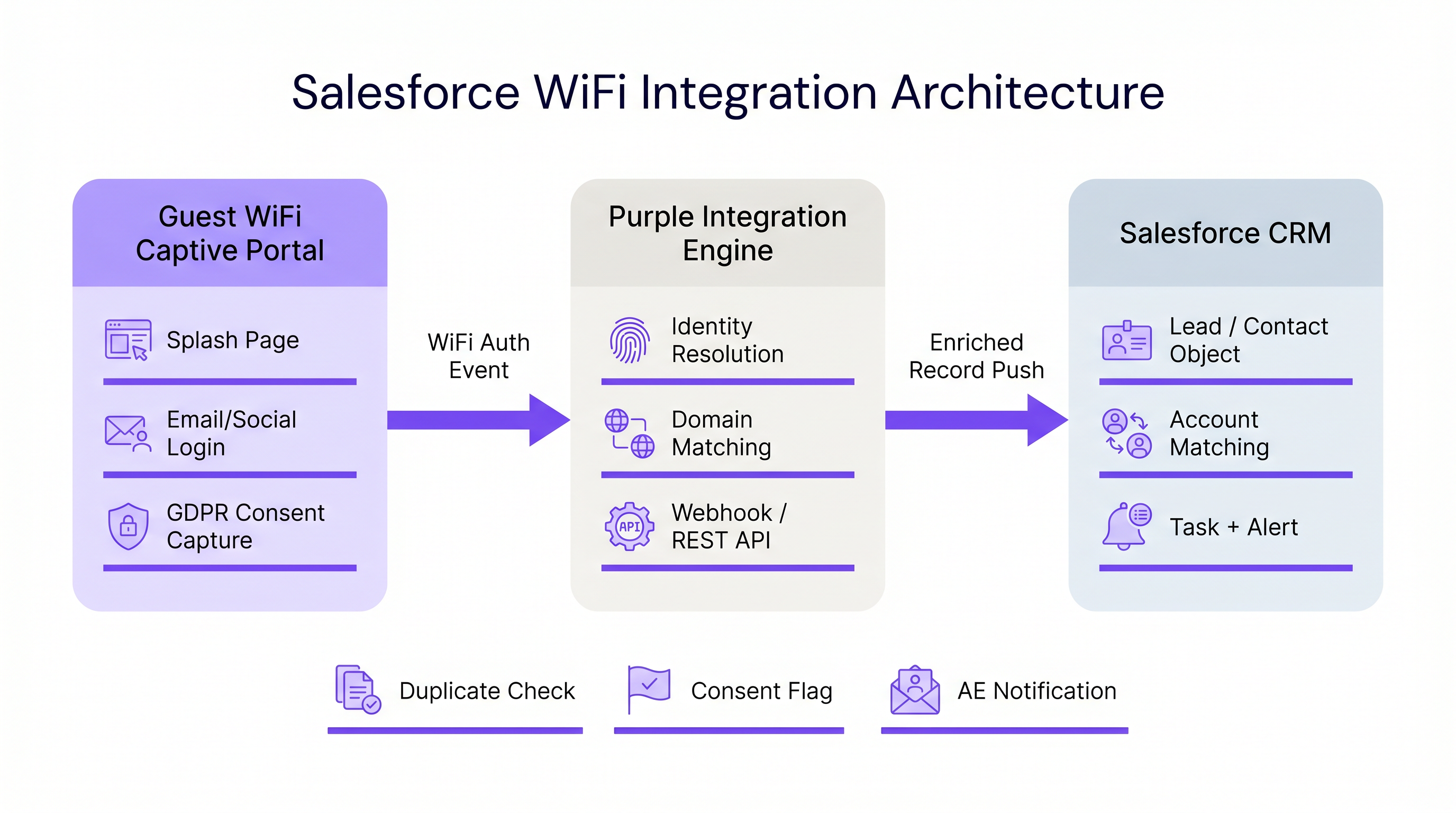
La arquitectura de una integración de Salesforce WiFi se basa en tres capas principales: el Captive Portal, el middleware de integración y el modelo de datos del CRM.
1. La Capa del Captive Portal
El Captive Portal es el punto de captura de identidad. Para la inteligencia B2B, la autenticación por correo electrónico o el inicio de sesión único (SSO) de LinkedIn son estrictamente necesarios. La autenticación de clic o solo por SMS (como se discute en Verificación por SMS vs. Correo Electrónico para Guest WiFi: Cuál Elegir ) no proporciona el identificador persistente necesario para una coincidencia robusta en el CRM.
Fundamentalmente, esta capa también debe gestionar el cumplimiento. Según el GDPR, el consentimiento explícito debe capturarse en el punto de entrada y transmitirse aguas abajo. La plataforma de Purple gestiona esto de forma nativa, pasando indicadores de consentimiento granular junto con la carga útil de identidad.
2. Middleware de Integración y Resolución de Identidad
El motor de integración recibe el evento de autenticación —normalmente a través de un webhook— y realiza la resolución de identidad antes de ejecutar una operación upsert en Salesforce. Esta lógica evita la creación de registros duplicados y garantiza la integridad de los datos.
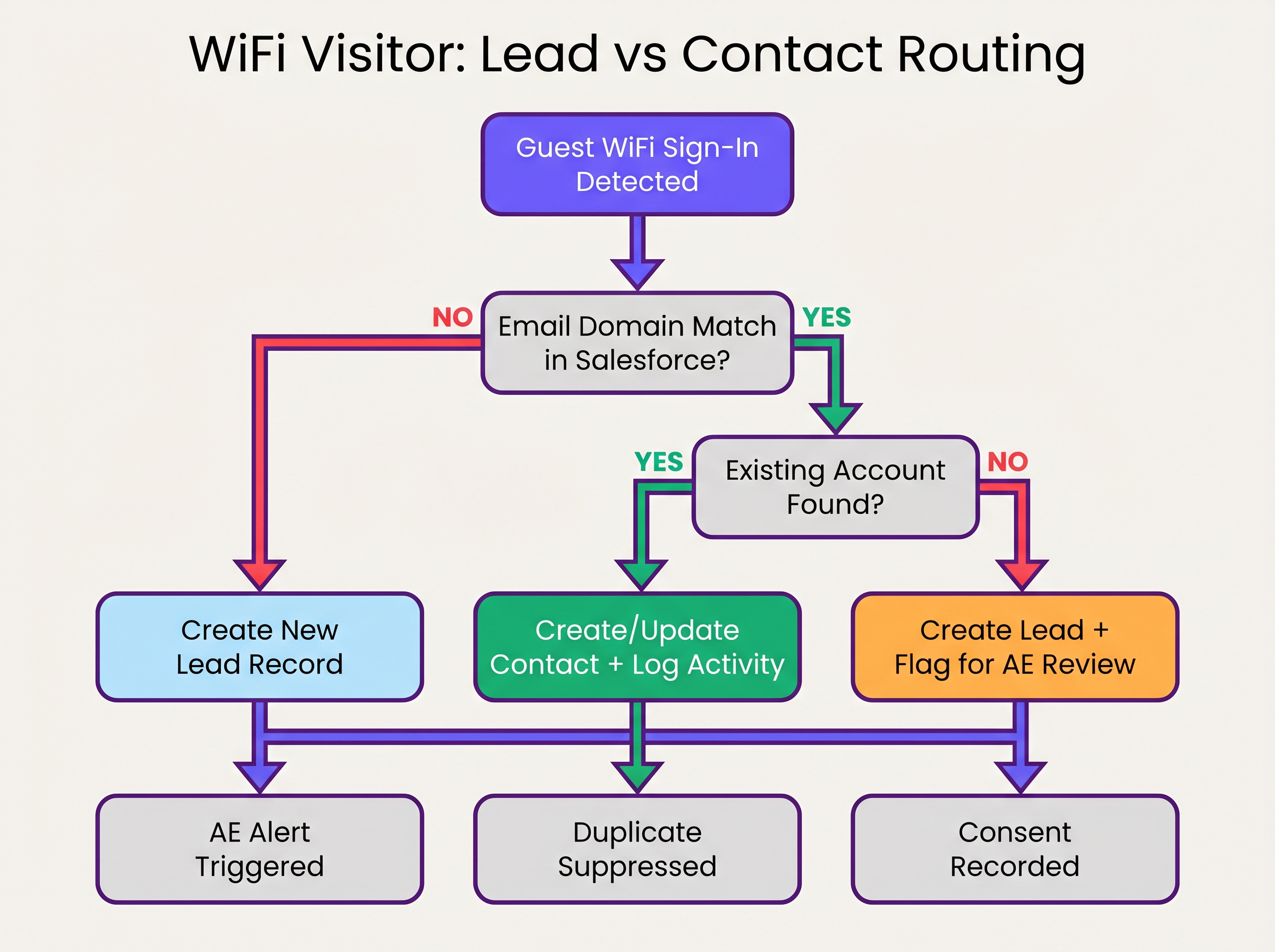
La secuencia de resolución de identidad opera de la siguiente manera:
- Extracción de Dominio: El middleware extrae el dominio de la dirección de correo electrónico autenticada (por ejemplo,
user@acmecorp.comse convierte enacmecorp.com). - Coincidencia de Cuentas: Una consulta SOQL verifica el objeto Cuenta de Salesforce en busca de un campo de dominio de sitio web o correo electrónico coincidente.
- Enrutamiento de Contactos/Leads:
- Si existe una coincidencia de Cuenta, el sistema verifica si hay un Contacto existente. Si se encuentra, el Contacto se actualiza (fecha de última visita, recuento de visitas incrementado). Si no se encuentra, se crea un nuevo Contacto y se asocia con la Cuenta.
- Si no existe una coincidencia de Cuenta, el sistema evalúa el dominio contra una lista de bloqueo (por ejemplo, gmail.com). Si pasa, se crea un nuevo Lead.
3. El Modelo de Datos de Salesforce
Para extraer valor de WiFi Analytics , el modelo de datos de Salesforce debe configurarse para recibir y consolidar datos de intención física.
Campos Personalizados Requeridos:
- Objeto Contacto/Lead:
WiFi_Venue_Name__c,First_Seen_Date__c,Last_Seen_Date__c,Visit_Count__c,Marketing_Consent__c. - Objeto Cuenta:
Total_WiFi_Contacts__c(Resumen acumulado),Last_Target_Account_Visit__c.
Guía de Implementación: Despliegue Paso a Paso
El despliegue de una integración de Salesforce WiFi requiere coordinación entre la infraestructura de TI y RevOps. Siga esta secuencia de despliegue neutral respecto al proveedor:
Fase 1: Gobernanza de Datos Pre-Despliegue
Antes de conectar los sistemas, establezca las reglas de compromiso.
- Definir la Lista de Bloqueo de Dominios: Compile una lista exhaustiva de dominios de correo electrónico de consumidores (Gmail, Yahoo, iCloud) para excluir de la coincidencia de Cuentas y la creación de Leads. Esto previene la contaminación del CRM.
- Establecer Umbrales de Conversión: Defina cuándo un Lead debe convertirse automáticamente en un Contacto. Una regla estándar es: >2 visitas en 30 días desde un dominio corporativo conocido activan la conversión y la asociación con la Cuenta.
Fase 2: Configuración del Middleware
Configure la capa de integración para manejar la carga útil del webhook.
- Configuración del Webhook: En el portal de Purple, configure un webhook saliente para activarse en el evento
user_authenticated. - Lógica del Middleware: Implemente la lógica de resolución de identidad en el middleware elegido (por ejemplo, MuleSoft, AWS Lambda o una aplicación conectada personalizada).
- Límites de la API: Para entornos de alta densidad (consulte Diseño de WiFi de Alta Densidad: Mejores Prácticas para Estadios y Arenas ), asegúrese de que el middleware agrupe las solicitudes o utilice la API masiva de Salesforce para evitar exceder los límites de la API REST.
Fase 3: Configuración de Alertas
Configure Salesforce Flow para activar acciones comerciales basadas en los datos enriquecidos.
- Alerta de Cuenta Objetivo: Active una Tarea y una notificación de Chatter al Propietario de la Cuenta cuando un Contacto asociado a una cuenta objetivo de Nivel 1 se conecte a la red.
- Reactivación de Inactivos: Alerte al Propietario de la Cuenta si un Contacto sin actividad registrada en más de 90 días se conecta al WiFi.
Mejores Prácticas y Mitigación de Riesgos
Gestión de la Aleatorización de Direcciones MAC
Los sistemas operativos móviles modernos (iOS 14+, Android 10+) implementan la aleatorización de direcciones MACión por defecto. Esto significa que el dispositivo presenta una dirección MAC diferente a cada red, lo que hace que el seguimiento persistente basado en MAC sea ineficaz en diferentes ubicaciones o durante períodos de tiempo prolongados. La integración debe basarse en la dirección de correo electrónico autenticada como identificador principal, utilizando la dirección MAC solo para la gestión de sesiones dentro de una única visita.
Evitar el "volcado de leads"
El modo de fallo más común en las integraciones de CRM es empujar cada evento de autenticación directamente al objeto Lead. Esto crea miles de registros duplicados, frustra a los equipos de ventas y oscurece las señales de intención genuinas. Es esencial una estricta adhesión a la lógica de coincidencia 'Account-first' (primero la cuenta) descrita anteriormente.
Cumplimiento y Sincronización de Consentimientos
El consentimiento de marketing capturado en el Captive Portal debe tratarse como la fuente de verdad para ese canal específico. La integración debe mapear el indicador booleano marketing_opt_in de la carga útil de WiFi directamente al campo de consentimiento correspondiente en Salesforce. Si un usuario opta por no participar posteriormente a través de una campaña de correo electrónico, la plataforma de automatización de marketing debe sincronizar esa preferencia de vuelta a Salesforce.
ROI e Impacto Empresarial
El impacto empresarial de una integración de Salesforce WiFi se mide en la velocidad del pipeline y el compromiso de la cuenta.
Al automatizar la entrega de señales de intención físicas, las organizaciones eliminan la latencia entre la visita de un prospecto a un lugar y el inicio del contacto por parte del equipo de ventas. Para Retail y espacios de eventos B2B, esta capacidad transforma un centro de costes (WiFi para invitados) en una herramienta medible de generación de pipeline.
Las organizaciones que implementan esta arquitectura suelen observar una reducción significativa en el tiempo de contacto para los prospectos in situ y un aumento en la tasa de conversión de leads cualificados de marketing (MQLs) procedentes de ubicaciones físicas.
Escuche el Informe
Para una visión general completa de la arquitectura y las estrategias de implementación, escuche el informe de podcast complementario:
Términos clave y definiciones
Identity Resolution
The process of matching an incoming authentication event (e.g., an email address) against existing CRM records to determine whether to update a Contact, associate with an Account, or create a new Lead.
Crucial for maintaining data hygiene and ensuring sales teams receive alerts tied to the correct accounts.
Captive Portal
The web page that users are directed to before they are granted access to the guest WiFi network. Used to capture identity and consent.
The primary interface for capturing first-party data and GDPR-compliant marketing consent.
MAC Address Randomisation
A privacy feature in modern mobile operating systems where the device generates a temporary MAC address for each network it connects to.
Forces IT teams to rely on authenticated credentials (like email) rather than device hardware addresses for persistent CRM tracking.
Salesforce Flow
An automation tool within Salesforce used to execute logic, update records, and send notifications based on specific trigger conditions.
Used to automate the routing of alerts to Account Executives when a target account connects to the WiFi.
Webhook
An automated HTTP push mechanism that sends real-time data from one application to another when a specific event occurs.
The standard method for transmitting WiFi authentication events from the network platform to the integration middleware.
Domain Blocklist
A maintained list of email domains (e.g., consumer providers like Gmail or Yahoo) that are explicitly excluded from certain integration actions.
Essential for preventing CRM pollution and ensuring only high-value B2B contacts are processed.
Roll-up Summary Field
A Salesforce field type that calculates values from related records, such as the total number of Contacts associated with an Account.
Used on the Account object to aggregate the total number of WiFi visits from all associated Contacts.
First-Party Data
Information a company collects directly from its customers or visitors, including demographics, behaviors, and consent.
Guest WiFi authentication is a primary source of high-quality first-party data for physical venues.
Casos de éxito
A corporate conference centre hosts multiple B2B events weekly. The RevOps team wants to alert Account Executives immediately when a prospect from a target account connects to the venue WiFi, but they are concerned about flooding Salesforce with consumer email addresses (e.g., Gmail) from event staff and contractors.
- Implement a middleware layer between the WiFi platform (e.g., Purple) and Salesforce.
- Configure the middleware with a strict domain blocklist containing all known consumer email providers.
- When an authentication event occurs, the middleware extracts the email domain. If the domain is on the blocklist, the payload is discarded or logged to a custom object for analytics only, bypassing Lead/Contact creation.
- If the domain passes the filter, the middleware queries Salesforce for an Account match.
- If an Account match is found and it is flagged as a 'Target Account', the middleware upserts the Contact record and triggers a Salesforce Flow to generate a high-priority Task for the assigned Account Executive.
A B2B retail technology vendor offers free WiFi in their executive briefing centre. They need to ensure that marketing consent captured during WiFi sign-up is accurately reflected in Salesforce and complies with GDPR requirements.
- Configure the captive portal to present a clear, un-ticked checkbox for marketing communications, distinct from the terms of service.
- Ensure the WiFi platform captures the timestamp, IP address, and the boolean value of the consent checkbox.
- Map the consent boolean from the WiFi API payload to a custom
WiFi_Marketing_Consent__cfield on the Salesforce Contact/Lead object. - Configure Salesforce to map this custom field to the standard Individual object or the integrated marketing automation platform's consent management system.
- Establish a daily sync to ensure any opt-outs processed by the marketing automation platform update the central Salesforce record.
Análisis de escenarios
Q1. A hospital network wants to integrate their guest WiFi with Salesforce to track vendor and partner visits. However, they are concerned about inadvertently capturing patient data in the CRM. How should the integration architecture address this?
💡 Sugerencia:Consider how you can filter authentication events before they reach the CRM.
Mostrar enfoque recomendado
The architecture must implement strict filtering in the middleware layer. The captive portal should be configured to require corporate email addresses, and the middleware must employ a comprehensive domain blocklist to discard any authentication events from consumer email domains (which patients are most likely to use). Furthermore, the captive portal should clearly state its purpose (e.g., 'Vendor and Partner Access') and include specific terms of service to discourage patient use.
Q2. Your RevOps team reports that the new WiFi integration is creating duplicate Leads for individuals who already exist as Contacts under known Accounts. What is the most likely failure in the integration logic?
💡 Sugerencia:Review the sequence of identity resolution steps.
Mostrar enfoque recomendado
The integration logic is likely failing to perform an Account domain match before creating a Lead. The correct sequence must be: 1) Extract domain, 2) Query Account object for domain match, 3) If Account exists, query for Contact match, 4) If no Contact exists, create a new Contact linked to the Account. Creating a Lead should only occur if step 2 (Account match) fails.
Q3. A hotel chain's marketing team wants to track how often specific corporate clients visit their properties. They are currently relying on MAC addresses to identify returning visitors, but the data shows artificially low return rates. Why is this happening, and what is the architectural solution?
💡 Sugerencia:Consider how modern mobile operating systems handle network connections.
Mostrar enfoque recomendado
The artificially low return rates are caused by MAC address randomisation, a privacy feature in modern iOS and Android devices that generates a new MAC address for different networks or over time. The architectural solution is to shift reliance from the MAC address to the authenticated email address. The captive portal must require email authentication, and the integration middleware must use this email address as the persistent identifier to query and update the Salesforce Contact record.
Conclusiones clave
- ✓Integrating guest WiFi with Salesforce converts passive network events into active, actionable account intelligence.
- ✓Identity resolution must prioritize matching against existing Accounts and Contacts to prevent CRM data pollution.
- ✓Middleware should be used to filter out consumer email domains before data reaches Salesforce.
- ✓MAC address randomisation necessitates the use of authenticated email addresses as the primary persistent identifier.
- ✓Automated alerts via Salesforce Flow enable Account Executives to engage target accounts while they are physically on-site.
- ✓Explicit, granular marketing consent must be captured at the captive portal and synced to the CRM to ensure GDPR compliance.




