

Salesforce-Integration mit Gast-WiFi für Account Intelligence
Dieser technische Leitfaden beschreibt, wie IT- und RevOps-Teams Gast-WiFi-Authentifizierungsereignisse mit Salesforce integrieren können, um umsetzbare Account Intelligence zu generieren. Er behandelt die erforderliche Architektur, die Logik zur Identitätsauflösung und die Datenmodellkonfigurationen, die notwendig sind, um physische Standortbesuche in hochpräzise CRM-Signale umzuwandeln.
🎧 Diesen Leitfaden anhören
Transkript anzeigen
Zusammenfassung für Führungskräfte
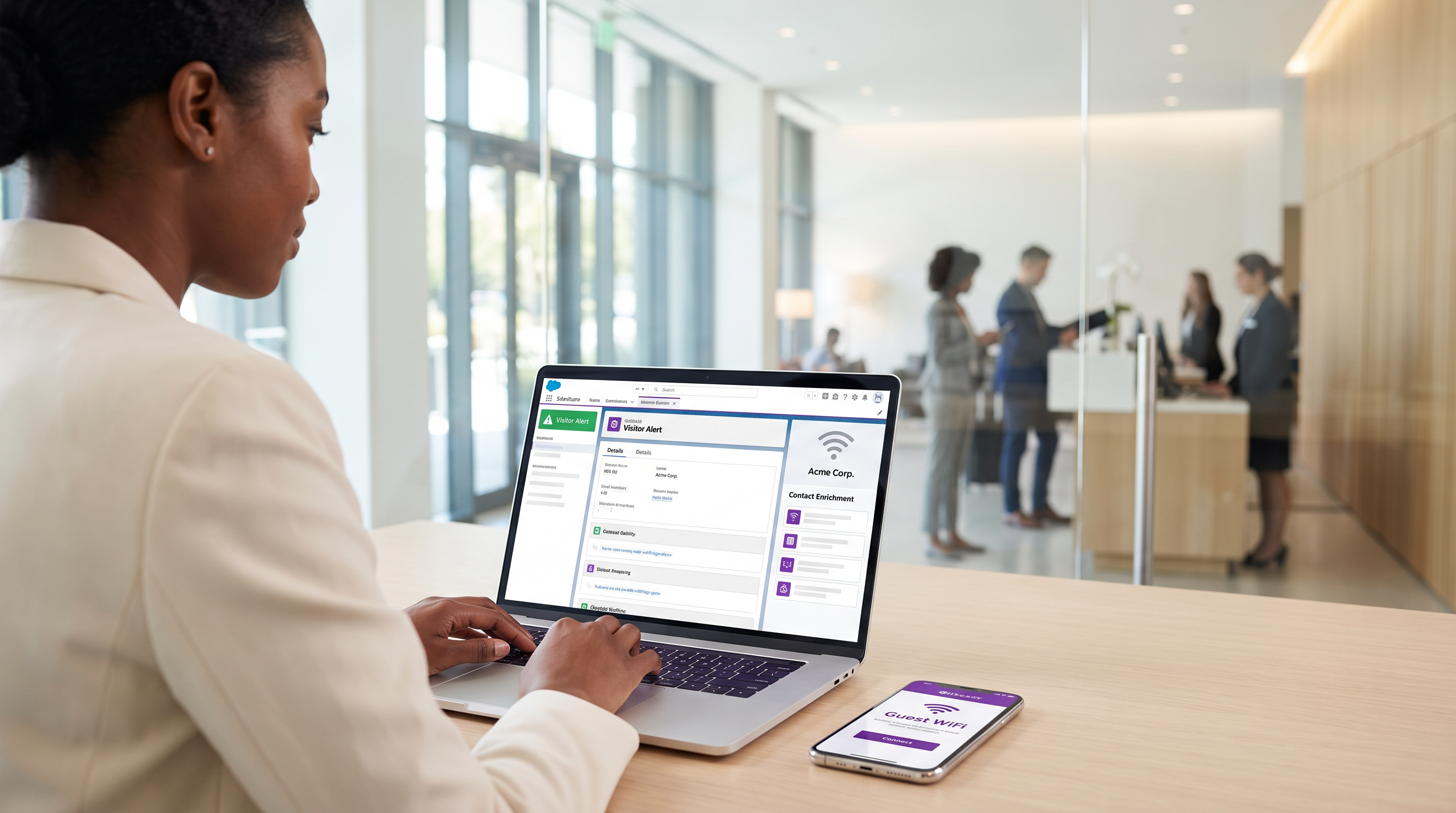
Für Unternehmensstandorte – von Konferenzzentren bis hin zu Unternehmenscampi – stellt Gast-WiFi ein ungenutztes Reservoir an First-Party-Intent-Daten dar. Jedes Authentifizierungsereignis ist ein physisches Signal des Engagements. Ohne eine strukturelle Verbindung zum CRM bleiben diese Daten jedoch isoliert und bieten keinen kommerziellen Nutzen.
Die Integration von Guest WiFi mit Salesforce verwandelt passive Netzwerkinfrastruktur in eine aktive Account Intelligence Engine. Durch das Weiterleiten von Authentifizierungsereignissen an Salesforce, die Auflösung von Identitäten anhand bestehender Accounts und das Auslösen automatischer Benachrichtigungen können Unternehmen ihre Vertriebsteams mit hochpräzisen physischen Intent-Signalen ausstatten. Diese Integration ist besonders wirkungsvoll für B2B Hospitality und Veranstaltungsorte, wo die Identifizierung von Ziel-Accounts vor Ort die Geschäftsabschlussgeschwindigkeit erheblich beschleunigen kann.
Dieser Leitfaden bietet die technische Architektur, die Anforderungen an das Datenmodell und Best Practices für die Bereitstellung für IT-Führungskräfte und RevOps-Teams, die eine Salesforce WiFi-Integration implementieren. Er geht über die grundlegende Lead-Erfassung hinaus, um ein robustes, konformes Framework für Account-basierte Intelligence zu etablieren.
Technischer Deep-Dive: Architektur und Identitätsauflösung
Die Architektur einer Salesforce WiFi-Integration basiert auf drei Kernschichten: dem Captive Portal, der Integrations-Middleware und dem CRM-Datenmodell.
1. Die Captive Portal-Schicht
Das Captive Portal ist der Punkt der Identitätserfassung. Für B2B-Intelligence ist eine E-Mail-Authentifizierung oder LinkedIn SSO zwingend erforderlich. Click-Through- oder reine SMS-Authentifizierung (wie in SMS vs Email Verification for Guest WiFi: Which to Choose besprochen) bietet nicht den persistenten Identifikator, der für ein robustes CRM-Matching erforderlich ist.
Entscheidend ist, dass diese Schicht auch die Compliance handhaben muss. Unter GDPR muss die explizite Zustimmung am Eintrittspunkt erfasst und weitergegeben werden. Die Plattform von Purple handhabt dies nativ und übergibt granulare Zustimmungs-Flags zusammen mit dem Identitäts-Payload.
2. Integrations-Middleware und Identitätsauflösung
Die Integrations-Engine empfängt das Authentifizierungsereignis – typischerweise über einen Webhook – und führt eine Identitätsauflösung durch, bevor ein Salesforce-Upsert ausgeführt wird. Diese Logik verhindert die Erstellung doppelter Datensätze und gewährleistet die Datenintegrität.
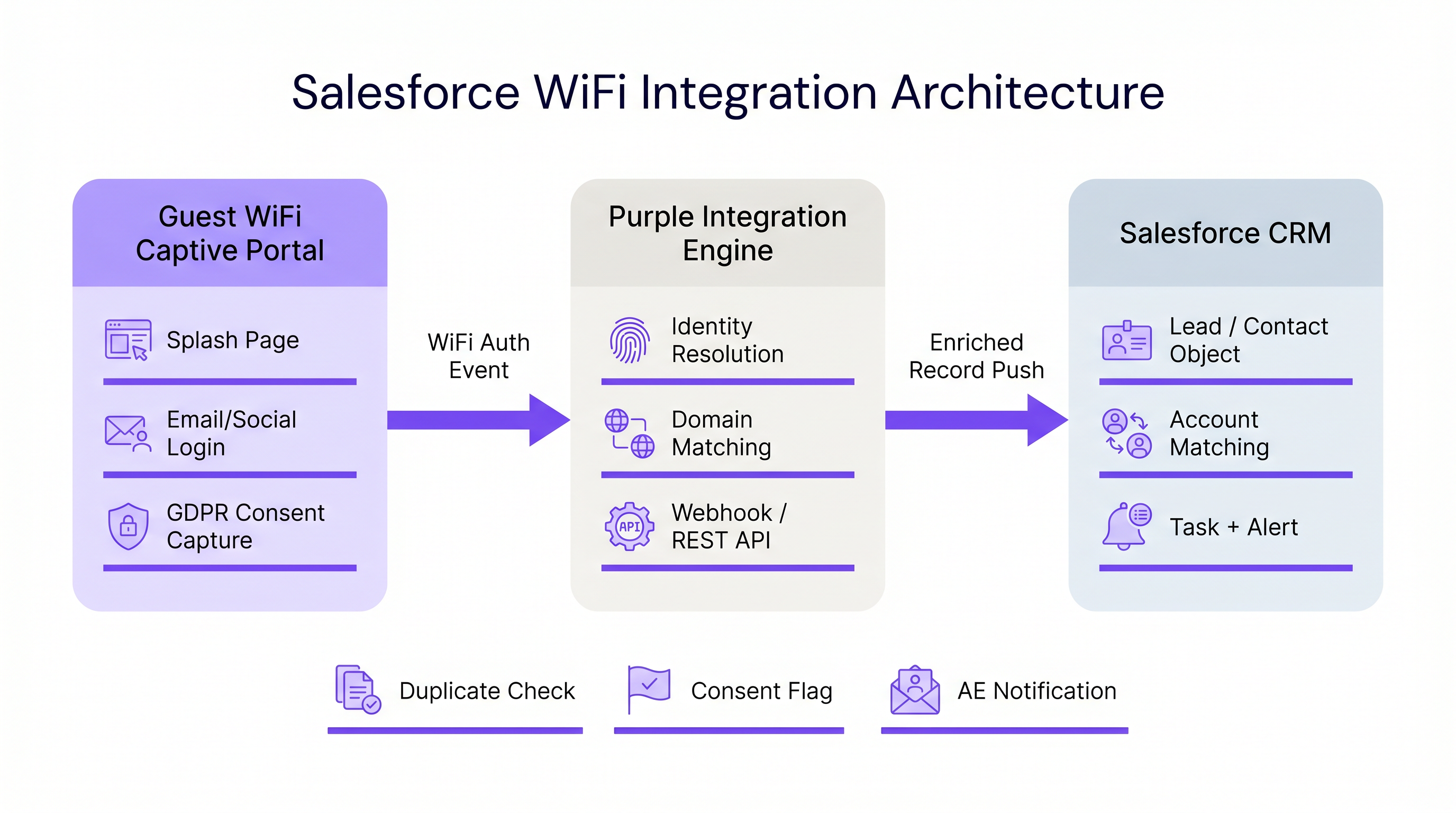
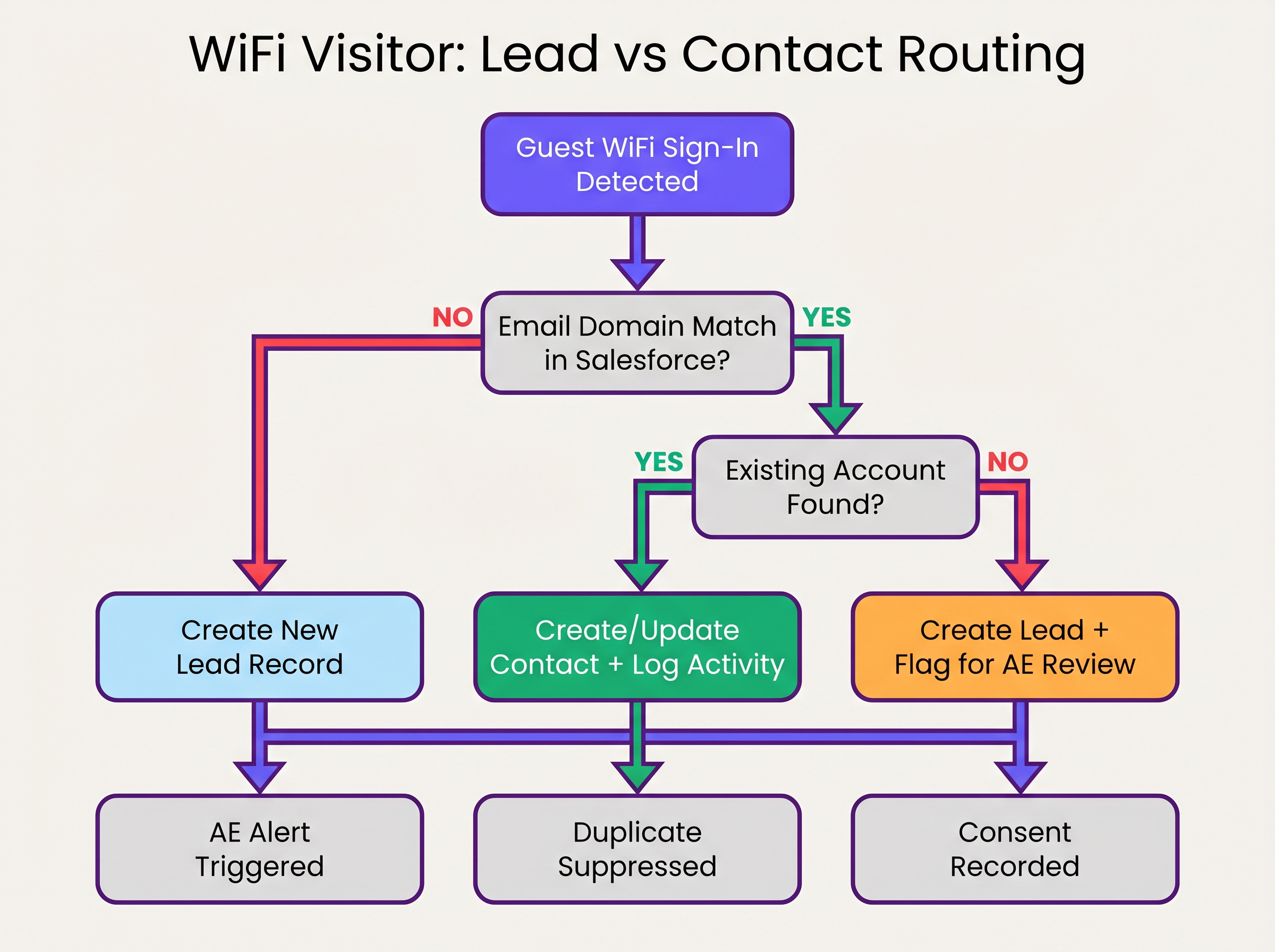
Die Sequenz der Identitätsauflösung funktioniert wie folgt:
- Domain-Extraktion: Die Middleware extrahiert die Domain aus der authentifizierten E-Mail-Adresse (z.B.
user@acmecorp.comwird zuacmecorp.com). - Account-Matching: Eine SOQL-Abfrage überprüft das Salesforce Account-Objekt auf ein übereinstimmendes Website- oder E-Mail-Domain-Feld.
- Kontakt-/Lead-Routing:
- Wenn ein Account-Match existiert, prüft das System auf einen bestehenden Kontakt. Falls gefunden, wird der Kontakt aktualisiert (Datum des letzten Besuchs, Besuchszähler erhöht). Falls nicht gefunden, wird ein neuer Kontakt erstellt und dem Account zugeordnet.
- Wenn kein Account-Match existiert, bewertet das System die Domain anhand einer Blocklist (z.B. gmail.com). Wenn sie die Prüfung besteht, wird ein neuer Lead erstellt.
3. Das Salesforce-Datenmodell
Um Werte aus WiFi Analytics zu extrahieren, muss das Salesforce-Datenmodell so konfiguriert werden, dass es physische Intent-Daten empfängt und aggregiert.
Erforderliche benutzerdefinierte Felder:
- Kontakt-/Lead-Objekt:
WiFi_Venue_Name__c,First_Seen_Date__c,Last_Seen_Date__c,Visit_Count__c,Marketing_Consent__c. - Account-Objekt:
Total_WiFi_Contacts__c(Roll-up Summary),Last_Target_Account_Visit__c.
Implementierungsleitfaden: Schritt-für-Schritt-Bereitstellung
Die Bereitstellung einer Salesforce WiFi-Integration erfordert die Koordination zwischen IT-Infrastruktur und RevOps. Befolgen Sie diese herstellerneutrale Bereitstellungssequenz:
Phase 1: Daten-Governance vor der Bereitstellung
Bevor Sie die Systeme verbinden, legen Sie die Regeln für die Zusammenarbeit fest.
- Domain-Blocklist definieren: Erstellen Sie eine umfassende Liste von Consumer-E-Mail-Domains (Gmail, Yahoo, iCloud), die vom Account-Matching und der Lead-Erstellung ausgeschlossen werden sollen. Dies verhindert eine CRM-Verschmutzung.
- Konversionsschwellenwerte festlegen: Definieren Sie, wann ein Lead automatisch in einen Kontakt umgewandelt werden soll. Eine Standardregel ist: >2 Besuche innerhalb von 30 Tagen von einer bekannten Unternehmensdomain lösen die Konversion und Account-Zuordnung aus.
Phase 2: Middleware-Konfiguration
Konfigurieren Sie die Integrationsschicht, um den Webhook-Payload zu verarbeiten.
- Webhook-Konfiguration: Im Purple-Portal konfigurieren Sie einen ausgehenden Webhook, der beim
user_authenticated-Ereignis ausgelöst wird. - Middleware-Logik: Implementieren Sie die Logik zur Identitätsauflösung in Ihrer gewählten Middleware (z.B. MuleSoft, AWS Lambda oder einer benutzerdefinierten Connected App).
- API-Limits: Für Umgebungen mit hoher Dichte (siehe High-Density WiFi Design: Stadium and Arena Best Practices ) stellen Sie sicher, dass die Middleware Anfragen bündelt oder die Salesforce Bulk API verwendet, um die REST API-Limits nicht zu überschreiten.
Phase 3: Alarmkonfiguration
Konfigurieren Sie Salesforce Flow, um kommerzielle Aktionen basierend auf den angereicherten Daten auszulösen.
- Ziel-Account-Alarm: Lösen Sie eine Aufgabe und eine Chatter-Benachrichtigung an den Account Owner aus, wenn ein Kontakt, der einem Tier 1 Ziel-Account zugeordnet ist, sich mit dem Netzwerk verbindet.
- Reaktivierung inaktiver Kontakte: Benachrichtigen Sie den Account Owner, wenn ein Kontakt ohne protokollierte Aktivität seit >90 Tagen sich mit dem WiFi verbindet.
Best Practices und Risikominderung
Verwaltung der MAC-Adressen-Randomisierung
Moderne mobile Betriebssysteme (iOS 14+, Android 10+) implementieren die MAC-Adressen-Randomisierion standardmäßig. Dies bedeutet, dass das Gerät jedem Netzwerk eine andere MAC address präsentiert, wodurch eine MAC-basierte dauerhafte Verfolgung über verschiedene Standorte oder längere Zeiträume hinweg ineffektiv wird. Die Integration muss sich auf die authentifizierte E-Mail-Adresse als primären Identifikator verlassen und die MAC address nur für die Sitzungsverwaltung innerhalb eines einzelnen Besuchs verwenden.
Vermeidung des „Lead Dump“
Der häufigste Fehler bei CRM-Integrationen ist das direkte Übertragen jedes Authentifizierungsereignisses in das Lead object. Dies führt zu Tausenden von doppelten Datensätzen, frustriert Vertriebsteams und verschleiert echte Absichtssignale. Die strikte Einhaltung der oben beschriebenen Account-First-Matching-Logik ist unerlässlich.
Compliance und Einwilligungssynchronisation
Die am Captive Portal erfasste Marketing-Einwilligung muss als die Quelle der Wahrheit für diesen spezifischen Kanal behandelt werden. Die Integration muss das boolesche Flag marketing_opt_in aus dem WiFi-Payload direkt dem entsprechenden Einwilligungsfeld in Salesforce zuordnen. Wenn ein Benutzer sich anschließend über eine E-Mail-Kampagne abmeldet, muss die Marketing-Automatisierungsplattform diese Präferenz zurück zu Salesforce synchronisieren.
ROI & Geschäftsauswirkungen
Die Geschäftsauswirkungen einer Salesforce WiFi-Integration werden an der Pipeline-Geschwindigkeit und dem Account-Engagement gemessen.
Durch die Automatisierung der Bereitstellung physischer Absichtssignale eliminieren Unternehmen die Latenz zwischen dem Besuch eines potenziellen Kunden an einem Standort und der Kontaktaufnahme durch das Vertriebsteam. Für Retail und B2B-Veranstaltungsorte verwandelt diese Funktion ein Kosten-Center (Gast-WiFi) in ein messbares Tool zur Pipeline-Generierung.
Unternehmen, die diese Architektur einsetzen, beobachten typischerweise eine signifikante Reduzierung der Kontaktzeit für Vor-Ort-Interessenten und eine Erhöhung der Konversionsrate von Marketing Qualified Leads (MQLs), die von physischen Standorten stammen.
Hören Sie das Briefing
Für einen umfassenden Überblick über die Architektur und Bereitstellungsstrategien hören Sie das begleitende Podcast-Briefing:
Schlüsselbegriffe & Definitionen
Identity Resolution
The process of matching an incoming authentication event (e.g., an email address) against existing CRM records to determine whether to update a Contact, associate with an Account, or create a new Lead.
Crucial for maintaining data hygiene and ensuring sales teams receive alerts tied to the correct accounts.
Captive Portal
The web page that users are directed to before they are granted access to the guest WiFi network. Used to capture identity and consent.
The primary interface for capturing first-party data and GDPR-compliant marketing consent.
MAC Address Randomisation
A privacy feature in modern mobile operating systems where the device generates a temporary MAC address for each network it connects to.
Forces IT teams to rely on authenticated credentials (like email) rather than device hardware addresses for persistent CRM tracking.
Salesforce Flow
An automation tool within Salesforce used to execute logic, update records, and send notifications based on specific trigger conditions.
Used to automate the routing of alerts to Account Executives when a target account connects to the WiFi.
Webhook
An automated HTTP push mechanism that sends real-time data from one application to another when a specific event occurs.
The standard method for transmitting WiFi authentication events from the network platform to the integration middleware.
Domain Blocklist
A maintained list of email domains (e.g., consumer providers like Gmail or Yahoo) that are explicitly excluded from certain integration actions.
Essential for preventing CRM pollution and ensuring only high-value B2B contacts are processed.
Roll-up Summary Field
A Salesforce field type that calculates values from related records, such as the total number of Contacts associated with an Account.
Used on the Account object to aggregate the total number of WiFi visits from all associated Contacts.
First-Party Data
Information a company collects directly from its customers or visitors, including demographics, behaviors, and consent.
Guest WiFi authentication is a primary source of high-quality first-party data for physical venues.
Fallstudien
A corporate conference centre hosts multiple B2B events weekly. The RevOps team wants to alert Account Executives immediately when a prospect from a target account connects to the venue WiFi, but they are concerned about flooding Salesforce with consumer email addresses (e.g., Gmail) from event staff and contractors.
- Implement a middleware layer between the WiFi platform (e.g., Purple) and Salesforce.
- Configure the middleware with a strict domain blocklist containing all known consumer email providers.
- When an authentication event occurs, the middleware extracts the email domain. If the domain is on the blocklist, the payload is discarded or logged to a custom object for analytics only, bypassing Lead/Contact creation.
- If the domain passes the filter, the middleware queries Salesforce for an Account match.
- If an Account match is found and it is flagged as a 'Target Account', the middleware upserts the Contact record and triggers a Salesforce Flow to generate a high-priority Task for the assigned Account Executive.
A B2B retail technology vendor offers free WiFi in their executive briefing centre. They need to ensure that marketing consent captured during WiFi sign-up is accurately reflected in Salesforce and complies with GDPR requirements.
- Configure the captive portal to present a clear, un-ticked checkbox for marketing communications, distinct from the terms of service.
- Ensure the WiFi platform captures the timestamp, IP address, and the boolean value of the consent checkbox.
- Map the consent boolean from the WiFi API payload to a custom
WiFi_Marketing_Consent__cfield on the Salesforce Contact/Lead object. - Configure Salesforce to map this custom field to the standard Individual object or the integrated marketing automation platform's consent management system.
- Establish a daily sync to ensure any opt-outs processed by the marketing automation platform update the central Salesforce record.
Szenarioanalyse
Q1. A hospital network wants to integrate their guest WiFi with Salesforce to track vendor and partner visits. However, they are concerned about inadvertently capturing patient data in the CRM. How should the integration architecture address this?
💡 Hinweis:Consider how you can filter authentication events before they reach the CRM.
Empfohlenen Ansatz anzeigen
The architecture must implement strict filtering in the middleware layer. The captive portal should be configured to require corporate email addresses, and the middleware must employ a comprehensive domain blocklist to discard any authentication events from consumer email domains (which patients are most likely to use). Furthermore, the captive portal should clearly state its purpose (e.g., 'Vendor and Partner Access') and include specific terms of service to discourage patient use.
Q2. Your RevOps team reports that the new WiFi integration is creating duplicate Leads for individuals who already exist as Contacts under known Accounts. What is the most likely failure in the integration logic?
💡 Hinweis:Review the sequence of identity resolution steps.
Empfohlenen Ansatz anzeigen
The integration logic is likely failing to perform an Account domain match before creating a Lead. The correct sequence must be: 1) Extract domain, 2) Query Account object for domain match, 3) If Account exists, query for Contact match, 4) If no Contact exists, create a new Contact linked to the Account. Creating a Lead should only occur if step 2 (Account match) fails.
Q3. A hotel chain's marketing team wants to track how often specific corporate clients visit their properties. They are currently relying on MAC addresses to identify returning visitors, but the data shows artificially low return rates. Why is this happening, and what is the architectural solution?
💡 Hinweis:Consider how modern mobile operating systems handle network connections.
Empfohlenen Ansatz anzeigen
The artificially low return rates are caused by MAC address randomisation, a privacy feature in modern iOS and Android devices that generates a new MAC address for different networks or over time. The architectural solution is to shift reliance from the MAC address to the authenticated email address. The captive portal must require email authentication, and the integration middleware must use this email address as the persistent identifier to query and update the Salesforce Contact record.
Wichtigste Erkenntnisse
- ✓Integrating guest WiFi with Salesforce converts passive network events into active, actionable account intelligence.
- ✓Identity resolution must prioritize matching against existing Accounts and Contacts to prevent CRM data pollution.
- ✓Middleware should be used to filter out consumer email domains before data reaches Salesforce.
- ✓MAC address randomisation necessitates the use of authenticated email addresses as the primary persistent identifier.
- ✓Automated alerts via Salesforce Flow enable Account Executives to engage target accounts while they are physically on-site.
- ✓Explicit, granular marketing consent must be captured at the captive portal and synced to the CRM to ensure GDPR compliance.




